Turnover has been updated to v1.0.841. This update brings a few bug fixes and performance optimizations.
As of this update, Turnover's supported Linux distribution has been changed to Ubuntu 16.04 64-bit, which is now reflected in the store system requirements.
The game should continue to run fine on Ubuntu 14.04 64-bit, SteamOS, and others. If you are using another distro and run into any problems, be sure to jump into Discussions and start a thread with your issue.
Changelog
New/Linux: New recommended distro requirement for Linux: Ubuntu 16.04 64-bit.
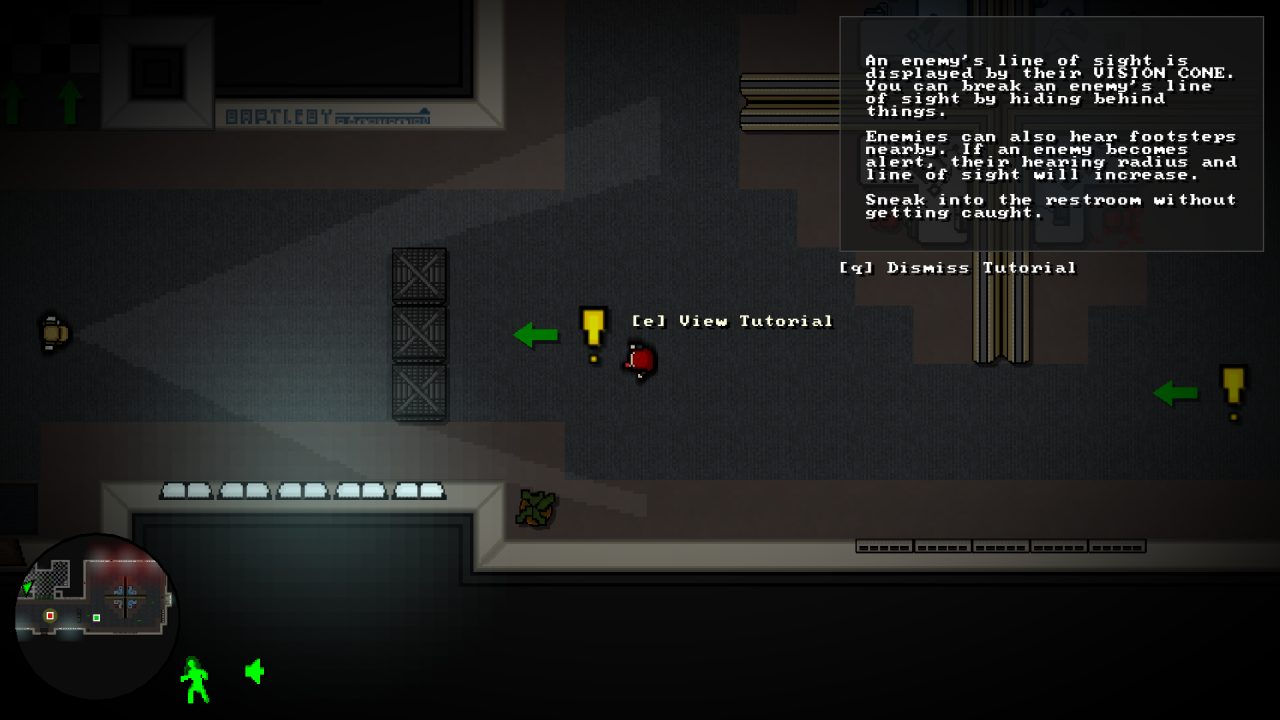
Changed: Added a mention of the hidden perks in the tutorial.
Changed: Tweaked animation timing for the Sergeant.
Fixed/All: Fixed a collision issue with the Sergeant.
Fixed/All: Fixed an issue with menu selections acting odd when certain inputs are held.
Fixed/All: Fixed some problematic code that had the potential to negatively impact GPUs with poor or old OpenGL drivers.
Fixed/All: Performance improvements related to collision and memory allocation.
Turnover: One Year Later
Turnover was released nearly a year ago on Dec. 15th, 2015.
Boy, time flies.
When I was preparing to release Turnover a year ago, I made a commitment to regularly update Turnover with fixes and features. Looking back, I have pushed about 10 notable updates to the game since it has been released. Considering I’m one guy, that’s not too bad.
I have been committed to updating Turnover and wanted to go back and take a look at some of the updates over the year.
This first update started addressing some controller issues, such as aim sensitivity. Admittedly, I’m not much of a controller player (at this point, at least), so over the course of the year, Turnover ended up seeing a lot of controller improvement updates.
v1.0.691: An alert desaturation effect was added to give an additional visual hint to the enemy alert status.
This was Turnover’s first major update and marked a large, progressive improvement to the game.
Highlights:
Difficulty Modes: Easy, Normal, and Hard. This was to help address the difficulty for a number of players. Some players found the game a little too difficult and wanted a more forgiving experience. This was a very reasonable request.
Improved AI. I ended up rewriting a number of AI routines to fix issues and improve their actions.
Added the Security Server hacking mechanic.
Snap pickup throwing. Aiming to throw was no longer required, but snap throwing was less accurate.
New player collision, which allowed player to easily glide off walls.
Major aesthetic changes to the HUD, menus.
I think this was Turnover’s most important update, since it added and improved so much. At this point, I felt that the core game was finished and I could move onto fixing issues and building on top of the game.
If something came up and I was unable to work on Turnover any longer, I would have been proud with how it turned out.
v1.0.740: New difficulty modes were added to Turnover to address concerns about how challenging the game was. The difficulty modes ended up being renamed in a later update.
This update in April addressed important refund and review feedback. A significant addition was the extra health given to the player for easy mode. This update also fixed some concerns regarding followers, making them a little easier to work with.
v1.0.755: One extra health was given to the player for easy mode, balancing it further.
I might hesitate to call this update “major”, but I will because it added a requested feature: an in-game tutorial.
I developed Turnover to introduce new features, new enemies, and new gameplay situations slowly over the course of the entire game, so you are always experiencing something new and are eased slowly into the game. You don’t really get to do everything in the game until you are about half way through. By that time, you’ll be more equipped to handle the more challenging second half of the game.
I always felt that Turnover was paced well. You are introduced to a new feature of the game in a level, then that feature becomes integrated throughout the rest of the game. I didn’t want to throw players into the deep end. Regardless, a tutorial was implemented, just to get the players’ feet wet before they dove in.
This update also brought a rewrite of the enemy hearing system. This was a major backend improvement. The original version “worked”, but was prone to quirkiness. This rewrite busted every outstanding enemy alert bug I had logged.
v1.0.784: An in game tutorial was added to give new players a hand at the fundamentals of the game.
07/26/2016 (Custom Level Support Update, v1.0.795)
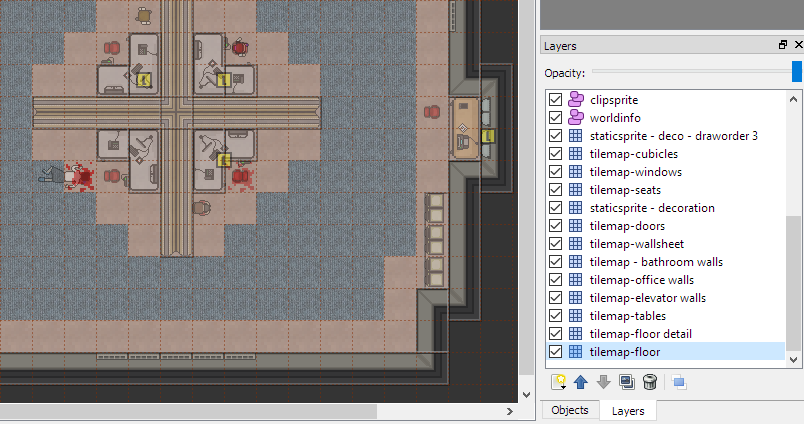
This update added a feature that was requested in Turnover’s Steam discussion forum: custom level support. When I started making it work, I had thought it would be difficult to implement, but it ended up being relatively easy.
This update was just a fun update. It also gave me an excuse to get some bug fixes live.
v1.0.795: Custom level support was added, allowing users to create levels using Tiled Map Editor. Documentation was also included.
I started working on this update after taking a month off from Turnover, and then playing through it again with a new controller. So, this update revolves around controller improvements and fixing things I encountered during the new play through.
For the controller, I pushed a change where aiming makes better use of analog values, so aiming with analog sticks is far more precise. Also, I added the ability to select which controller you would like to use in the Option Menu if you have multiple controllers plugged in.
Outside of that, I addressed a number of things I ran into during my new play session. I improved Security Cameras, balanced a few levels, fixed some art quirks, and took care of other misc. issues.
v1.0.804: Analog stick aiming was improved, taking analog values more appropriately into account.
11/22/2016 (Save Slots, Steam Cloud and XInput Support, v1.0.832)
This update came from things I just felt should be added to the game. I wanted to create a big update to cap off Turnover’s first year of release. So, this update addressed many outstanding bugs in my issue tracker, and also added some features purely just to please me and to build upon the game.
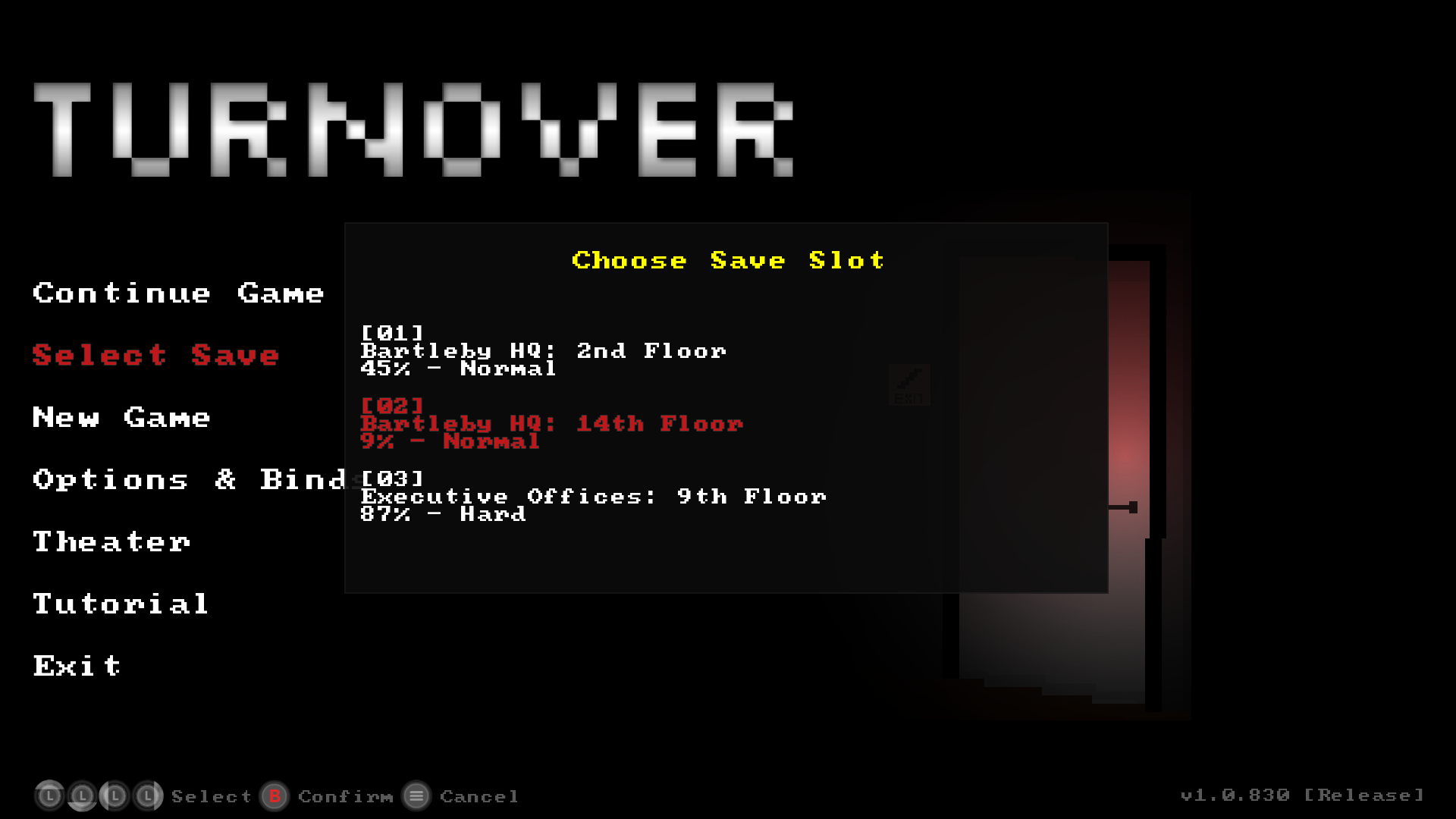
One major addition in this update is save slots. For full disclosure, this was suggested to me by my lead tester very early in development. It had remained in my todo list until I had run through everything else that was of higher priority.
Since I was messing with saves, it felt like the right time to add Steam Cloud support. With cloud saves, I was able to check off the last of Valve’s recommended Steamworks features.
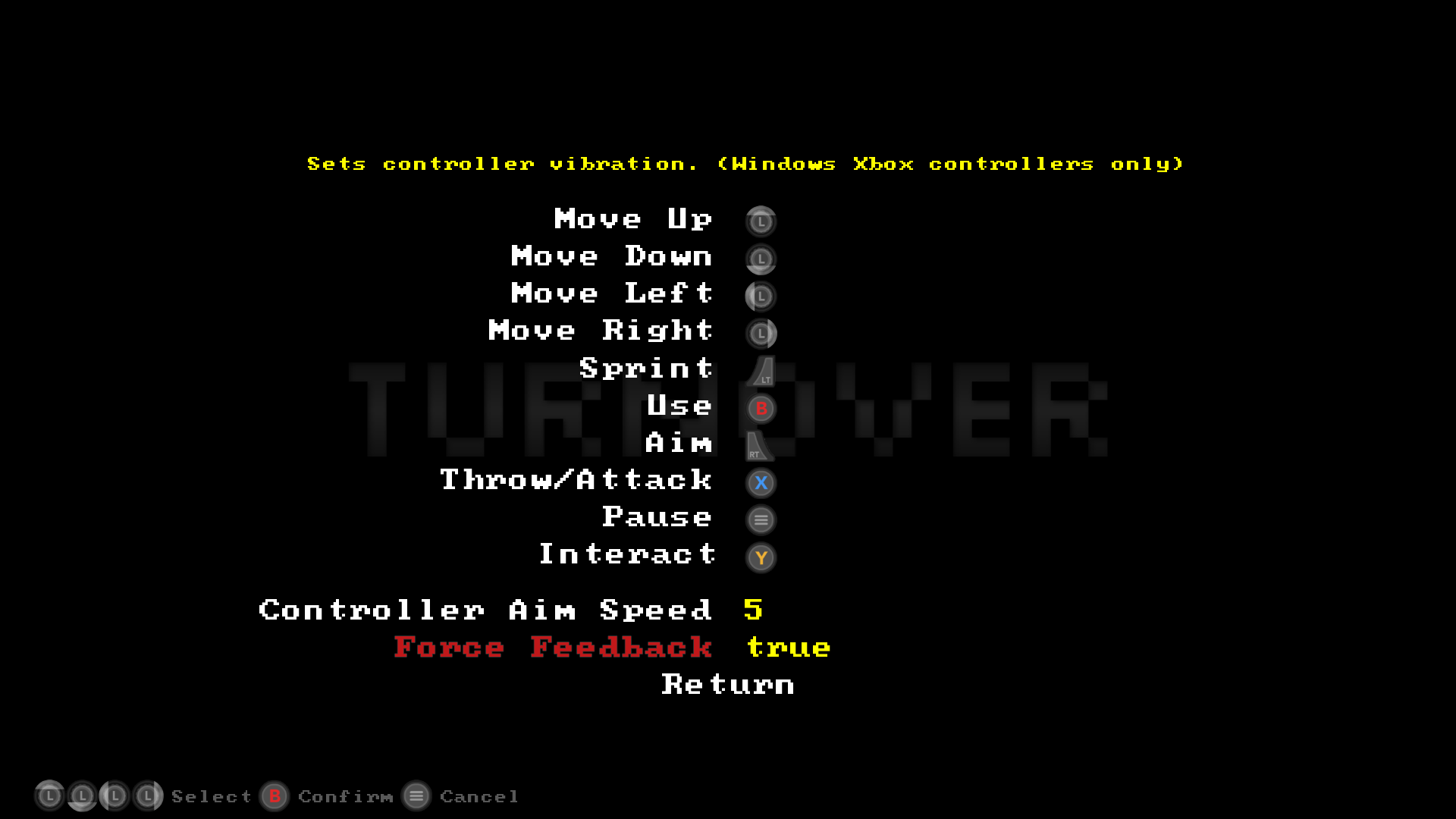
This update also added XInput support in Windows. Having recently been playing with an XBox One controller, I felt that the controller setup in Turnover was not tuned well for these. Turnover didn’t have any of the input contexts or vibration niceties that many players come to expect with robust Xbox controller support. Since XBox controllers are very popular, I felt that fully supporting them through XInput (with force feedback) was ultimately the right thing to do. Taking care of this basically put Turnover controller support into a finished state.
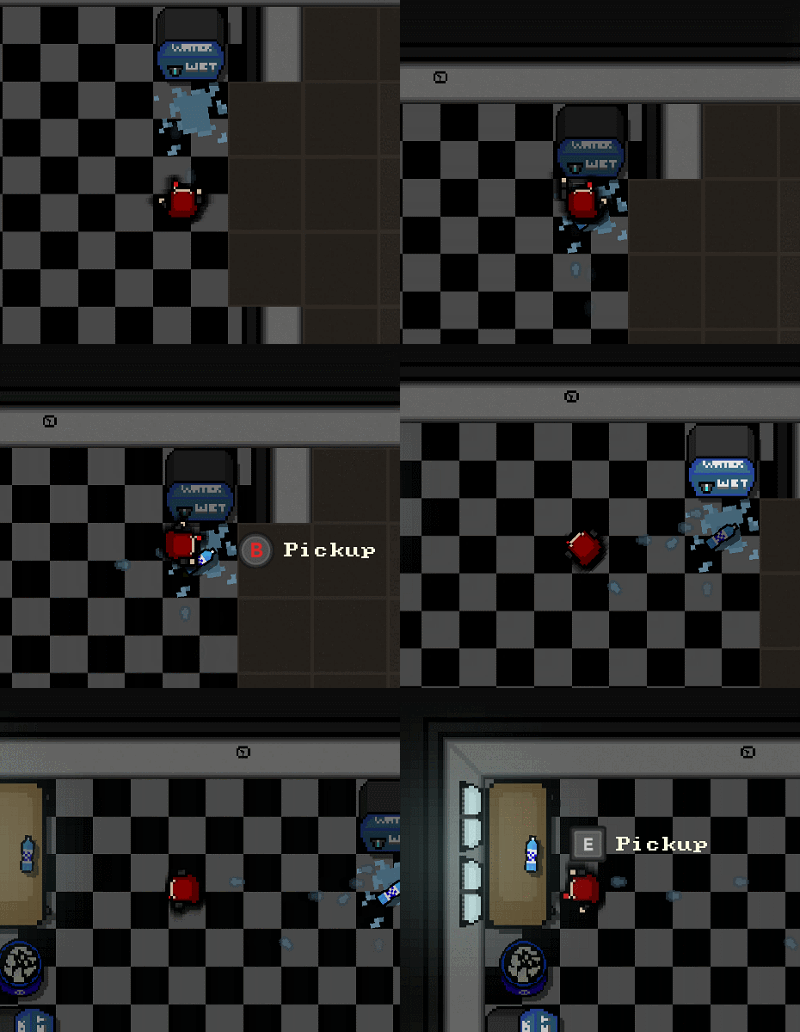
While adding XInput in, I realized the existing text-based input context hints were not cutting it any longer, so I changed all input contexts to graphic icons. Now KB/M and Xbox controllers have their own custom icons. Generic controllers are using generic controller icons.
v1.0.832: XInput was utilized to give proper, full Xbox controller support (with rumble) in Windows. In addition, new input context icons were added.
In 2017
So, what’s the status of Turnover right now? Well, it’s at a state where I am very proud of it. My todo list, issue tracker, everything related to it, is empty. For all intents and purposes, it’s done.
Looking back on the game put me in a weird place. The amount of man hours I have put into it is pretty staggering, but I don’t regret one second of the work. I have learned so much and have developed a tremendous amount of skills during Turnover’s development. Personally, to me, the game is a resounding success and a landmark in my personal development.
So, what’s in store for Turnover in 2017? If people are still interested, and I find new and creative things to add to the game, and I have no major disruptions in my life, then I’ll continue to update it.
Until then, I’m off to work on my next game.
Turnover Updated: Save Slots, Steam Cloud, XInput Support, and More
Turnover has been updated to v1.0.832. This updates brings a number of new features, changes, and fixes.
Save Slots and Steam Cloud Support
Turnover now has 3 save slots available in game.
To start a new game, select "New Game" in the Main Menu, then choose a save slot.
To continue the previously started game, chose "Continue Game" from the Main Menu.
To load another save, choose "Select Save" from the main menu, then "Continue Game" to resume your game.
Save games prior to this update will be converted over to Save Slot 1 on first launch, so you should not lose your progress prior to this update.
With this update, Turnover has Steam Cloud support for the 3 save slots.
XInput for Windows (with Force Feedback Rumble)
XInput is now used in the Windows build if the game detects an XInput controller. This should fix all current quirks and issues with Xbox 360/One controllers. If you are planning on playing Turnover with a controller, a Xbox 360/One controller is now the recommended controller to use in Windows.
In addition, Turnover now uses Force Feedback rumble with Xbox controllers (in Windows) for many in game actions. It can be enabled/disabled in the Binds menu when a XBox controller is selected in the Options menu.
Note: The latest version of x360ce has been tested to work with Turnover. If you are using a non Xbox controller and want the Xbox context hints in-game, then this is an option for you to try out.
New Input Context Icons
Turnover can now be played with a keyboard/mouse and a controller together, so you can swap between the two on the fly. HUD context icons will dynamically change based on the last input method.
Also, the old text based HUD Hints for input have been replaced with icons. This should give nicer visual cues for input.
Full Changelog
New: Save Slots. 3 are available.
New: Steam Cloud support is now available. Save files for the three save slots will sync to cloud.
New: Added game progress % on Main Menu when Continuing a game.
New/Windows: XInput is now used in the Windows build for XBox controllers.
New/Windows: XInput/Xbox Controllers: Force feedback is available and affects a number of actions in-game. The option can be disabled from the Binds menu.
New: HUD: All new icon graphics for input context hints. Available for XInput (Xbox controllers) and Kb/M. Generic icons will be used for other controllers.
Changed: Input: KB/M and the selected controller can be used together to play the entire game and navigate menus.
Changed: Input: If selected controller is unplugged while playing, game will fall back to Kb/M only input.
Changed: HUD: HUD input contexts will now change dynamically based on the last input device used.
Changed: HUD: Opacity setting now only affects in-world HUD elements and hints.
Changed: Fireman: Screen will now shake when Fireman explodes.
Changed: Sergeant: Screen will now shake when Sergeant dies.
Changed: Minor menu changes.
Changed: Minor sound changes.
Changed: Clarified Options/Binds help text in menus.
Changed: Removed the clearappdata command line argument.
Changed: The setkbm/setcontroller commandline arguments have been replaced by setbinds x.
Use setbinds x to go straight to the binds menu when launching the game. This is useful if you have an issue with the the default binds.
If x is set to -1, kb/m binds will be set. If x is set to 0, the system perferred controller binds will be set. Anything above 0 is used for other controllers plugged into your system (if any more are present).
Ex. turnover setbinds 0 will take you to the bind menu where you can set the binds for your system preferred game controller.
Fixed/Windows: Fixed an issue with the game's config files/log files not being generated on first run for some Windows configurations.
Fixed/Linux: Improvements to the stability of the Linux build.
Fixed/All: Improvements to the stability/memory footprint (related to OpenGL) of Windows, Linux, and Mac builds.
Fixed/All: Fixed some minor game interaction issues where some binds could be incorrectly registered while be held instead of pressed.
Fixed/All: Fixed default binds sometimes not being assigned when switching between controllers in Options.
Fixed/All: Fixed vents sometimes not playing their knock-down sound during collision.
Fixed/All: Fixed a minor collision issue in Bartleby HQ: 10th Floor.
Fixed/All: Minor misc. optimizations.
Turnover Updated: Controller Improvements & More
Turnover has been updated to v1.0.804, bringing general improvements to the game.
Controllers
Controller aiming now makes better use of analog values, increasing aiming accuracy. Controller users who have an analog stick are now encouraged to bind move/aim to an analog stick if possible.
If you have multiple controllers plugged into your PC, you can now select which one you would like to use from the Options menu.
Gameplay
Security Cameras will now throw a general "suspicious" alert if a camera check is triggered multiple times within a short period.
A few sections in some later levels have been rebalanced. This is to ensure a more consistent difficulty ramp as the game progresses. More or less, these levels will now be slightly easier.
Full Changelog
New: Controller selection now available in Options menu if multiple controllers are plugged into the PC. Note: If controller is set to "Disabled" in Options, Universal Input (for menus) will use the default/preferred controller of the OS if one is plugged in.
Changed: Controller/Aiming: Axis binds now utilize range (analog) values for aiming, increasing fine touch and accuracy when using analog sticks.
Changed: Binds Menu: Changed "Aim Sensitivity" to "Controller Aim Speed".
Changed: Enemy/All: Enemies that are killed will now dim in color.
Changed: Enemy/Security Turret: Slightly increased the delay between spotting and firing.
Changed: Enemy/Security Turret: When spotting/ranging, a Turret's vision cone will turn red, even before firing.
Changed: Enemy/Security Camera: If something(s) triggers a camera check 3 times within a 5 second period, the camera will become suspicious and will throw an alert.
Changed: Pickups: A "denial" sound will play if the player tries to pick up an object of the same type that they are already holding.
Changed: Music: Added some music to the transition between levels.
Changed: Cutscene: Slightly changed the transition between the final levels to warn of upcoming bosses.
Changed: Level/24: Fixed southern area cameras not being in sync.
Changed: Options Menu: Changed the descriptions of some options.
Changed: Art: Tweaked a few sprites.
Fixed/Linux: Fixed a small memory leak.
Fixed/Linux: Fixed the window icon not being displayed in some distros.
Fixed/All: On game launch, the default mouse cursor will be moved to a position away from menu elements to prevent accidental selection when using a controller.
Fixed/All: Fixed a rare issue with the name of the current world not being displayed on the main menu if a game is in progress.
Fixed/All: In Options, stopped the selection blip sound from playing when trying to increase HUD Opacity past 100%.
Fixed/All: In Options, fixed the Volume selection preview sound not playing when selecting the 100% value.
Fixed/All: Fixed a rare issue with the minimap alert triggering after a Sentinel is killed.
Fixed/All: Fixed the name of a perk not updating immediately when it is unlocked.
Fixed/All: Fixed a few missing and misaligned sprites.
Fixed/All: Fixed a rare issue where some enemies would get stuck in a spotting loop when seeing the player.
Fixed/All: Fixed the Security Camera turn sound from not playing normally after an alert check has been triggered.
Fixed/All: Misc. minor bug fixes.
Turnover Updated With Experimental Custom Level Support
Turnover has been updated to v1.0.795. This update brings experimental custom level support. Using the Tiled Map Editor, you can now make your own levels in Turnover!
Documentation can be found in Turnover's extras/CustomLevelDocumentation/ directory.
Full Changelog
New: Custom Level Support. Please refer to extras/CustomLevelDocumentation/index.html in Turnover's directory for documentation on creating/distributing your custom levels.
Changed: Controller (XBOX): Disallow binding of LT/RT, as the input library used in Turnover is broken in detecting their values.
Changed: Controller (XBOX): Better default binds for Xbox360/One controllers.
Changed: Added minimap blips for Security Cameras.
Fixed/Mac: High Resolution Capable has been set to No, since Turnover is not compatible.
Fixed/Mac: Fixed an issue with audio resource allocation, which should reduce audio related crashes.
Fixed/All: Changed how some engine parts allocate memory, which should reduce memory related crashes.
Fixed/All: Fixed a tiny vision cone rendering bug.
Fixed/All: Engine optimizations.
Turnover Updated: In Game Tutorial, Enemy Hearing Improvements, & More
Turnover has been updated to v1.0.784. This update brings a number of new features and improvements.
In Game Tutorial
Turnover now has an in game tutorial to help new players learn the basics before jumping in.
New Minimap Hints
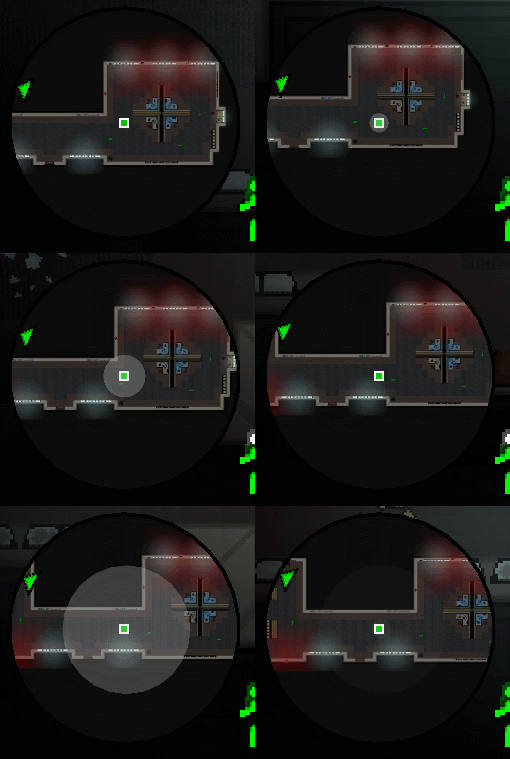
Noise radius and enemy hearing range is now displayed on the minimap for both Easy & Normal mode.
Other Notable Changes
Game menus can now be navigated using the mouse. Left click selects a menu item. Left/Right click cycles through menu selections that have multiple options, like resolutions, volume, etc...
In Windows, an info box will now pop up on most game errors, just to give you some more info about what happened. In Mac and Linux, the error message will dump to the terminal.
The enemy hearing system has been rewritten to fix problems and to accommodate the new radii blips in the minimap. Enemy hearing should be far more consistent.
Full Changelog
New: Game: Added an in-game tutorial to help new players with the gameplay basics. It can be accessed through the main menu.
New: Menus: Added ability to make menu selections using the mouse and left click in the main menus.
New: Minimap: Added enemy hearing radius indicators to minimap for Easy & Normal mode.
New: Minimap: Added sound generation markers to HUD to display various hearing/noise radii for Easy & Normal mode.
Changed: Art: Improved shading, perspective, and detail on a number of sprites.
Changed: Enemies: Rewrote hearing system, improving hearing from enemies.
Changed: Enemies: Enemies have slightly better reaction times, but the Slow Reactions perk now has a greater benefit.
Changed: Enemies: Improved enemy spotting priority. Enemies should spot dead bodies in fire better, etc...
Changed: Rent a Cop: Increased bullet speed.
Changed: Levels: Tweaked a few levels to accommodate new hearing system.
Changed: Engine: Reduced frequency of Steam background checks.
Changed: Engine: Minor optimizations, mostly involving the rewrite of the enemy hearing system.
Changed: HUD: Reworded difficulty text.
Changed: Intro: Shortened the lead-in time on the logo screen when first launching the game.
Changed: Game: Added more Continue screen hints.
Changed/Windows: Engine: Added a popup alert box on game error shutdown to relay more info to user.
Changed/Mac & Linux: Engine: Added console output on game error shutdown to relay more info to user.
Fixed/All: Levels: Fixed some incorrect positioned deco and other oddities.
Fixed/All: NPCs: The calculation of vision cones was delayed by 1 frame. Also fixed a tiny rendering bug.
Fixed/All: Worker: Fixed Victoria's HUD blip disappearing after disabling a server.
Fixed/All: Minimap: Fixed Turret blips not showing up on minimap.
Fixed/All: Minimap: Fixed minimap alert sometimes blinking red at the beginning of a level.
Fixed/All: Controller: Potential fix for incorrect default binds for Xbox 360 controllers.
Turnover Updated to v1.0.755+
Turnover has been updated to v.1.0.755+. This update contains an Ubuntu bug fix.
Changelog
<*>Fixed/Linux: Fixed Turnover not launching in Ubuntu 16.04.
Turnover Updated to v1.0.755
Turnover has been updated to v1.0.755. This update brings a number of balance improvements and bug fixes.
Changelog
<*>New: Easy Mode (Hostage): Player now has one extra health, giving them one free bullet hit (turrets are still insta-kill & fire is unchanged).
<*>Changed: Minimap: Red alert outline indicator now fades as alert status runs out.
<*>Changed: HUD: Better follower hinting, alerting you to when you can call a follower, halt a follower, etc.
<*>Changed: HUD: Repositioned status cluster for better alignment and spacing.
<*>Changed: HUD: Slightly increased minimap alert outline size.
<*>Changed: Followers: Reduced all interaction cool down times and key hold times to improve responsiveness.
<*>Changed: Followers: Slightly increased run speed.
<*>Changed: Workers: Reduced time it takes for workers to hack a server.
<*>Changed: Shock Trooper: Alert status now triggers red alert outline on minimap for alerted Shock Troopers.
<*>Changed: Security Server: Reduced key hold time for server previewing.
<*>Changed: Pick Up Objects: Reduced pick up delay time after pick ups are dispensed.
<*>Changed: Increased game's ambient light level slightly.
<*>Fixed/Mac: Misc. bug fixes to increase stability for OS X.
<*>Fixed/All: Improved some window handling code. This should reduce crashes related to it.
<*>Fixed/All: Game: Smoothed out the view code, eliminating intermittent shimmering on world sprites/minimap when moving.
<*>Fixed/All: Player: Fixed death animation not playing when player is killed while hacking a server.
<*>Fixed/All: Rent a Cop: Fixed ability to aim cop when he is nearby.
<*>Fixed/All: Security Camera: Fixed camera sprite changing incorrectly when camera is deactivated after being destroyed.
<*>Fixed/All: Security Camera: Fixed an instance where a camera's turn sound would still play after camera is destroyed/malfunctioned.
<*>Fixed/All: Fixed some HUD issues, producing a few cleaner looking HUD elements at lower resolutions.
<*>Fixed/All: Fixed F1 screenshot key not creating screenshots correctly sometimes.
Update: v1.0.742
Turnover has been updated to v1.0.742. This update contains a few bug fixes.
Fixed/All: Reduced number of internal OpenGL contexts. May increase stability and speed.
Fixed/All: Fixed debris making noise when player is "moving" up against the wall.
Fixed/All: Fixed a few engine math issues which may have caused some rare problems.
Fixed/All: Fixed a small vision cone bug.
Major Update: New difficulty modes. Improved AI, controls, mechanics, and more!
store.steampowered.com/app/372250
Turnover has been updated to v1.0.740. This is a major update that affects nearly all aspects of the game.
Major Updates
New difficult modes: Hostage (easy), Survivor (normal), and Specialist (hard). Game has been balanced in favor of slightly more cover, improved mechanics, and better AI.
Improved controls and NPC interaction: New Security Server unlock mechanic. Reduced number of binds to make greater use of a smaller set of binds.
Player movement improvements: Wall sliding (fixes wall sticking). Numerous collision improvements to enemies, decoration, and bullets.
AI Improvements and new AI states: More cautious and better AI. Enemies prefer turn-to-look as opposed to snap-looking. Enemies pay better attention to threats.
Ability to throw objects without aiming (with penalty).
Bug fixes and much more!
Changelog
New: Difficulty Modes: Hostage, Survivor, and Specialist. Survivor is the intended difficulty mode, while Hostage provides less of a challenge and Specialist provides more of a challenge.
New: Controllers: Preliminary brand-specific default binds: Detects a few popular controller types and assigns best-guess workable default binds for initial menu navigation. Tentative support for XBOX 360/One controllers.
New: Security Server: New gameplay mechanic: password input. To disable a server, the player must enter a simple password sequence.
New: Sentinel: New gameplay mechanic: suspicion. Certain noises and spotted projectiles will make Sentinels take a slower, more cautious approach to checking out the source.
New: Player: Will slide across walls when moving. Remedies corner/collision sticking.
New: Player: Can throw/use pickup objects without aiming, but doing so will incur a heavy accuracy penalty.
Changed: Hard Mode was changed to Specialist mode. No longer needs to be unlocked.
Changed: Survivor/Specialist Difficulty: Levels: Balanced levels, adding a little more cover at parts.
Changed: Survivor/Specialist Difficulty: Sentinel: Pistol bullet speed reduced by ~30%.
Changed: Enemies/NPCs: New path walking routine, resulting in smoother paths and eliminating movement hitching.
Changed: Sentinel: Improved AI when spotting, hearing, and searching for suspicious activity.
Changed: Sentinel: Slightly easier to distract with noise.
Changed: Sentinel/Shock Trooper/Fireman: Removed most instances of snap spotting in favor of turning to spot.
Changed: Fireman: Fireman now explodes on grenade hit, instead of malfunctioning.
Changed: Sergeant: Vision cone is slightly shorter.
Changed: Security Server: New interaction, Press "Use" to disable, hold "Use" to preview what the server is controlling.
Changed: Security Server/Security Camera: Alerted Sentinels now have less of a chance to stack on top of each other when they are checking out an alert situation.
Changed: Enemies/Player: Colored outline changed to a black pop out.
Changed: Enemies: Improved enemy corner-spotting variance. Enemies will have worse vision the farther away you are, giving the player a tiny bit of leeway.
Changed: Enemies: Improved enemy attention. Enemies will now more often ignore other threats/attention getters when spotting the player and NPCs.
Changed: Throwables: Certain throwables now lose velocity as they travel.
Changed: Pickups: Increased standard delay between pickups.
Changed: Effects: Added animation to Fire Extinguisher and Flame Thrower spray sprites.
Changed: Perks: Clarified perk level hints.
Changed: Levels: Added missing shadows to some deco, removed unusual shadows from other deco.
Changed: Binds: The "Dismiss" bind has been removed. All major game interactions are now handled by the "Interact" & "Use" binds.
Changed: Game Camera: The Sprint" bind now skips camera/node previews. A HUD Hint was added to inform the player.
Changed: Pause Screen: Restyled, fixed positioning and other issues, removed the help hints, added a little more color. Now relays more info to the player as well.
Changed: HUD: Ammo indicator now uses color (green->red) to indicate ammo.
Changed: HUD: Certain text and hints have been given text shadows.
Changed: HUD: More context hints for workers and servers.
Changed: HUD: Menu key hints made stylistically similar and moved to hint area.
Changed: HUD: Hide mouse cursor during cutscenes.
Fixed/All: Fixed an issue with the Sentinel's stun time sometimes being way too short.
Fixed/All: Fixed some rare instances where enemies wouldn't investigate noise generated from thrown objects.
Fixed/All: Fixed water and enemy blood clipping into walls on generation.
Fixed/All: Reduced length of stun stars effect when someone was stunned. Initially played for too long.
Fixed/All: Fixed an issue with the Security Camera's hitbox being too large.
Fixed/All: Fixed the Attack Dog's vision cone turning to yellow warning while attacking player.
Fixed/All: Tightened Security Server HitBox to prevent warping when attempting to deactivate when not directly at the keyboard.
Fixed/All: Fixed incorrect Fire Extinguisher hitbox.
Fixed/All: Added some missing footstep sounds when Worker is walking, as well as typing sounds when they deactivate a server.
Fixed/All: Fixed an issue where NPCs could not be called when player is butting up against certain walls.
Fixed/All: Fixed vision cones sometimes drawing through walls.
Fixed/All: Fixed a small issue where vision cone detection area would be slightly larger than what is drawn.
Fixed/All: Fixed light flicker not working at low frame rates.
Fixed/All: Fixed a few instances in levels where enemies can spot you at the very entrance of a level.
Fixed/All: Fixed a few times where enemies would take incorrect patrol paths.
Fixed/All: Fixed pickups and dispensers conflicting when player collides with both.
Fixed/All: Fixed HUD Hints sometimes overlaying over certain entities, blocking their view.
Fixed/All: Fixed certain cutscenes not unlocking correctly for Theater.
Fixed/All: Fixed a few sprite issues.
Fixed/All: Screen shake was not being applied equally to all render textures, causing some weird looking results.
Fixed/All: Fixed a couple of game over screen game hints being cut off on low resolutions.
Fixed/All: Fixed a "Failed to open sound file from memory (format not supported)" warning message when running from the console/terminal in some levels.
Fixed/All: Fixed startup check when game fails to launch because of a system incompatibility or renderer initialization failure. It should now report your problem to log.txt so you know what's going on.
Fixed/All: Fixed a startup crash issue with font handling.
Fixed/All: Fixed an intermittent crash while loading screens/levels.