

Undecember
Dec. 8 Temporary Maintenance Notice
UNDECEMBER will be undergoing temporary maintenance on Dec. 8.
We apologize for the inconvenience due to the temporary maintenance.
Please refer to the following information for details about the temporary maintenance.
[Dec. 8 Temporary Maintenance]
1. Temporary Maintenance Schedule
: Dec. 8 2022 08:00 ~ 09:30 (UTC+9)
2. Maintenance Details
* Server Stabilization
3. NOTES
■ Maintenance schedule is subject to change due to the service circumstances.
■ Please log out of the game in a safe environment as it is unavailable during maintenance.
■ Guest accounts may be lost when uninstalling or reinstalling the game.
■ The Chaos Dungeon and Auction House will be unavailable 10 minutes before maintenance begins.
UNDECEMBER will strive to provide a stable game service.
Thank you.
How to Connect Cross Platform Account (Steam/Mobile ↔ FLOOR)
For those of you who have been experiencing difficulties after the change of account connecting system on Nov 23 (Wed), we have prepared a guide on how to connect your accounts.
※ Cross Platform Link can only be done on [Steam] or [Mobile].
※ Any characters on the account that you do not select during the connecting process will be removed after connecting and cannot be recovered.
※ The following guide explains connect from (Steam → PC) and (Mobile → PC).
Please refer to the following information for details.
✅ How to Connect Cross Platform Accounts
✔ How to Connect (Steam → FLOOR)
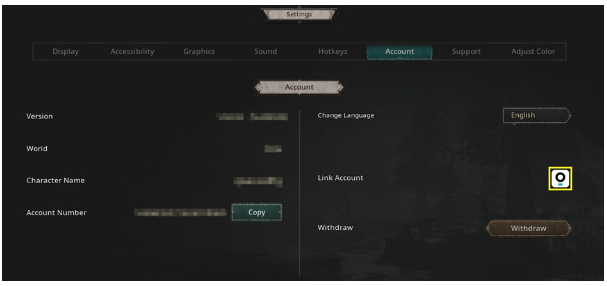
1) Access the game using your Steam account and go to [Settings→Account].
Select the [FLOOR icon].
→ Cross Platform Connect can only be done on Steam.
2) Create a new FLOOR account by clicking the [Register] on the bottom of the login page.
→ If you already have a FLOOR account, please skip to step 3.

3) Log in with your FLOOR account.

4) Click [ Connect ] on the [Account Connection] page.

5) The [Account Selection] page will appear where you can check your character information.

6) Check your character information on the [Account Selection] page and tick [ ✔ ] the box of the account that you would like to keep.
→ Select the account that holds the character data you would like to keep.
→ If you select the Steam account, the character(s) on your FLOOR account will be deleted.
Likewise, the character(s) on your Steam account will be deleted if you select the FLOOR account.
→ You must select the account that has the data you would like to continue playing.
→ Any characters on the account that you do not select during the connecting process will be removed after connecting and cannot be recovered.

7) Click [ Confirm ] to complete the cross platform account connecting process.

8) Now, you will be able play on both Steam and FLOOR with your characters on the Steam account.
→ When playing on PC, you must log in to the FLOOR PC Client using the FLOOR account that was used in the connecting process.
✔ Precautions when connecting with STEAM account
※ Any characters on the account that you do not select during the connecting process will be removed after connecting and cannot be recovered.
Please be advised before you proceed.
※ You will not be able to access the game on both Steam and FLOOR at the same time after connecting your accounts.
You may alternate between the two platforms whenever you want, but you can only access the game on one platform at a time.
※ Cross platform account connecting can only be done through [STEAM].
※ If you have already connected your mobile account to FLOOR account, you will be unable to connect that FLOOR account with a Steam account.
(You cannot connect all 3 platforms together with the same account.
Please choose between Mobile → FLOOR or Steam → FLOOR if you wish to connect your account.)
✔ How to Connect (Mobile → FLOOR)
1) For Rune Hunters playing the game on a Mobile Account (Google, Apple, Facebook, Line Account).
2) Access the game using your Mobile account and go to [Settings→Account].
Select the [FLOOR icon].
→ Cross Platform Connect can only be done on your Mobile device.

3) Create a new FLOOR account by touching the [Register] on the bottom of the login page.
→ If you already have a FLOOR account, please skip to step 4.

4) Log in with your FLOOR account.

5) Touch the [ Connect ] button on the [Account Connection] page.

6) The [Account Selection] page will appear where you can check your character information.
[If you DO have a Character on your UNDECEMBER FLOOR account]

[If you DO NOT have a Character on your UNDECEMBER FLOOR account]

7) Check the character information on the [Account Selection] page and tick [ ✔ ] the box of the account that you would like to keep.
→ Select the Mobile account (Google, Apple, Facebook. Line) that holds the character data you would like to keep.
→ If you select the Mobile account, the character(s) on your FLOOR account will be deleted.
Likewise, the character(s) on your Mobile account will be deleted if you select the FLOOR account.
→ You must select the account that has the data that you would like to continue playing.
→ Any characters on the account that you do not select during the connecting process will be removed after connecting and cannot be recovered.

8) Touch [ Confirm ] to complete the cross platform account connecting process.

9) Now, you will be able to play on both Mobile and FLOOR with your characters on the Mobile account (Google, Apple, Facebook, Line).
→ When playing on PC, you must log in to the FLOOR PC Client using the FLOOR account that was used in the connecting process.
✔ Precautions when Connecting with Mobile account
※ Any characters on the account that you do not select during the connecting process will be removed after connecting and cannot be recovered. Please be advised before you proceed.
※ You will not be able to access the game on both Mobile and FLOOR at the same time after connecting your accounts.
You may alternate between the two platforms whenever you want, but you can only access the game on one platform at a time.
※ Cross platform account connecting can only be done through [Mobile].
※ If you have already connected your mobile account to FLOOR account, you will be unable to connect that FLOOR account with a Steam account.
(You cannot connect all 3 platforms together with the same account.
Please choose between Mobile → FLOOR or Steam → FLOOR if you wish to connect your account.)
Please take note of the guide above to avoid any inconvenience while playing the game.
We will do our best to provide a stable game service to all the Rune Hunters out there.
Thank you.
Nov. 30 3rd Server Patch Notice
UNDECEMBER will be undergoing a server patch on Nov. 30 to address existing issues.
Please refer to the following information for details.
[Nov. 30 Server Patch]
1. Server Patch Schedule : Nov. 30 2022 19:15 (UTC+9)
* Server patch will proceed without maintenance,
* Game is available to play while the server patch is underway.
2. Server Patch Details
- Addressing the issue where the loading does not end when attempting to exit Spire of Barrier.
3. NOTES
- Please exit the game completely and log in again for the patch to be applied.
- The Chaos Dungeon and Auction House will be unavailable 10 minutes before/after the patch.
Please be advised that players may experience temporary disconnections
while the patch is underway.
UNDECEMBER will strive to provide a more stable service.
Thank you.
Nov. 30 2nd Server Patch Notice
UNDECEMBER will be undergoing a server patch on Nov. 30 to address existing issues.
Please refer to the following information for details.
[Nov. 30 Server Patch]
1. Server Patch Schedule : Nov. 30 2022 14:30 (UTC+9)
* Server patch will proceed without maintenance,
* Game is available to play while the server patch is underway.
2. Server Patch Details
- Game Service Stabilization
3. NOTES
- Please exit the game completely and log in again for the patch to be applied.
- The Chaos Dungeon and Auction House will be unavailable 10 minutes before/after the patch.
Please be advised that players may experience temporary disconnections
while the patch is underway.
UNDECEMBER will strive to provide a more stable service.
Thank you.
Nov. 30 Server Patch Notice
UNDECEMBER will be undergoing a server patch on Nov. 30 to address existing issues.
Please refer to the following information for details.

[Nov. 30 Server Patch]
1. Server Patch Schedule : Nov. 30 2022 11:00 (UTC+9)
* Server patch will proceed without maintenance,
* Game is available to play while the server patch is underway.
2. Server Patch Details
- Game Service Stabilization
3. NOTES
- Please exit the game completely and log in again for the patch to be applied.
- The Chaos Dungeon and Auction House will be unavailable 10 minutes before/after the patch.

Please be advised that players may experience temporary disconnections
while the patch is underway.
UNDECEMBER will strive to provide a more stable service.
Thank you.
November 30 (Wed) Additional Updates
This is a notice on the new contents that will be updated on November 30.
Please refer to the following information for details.
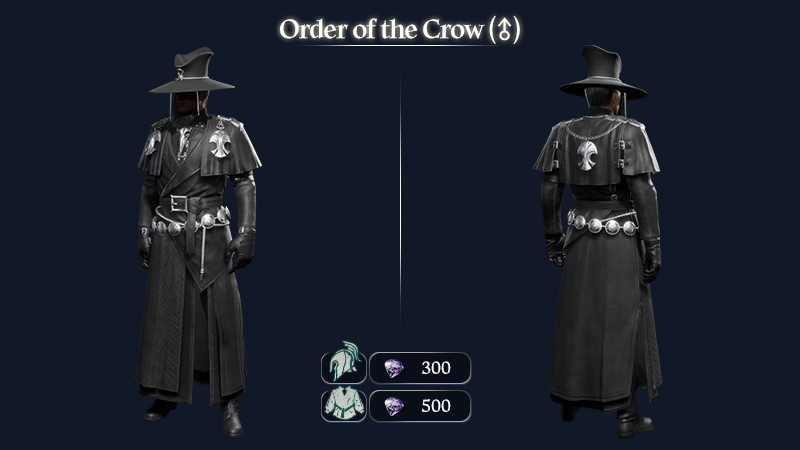
◆ New Costumes : Outfit / Helmet
- The new costumes; Order of the Crow Uniform and Order of the Crow Hat will be added.
- Release Date : Nov. 30 (Wed) 2022 11:00 (UTC+9)
- You can find the new costumes from Menu > Beauty on the top-right side of the screen.


■ New Emoji
- The new [Revelation of the Blind Crow] emoji can be used upon equipping ‘Order of the Crow Uniform’.
- Emojis can be used in [Chat].

◆ New Pet : Nuni
- The new pet Nuni will be added.
- Release Date : Nov. 30 (Wed) 2022 11:00 (UTC+9)
- You can find the new pet from Menu > Pet on the top-right side of the screen.


◆ New Portal : Messenger's Window
- The new portal; Messenger's Window will be added.
- Release Date : Nov. 30 (Wed) 2022 11:00 (UTC+9)
- You can find the new portal skin from Menu > Beauty > Portal on the top-left side of the screen.


Please take note of the contents above to avoid inconvenience while playing the game.
Thank you.
Nov. 24 Server Patch Notice
UNDECEMBER will be undergoing a server patch on Nov. 24 to address existing issues.
Please refer to the following information for details.
[Nov. 24 Server Patch]
1. Server Patch Schedule : Nov. 24 2022 15:00 (UTC+9)
* Server patch will proceed without maintenance,
* Game is available to play while the server patch is underway.
2. Server Patch Details
- Addressing the issue where the [Fierce Strike] skill’s certain effects are not applied in a particular situation.
3. NOTES
- Please exit the game completely and log in again for the patch to be applied.
- The Chaos Dungeon and Auction House will be unavailable 10 minutes before/after the patch.
Please be advised that players may experience
temporary disconnections while the patch is underway.
UNDECEMBER will strive to provide a more stable service.
Thank you.
Steam Data Export/Import Function Change
There will be a change regarding the Steam Export/Import function.
This function was at first provided so that you can also enjoy the game on mobile devices.
However, there have been several cases of abusing this function.
Therefore, there will be a change as stated below.
[Steam Data Export/Import Function Change]
- Schedule of Change : After the Nov. 23 (Wed) 2022 maintenance
- Before : Account Linking through Steam-Mobile Account function provided
- After : Unifying the function by having Steam account be connected to FLOOR account
※ FLOOR Homepage :
EN : [FLOOR LINK]
JP : [FLOOR LINK]
TW : [FLOOR LINK]
Please take note of the details above to avoid inconvenience while playing the game.
We will strive to provide a stable game service.
Thank you.
Black Friday Events
We have prepared two special events to wrap up November.
A Festa and Discount event to shine on Black Friday!
Please refer to the following information check below for the details.
◆ Black Friday Festa
■ Event Period
- Nov. 23 (Wed) 2022 ~ until Dec. 14 (Wed) 2022 (UTC+9) maintenance
■ Event Contents
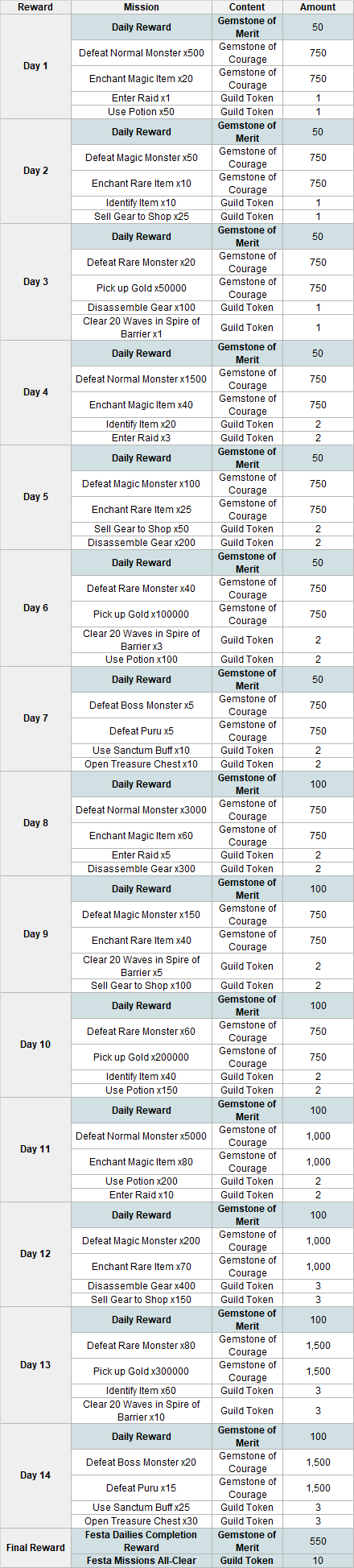
- Complete daily missions from Day 1 to 14 to collect rewards in-game.
- You can proceed with the daily missions after receiving the daily reward.
- You can still complete and receive rewards for missions from previous Days.
- Received rewards will be sent to your Bag.
■ How to Participate
- Click the [Event] button on the top-right side of the game screen to access the event screen.

- Receive the daily [Day n Reward] to view the missions under that particular Day.
- Once you complete the mission, use the [Receive Reward] button to collect the reward.
■ Precautions
※ Event period and details may be changed at a later date.
※ The Black Friday Festa Event is renewed every day at 09:00 (UTC+9).
※ The Black Friday Festa can also be completed along with the ‘Complete Objective Festa'.
※ You can only participate in this event 'Once per Account'. Progress is shared between characters on the account.
※ You will no longer be able to complete or receive rewards for the missions once the event ends. Please make sure to participate during the event period.
◆ Black Friday Special Sale - Ore Shop
■ Event Period
- Nov. 23 (Wed) 2022 ~ until Dec. 14 (Wed) 2022 (UTC+9) maintenance
■ Event Contents
- During the event period, several products will be sold at a discounted price from NPC Ore Collector Joyce’s [Ore Shop].
* The Ore Shop can be used after entering Act.2 Fortress Plaza.
- Special products will be added which you can only purchase during the event period.
■ Gemstone of Courage Shop Discount & Special Products

■ Gemstones of Merit Shop Discount & Special Products

■ Precautions
※ The event period and details may be changed at a later date.
※ The Bundle item contents can be checked through [View Info] by clicking the product in the game.
※ The discounts are only limited to the items stated.
※ The special [Event] products are only available during the event period.
◆ Black Friday Special Sale - Guild Shop
■ Event Period
- Nov. 23 (Wed) 2022 ~ until Dec. 14 (Wed) 2022 (UTC+9) maintenance
■ Event Contents
- During the event period, several products will be sold at a discounted price from NPC Peddler Falo’s [Guild Shop].
* The Guild Shop can be used from the [Guild Base] after joining a Guild.
- Special products will be added which you can only purchase during the event period.

■ Precautions
※ The event period and details may be changed at a later date.
※ The discounted item price at the Guild Shop is only applied during the event period.
※ The special [Event] products are only available during the event period.
※ The Bundle item contents can be checked through [View Info] by clicking the product in the game.
※ The discounts are limited to the products that are stated in the notice.
We hope you have a blast with the new UNDECEMBER events.
Thank you.
Nov. 16 (Wed) Server Patch Notice
UNDECEMBER will be undergoing a server patch on Nov. 16 to address the known issues.
Please refer to the following information for details.
[Nov. 16 (Wed) Server Patch]
✅ Server Patch Schedule
- Nov. 16 (Wed), 2022 18:30 (UTC+9)
* Server patch will proceed without maintenance.
* Game is available to play while the server patch is underway.
* You may experience temporary disconnections while the patch is underway.
✅ Server Patch Details
- Auction House Service Stabilization
✅ NOTES
✔ Please exit the game completely and log in again for the patch to be applied.
✔ The Chaos Dungeon will be unavailable 10 minutes before/after the patch.
Please be advised that players may experience temporary disconnections while the patch is underway.
UNDECEMBER will strive to provide a more stable service.
Thank you.