Mesh Animations thoughts on that and, Making a Doll
Meshes can now be animated Placed down meshes can be assigned an animation When moving from one cell to another if the player is stuck within a cell they will teleport to the outside of the static freeing them. Fixing a long time issue with unfolding lol Volume is now more accurate to what was saved NPC gun maker no longer crashes the game Cell explorer no longer crashes the game
Mesh Placer + New Inventory Style
Added in the Mesh bone creator which later on will be a skeletal animator. Going to be working on this full time, will be making a game I'll pitch to publishers later on.
changed inventory to a different style, has cooldowns now based on the items weight
Fixed Items not loading the dialogue that they use
A ton of other minor things I cant remember lol
Unfolding Optimisation
Video has stuff that's upcoming
Unfolding Engine: I've made it more optimized and intuitive. It's a pleasure to see how this enhancement affects the game.
Performance Boost: A serious leap forward! The engine is way faster now, even up to 16 times more FPS in certain areas. This speed bump will definitely make a difference.
Collision Checking: I've spent quite some time improving this and I'm pleased with the outcome. It's significantly faster now, making gameplay feel even more fluid.
Statics Management: This is a great quality-of-life improvement. The static manager tool makes it easier to select and edit individual statics. Can't wait to see how this impacts overall development efficiency.
Of course, there's likely a whole lot more I've added and just didn't note down. These tweaks and changes will become apparent as I continue development. Looking forward to seeing how all these changes will improve the game in the long run.
Weapon Maker, Custom Themes, Rulers and Flag Viewer Build
Hello, Barchboi here
As always, the idea of Unfolding Engine is to find new ways of making it easier for the ordinary gamer to express the games they want to make no matter the skill level. Working out new ways to make that experience as accessible for everyone.
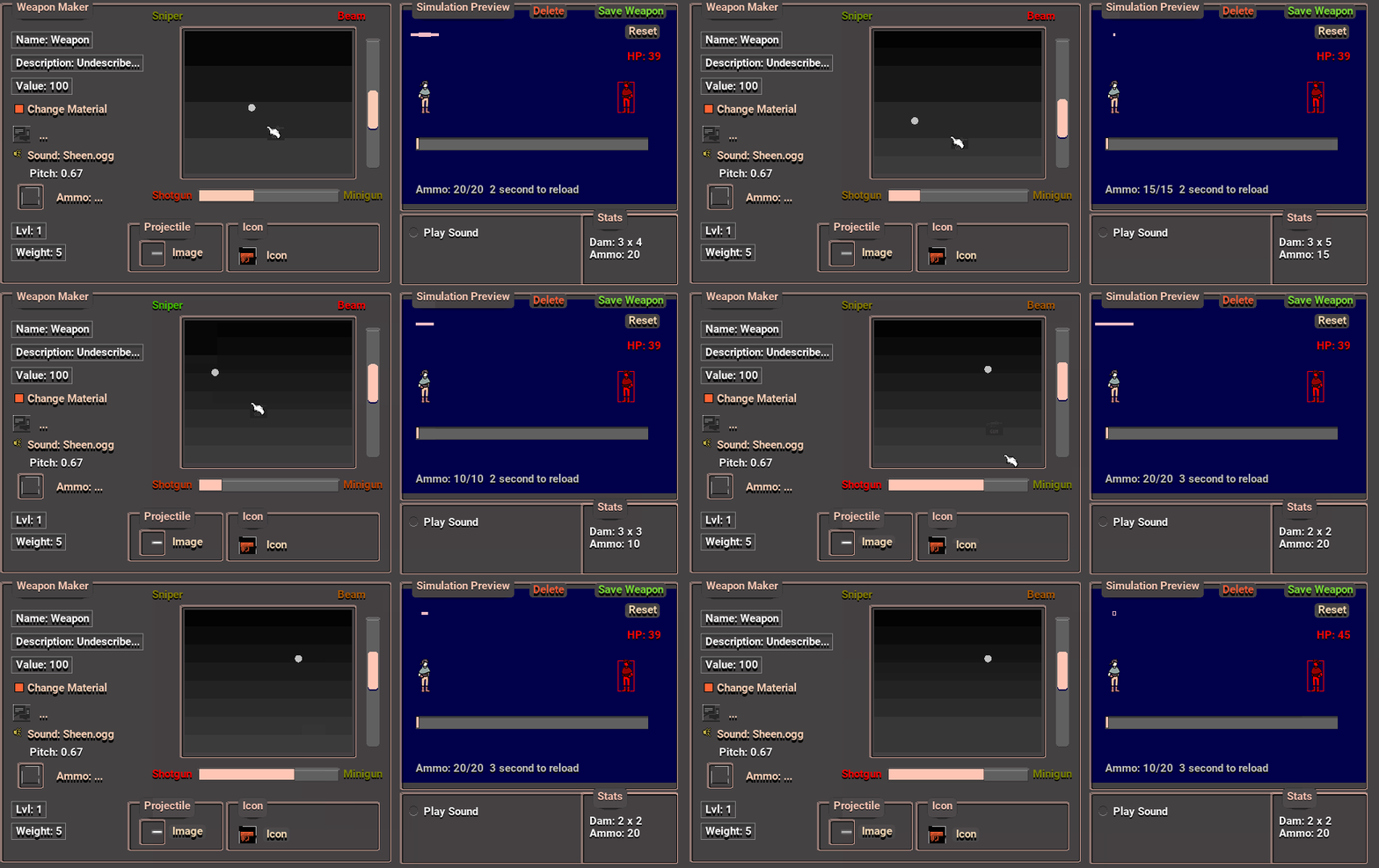
The new weapon maker is now ready for you. Its easier then ever to generate hundreds of weapons for your module and see how it would react in game with the simulator preview window! This opens up hundreds of possibilities for weapons for your players to collect, trade, and use in your games.
A new GUI theme maker, this is exciting because remember the old days of customisation of windows 95? So much control over the old themes? Well I thought your games deserved that experience where you have that control over the UI. Even things like turning the mouse cursor into a flaming sword? Yea you can do that now
A new Loadscreen Editor, I'm opening up more parts for you to express your game. I've always loved games with beautiful loadscreens as well as the little game tips at the bottem showing lore? Its great! Well, now you have the options to change your game and loading screen where now you have 20 messages that are randomly selected. As well as 20 screenshots as well. You also have all the options to swap out loading bar sprites, borders, everything.
A new ruler that gives you pixel perfect measurements of whats happening on screen. As well as this it can give you a real life equivalent distance so you can calculate how big your games are in real life.
New textbox input's using Mytino's text input libraries, this is perfect for real time editing and entering of text that works in fullscreen mode. No more frustrating popup windows that pause the entire game.
Dialogue placements now can be accessed via middle clicking them. As well as this NPC's can be right clicked and have their dialogue opened up for editing as well. No more searching through the dialogue database.
A new flag viewer allows you to view your games dialogue flag states. Its no longer invisible anymore, as well as this it allows you to change the values of the flags while the game is running. I've seen so many developers scratch their head confused whats going on with their flag states and if only they had this tool to help.
Sounds now have a previewer so its easier then ever to make those ambient sounds. Knowing where the player will hear the sounds creep on them is so important for horror games and that control is needed to get precisely the result you want.
General bug fixes such as flag values being blank, items can not be subbed from the player, Dialogues now look nicer placed down. Transitions between cells look that bit nicer now. FPS Tracker can also be enabled now
Resizeable Windowed Mode, Realtime Text Inputs Update
Sorry for the wait everyone. I've been working hard on the new features. One popular request was the windowed mode feature that allows you the resize Unfolding in windowed mode. This feature is immediately noticeable when you launch Unfolding as it now corrects itself to be the size of your screen. As well as this a whole host of bug fixes makes this version the most stable version out there yet.
New Features
- Windowed mode is now resizeable while also not tearing the user interface, supports widescreen screens, and custom resolutions, automatically defaults to desktop resolution at the start of windowed mode. - Many text inputs have now been converted to have inbuilt text inputs instead of a pop up window which allows better fullscreen support. Text input no longer pauses the engine allowing to see live feedback of number changes - Tooltips are now on an easier to read black rectangle backdrop and appear immediately instead of fading in and out. - Cover Designer now has the text inputs for Author, Title more easily visible. - Slopes now slow down the player when going up a steep hill instead of teleporting them to the highest point. - Cells can now be deleted or cloned in the cell loader by right clicking on them. - Windows Default cursors are now in place and are frame rate independent from the engine which makes the cursor faster. I intend to bring back the custom cursors once I get the DLL set up to alter window cursors to custom sprites. - Books are now removed
- Dialogue texts now save - Windows sub windows now correctly appear on the right side of the window opening it up - Mouse when clicking on inactive windows will mostly have the correct window on top be highlighted instead of the window on the bottom. - When moving a window, accidentally triggering a button is not going to happen - Viewing the task manager now no longer crashes the engine - Setting the width / height of the animation maker to 0 now no longer crashes the engine - Weather correctly loads all weather files, and no longer has duplicate entries. - action teleporter now no longer crashes when opening up the cell selector.
Scripting Language Nodes, 200% Gui Size increase, Item manipulation now in place
[previewyoutube="A2jAsqzlmB0;full"] - Having items that are too heavy for the player now causes the player to become more and more encumbered - Items now can use dialogues and be right clicked - Item quantities can now be split by holding ctr - Items can now specify how many of an object you want to destroy by right clicking - Items can now be examined to see their stats / value / description. - Incrementals now can specify how much items are collected instead of having all items at once as well as specify how much weight will come out of it. - TeamQuest Project Manager now has its headings correctly going to the correct menu - Dialogue now has if statements that allow you to build conditions for levels, item levels, attributes. - Dialogue now has more effects that it can bring such as teleporting the player, spawning items or adding exp or stats. - Menubar is now double the size allowing for icons to become more readable. - Menubar now has more icons popout per category.
Simply Incremental, More usable incremental mechanics, patched crafting, water
The Future
I have been conducting one on one dm interviews with various fans on the discord about what they like / dislike and how they feel about the direction of Unfolding. What I've learned so far is that there are many processes in Unfolding that feel clunky and unintuive that I want to address. IE the windowed mode meant that workflow kept on getting inturrupted as well as the popups would stop the flow of writing. One interesting point was how because of how Unfolding doesn't have a paint / drawing program to create images it meant that some designers would have no way of creating new assets. I assumed users would use other drawing programs to add new images however that's coming from a position of privilege of me having experience in photoshop / aesprite / pixel art.
I've also learned users want more options and the ability to tweak in real time which is why I've added the options for water to flow and push the player in directions. The ability to change wave sizes as well as the ability to change the water's y position through dynamic actions. Having more dimensions to fine tune the engine is something many people have been wanting.
Working out what to focus on next is going to be tricky.
Overall I'm getting closer and closer to getting the engine completely stable and stopping the most obvious bugs. Keep letting me know of the ones I keep missing.
What I learned
I learned that the key feature of what makes the Unfolding philosophy of design strong is that it has multiple simple parts that interface in simple ways. For instance I made the incremental maker now only have 2 parts to it and can be placed into the world. The previous builds had a system that had over 10 parts, upgrade mechanics, options for items vs producing money. However by making it only 2 parts and having it place into the world. The incremental system can now interface with the games world. Ie designers can place barriers in the world that are unlocked by defeating monsters or by gettings items.
Its taught me a general philosophy in the correct ui design philosophy which I outlined in the manual. Rule 10 https://barchboi.gitbook.io/unfolding-engine-manual/philosophy .
My own personal ideas / culture of where the engine should go keeps getting the way of understanding the best place to go so you guy's perspectives are always good for keeping the engine getting better.
Patch Notes
- Cell Loader now has static stress on it - Moved lights to the weather tab - Added a Alt + Zoom key to allow toedit the entire scene at once water now has more features such as the ability to customise the wave type as well as applying water flow to the water. - Added a dynamic water placement allowing for the ability to move water levels in the cell. - Polygons are now in game allowing the ability to make 4 polygon versions of statics - Incrementals are now simplier and are now only 2 options to create one. Producers and the cost to create. - Fixed a visual glitch with containers - Player now spawns in the center of the cell instead of top left -default water is now blue and transparent
Dynamic Actions update, you can now create scripted events
Dynamic Actions - Added dynamic actions that allows you to set immersive reactive effects to the statics - Added conditions to the dynamic actions that trigger how they trigger
Menubar and Gui - Added many editmode hotkeys ie Ctr + 1-5 selects landscape tools other hotkeys are in the manual - Added a quick freeroam feature that allows you to travel through objects - Added a restart module under the load menubar - in the static placer if you hold down ctr and scroll the mouse wheel you can scroll through various statics. Holding down shift instead and scrolling randomly goes through various statics. - Added living smoke motif to the windows bar - Added soft smooth transitions fading - Menubar now has correct descriptions - Made menubars transparent - Menubar buttons are more round and transparent - Horisontal scrollbars have the living smoke applied to it - Opening the visual settings no longer causes the FPS to lock to 5fps - Maps are now in the bottem left corner of the screen - Lower taskbar now correctly displays the screen titles without overlapping - lower taskbar can now rearrange windows or minimise them - Text displays now have a curved outline
water update - You can now go up and down in water by using the up and down keys - water now kills you / other NPC again when you run out of breath - fixed water not appearing if water reflections is turned on
Landscape tools - Removed statics descriptions - Static placer is now transparent allowing you to see whats underneath - Landscape ceilings now push the player down
The Rotating Statics Update + More Stable Build
[previewyoutube="qg0J0iaquwM;leftthumb"]
-------------------
Main feature is now you can add extra properties in your game by middle clicking a static in the static brush mode. After you place down a static middle click the static and you should get a window pop up that will allow you to add new properties.
-------------------
Fixed time being editable and settable in the main menu (in future builds probably will allow you to add in custom times / BC AD etc)
Made Menubar descriptions have the correct text / descriptions when the player hovers over it.
Volume now correctly saves the correct amount you last set it as, instead of setting it a default amount
Removed the ability to place down dynamic code, (Going to build a more intuitive scripted events system that incorporates the dialogue node based system)
Removed the ability to edit the day and night cycle due to the interface / system not being according to the design philosophy (may come back later in later builds)
Added the ability to add more properties to the statics, including swing, blendmodes, rotation, and alpha values, as well as now being able to change the colour after it has been placed.
Fixed crash when trying to add a sprites collision mask to a sprite pack.
Manual + Project Management Update
Unfolding finally has a manual inside of it. If you click help in the menubar you will now get a link taking you to the current build of the manual. This is the first draft so I have done the areas people struggle. I intend to fill out the rest of the manual.
Unfolding now has a project manager that now allows you to collaborate with your players / friends. I made this tool for myself to make it easier to track what tasks I needed to work on but I found that other people will find this useful as well.
You can find the project manager in the task
Contains Post it boards, anyone who is familiar with any agile management softwarea these days will see how familiar this looks. You can specify
Contains a Wip Map where you can specify what areas you plan to make. If you specify an area on the cell map as wip then you have the option to load a wip. This is really useful for finding work todo if you are lost on what to do.
Some small fixes
- Unfolding does not resize anymore in windowed mode preventing mouse errors.
- Fixed the sprite flickering on a flat polygon landscape.
- Disabled changing gun projectiles sprite due to mysterious error when referencing the parent window.