

Unfolding Engine: Paint a Game
Manual + Project Management Update
Unfolding now has a project manager that now allows you to collaborate with your players / friends. I made this tool for myself to make it easier to track what tasks I needed to work on but I found that other people will find this useful as well.
You can find the project manager in the task
Contains Post it boards, anyone who is familiar with any agile management softwarea these days will see how familiar this looks. You can specify
Contains a Wip Map where you can specify what areas you plan to make. If you specify an area on the cell map as wip then you have the option to load a wip. This is really useful for finding work todo if you are lost on what to do.
Some small fixes
- Unfolding does not resize anymore in windowed mode preventing mouse errors.
- Fixed the sprite flickering on a flat polygon landscape.
- Disabled changing gun projectiles sprite due to mysterious error when referencing the parent window.
Now can export your standalone games in Unfolding
- You can now export your games to standalone. In the brushes tabs on the far right you will have the option to export your games module to third party websites such as Itch.io or Steam. Uses won't even need to have Unfolding Engine installed.
- Music that is playing from one cell to another but has a different pitch will now slide to that pitch.
- Fixed static placement placing in the wrong spot in windowed mode
- Fixed camera placement increasing in size if the mouse hovered over them
- Context menu now works with the new gui system
- Setting weather to blank now correctly saves to blank
- resources no longer need to held down in order to gather them
- Fixed now playing appearing behind static files
- Fixed items having a weird "A"
- Updated the music player to have correctly sized fonts
- Fixed multiple placement issues in windowed mode
- Fixed dialogue placer having the sound placement in the wrong spot
- Fixed stretching issues from going from fullscreen to windowed then to windowed again.
- Fixed dialogue goto promp pointing the the dialogue it is going to without indicating where it is going to with the selection x/y
- and many more misc improvements I missed to log.
Upcoming features: The Game Exporter
To give an idea of what the process would look like. You'd press this tab here and it will get you through a step by step process to export your game.
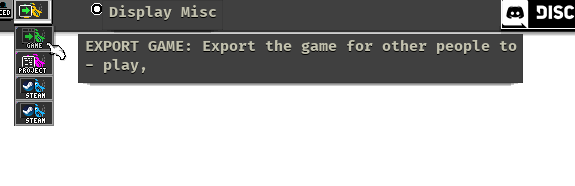
When you want to export your game it is this tab.

It aint pretty, but I got to stop getting things perfect in order to stop holding back these updates for you guys, I used to have a real good speed of updates for you guys and its something I want to get back into so you can whip me into shape and tell me what needs to be fixed up before I over commit to something that you guys don't even want. I've got a tendency to hide work. But I know deep down its better to show you guys the early prototypes so you can give feedback on every step of the way.
Things haven't been well for me lately. Part of which also is I've fallen into a pretty steep depression, covid didn't do much to make things easier as well. I've climbed and clawed out of the depression recently, luckily I've had a great support network. I'm not going to let anything stop me from making this engine one of the best engines for you guys to make some pretty damn interesting games in. If you guys can make some games, export them and heck even make some money off it one day then gosh that would mean that the engine is worth it. Heres to the next update.
Build 1200 // GUI overhaul, topdown mode, you can now change the cell size...
This build is a complete rewrite of certain features and I need alot of help catching all of the bugs.
- Improved Dialogue Maker
- New font has been added in allowing it to be easier to read

- All Gui's have been remade to support higher resolutions screens instead of being bounded by the native games size. I NEED HELP TESTING THIS FOR WIDER / UNCOMMON SCREENS!
- Cell size is now modifiable, and you can now have cells of different sizes.

- Top down mode allows you to move around the cell as if it were a top down game.
- Volumnic fog and lighting

Upcoming features: Change Cell Size, New Dialogue and new Resolution
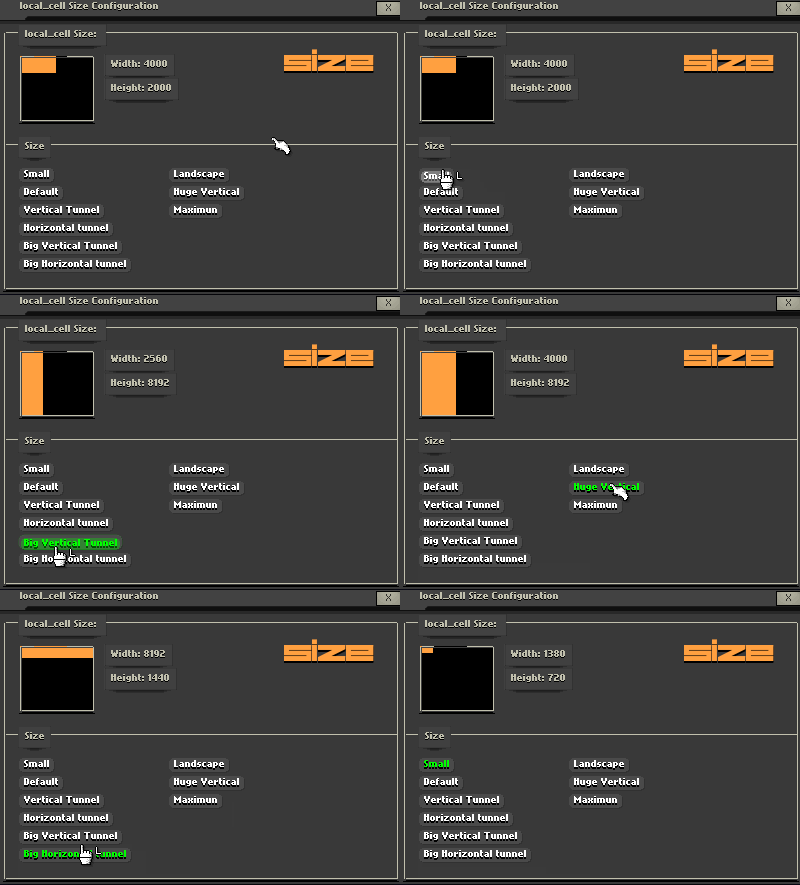
You will soon be able to change the cell sizes of you cell to have skinny or huge cells.

As well as this the dialogue maker is now bigger and will have options for more control over creating scripts in the dialogue engine. I want the entire scripting language to be in the dialogue system allowing for a sophisticated node based coding system.

Table top mode is also a feature I am working on that will allow people to make their own top down tabletop modules.
As well as this one complaint was that the text was hard to read as well as support for higher resolutions and easier icons to read. As a result I have changed the font to a more readable one and making preparations to changing all the GUI to fit in the higher resolutions.
Why is it taking so long to release?
Mostly because the font has caused all the GUI's to break so Im rewriting all of the forms to be consistent with it. As well as remaking them for the higher screen size as well as getting it ready for a big marketing release. Thankyou for still being with the project and seeing how people are still making games in Unfolding really cheers me up and gives me motivation to still work on the project.
Build 971 // Incremental Maker works with Items, Grayboxing, and Static Menu
You can now specify how the incremental maker interacts with items. For example does an option cost items to produce. Or how about the instead of the incremental maker instead of creating items now produces wheat or energy. The options are endless with these features and now opens up a whole new array of incremental games for you to add into your module.
As well as this a new type of static can be placed called grayboxing. Grayboxes are used by professional game studios in order to mock up a level without having to devote hours into it. It helps you make sure that the level you are making is ready to express what it is you are trying to express in your world before you spend the time decorating it.
As well as this containers are now in place. Containers can specify whether or not the loot inside of them is randomised or certain. It can also specify the range of how many items are inside of it. Allowing for you to create randomised loot and gear for your players to find.
As well as this you can specify whether or not the loot respawns, giving reason for players to come back to reexplore areas.
I hope you enjoyed this update as well as this I am always needing feedback and suggestions.
The features in the future are going to be focused on adding in top down features soon as well as table top modes for the unfolding .
Statics are now twice as big making it easier to see what you are selecting on.
This build is focused on giving more features to the incremental maker and making specifically work with items.
Build 761 is now up! NPC addition update
Build 761:
Proud to say this is a big one!
Features added into the Unfolding Engine
https://www.youtube.com/watch?v=fP_t3Tku1H0
+ Stats are now in place and influce character (ie agility makes the player jump higher, speed run faster)
+ Guns can be equipped in Invertory and equipped by pressing the 1-4 keys]
+ Bullets stay for 2 frames if hitting into a solid instead of just vanishing
+ Cover designer now no longer crashes if it cannot find the sprite
+ NPCS drop the weapon they are holding onto
+ NPCS now have ai states
+ Ceiling and landscape buttons now longer click when the player is selecting another brush
+ Ceiling and landscape now correctly places down and the player will correctly stand onto them.
+ There is now a death state for the player when they lose all of their health
+ Dialogue banners can now be changed
+ Character animation packs are now in place and it is now easier to create custom animation packs
+ Moving to another cell no longer crashes the game
+ When the game is in edit mode and a dialogue is opened up then a visualisation will appear
+ If Flags now correctly work
+ Resources now have a work value that must be depleted in order to harvest a resource
+ Resources with a respawn checked for them will not be destroyed once harvested but can be harvested multiple times.
Build614 is now up! Now you can make weapons!
+This build contains the weapon maker if you click on the menu bar and select the weapon you can add in your own weapon.
+it also contains 5 generators that allows you to quickly see the different combinations that can be made.
+you can select a variety of projectiles as well as choose the sound that the weapon makes.
+if you are want more precise controls over your weapon you can click the advanced tool and fine tune all the variables.
+As well as this, camera effects are working again, and are back to normal. I've also added in two new effects based on FOV effects called widen.
Build565 is now up! (Lights are Fixed as well as a gun prototype?)
+ We have some window fixes to show you as well as a the prototype combat system but first we will talk about Lights
+ Lights are now fixed and can now be correctly cleared when leaving the room. This is a fix that makes sure that lights that are cleared remain cleared.
+ As well as this a minor fix with the windows. Windows now layer and the windows remember the order in which they were activated. This allows
+ As well as this - Guns are now being worked on in the game - however they are not added in yet. Next week I hope I will be able to show you Guns working in the game. You can test out a small concept by pressing the X key - however it is very early stages.
+ A new icon has also been added in to have a more modern look using the Windows 10 icon stylisation
Build560 is now up! (New resolution support and Custom Texture adding)
https://www.youtube.com/watch?v=ETTiEAbRyxs&feature=youtu.be
+ The entire interface has had a face lift, little features like the introduction of the game is now longer a dos terminal. As well as this a Patron induction is now in place. That will scroll Patrons
+ A more updated design philosophy with the interface includes subtle shadowing on windows as well as subtle flying in when the window is out of place. Nice subtle browns and a off whitte colour give it a bueatiful mechanic look that complements the atmosphere well
+ as well as this you may have noticed the resolution of the game is now 1280*720 leading to no more black bars for those with widescreen moniters on fullscreen support.
+Changing the amount of times a player can jump has also been added in. The player can jump up to 15 times.
+ As well as this texture adding is now avalible as well as a prototype text inputter for the name. This is to help the annoying popup windows that inturrupt gameplay and allow for seamless creation of the game world.