We are releasing the companion update to the Barbarossa DLC (Update 15) today, one day ahead of the DLC release itself. The main attraction here is the completely overhauled tutorial, but there are a few other features and bug fixes too.
First, a quick recap for the Barbarossa DLC: the release date is April 21, and the price is $9.99. You command Axis forces, from the initial invasion all the way to the Battle for Moscow in late 1941.
23-scenario historical campaign, with battles from the lakes of Karelia in the north to the Black Sea beaches in the south
Limited, but still difficult to achieve, alternative historical outcomes, such as capturing Moscow in late 1941
Detailed, zoomed-in maps for the hard-fought sieges of Odessa and Sevastopol
20+ new unit types including those from Italy, Romania, Hungary, Slovakia, Finland, and Spain
Beautiful new vehicle models including BT-7 and T-26 tanks, and the iconic ZIS-5 truck
New German cards: Blitzkrieg (reloads HQ command points) and Luftflotte
New terrain type: bog, used to model the impenetrable, swampy terrain facing Army Group North and the Finns
New original music: 4 brand new tracks by Bruno Babić, composed specifically for Barbarossa DLC
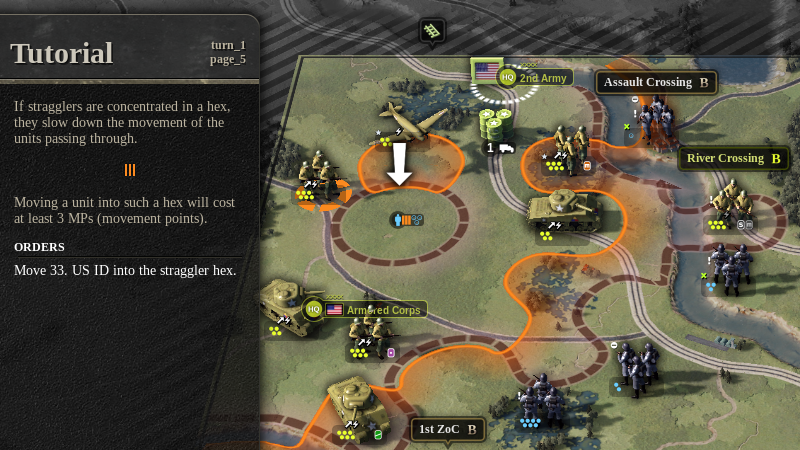
From Zero to Hero – the UoC II Tutorial
The original UoC II tutorial was never a fan favorite, and rightly so. In its defense, it was cobbled together in a few hurried days leading up the game’s release and never given the attention it deserves. Everything about the game was new to us at the time. We didn’t know how the players will react to all the new mechanics. What is obvious, and what needs to be pointed out. What is intuitive, and what needs explaining… all of that was a bit of a mystery to us back then.
I am not saying the new tutorial is perfect, but I assure you there is a world of difference. We are starting off real easy in this one, taking the time to introduce the very basics of movement and combat, how to undo, what are hexes, the fog of war, etc. Don’t worry if this sounds a bit pedestrian: the second tutorial already shows you the finer details of setting up your supply network. By the time you’re done with all six, I assure you that even the grizzled veterans of the vanilla, tutorial-impaired UoC II will have learned a trick or two.
The six tutorial scenarios are followed by the Tutorial Campaign. It’s only lightly annotated, showing you how to buy stuff on the conference screen, and then you’re off to play the scenarios. You are tasked with leading the fictional “T Force” from the Louisiana Maneuvers, through Torch Landings to the final Run for Tunis scenario.
We invented T Force because we needed a persistent core of units and an HQ to take them through the campaign. As a bonus, it serves to make the campaign easier for the novice player. The historical units are still there, in the North African scenarios, but they are aided by the tutorial “T Force” units. It still makes for quite interesting, if relatively easy, play.
Don’t Go For All Bonus Objectives
In the final scenario of the tutorial, we try to make a point that you are not meant to take all bonus objectives. We understand that a proficient player can, perhaps with some restarting, achieve this feat in most scenarios. It really isn’t the way this game was designed to be played, though. Let me quote AFHQ, straight from the final tutorial scenario briefing:
Bonus objectives are not required for victory, and often present you with a difficult choice. Focusing on one objective can cost you another. And that is OK, don’t feel bad about missing some bonus objectives. It is meant to be that way. Now, run for it!
Personally, dropping objectives is how I’ve always been playing the game. There is a mud patch in the way, or I don’t particularly need the bonus reward? Skip the objective. My force is depleted and I need to bring it up to strength for the campaign? Don’t waste steps taking objectives on time. Even if you’re late on a primary objective, you get at least 25 prestige: don’t massacre 100 prestige worth of steps just to take it “in time”.
You have this freedom with objectives, and it allows you to take an alternative approach to the entire scenario if you want. This is the way the game was designed to be played: set the difficulty level so that it’s challenging on a turn-by-turn basis, but be strategic about going for objectives.
One More Turn
This is a new feature: we are letting you request an additional turn to complete the scenario. Such requests are always granted, but your prestige does suffer as a result. The prestige cost starts at 25 but doubles every time such appeals are needed in the campaign.
This option is disabled by default on classic and hard difficulties, but it can be enabled in Options/Gameplay.
We are also giving you a light boost if you’re forced to restart a scenario. On normal, you will receive a truck asset and one flying arty. On easy, there’s more: an air attack, infantry steps, engineers. This feature is never available on classic and hard difficulties.
Anyway, that’s it from me for today. The tutorial was a big undertaking for us, so there wasn’t much time to devote to improvements for non-novice players this time around. We hope that in the next update we can do more on that front. Feel free to comment, and we’ll take a look at what’s possible.
Cheers,
Tomislav
Barbarossa DLC Announced
The Barbarossa DLC will be released on the 21st of April on Steam and the price will be $9,99.
In this DLC, you command Axis forces during Operation Barbarossa, from their summer of roaring victories to the painful halt at the gates of Moscow in the winter of 1941/42.
Key Features
23-scenario historical campaign, with battles from the lakes of Karelia in the north to the Black Sea beaches in the south
Limited, but still difficult to achieve, alternative historical outcomes, such as capturing Moscow in late 1941
Detailed, zoomed-in maps for the hard-fought sieges of Odessa and Sevastopol
20+ new unit types including those from Italy, Romania, Hungary, Slovakia, Finland, and Spain
Beautiful new vehicle models including BT-7 and T-26 tanks, and the iconic ZIS-5 truck
The main purpose of this update was to add support for Mac OS X, but we ended up fixing a lot of issues and even added a couple of small features. The changelist is attached below. As usual, if you run into any issues, please report them in the Technical Support subforum on Steam Discussions.
Cheers!
Features
Mac OS X support
odds shown on combat sheet (optional, via options/gameplay)
combat sheet: tooltips on attacker totals for sup fire, pindown
victory dialog tooltips
CTRL-1 hotkey to select scenarios in campaign screen (if occluded by sidebar)
enroute HQ can be set to arrive at later turns (in scenario editor)
command line option to run without steam mods (--no-steam-mods)
open manual and scenario charts from main screen
Bugfixes
fixed rail hexes on europe map
fix: crash on remove billboard
fix: unit rot animation crash
fix: hq deploy/store crash (hardening)
fix: armor shift calculation error when unsing amphibious armor
fix: combat sheet "Armor Shift" message should show the shift value before rounding, not after
corrected tooltip for "90% Success" milestone
fix: axis truck card tooltip
hardening: Interpolation1D.length() sometimes unexplainably returns NaN (numpy.linalg.norm() issue, possibly Mac only)
armor_shift_f not rounded correctly (ROUND_HALF_UP)
fix: axis truck card tooltip
fix: banner now says "Feint Attack" instead of "Pindown"
fix: crash on naval landing when para animation is still going (hardening)
fix: para planes fly sideways in history mode
fix: when you load a campaign ending in loss, victory sound is played
HQ store view, disable "armor" items if there is no infantry in the fp, or if there isn't enough prestige for armor + infantry
hardening: runtime check and logging for HeightMap.point_average_height()
fix: if supply bonus objective is re-taken by AI, theater supply is wrong
fix: deploy enroute unit, undo, then deploy again (wrong unit state)
fix: when using the sabotage card, message reports wrong turn value for recovered trucks
fix: wrong casualty score when para unit is killed on drop. Check the same thing for naval assault.
fix: AI crash while removing out of supply hub
fix: front line crash close to a mix of minor/major rivers
combat: do not negate armor shift in counterattacks that are across the river
fix: "destroy unit" bonus objective not listed taken after save/load
fix: FXAA on the mac now works
Update 14 Test
We have set Update 14 live on the testing branch. The main purpose of this update is to add support for Mac OS X, but we ended up fixing a lot of issues and even added some small features.
Please report any issues in the "Testing Branch" subforum of our Steam community discussions.
odds shown on combat sheet (optional, via options/gameplay)
combat sheet: tooltips on attacker totals for sup fire, pindown
victory dialog tooltips
CTRL-1 hotkey to select scenarios in campaign screen (if occluded by sidebar)
enroute HQ can be set to arrive at later turns (in scenario editor)
command line option to run without steam mods (--no-steam-mods)
open manual and scenario charts from main screen
Bugfixes
fixed rail hexes on europe map
fix: crash on remove billboard
fix: unit rot animation crash
fix: hq deploy/store crash (hardening)
fix: armor shift calculation error when unsing amphibious armor
fix: combat sheet "Armor Shift" message should show the shift value before rounding, not after
corrected tooltip for "90% Success" milestone
fix: axis truck card tooltip
hardening: Interpolation1D.length() sometimes unexplainably returns NaN (numpy.linalg.norm() issue, possibly Mac only)
armor_shift_f not rounded correctly (ROUND_HALF_UP)
fix: axis truck card tooltip
fix: banner now says "Feint Attack" instead of "Pindown"
fix: crash on naval landing when para animation is still going (hardening)
fix: para planes fly sideways in history mode
fix: when you load a campaign ending in loss, victory sound is played
HQ store view, disable "armor" items if there is no infantry in the fp, or if there isn't enough prestige for armor + infantry
hardening: runtime check and logging for HeightMap.point_average_height()
fix: if supply bonus objective is re-taken by AI, theater supply is wrong
fix: deploy enroute unit, undo, then deploy again (wrong unit state)
fix: when using the sabotage card, message reports wrong turn value for recovered trucks
fix: wrong casualty score when para unit is killed on drop. Check the same thing for naval assault.
fix: AI crash while removing out of supply hub
fix: front line crash close to a mix of minor/major rivers
combat: do not negate armor shift in counterattacks that are across the river
fix: "destroy unit" bonus objective not listed taken after save/load
fix: FXAA on the mac now works
UoC II on Mac OS X - Now in Beta
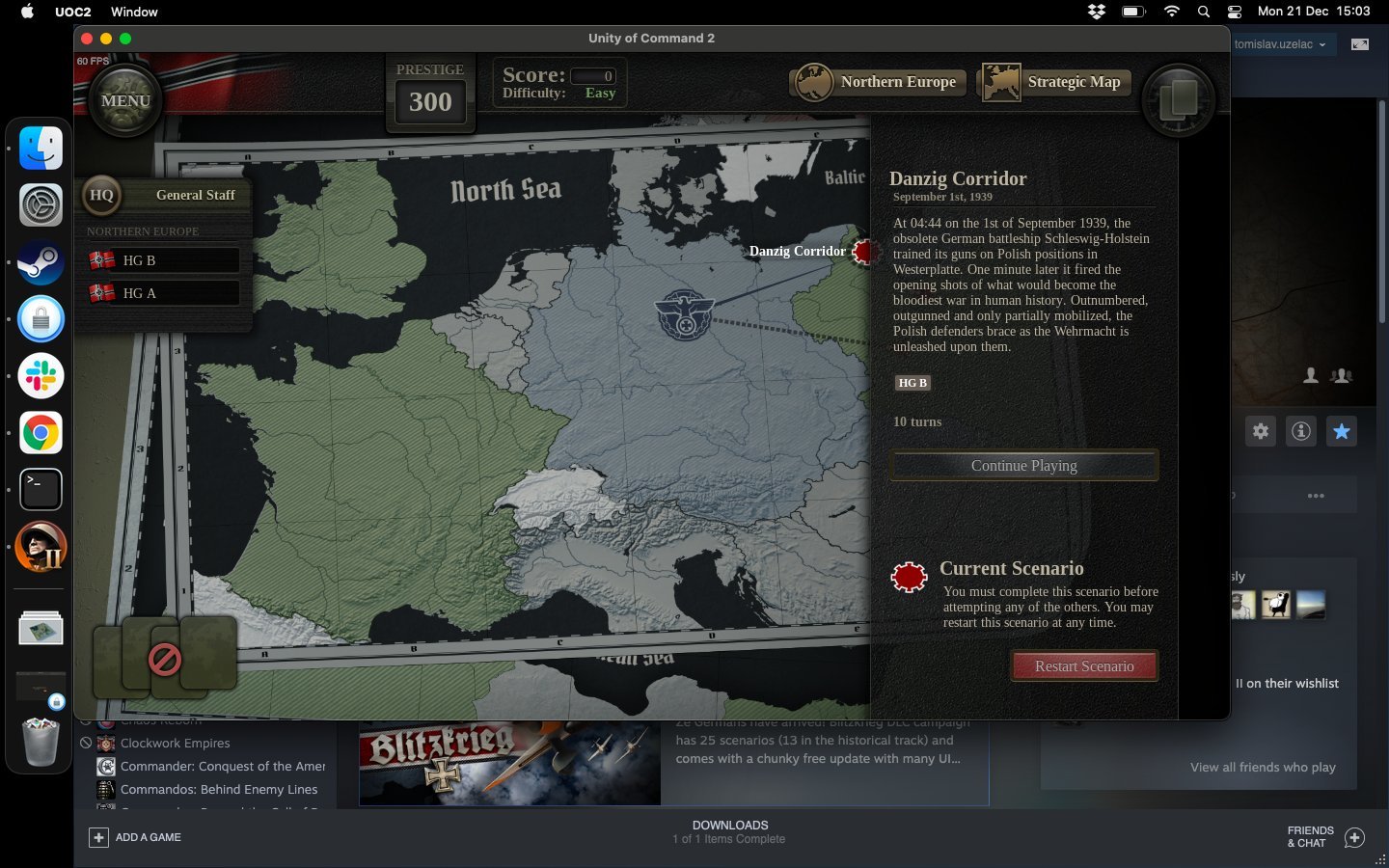
We have started testing the Mac OS X version of UoC II on Steam.
If you currently own the game (on Windows), and you want to try it on a Mac, you can simply install on the Mac, switch to the beta branch and play. This post explains how to switch to beta: https://steamcommunity.com/app/809230/discussions/2/3003297945133220808/
Please report success, or any issues you run into, in that sub-forum (Testing Branch on Steam).
The game will not be "officially supported" on Mac during this test period. Once we feel it's been sufficiently tested we will enable Mac purchases in the Steam store.
Cheers!
Blitzkrieg DLC Incoming
The 1939-41 Axis campaign is a wargaming classic, and we were super happy to dig into it, though there were a bunch of challenges to be sure. The sheer number of nationalities and unit types took a lot of time to research and model, and it's actually a pity most of them only show up for a scenario or two. I hope that maybe modders can make further use of some of these units/models in the future.
Quality of Life
We started development on this update by fixing a potentially huge balancing issue. Turns out, at some point we introduced an error into the code, that effectively clamps the “combat odds number” at 6 (should be 9). In practice, this means that a lot of high odds kill values were clamped at 3 KIA – which is just wrong even if you go as far back as UoC1.
Interestingly, no one noticed! 😂 Partly this must be due to the enemy (germans) having reasonably strong units, so very high odds were bound to be rare anyway. And then, even in attrition-type situations, the defender is more likely to retreat in UoC II, because of the new “cumulative retreat” shift rule.
Either way, we replayed “Victory in the West” extensively upon making the change. To me personally, it feels marginally easier and a bit more fun. Other people on the team agreed, so no special changes were made to the campaign in the end.
On to quality of life changes! In the left (see above, click for full size image) you can see that we’ve added designer notes (1) and army insignia (2) for each of the campaign HQs, and that we now show you a list of HQs (3) when you select a scenario in the campaign screen. Note that all quality of life changes described in this post also apply to base game content.
In the middle, you can see that tooltips appear to the side (4) of menus and sheets. This does not work equally well for all tooltips though, so I enabled it only where I felt it makes sense. You can also see command points on attack icons (5) and HQ selector (6) buttons. That’s a nice little change that will spare you many glances to the HQ sheet down in the lower right.
On the right, you can see that now there are tooltips with full unit stats for enroute units (7). They sure look sweet! I find EXP warnings on deployment (8) even more useful in a practical sense though — if you’re reinforcing your units, they warn you if the next deployment is going to lower ther experience level.
DLC Mechanics and Features
Fixed Fortifications are found in places like the Maginot Line, Eben Emael, Brest etc. They provide a -1/-3 combat shift to defender, depending on whether they are destroyed or intact, respectively. This shift is cumulative (adds up) to the entrenchment shift, so units fortified in fixed fortifications are really hard to flush out.
Army Group and Panzer Group HQs (1): armies are slow moving infantry formations, and you can upgrade their command range during the campaign, but they never go very fast. Panzer groups, on the other hand, have a fixed small range, but they can be upgraded to full 12MP (+3 if on rail) of movement. You want to keep your panzer generals close to the front.
Long-range Transfer (2): German HQs can transfer steps and specialists anywhere within their command range, not only between adjacent units. This changes everything.
Kampfgruppe (3): when sufficiently upgraded, German HQs can deploy security units (kampfgrupen) that also reorg any stragglers found in the deployment hex. Reorg’d straggler steps become active immediately.
Level-3 Force Pool (4): if a German HQ has its force pool upgraded to level-3, it does not spend command points when reorganizing stragglers at the start of the turn. This is a kind of a “technical” update — we decided to represent German HQs at army group-level and not army-level, so there is simply more stragglers around per HQ than what the Allied HQs had. Upgrade at your earliest convenience!
Oversupply (5): provides a unit with additional (mobile) supplies, and is totally super useful if you are planning to thrust recklessly into the enemy rear with half a dozen panzer divisions on a logistical shoestring. Which, you know… you’d never do, right?
Ju 87 Precision Bombing (6): this theater asset will let you blow a bridge, or destroy two trucks in an enemy supply hub. It’s a lot like “sabotage” except you get 3 hits in one scenario, so lord have mercy on your enemies.
Flying Artillery (7): simulates a heavy air attack by massed close air support aircraft (yes, Stukas again). Flying artillery generates high suppression results on the targeted unit and, even more importantly, has a whopping 50% chance of destroying fixed fortifications.
Release When
The release itself is on November 5th — if you are reading this past the date, the banner below will say "Buy Now" instead of "Add to Wishlist". Either way, make sure that your reaction is spontaneous and automatic! From everyone at 2x2 HQ, we wish you good times with our brand new campaign 😎
The first Axis DLC in the Unity of Command II series is coming in November 2020. The 13-scenario historical campaign, and the additional scenarios that add up to some 25 scenarios in total, will let you command Wehrmacht forces from 1939 to 1941.
The DLC price will be set at $9.99 (€8.19).
From 1939 to 1941, Germany stunned the world with the introduction of Blitzkrieg, a new mode of war focused on massed armored spearheads and close air support. Rapid shock and encirclement by mechanised armies replaced the grinding attrition of World War I trench warfare.
Key Features
13-scenario historical campaign, based on early-war battles in Poland, Norway, Western Europe and the Balkans
Alternative history tracks, including one of history’s greatest "what-ifs": Operation Sealion, the German plan for invasion of Britain
50+ new unit types, from almost every European nation including Poland, France, Norway, Sweden, Greece and more
Beautiful new vehicle models including Pz IIIF, Cruiser mk.III A13, Citroën U23, Char B1 bis, SOMUA S35, L3/35 and more
A new forts mechanic designed to simulate the challenges of attacking the formidable Maginot Line
New air support theater assets to simulate the devastating effectiveness of the Luftwaffe: Precision Bombing and Flying Artillery
New capabilities for German HQs: advanced force pool, kampfgruppe, oversupply and more
Many new specialists, including an entirely new type: assault guns
The V-E Day update is here, and it’s loaded! There are 13 new scenarios (all what-ifs), a shorter and punchier Second Front campaign, numerous rule and balancing tweaks, and a bunch of technical improvements, including full UI scaling among other things.
I also, ekhm… only now realize that Update 11 somehow slipped in without a post on our blog, with just a quick note here on Steam🤦♂️ Let’s just attribute that to coronavirus-induced panic and move on.
In general, the whole work-from-home thing seems to be working for our team. We are able to stay productive and keep ourselves safe, which is basically all you can ask for at this point. I wish the same, or at least close enough, to all readers of this blog and fans of our games.
Unthinkable
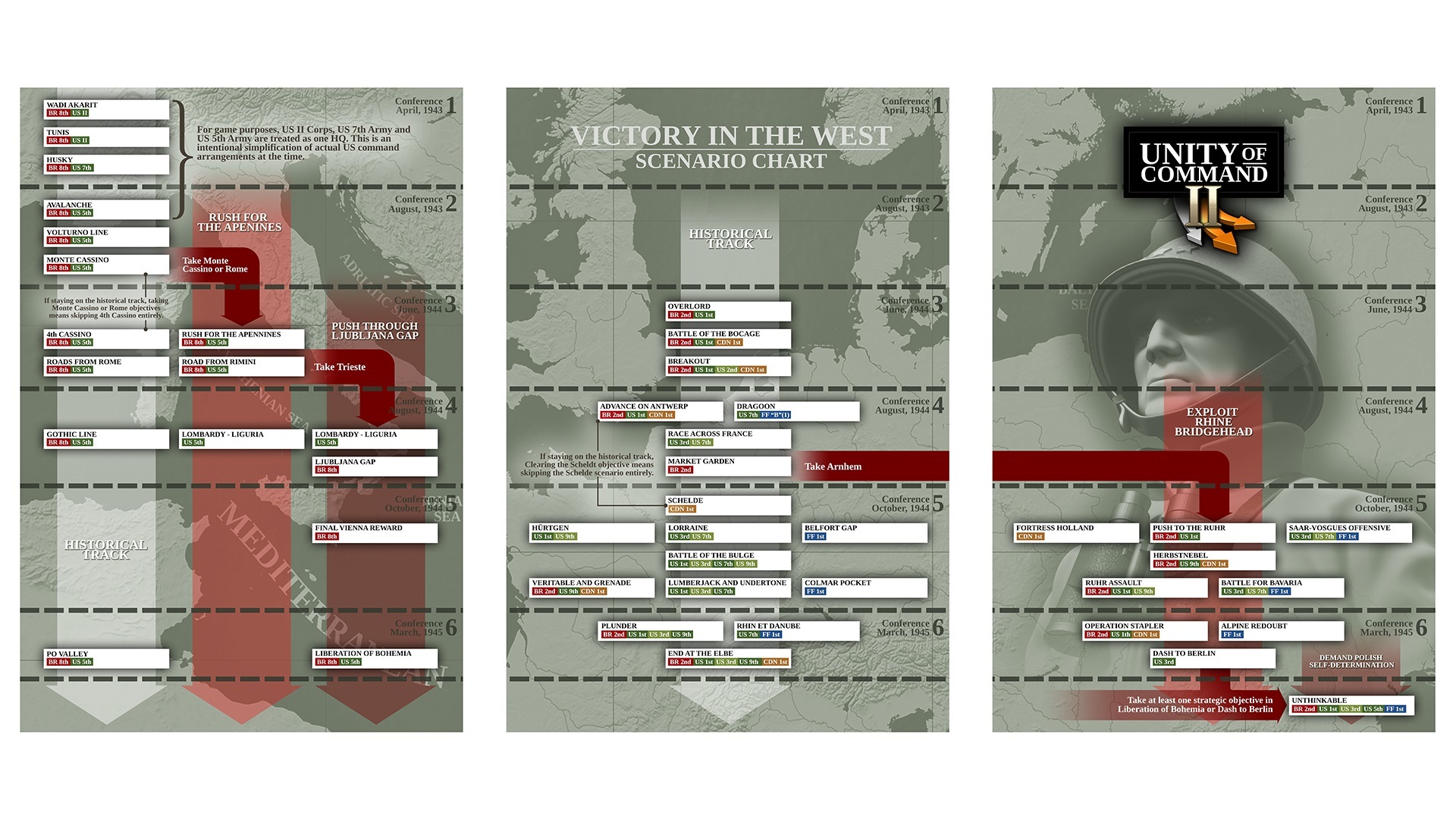
To quote Daniel Mellbin, who designed all the scenarios in the Victory in the West campaign, “things can now get a bit crazy if you succeed with Operation Market Garden and choose to exploit the bridgehead. Things get even crazier if you don’t feel like giving Stalin a free hand in Poland later on.”
Not that it’s super easy to get there, but if you play both Mediterranean and Northern European theaters to their a-historical conclusions, you will be faced with Operation Unthinkable. See, we knew you had secret longings for IS3s, SU-100s, and other Soviet bad boys from the original UoC, so we decided to bring them into play slightly ahead of time 😀
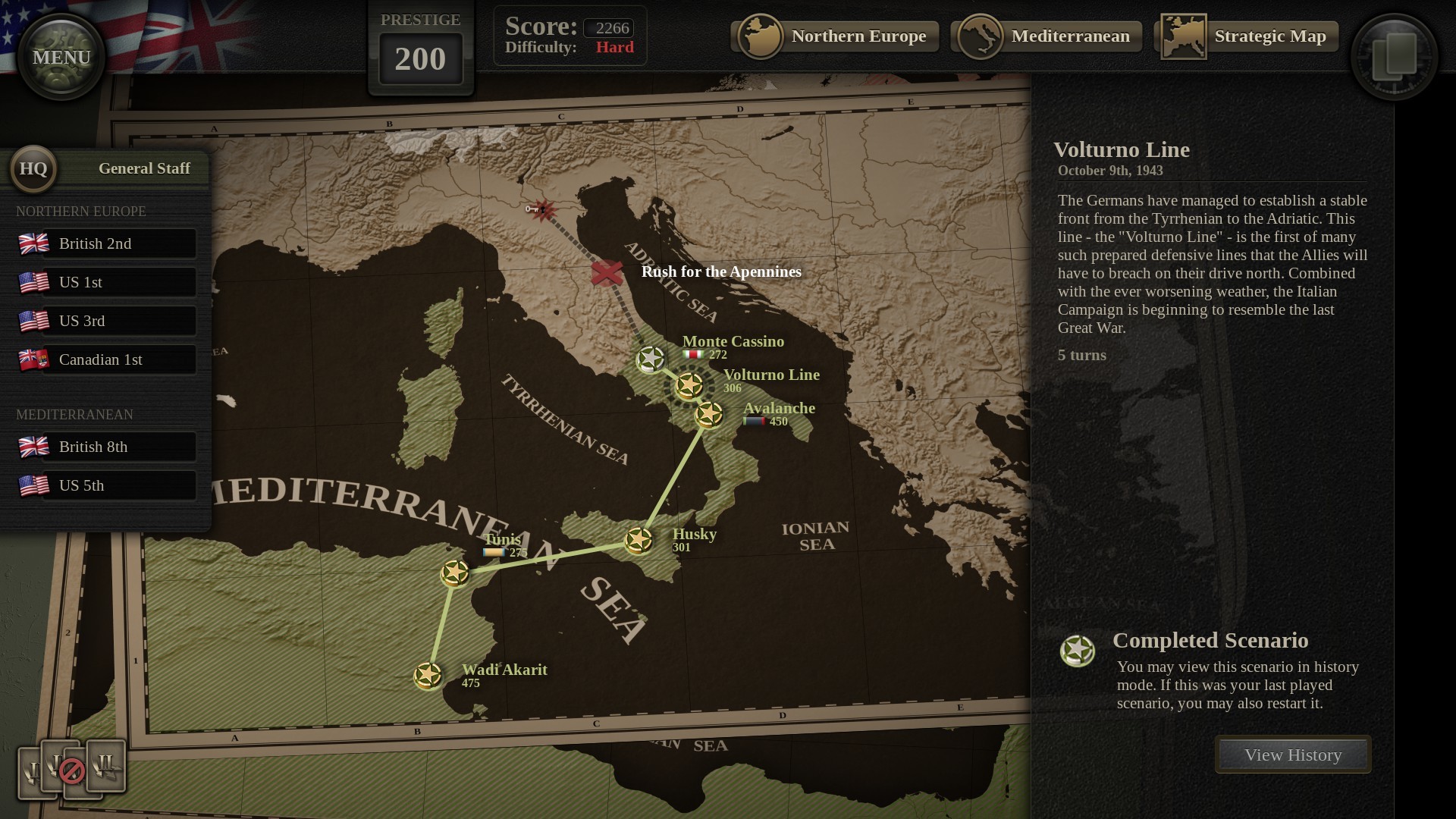
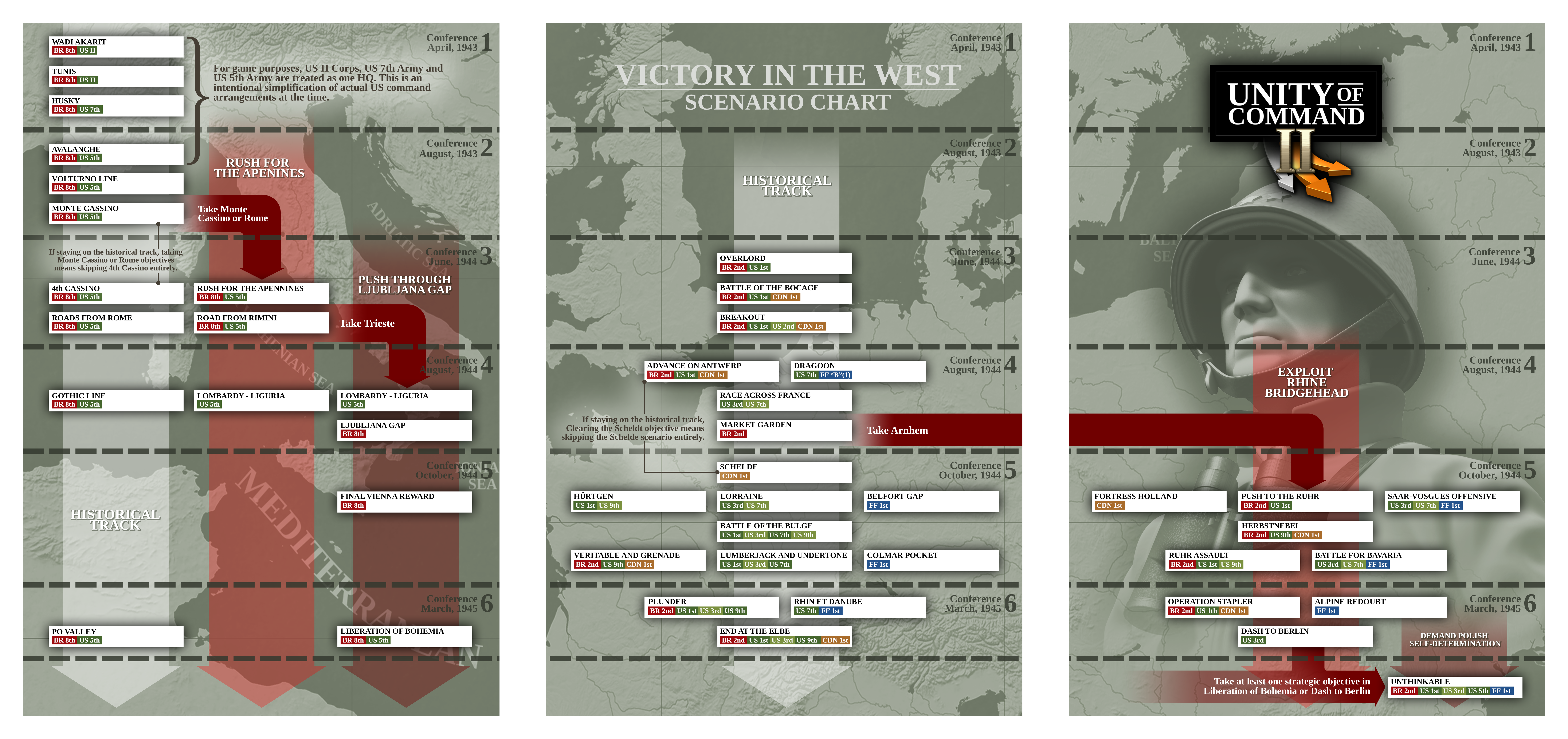
Because things can now get pretty involved in the campaign, we are providing the Scenario Chart below. Click on the image for the HD version, or get it in PDF or full-size PNG. In addition to scenarios and branching, the chart also enables you to track HQs across scenarios. This should allow for better planning of prestige investment in HQ specializations and upgrades.
For those that are slightly tired of slogging it through Italy at the start of each campaign run, we are now providing the Second Front campaign. This one lets you jump straight into the action at Overlord. The Mediterranean theater is removed, and you cannot reach Unthinkable, but other than that it’s the same campaign. You cannot unlock achievements and milestones related to Victory in the West via this shortened campaign, though.
Rules and Balancing
Special forces have received special attention in this update. The specialists with the black icon will, from now on:
Bypass enemy entrenchment in attack (like engineers) but do not remove it (unlike engineers).
Help their parent unit lower its combat losses: +1 attacker loss shift per active special forces specialist.
Additionally, special forces with the amphibious AMPH flag are able to:
Land un-suppressed in naval landings and major river crossings.
Reduce the river shift from -2 to 0 when attacking across minor rivers.
Allow their parent unit to perform a feint attack (HQ action) across a minor river.
We made smaller changes to other specialists too. Amphibious tanks, like the DD Sherman, now provide armor shift when attacking across minor rivers. M10 tank destroyers got nerfed on attack and defense, while still keeping the formidable +3* armor shift. Stacking multiple towed arty specialists is discouraged further: second and third such specialists are pushed up in the loss queue, by 2 and 4 places respectively.
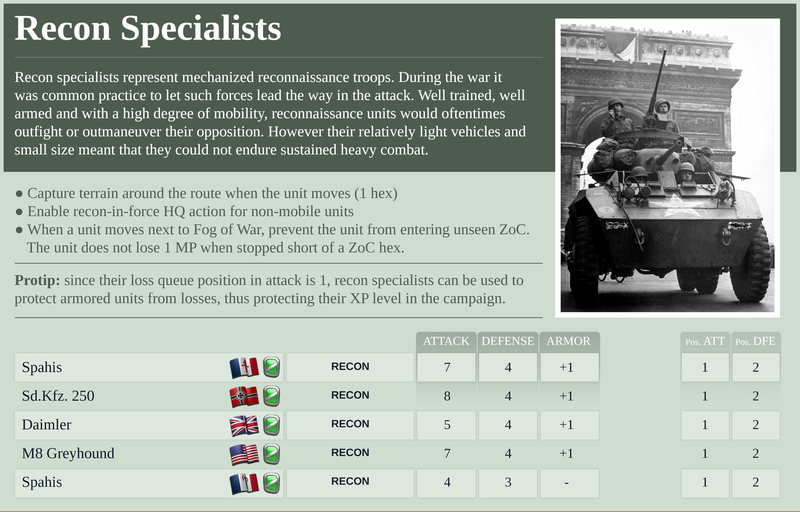
To help the players keep track of specialists and their abilities, we are providing a Specialist Reference Sheet. You can see a small excerpt below. Get it here in PDF.
We did some tweaking on the prices too. The Air Recon card now costs 10 prestige. At the same time, recon assets in scenarios have been slashed to just one or two across the board. This should make the asset and its card more meaningful. The AFHQ/SHAEF card was also reduced in price, as we feel it’s a good card that should be used more often. HQ branch upgrades are now cheaper in general. Hopefully this will encourage players to experiment with some of the less-used HQ actions.
UI Scaling
The game is now able to do UI scaling on its own. To turn this, go to Options and adjust these settings:
Ignore System UI Scaling: this will make the game ignore the “Make everything bigger” Windows setting. The game will render in native display resolution. Note that the “Make fonts bigger” Windows setting is always ignored for game purposes.
UI Scale: the game will scale (enlarge) UI elements by selected factor, up to 200%. This is done independently of Windows, so you probably want to select the “Ignore System Scaling” option above for anyhing else than 100%.
Q: The game appears to be low-resolution and/or text is blurry It is possible that you have enabled the “Make everything bigger” setting in Windows. Try enabling Ignore System UI Scaling in Options and then restarting the game.
Q: I have a high-resolution display and text is too small to read Go to Options, and set UI Scale to desired magnification (up to 200%). Restarting the game is not needed.
Q: I’m running with Very High settings on a high-res display and the framerate seems low and/or fan is too loud Go to Options/Video and set Smoothing to Off. This should be of most help with the framerate, and at the same time not too noticeable visually. Another thing to try is to go to Options/General and disable VSync. This eases the burden on the CPU (not GPU) and should help with fan noise in most cases.
Taking the Sting out of Easy
If you’re finding the game too difficult even on Easy, I recommend that you subscribe to the Recruit Difficulty mod on the Steam Workshop.
I’ve made this one really over-the-top easy. If you’re finding it useful please comment here or on the mod page, as we might want to use the player feedback to add another difficulty level (Cadet level, say).
In a final piece of news, we are releasing the Unity of Command II Soundtrack as a standalone product on Steam. This version offers an extra track (compared to the in-game version), some different mixes and high-quality FLAC files.
As usual, feel free to AMA in the comments.
Cheers! Tom
Unthinkable has happened!
A gargantuan FREE update, including the new ending to the (overhauled) "Victory in the West" campaign, is now available for playtesting in the newly released Update 12 Test.
How would you end the Second World War? We've been busy making A LOT of changes to the "Victory in the West" campaign to enable you to chose "to impose the will of the Western Allies" by attacking the Soviet forces. Operation Unthinkable is now available, along with IS3 units, SU-100s, Guards Mechanized, Guards Cavalry, IL2s and much much more, as an alternative final battle in the newly released Update 12 Test.
Daniel wrote a nice blog entry describing the path you need to take in order to unlock the Unthinkable, along with instructions on activating the Update 12 Test in case you want to jump in and try the new content straight away. You can read the full blog by visiting our forums, and we'll continue to tweak, update, upgrade and create new content, making Unity of Command II an even better game (and it's already pretty damn good!).
"Unthinkable", following an early end to the war things go a bit haywire between east and west
Axis Scenarios Update
After a period in testing, Update 11 for Unity of Command II is now live for all players, delivering new content, UI improvements, features, bug fixes and more.
Battle of Kasserine Pass and Operation Nordwind standalone scenarios are now included, completing an exciting trio of Axis operations together with Wacht Am Rhein.
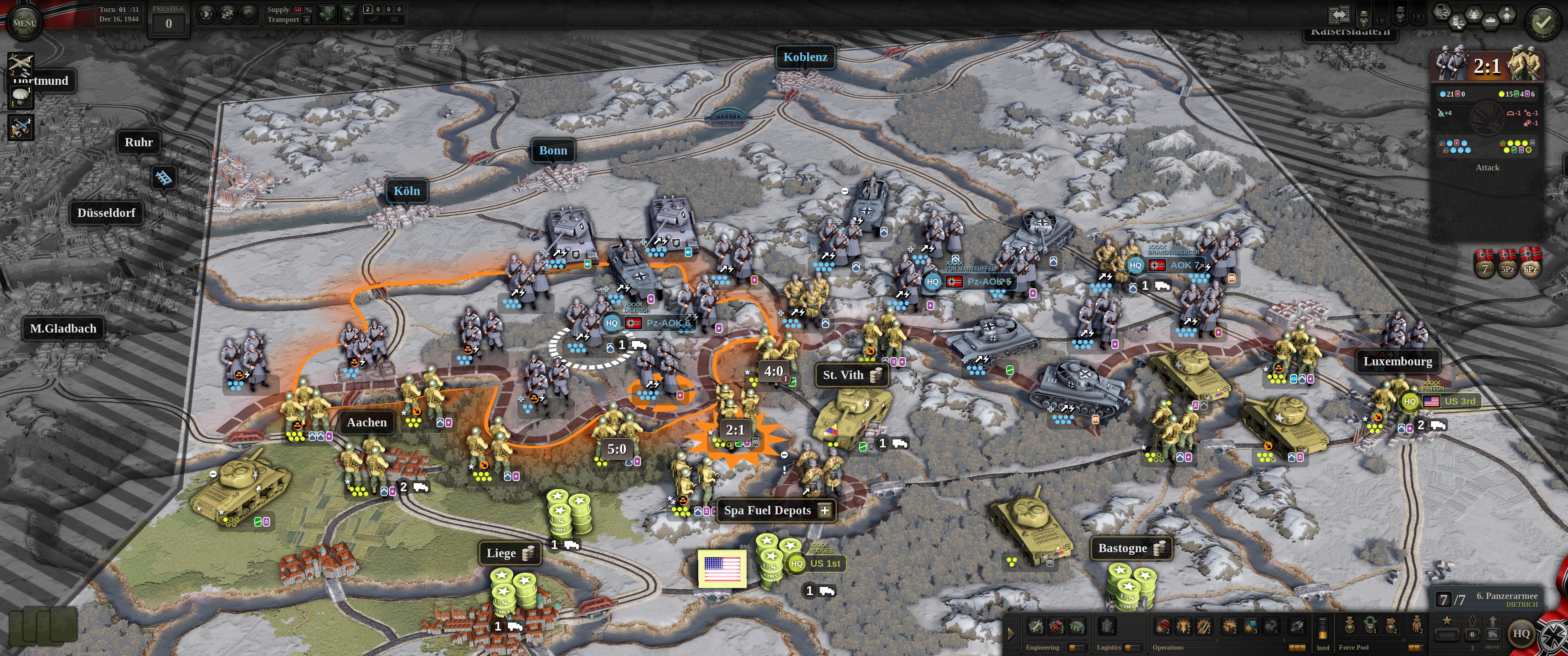
Opening stages of Unternehmen: Wacht am Rhein, Hitler's last-dich effort to turn the tide on the Western Front, played in ultrawide resolution.
The game now includes a “Save As” option. It is enabled by default for standalone scenarios; for campaigns, you need to go to Options > Gameplay > Allow 'Save As'. You also have the option to change the save name when starting a new game/campaign. Happy save scumming!
Other notable changes:
campaign games can now be restarted from the last conference played. There is a score penalty of 10% (capped at 250) for this, but no prestige penalty.
the game now counts how many scenarios a unit will stick around for (in the campaign), and displays a 1, 2, or 3+ on the unit sheet.
persistent cards that are face down in the deck (for example a para card that was just dropped) can now be recouped for 0 prestige, to make room in the deck.