
- Added line from hand to distant grab hand to make the remote grabbing intent clearer
- Fixed several small bugs
- WMR controller binding for toggling the projection should now be correct, thanks to muuyo
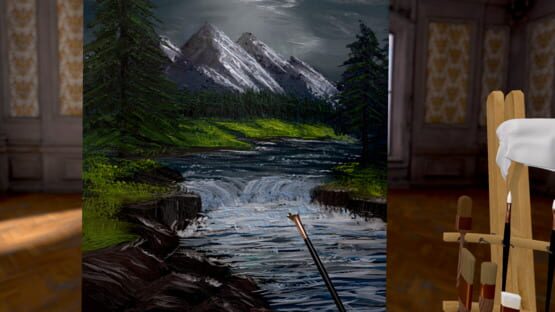
Vermillion
Improvements and fixes regarding distance grabbing
Gallery & Glossy paint update
- You can now mount your paintings in the Manor and Loft studios by approaching a wall, and even have them sitting in a customizable frame.
- The paint now looks a whole lot glossier. It's pretty damn tasty if you ask me. You can still reduce or disable the specular highlight using the slider on the lamp, but will you want to? I think not.
- The painting settings have moved to a little panel on the palette, where you can now set the canvas mixing sensitivity, paint thickness, and an all new infinite paint toggle. I've revamped the canvas mixing sensitivity at 0 to properly never mix with what was on the canvas. With the mixing sensitivity at 0 and the infinite paint toggle enabled you can doodle away at your heart's content!
- I've fixed the hands being the wrong way around if you're starting in OpenVR as a leftie. Sorry about that!
- I've changed the two inch brush to have a smoother look to its paint.
- A dry palette knife is now an excellent tool for smoothing paint on the canvas. Try it, it's something else.
If you're enjoying the update, please leave a store review! That really helps out. Thanks!
Fixed start as overlay closing running VR app.
Fixed missing "toggle projector" binding in OpenVR
Also, Vermillion is just 15 reviews away from transitioning to "Overwhelmingly positive"! If you've enjoyed your time in the studio, I'd really appreciate you taking a minute to leave a review. 🙏🏻
Locomotion & LIV fixes
- Fixed head aimed smooth locomotion being active without holding trigger.
- Teleport fixes in overlay mode.
- Prevented LIV from moving you around.
Overlay, Locomotion, Outdoor studio & OpenVR update
https://www.youtube.com/watch?v=udc1i97KPLY
Another important change this update brings is improved locomotion. Locomotion was always a second class citizen in Vermillion, but this is no longer the case.
- Better teleport
- Smooth locomotion
- Snap, quick, and smooth rotation
- Grab locomotion (very useful to position yourself just right!)
The smooth locomotion options are especially useful in overlay mode!
One more cool addition this update brings is a new outdoor studio. You know, in case you're done painting in Skyrim or VRChat.
The final important change this update brings is that now the default VR runtime is OpenVR, instead of OpenXR. OpenXR is the supposed new standard, but it's been nothing but trouble since Vermillion's launch. To this day it causes some users' controllers to not track. Out with the new, in with the old! You can still use the OpenXR launch option to bypass SteamVR on non-SteamVR platforms, such as Oculus and WMR.
Artwork by @lizaledwards!
Fixed palette and default brush rotation in overlay mode.
Layer fixes & more
- Fixed issue with layered transparent paint. Only applies to new paintings.
- When trying to join a public room and none is available, you now automatically create a public room yourself so others can join later.
- Fixed player moving when going in and out of multiplayer.
- Added "Merge" label on layer merge button for clarity.
- Made the easel less heavy to move around.
- Changed the way thick paint is applied, so you can't get overly thick paint from going over the same bit twice.
- The overlay beta can now also start as the regular game.
You can now paint in *any* VR game!
It's confirmed to be working very well on Vive and Index. WMR controllers will probably not work quite yet. Sadly, on Quest over Link, the overlay is still juddering due to technical issues with the way the SteamVR overlays work.
To opt into the beta, right click Vermillion in your Steam library > Betas > enter overlaytesting as password and select the overlay beta. You now get a new launch option to start Vermillion as an overlay. If you experience the overlay juddering when on Vive or Index, make sure the Vermillion window is in focus. If you want to get back in the normal studio, you will currently have to opt out of the beta again. I'm really looking forward to see where you will be painting!
Artwork by the talented Liz Edwards! https://www.youtube.com/watch?v=vArWTlRieGI
Major layer improvements!
- You can now merge layers down. This allows you to free up layers, so you can make complex compositions without worry.
- You can now move layers. Gone are the days of forgetting to start on layer 2, and not being able to put in your background afterwards.
- The longest standing bug in Vermillion is fixed: blurring a paint stroke on a higher layer no longer creates a white halo.
Note that you can only merge layers on new paintings. This is because the way transparent paint used to be shown on the canvas was incorrect, and made it impossible to merge layers down. Your old paintings are not affected by this change, but you therefore also can't merge layers on those.
Other changes:
- You now see the player names above their heads when you're on the multiplayer session page, so you can easily block or mute the right person.
- I scaled the Facebook avatar heads down to make them human-sized.
- Fixed spots of opaque paint appearing in the stroke of the dagger brush with thinned paint.
- Fixed the floating screen lagging behind the item it's docked to.