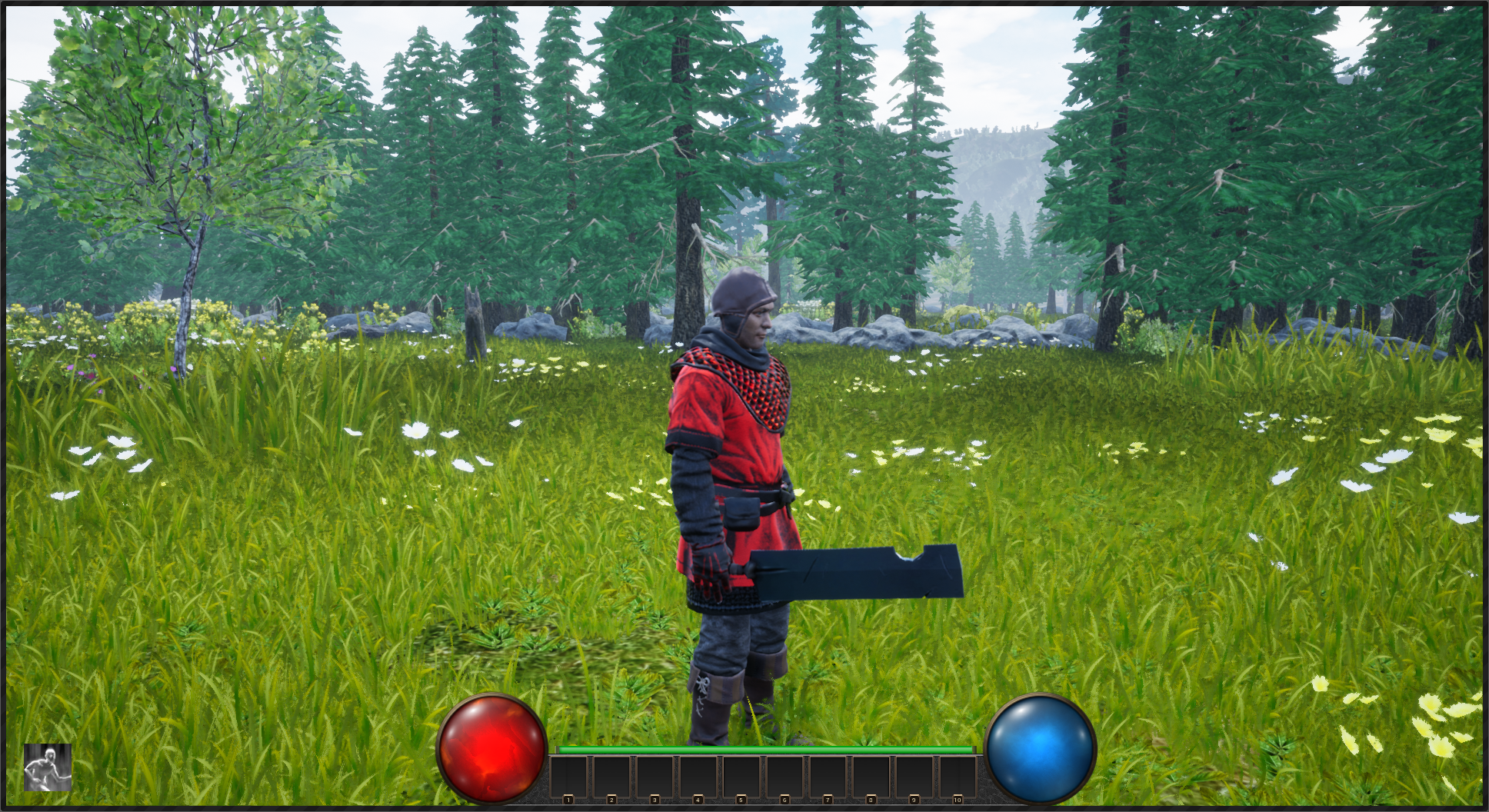
VoidGate cover
VoidGate screenshot
Genre: Role-playing (RPG), Hack and slash/Beat 'em up, Indie

VoidGate

Optimization, Camera, and Forest Updates

A very important aspect of software development, whether in games or applications, is the process of optimization. I'll discuss this briefly, but don't expect a lengthy tutorial (I am sure there are far better specialized tutorials out there). However, I'll perhaps provide some guidance about approaching it.

Additionally, I'll go over some new changes and updates in the Forest area for VoidGate, along with a few other small, yet significant, changes.

If one were to simplify the process of programming it could be put into 3 steps, it would probably look like this:

  1. Get it working right
  2. Clean it up
  3. Make it efficient


While it is good practice to keep in mind the cost of using certain algorithms, especially in terms of the Big O, it is far more important to simply get your current problem solved and working. Thinking about optimization while struggling to get a particular feature or function working could very well be a waste of time.

In the case of Big O, it's best to consider how to approach the problem before implementation. Other than that, it is very difficult to determine performance impact of any function/features before its implementation.

Trying to optimize a particular part of your program before knowing if it actually causes a bottleneck is like looking for a needle in ten stacks of hay, and not knowing which haystack contains it.

This is where the powers of profiling come into play. Profiling should be a tool every developer becomes familiar with; it removes the guesswork and gives precise details on how to optimize your program.

Since VoidGate is being developed in the Unreal Engine, we use Unreal's profiler. All profilers essentially work the same.

So let's take a look at a screenshot of profiling pre-optimizaiton:
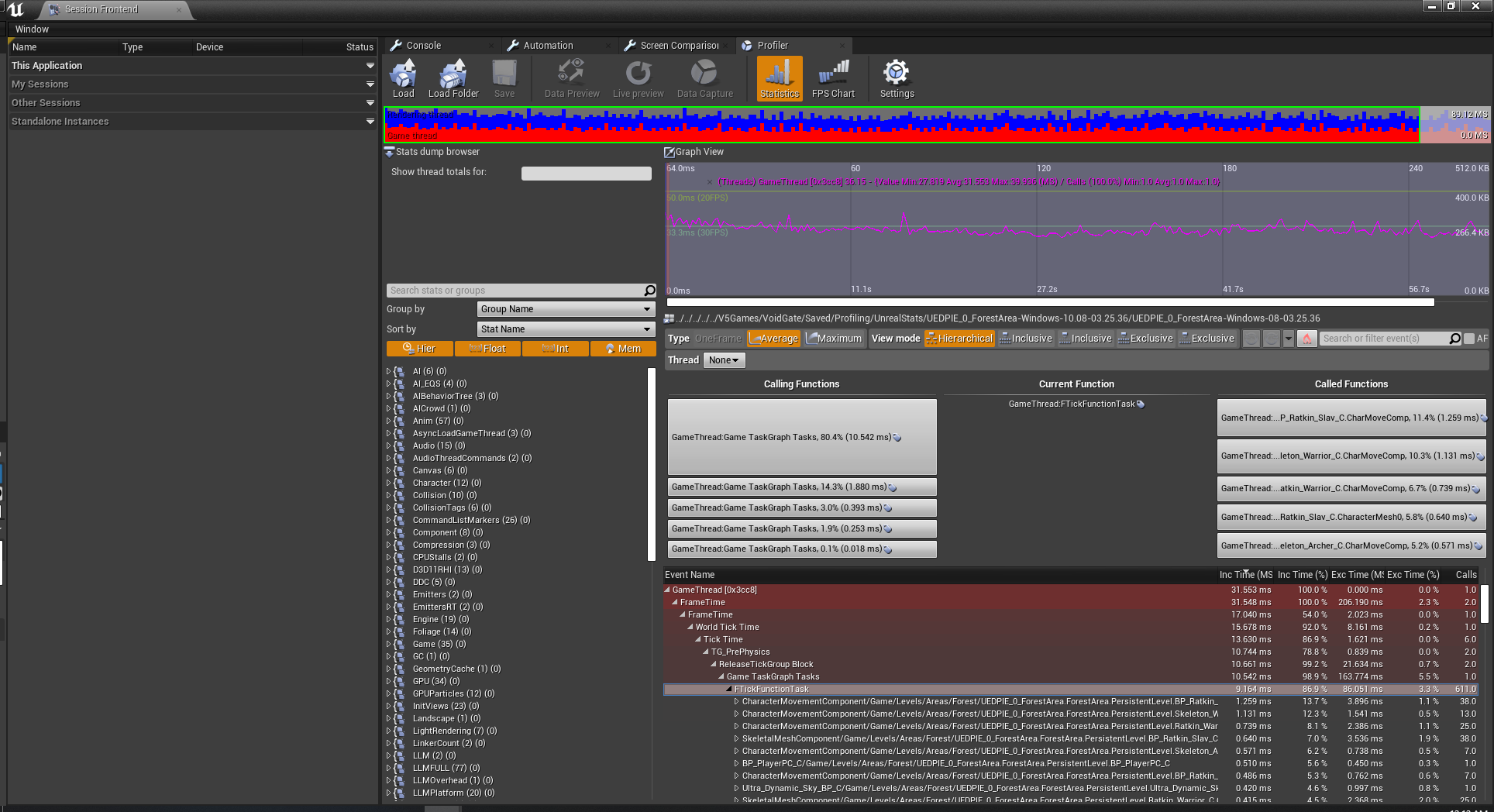


As we can see here, the major bottleneck in the game at this time is on the primary GameThread, particularly AI (monster/enemy) movement and animation.

At of the time of this writing, the randomized Forest Area in VoidGate spawns approximately 200 enemies on the map. So this bottleneck is understandable, though obviously not ideal. So optimization comes down to reducing the performance time.

There are a few options to consider. First, rather than spawning all enemies at the beginning, we can spawn them as they are needed. For example, we can check when a player nears an area where a particular set of enemies reside, then spawn them as the player reaches it.

However, this option has flaws for a number of reasons. First spawning actors (instantiation of objects) is an expensive process. This is because memory allocation for the object is slow. Even with Unreal's specialized pooling it is a slow process. Now, if we could specifically choose when to spawn an object in the game (such as during a loading screen, cinematic, etc) it would be a viable option. However, during gameplay this is impractical. If we spawn the enemy while the player is in the middle of combat (or even outside) there will be a very noticeable frame rate dip. If we spawn the enemy when the player has to fight it, we'll get a frame rate dip and an enemy potentially popping out of nowhere.

I spent a brief amount of time trying to find how others might approach this issue and couldn't find anything. It doesn't mean no one has addressed it and has tackled the problem, I just couldn't find it.

So I came up with my own approach (even though it's highly probable I'm just reinventing the wheel here). Memory is cheap and not really an issue right now in the game, so it is safe for us to spawn all of the enemies during the map's load time.

After this, we simply have each enemy do a check regarding their distance to the player. It's important to note this check is not done every frame or tick; checking distance can be an expensive operation, especially if Unreal uses the accurate square root method (which I assume it does; Manhattan distance is cheaper, but also less accurate).

First we'll go over the result of the check, then we'll go over the timing of the check.

So, once we have our result of the distance between the enemy and the player we have a few different options. I base this on three tiers of distance: short, medium, and far. I use these rather than actual values because it will depend on the game, and the medium distance may be unnecessary in other cases.

VoidGate has stealth mechanics, though not all of it is fully implemented yet, and AI is perception based (hearing and sight) and uses alert levels of awareness.

This means short distance needs to be far enough for the player to be aware of an enemy then either engage or avoid. Since the game depends heavily on randomization, medium distance is far away enough the enemy doesn't need to be visible, have active animations, or have active perceptions, but close enough to still move around. And far distance means the enemy/AI is completely inactive.

Medium distance may be omitted completely, and may be in the future. We will do more testing on it, and may find it ineffective.


  • Short - Enemy visible and fully active, perceptions are active (fully active).
  • Medium - Enemy not visible, animations not active, perceptions inactive, brain still active.
  • Far - Fully inactive.


So, how do we do the timing to check? In my case, I use Unreal's event timers. The frequency is determined by the distance. The minimal amount of time is half a second, while the maximum amount of time is thirty seconds. These bounds are set by simple clamping.

Then I use a formula to determine the amount of time: Time = (Distance - ShortDistance) / TimeDistanceRatio.

There is no magic to this formula, and it certainly can be changed. I only picked it by asking: At what distance do I want to make a check every second? In Unreal terms, each Unit (1.0) is approx. 1 cm in distance. Let's say my short distance is approximately 5000 units, this means as long as the enemy is within this distance we want to do a check at our minimal amount, up to that amount.

In my case I chose TimeDistanceRatio as 2000 units. This means for every 1000 units past the short distance, half a second will be added to the amount of time.

The rationale behind this is simple: it is improbable that a player reach a certain distance to far enemies in a certain amount of time, so the farther they are the less frequent we need to do the check. But as the player gets closer to the enemy, we need to make the check more frequently.

So, what is the result of doing this method? Obviously the results will vary according to the formula, variables, and distance among other things. I could certainly play around with the formula and values for different result, however I was happy with the result I got on this basis.


As you can see, the amount of time spent in the GameThread was cut in half, from 10.542 ms to 5.275 ms. The majority of enemies now have their performance time cut in half, even when "moving."

Of course, this doesn't mean the job is done. The instructions for game optimization can be found on bottles of shampoo: Lather, rinse, repeat. It's not something that needs to be done after every step, but often enough. Too much and progress will be slow, too little and progress won't matter much. The when fits inside a vague Goldilocks zone.

Now we can move onto some recent changes.

First, we have implemented a feature to improve the camera view. Since our game depends on randomized level generation, we can't design our levels to avoid obstructing the camera. There are a number of other ways to deal with this, however, we'll stick to our own solution.


Whenever an object obstructs the camera it becomes translucent, so the player won't lose visibility. Special thanks to this YouTuber for the method and base setup on doing this:
https://www.youtube.com/watch?v=COodvTeEfSM
I recommend if you use this for your own project that you modify it to suit your particular game, as we have. The code is built for general use for ease of plug and play, but taking some time to fit it around your own project will increase its efficiency. As an example, the code has you select a particular Actor class to filter through. In our case, we don't even care about the class. Rather than have Unreal fetch any actors matching the class and iterating through an array, we only need one actor. So we grab it directly and remove the array iteration. While the performance difference may be negligible in this case, it is good practice.

Additionally, there is a flaw in the basic setup that ALL static objects will be susceptible to this (allowing the camera to break through the ground to look up at the player, though this might be what you want). And it requires the spring arm on your camera to ignore any collision. This can cause problems. For example, in our dungeon level we don't want the player to be able to swing the camera outside of dungeon walls and examine the "outside" of it, allowing them to view dungeon layout among other things.

So we managed this by setting up a new object type within Unreal's custom channels called Fade, referring to the code's fade ability. Any object we want to use this effect, we set its object type to Fade. There will be a few other tweaks you might require, such as properly setting collision on your pawn/character.

Other than that, the code is well-designed. It uses Unreal's tracing system to search for objects, which Epic has demonstrated has little impact on performance.

And finally, we would like to mention a small update to the Forest Area and other similar maps. These maps generate a pathway to connect important parts of the map; offering guidance to the player. Enjoy some screenshots.

Thank you.


Development News

It has been well over a year since the last article we posted about VoidGate. Some might take this to mean the project is dead, but that is far from the truth. Instead, for the past year we have rewritten the code for the game. Now we have mostly finished that and are able to focus once again on creating content.


So, what was the reason for rewriting the code? The game is being built in Unreal 4, and it had been completely written in Blueprints. Not a terrible thing in itself. A strange route to go, considering I am far more proficient in C++. So why Blueprints? Partly to familiarize myself with the system (although I had spent a great deal of time prior learning it), and partly out of enjoyment.


However, as time went on it became messy and difficult to manage. The greatest strength of Blueprints seems to also be its greatest weakness.

It's easy to build quickly in Blueprints. However this speed leads to a lack of maintenance. Code just grows without being trimmed and optimized. Obviously this is not the fault of Blueprints itself. The fault lies at the programmer. But even a good programmer falls easily into the temptation of laziness. And before too long, it has become an untamed beast.

An example of this is our code just to handle the dragging and dropping of inventory items in the GUI:


And the result of this was very buggy UI which is one of the more difficult aspects of a game to develop (although this perhaps depends on the developer). In this case, fixing one bug meant creating more. It lost the flexibility and power of modular, small purpose functions.

With the rebuild, it hasn't been completely moved from Blueprints, as some things are nice and easy to do in Blueprints, and for things where optimization for speed isn't as important, like menu based UI (inventory management).

Cleaning it up, it's now much more manageable:


Another easy trap to fall into with Blueprints is scope. Blueprints makes it far too easy to break a rule stressed by experienced programmers: keep variables and objects within scope. Although Blueprints has the ability to restrict access, like making a variable or function private, the ease of using makes it too easy to remember this feature even exists. Because of this the many complicated systems of the game becomes far too coupled. Even as an experienced programmer who understands the dangers of this, and the significance of decoupling fell into this. Again, Blueprints is not necessarily to blame for this. It's the programmer's job to avoid this, because it's easy to do in any language.

Please don't misunderstand any of this. I'm not speaking ill of Blueprints. It is a very interesting form of programming, and I enjoyed it a great deal. I say this despite C++ being my favored language. To avoid a tangent I won't go into more details. Blueprints is powerful, easy, and convenient.

As a wonderful bonus, through the process the majority of the C++ code has been exposed to Blueprints in order to rebuild it in layers. And this has been a very fun and interesting experience. The sheer power and flexibility of Unreal is both amazing and humbling.


Another advantage to rebuilding the game is moving a huge amount of data away from Blueprints and Data Tables into JSON. This gives easier access and flexibility with modifying game details, for one example adjusting balance. Rather than having data placed inside of Blueprints for items, the data for equipment and items is now held in JSON. This is then used as a basis for how to randomize the item. The same is true for monsters and player data.

We plan to make it possible for players to create their own JSON files to adjust the game to their liking. And upon starting a game, be able to select from a list of possible configurations. How far this moddability will extend is yet to be decided and seen. Hopefully though, this will increase the replayability of the game.

And now with the rebuilding largely done (there are still a few systems to touch up on, such as magic) we can turn back to building content.


As you can see from the pictures showed, we started our focus on rebuilding the forest areas. This is the third or fourth time building forest maps. We experimented with a few methods and even tried a voxel system. Voxels turned out to be a mess and weren't working the way we hoped, so we scrapped it. We weren't planning on allowing the land to be modified by the player, instead we wanted a way to develop varied terrain. This caused some gameplay elements to become much more complicated.

So now we are taking a simpler approach, but so far we are happy with it. It has some ways to go, but it is promising. We are excited to see what becomes of it.

And with that we come to the end. Thank you for your patience and support. Here is a short video demonstrating the new dynamic day/night cycle in VoidGate.
[previewyoutube="lYLOJyGF_fg;full"]

Hotfix Alpha 0.9.7.1

Fixed small bug with starting equipment

Changes to Alpha 0.9.7

VoidGate migrated to UE 4.21
Forest map updated
Jump height of player reduced
Desert map updated

Changes to Alpha 0.9.6


  • Fixed issue with jars and barrels spawning twice
  • Diamond/Emerald UI image changed
  • Fixed bug allowing duplicate placements of skills/spells on action bar
  • Player can no longer move/remove action bar spells/skills while in cooldown
  • Poisoning/Burning effects have max duration of 10 seconds
  • Areas locked until condition met (Forest unlocked after defeating Garux)
  • Orbs are removed from quest inventory upon defeating Garux
  • Fixed various bugs with items in actionbar breaking (due to durability loss) such as duplicating
  • Forest level updated to use landscape rather than voxels
  • Desert level updated to use landscape rather than voxels

Changes to Alpha 0.9.5


  • When using dual weapons, player has advantage of greater mobility while using light attacks
  • Kneeling bug fixed (Player randomly kneeling when stopped)
  • Fixed default keybinding for spell book to not conflict with skill tree (secondary, controller)
  • Dungeon modified slightly
  • Fixed issues with purchasing items in shop
  • Barrel spawning now uses better uniform distribution for random generation
  • Leech weapon now equippable in offhand
  • Fixed issue with player able to perform actions (or at least expend stamina) when in ragdoll mode
  • Fixed bug where character stands after death by boulder
  • Fixed issue with consuming items locking actions
  • Fixed bug incorrectly displaying hotbar item equipped when swapped with another hotbar item
  • Improvements to arena
  • Fixed a typo in Soul Stalker description

Changes to Alpha 0.9.4


  • Updates to Garux map
  • Crystal and orbs are removed after defeating Garux
  • Fixed keybinding issue in main menu options
  • Items can no longer be used during another action
  • Character rotation is no longer locked during consumption
  • Oculus and SteamVR plugins disabled
  • Fixed issue with chest remaining open forever after opening another
  • Garux critical attack multiplier reduced
  • Other Garux stats adjusted
  • Garux and AI stats adjusted
  • AI no longer use skills after death
  • Fixed issue with Skeleton Warriors not attacking
  • Music now plays while paused in menu
  • Fixed monster blocking chances
  • Fixed monster critical multiplier to not be less than 1
  • Fixed aiming with bow/magic projectiles
  • Fixed issue with shooting magic projectiles while performing another action
  • Reduced boulder trap force amount
  • Items in arena always identified
  • Arena improved

Changes in Alpha 0.9.3


  • Fix to AI sight perception to be able to see over barrels and other interactables
  • Removal of perception check which potentially caused AI to become unresponsive
  • Fix to torch+offhand weapon incorrect placement
  • Stats in arena are no longer saved to affect dungeon crawl stats
  • Highest level in stats now functional
  • Quest items now capped at maximum
  • Orb rooms no longer spawn when player is at max amount
  • Icon image during drag and drop from talent window now fixed
  • Attack frequency now monster specific
  • Giant rat attack frequency reduced
  • Player stun after hit time reduced
  • Issue with player aiming bow/magic fixed
  • Fixed issue with aiming while bow breaking
  • Fixed issue with Golems not attacking
  • Going through the portal when not active no longer results in endless loading
  • Boss Garux fixed

Boss Garux Now Working

The Boss Garux is finally working in the update coming now.
He still needs work done, but at least he is there.

Good luck!

Boss Still Broken

The boss Garux is still broken in the current update. For whatever reason, he works perfectly fine in Unreal editor but breaks in the packaged version.

So we are going to be working on another solution but it will take some time.

We have decided to go ahead and post the update anyway, as it fixes many issues.

Thank you and sorry about the problem.

We will get it though :)