

Voxel Tycoon
Update 0.88.0.8 beta
— Translations updated
Update 0.88.0.7 beta
— Passengers/mail popup: Fixed vehicles could show red items indicating there's no vehicles for them
— Passengers/mail popup: Added red highlight to removed stations, wording changed from 'Unknown station' to 'Station removed' for improved clarity
Update 0.88.0.6 beta
Update 0.88.0.5 beta
Update 0.88.0.4 beta
— Fixed more cases where valid destinations were shown as red
Update 0.88.0.3 beta
— Fixed some cases where passenger/mail tooltip shows valid routes as red
— Station label and station window now should be more consistent in displaying passenger/mail numbers
— Fixed items displayed in the wrong locations on semi-trailers
— Fixed creating a new vehicle replacement can cause an error in some cases
— Translations updated
Update 0.88.0.2 beta
— Improved station passenger/mail indicators behavior
— Fixed internal recipes shown in the tech tree
Update 0.88.0.1 beta
— Mail lifetime increased, as well as delivery reward
Update 0.88.0.0 beta
— The passenger switching feature is still a work in progress, and it will require some fine-tuning. Please share any feedback with us!
— Along with passengers, there's a new kind of cargo: mail!
— Passenger coverage is now highlighted when placing passenger stations
— Improved the visual appearance of trucks with trailers in tight turns
— Added an explicit toggle allowing users to enable Cloud sync for a new save
— Autosaves now show the name of the world or the original save name
— Fixed replacing some vehicles in the vehicle editor window wouldn't allow you to select a vehicle to replace
— Fixed the camera would go wild after following a vehicle very closely
— Modding: Added Coupling1Offset and Coupling2Offset properties to the .carunit asset, allowing you to fine-tune the trailers' visual behavior
— Modding: Added the Height property to the .carcoupling asset, allowing you to fine-tune the trailers' visual behavior
— Unity updated to 2021.3.16
0.87.3 intermediate update is available!
Support for devices with multiple outputs
The recent lock of device inputs/output directions made possible the new feature that was requested by modders for quite some time already. This update introduces support for devices capable of producing more than one product. Even more, products now can have different probabilities of yield.
For example, it is now possible to create a device that will process raw coal and output charcoal every time, but also - with a very small probability - it can output a shiny pricey diamond.
Or, there could be a uranium ore processing device that will yield the regular uranium 99.99% of the time, but also there's a 0.01% chance of outputting some rare isotope.
The main intended usage of this feature is devices yielding byproducts, but we are sure that our awesome community will find many creative ways to (ab)use it!
UI changes
To accommodate the new feature we had to redesign how product recipes are displayed in the device and recipe picker windows.
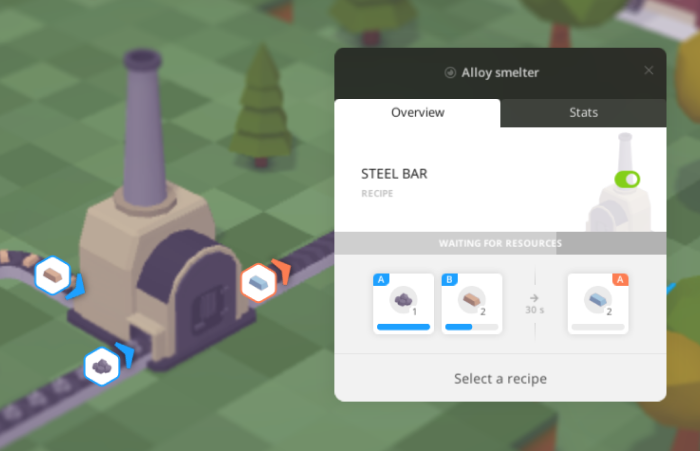
The new design allows displaying more than one output product, output probabilities, as well as exact inputs and outputs assignments.
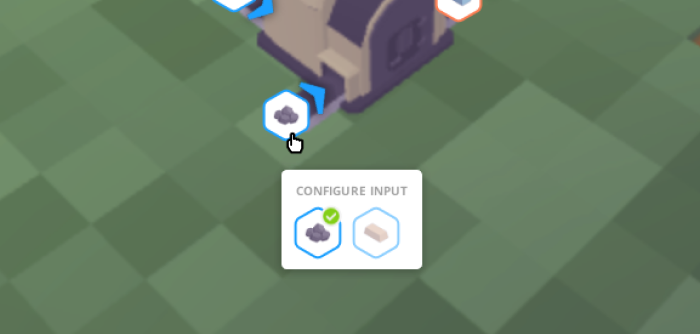
There're also new device indicators that show input and output directions and locations in the world, as well as the items expected to come in and out.
And they are not just here to inform, they are also interactive: clicking on it allows you to configure item assignments.
Languages, city and people names, and currencies modding support
Our intention was always to make Voxel Tycoon as moddable as possible. But not every type of asset easily supports this.
For example, the currently selected language is loaded just as the game starts. If this language comes from a mod and the player decided to unsubscribe from this mod, from the game perspective an asset required to even show the main menu is just missing, and the game won't be able to start. The same applies to currencies and city names assets, since they are also used in the main menu.
Thanks to the new error handling system, the game is now able to gracefully handle such situations. So, we've implemented the missing parts and now the modding of languages, currencies, and city and people names is finally possible.

It's time to reticulate some splines for some serious §§§
A few fixes
Items no longer got vaporized inside devices between sessions
In the process of reworking the device window, we have also touched the devices' internals a bit. Besides other changes intended to streamline devices' logic flow, we have fixed the issue that was in the game from the very beginning: previously, items inside devices were not saved between sessions, and effectively they just got vaporized when you load your game. While it wasn't such a big problem in most cases, it's always better to know that your hard-earned products are safe now.
Double conveyor fix
Continuing efforts on improving conveyor building, we got the bug squashed where the conveyor builder tool was placing double overlapping conveyor pieces in some cases. These double pieces produced weird issues where items can’t pass through otherwise looking alright conveyor junctions.
That's it for now
This is probably the last minor update for the 0.87 version. Stay tuned for what's coming next!