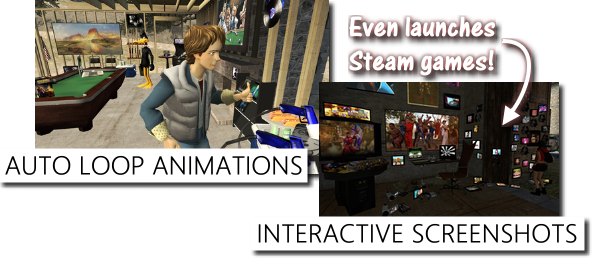
Share your creations with your non-AArcade friends like never before with the new Interactive Screenshot feature! Every object remains a clickable shortcut, and your friends can check out your links or even launch their Steam games directly from your screenshot!
Click this link to see what Interactive Screenshots look like: http://www.anarchyarcade.com/2d/de_cbble0.html
Today's update also adds auto-looping of animation sequences for addon models, so now it's easy to make Han Solo dance his heart out, or have Marty McFly continuously give you a thumbs up. :)
Various other improvements are listed below, including an option to cache your collection of maps to speed up start times!
AArcade is approaching completion, with restored Steam Workshop support & VR support being the last two remaining big-ticket items left for me to work on. Thanks everybody for your continued support, and I hope you're all enjoying the metaverse!
Change Log
Added Interactive Screenshots to the screenshot menu.
Added the ability to launch Steam games directly from Interactive Screenshots.
Added an Instance Info link near the clock that takes you directly to the Edit Instance menu so you can easily rename your instances.
Added auto-looping for all sequences played on custom addon models.
Added "Detect New Maps When AArcade Starts" to the Settings menu. Disable this to improve AArcade's startup time when you have hundreds of maps.
Improved & fixed the Origin wizard.
Improved & fixed the Instagram wizard.
Improved Netflix URLs to be preferred over an item's Preview URLs. (This was supposed to be in the previous update, but it was bugged out.)
Fixed a bug that could sometimes cause AArcade to crash when shutting it down with an object still selected.
Mario 64-Style Magic Paintings - Client Update 7/31/2018
A geotag is when a photo has detailed information embedded into it that shows exactly where it was taken. Screenshots in AArcade are very much like this. They remember what map you were on, where you were standing, and even what instance & server you were on when you took your screenshot.
Today's update adds the ability to spawn your screenshots right into your arcades as objects. Screenshot objects behave just like the Map Transition doors in the meta_ maps!
Just walk up to one and press E to "use" it and you'll be able to travel directly to the spot that the screenshot shows!
Think of them like the Mario 64 paintings: jump into them to load the map shown in the picture. Except you press E on them in AArcade instead. :D
How To Spawn Screenshot
When you hover over screenshots in the Maps > All Maps menu there will be a new icon that looks like a chess pawn. Click it to spawn that screenshot into your arcade! Note that screenshots you've previously spawned can be found in your library under the "maps" type.
Using Screenshot Objects
You have to press E (USE) on the screenshot object to use it as a teleport. This will bring up the Map Transition menu just like the doors do in the meta_ maps.
AArcade Steam Community
Sure, the latest Steam client update may have broken the Steamworks API a little, but it also introduced an amazing new Discord-style Steam Community Group Chat feature! If you like to be on the bleeding edge of new social platforms, feel free to join the AArcade Steam Community Group Chat by using this link: https://s.team/chat/DP7mOO2x
Ancient Stuff (Twitch & Discord)
Discord is so last year, but it still remains the most popular chat platform I know of, so if you want to get in contact with me or other AArcade users feel free to drop into the Discord: https://discord.gg/8cxtuKY
Or if you'd rather lurk me during my live Twitch streams: http://www.twitch.tv/AnarchyArcade
Change Log
Added the ability to spawn screenshots as objects.
Added Wait For Initial Images To Load to the General tab of the Settings menu. When it is enabled, the Loading Instance menu will remain up until all initial images are also loaded.
Added a wizard for Wallpaper Cave. Remember that you can hide wizards that you don't care about using the Wizards tab of the Advanced Library Browser.
Improved screenshots to also create full resolution JPEG images.
Improved teleporting to screenshots to also set your camera pitch.
Improved the Loading Instance menu to use a full resolution screenshot, when available.
NOTE
Pressing E to "use" a screenshot object only works if the object is its original un-scaled size! I'll be fixing this bug in the future, but for now just be sure not to scale your screenshots when you spawn them into your arcades. :ily:
NOTE 2
You may have noticed that the latest Steam client update broke web page pop-ups in AArcade, including a few of the wizards that depended on pop-ups like DuckDuckGo Images and Bing Images. Please be patient while I try to get Valve's attention about the bug they re-introduced with the Steam client update. It's actually one they've briefly introduced & fixed before, so hopefully it will be as easy for them to fix it again this time around. Sorry for the inconvenience and thank you for your patience!
Map & Server Menu Improvements - Client Update 7/26/2018
Today's update improves various multiplayer & map loading menus to provide a better experience when changing maps and/or servers.
Keep an eye out for next week's update which will address a few issues with various wizards & web browser popups, among other things. Party on!
Change Log
Updated various AArcade logos to be the new logo.
Improved the Multiplayer > Servers menu to indicate which servers have been updated since you last visited.
Improved the Tab Menu > Screenshots tab to update your last-used spawn position in the map when ever a new screenshot is taken.
Improved the Map Transition menu that is used on the special doors that connect the meta maps.
Improved the Netflix wizard to work on the browse & title pages too, and to scrape better URLs into the shortcut.
Improved viewing of Netflix as the File field of your shortcut.
Fix an issue some users had with hosting particular arcades in multiplayer.
Saving From Multiplayer - Client Update 7/17/2018
Now when you encounter a cool model or item while playing multiplayer, you can easily middle-click on it and choose Save To Library to make it available to you in singleplayer. This works for items as well as models. You can even save the entire arcade to your local library so you can explore & customize it later in singleplayer mode.
The Atlas & the All Maps menu have been improved to give you faster access to what you usually want from them.
There are also various additions & improvements, most of which were requested by users in the Discord or Twitch last week.
The Twitch is twitch.tv/AnarchyArcade (live every Wednesday), and the Discord like is https://discord.gg/DmavyWk
Change Log:
Added the ability to save models to your library that you encounter as a multiplayer guest.
Added the ability to save arcades, along with all the items & models used in them, to your local library. Note that there is no progress bar for this yet, so when saving very large arcades to your local library, the AArcade window may appear like its frozen while it works so you'll have to be patient.
Added links directly to the Servers & Maps menus onto the Atlas.
Added a Server Info link to the AArcade Task Bar if you are in a multiplayer server. It opens the Multiplayer menu up to the Connected tab for you.
Added a wizard for Shudder, which is like the Netflix of horror movies. Remember that you can hide wizards in the Advanced Library Browser > Wizards tab if you don't care to see them in the menus.
Added Use 12-Hour Clock to the Settings > UI tab. Disable it if you'd rather see a 24-hour clock instead.
Added the launch option +default_engine_no_focus_sleep 0 for testers to try different update rates while tabbed out & unpaused. (Use 50 instead of 0, for example. Normally you should just leave this on the default value of 0.)
Added Assign Item To Object Under Crosshair to the top of the Transform Menu while spawning an item. You can use it to change which item is used on a cabinet without having to reposition it.
Improved the All Maps menu to show the correct thumbnails for the Quick Load instance on each map and to show favorites on the top of the list.
Improved hover text while a multiplayer guest to properly label models as From Library, when appropriate.
Improved Save Arcade dialogues to show how many changed & new entries there are.
Improved usage of VR HMD eye matrices for better VR support. (Note: There is no VR support with this particular build though.)
Fixed an issue with exporting an entire arcade as a YouTube playlist.
Fixed an issue that could cause remote-only models to have 0 as their thumbnail field.
Meta Data Export - Client Update 7/9/2018
Today's update adds the ability to export meta data from your arcades to various formats for use in other apps & frontends. You can also export into plain text formats or URL lists if you just want to look at the meta data at a glance.
Also included are various bug fixes & improvements to some of the multiplayer menus.
You can expect some more multiplayer improvements this month, and then Steam workshop improvements in August as AArcade works towards coming out of early access later this year.
I again want to thank the community for helping each other out and taking part in the fun, both inside AArcade & from the multiplayer games & Twitch streams we launch from it. Rock on! The Discord link is below for anybody who wants to join, talk, play, idle, or lurk with us: https://discord.gg/V6EKnY
Change Log:
Added Meta Data Export to the Main Menu and also to the context menu. Use it to export your meta data for use in other frontends, or just to take a look under the hood to see what makes Anarchy Arcade tick.
Improved the help text when hovering over the Lobby ID field of the Host Multiplayer menu. (It gives a better explanation of what to use if you are re-hosting one of your persistent servers.)
Improved the Guestbook entries to be sorted with the newest posts on the top.
Fixed the COPY button next to your invite link on the Multiplayer > Connected tab.
VR Testers Note Thanks for your help testing the last VR build! Compatibility seems to be working well. I will have another VR test build in a couple weeks with improvements. (Today's update does not have a VR test build that goes with it.) Full VR support in Anarchy Arcade is still a few months of work away, but we now have a viable path to achieve this goal. :) Thanks for your patience! :ily:
Multiplayer Media Presence & Server List - Client Update 7/2/2018
Ever look at your buddy in-game and wonder what he's watching? With today's update, looking at him will also show you what he's watching. :)
The server list has also been updated to show the # of objects in the server, how many visitors it's had, and a Reddit-style thumbs up/down rating. There is also a Guestbook feature in Main Menu > Multiplayer > Connected that lets you leave feedback for the arcade host.
Note that the server list improvements will be applied to your persistent arcades the next time that you re-host them. Party on!
Added details about a player's state when you look at them in a multiplayer game.
Improved the Multiplayer > Servers menu to show more detailed information about servers.
Added a Reddit-style rating system to the Multiplayer > Current tab.
Added a Guestbook feature to the Multiplayer > Connected tab. Works best with persistent servers.
Hid the 360 Screenshots button until a future update.
Renamed the Multiplayer > Online tab to Connected tab.
Merged the Multiplayer > Panoramas tab into the Multiplayer > Connected tab.
Improved the Twitch Bot to only respond to commands if your Twitch stream is also live.
Improved the Twitch Bot to remember your enabled/disabled preference.
Fixed the Add to Favorites button on the Advanced Context Menu to automatically save items to your local library when you favorite them (in multiplayer servers).
NOTE
At 8:04AM Pacific I pushed a hot fix to correct the crash-at-launch. All should be good now. If you want to test VR support, hit me up on Discord!
NOTE II
At 10:06 am Pacific today (July 3rd) I pushed yet another hotfix that fixes screenshots & adds the 360 panorama button back to the Connected menu! :ily:
The Atlas & Meta Lobby - Client Update 6/16/2018
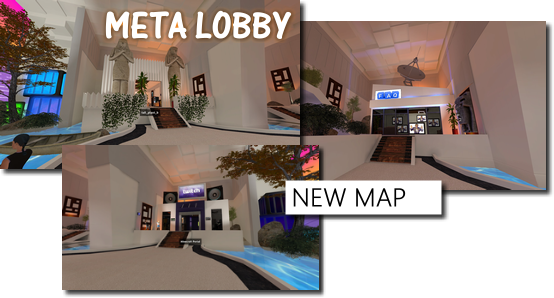
Today's update brings a new map, Meta Lobby, and a new menu called The Atlas!
Change Log
Added a new menu called the Atlas, it's accessible from the main menu.
Added a Hulu wizard that works to spawn shows or episodes.
Added a new map called meta_lobby.
Added a Clear ALL Chat Logs button to the Chat widget.
Added Show Joined/Exited Notifications to the Twitch tab of the Settings menu.
Added the following launch option for internal testing purposes: +vrworldmenutest 1
Changed the Multiplayer Servers menu to be wider to fit longer titles.
Fixed a bug that'd sometimes cause items to look like they had blank item properties after leaving a multiplayer server.
Fixed a bug that showed the Spawn Twitch Stream button on the Chat widget even when no map was loaded.
NOTE At 2:18PM Pacific I pushed a hotfix so that the featured server icons show up correctly in the atlas.
Gamepad Support & 3D Stereo Rendering - Client Update 6/2/2018
Today's update adds gamepad support for menus, 3D stereo rendering support, and bug fixes/improvements in a wide variety of features.
Friendly reminder for those who wish to get in contact with the AArcade community:
Discord - https://discord.gg/PeegBR
Dev Twitch - http://www.twitch.tv/AnarchyArcade
Change Log
Added FOV, Stereo Rendering, and IPD (for Stereo Rendering) to the Camera tab of the Settings menu.
Fixed a bug that caused input to sometimes be sent to the wrong object when an unrelated nearby YouTube video started auto-playing.
Fixed chat links to be un-clickable if no map is currently loaded.
Joining social prior to loading a map now refreshes the menu so that the social chat box may appear.
Fixed an issue that caused the Windows Task Bar to sometimes remain on-top when it wasn't supposed to. (There are still a handful of cases that could cause this to happen though.)
Improved the EZ Library Browser's search box to allow URLs or file locations to be pasted directly into the search box to add new shortcuts to your library.
Improved the EZ Library Browser's file browse button to allow new prop models (MDLs) to be added.
Fixed an issue with spawning CLIPS from Twitch.
Fixed an issue with Libretro when initially loading non-video files.
Changed player model morphing so that you always start as the default model, to prevent crashing from using a bad model last session.
Fixed an issue that caused problems when auto-loading the last used map in certain situations. (If you are already impacted by this bug, use this launch option: +last_map_loaded 0)
Improved Libretro gamepad support by dedicating most buttons on your gamepad to be reserved for Libretro while a Libretro instance is active.
Added gamepad support to all menus. Left-Analog moves the mouse cursor. R-Trigger sends a mouse click. Top L & R are mouse wheel up & down. Note that the gamepad only works on menus if a map is loaded.
Improved unpausing to take you back into the 3D world right away instead of showing the Main Menu.
Today's update improves your item favorites list to be easier to access, and makes it easier to spawn multiple things from the same library search results.
As a multiplayer guest, adding an item to your favorites will now properly add the item to your personal library for use in singleplayer.
If you need some help, have questions, or just want to talk to other AArcade users, the AArcade discord is at: https://discord.gg/gvyrWS
Have fun!
Change Log
Added Last Search Results to the favorites lists on the Main Menu and Library Browser.
Improved favoriting of an item as a guest in multiplayer to automatically save that item into your local library for later use in SP.
Improved the Multiplayer Servers list to show servers with players on the top.
Improved AArcade to run at max FPS while in the background (ONLY if left unpaused.)
Changed Z button's default bind to be TOGGLE zoom, instead of HOLD to zoom.
Persistent Servers - Client Update 5/25/2018
Today's update adds the very chill multiplayer feature of being able to host your arcade in PERSISTENT mode so your arcade can remain available to others even after you disconnect & turn off your PC.
Normally when you disconnect from a server that you are hosting, it is removed from the cloud and all of your guests get kicked to the Main Menu. This is great for temporary servers, but it also means that your arcade is only open for business while you are actively connected.
Advanced users who want to keep their arcades up 24/7 can now host their arcade in the new PERSISTENT mode. This keeps your arcade live & open for visitors in the cloud even after you disconnect & shut down your PC.
If you want to update one of your existing arcades that you hosted in persistent mode, simply go and re-host that same arcade again. It will be replaced with your new version.
You can shutdown your existing persistent arcades by going to the Mutliplayer > Servers menu.
Cheers!
NOTE
At 9:52AM Pacific I pushed a hotfix that allows other people to actually SEE your persistent servers on their server list. All should be good now.
Change Log
Added an option to toggle cloud syncing of custom model assets to guests to the Multiplayer > Host menu.
Improved the Multiplayer > Servers menu to show you the name of the map that the server is on and the name of the player who created the server. Also added a checkbox to show only servers that are running maps that you already have.
Updated the Multiplayer > About menu to be more helpful & informative.
Fixed an issue that caused the Multiplayer > Host tab to be accessible as a guest.
Added Persistent Servers to multiplayer, so you don't have to leave your computer open to keep your multiplayer arcade alive.
Added a button to remove persistent servers that you created to the Multiplayer Servers list.
Improved the Multiplayer Servers menu to show the display name of the person who created the server.
Fixed a bug that caused favorite list categories to show up even as a guest in MP games.
Fixed an issue when joining certain arcades on hub_highrise, meta_hood, and oververse maps.
Added Local Video End Behavior to the UI tab of the Settings menu.
Removed an HTML file that Avast didn't like from the repo (packing - copy.html).