
https://store.steampowered.com/app/1517290/Battlefield_2042/

Battlefield 2042
Battlefield 2042 – Season 3
https://store.steampowered.com/app/1517290/Battlefield_2042/
BATTLEFIELD 2042 UPDATE #3.0.0
Season 3 for Battlefield™ 2042 deploys across all platforms on Tuesday, November 22 at 12:00 UTC, while Update 3.0.0 goes live at 08:00 UTC.
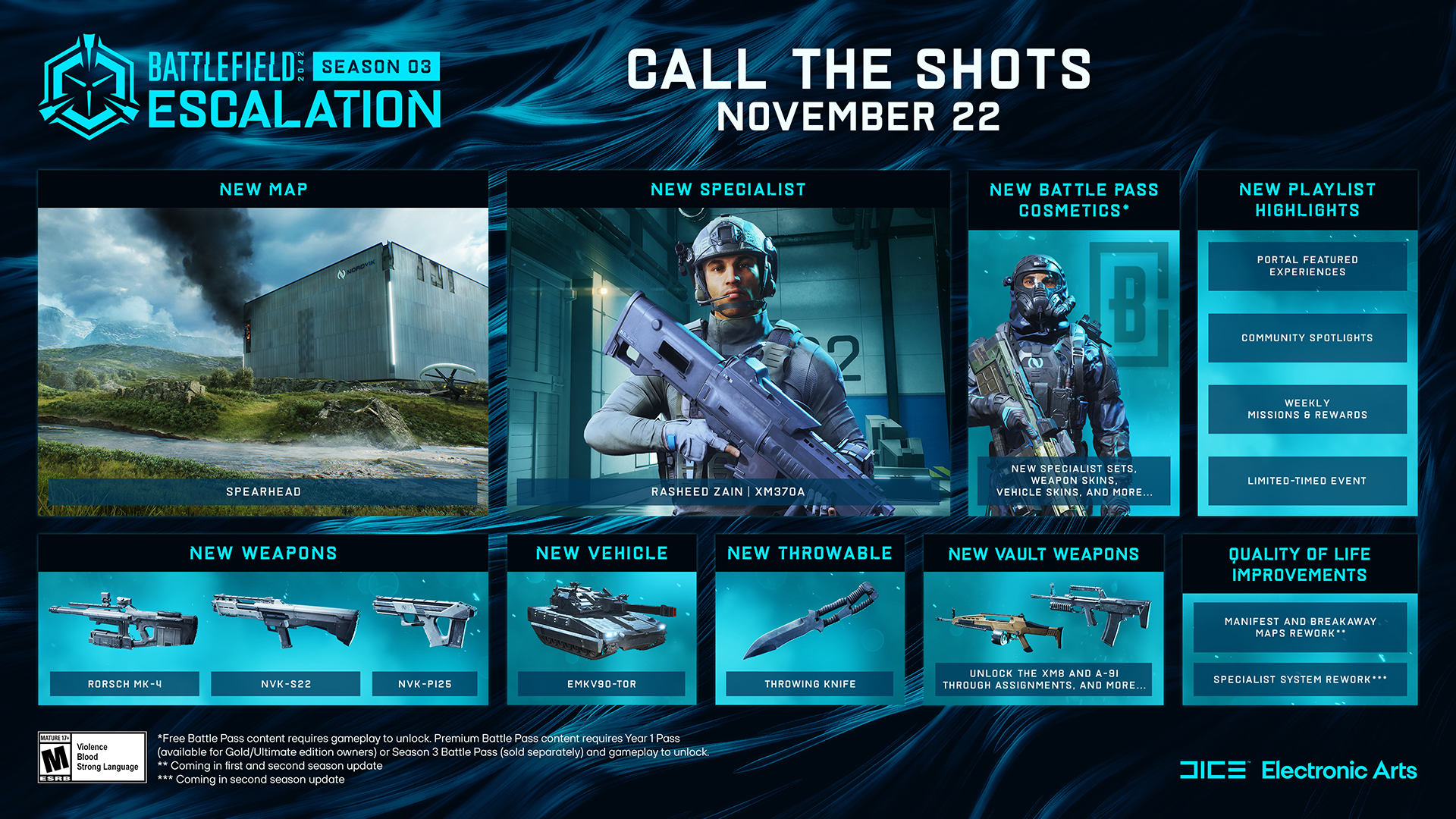
Tensions continue to escalate as our squad of No-Pats head to the Northern Swedish wilderness within Season 3: Escalation.
What’s new in Season 3?
Here is an overview of the new content in the Season 3 Update, alongside highlights for changes and improvements:
- New Map: Spearhead
- New Specialist: Rasheed Zain
- New Vehicle: EMKV90-TOR
- New Weapons: Rorsch Mk-4, NVK-P125, NVK-S22
- New Gadget: Throwing Knife
- New Vault Weapons: XM8 LMG, A-91
- New Battle Pass
When can I play?
Season 2 of Battlefield 2042 officially comes to a close on November 22nd at 08:00 UTC, at which point Update #3.0.0 will go live for all platforms. Season 3: Escalation will release on the same day at 12:00 UTC, along with progression towards that content.
Once Season 3 is available for play you will be able to jump into our latest map, Spearhead. We are introducing 24/7 playlists for both Conquest and Breakthrough, and you’ll be able to begin working your way through unlocks within our latest Battle Pass where the all-new Specialist, Weapons, a new Vehicle, Gadget, and loads of Cosmetics await you.
When can you expect our next game update?
Update 3.1 will land before the Holidays, you can expect to see the reworked Manifest map, more Vault Weapons added to All-Out Warfare alongside further fixes and changes. With a brand new Mid-Season Event taking place later in December.
//The Battlefield Team
Stay Informed
Follow us on the @BattlefieldComm Twitter account to stay informed on the roll out of our updates. You can also follow along with our tracking of Known Issues and further game changes we’re making via our Battlefield forums.
What’s in the 3.0 Update?

New Map: Spearhead
Spearhead is our latest CQC-focused map, nestled within the rocky formations of the Swedish wilderness you will find Nordvik’s manufacturing facilities, capable of manufacturing high-tech weaponry and components for weather machinery.
Inside these manufacturing facilities you can expect frantic close quarter confrontations as you battle it out to reclaim control of The Cubes. Outside, make sure you are carrying explosive ordnance as you’ll be upfront and personal with vehicles roaming over the dense rocky landscape.

Points of Interest
A1 & A2: Forward Operating Base
One of the first notable points of interest with Spearhead is the joint Forward Operating Base next to the lake, capturing and maintaining both of these objectives will ensure easy access as you approach the Communications Outpost.
B: Communications Outpost
The Communications Outpost is a medium sized staging area with four communication towers located throughout it. Keep your eyes peeled on the skyline as verticality is at play here.
C1 & C2: Printing Facility
The Printing Facility is one of two Cube structures that dominates the horizon of this particular location. Close quarter confrontations await you as you head into the Weapons Printing Facility, make your own entry points through the walls as you take the fight towards your objectives.
D: Materials storage
As you continue alongside the ever winding lake that splits this location in half, you will find the Materials Storage. Exercise caution as you fight throughout the explosive storage units that supply both Nordvik facilities.
E1 & E2: Painting Facility
The Painting Facility brings out Points of Interest recap to a close, as with the Printing Facility of C2 you can expect similar encounters as you battle through this second Cube building.

New Specialist: Rasheed Zain
Perseverance and formidability are two characteristics that define Egyptian-born security expert, Rasheed Zain.
Through Zain’s training throughout military and special forces, Zain has become adept at using his XM370A airburst launcher to flush out foes from behind cover, leaving him clear to pick them off as they run for the shadows.
Though that’s not all that Zain has to offer, through his sense of duty above all else and tireless stoic attitude, Zain is able to recover health much faster in the field. Positioning him as a prime candidate for leading from the frontline.
Specialty: XM370A
The XM370A is an Airburst Launcher that allows Zain to flush out enemies from around and over cover, becoming a situational area denial loadout. If you have some foes hiding behind cover and are giving you trouble, the XM370A is the go-to piece of hardware.
Trait: Perseverance
Perseverance allows for Zain to begin recovering health immediately upon taking out an enemy. This effect stops if Zain takes further damage.

New Vehicle: EMKV90-TOR
Positioned at the forefront of cutting-edge technology, the EMKV90-TOR is a Rail Gun Destroyer Tank that is capable of entering alternate modes aimed at arising and responding to different combat situations.
Siege Mode
Siege mode places the EMKV90-TOR into a grounded state, this lowered profile allows for improved stability as well as fire rate from the main Rail Gun turret.
Mobility Mode
Engage the Mobility Mode on the EMKV90-TOR to bring the Rail Gun Tank up from its Siege Mode, allowing you to move swiftly across the landscape and obstacles ahead of you. This mode is perfect to transport yourself and other passengers closer to the objective or insertion points while still being able to inflict significant damage to those around you.
Active Threat Detection
Fresh off the development line, the EMKV90-TOR features a detection system that picks up the source of incoming attacks within a certain range and filters that information back to you on your HUD.
New Weapons: Rorsch Mk-4, NVK-P125, NVK-S22

Rorsch MK-4
The arrival of cutting-edge technology is here with the Rorsch Mk-4. This weapon uses electromagnetic forces to launch projectiles at preposterous speeds.
With powerful armor penetrating ammunition and requiring a short charge up time before each shot this versatile weapon can adapt itself to any situation and change its fire properties by quickly swapping the configuration of its under barrel mounted capacitors.
With the Rorsch MK-4, you have the ability to choose between a powerful single shot to decimate targets at any distance, full auto or burst fire for medium to short range encounters and make the battlefield yours.

NVK-P125
With its unusual Bullpup configuration and its particularly high bullet speed this sidearm is perfect for engaging moving targets at medium distances without compromises, the perfect companion for any sharpshooter.

NVK-S22
Need a shotgun with tactical options? This dual-barreled semi-automatic weapon offers great destructive power in a compact and nimble package. Surprise your enemies and become the dominator of close-quarters combat.

New Gadget: Throwing Knife
Tactile in every way, an old friend from previous Battlefield titles returns. These deadly knives are used by masters of precision and timing and will deliver lethal damage for the one ready to meet the task at hand. Don't worry if you miss, you can pick them back up and try again - if you don't die while doing so.
New Vault Weapons: XM8 LMG, A-91

XM8 LMG
Sporting the 100-round Beta-C magazine that allows it a shorter reload than others in its class, this Light Machine Gun variant of the XM8 is dangerous at medium ranges thanks to its very controllable recoil and agility.

A-91
The A-91 offers highly controllable recoil which makes this smaller assault rifle very strong in all situations, just watch out for its horizontal recoil that can make it unpredictable at times.
New Feature: XP Boosts
Within our Season 3 Battle Pass we’ll be including XP Boosts, these are items placed on a set number of tiers which grant you an additional boost in XP for a certain period of time.
While these XP Boosts will be consumed as soon as you earn them, the timer will only count down while you are actively in a match. You can expect to receive your first XP Boost at Tier 18 of Season 3’s Battle Pass.
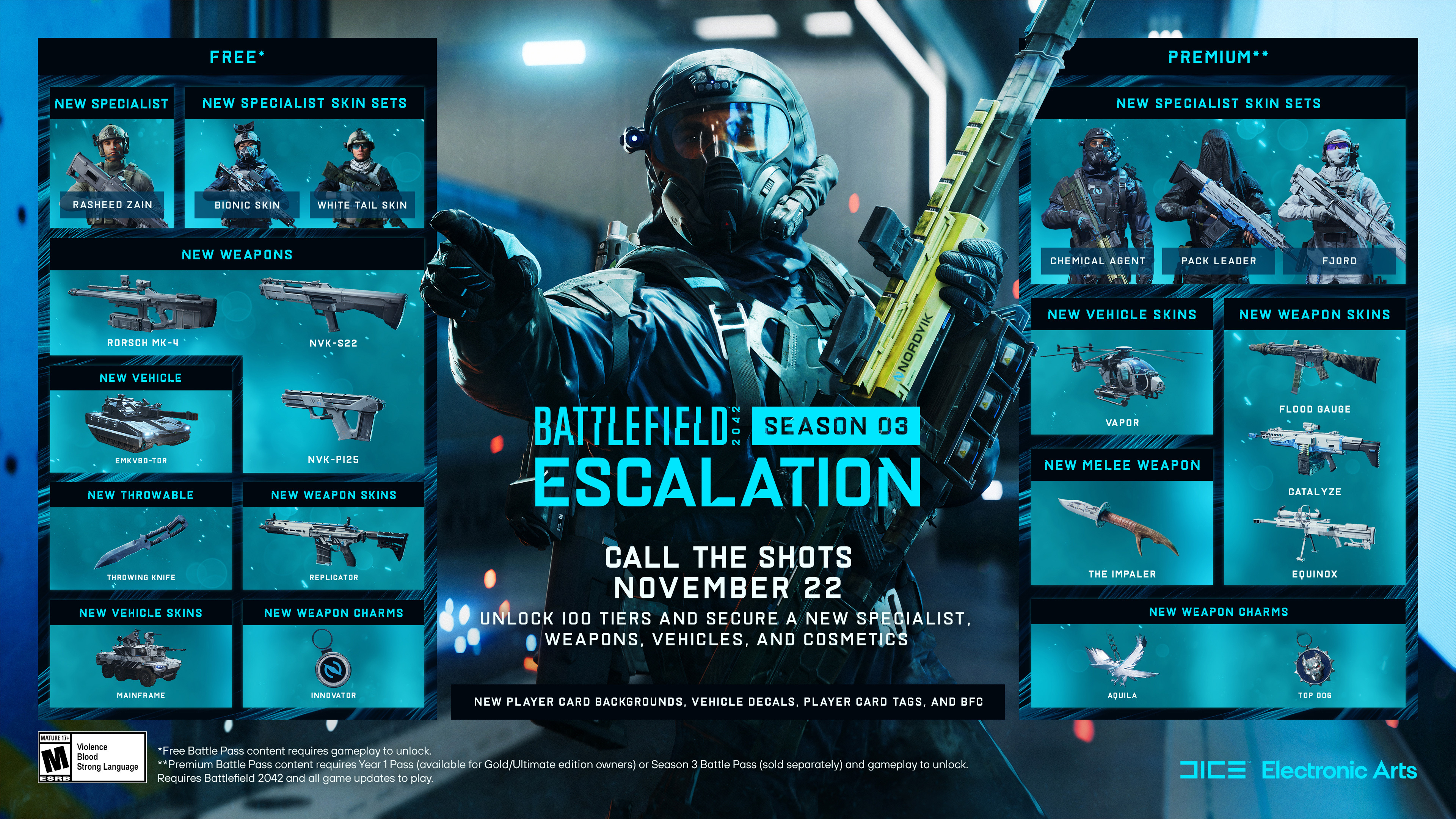
New Battle Pass
100 new tiers of Hardware, Cosmetics and Player Card items are available for you to earn in Season 3’s Battle Pass. Gameplay content such as the new Specialist, Rasheed Zain alongside new weaponry like the Rorsch MK-4 are all available as part of the Free Tiers, while the Premium Tiers will grant access to further cosmetic rewards.
Changelog
Ping System Rework
We’ve made alterations to how the Ping System functions within Battlefield 2042, these changes aim to reduce the complexity of the existing ping system. Allowing for improvements to the pacing and accuracy of communication between teammates.
- Pressing the ping button once will no longer place a location ping, but instead check for targets such as soldiers, vehicles or objects near the point of that placed ping.
- If a threat is within the radius, it will immediately ping or spot that target for a duration of time.
- Spots are shared to the team, while pings are shared to your squad.
- Pressing the ping button twice in a row will still place a danger ping in that location.
- Contextually, pinging targets no longer has any input delay.
- Repeatedly pressing the ping button without the system finding any targets will incur a short cooldown which will prevent spotting.
With these changes in place, we anticipate an increase in communication between your team while reducing out of date pings that may have been placed for a previous encounter.
Gameplay Improvements
- Fixed an issue where Q-spotting was not working as intended when pinging enemy air vehicles from further than 300m away
- Fixed an issue when switching between Borderless from Fullscreen, the game window was not rendering as intended
- Fixed an instance where pressing the ESC button would sometimes show an old Experience Selection screen
- UI subtitles from Tutorial Videos would remain on screen for a short time when returning back to the main menu
- User receives invalid game state error 2:2413J when accepting an invite from a player being in the second part of a Breakthrough game
- The Turn Right/Yaw Right keybind was unable to be unbound unless the user unbinds Turn Left/Yaw Left too. This has now been resolved.
- You will now be presented with a prompt to repair your game installation, if the game detects that you're missing files from a patch process
- Soldier movement when changing directions will now appear smoother through improved animation physics
- Fix for character models getting stuck outside of vehicles after entering them or changing seats while playing with high latency
- Fix for ping not being positioned correctly for players inside vehicle open seat
- Communication between soldiers equipped with Repair Tools has improved when near vehicles
- - A soldier with the Repair Tool equipped will be able to see an icon over vehicles that are needing to be repaired
- - A vehicle driver will be able to see an icon over soldiers equipped with the repair tool.
- Added a new HUD option called "Interaction Prompt Scale" which allows adjusting the size of interaction prompts. This option can be found under Display > HUD Icons
Audio
- Fixed projectile and firing SFX for the AA rocket for the Attack Helicopters
- Lock-on sounds design overhaul, resulting in improved Air & Ground target lock on sounds
- Weapons Audio sound improvements
- Improved instances of VO when deploying into vehicles
Gadgets
- Resolved an issue where the sprint animation for Launcher Gadgets wouldn't play as intended in first person
- Fixed an issue where the player could not lock-on using SOFLAM through smoke
- Fixed an issue where broken animations were present on grenades when switching from FXM-33 AA Missile
- Fixed an issue where a broken animation was present on grenades when switching from any main weapon customized with a Bipod
- Vehicles now get an “Hack Warning” indicator from the OV-P Recon Drone EMP weapon when locking on
- Under Options, we have changed the naming of Quick Throw Grenades to better reflect its action within the game. It does not result in throwing grenades quicker, it results in automatically throwing the Grenade when pressed
- C5 throwing distance has been adjusted to be more in line with its Anti-Vehicle intent
Progression
- Reduced damage threshold for Vehicle Destroy Assist to 1, this will result in more Vehicle Destroy Assists taking place. Teamwork makes the dream work!
- Ranger kills would sometimes incorrectly report incorrect quest progress, this has been resolved
- Mounted Vulcan now gives you Damage XP when damaging enemy light vehicles
- Fixed issue where the Masterkey underbarrel attachment wouldn't be displayed correctly in the score log for SWS-10, M5A3, AK24 and LCMG
Specialists
General
- Fixed an issue on previous generation consoles where character models were not rendering properly
- Fixed an issue in Battlefield Portal where BC2/BF3 Characters' hands do not align with the ladder when climbing in 1P
- Fixed an issue that would often show Specialists’ character hands as shaking while climbing ladders
- We've made several changes to improve the responsiveness of Soldiers in Update 3.0, you will notice these improvements particularly around Soldier Movement such as Jumping, Vaulting, Sliding, Entering Ladders and the deployment of Parachutes
- Fixed Specialists having odd movement while attached to a rope while standing ontop of vehicles
Crawford
- Fixed an issue with Crawford's animation Vulcan Stationary Minigun animation while in death cam
Sundance
- On the first explosion when being killed by Sundance's Scatter Grenade, the wrong weapon was displayed. It now rightfully calls it out as 'Scatter'
- Fixed an issue that caused Sundance's Anti-Armor grenade to be called Scatter
Casper
- Fixed an issue where the "No ammo" prompt was displayed when Casper deploys the OV-P Recon Drone
Irish
- We had spotted instances where Irish’ Deployable Cover was unable to be deployed as intended, we’ve made steps towards improving this
AI Soldiers
- AI Soldiers will no longer quickly bleed out when being pinged by the player
- AI Soldiers will no longer immediately re-enter vehicles after exiting due to taking damage
- AI Soldiers have learnt the ability to drive and shoot with the M5C Bolte, always ensure you look both ways when crossing a road
- AI Soldiers will now revive more often than before
- Fixed an issue which resulted in AI Soldiers attempting to climb destroyed ladders
- Improved AI navigation through several maps and modes
Maps
- Fixed issue where players would not receive damage while in moving elevators on Kaleidoscope, Hourglass, Exposure and Orbital
- Seagulls have begun to migrate, you’ll see less of them in some areas of maps. Do seagulls quack?
- Adjusted birds flying low and popping in and out of view
- Soldiers will no longer appear as though the are spawning in through the ground on maps
- Fixed issue where entering an elevator with the ATV would result in death, driving them off a considerable height may still result in death when they land
- Fixed issue where "Deploy point lost" message was showed on contested points and the player was not able to deploy on objective
- Fixed issue where the tornado was following it's route through the team's HQ affecting spawns and gameplay
- Fixed issue with visual glitch on Deploy/Undeploy
- Map Location Icons were displaying incorrectly on Manifest, this has now been resolved
Vehicles
Categorization of Vehicles has received an overhaul with Update 3.0, providing updates to the classification of Vehicles. Vehicle counts and availability have also been updated depending on Map and Mode requirements.
Vehicle categorization is as follows:
Light Transport - LATV4 Recon, LCAA Hovercraft
Armored Transport - MAV, M5C Bolte
Heavy Armor - M1A5, T28, EMVK90-TOR
Light Armor - EBAA-Wildcat, EBLC-Ram
Air Transport - MV-38 Condor, Mi-240 Super Hind
Attack Helicopter - AH-64GX Apache Warchief, KA-502 Super Hokum, YG-99 Hannibal, RAH-68 Huron, MD540 Nightbird
Fighter Plane - F-35E Panther, SU-57 FELON
With the reworked allocation of Vehicles and their availability, you can expect Maps and Modes to play a part in the amount available to you.
For example with Conquest 128 Players on Spearhead will consist of 4 Light Transport, 1 Armored Transport, 1 Light Armour, 2 Heavy Armour, 1 Air Transport, 1 Attack Helicopter and 1 Jet Per Team alongside In-World Civilian Vehicles.
- Fixed an issue where AT missile could not be fired against SOFLAM painted Aircraft and AA Missile could not be fired against SOFLAM painted Vehicles
- Fixed an issue with absent visual effects on tanks when receiving systemic damage
- Lowered collision damage multiplier at low-med velocity for Bolte
- Fixed an issue where the "Location Revealed" message was not shown for the soldier sitting in a gunner seat
- Fixed an issue where destroyed tanks would disappear immediately after the last hit
- Fixed an issue where Heavy Ground Vehicle crosshairs moved slightly down when resizing the client window
- Fixed an issue where the vehicle crosshair had a random color
- Fixed an issue where the LATV steering was as sensitive after receiving wheel damage as when undamaged
- Removed min dispersion on 50m Air and Ground Cannons
- Fixed an issue where icon opacity while zooming in vehicles would not function correctly
- Fixed an instance of driver model being rendered outside of vehicles
Weapons
- Fixed an issue where the MGL Laser beam was not properly aligned with the Ghostmaker R10 and its attachments
- Fixed an issue where the Tactical, Warhawk and Arcom attachments had the same icon on DXR-1
- Avancys is now using the correct bipod
- Fixed an issue with the hands pose being incorrectly placed on the LS-1 Laser Sight on M12
- HE Grenades and Incendiary Grenades now always explode after the arm timer has elapsed, regardless of a player having been hit before or not
- Fixed Scope magnification on the GOL Magnum Sniper not applying properly when switching between weapon attachments and other weapons
- Fixed an issue where the reload prompt was not the same color as the rest of the HUD
- Improved a situation where the weapon would stop shooting in automatic fire under bad network conditions
- Fixed an issue where both the STNR Laser and MGL Laser were seen as red when looking directly at them
- The Ghostmaker R10 is now correctly functioning as a silent weapon
- There was too much dirt on some scopes for the BSV-M, we’ve put a cloth to some of the lenses and they should now be much cleaner
- Improved Aim Assist functionality when fighting vertical recoil
- Fixed an issue where the Laser Sight was passing through walls/objects
- Shotgun pellet count lowered and damage adjusted to compensate
- Fixed issue with suppressors not silencing under some conditions
- Removed the 1x Body Shot range on SWS-10 to match the change on the GOL
- We have noticed a rising trend of using bolt actions in enclosed space and getting advantage of this feature, meant to be used defensively, in an offensive manner
- This change encourages Bolt Actions to be used for medium to long range encounters, allowing for the opportunity to switch to a sidearm on close quarter encounters
- Bolt Action Snipers Hipfire Dispersion increased by ~1 degree in all stances
- Increased AKS-74u Damage drop-off distance, making it better at medium combat ranges
- Lowered Avancys Damage drop-off distance, there will no longer be a 4-Shot Kill range during close range encounters
- Increased NTW-50 Damage against Light Vehicles slightly with Anti Materiel ammo and substantially increased with Anti Materiel High Power ammo
- Body Shot range reduced for NTW-50 from 150m to 100m
- M60E4 damage lowered from 50 to 75 meters. 28 -> 22
- Increased M1911 Damage drop-off distance up to 30m
- Increased MP412 REX Damage drop-off distance up to 40m
- Increased AC42 Bursts per minute. 160 -> 170
- Increased PP-29 Damage drop-off distance under 30m
- SFAR-M GL damage lowered from 50 to 75 meters. 28 -> 22
- Semi-Auto fire mode is back on AK24 after a failed experiment
- Fixed an issue on some Vault Weaponry not getting the correct headshot multipliers when some attachments were active
Battlefield Portal
- Added the new Season 3 map, Spearhead, to the IsCurrentMap selection block
- Added the BF3 gadget, MAV, to the gadget selection block
- Added Charlie Crawford's Mounted Vulcan Specialist Gadget to the Specialist Gadget selection block
- Added Rasheed Zain’s XM370A Airburst Launcher Specialist Gadget to the Specialist Gadget selection block
Battlefield Portal Weapons
- Improved underbarrel grenades zeroing precision
- Adjusted shake on Holo and PKA-S optics
- M416 and AEK will now have improved gunsway
AN94
- Recoil Distance has been decreased for the AN94
M16A3
- Lowered Horizontal Recoil offset by 0.05
G3A3
- We’ve lowered the Vertical and Horizontal Recoil for the G3A3 while increasing the Recoil Decrease rate
ACW-R
- Slightly increased the Recoil Decrease rate
M60E4
- Horizontal Recoil decreased for the M60E4
SCAR-H
- Slightly reduced Vertical and Horizontal Recoil

This announcement may change as we listen to community feedback and continue developing and evolving our Live Service & Content. We will always strive to keep our community as informed as possible.
Battlefield 2042 Season 3 Trailer
This journey will continue with Battlefield 2042 – Season 3. The battlefield will be expanded with a new map, a new Specialist, new weapons, vehicles, gadgets, and much more. See more in the trailer, dropping tomorrow.
https://store.steampowered.com/app/1517290/Battlefield_2042/
Requires Battlefield 2042 (sold separately) and all game updates to play.
Battlefield Briefing - Development Update, November 2022
As we head into the end of Season 2: Master of Arms, we want to get you up to speed with where we’re at with Season 3, our work on the Specialist and Classes Revamp, which weapons are next to join the 2042 arsenal, map reworks, and exciting news about life for Battlefield 2042 beyond Season 4.
Here’s Alexia Christofi from the Battlefield 2042 Development team to tell you more:
To recap our Development Update video, we’re drawing ever closer to the start of Season 3, which is set to bring with it a new Specialist, a brand new map alongside reworks for both Manifest and Breakaway, and all new hardware to add to your armory. Season 3 will also see the return of classes to Battlefield 2042, but that’s not all.
We’re also excited to share that we’ve recently started pre-production on all new content that will come after Season 4, next year. Our work on Battlefield 2042 isn’t done.
We’re proud of the work that we’ve done over the past 12 months and so if you haven’t jumped in yet, starting in Season 3 we’ll be introducing Battlefield 2042 into Xbox Game Pass Ultimate, and making the game available for subscribers with EA Access. While in December, we’ll also have free access periods across all platforms*. Experience the evolution and improvements we’ve brought to the game for yourself, and we look forward to welcoming you onto the Battlefield.
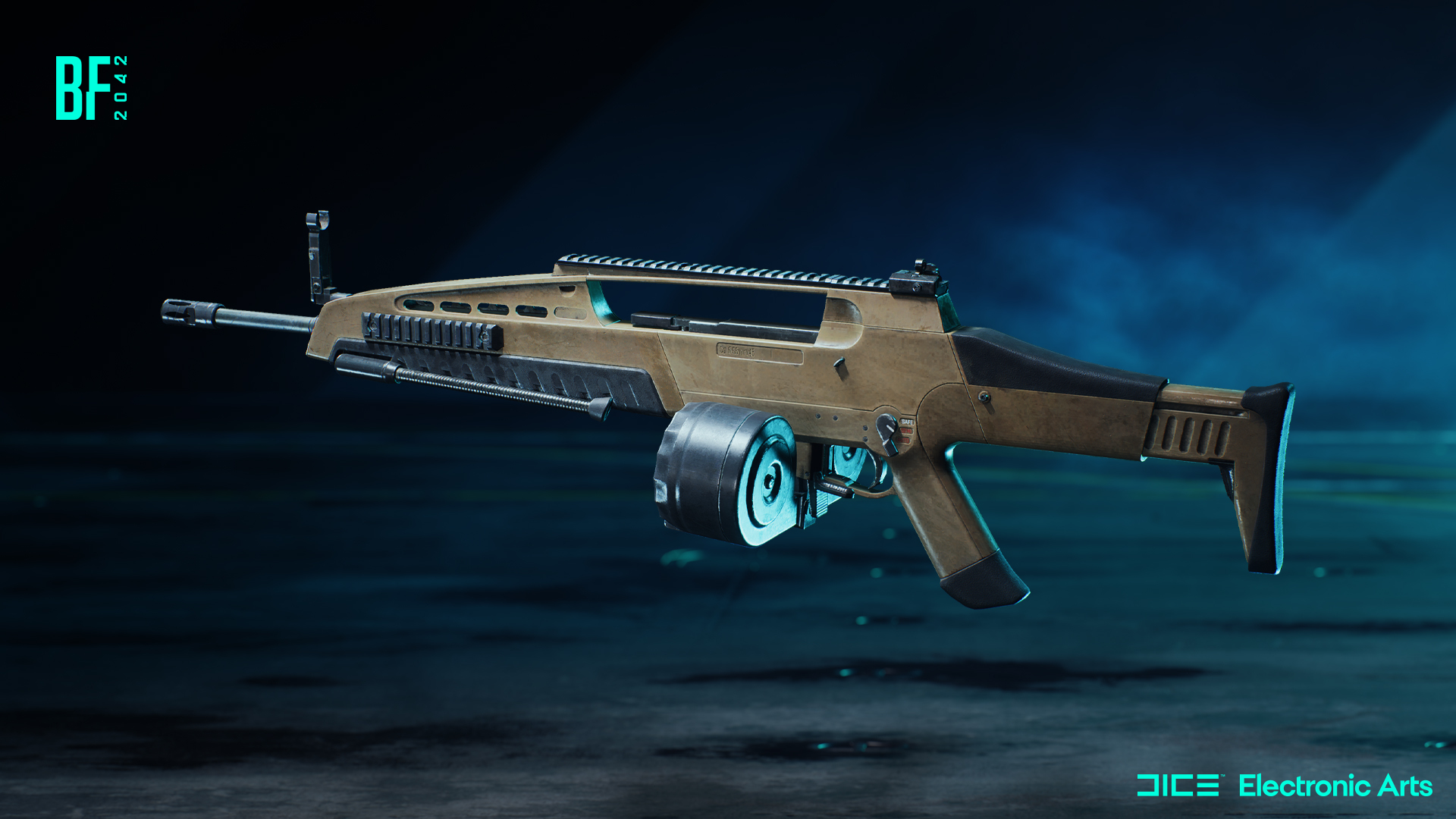
New Vault Weapons
At the start of Season 3, we’re bringing Bad Company 2’s XM8 into the LMG pool, alongside Battlefield 3’s A-91, with more Vault Weapons arriving in further updates during the Season. These classic weapons will sit alongside all new hardware that the team have developed for Season 3. Stay tuned for news on what they are, and how they’ll transform the Battlefield in the coming weeks.
Specialist Rework - Update 3.2
As we’ve finalized our work on Season 3, we’ve been able to lock down when you can expect to experience the overhaul that we’re bringing to Specialists, reintroducing Classes to Battlefield 2042. This big change will deploy in the early part of 2023, during the later half of Season 3 as part of Update 3.2.
In case you missed our most recent update on the Specialist rework, we’ve committed to the reintroduction of classes into the game, placing our Specialists within defined roles that see them gain access to a specialized set of gadgets and equipment that best suit their purpose on the Battlefield.
We’ve been testing these changes extensively, recently inviting folks from across the Battlefield community to play with us, and to share their immediate feedback on the changes and to help affirm that we’re headed in the right direction. With their help, we’ve been able to test the Weapon Proficiencies that we introduced as a result of your feedback, a system that enables us to retain the combat freedom we know you’ve come to appreciate playing the game your way, but better reward players who stick to more common archetypes of weapon and class combinations.
Here’s where we’re at with the weapon proficiencies that we have so far:
Assault - Assault Rifle Proficiency
Assault Rifles are ready to fire quicker after sprinting
Engineer - Utility Proficiency
Utility Weapons have improved reloading capabilities
Support - LMG Proficiency
LMG’s have additional magazines and are more efficient when deploying bipods
Recon - Sniper Rifle Proficiency
Faster to stabilize when holding breath, with longer hold breath durations
Using the feedback that you’ve shared, we’ve also switched Irish into the Support role, with Crawford swapping in as an Engineer. Irish will therefore take Crawfords current trait, reviving downed teammates with additional gadget ammunition, and we’ll be developing a new trait for Crawford that will allow him to better specialize as an Engineer.
We’ve also reviewed how it is that Rao best fits into the new system and are working on improved team and squad communication around this Specialist so he performs as a strong asset within the Recon Class. For more on those changes, be sure to check out our recent blog.
With Season 3 just on the horizon, we’ve another new Specialist to introduce to you, who will later go on to join the ranks of Assault. We look forward to you meeting them in the coming weeks.
Updating Manifest and Breakaway
We have 2 more map reworks coming your way during Season 3. With Update 3.1, you’ll receive an update to Manifest, and then alongside the Specialist rework in Update 3.2, look forward to a massive overhaul of Breakaway.
With Manifest, the team has reworked the map to bring it in line with the updates that you’ve already experienced with Kaleidoscope, Renewal, and Orbital - bringing the HQ flags closer to the action, and removing redundant playspace.
We’ve also worked to improve the visibility that you experience on this map, ensuring that our play spaces are better lit, and that your sightlines are improved when you’re scanning for enemies.

You’ll experience better cover, and improved pathing between the flags, with the flags themselves receiving careful attention that ensures that you can better focus your attack and defense when playing the objective.
Be sure to check out the preview of these changes in today's video, and look forward to a more detailed preview as we get closer to Update 3.1
In early 2023, we’ll return with a new and improved Breakaway, bringing a dramatic overhaul to the map which see’s us move the Oil Rig much closer to the action, and better focus our gameplay within a more refined playspace.
We’ve carefully reviewed the purpose of the Outlook flag and decided that we can create a more engaging round of Conquest without it, empowering us to consider how much of the playspace we should retain on top of the Glacier, and design new ways to play within the ice itself.
There are entire new flags for the map, as well as heavily reworked the Town and nearby Refineries to ensure that you’re able to move with more confidence between these flags when playing as infantry.
Ice and Snow shaders have also been reworked, helping to bring a new visual look to the map, and we’re excited to see you get hands on with this one in 2023.
Our work to bring map improvements will continue next year beyond these two changes and we’re excited to show you what we’re doing next.
Season 2 - In Review
During Season 2: Master of Arms we introduced the first of our Mid Season Events: The Liquidators, and we wanted to acknowledge some of the learnings that we gained throughout the event.
We know that you enjoyed the event itself, and that Tactical Conquest was a fun alternative to the All-Out Warfare of Conquest. We saw more of you jumping in and sticking with the mode more than any other mode during those two weeks so thanks for playing!
We have heard your feedback around spawn trapping in rounds where one team took total control of the Battlefield, and the improvements we may consider making to flag spawns to ensure that respawns are more predictable in the future. We also recognise that 8v8 and 16v16 helped to create entirely different playstyle experiences, with 16v16 showing itself to be better suited for the mode and size of the playspaces.
If we return Tactical Conquest to the mix in the future, we’ll take this feedback on board and bring it back with improvements that help to improve the experience.
We wanted to also acknowledge that the event could have felt more rewarding than it did. We got that feedback loud and clear and as we think about the Mid-Season events that we want to bring during future seasons, we’ll be ensuring that you have opportunities to earn and unlock more cosmetic items, and that you receive clearer communications from us about what is earnable heading into the event itself.
We’d also like to improve the feedback you get at the end of round to help track your progress with these events, and this is something that we’re looking at possibly introducing in a later season.
Season 3 (and what to expect)
We’re only a few weeks away from the start of Season 3. This season will see us head to an all new Battlefield, in a location we’ve always wanted to realize, but haven’t so far in our 20 years of creating Battlefield.
Vi är väldigt förväntansfulla!
Season 3 will bring with it a new Specialist, all new Battle Pass, brand new hardware, and a new event, experiences and more with Battlefield Portal, alongside more improvements, fixes, and quality of life enhancements with each and every update.
Stay Informed
Make sure to follow @Battlefield and @BattlefieldComm to stay informed on all things Season 3. There’s not long to go now!
Go Spin Some Dogs
Freeman // @PartWelsh
Community Manager, Battlefield
US / ROW (excluding EU, UK, Germany, Brazil):
“*Limited time free trial. Trial time is subject to change. Free trial runs from:
On Xbox, from December 1, 12:01 AM PT through December 4, 11:59 PM PT.
On Steam, from December 1, 10 AM PT through December 5, 10 AM PT.
On PlayStation, from December 16, 8 AM PT through December 23, 8 AM PT.
Internet connection, EA account, and acceptance of EA User Agreement (terms.ea.com) and Privacy & Cookie Policy (privacy.ea.com) required to play. Access on certain platforms may require a premium platform account. Additional in-game content may be available for purchase and is available for continued use in the full game; purchased content will not be refunded upon completion of the trial.
EU / UK / Germany / Brazil:
“*Limited time free trial. Trial time is subject to change. Free trial runs from:
On Xbox, from December 1, 12:01 AM PT through December 4, 11:59 PM PT.
On Steam, from December 1, 10 AM PT through December 5, 10 AM PT.
On PlayStation, from December 16, 8 AM PT through December 23, 8 AM PT.
Internet connection, EA account, and acceptance of EA User Agreement (terms.ea.com) required to play. EA’s Privacy & Cookie Policy applies (privacy.ea.com). Access on certain platforms may require a premium platform account. Additional in-game content may be available for purchase and is available for continued use in the full game; purchased content will not be refunded upon completion of the trial.
This announcement may change as we listen to community feedback and continue developing and evolving our Live Service & Content. We will always strive to keep our community as informed as possible.
Battlefield™ 2042 EA Play* Aurora Epic Soldier Set for Falck
follow us on Twitter @eaplay!
*CONDITIONS, LIMITATIONS AND EXCLUSIONS APPLY. SEE https://tos.ea.com/legalapp/eaplay/US/en/PC/ FOR DETAILS.
DEV CORNER // BATTLEFIELD 2042 UPDATE 2.2
https://store.steampowered.com/app/1517290/Battlefield_2042/
Battlefield 2042 - Update #2.2.0
We’re about to head into the second major game update for Season 2: Master of Arms. We hope you continue to enjoy everything new so far in this Season.
Update 2.2 for Season 2: Master of Arms releases on Thursday, October 20 @ 08:00 UTC.
Here’s an overview of some of the key changes and improvements that are included in this Update:
- A reworked version of Orbital with an improved gameplay flow, more cover and assets, and terrain improvements
- 3 new Vault Weapons enter the All-Out Warfare arsenal; the ACW-R, AKS-74u and MP412 REX
- Premium Battle Pass holders will have the option to keep their servers visible in the Server Browser via the new Persistent Servers Feature even when they’re not playing.
- Laser Sight behavior on weaponry has received improved visuals and is now more fluid and reactive with movement
With a new reworked map and 3 new Vault weapons available for play alongside a variety of changes and improvements, we’re looking forward to hearing your feedback once you’ve been able to play.
//The Battlefield Team

Stay Informed
Follow us on the @BattlefieldComm Twitter account to stay informed on the roll out of our updates. You can also follow along with our tracking of Known Issues and further game changes we’re making via our Battlefield forums.
Content
Orbital - Map Improvements
Orbital is now more action packed with an improved atmosphere. In Conquest, we’ve changed two of the previous flags (Checkpoint and Radar) into HQ’s. They are placed in such a way that there are multiple viable flags in proximity which will lead to a better combat flow, and reduced traversal time.
We have added a new flag on top of the ridge between the Launch Site, and the Cryogenic Plant. This also helps counter the removal of the two Checkpoint and Radar flags and further helps maintain a smooth gameplay flow by reducing traversal distance. The new flag also connects to the vehicle transport tunnel underneath it, which adds new options for infantry caught in the crossfire of enemy vehicles inside the tunnel.
To implement these new improvements and visual updates we relied on three main areas: a military, war-torn and natural feel across the map. For the military aspect we reinforced industrial areas with buildings that needed defending, which you can now find throughout the map. You'll also find that the war has progressed on Orbital through a previous attempted attack by a convoy of tanks which unsuccessfully tried assaulting the Rocket. There are traces of the assault leading all the way to the crawlerway, and you’ll find a number of destroyed tanks and craters throughout the level with signs of destruction in areas where they have passed through.

Radar Station
The Radar Station has a reinforced military presence through updated visual and new vehicle assets along with signs of destruction by a previous tank convoy assault. It’s now a more linear Breakthrough Sector as well, with both radio domes having one flag each
Crawlerway
The Crawlerway has received a big overhaul, with areas both reinforced by the aforementioned military presence and large craters and destruction covering the previously empty space. There are military areas both around the flags and between them, with additional cover added in the tunnel under the Crawlerway. This is the most war-torn area, showing clear signs of a war that has progressed.

Launch Pad
The Launch Pad has been reinforced as an operational base, ensuring there are more options to play around in any game mode. The natural surroundings between the Crawlerway and the Launch Pad have also received an overhaul with more natural cover such as rocks and vegetation.

Entry Checkpoint (New flag)
On Conquest you’ll find a new flag on top of the ridge. It’s a high action site as it connects the Launch Site with the Cryogenic Plant, while being opposite for both teams leading out of the HQ. Connections inside the tunnel underneath have also been added, with more cover and options for infantry to make their way out of the tunnel and towards the flag.
Cryogenic Plant
The Cryogenic plant has received an improved military theme. It feels reinforced, and part of the combat that has taken hold of the map. There is also new added cover and better combat spaces for infantry, while maintaining options for vehicles throughout the space.
Persistent Servers
A much requested Community feature within Battlefield 2042 is the option to host Persistent Servers to help you grow and play with your own Communities. We are excited to share that we’ll introduce this feature as a new option for hosting Servers within Battlefield Portal as part of this update.
We have designed Persistent Servers for Creators and Community Leaders to nurture their own Communities within Battlefield Portal. This is your own dedicated space where you can meet. You set the rules.
Today, we’ll provide an overview about the functionality of Persistent Servers to help you understand how this works when it becomes available in-game.
What is a Persistent Server?
Presently, if you host a server within Battlefield Portal, it only remains visible within the Server Browser for as long as players are active within it. Once the Server is empty, it shuts down and will no longer be visible within the Server Browser.
A Persistent Server means your Server remains visible within the Server Browser even without active players. This will enable communities to stay together across their favorite servers, without needing to wait for the Server Owner to come online and activate the Server.
Who has access to Persistent Servers?
Starting with Update 2.2, owners of the Premium Battle Pass can select a Persistent Server option when Hosting a Server.
How many Servers can you Host?
Premium Battle Pass owners can host 1 active Server per account.
For how long will Persistent Servers remain visible?
Our intent for Persistent Servers is to help nurture active Communities while also making it easy to find active Servers to play on. This means that a Persistent Server will remain visible in the Server Browser for up to 7 days from any last player activity on the Server. We’re able to adjust this value if we see room to improve that experience.
What functionality comes with Persistent Servers?
Existing functionality for hosting a server within Battlefield Portal remains unchanged. That means when you host a Server you’ll still have access to:
- Enabling Cross-Play
- Allowing players to follow a Server
- Setting a welcome and match message
- Password protecting a Server
- Admin features for the Host
We’re eager to hear your thoughts and feedback as we introduce this feature, and we’re looking forward to seeing you create and find new homes for your Community within Battlefield Portal.
New Vault Weapons
ACW-R - Battlefield 3
A lightweight, feature-heavy rifle platform chambering a recoil-reducing round. It’s reliable in all weather conditions from wet, sticky jungles to gritty deserts.
Unlock Assignments:
- 100 Kills and Assists with the ACW-R or M5A3
- 20 Headshot Kills with Assault Rifles

AKS-74u - Battlefield: Bad Company 2 / Battlefield 3
A compact and maneuverable platform that excels in CQB situations. 30-round magazine and high rate of fire help you say goodbye to the competition. Just keep it under control.
Unlock Assignments:
- 100 Kills and Assists with AKS-74u or AM40
- 8 Kills with Assault Rifles from a distance of 25m or less in a round

MP412 REX - Battlefield: Bad Company 2 / Battlefield 3
The “revolver for export” chambers the .357 round with a 6 round capacity and high damage. But being a revolver, it is low capacity and requires more time to reload.
Unlock Assignments:
- 60 Kills and Assists with the MP-412 REX or M44
- 10 Headshot Kills with Secondary Weapons

Changelog
General
- The in-game Blocked Players list now updates in realtime when Blocking or Unblocking a user from the same platform
- The Squad VOIP UI is no longer visible on the Home Menu when starting the game
- When joining a Portal Featured Experience, the map location icon is now displayed on the loading screen in the bottom-left corner of the screen
- Resolved an issue that could display the same Welcome Screen multiple times when booting the game
- When joining a friend in Conquest in All-Out Warfare, the bottom left corner of the loading screen now correctly states US/RU instead of No-Pat Conquest
- Some PC menu buttons and screens have been updated to no longer show "(F) Change Settings" if pressing that button would have no effect
- Red background lights should no longer clip through player models in the Home Screen
- PS5 - The Activity menu on PlayStation 5 now correctly show the actual in-game activity, instead of always stating Conquest
- The "5 Kills and Assists as" Assignment to unlock a cosmetic for Crawford and Lis now track Assists correctly
- The "Hellbent" Player Card Tag now tracks Season 2 missions correctly. This fix should be retroactive
- The name of Crawfords Mounted Vulcan in the Mastery criteria has been corrected. Turret Assists now also progress it
- Fixed an issue with the Statistics page not correctly tracking damage dealt with Season 2 weapons
- Unobtainable Seasonal badges for expired Seasons are no longer present in the Upcoming rewards screen
- Fixed an issue with Battle Pass rank ups being missed when a player ranks up too quickly
- Added the ability to equip Player Card Backgrounds from the Battle Pass screens
- Fixed an issue with the Battle Pass Mastery Badge tracking slowly. The badge should now track correctly when progress is made
- Fixed an issue where the XP bar travels backwards in the XP summary screen
Audio
- Added improvements and fixes to the Audio of C5
- Removed a faulty Voice Line after capturing E2 on Renewal
- Added general Audio tweaks and mixing on Orbital
- Added sound on burning wreck on Orbital
- Made audio improvements to Ranger's footstep patterns when they are off screen
- Fixed an audio issue with Ranger's footsteps when they come to a standstill
Gadgets
- Fixed a minor bug where a backslash symbol was present in the World Log while AI resupplies, heals or revives revives
- Fixed an issue where grenades did not show any indicators unless facing an enemy grenade. Sometimes problems just hit you in the face
- Fixed an issue where the "No Ammo" prompt is displayed when throwing your last available grenade
- The wrong name is no longer displayed for the FXM-33 within the Collection screen
- Fixed a bug where the left arm is not visible while using the Med-Pen while traversal sprint is active
- Fixed an issue where the Repair Tool was shaking during the repairing or damaging animation
- The Recoilless M5, SOFLAM, FXM-33 AA Missile and Javelin can now lock onto empty or neutral vehicles
Portal
- Stranded has been added to the Custom Conquest Game Mode
- MCOMs added to TDM, FFA, VTDM, and Custom Conquest Game Modes
Rules Editor
- MCOM releated blocks have been added to the Rules Editor. Using these new blocks, you will be able to listen for and manipulate MCOMs to add to your game modes:
- MCOM Objectives
- MCOMDefused block
- MCOMDestroyed block
- MCOMArmed block
- AllMCOMs block
- SetFuseTime block
- Added MCOM objective to EnableObjective block
- Added MCOM objective to Teleportation block
- Added MCOM objective to SetTeamOwner block
- Added MCOM objective to TeamOwner block
- Added MCOM objective to IsActive block
- RemainingFuseTime block
- IsDefusing block
- IsDefused block
- IsArming block
- IsArmed block
Other new blocks have been added to the Rules Editor:
- GetCapturePointPosition block
- EnableCapturing block
- IsType block
- OnPlayerDamaged block
- OnPlayerEarnKillAssist block
- Vehicle Repair block
- Vehicle Damage block
Mutators
- FriendlyFireDamageReflection mutator has been added. When using this Mutator, all damage dealt to friendlies will be reflected back at the player after two friendly fire kills.
Soldier
- Fixed an issue which prevented movement in any direction while using a parachute
- Soldiers are no longer able to stand on Flying Drones. Drones are not made for surfing and you should know better
- Soldiers no longer spin for a brief moment after exiting vehicles
- Fixed an issue where reload animations sometimes wouldn't play as intended directly after being revived
- Fixed an issue where moving slowly while prone could prevent the matching animations from being played
- Soldier physics and animation stances were sometimes out of sync. This allowed movement into spaces where there wasn't enough room to stand
- Fixed several instances where input didn't work while parachuting
- Soldiers will now stop faster when starting a revive while sliding. This should prevent you from sliding out of range while starting a revive
- Fixes several instances where the vaulting animation didn't trigger on stairs or steep slopes
- You can no longer deploy on a squad mate who is close to an enemy vehicle
- It's no longer possible to to revive teammates through glass windows on Renewal and Exposure
Specialists
Angel
- Fixed a bug where playing Angel and being in the MD540 Nightbird passenger seat prevented you from dropping a Supply Crate
Boris
- Fixed an issue where going outside the SG-36 Sentry Gun's range breaks its firing animation while the Sentry Gun is moving
Casper
- Fixed a bug where "Enter Drone" prompt is present on screen even when the player does not use Casper's tablet
- Fixed an issue with the EMP weapon icon missing while controlling Caspers' Recon Drone
Crawford
- Fixed a bug where you could disappear from the map, and squad mates wouldn't be able to spawn on you when operating the Mounted Vulcan
- Fixed an animation issue when picking up the Mounted Vulcan
- Fixed an issue where the "No Ammo" prompt appears when picking up the Mounted Vulcan
- Fixed an issue where the Mounted Vulcan shooting sound gets stuck while alt-tabbed
- The Mounted Vulcan can now be repaired
Dozer
- Fixed a bug where bashing a vehicle with Dozer's SOB-8 Ballistic Shield and entering it at the same time will break 1P animations
- Friendly players can no longer move through Dozer while his Shield is deployed
Falck
- Resolved a broken self-heal animation upon using the S21 Syrette Pistol
Irish
- Fixed an issue where Irish's "Veteran" Trait prevented picking up ammo from fallen enemies
- Fixed an issue where the APS-36 Shootdown Sentinel’s in-world icon appears blue instead of green
- Fixed an issue where the APS-36 Shootdown Sentinel's icon is not aligned when placing it on uneven terrain
- Fixes several bugs which allowed the DCS Deployable Cover to be deployed inside players, vehicles or assets
Lis
- Fixed a bug where Lis dealt 0 damage when shooting herself with the G-84 TGM. We don't know why you want to do that though.
- Fixed an art issue with Lis after entering BF3 Portal Collection
Mackay
- An animation issue for Mackay during End of Round has been fixed
Paik
- Fixed an issue with Paiks' Scanner where the "Got one!" Voice Over would trigger while no enemy was visible on the minimap
Rao
- Fixed an issue with Rao's Cyber Warfare Suite where a white scanning Indicator was momentarily visible when first equipping it
- Fixed an issue with Rao not getting XP when Hacking doors
Sundance
- Fixed an issue where Sundance bounces while opening the Wingsuit close to the ground
- Fixed an issue where the wrong name isdisplayed for Sundance's Grenade Belt
Maps
We have made numerous smaller fixes across several maps with a focus on fixing bugs which could detract from a smooth and immersive gameplay experience. You should find less distractions such as becoming stuck, seeing floating, glitched or low quality terrain and assets.
Breakaway
- Fixed some ice and snow covered mounds spawning with low quality textures when explosives are used nearby
Discarded
- Fixed reflecting lights on the ship interior floor that didn't accurately change position during movement
Exposure
- Fixed an issue where soldiers could clip through the roof texture and see outside a building at A2
- Fixed extended collision of several pine trees that prevented players from shooting through them
- Fixed an issue where players could get stuck behind an invisible collision after falling from a cliff at B1
- Players will no longer clip through metal beams after climbing on crates at D4
- Fixed an issue in 64 player Breakthrough where the terrain around fences could be destroyed enough to them float
- Fixed several areas in structures where soldiers could get stuck
- Fixed an issue on B1 between containers and landslides which allowed players to crawl through them towards the other side
- Fixed issue in Breakthrough where soldiers could get stuck between barriers and containers in the tunnel from US HQ to the C1 flag
- Fixed issue at D3 where soldiers could not traverse the middle of this elevation when running towards the zipline
- Fixed an issue on several locations where sometimes Soldiers could either go below, or into unintended locations of the map
- Fixed issue where it was possible to see through mountain textures
- Fixed issue where the Interaction Key remained visible after having interacted with automatic doors
- Fixed an issue at where grenades could get glitched in the ceiling of the room with the D1 flag
- Fixed multiple issues of stretched and corrupted textures across the map
- Fixed multiple areas on the map where Soldiers could clip through assets or terrain
- Fixed multiple misplaced or floating assets across the map
Hourglass
- Fixed an issue with several buildings having collisions outside their visuals. This means they unintentionally could blog bullets
- Fixed issue on Deploy Screen where the button to select a vehicle was covered by the loadout UI
- Hourglass - Fixed an issue where light panels near C1 had no animation when being destroyed
Kaleidoscope
- Culling behavior on windows at the base of buildings has been improved
- Fixed an issue at C2 where the terrain near the plaza avenue planter could be destroyed enough to see the front of the asset partially float
- Fixed several terrain and craters issues at B3
- Fixed issue where anti-air background atmosphere tracers were placed too close to the air OOB area.
- Fixed an issue at C2 between the electrical box and plaza foundation which prevented traversal
- Fixed multiple asset clipping issues across the map
- Fixed an issue on B4 where destroyed terrain could cause assets to float
- Fixed an issue at C1 with hydrant water VFX inside the building.
- Fixed an issue with the command post in B1 that had the material physics set to metal resulting in the wrong footsteps SFX
Manifest
- Removed several invisible walls on Manifest
- Fixed several light culling issues on floodlights
Orbital
- Fixed several areas on Orbital where the light was overexposed when looking outdoors from inside a building
- Fixed several lighting and shadow issues across tunnels in Orbital
- Fixed several issues at B2 where Soldier encountered traversal issues when passing through two rocks and trying to return
- Fixed an C5 Explosive issue that disappeared and did not do any damage when placed in the buildings around the D2 flag
- Fixed an issue where soldier could get stuck under the rocket launching pad
- Fixed an issue where multiple different impact SFX are audible when throwing any grenade at the ceiling inside D2 storage units
- Fixed multiple issues where light was bleeding inside/outside buildings and containers
- Fixed an issue where control panels would remain and float after their surrounding buildings were destroyed
- Fixed an issue where you could not Hack after being Hacked by an enemy
Renewal
- Fixed several issues with draw distance and culling of objects across the map
- Fixed an issue in Hazard Zone where Uplinks were in locations where they couldn't be interacted with
- Fixed an issue on Sector D where Soldiers could be flag as out of bounds
Stranded
- Battlefield Portal layouts are now available for Stranded
- Fixed issue at B1 where defenders in Rush were able to snipe at the A objective in the first sector from their HQ
- Fixed an issue at C2 where prone soldiers could clip with the tower platforms and could be damaged by bullets
- Fixed an issue where the widget for the random deploy point was missing in FFA based Portal modes
- Fixed an issue at C1 where an occluder was visible when looking inside the middle part of the ship near a container
- Fixed an issue where soldiers were able to interact with a non usable ladder on the ship deck
- Fixed an issue at C1 where a corner from the marketplace section in the middle of the ship was turning bright when the player was facing the wall
- Fixed an issue at C2 where Mackay could camp on top of support beam
- Fixed an issue in Breakthrough where squad members could be seen walking through boxes during the insertion sequence
Vehicles
- Bolte - Reduced size of Bolte incendiary mine AOE to match VFX.
- Characters with items on their backs should no longer clip through the seat of the Tuk-Tuk
- AMPs on the EBLC-RAM now blocks Sundance's Scatter Grenades
- The EBLC-RAM spawn beacon now gets destroyed by storms
- Fixed an issue that would cause vehicles to jitter while using the 3p cameras of Tanks and Stealth Helicopters
- Fixed an issue where overlapping icons would be present when AI's are occupying all the remaining seats in a vehicle
- Fixed vehicles freezing for a few seconds when switching seats on a moving platform.
- Fixes an issue which was causing some vehicle cameras to drift upwards while turning.
- Ground Vehicles - Reduced the impulse of ground vehicles 50mm cannon. This should stop vehicles such as the MD540 Nightbird from being pushed too much by weapon impacts.
- Improved the collision of tank shells when aiming close to the side of an object.
- KA-520 Super Hokum and MV-38 Condor - The Miniguns for Ground Vehicles now properly damage the Condor and Hind across various distances
- Lock on missiles will no longer hit the helicopter pilot but instead deal damage to vehicle as intended
- RAH-68 Huron - Fixed an issue where rain could be seen inside the cockpit of the RAH-68 Huron
- Smart rockets now follow the same scatter angles as heavy rockets. They shoot more inwards and are more accurate
- Stealth Helicopter Bombs will now play the bomb trail visual effects as intended for players other than the pilot dropping them.
- The 1st person view in the Polaris RZR now displays dynamic values.
- The audibility of the stealth helicopter bombs for low altitude bombings has been improved
- The name of the M1A5 and T28 HEAT Shell to HE Shell to better match its functionality as anti-infantry
- The Polaris RZR is now affected by systemic damage on its wheels.
- The SFX from Passenger pings would sometimes play twice, so we've removed the repeat button
- Wildcat - Fixed an issue which caused the crosshair for 40 and 57mm Cannons to not work properly on the Wildcat
- Wildcat - The projectiles from the Wildcat's 40mm cannon are now aligned with the center of the crosshair when shooting from a 1P perspective.
- The enemy vehicle type is now shown on the Kill Card when a vehicle blows up due to vehicle collision
- Fixed a bug where some Specialists still have their backpack gadget on while in the Polaris RZR
- Fixed a bug where players could lock onto friendly helicopters after locking onto an enemy helicopters
EBAA Wildcat, MAV, M1A5, T28
We have increased the health for the Track / Wheel Damage Zone on Heavy Armor vehicles to ensure players have to be accurate at disabling specific vehicle parts. It now takes 2 shots to disable.
- Tank Track / Wheels - Health Increased from 200 -> 300
EBAA Wildcat, M1A5, T28
The Turret Damage Zone also had its health increased to reward accuracy versus vehicles. It now also takes 2 shots to be taken down. To compensate, the health regenerates slower.
- Tank / Wildcat Turret - Health increased from 250 -> 350
- Health Regeneration Duration increased from 10 -> 14
Weapons
- The Target 8T Iron Sight is no longer blocked when using the Skeletonized skin.
- Added suppressor sounds to the GVT 45-70
- DM7 - The DM7 magazine would sometimes disappear for a second after reloading when viewed from a 3rd person perspective. The mags have been given a confidence boost and no longer hide
- Added a missing animation for the DXR-1 casing ejection
- The AM40's standard issue / Drum Mag now displays the correct ammo count.
- Toggling an underbarrel will no longer appear in the HUD of nearby players
- Fixed an issue where bipods appeared closed from another players perspective
- Removed muzzle flash that was incorrectly visible across a number of weapons when using a suppressor
- The M16A3 was missing pros and cons for some of its underbarrels. These have been located
- Resolved an issue with missing SFX while reloading
- The barrel is no longer visible while Aiming Down Sight while using the Avancys with certain scopes
- The GAR45 silencer now properly hides you from the minimap like all light silencers.
- Fixed an issue that was causing an invisible mesh to appear on the standard magazine of the PF51
- Laser sight is no longer misaligned on weapons when using traversal sprint and a FOV above 55
- In-game hints now display correctly for the Canted Sight Sig Tango 4
- Improved spin-up weapon behavior when firing soon after entering vehicle weapon stations
- Fixed an issue where the ADS animation would look odd from another player's perspective
- Fixed an issue that was causing the animated bolt to clip through the gun on an empty magazine reload
Laser Sights
Laser Sight behavior on weaponry has received multiple fixes and visual improvements
- Fixed an issue where the laser was floating around the weapon attachment in 1p view when using a high FOV setting
- Fixed an issue where the laser was pointing forward too much in 1p while sprinting and using a high FOV setting
- Fixed issue where the glare from green and blue lasers was red when looking at other players
- Green and blue lasers are now slightly more intense than the red one
- Lasers are now accurately blocked by geometry
- Laser dots are now visible as intended when ADS through most sights/scopes
- Added further visual polish and fixes to lasers
A preview of Persistent Servers in Battlefield Portal
A much requested Community feature within Battlefield 2042 is the option to host Persistent Servers to help you grow and play with your own Communities. We are excited to share that we’ll introduce this feature as a new option for hosting Servers within Battlefield Portal as part of the upcoming #2.2 Game Update.
We have designed Persistent Servers for Creators and Community Leaders to nurture their own Communities within Battlefield Portal. This is your own dedicated space where you can meet. You set the rules.
Today, we’ll provide an overview about the functionality of Persistent Servers to help you understand how this works when it becomes available in-game.
What is a Persistent Server?
Presently, if you host a server within Battlefield Portal, it only remains visible within the Server Browser for as long as players are active within it. Once the Server is empty, it shuts down and will no longer be visible within the Server Browser.
A Persistent Server means your Server remains visible within the Server Browser even without active players. This will enable communities to stay together across their favorite servers, without needing to wait for the Server Owner to come online and activate the Server.
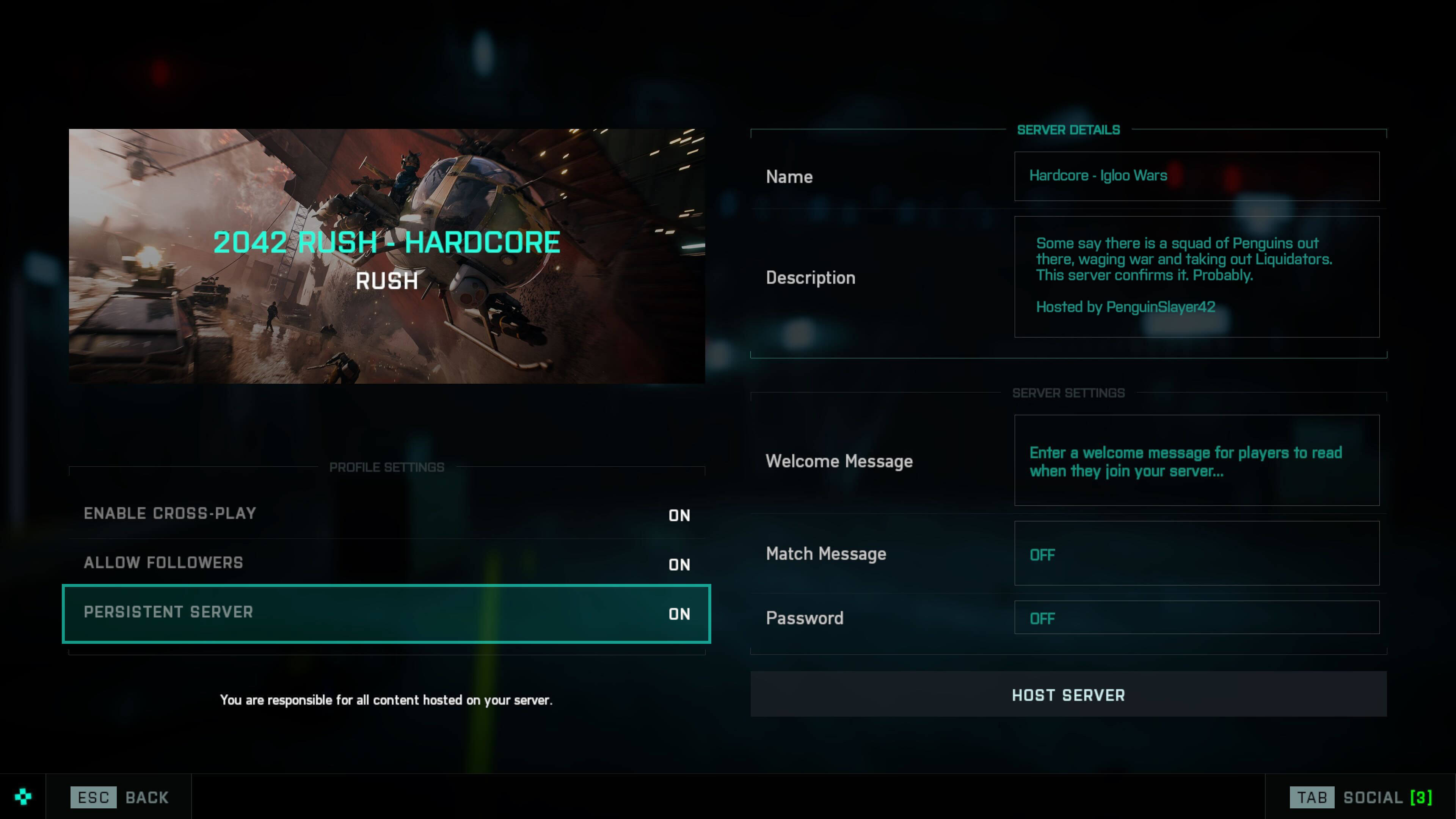
Who has access to Persistent Servers?
Starting with Update 2.2, owners of the Premium Battle Pass can select a Persistent Server option when Hosting a Server.
How many Servers can you Host?
Premium Battle Pass owners can host 1 Persistent Server per account, Individuals that do not own the Premium Battle Pass can host 1 Server per account. At any point in time, the max amount of Servers you can host is set to 1.
For how long will Persistent Servers remain visible?
Our intent for Persistent Servers is to help nurture active Communities while also making it easy to find active Servers to play on. This means that a Persistent Server will remain visible in the Server Browser for up to 7 days from any last player activity on the Server. We’re able to adjust this value if we see room to improve that experience.
What functionality comes with Persistent Servers?
Existing functionality for hosting a server within Battlefield Portal remains unchanged. That means when you host a Server you’ll still have access to:
- Enabling Cross-Play
- Allowing players to follow a Server
- Setting a welcome and match message
- Password protecting a Server
- Admin features for the Host
We’re eager to hear your thoughts and feedback as we introduce this feature, and we’re looking forward to seeing you create and find new homes for your Community within Battlefield Portal.
See you on the Battlefield,
//The Battlefield Team
This announcement may change as we listen to community feedback and continue developing and evolving our Live Service & Content. We will always strive to keep our community as informed as possible.
Season 2: The Liquidators Event - Play Now
Join the Dark Market's vicious hit squad – the Liquidators – as Battlefield 2042 launches the Liquidators Event from Oct 11 until Oct 25th !* Unlock unique skins and make every move count in Tactical Conquest, a tight infantry-based mode.
When you screw with the Dark Market, prepare to get terminated. Introducing The Liquidators, a vicious hit squad sent out for “involuntary asset liquidation”. They get in, get the job done, and get out. The Liquidators are created to dissolve enemy squads from the battlefield and capture areas critical to the Dark Market’s bottom line.
Make sure to play your cards right this mid-season – you might be the difference your squad needs. Watch the trailer for more info.
https://store.steampowered.com/app/1517290/Battlefield_2042/
*Requires Battlefield 2042 on applicable platform (sold separately) and all game updates to play.
Battlefield 2042 - Update #2.1.1
The main focus of this smaller Quality of Life Update is to improve gunplay. Included are several weapon balance changes and bug fixes to ensure a consistent gameplay experience between our weapon offerings:
- The M16A3 and M60E4 now have correct recoil reduction on Consoles to ensure their performance is consistent across all platforms
- The M16A3 and M60E4 have received balance changes to improve their performance
- The Avancys, K30 and MP9 have received balance changes to reduce their performance
- We have resolved an issue that was preventing some players from being able to Aim Down Sights (ADS) after exiting a vehicle
- A hit registration issue has been resolved which could occur when using a controller and firing weapons over a sustained period
What can you expect from the next game update?
The second major game update for Season 2 includes the Orbital map rework, alongside new Vault Weapons. We’ll follow-up with full details closer to its release
Stay Informed
Follow us on the @BattlefieldComm Twitter account to stay informed on the roll out of our updates. You can also follow along with our tracking of Known Issues and further game changes we’re making via our Battlefield forums.
General
- Setting Mouse Raw Input to Off in Settings will no longer disable mouse movement in-game
Maps
- Renewal - It was sometimes possible to deploy under the map in the first sector of the US HQ. This no longer happens
- Renewal - Fixed several areas on Conquest 64 that would incorrectly flag you as Out of Bounds
Weapons
- Firing continuously with weapons while using a controller would sometimes desync recoil between the client and the server. As a result, shots missed their target when they should have hit. This has been resolved
- The AC-42 sights are once again useable after equipping the UH-1 Smart 1.5x Scope in the default slot
- Fixed an issue where the mesh of the UH-1 Smart 1.5x Scope was missing from the AC-42
- Vault Weapons now properly apply recoil reduction when playing on Console
- The range of weapon draw speed for Vault Weapons now matches those of All-Out Warfare weaponry
- Fixed an issue where users cannot ADS after exiting a moving vehicle if the equipped weapon has an underbarrel attachment equipped
- ---- This bug reappeared after we previously rolled out a fix. Please let us know if you continue to experience it after this update
- The M16A3 now has the correct Headshot Multiplier for Assault Rifles (2.15x)
Avancys
The Avancys was highly accurate, and coupled with its large magazine size meant it was too powerful during sustained fire. We have reduced its accuracy to compensate.
- Base Recoil increased 0.32 -> 0.36
- Dispersion Per Shot increased 0.03 -> 0.06
K30
The K30 is intended to be a close range SMG, and was too accurate at medium distance. Its accuracy at range has therefore been decreased.
- Min Dispersion Angle increased 0.15 -> 0.18
- Dispersion Per Shot increased 0.09 -> 0.15
- Dispersion Decrease Rate reduced 20 -> 4
MP9
The MP9 is also intended to be a close range SMG, and similar to the K30 received an accuracy penalty to reduce its effectiveness at medium distances.
- Dispersion Per Shot increased 0.06 -> 0.11
- Min Dispersion Angle increased 0.14 -> 0.17
M16A3
The M16A3 did not match the performance of other Assault Rifles. To compensate we have reduced its recoil and improved its accuracy during sustained fire.
- Base Recoil reduced 0.44 -> 0.36
- First Shot Recoil Multiplier reduced 1.45 -> 1.15
- Dispersion Per Shot on ADS reduced 0.13 -> 0.1
M60E4
The M60E4 did not match the performance of other LMGs. To compensate we have reduced its recoil and improved its accuracy during sustained fire.
- Base Recoil reduced 0.6 -> 0.54
- Dispersion per Shot on ADS reduced 022 -> 0.17
- Reduced Stepped Recoil Multiplier from 6 bullets to 4
- Damage Increased on all ranges
This announcement may change as we listen to community feedback and continue developing and evolving our Live Service & Content. We will always strive to keep our community as informed as possible.