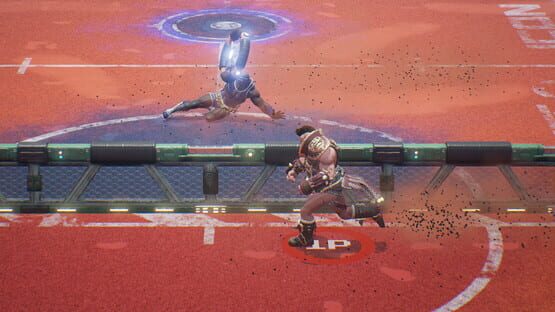
Hey everyone! A new patch just went live! Here are the patch notes:
NEW Added Twitch integration! Players can now link their Twitch accounts and will receive the "Stream Pro" tag for doing so. Once linked, Disc Jam will automatically detect when you're streaming on Twitch and allow viewers to vote on the team they think will win. Streamers will receive extra jamoleons for viewers voting and viewers will receive extra jamoleons for voting correctly!
NEW PS4 controllers are now supported natively. Just plug 'em in! (64-bit Windows only)
NEW Added an option to the Options menu so that players can now set the game audio to continue playing even when the window does not have focus.
NEW Added Gator emblem.
NEW Added flags for Austria, the Netherlands, Finland, and Sweden.
NEW Added "Captain Buzzkill" and "So Sweaty" tags.
NEW Added 2 new legendary Gator skins, Junker and Galvanized Steel
UPDATED Unreal Engine has been updated to version 4.14.2.
TWEAKED Made it a little easier for Makenna to perform wall skips.
TWEAKED Slight buff to how far Makenna slides
TWEAKED Buffed Makenna's cross-court lobs.
TWEAKED Slight buff to Makenna's perfect throws.
TWEAKED Slight nerf to Stanton's slide
TWEAKED Reworked the deflection trajectories so they're more consistent.
TWEAKED Buffed Gator's movement speed, throw speed, lobs, and slide to bring him more in line with Stanton and Makenna.
TWEAKED Added new sprint animation for Gator that better reflects his personality.
TWEAKED Reorganized the sorting order of some of the content in the Customization menu for better presentation.
FIX There were some UI and button focus issues when accepting invites from various submenus. These have been fixed.
FIX Leave match dialog will no longer stay up indefinitely if it's open when the match ends.
FIX Point countdown sound should now stop if the host disconnects prematurely.
FIX Match should now end correctly if the client leaves just after the start of a match.
FIX Victory podiums should no longer move positions in 2v2 after one of the team members leaves.
FIX Players should no longer see "CHOICE TEXT" in place of their graphics resolution when their native desktop is set to an unsupported aspect ratio.
FIX Fix for camera panning to the wrong angle after accepting an invite in the Customization menu.
FIX Characters will now show up correctly in the party lobby after entering the Prize Machine through the Customization menu and backing out.
FIX Fixed some minor graphical issues when transitioning to the post-game victory screen.
FIX Fixed an issue where players could get stale error messages on login in rare cases.
New Character Added as Disc Jam Beta Launches!
Hey all,
We're moving right along with the next phase of the project. We are pleased to announce our beta is live and with that we've introduced our third character! The bayou brawler known as Gator enters the fray as an all-arounder with no real weaknesses. Makenna and Stanton have been pushed farther into their own extremes so be sure to try them all and find your play style within! Patch notes below:
NEW: Our third character, Gator, has been released! All new skins, taunts, and victory poses are available for him.
IMPROVED: Text chat is now outlined rather than drop-shadowed. This dramatically improves the readability.
TWEAKED: Major gameplay rebalance. Stanton now throws even harder, for example, but his ability to curve has been drastically reduced. Makenna's skill shots have been strengthened. Gator is tuned as an even all-arounder.
TWEAKED: "Great shot!" has been replaced with "Nice one!" and "What a rally!" has been replaced with "gg" in the Quick Chat.
FIX: Lob button now requires perfect timing to perform a Super Return.
FIX: Borderless is now supported again when using the low-end renderer.
FIX: Disc hologram no longer freaks out and turns upside down after hitting the court from a deflection.
Christmas Weekend Patch Notes!
We've made a huge engine upgrade, added our advanced tutorial, and more! See below for details:
[H1]Patch Notes[/H1]
NEW: Added Advanced Tutorial.
IMPROVED: Updated Unreal Engine to 4.14.1.
IMPROVED: Updated scoreboard menu to match the aesthetic of the post-game summary UI. The scoreboard menu now shows player emblems and tags, and allows players to mute/unmute other players.
IMPROVED: Shield charge up now takes less time in proportion with the disc speed increase over the course of a rally.
TWEAKED: Juiced throws no longer count as 2
FIX: Players can no longer start charging up for a super while falling after getting hit in the back.
FIX: Wall skip indicator no longer plays erroneously when throwing a super.
FIX: Wall skip indicator no longer plays erroneously during some quick curves.
Big Gameplay Update! Patch Notes - 12/15/16
Chat with us on Reddit and Discord
First off, we want to announce our reddit page has been updated and will be our primary forum going forward. We also have a Discord server for players to find matches, discuss new mechanics, and give feedback.
Now, onto the good stuff!
Patch Notes
NEW: Overhauled the deflection mechanic.
Hold A to charge shield which now slows you down over time.
A fully charged shield guarantees a super.
The supers have all been buffed to compensate for the increased difficulty in execution.
NEW: Overhauled the lob mechanic.
Lobs no longer contribute to the perfect/juice system and in fact will break your perfect streak if deployed.
Aiming lobs is no longer restricted by horizontal damping. You should be able to place the lob anywhere on the court from any position.
Timing does not affect the success of the lob throw. You will throw the same lob if you hold it and run for a bit.
Visuals and physics completely reworked. The shot flies up high quickly then floats downward with very little forward movement.
This fixes issues catching lobs from very far in front of the landing point.
NEW: Perfect timing on supers results in a SUPER RETURN which fires back a super based on whatever throw button was pressed
NEW: Quick chat has been added on the D-Pad for easy mid-game communication. There are 4 categories (Cheers, Jeers, Bold, Cold) with 4 phrases in each. Taunt has been moved to RB as a result.
NEW: Added audio and visual cue for wall skips so it is much easier read when one is incoming
NEW: Added 10 new player emblems
NEW: Disc hologram is now a generic locator disc shape
NEW: Laser pylons now blast the disc on all winning points (previously only blasted on goals)
FIXED: Point starts correctly at (5) and aces are now worth double points (10)
FIXED: Deflections no longer bring you forward and are directed primarily for setting up the new charge/super mechanic. There is no longer an offensive advantage to quick tapping the shield
FIXED: Corrected material slots on the discs which was causing overly bright materials on Future disc (hopefully addresses the 'wobble' issue that was brought up)
FIXED: Quit buttons re-added for PC only (were removed for PS4)
FIXED: Spamming purchase button with insufficient funds no longer triggers audio nightmare
FIXED: Hid tutorial button from party clients
FIXED: Chat box scrolling no longer trims off the bottom line of long posts
FIXED: Rapid wall bounce issue on Pythagoras has been fixed
FIXED: Can no longer be scored on while charging a super from the edge of the end zone
FIXED: Removed "Rematch" option from spectators in post game screen
FIXED: Game camera now properly tracks the ragdolls during post-point fanfare
TWEAKED: Punched up Makenna's "Loser" pose and Stanton's "Yay" pose
Disc Jam Alpha Launched - PLAY THIS WEEKEND!
Today, after almost nine months of pre-alpha development and testing, Disc Jam reaches its alpha milestone! To celebrate, this week’s playtest will last all weekend! Check out our blog post for details on what's new.
Play from Thursday 12pm PST to Sunday at 11:59pm PST
As always, we are eager to hear your thoughts and answer questions, so drop by our discussion forums and give us a shout! Check out our FAQ for more details.
Playtest Today: Get Stuffed!
Patch Notes
NEW: Added 'Stuff Block' mechanic! While standing at the net, deflecting a disc will send it straight back to your opponent's side of the court. They must slide to retrieve it before it hits the ground.
NEW: Catch collision algorithms have been revamped. The new calculations are much more responsive and include different hitboxes for standing, charging up, and sliding. This should help everyone's throw timing considerably since the visuals and timing of the catch now match up more closely. This should also reduce some network desync artifacts.
NEW: If playing windowed, the Disc Jam window will now be brought to the front when a match is found.
TWEAKED: Throws that are going to skip along the wall are now tilted considerably. This is an effort to make it more clear when the disc will skip vs bounce.
TWEAKED: Deep lobs now travel faster.
TWEAKED: Deflecting a fast/perfect/super throw is now more of a penalty and will often require a quick slide to recover the disc.
FIXED: Squashed bug where the disc could disappear while players were battling it out at the net.
FIXED: Rare desync that could occur where one player sees the disc bounce and the other sees it skip along the wall.
FIXED: Only one teammate can charge up at a time.
FIXED: The player that is charging up is always the one guaranteed to catch the disc.
FIXED: Players can no longer pass to a teammate while they've been knocked down.
FIXED: Players can no longer catch a falling disc while they've been knocked down.
FIXED: Disc now spins in the correct direction for all throws.
Want to watch and live chat with us?
We will be discussing our changes live on our Twitch channel at 2pm PST.
What do I do next?
In the meantime, make sure you've redeemed your Steam key and downloaded the game client. If you haven't yet received your key and you're unable to get one from discjamgame.com, please check out this post.
How do I play?
Check out our 'How To Jam' page for a description of the rules, the controls, and some tips on how to jam like a pro. Once you're playing, you can also press Start or ESC to open the in-game menu and get a refresher.
Can I use a controller?
Yes! In fact, we recommend using a Microsoft Xbox 360 or Microsoft Xbox One controller for the best experience. If you don't have one, no worries, you can still play using a traditional keyboard.
Can my friends play?
Of course! If your friends want to play and they haven't signed up yet, send them over to discjamgame.com. They'll receive a Steam key as soon as they sign up and verify their email address.
Can I stream this or post videos?
Definitely! Everyone is encouraged to stream the game and upload footage wherever they wish. We're excited to share the game with the world, build a community, and get everyone involved in helping us make Disc Jam the best game it can be.
Disc Jam @ PAX - 9/1/2016
Disc Jam @ PAX
There is no patch today as we are headed to Seattle to show Disc Jam at PAX West! We're holding a tournament where the winner will take home an Intel Skull Canyon! This miniPC runs Disc Jam at a blazing 60FPS @ 1080p.
If you haven't already, be sure to sign up for the Disc Jam Discord to chat with developers and community members.
We will be keeping an eye on the forums and Discord channel throughout the day but won't be able to immediately address any issues. We'll be back next week with some exciting new changes and character balance tweaks. Have fun!
What do I do next?
In the meantime, make sure you've redeemed your Steam key and downloaded the game client. If you haven't yet received your key and you're unable to get one from discjamgame.com, please check out this post.
How do I play?
Check out our 'How To Jam' page for a description of the rules, the controls, and some tips on how to jam like a pro. Once you're playing, you can also press Start or ESC to open the in-game menu and get a refresher.
Can I use a controller?
Yes! In fact, we recommend using a Microsoft Xbox 360 or Microsoft Xbox One controller for the best experience. If you don't have one, no worries, you can still play using a traditional keyboard.
Can my friends play?
Of course! If your friends want to play and they haven't signed up yet, send them over to discjamgame.com. They'll receive a Steam key as soon as they sign up and verify their email address.
Can I stream this or post videos?
Definitely! Everyone is encouraged to stream the game and upload footage wherever they wish. We're excited to share the game with the world, build a community, and get everyone involved in helping us make Disc Jam the best game it can be.
Playtest Today: New Renderer for Low-End and Integrated GPUs!
We spent the last couple of weeks getting a second rendering pipeline up and running that is capable of rendering much faster on integrated and low-end GPUs. Although it supports only a subset of our primary renderer’s features, we think it still looks pretty darn good.
We’re also able to achieve 60fps at 720p on Intel HD 4000 integrated GPUs and above. For comparison, our primary renderer at the same settings on that hardware runs at only 15fps. That’s a 4x speed increase!
NEW: Experimental spectator mode has been enabled in private matches.
NEW: Railguns and pylons in the corners of the court.
FIXED: Inputs were not handling correctly at low framerates. The code has been reworked to behave better independent of performance.
FIXED: Deflection shields would not show up or would permanently stay on at low framerates.
FIXED: Players can no longer bring up the deflection shield while sliding.
FIXED: Voting for a rematch twice no longer carries over to the next vote.
FIXED: Using ALT+TAB after a match should no longer cause the UI to lose focus.
FIXED: Various physics-related issues that can occur after the disc hits the ground.
FIXED: Inconsistent ordering of players in the 'Vote for Rematch' panel.
Want to watch and live chat with us?
We will be discussing our changes live on our twitch channel at 2pm PST
What do I do next?
In the meantime, make sure you've redeemed your Steam key and downloaded the game client. If you haven't yet received your key and you're unable to get one from discjamgame.com, please check out this post.
How do I play?
Check out our 'How To Jam' page for a description of the rules, the controls, and some tips on how to jam like a pro. Once you're playing, you can also press Start or ESC to open the in-game menu and get a refresher.
Can I use a controller?
Yes! In fact, we recommend using a Microsoft Xbox 360 or Microsoft Xbox One controller for the best experience. If you don't have one, no worries, you can still play using a traditional keyboard.
Can my friends play?
Of course! If your friends want to play and they haven't signed up yet, send them over to discjamgame.com. They'll receive a Steam key as soon as they sign up and verify their email address.
Can I stream this or post videos?
Definitely! Everyone is encouraged to stream the game and upload footage wherever they wish. We're excited to share the game with the world, build a community, and get everyone involved in helping us make Disc Jam the best game it can be.
Playtest Today! Patch Notes and Dev Blog
The inaugural Thursday Night Jam begins today at 12pm PST! Every week we will be flipping the servers online to test our latest build for 12 hours. We will be discussing the changes live on our twitch channel at 2pm PST.
For a detailed write up on this build, check out our dev blog