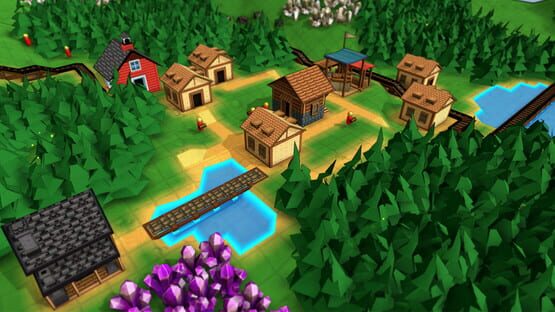

Factory Town
.160 Patch Notes
- Added new Biome ‘Chunky Islands’
- Fixed bug: Mechanical Rail research required Fire Purification research, now it requires Railway and Steam Engine research
- Fixed bug: Worker Types were showing up as ‘locked’ in the hotbar
- Fixed bug: Game objects with dual research requirements were being inadvertently hidden from UI (e.g. Steam Locomotive, Cargo Boat, Steam Engine)
- Fixed bug: Campaign flag was not being cleared on exit to main menu, resulting in custom maps possibly being flagged as Campaign maps, resulting in unexpected behavior (like Terraforming or other map editing tools being unavailable)
- Added admin command (accessible via backquote key) “campaignNum 0” that clears campaign number, for any maps that got stuck with an invalid campaign number due to above bug. Player would need to save and reload the map after performing this command to regain normal map functionality
Campaign Update now available!
Because these campaign maps are built by hand, I can ensure a balanced distribution of resources, and some interesting constraints (no terraforming!) so that each map is interesting and challenging in its own way.
What's more is they are built entirely using in-game editor tools, including the new customizable Victory Conditions, so you can create your own challenge maps and share them on the Workshop!
This update includes 2 Campaign maps, but the following 6 will be coming shortly. And of course all the existing sandbox / custom / creative features are still intact for those who like a more open-ended and randomized experience.
Here's the full patch notes:
Features / Improvements
- Added Campaign Maps 1 and 2. These are custom-built maps with specific start conditions and goals, and are unlocked in a progression. To access these, choose New Game, then Campaign.
- Non-sandbox maps from previous versions of the game are assigned the default victory conditions (“Build OmniTemple”)
- Added customizable Victory Conditions, accessible during game creation and in-game editor function. Min happiness, min required buildings of specific types, min required player items, min items produced (even if consumed) and min base level can all be set independently.
- If School is disabled in game rules, then buildable items that depend on research are automatically hidden
- Can now modify Research Recipe properties
- Added Max Base Level as editable value on global rules. Will automatically hide any buildable items that are unobtainable based on the set value of this max level restriction.
- Added Max House Level as editable value on global rules.
- Base can now have its population-provided-per-level adjusted. Default is '4', can enter comma-separated values to change population provided per-level (e.g. '4, 8, 12, 16'...)
- Can directly enable or disable an item from the right-click menu when editing rules
- Improved performance on selected building UI
- UI panels preserve their position when closed
- Some UI panels can be resized by dragging on window edges and corners
- Added new models for the Base to make each level more distinct
- Will now show a save prompt if you try to load a new map while in a non-saved map
- Main game menu now has distinct ‘save’ and ‘save as’ options. ‘Save’ only appears if you have previously saved the map
- When zoomed in, Tilt Shift blur is now dependent on camera depth, not screen position
- Minor structures are not shown in Unlock Notifications
- Added tooltip when hovering main Happiness display icon, showing current Happiness Level, production bonus, and happiness required for next bonus level.
- Added new Biome: Low Ridges
Bug Fixes
- Fixed bug: Disabling a default recipe for a building in the Rule Editor would not be stored or have any effect
- Fixed bug: Pinned menus were dismissed when ESC key pressed
- Fixed bug: disabled items were still showing up in House sell categories
- Fixed bug: foot paths spawning under initial base position
- Fixed bug: inventory icons would be incorrect size when UI scaling applied
- Fixed bug: Wagons wouldn’t prefer foot paths over grass even though they get a foot path movement speed bonus
- Fixed bug: Houses and Base wouldn’t display the correct level-dependent preview when moving or placing
- Fixed bug: unintended unlock notification when switching creative mode on and off
- Fixed bug: possible error if House Population Provided did not include enough array entries
- Fixed bug: right-click menu was not dismissed when clicking on blank part of menu
- Fixed bug: Item Generators would not output anything if an OmniPipe was hooked up to its primary output
Balance Changes
- Wagon, Chute, Stairs, and Fence require Woodworking research but no other buildings
- Road, Road Ramp, Bridge, Stone Wall, Stone Bridge Stone Arch, Stone Bench, and Stone Pillars require Masonry research, not the Stone Mason building
- Decorative Lantern requires Metallurgy research, not the Forge building
- Farm Tile requires Farming research, not the Farm building
- School now only requires Base Level 2, instead of Base level 3
- Workshop no longer automatically unlocks at Base Level 3, instead requires Woodworking research
- Farming and Basic Logistic research requires Base Level 3
- Woodworking research only costs 1 coin per research
- All research requires 100 count of recipe completions
- Significantly reduced all purple coin requirements for (non-infinite) research recipes
- Base Level 3 requires Stone Bricks instead of Stone, and 100 yellow coins instead of 50
- Paper recipe no longer requires Base Level 3
- Paper recipe now requires 1 Wood instead of 2 Wood, and Produces 2 Paper instead of 1 Paper
- House upgrade level 4 costs 25 Red Coins instead of 100 Yellow Coins
- Wagons and Caravans move slightly faster on foot paths than previously
- Sandwich is requested by house at level 4 instead of house level 3
- Warm Coat is requested by house at house level 4 instead of house level 5
- Fluid Pipe research requires Base Level 3 and Basic Logistics, costs 1 Red Coin and 1 Writing Supplies per research instead of 2 Yellow Coins and 1 Writing Supply
- Basic Logistics requires 1 Red Coin per research instead of 4 Yellow Coins
- Tree Planter requires 4 Planks instead of 2 Iron Plates
- Forester costs 20 Stone instead of 20 Stone Bricks
- Gourmet Foods costs 20 Planks instead of 20 Iron Plates
Campaign Update coming soon!
There will eventually be 8 custom-built maps (this update will ship with 2) that each come with a few starter buildings & resources, and have specific victory conditions that must be met before the next level is unlocked.
Many players, including myself, have wanted this game to have more clearly defined goals for a while and I think this will help deliver on that idea. These campaign maps will also be more carefully balanced than the randomly-generated maps in terms of resource placement, and have some interesting restrictions (like no terraforming) that will really challenge players to come up with creative transportation solutions.
Included in this version is a new editor menu that lets you set custom victory conditions to your liking. And in fact, all of the campaign maps will be built using in-game editor tools, so it should give you a good idea of what is possible with them!
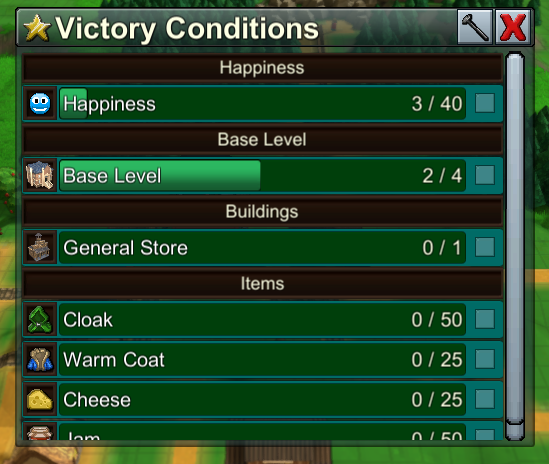
Of course, sandbox mode and advanced custom maps will still be available as always.
There is currently a version up on the beta branch with just 1 campaign map, and hope to release the full update in the next week or two.
Cheers!
Erik
.158 Patch Notes
- If a logistic or computational block has a Signal Tag filter, will now evaluate to False if the triggering agent does not have any Signal Tag property. (Previously, Minecarts would always evaluate to True, since they don’t have any signal tag)
- Fixed bug: going from the launch menu to Help / Tips and then hitting the ‘Close’ X button left the player with no UI
- Fixed bug: ‘Idle Workers’ alert was not always displaying / hiding when it should
- Fixed bug: Void Building icon would disappear in the Data Overlay view if it processed an item
- Fixed bug: Could move a structure over an incompatible worker unit, causing that worker unit to disappear
- Fixed bug: pipe Axis buttons in bottom-right were not clickable and tooltip flickering rapidly
- Fixed bug: cursor placement validity was not being recalculated based on a worker moving into / out of the placement area
- Fixed bug: required support structures created during Building placement were not checking for blockage by worker units, and could overwrite them
- Multi-item deliveries to Markets are now distributed more evenly among houses
- Fixed bug: Infinite Markets were not instantly consuming all items from a multi-item delivery, resulting in excess inventory being held at the Market
- Fixed performance issue when moving cursor or camera while a building with a large inventory was selected
.157 Patch Notes
- Fixed bug: solo pipe paths were not always selectable
- Fixed bug: Item Filter selection panel would sometimes get stuck showing only pre-filtered results (e.g. only shows Fluids, etc)
- Fixed bug: right-click to move camera would sometimes be ignored when hovering over a world object
.156 Patch Notes: Tutorial Maps added
- Added ‘Item Generator’ building for Creative mode - will endlessly produce an item matching the building’s Item Filter
- Added ‘Worker’ filter to Agent Trigger, which, if set, is an additional condition that is evaluated when determining output value
- Added ‘If Block’ computational block. This will pass on its value (default = 1) only if it receives
a True (i.e. nonzero) message
- Added new decorative structure: Message Board. These are editable like Sign Posts but can display longer messages, and the text doesn’t show up when you activate the Data Overlay (default: F)
- Added additional navigation in Help menu - you can click on referenced Buildings, Items, etc. to jump to that item
- Removed alternate right-click behavior for terraforming commands - now moves camera, consistent with other actions. TAB will switch between the related tools instead.
- Computational blocks can now be rotated
- Added Help menu to main launch menu
- Help menu shows ‘sellable’ data for items
- Fixed bug: In-game Help function was not always jumping directly to the correct item in the guide
- Disabled achievements and stats in creative mode
- Fixed bug: Context Commands menu was showing LMB icon as ‘Issue Command’ action when it should show RMB
- Fixed bug: some modal menu were allowing mouse cursor through to world layer, and wouldn’t dismiss when clicked outside the panel
- Improved display of highlighted / selected item labels, and sign post labels
- Fixed bug: closely-packed items on belts would often ignore Pushers’ primary direction
- Autosave now saves as “[current filename]_Autosave” instead of just “_Autosave”, which had made it too likely that autosaves were overwritten
- Fixed bug: object alert icons would sometimes appear in the sky if the object was very far behind the camera
.155 Patch Notes
- Increased Train Station inventory capacity from 4x100 to 8x200
- Added top-level item filter for Train Station
- Reformatted save file to be smaller and more efficient
- Fixed bug: first path drag-placement in game session was not following terrain height
- Fixed bug: unable to place certain Farming Actions or Natural Resources on hotbar
- Fixed load crash if custom rules had a recipe with a new externally required resource
- Fixed custom items being removed from Item Filters on game load
- Fixed incorrect rail cart rotation when moving
.154 Patch Notes
- Base and House inventories have no limit on the number of types of items it can hold (i.e. creates new inventory slots when new items delivered)
- When deleted items are refunded to the player, they are deposited even if that item is already at maximum capacity (so players won’t lose resources)
- Removed Population cost for Steam Locomotive
- Fixed bug: Chute and Pipe items had unnecessary latency when restarting movement after being blocked
- Fixed bug: Obsolete water input inventory slots would continue to pull in nearby water and automatically output it
- Fixed bug: ‘No Pipe’ alert would not be dismissed if pipe was connected using the 2D underground layer
- Fixed bug: Select ‘auto-manage recipes’ would in some cases not take effect
- Fixed bug: Selecting single recipe while ‘auto-manage recipes’ setting was on would sometimes cause recipe select to not function properly
- Fixed bug: Biome Selection menu was not displaying multiple selections
.153 Patch Notes
- Fixed bug: Moving, and then deleting an Agent Trigger would create instability at previous location
- When item is missing physical texture, it now shows an 'alert' sprite instead of a random one
- Fixed bug: Rotational Power was transmissable through omnipipes and conveyor belts. Behavior updated so that it transfers directly to building or rail in front of it, but can not be carried through pipes or belts.
- Fixed bug: Some building & block alerts were blocking cursor input
- 'Incompatible Path Outlet'now calculated for all item / path combinations, and will not be shown if a valid path outlet does exist on the building
- Water Shrine recipe changed from 2 Water Mana -> 1 Water to 1 Water Mana -> 4 Water
- Fixed bug: Alternate Cursor icons were flickering
- Fixed bug: “Hold Until Empty / Full” flags not loading on map reload, or being copied / pasted
.152 Patch Notes
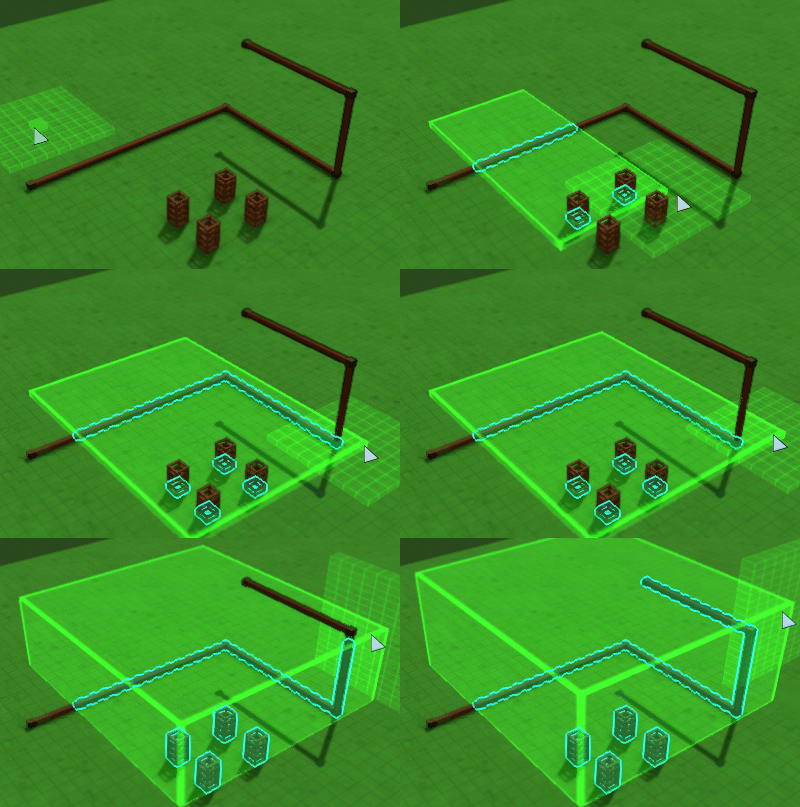
- When building Pipes above-ground or using the Block Select tool, the player can now choose which 3D axis is active. Previously this relied on the current camera angle, which was very confusing. Now, there is a set of buttons in the lower right showing the active editing plane, and the player can cycle through with the TAB button. The display of this 3D selection plane has been improved as well.
- A building in Creative mode will always be created with a worker, regardless of population max
- New Video Preference: Outline Effect (default is on). The effect has always been there, but now it can be disabled.
- New Structure: Fuel Loader, which will only load Water and Coal into Steam Engines. Will not load anything into solo minecarts, or train cargo. (For now, Rail Loader can still be used to load fuel into Train Engines)
- Fixed bug: cancelling the move tool by switching to another tool via hotkey (e.g. Pipette) would cause the cursor to get stuck with the moved object
- Fixed bug: moving groups of buildings would sometimes result in certain blocks missing their ‘obstructed’ flag, allowing invalid building placement
- Fixed some object tooltips getting stuck on cursor if menus opened while tooltip active
- Alternat build action, when available, is shown on right-hand side of screen. Can switch between these with the TAB key
- Fixed some delays between when items were received into main player inventory and when affordability was updated in the UI