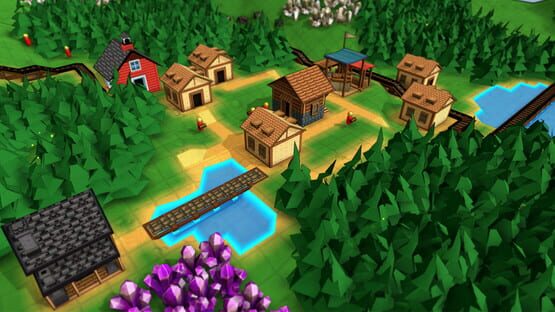
These are new buildings that spawn in unpurchased territory. They always offer 3 randomly assigned trades that are very advantageous. However, they are classified as NPC buildings so you can not move them around - you have to bring goods to them! By default, 8 of them spawn on a map but you can change this value in the 'edit map' section when creating a new game.
You can build them and change their recipes in creative mode. You can also add new trading post recipes in the Game Rules Editor. Any recipes assigned while editing the map will be fixed in place during non-creative playthroughs, opening up some interesting possibilities for custom map scenarios.
Campaign Map 4
After a long delay, Campaign Map 4 is now available. I wanted to make this one pretty unique, so it needed some additional features to be built before I could finish it.
The setting is one large main island, with a different trading post on each of the 4 major shorelines. There is an abandoned railway running through a desert region. Perhaps it was once used to move goods across the island?
To win the scenario you will need to generate Elixirs and other goods that can only be acquired from the Trading Posts. So you must establish some trading routes and probably make use of Freight Rail cars to deliver large quantities of items for trade.
Other Feature Additions & Changes
Added new Create Game property: Trade Recipes. This is a list of recipes that the Trading Posts will choose from on map creation. New trade recipes can be added here. Any of these recipes can be assigned to the trading post in Creative mode.
New option when customizing new random map: Trading Posts, which let you choose how many trading posts should spawn
Rail Cars now default to including top-level Train filter in its logic, but the rail car can specify whether the Train filter should be active or not. This also fixes a bug where a fixed-filter rail car (like Hopper) would ignore train filters for specific goods due to its built-in Loose Bulk filter always taking precedence.
‘Packed only’ and ‘Unpacked only’ filter restrictions can now be specified for item categories like ‘Gourmet’
Recipes with inputs that are not produced in map (based on custom rules) are no longer automatically removed, as they may be produced by Trading Posts
Replaced NPC building particle effects (when they appear on a newly purchased terrain chunk) with an exclamation point icon that disappears when you select the building
Updated ‘Rail’ tutorial map to include Freight Cars
Alert icons are hidden during Campaign intro cutscenes
Balance Changes
Freight Cars are now dependent on Steam Locomotive research, not Steam Engine research
Removed Red Coin cost from Farm Herbs recipe
Campaign 2 starts player with General Store and a worker delivering Planks so they get an example of how Red Coins are produced. Also flattened out some terrain near starting area and disabled several Kitchen recipes which were impossible to produce or consume.
Bug Fixes
Fixed bug: Steam Connectors over Water Pumps could be assigned “Water” filter if an outlet pipe built from them in the same session they were created. Similar bug with Water Connectors and the Steam Generator.
Fixed bug: Custom recipes defaulted with Enabled property set to Off
Fixed bug: In creative mode, some objects were not appearing in build menus if they had been disabled by active rule set or if map launched with creative mode off
Fixed bug: When moving rail cars and re-attaching them to existing train, would create a bad train link that could cause errors when highlighting or deleting that train car in the future. Any bad links currently in games are automatically fixed during game load.
Fixed bug: Transfers to or from Rail Cars were being accidentally limited during train station stops. New behavior is that an unlimited number of items can be transferred to a single Rail Car per transfer attempt.
Fixed bug: Non-physical items like ‘Steam’, ‘Fuel’, ‘Knowledge’, etc would appear as pick-up options for workers, and would be transferred by ‘Deliver All’ commands
Fixed missing localization on ‘PlayerActionCloseTopMenu’
Fixed bug: placing structures would immediately show 'occupied' error after successful placement, instead of waiting for cursor to move
Fixed bug: when placing Farm Tiles over crops the crop icon would obscure placement position
Fixed bug: ALT key activation of ‘remove block’ tool would prevent correct hotbar assignments to top row
Fixed bug: Context commands menu would be displayed when backing out to the main menu
Fixed bug: Item filters specifying categories like ‘Gourmet’ would ignore packaged versions of items matching that category.
Fixed bug: attaching a new rail cart wouldn’t immediately apply the relevant top-level train filter
Hotfix .171k:
- Fixed missing recipes for basic medicine items in Campaign Map 4 (bandage, remedy, fish oil, protein shake). Also disabled Mana Brick, sellable books, and Specialty Goods Store. Retroactively affects campaign maps already in progress - Removed sellable books from Campaign Map 3 - Fixed hotbar items loading with incorrect locked display state
.170 Patch Notes
- Fixed launch crash introduced in .169 - Fixed missing localization on ‘Complete Construction’ recipe output for Omnitemple
Hotfix 170a: - Fixed issue where filters (e.g. fluid pipe connectors) were being assigned the wrong value on legacy files
Hotfix 170b: - Retroactively fixes connector filters that had been broken by previous update
.169 Patch Notes
- Boxcar inventory increased from 40 to 50 - Added new Interface option: ‘Secondary Action Delete’ to determine whether the right-click button destroys blocks if you click down on them. This defaults to ON for legacy players and OFF for new players. - Players can hold the Alt button to temporarily activate the Remove Block tool without changing their build object. (This is meant to allow for convenient block deletion even if Secondary Action Delete is off) - Formatting improvements to context controls menu - Added Camera Controls to context controls menu, when in default cursor mode - Fixed bug: blurry textures on some buildings - Fixed bug: ‘Supply All’ behavior would never supply recipe inputs that were filter categories (i.e. Fuel) - Fixed bug: buildings with lots of recipe inputs could have some of their ingredient icons hidden in the pop-up menu when assigning a worker behavior target - Fixed bug: Crystals could get stuck at an input Mana Connector on save / reload. Happened if the crystal was fully depleted, the Output connector was a separate pipe, and the output pipe was full at the time of map save / reload. Also happened if crystal was depleted when it arrived at the input connector, even without save / reload. - Fixed bug: deleting an entire train would fail to refund attached rail cars & their inventories - Fixed bug: Minecarts with filters that didn’t match Loose Bulk items would accept any item - Fixed bug: If Cancel action mapped to a hotkey that is not mapped to camera pan or move, it was waiting for hotkey release instead of triggering on hotkey press, making it less responsive - Fixed bug: when moving Conveyor Belts, the directional arrow preview would be incorrect for South and West directions - Fixed bug: was using wrong text for the “No Fuel” alert on Steam Locomotives
Freight Rail Cars: Boxcars, Hoppers, and Tankers! (.168 Patch Notes)
In this update I've added several new rail cars to make the Train system much more interesting and useful!
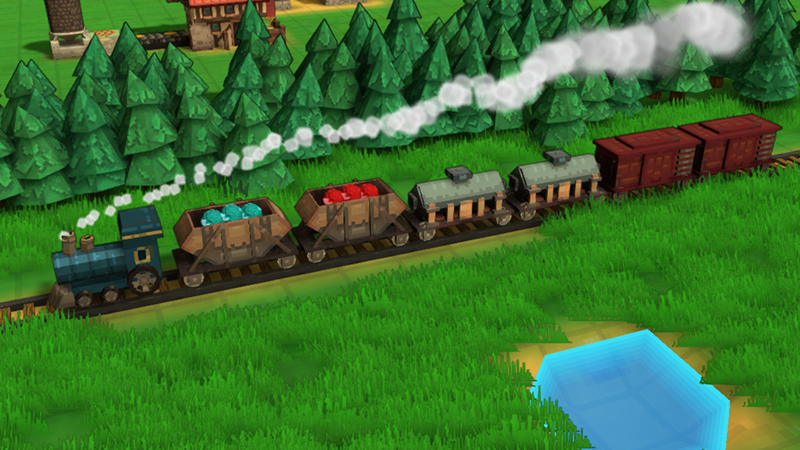
Previously players only had access to Minecarts, which could hold a decent amount of goods but for very high throughput, players had to spam them everywhere which created lots of traffic jams. But now, you can research Freight Rail Cars and unlock 3 new units:
Hopper Car - holds 100 units of any 'Loose Bulk' goods. This includes grain, stones, ores, flour, and basic crops. (the same filter as what the Chutes have)
Tank Car - holds 100 units of any Fluid. This includes water, milk, fruit juice, etc. (the same filter as Fluid Pipes)
Boxcar - holds 40 units of any item, including packed goods.
There's a few catches to these higher-capacity cars. They are larger than minecarts, each taking up 2 block units. Also they can only be loaded and unloaded at Train Stations - Minecart loaders will have no effect. So that means they must be pulled by a Locomotive. But, they should be extremely useful for moving large quantities of items across long distance especially for specialized goods.
To balance things out, the Minecarts now only accept Loose Bulk goods. So they are still useful for simple transport unprocessed materials, but won't be good for the 'last mile' deliver to markets and such. Note that this might be a disruptive change, so I added a new game rule 'Restrict Minecart Inventory' that will default to OFF for any games created before this update. It will default to ON for any newly created games. You can of course change this any time in the Editor / Edit Rules page.
Moving and rotating trains has been made much easier too. And there's now a button right on the Locomotives to add a new car to the back of the train.
There's also a new cosmetic change: The "Gourmet Foods Store" is now simply called the Tavern. And it has updated art too:
Here's the full patch notes:
Features / Improvements:
- Added Boxcar, which is a 2-length rail car that holds 40 items - Added Tank Car, which is a 2-length rail car that holds 100 units of fluid - Added Hopper Car, which is a 2-length rail car that holds 100 units of loose bulk goods (same filter as Chute: ores, crystals, grain, flour, fertilizer, etc) - Boxcar, Tank Car, and Hopper Car all occupy 2 blocks and can only be loaded / unloaded at a Train Stop. - Added new research “Freight Cars”, which unlocks Boxcar, Tank Car, and Hopper Car. - Added button on Steam Locomotives to directly attach railcars to the end of the train - Move and rotation tools now work on entire trains - Added new Global Rule: Restrict Minecart Inventory. Default is ON, which adds a “Loose Bulk” top-level filter restriction to all Minecarts. Note that for any legacy maps the Default for this new rule is OFF (meaning minecarts can still load any item) to prevent interfering with current builds. - Newly attached train cars will follow existing track lines - “Gourmet Foods” store is now called “Tavern” and its building model has been updated - Total inventory slot capacity is displayed and not just item count - Campaign map 2 added a new victory condition requiring Base Level 4. This is to help guide players towards the base upgrade which is required for other buildings. - Tooltip for Research will indicate which worker units are unlocked by it - Steam Locomotive only outputs smoke particles if consuming fuel - ‘Rollable’ filter (items that can be transported in Chutes) has been renamed to ‘Loose Bulk’
Balance Changes
- Increased maximum rail car speed on Magic Rails by 25% - Eggs, Ethers, and Mana Crystals (charged or depleted) are no longer considered Rollable / Loose Bulk (meaning they can no longer be placed in a Chute, or in a Hopper car) - Filters on minecarts and rail cars will override any train-level filters. Previously the filter effects were merged.
Bug Fixes
- Fixed bug: Move Tool was unlinking rail cars and stopping worker unit behavior on selection, not on move confirmation. - Fixed bug: When moving a Steam Locomotive, its potential new position could be blocked by current position - Set default OSX rendering path back to Metal, with fallback OpenGLCore, instead of the other way around. OpenGLCore default was causing performance issues for many OSX players. If OSX players encounter display issues (missing world items) due to this change, they can specify a launch option of ‘-force-glcore’ - Fixed bug: attached minecarts (with no Engine) were treating first minecart’s filter as a train-level filter - Fixed bug: hitting the ‘Go’ button on a rail car or train would not cause it to move if the game was paused
Enjoy! And as always, feel free to join in the discussion on the Discord server: https://discord.gg/factorytown
.167 Patch Notes
- When using the Move tool on any worker unit / rail car, it no longer performs the reposition immediately after selecting the unit & moving the mouse. It will now keep the original unaffected until you click down to select the new location. This also allows you to move the camera via right click while moving, or to cancel the move action before it is performed. - Minecarts can be attached to train by highlighting underlying track, not just by highlighting the target rail car - Fixed bug - train locomotives were not occupying secondary navigation position on game load, resulting in ability to attach other rail cars in overlapping positions - Fixed bug - unreliable results when moving rail cars
.166 Patch Notes
- Fixed bug: inconsistent behavior of camera move & pan commands - Fixed bug: game would ignore first input drag command (camera look, camera pan) when it regained focus after running in background - Fixed bug: minecarts attached to parent trains might be placed in the wrong facing direction, preventing future attachments - Fixed bug: was possible to dismiss some main menus by clicking outside the menu, resulting in a blank menu state
Hotfix .166a:
Fixed bug: single-right-click to delete a block would cancel the build action
.165 Patch Notes
- When in creative mode, added ability to right-click on buildings and choose to ‘Lock’ or ‘Unlock’ them. Locked buildings will then not be modifiable by the player outside of creative mode. - Steam Locomotives now occupy 2 rail tiles (any existing trains will occupy the additional rail tile as soon as space is available) - ‘Cancel’ action is now mapped to RMB by default (mapping is preserved for previous players). It triggers only if click down + click up occurs without dragging or performing another action, so it won’t interfere with other action mappings. NOTE: Players from previous versions will have this mapped to Z, if you want this new behavior, you will need to manually remap using Options / Controls. - New Input option: ‘Close Top Menu’. Used to back out of menus, without having to use ESC (which is not remappable). Default key is Z - Can now right-click on Hotbar item to show ‘Delete’ option, that removes it from the hotbar - Improved display of Goods Supply panel, now Supply and Happiness status meters are shown separately, and removed obsolete item tier icon - House happiness panel now shows a checkmark icon for “Supplied” state instead of a less-relevant timer icon for consumption time - Fixed bug: Mines would occasionally get stuck in a state where they stop producing anything. Any mines that were currently stuck are fixed upon map load - Fixed bug: was failing to load custom presets for rules, scenarios, and maps in Create Game menu - Fixed bug: when trying to move invalid buildings, error message was shown when placing buildings instead of when trying to pick it up - Fixed bug: Inputs mapped to Select Column and Select Block did not have any effect - Fixed bug: minecarts accepting items that didn’t match filter (happened if minecart and loader had completely conflicting filters, game treated that as an ‘accept everything’ case instead of a ‘exclude everything’ case)
Hotfix .165c:
- Fixed bug: selecting a worker and then right-click-drag resource to destination was moving camera instead of assigning harvest command
The Logistics Update is here! (.163)
Added a lot of things from players' feature wishlists that will help make it easier to sort, move, load and unload items at your production zones! Here are some highlights:
Multi-Item Filters
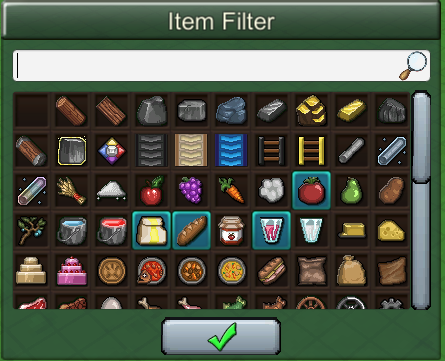
You can now select multiple items in a single filter! Just shift+click to add more items (or right-click to open a menu, and hit "Include"). The item, worker, or train will pass if it matches (or is holding) any of the selected items.
Advanced Filtering Options
You can also set some advanced conditions on your item filters. Right-click on the icon to open an options menu. Now you can set an item as "Exclude" and the item will NOT pass if it matches that condition. You can Exclude a whole category like "Fruit". And you can even stack these together on the same filter - include or exclude as many items as you want.
Similarly you can "Require" an item. This option appears on Logistic Block filters, and is useful if you had a train that *must* have two or more specific item types. So it works like an 'And'.
You can also specify if your filter should only include the Packed version of an item, or the Unpacked version (or keep default behavior, which allows either).
This shows several different advanced filters working simultaneously:
Note that single inventory slots can still only be assigned a single specific item. These advanced options apply to the top-level item filter of the worker, building, or block. The game will consider both inventory slot restrictions as well as top-level item filters when determining if an item can be transferred.
Merge Blocks
The new Merge block is the opposite of a Splitter. It will combine items onto a single belt, evenly combining them based on the direction they're coming from. You can even assign a specific ratio of input directions (so you can have a 2 : 1 belt merge, or a 1 : 1 : 2, for instance). It will automatically ignore directions that don't have an input path.
Terrain Texture Painting
In Creative mode, you can now paint textures onto the terrain, giving you more options for your custom maps! Right now only the basic 4 textures are available (Grass, Deep Grass, Sand, and Rock) but I hope to add more later. Use it to create something more realistic (or not)
Here's the full patch notes:
New Features:
- Added Multi-item filters, with the ability to flag items as packed only/unpacked only (or both), exclude items, require items (for testing worker units that can carry multiple types) - More objects have top-level Item Filter - Train Stops, Fuel Loaders, Minecart Loaders, and all worker units - Added Merge block that only allows a balanced number of items into the block from different directions. Works as 2-way or 3-way balancer. Default ratios are 1:1 but you can specify different ratios for the straight, left, and right input directions. - Added Natural Resource config to the Edit Rules menu. Can change display name, as well as a “Preserve When Depleted” flag that, if enabled, will re-plant the crop (or preserve a ‘depleted’ form of the ore/mineral) once all the resources have been harvested from it - whether or not there is a linked production building. - Added terrain texture painting in Creative mode, and painted previous campaign maps - Train cars will now merge their filter with the Engine’s item filter - previously it would just override it. Exclude flag can be used in cases where player doesn’t want an item into a train car that the engine’s filter would otherwise include
Balance Changes
- Can no longer move Storage buildings (barn, base, rail depot, silo, crate) if they have inventory items in them. - New global rule: “Allow Storage Moving” which prevents players from moving storage buildings that contain items. In creative mode, this rule doesn’t apply. You can still move empty storage buildings at any time. - Steam Locomotives will move (slowly) even when they are out of fuel or water - Minecarts can now load and unload at Minecart Loaders (previously, Rail Loaders) even if they are part of a Train.
Misc Changes
- Opening the Text / Number input panel won’t deselect the active item - Improved icon for Splitter - Right-click actions now only count full click down + release (not just right-click-down) - Fishing boats now have a fixed top-level filter of ‘Fish’, rather than an assigned Fish type on its inventory slot (for consistency) - Train Cars will show parent filter (based on train Locomotive) in display-only format on their selection panel - Steam Locomotives show an alert when they are missing fuel or water - Can toggle overhead view on or off without changing build object
Bug Fixes
- Fixed bug: Display bug where objects were invisible on OSX (by changing default graphics API from Metal to OpenGL) - Fixed bug: natural resources showing a blank ‘Inputs’ row on item hover tooltip - Fixed bug: could click outside of Edit Rules menu when creating new game to be left with blank UI - Fixed bug: Object Labels would still be shown on path and logic blocks even if turned off in preferences - Fixed bug: Was not activating Mining layer when using Prospecting or Mine Shaft tools, which resulted in confusing behavior and error messages - Fixed bug: Water, Steam, and Omni connectors would produce items even if active state set to Off - Fixed bug: Water and Steam connectors were missing ‘In+Out’ access type (Mana Connectors intentionally do not have this, for now)
Campaign Map #3 released! (plus .162 Patch Notes)
- Added Campaign Map #3 - takes player through Mining, Machinery, Boating, Fishing, and basic Railway technologies. Map is full of large islands, so Cargo Boats are useful to move goods between mining regions. A few flat areas for minecart loops to help produce all the necessary resources. - Added smoother texture blending to underwater terrain - Items that are impossible to produce (based on custom rules) are automatically hidden from House Happiness panel - Added new Biome: Mesa Valleys - Added recipe inputs to item tooltip panel
Balance Changes:
- Tree, Bush, and Vine crops (Apple, Pear, Cotton, Berries, Herb, and Tomato) will now automatically replant when depleted. Their baseline item capacity and default grow speed (unless boosted by Farm Tile or Tree Planter) have both been significantly decreased. - Herb is no longer sellable on its own for Yellow Coins - Medicine research is now “Intermediate Medicine”. Advanced Medicine and Basic Medicine were added as new research options. These are both retroactively marked as complete for any maps that had previously completed Medicine research. - Got rid of house level requirements for selling specific items - Removed Lumber Mill requirement for wooden scaffold blocks
Bug Fixes:
- Fixed bug: hidden / disabled research was showing up on Research menu - Fixed bug: missing tooltips on Research menu - Fixed bug: could break functionality of House Happiness panel if you loaded a map with limited satisfaction categories after playing a map with more categories available - Fixed bug: Water was missing in ‘Edit Biome’ view - Fixed bug: extending a chute in a side direction would stall out items that had been stuck at previous end of chute - Fixed bug: unnecessary error logging when trying to transfer items to buildings that have unique item slots that are also full - Fixed bug - Replacing a Sensor Block with same structure type would leave invalid references to replaced block, potentially triggering lots of unexpected path item behaviors - Fixed bug - opening "edit rules" or "edit victory conditions" menus during a game unpauses it - Fixed bug - Victory flag could persist in game state if starting a new custom map after achieving victory on another map in the same session (flag Is cleared on legacy maps that don’t meet current victory conditions) - Fixed bug - Infinite research unlocks were not displayed after victory screen displayed - Fixed bug - missing label on ‘Construction Complete’ tooltip alert for OmniTemple - Fixed bug - using Upgrade hotkey to upgrade multiple buildings could upgrade more buildings than player could actually afford - Fixed bug: Moving or placing a house within a Market network did not immediately trigger goods being sold to that house
.161 Patch Notes
- Fixed bug: Data Overlay key (Default: F) showing invalid header label for objects - Fixed bug: default mapping of R = Rotate Object was hiding other default mapping of R = Open Research Menu. The game now does a separate test for inputs when objects are selected, allowing inputs to pass through to the default input context when nothing is selected - Fixed bug: Completed research was not categorized as such on the Research Panel - Fixed bug: Creating a new map and placing initial base position did not show a preview of the Base building - Fixed bug: Creating a new custom map would initialize to the same random number every time - Fixed bug: Starting a new map with manual Base placement did not correctly load locked state of buildings, resulting in missing unlock notifications for them - Fixed bug: deleting Roads and Foot Paths did not update neighboring blocks’ worker paths navigation, resulting in workers being able to walk into buildings or through stone walls - Fixed bug: loading Campaign Select menu after completing all available campaigns would select an unavailable campaign by default - Research Panel is now draggable, and reformatted slightly