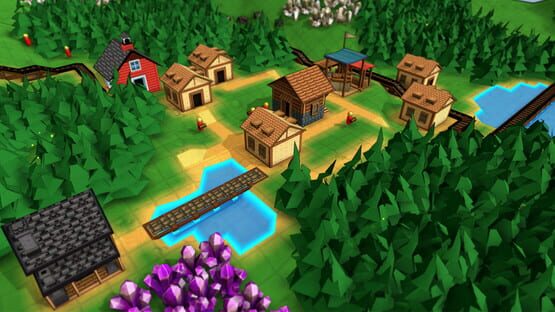

Factory Town
.190 Patch Notes
- [.190a hotfix] Fixed build cursor in incorrect position when building over water
.189 Patch Notes
- Currencies, including Star Coins, are now shown in the Shared Inventory panel (Hotkey: I) and are available as configurable options when assigning items on the shared inventory hotbar in top-left
- Woodworking and Masonry only require 1 work unit per research instead of 2, and produce 2 research units each time
- Research recipes now show number of output items produced
- Cost for General Store changed from 20 Stone to 10 Stone Bricks
- Town Center AoE max border radius shown when placing foot paths or roads
- Grabber and One-Way block are now available without any research requirements
- Added Basic Medicine as requirement for Intermediate Medicine requirement, and Intermediate Medicine as requirement for Advanced Medicine
Town Centers & Town Specialties, plus Campaign Map #7!
Campaign 7 has also been finished (only 1 left to go!) and it makes full use of this new Town Center concept.
That's the short description of the update but a lot has changed, read below for more details on all the new features!
Multiple Town Centers
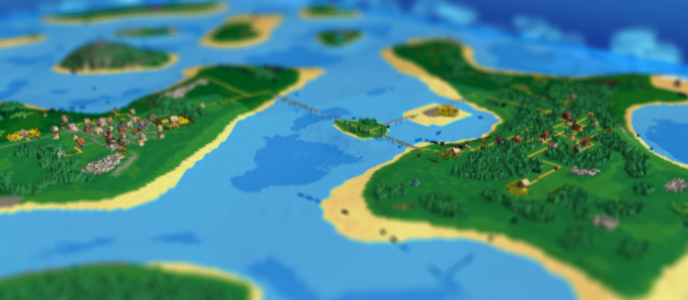
The game now supports the ability to build multiple Town Centers (the building previously known as the 'Base'). By performing Civics research, the player increases the maximum number that they can build. It starts at a maximum of just 1, but reaching Town Center levels 4, 6, 8, and 10 each unlocks a new level of Civics research that increases this maximum to 2, 3, 4, and 5 buildings.
Town Borders

Historically the Town Center (Base) was a glorified storage building that didn't interact with the rest of the buildings much. The previous update improved this slightly by allowing Markets to join together via a central Town Center. But now, the Town Center is a critical building because it has its own area-of-effect that combines nearby buildings into a single "Town" unit.
In the screenshot above you can see the highlighted tiles represent the 'town borders'. It's an area that extends from the Town Center along roads (or foot paths), out to a certain radius. Any House that is connected to this road network will also extend the town borders around it. Markets connected to this road network can deliver to any Houses in the town. And, any production building anywhere in these borders (no road connection necessary) will also be considered part of the town.
The range of the Town Center will extend as it is upgraded. And Town Centers have a label property, so you can give your towns their own name!
This leads us to one major balance change: The Happiness bonus is now specific to a particular town. It's no longer a global value. Happiness is calculated per-town based on the houses within it, and only production buildings within the town get that bonus. Players are still free to place buildings wherever they want, but will need to try and extend their town borders and consider placement more carefully in order to optimize production. While this may seem like a big nerf, many other balance changes were made to boost production in other ways...
Town Specialties

Each Town can be assigned one Town Specialty, like Farming, Mining, or Magic. In most cases, the result will be that certain recipes matching this specialty will double their output (without requiring more ingredients). Other specialties like Commerce will double the speed that Houses in that town consume items, allowing you to sell goods much faster and earn more coins.
Town specialties have requirements that must be met in order to be available - like having a certain number of houses or specific production buildings within the town's borders.

In the example above, Wood Wheel and Cloth are part of a town that has a specialty of 'Production' so their output is doubled. The pickaxe, however, is a recipe that requires a specialty of Mining or Industry, so it is produced at the normal amount.
Again, this Town Specialty attribute is assigned at the Town Center and only buildings linked to that Town will receive this very large bonus!
In summary, the combination of these elements should mean that players have a strong reason to spread their towns out across the world and transport goods between them. It should make things much more interesting!
Campaign Map 7

Finally, Campaign Map #7 is out! I try to make each Campaign map feel unique, and I wanted this one to require the player to send goods across multiple production center islands. The player actually starts with 3 towns spread across the map - one specializing in Farming, another in Mining, another in Forestry. Resources are pretty concentrated on these islands as well - so the player will need to solve problems like delivering Planks to the mining island.
The goal of this map is to activate an abandoned Mana Reactor high on a mountaintop, and use it to produce powerful Omnistones for the first time in the campaign, study them, and build their own Reactor.
Work Units display

The game has had multiple bonuses available to speed up production, but it's never really displayed this information very well. Now, this information is conveniently displayed if you hover over the Work Units icon on a selected building. All the various active & inactive bonuses are shown in this list, so you can see exactly what is contributing to production speed.
Then, instead of the misleading 'production time' value on each recipe, it just shows how many Work Units are required to produce it. For example, a recipe requiring 3 Work Units in a building producing 1 Work Units per Second will be completed in 3 seconds.
A few changes have been made to standardize the production bonuses. For instance, The Happiness and Global Production Speed bonuses are no longer multiplicative on top of all other bonuses. Instead it is multiplied by the number of workers in a building, and then added to the rest of the bonuses.
Auto-Upgrading Houses

Having to click 'Upgrade' on all your houses multiple times was kind of a rote, tedious process. I want to move more towards a model where several town & production buildings upgrade more organically through use and/or through supplying goods, and the player doesn't need to spend as much time stockpiling specific goods in barns.
So now, manual upgrading of Houses has been removed and instead they upgrade once they have consumed enough goods of a specific type. The amount & type of goods they require for each level is roughly the same as what they used to for manual upgrades. Plus, the goods are no longer subtracted from the player's inventory. Houses that require a specific good for an upgrade will take the highest delivery precedence over other houses.
Balance Changes
- The first worker in a building produces 100% of baseline worker units. Workers 2 through 5 each produce 50% of baseline worker value. Additional workers after 5 produce 40% baseline worker value. Previously additional workers only added a flat rate of 25% for all buildings, except for natural resource production buildings where additional workers provided 100 for each worker. UPDATE: In version .189, the worker production value was reverted to 100% for all natural resource production buildings (Farm, Forester, Fishery, and Mine) because they are harder to connect to the Town due to their placement restrictions, and are already limited by resource yield.
- Steam Boost will provide 1 additional work unit per second (additively), instead of 50% (multiplicatively)
- Elemental Boost will provide 2 additional work unit per second (additively), instead of 100% (multiplicatively)
- Omnistone Boost will provide .5 additional work unit per upgrade per second (additively), instead of 100% per upgrade (multiplicatively). Infinite research of Omnistone Boosts increases this amount by .1 per upgrade, for each level of research completed
- Supply Water, Supply Fertilizer, and Supply Pickaxe recipes only require 1 work unit instead of 2
- Happiness and Global Production Modifiers are now applied per worker, instead of multiplying against the baseline worker output (which changes calculations slightly because not all workers apply the same baseline value, e.g. the first worker is 1 work unit / sec and each additional worker is .5 work units / sec, but each would receive a .2 work unit / sec bonus from happiness)
- Campaign Map 4 starts with a working locomotive setup
- Omnitemple research requires base level 10
- Temple research no longer requires Mana Reactor, just Base Level 9 and the related elemental Purification technology
- Removed Omnistone ingredient from temple research
- Elemental purification and Elemental Temple recipes no longer require purified Crystals, just elemental ethers
- Houses no longer have resource cost (they are still limited in number though)
- Default Grain Yield increased from 5 to 10. Grain Affinity multiplier reduced from 4 to 2. This means grain is easier to grow in arbitrary locations, production is not as strongly linked to affinity.
- Cotton, Berries, Herb, Tomato, and Cactus Fruit automatically being re-growing when harvested instead of disappearing
- Removed Happiness victory condition from Campaign 2
Misc Changes & Improvements
- No longer shows infinite research Stars on the top-left status panel, as it is needed to display base count instead.
- Item production details are now shown on tooltips for Research recipe outputs
- Attribute selection panel (Math Function, Access Type, etc) is now a repositionable window
- Happiness and Consumption duration are shown on tooltips for sellable items
- Instead of a single base level requirement, can now have victory conditions specifying which town specialty is required for that base level.
- Temple building research is no longer hidden when is in a locked state
- Worker Bonus editable rule on buildings has been deprecated, as it is now a global setting
- Clicking on a Train Station’s inventory slot will open up details for the full list of inventory slots, not just the one that was clicked on, to make batch editing easier
- Improved performance when drawing many highlight tiles on the ground
- Boat pathfinding has longer range and is more optimized
- Removed Juices / Jams / Dragon Punch from Campaign Map 1 as they weren’t possible to produce with available buildings
Bug Fixes
- Agent Triggers were not showing all selected worker filters, just the first one
- Was showing erroneous tooltip when hovering over a blank inventory slot
- Unexpected behavior when worker unit holding an item was issued a dropoff command to a chute or belt
- Was unable to build extension to Omnipipe from a location that had an item in it, had been giving an 'occupied' error message
- Fixed 'base capacity increased' appearing repeatedly (hotfix .188k)
That's all for now, thanks as always for playing!
.187 Patch Notes
Balance Changes
- If player has spare capacity for Houses or Workers, the number indicator on the status panel will be highlighted in yellow
- Airship dock no longer costs Purple Coins. A cost of 50 Reinforced Planks was added in addition to the existing 50 Mana Bricks.
Bug Fixes
- Fixed error making it impossible to start a new game
- Omnitemple was not showing ‘Supply Offerings’ recipe once construction was completed, until game was saved & reloaded
- Targeting lines & effects were incorrect for workers when assigned the “Deliver to…” behavior
- “Drop Off” behavior would not assign the specified highlighted items
.186 Patch Notes
Town groupings and extension of Market delivery radius
- The Base building now has its own area-of-effect range that will group nearby Markets and Houses into a single ‘town’ unit.
- Markets in the same town will share delivery range with each other, making it much easier to supply goods to a larger area.
- The range of this effect will increase as the Base is upgraded.
- Removed ‘always connect’ square radius of Markets, as it was confusing to have two different ways to connect. Now you need to use Foot Paths or Roads to connect all town buildings (Bases, Houses, and Markets).
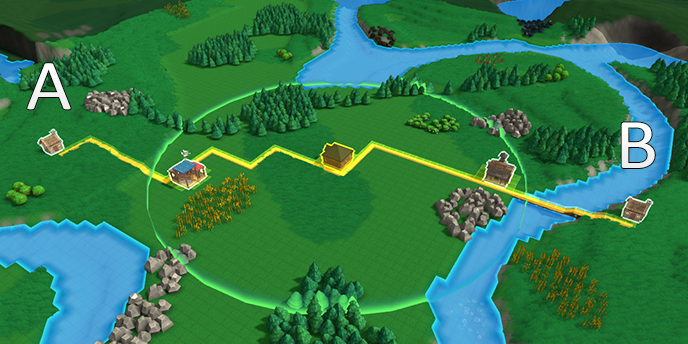
In the picture above, House A is only in range of the Food Market. House B is only in range of the General Store. But because both markets are connected to the same Base, the delivery range is combined and both houses will be supplied by both markets.
Improvements
- Added new building materials: Mana Crystal, Fire Crystal, Water Crystal, Earth Crystal, and Air Crystal (with blocks, ramps, etc for each)

- Roads and Footpaths that are next to each other will now combine to form solid textures instead of a lattice

- Greatly improved map load times by deferring a lot of navigation data calculation until it is needed during gameplay. This especially has a benefit on maps with many purchased terrain chunks.
- Made Grain more plentiful, and closer to starting area, on new custom generated maps
- Made terrain adjustments to starting area smoother and over a larger radius
- Increased display range of many world objects
- PgUp / PgDown can now be used to change the placement height of block structures, buildings, moved and copied block regions.
- Improved terrain textures
- Improved model & texture for stone brick physical item
- Increased smoothing amount of area around starting base
- Removed excess AoE display effects when placing houses
- Temples that spawned with map can be moved once the associated temple research is complete (excluding Campaigns)
Bug Fixes
- Path Planner would often attempt to draw paths underwater, and make mistakes in other edge cases
- Flipped texture on walls
- Missing frame mesh on wood stairs
- Movement commands were not able to target the tops of solid block structures
- Workers delivering multiple item types to a group of houses would sometimes prioritize items wrong
- Building and deleting a Steam Generator in the same session would cause the ‘missing pipe’ icon to hover in center of map (usually above Base)
- Merge blocks would jump to the next scheduled inlet during game load if an item was restored in that location
- Was able to assign Filter Categories to an Item Generator, resulting in invalid items being output
Block Builder Update!
New Blocks!
This patch adds dozens of new decorative / structural blocks you can use to spruce up your town! Choose from several new shapes like blocks, ramps, stairs, platforms, and pillars and materials like Wood, Stone, Brick, Iron, Gold and Cheese (?).
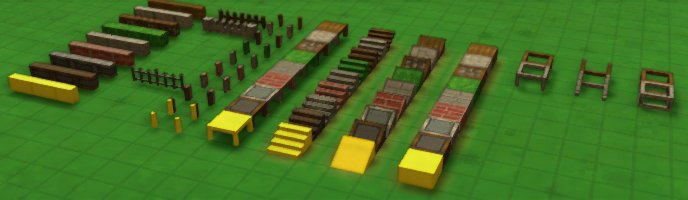
The decorative Fence has also been greatly improved - now instead of just placing it like a single block (which made corners impossible), you can drag it like any other path object, or hit R to rotate to a specific angle. It also comes in several different variants (like a Stone Parapet) and also as a solid wall, in each of the different material types. At some point I may add some in-game function for these fences, but for now, it's just for decorative purposes.
Some of the older structures had their textures improved as well.
Log Bridge

There's a new Log Bridge path structure as well. This is created like a path, is very cheap and can be placed above water. Workers walk quickly on it, but wheeled vehicles move slowly. Like other paths, you can hold down CTRL while dragging to create a level path in the air. The Log Bridge does not require any supports beneath it, but also can not be used to support other structures. It's meant to be used in the early game if the player needs to cross water but doesn't have much manufacturing capability.
Context Hotbar

With all the new block types, the game needed an easier way to switch between block types of the same material. Now, when you're building one of the new decorative blocks, a hotbar appears in the bottom-right showing all the different types available for the active material. You can click on these icons, hit TAB to cycle through them (or Shift+Tab to cycle in reverse).
In addition, this hotbar shows various relevant pipe structures when editing the 2D layers.
Misc Improvements
- Increased spawn rate of Sugar zones on custom maps
- Improved display of pipe connectors and their highlights
- When a chute or rail path is drawn so that it stats or ends in the middle of an existing path, it will create a T junction instead of a much less functional X junction
- Any structural block that does not require a lower support (e.g. scaffold blocks, but not flower pots) can be built off of a building based on where the cursor hits
Balance Changes
- Terrain purchase is now a flat cost of 500 yellow coins
Bug Fixes
- Fixed incorrect highlight messages when harvesting items
- Fixed bug: Using the pipette tool on a Road or Foot Path that was laying flat on a block would pick up the block, not the path
- Fixed bug: Small sized maps did not have adequate distribution of spawned resources
- Fixed bug: the Tools menu button show an empty list every 2nd time it was used
- Fixed bug: placing non-path structures that still support navigation (like solid blocks) were not recalculating Market reach
- Fixed bug: menu quick-access buttons were not highlighting properly
- (Hotfix .185h: Fixed workers not being able to drop off to chutes that were on top of non-solid block surfaces)
Next up I'll be working on Campaign Map 7! Thanks as always for playing,
Erik
.184 Patch Notes
- Fixed bug: Trains would stop to pick up at a Train Stop (and perhaps stay indefinitely) even when overall train stop + train filters were completely incompatible, as long as one of the rail cars had an individual item slot without a specific item filter
- Tailor can now be upgraded with Steam, Water Mana, and Omnistone boosters
- Medicine Hut can now be upgraded with Steam, Fire Mana, and Omnistone boosters
- Fixed bug: was possible to inadvertently re-trigger a double-click action on selected object when closing out of a menu
- Added additional patches of Potatoes, Carrots, and Apples to Campaign Map 6
- Fixed bug: default behavior of path planner tool would create a path below the surface of water
.183 Patch Notes
- Fixed bug: Trains transferring goods from non-Train Station buildings would depart the station before moving all possible goods
- Increased spawn rate of Grain at medium distances from map center
- Fixed bug: activating Chute or Rail from build menu or hotbar would not allow rotation or placement of single path items
- Fixed bug: was able to set research state completed / uncompleted in non-creative mode
- Fixed bug: cursor building action panel would block the mouse cursor from hitting world objects
- Fixed bug: flickering when building pipes due to colliders inadvertently remaining on path previews
(sorry if this is a duplicate - there were some issues posting these patch notes earlier)
Update: Campaign Map 6 Now Available!
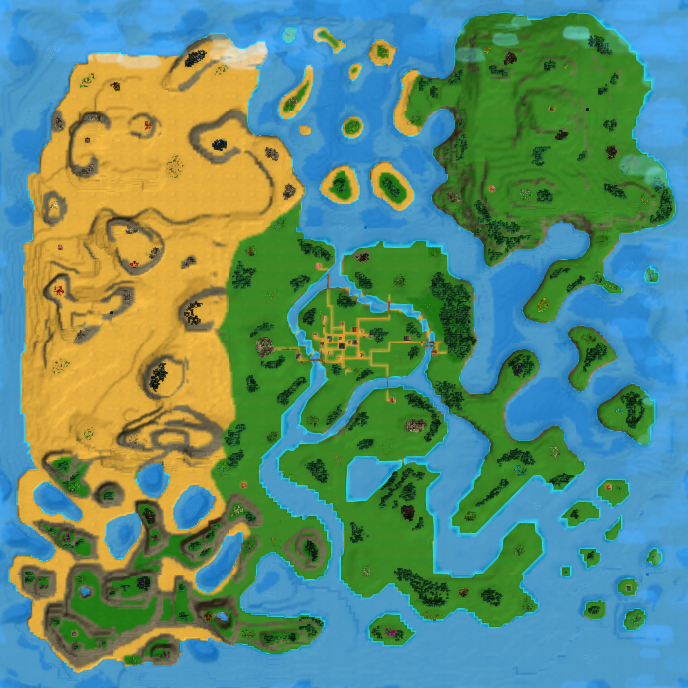
New Campaign Map
Campaign Map #6 is here! It's a large, varied map that will introduce the player to Elemental mana power. The starting center town is surrounded by four distinct biomes, and you must venture far out into each to find the four Temples of Fire, Water, Earth, and Air. These produce matching types of Crystals that you can research to unlock new magical technology. Once that research is mastered, you can craft and sell extremely valuable Spellbooks to achieve victory.
It will take a large network of roads, rails, and pipes to move all the necessary goods around, but there are a number of helpful trading posts around the map to assist you. In particular, the two trading posts closest to the town are looking for Exotic Fruits (Cactus Fruit and Dragonfruit) and if you can supply them you gain access to a great source of coins and materials.
Balance Changes
- Bandage, Poultice, and Medical Wrap moved from Workshop to Medicine Hut. For compatibility reasons, legacy maps will automatically be set up with a custom rule override that retains a copy of these recipes at the workshop.
- Steam Pipe recipe consumes 1 Iron Ore instead of 2, and produces 2 Steam Pipes instead of 1
- Rail Tile consumes 1 Stone Slab instead of 2, and produces 2 Rail Tiles instead of 1
- Remedy now worth 4 Blue Coins (up from 3)
- Poultice now worth 3 Blue Coins (down from 4)
- Antidote worth 14 Blue Coins (up from 12)
- Medical Wrap worth 18 Blue Coins (up from 14)
- All recipes that produce Elemental Crystals decreased baseline production time from 6 seconds to 4 seconds
Misc Improvements
- Path preview when drawing pipes has been improved
- Improved performance related to Affinity Tooltip panels
- Improved performance of modifying roads and houses
- Bottom-left button grid now shows more buttons than before, instead of hiding behind mouse-over popup menus
- Natural resource groupings are cached so that displaying them doesn’t take as long when using the World Data panel
- When placing Farm Tiles / Tree Planters / Omniplanters, blocks that already have that structure type are no longer highlighted, making it easier to see where they need to be placed
- Grabber will now auto-create when placing a single belt facing away from a building (used to have to drag a path of 2+ tiles)
- Inventory slot detail menu and Item filter selection panel are now draggable
- Dragging a menu panel will make it the front-most UI panel
- Improved performance of preview paths
- Improved performance when building anything while game is unpaused
- Path Planner tool is more reliable when end target is on steep or uneven terrain
- Added tooltip descriptions for farming supply actions
Bug Fixes
- Fixed trains continuously loading goods from a building when multiple valid items are being continuously delivered to the building (even when ‘hold until full’ is off)
- Removed obsolete “Fruit Juice” and (plain) “Jam” recipes from Kitchen. For compatibility reasons, legacy maps will automatically be assigned an override rule that keeps them active.
- Fixed bug: tile affinity was conferring yield bonus to a resource even if the affinity was for another item type
- While the tutorial is active, opening the victory conditions panel early will no longer skip the tutorial step that requires you to open it
- Fixed cursor tool preview block being too opaque
- Fixed bug: when placing path structures like chutes & belts, arrows indicating default access into or out of building were not being displayed correctly
- Fixed 2D grid selection highlight not appearing
- Fixed bug: Priority Sorter was acting unreliably
- Fixed bug: workers would not re-attempt to harvest resources if they had fully depleted but then regrew
- Fixed bug: resources, affinity, and mining layer wasn’t being correctly loaded on northern-most row of each terrain chunk, resulting in straight lines missing data
- Fixed patches of missing affinity in Campaign maps
- Fixed bug: placing a farm tile wouldn’t immediately update the inventory display panel of the resource on that tile
- Removed item Descriptions for physical items, they were often unhelpful and out-of-date
- Fixed bug: Apple Jam and Apple Juice were not showing their recipe inputs in their tooltip panel
- Fixed bug: worker units not triggering ‘On Exit’ condition of agent trigger
- Fixed bug: ‘Hold Until Complete’ was not working for loading trains
- Fixed bug: Victory Condition of ‘Item Sell Counts’ wouldn’t store tally of items sold with the map file
- Fixed some missing localization
Major Resource Rebalance & Quality-Of-Life patch!
It's a major step towards the 1.0 release, and addresses some fundamental gameplay issues that I feel have been holding back the game since the beginning. So here's all the details!
Map Generation Improvements
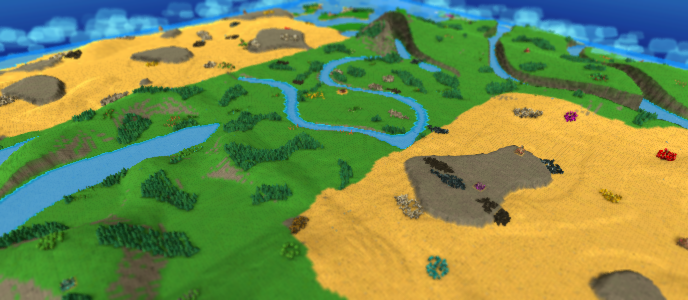
The previous logic for generating resources on a Custom map was pretty messy. In general the map was flooded with resources, because the old method didn't have a good way to keep patch size reasonable while still ensuring there was enough of that resource on the map. Or, you might get a bunch of tiny patches with just 1 or 2 items. There was no guarantee you'd have the right resources near your base, or that there would be enough on the map at all. And ultimately, it didn't even matter where resources spawned, because you could just arbitrarily create your own anywhere (see the next section for how that is addressed).
So I rewrote the resource generation algorithm from scratch!
BEFORE:

AFTER:

In the new algorithm, resources are generated in several separate steps. First, the map is divided into zones that are evenly spread out from each other (with zones being a bit closer together in the center of the map). Then, resource types are assigned to those zones - taking into account which resources are important to have close to the base, and how much of that resource has already been generated. Last, the patches are 'grown' outward to reach a target size based on resource type and distance from center.

A debug view of the zone generation method - 'peaks' of this noise map are turned into resource zones. Note they are warped to be more frequent in the center

Resource zones after they are created
The result is a huge improvement in how maps play out. Resource patches are more consistently sized and have more space between them, resulting in more building area, less need to clear useless resources, and more meaningful mining & harvesting locations. Players will always have a good amount of certain critical resources near the base and reasonable amounts of all resource types elsewhere on the map. It also just looks better to not have huge fields of carrots, stone, and tomatoes smashed up against each other.
Resource Affinity & Yield

All the improvements to resource regeneration would be pretty useless on their own - as it was pretty simple to just place whatever crop you wanted anywhere on the map with no downside to consider. It made things a bit too easy - players had no incentive to take advantage of natural resource spawn locations, and missed out on having to solve interesting transportation challenges.
To fix this, the game now has the concept of Resource Affinity. Simply put, some things grow better in some parts of the map than in others. This means the efficiency of farms, foresters, and mines depend heavily on where you build them. And if that's the case, long-distance, high-throughput transportation options (like Trains) will become much more valuable. So it should make gameplay much more interesting in the long run.
Here's how it works in more detail. Each terrain tile can have affinity for a certain farm crop, tree type, or mineral. The affinity value can go from 0% to 100%. When a map is created, any naturally-occurring resource patches (plus a small area around it) is assigned 100% affinity for that resource type. When a resource is regrown on a tile the amount of items that can be harvested from it (i.e. its Yield) will be increased by 4x if it has the right affinity. On fast-producing farms, players will often be limited by how many crops are ready to be harvested, so a higher yield winds up producing a much higher amount of items over time.
There's a tooltip on each item source that lets you easily see all this data in one place:

You can place resources without affinity, but the yield will be smaller. However, each time the crop/tree/ore finishes growing, the tile will gain a small amount of affinity. So over time, you can change affinity to match your desired farming area. However, this process takes some time, so it is much more effective to base your farms around natural affinity regions.
If a tile has Affinity for a different resource than what you planted, the affinity of the tile for the old item will decrease slightly each time growth completes. Once it reaches zero, that old affinity is lost and it begins adding affinity for the resource type being grown that tile.
Yield is also affected by Farm Tiles, Fertilizer, and Water. Previously, these would increase crop regrowth speed, but now they simply add more items to the resource once growth completes. (Earth Shrines still boost regrowth speed.)
Affinity & Yield details can be viewed in several ways: When placing a resource or a Farm Tile-type block, all tiles with relevant affinity are highlighted on the map. Hovering over terrain will display its affinity value. A selected resource displays current yield and affinity, and hovering the Yield element will give a detailed description of the boost factors that are or aren’t currently being applied. And the new World Data panel has options to display crop, tree, or ore affinity tiles.
Affinity only applies to above-ground resources - minerals that spawn underground aren't affected. However, their Yield is increased from previous version, and can be increased much further by supplying Pickaxes to the Mine Shafts (via connected Mines).
One big related change is that the old 'Ore Prospecting' feature has been disabled by default. Again, this made it too easy to create mines in arbitrary locations, and was always intended as a placeholder until these current resource improvements could be made. To balance this out, underground resources have a much higher yield now, so you won't need to create huge patches to get a useful mining setup. (For players that really liked the old style, you can re-enable this ability with global rule “Ore Prospecting”.)
World Data Panel

The hotkey for Data Overlay (default: F) used to just show all items stored or produced by all buildings. On big towns, the result was information overload and made it much less useful.
Now, there is a new panel you can toggle with the same hotkey which has multiple layers of data you can toggle on or off.
Resource groups like crops, trees, ore, and fish can be shown. This highlights all tiles with matching affinity, and shows an icon for that crop over each resource patch. (A ‘patch’ is calculated dynamically based on groups of nearby resources).
Data Overlay ‘Production’ tab shows icon highlight color when recipe is starved for input (red) or can’t produce because output is full (purple):

New Resources & Recipes

- Added new natural resource: Prickly Pear, which produces Cactus Fruit. Cactus Fruit can be harvested by Farms, but Prickly Pears can only be planted on Desert Sand tiles. They also only spawn naturally on Desert Sand terrain.
- Added new natural resource: Dragonfruit Tree, which produces Dragonfruit. Dragonfruit are harvested by Foresters and require Tree Planters.
Note: maps created before this update will use the old resource generation algorithm, and will not naturally spawn Dragonfruit Trees or Prickly Pears.
- Added new items and recipes: Cactus Jam and Dragon Punch
- ‘Fruit Juice’ and ‘Jam’ have been changed into fruit-specific items and recipes: Apple Juice, Pear Juice, Berry Juice, Apple Jam, Pear Jam, and Berry Jam. They are grouped into ‘Juice’ and ‘Jam’ satisfaction category for houses.
NOTE: For compatibility reasons, the old Fruit Juice recipe will be left intact on legacy maps. This recipe accepts any fruit, and instead of a generic 'Fruit Juice' item it will convert it to Apple Juice. Any existing ‘Fruit Juice’ items are treated as Apple Juice. Similarly, the old Jam recipe now produces Apple Jam and any existing ‘Jam’ items are treated as Apple Jam.
New Buildings

- Added new building: Tailor. This handles all clothing-related recipes (Shirt, Cloak, Warm Coat, Shoe) instead of the Workshop. Legacy maps will retain these recipes at the Workshop.
- Added new building: Medicine Hut. This handles medicinal recipes (Remedy, Fish Oil, Ointment, Antidote, Health Potion, Elixir) instead of the Enchanter and Kitchen.
NOTE: For compatibility reasons, maps created in prior versions will retain these recipes at the original buildings.
Balance Changes
- Removed default auto-replanting of all Farm crops, unless linked to a Farm or Farm Tile
- Can place a crop without a Farm Tile, as long as terrain is valid.
- Can no longer place Farm Tiles or Tree Planters on Sand or Rock terrain types
- Yield for underground resources has generally been rebalanced so that common resources like Stone and Iron Ore have a higher yield than rare resources like Gold or Mana Crystals. Previously this was the opposite.
- Mines will prefer to harvest above-ground resources before underground resources
- Made crop growth speeds more consistent (difference now is in the yield each item produces)
Miscellaneous Improvements

- Improved the visual lines that indicate worker targets & paths.
- When a building is selected, arrows indicate where workers are supplying input, and where they are delivering output. Assigned workers are highlighted as well.
- When a worker unit is highlighted, its pickup and dropoff locations are be highlighted.
- Farm Crops get automatically removed when placing or moving a building onto their location (unless they are compatible, like Farm Tiles)
- Can double-click on terrain to jump camera to that location
- Can now change textures on terrain that had a default texture assigned from its original biome (e.g. Deserts)
- Built-in Biomes now have a wider variety of textures
- Fixed bug: Mesa Valleys biome had resource distribution similar to Desert type
- Added Oasis biome
- Resource patches are no longer 100% solid masses, they have some natural spacing in between individual blocks
- Added ability to specify terrain type within each component of the terrain generator. The terrain used is based on the component with the highest height (unless a ‘Minimum’ height blend is specified, in which case the component with lower height gets terrain type precedence).
- When editing custom map generation, now can set resource ‘patch size’, which is a more useful value than ‘spread’.
- Mining ores spawn with higher resource counts as you get farther from center of map
- Tiles that are near water are highlighted when placing crops
- Water and Fertilizer state on Farm Tile is now simply On or Off. Instead of decaying slowly, water and fertilizer state will contribute to Crop Yield once growth completes, and each will deplete at that time (at which point it can be refilled by nearby water or Farm).
- Pickaxe state on underground resources are consumed one at a time when the ore node finishes regenerating, instead of slowly depleting.
- Added cursor highlight when navigating 2D views (underground mines, pipes, etc)
- Worker Overview panel now starts on left side of screen so it’s easier to see the workers you click on
- Camera can now be moved while dismissable modal menus are active (e.g. Worker overview, World Data panel)
- Fish particle effect changed - now shows as circular bubble rings. They can also be displayed as an Affinity Zone highlight. These zones are visible when interacting with Fisheries or Fishing Boats. Can also have these zone displays toggled on or off in the Global Data panel.
- Reorganized list of item icons that appear in Item Filters and Player Inventory
- ‘Remove Resource’ now has a dedicated control (default: Ctrl+X) which will toggle to and from the current build action without clearing it. It also has its own icon in the bottom-left Tools menu
- Improved performance of drawing glowing highlight tiles around the map
- Reduced glow when showing Market-connected paths
- Minor changes to campaign maps
- Riverbanks now default to a green grass texture, not sand
Bug Fixes
- Fixed bug: recipes would forfeit remainder of production time each time a recipe completed during a simulation tick, causing meaningful reduction in output on fast / highly boosted recipes, especially on lower framerates
- Fixed bug: Trains would remain at a stop loading a handful of items at a time, if new valid items constantly flowed into the building and the building contained other items that were not valid transfers to the train
- Fixed performance issue caused by frequently redrawing world highlights when certain buildings were selected
- Fixed some missing text characters in localized text, were appearing as boxes
- Fixed missing tooltip on natural resources & crops actively growing
- Fixed missing localization on 'InvalidTerrain'
- Fixed bug: unable to select an underground resource if it was on a Mine Shaft
- Fixed bug: hitting ESC while assigning a worker delivery would not immediately remove the dragged item’s icon from the cursor
- Fixed bug: worker preview paths were not always displaying
- Stopped building alerts from interfering with worker targeting actions
- Fixed bug: game loop would break when a worker assigned to harvest water from a river or lake
- Fixed out-of-date icons for potato & carrot plants
- Fixed bug: switching between maps might not update build button costs or locked state properly
- Fixed bug: empty inventory slots would sometimes appear as partially full
- Fixed bug: incorrect icon for Fabric filter category