Hello! The current patch I'm working on is taking a bit longer than usual so I wanted to give players a status update.
Problem that needs solving
A core part of Factory Town gameplay is about transporting raw materials and goods around the map to keep your supply chains running at full speed. But the way the game handles spawning & placement of natural resources doesn't really work well for that purpose.
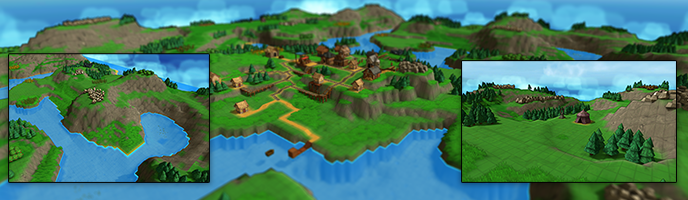
Fig. 1: A mess.
Currently, the map generation uses a random function for each resource that determines where patches will spawn and how big they are. But the way it works is a bit too random - you might have huge fields of carrots, or a tiny patch of just 1 or two. You might have a map that is totally missing some key resource, or it might be too far away from the starting area to be useful. And resources overall are so plentiful and crowded that players wind up bulldozing most of them.
Furthermore, once you get a basic Farming or Mining setup the natural resource spawns become completely irrelevant. You can place a full grid of any crop you want anywhere on the map, or Prospect for any mineral in any location. I want to give players creative freedom for sure - especially in the late game stage - but letting players generate whatever resource they want in any location means that many of the interesting tools for long distance transport (Trains, Minecarts, Packagers, etc) don't have a strong reason to use them.
Attempted solution
Both of these problems need to be solved together - if I limit the ability to place crops, but the natural resource generation is subpar, then the game would just be frustrating. Or I could greatly improve resource spawning, but if players can just bulldoze them & rebuild wherever they want, it's wasted effort. So, I am planning on addressing them both in this patch.
For one, I have rebuilt the resource generation algorithm from scratch. Instead of each resource having an independent random function, the game performs a first pass to determine where generic resource 'spawn zones' should be located. This helps me guarantee a good concentration of resources near the base, and spread them out as you get farther away. Then a second pass determines what resource should actually be assigned to those zones, and how big those zones should be.
Fig. 2: Generic resource zones before they are assigned a specific item.
This gives me very tight control over which types of resources spawn based on their location on the map - for instance, I can guarantee that the closest resource patch is always Wood, and the next one is always Grain. I can make sure that a certain resource is chosen if there isn't enough of that resource on the map. And I can independently control the size of resource patches and its frequency - so I can guarantee that Gold Ore is rare, always shows up in small patches, but still has enough locations on the map.
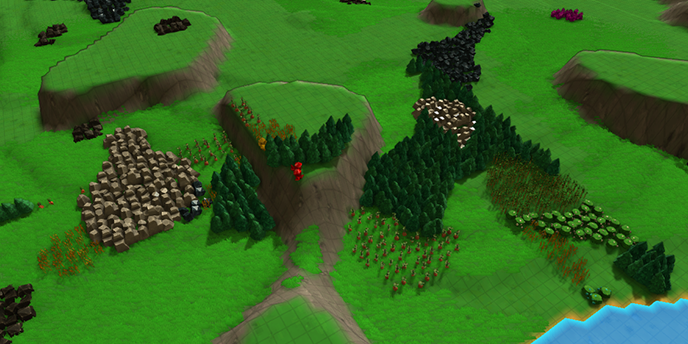
Fig. 3: How things are looking now (note that patches are more spread out and reasonably sized).
The second big change is to add 'specialty' or 'affinity' zones that are better at growing certain types of crops. By default these zones will show up where resources have naturally spawned on the map. You'll probably be able to change terrain crop affinity over time, but it'll either be very slow or very expensive.
Similar changes will occur with underground mining - you won't be able to prospect for any ore at any location, but the map will do a better job of creating a good balanced set of patches.
My hope with these changes is that resource availability will be more consistent and fair, natural resource patches will be more meaningful and valuable, players will have much more room to build without having to bulldoze a bunch of potatoes, and will have to think a bit harder about how to move resources around the map.
(A caveat to all this - I plan to allow more flexibility around this stuff in the late game stage, and also make it optional in case players like the total freedom of the old method.)
There's a bunch of other stuff too - some new resources, recipes, and buildings will be available. My guess is another week or two before it's all ready.
Cheers!
Erik
.180 Patch Notes: Expanded Train Functionality
More flexible Train Stops
Trains can now stop at any building that has a Train Stop attached. The transfer rate when using a Train Station remains at 1 full car per .5 seconds, otherwise transfer rate is limited to 4 items / second.
Trains have been available for a while, but after player feedback I realized I made them too limited. I wanted Trains to fill a niche of high-throughput long distance transport, so I made them carry a lot and load & unload very quickly, but also require a 3x3 Train Station to transfer any items, plus a 1x1 Train Stop logistic block to connect to the station.
However, this means that in pretty cramped layouts trains were not viable - space is at a premium and players just didn't want the hassle of working a the 3x3 Train Station into their layouts. Also, many players were confused why Trains weren't making use of Train Stops (the answer being, they weren't connected to a Train Station).
So I've changed things around so that trains can load or unload at any building. (A Train Stop is still required, as this tells the Train it needs to perform a transfer, but those are 1x1 and fit neatly over rail tiles). However, the rate it can move items when it's not at a Station is just 4 per second.
This should preserve the advantage of long train routes + Train Stations for centralized, large-scale transfer tasks, but add an additional role for trains that they can shuttle goods around a smaller loop. This is particularly useful because trains can carry multiple goods at a time, and can perform both pick up and dropoff. You'll just need to find a way to supply your train with fuel and water.
Additional Balance Changes
Airship transfer rate increased from 2 items / sec up to 4 items / sec when not at an Airship Dock
Bug Fixes
Fixed bug: Chinese localization would not display correctly on some menus & tooltips
Fixed bug: arrow keys on Build menu would jump around between results instead of navigating up or down
Fixed bug: High throughput, High latency maps could sometimes stop working. Caused by a Farm harvesting action that changed a crop state which then caused an Earth Shrine to apply its regen boost all in the same update loop.
Fixed bug: Trains at a Train Stop flagged for ‘Wait until Empty’ would never resume unloading if had to temporarily pause due to target building being full
Fixed bug: missing text for ‘Preserve Depleted’ option when editing rules for Natural Resources
Fixed bug: Build menu search text would not get cleared after loading a different game
.179 Patch Notes
- When searching in the Build menu, items whose names start with the search text are sorted above those where the search text appears in the middle of the item’s name - Majority of structures, not just Paths and Logistic blocks, can have their rotation updated by building the same structure type on top of it. (This excludes structures that can be stacked like scaffolds) - Fixed bug: Build menu was not reliably highlighting the topmost item when searching - Fixed bug: flattening terrain would not update slope data, resulting in incorrect chute behavior - Fixed bug: Pipe connectors that were Inlets as well as Outlets were inadvertently restricting filters based on building's recipe output - Fixed bug: using ALT key to activate a hotkey or the 'delete block' alternate action would prevent the ability to right-click delete until cursor action changed again - Fixed bug: After placing a Logistic or Computational block, the cursor was not updating in a way that allowed it to be immediately deleted by right-click
.178 Patch Notes
- Fixed bug: towns could have multiple production problems if harvested regions were terraformed, resulting in navigation errors
Priority Block and Performance Improvements
Priority Sorter
This patch introduces a new Logistic block called the Priority Sorter. If you place it on an intersection, it will ensure that objects moving straight through the block take priority over those entering from the sides. (Otherwise, the default merge behavior is basically random).
Improved Inventory Display
The top-right display of player inventory has had some quality-of-life improvements. The font is clearer, and displays large values of coins or items in a shortened format. To see the precise amount of coins or items you own, just hover over the icon.
Performance Improvements
A good amount of optimization work was done to make the game run smoother, load faster, and allocate less memory over time - especially when big busy towns are involved. These changes involved text display, belt/chute/pipe item creation and destruction, pathfinding, navmesh generation, computational block display, rail cart animations, and worker behavior. It appears this can result in around 20% improvement in framerate on larger maps.
Pipe Management
Making edits to tightly-packed pipes has been a source of trouble, especially in the case where you're deleting part of a pipe path that crossed over another. The game previously would automatically create an intersection when part of a crossover was deleted, which resulted in contamination (left image). Now, the game preserves the crossover, preventing the path items from mixing until the player makes more edits (right image).
Balance Changes
Filters for Mana Connectors always show all crystal types, regardless of building output, in order to handle booster outputs
Plant Herb no longer requires Intermediate Medicine requirement - it only requires Farming knowledge
Bug Fixes
Fixed bug: Airships carrying multiple item types would stall at a building until the building's inventory was full
Fixed bug: got errors loading starting maps that already had buildings on them
Fixed bug: A group selection containing a logic block would inadvertently highlight all connectable logic blocks. Intended behavior is these will only highlight if a single logic block is selected, so you can link it
Fixed bug: enormous list of items would appear if a House was hovered while a worker unit was selected
Fixed bug: Hitting ESC while an object was selected in a 2D Grid View would dismiss 2D view instead of deselecting the active object
Update: Campaign Map #5 Now Available
Campaign Map 5
A terraced, mountainous terrain where the player starts harvesting Mana Stones for the first time and processing them into Mana Crystals. These Crystals are like magical batteries that can be used to infuse normal objects with special attributes. But in order to master this new technology, players will first need to make use of the four NPC Enchanters scattered around the outer hills - they produce magical goods that the player can sell back at their town, in order to earn the Purple Coins needed to complete advanced research.
Quality-of-life
- Infinite Research no longer automatically restarts as soon as it’s completed, which potentially consumed valuable resources unintentionally. Instead, when an Infinite Research completes, its notification panel has two buttons: “Repeat” and “Complete”. Repeat will keep the infinite research going. Complete will remove it from all Schools currently researching it. - Path Planner is now capable of ramping up to the highlighted endpoint. Hold CTRL for path to begin ramp up placement at beginning of path. - Can now specify a target endpoint height for Path Planner tool (PgUp / PgDown to change height), even with no object in place at endpoint - When placing resources using creative mode Place Resources tool or regular farming actions, and using a cursor tool size larger than 1x1, no longer rejects placement when center position is invalid (as other surrounding positions may be valid) - When you open the Build menu, the Search Text field immediately gains focus so you can just type to begin filtering for the object you want. - Menu items in Build menu are cached to speed up searching and navigation - Building a Farm, Forester, or Mine will automatically assign default ‘assist’ recipes (supplying water, fertilizer, pickaxes) when created, and will also automatically assign a resource gathering recipe as long as there is only one matching nearby resource type - When using the right-click delete function, the cursor tool size is always reset to 1x1 to avoid accidental deletions - Pipette tool will copy a Rail or Chute’s placement path direction
Bug Fixes
- Fixed bug: Worker units would attempt to navigate through unpurchased terrain, resulting in them getting stuck - Fixed bug: OmniTemple ‘Collect Bonus’ property would not update its display when toggled on or off - Fixed bug: In Creative Mode, Research recipes were not correctly displaying Completed / Locked status - Fixed bug: A fast-moving chute item that ran into a slow-moving chute item would maintain its fast speed but move intermittently - Fixed bug: Path Planner tool would create invalid corners for foot paths and roads that were going down a sloped path - Fixed bug: Hotkeys that activated modal menus (Supply, Production, etc) would not toggle them off - Fixed bug: Right-clicking while dragging a path would cancel the path drag but also delete any highlighted block - Fixed bug: Dragging path planner tool to an elevated position and then back to initial block would incorrectly show a ramp preview tile
Balance Changes
- Fire Temple now requires 200 Fire Ether instead of 100 Fire Ether to construct (to bring it in line with similar costs of other Temples) - Mana Pipe Connector now unlocks from Mana Transmission research instead of Mana Power research - Health Potion is now its own Satisfaction Category (previously coupled with Remedy) and sells for 5 Purple Coins instead of 16 Blue Coins - Antidote is now in the same Satisfaction Category as Remedy - Red Coin cost removed from Health Potion and Elixir recipes - Mines can now be embedded in hilly terrain - Wells and Water Pumps can be placed in blocks with up to 1 block unit of terrain slope - Sugar is now a Loose Bulk good (can be put in Chutes, Minecarts, and Hopper Cars) - Steam Pipe recipe has been moved to Forge, instead of Machine Shop. It also requires fewer total resources, with 2 Iron Ore and 2 Fuel to make 1 Pipe. The older recipe (2 Iron Plates to make 1 Pipe) will automatically be available in Machine Shops in older maps to prevent breakage. - Cost of Mana Transmitter and Receiver reduced to 10 Mana Bricks each, since they are no longer as useful
Other
- Removed automatic terrain stone texture when underground resources or mine shafts - In Creative mode, can right-click on items in the Research panel to modify their completion state - Locked NPC buildings no longer count towards building maximums or victory conditions. Their assigned workers do not count towards player’s population, and assigned worker can’t be changed outside of Creative mode. Their available recipes will also be fixed based on what is selected during map editing (even if not a Trading Post) - In Creative Mode, can use Place Resources tool on the Mining layer to create new underground mineral deposits - Added new Victory Requirement configuration option: “Items Sold”. This tracks the number of specific items sold to Houses. - Added Traditional Chinese localization
Shrine Update!
Highlights
Shrines and Mana Boosters
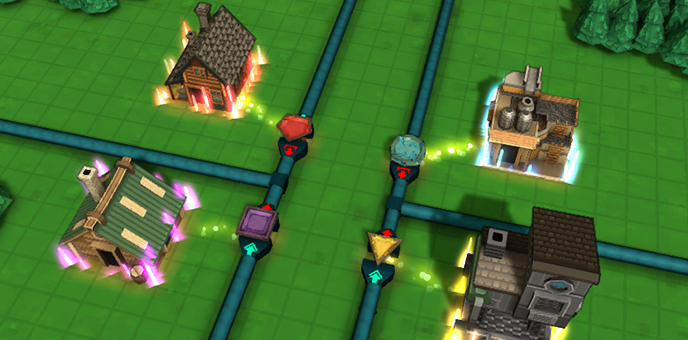
Elemental Mana Boosters are powerful - if you add that upgrade to a building and then supply charged Elemental Crystals, you get 100% output speed to a building. But this didn't mesh well with recent changes to the Mana System, because a building might also consume a charged Crystal as a recipe ingredient.
So I decided to move the Boost functionality out of the production buildings themselves, and into Shrines. Then, the Shrines can fill nearby buildings' boost meters via an area-of-effect ability.
To use this, first apply the Booster upgrade to your building (each production building allows a specific Elemental booster). Then place a Shrine of the matching element nearby, and select the "Transmit Boost" recipe on the Shrine. When you supply the Shrine with the right Elemental Crystal, it will fill the boost meter of nearby buildings. The Shrine will output Depleted Crystals, which you can then send to a Recharger so they can be used again.
(For now, the old method of connecting a pipe directly to a building to fill its Boost meter is still possible, but it's likely I'll make that obsolete in some future patch.)
As a bonus, the Shrine buildings have been updated. They no longer look like mini-temples - instead they each have their own unique shape that should help them be more identifiable.
Auto-disabled Grabbers
Previously, when adding a new Grabber, it would start out fully active and would begin pulling out items before the player had a chance to set a filter. This led to odd workarounds like having to build the grabber away from the building, then set its filter, then move it onto the building.
Now, the game detects if the newly created Grabber is linked to a building that could potentially output more than one type of item. If this is the case, the Grabber starts with an initial "Nothing" filter which will not output any items until a filter is assigned. (You can still use the blank "None" filter if you do actually want to pull everything, or shift-click on multiple specific item icons to select those as well).
Mana, Fluid, and Omni Pipe connectors also use this new process.
You can now also double-click on Pipe Connectors, Rail Stops, Inventory Sensors, and Agent Triggers to immediately open the filter selection window.
Cleaner Item Filter panel
Another nice change is that the Item Filter menu now only displays items that are relevant to its connecting building. So instead of digging through 100 items each time you want to set a Grabber filter, you only need to pick from the 2 or 3 items that the building produces as output, or the storage building is holding.
Smarter Mana Connector behavior
Some additional changes were made to Mana Pipe behaviors, as there were a few edge cases I hadn't taken into account when making the last round of updates. A big one of these was how Depleted Crystals behave. They used to always Bypass any building - but this made setting up Rechargers very difficult, as the player would often want those to Hold at the Recharger's connector if there wasn't spare capacity. This has been resolved so they behave more predictably
Full Patch Notes
Shrine Changes
- Increased Earth and Air Shrine area-of-effect radius - Fixed bug: Air Shrines were not applying effect on workers that were on Foot Paths or Roads - Workers can be boosted again by Air Shrines when their boost remaining falls below 20% - All 4 shrine types now have an additional “Apply Boost” recipe that will fill matching elemental boost meters for any buildings within their Area-of-effect
Mana Pipe Changes
- Removed logic that caused Depleted Crystals to always bypass a building. In order to preserve legacy booster setups, they will still default to bypass if the access type is 'Power In', or if they are at a Mana Connector with no outlets AND the building has a booster meter. But otherwise will act like regular items in a pipe. - Fixed Mana Crystals being output at a building’s Input node. The only exception to this is if the building produces depleted crystals as a byproduct or has a Mana Booster, as legacy setups require Input Connectors to act as Input+Output. This issue had mainly been affecting Rechargers, causing their charged crystals to be sent out their Input connector. - Fixed bug: A Mana Connector with input overflow behavior set to Hold was not holding Depleted Crystals - “Charged Crystal” and “Depleted Crystal” are now filter options when configuring a Mana Connector - Depleted Crystals will default to Hold at a connector if the attached building accepts Depleted Crystals as input (e.g. Rechargers).
New Features
- Added “Nothing” option to item filters, which will output no items (similar to setting to inactive state) - When creating a Grabber or OmniConnector (either manually, or via dragging a belt or chute away from a building) if the source building produces 2 or more items, or is a storage building containing 2 or more items, the Grabber will default to the “Nothing” filter. This gives players a chance to configure a filter before items are pulled out of the building. An exclamation point alert will be shown on the block until it is selected. - Can now double-click on Pipe Connector, Rail Stop, Inventory Sensors, and Agent Triggers to edit their Item Filter - When configuring the filter on a Pipe Connector or Grabber that is attached to a production building, only the building’s production outputs are displayed in the available filter list - Added 'Animate Workers' option in the Video Options panel, which turns worker bouncy movement on or off
Balance Changes
- Modified several Trading Post recipes to make them more advantageous, especially ones producing basic goods - Added new Trading Post recipes that produce Wood Wheels, Conveyor Belts, and Rail Tiles - Ethers had their consumption times sped up to account for recent change that they can now be produced 4X as fast, but also decreased sell values: - Changed Fire Ether sell value from 15 Red Coins to 10 Red Coins - Changed Water Ether sell value from 10 Blue Coins to 6 Blue Coins - Changed Earth Ether sell value from 4 Purple Coins to 2 Purple Coins - Changed Air Ether sell value from 20 Yellow Coins to 15 Yellow Coins
Misc Bug Fixes
- Fixed bug: could not use label filtering when filter menu was already displaying a subset of items based on parent object’s fixed filter - Fixed bug: Packed items would not enter storage buildings with packed item filter
.174 Patch Notes
- Fixed bug: Wood and Stone pillars were not buildable at the base of steep cliffs - Capped Pipe Animation speed so it would not appear backwards in cases of low framerate - Fixed bug: Copying and pasting compute block attributes onto another compute block would not always update the block’s icon - Fixed bug: Train cars would potentially load their item filters out-of-order, resulting in train engine's filter being ignored and accepting invalid goods - Fixed bug: Game would fail to update many world objects if there was a pipe connector without a pipe path - Carrot and Potatoes use Mesh Instancing for better performance
.173 Patch Notes
- Fixed bug: Airship navigation was sometimes unreliable if cursor hovered over belts, chutes, etc. when targeting its path - Fixed bug: Pipe connectors in the middle of vertical pipes were not treated as contiguous, and as such would hold items by default instead of bypassing - Fixed Mana Crystals being output at Input-only connectors, causing pipe blockage - Changed logic for when pipe items can jump from a building’s input connector to a non-contiguous outlet: Depleted Crystals can jump between Mana Connectors. If the connector is not a “Power” inlet, is set to Bypass AND it has no other pipe outlets, items can jump. This should prevent unwanted inputs from clogging up output pipes.
The Airship Update is here!
Airships and Airship Docks
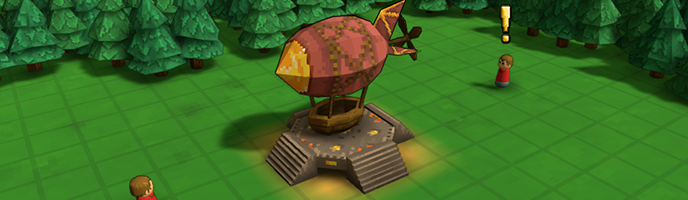
Airships are a new worker unit that allow for flexible point-to-point delivery of goods over long distances. They have a large capacity (4 filterable slots of 25 items each), can travel through the sky above obstacles, and can pick up and drop off at any building with clearance above it. It will be very useful when you need to make a large one-off delivery, or need to move a set of goods over a crowded area.
This is obviously very powerful, so there are some key restrictions to make sure it doesn't make everything else in the game obsolete.
For one, they move pretty slowly - about 2 blocks per second. They also require 4 population capacity, so it will not be viable to spam them. They are only only available late-game (Airship research becomes available once Air Mana Purification research has been completed). And, when transferring items to and from buildings, they unload slowly (2 items / second).
However, there are ways to improve this performance. For one, there is a new Airship Dock storage building that holds 400 items, and can transfer 25 items a second between Airships. So for high throughput routes, you will probably want to use those at your endpoints. Another is below...
Air Shrines and Worker Boosts
The Air Shrine has finally been introduced! When charged with Air Crystals, the Air Shrine will apply a 'Boosted' status effect to all population-based worker units that walk within a few blocks which doubles their movement and harvesting speed. It also reaches into the sky above it, so if you put an Air Shrine along an Airship route you will get much better results!
Mana Rework
The Mana system has been overly complicated for a long time, frequently blocking players from progressing further in the game. So some big changes have been made to it.
There's a lot of details, but the tl;dr is that Mana Transmitters and Mana Receivers are no longer necessary. Instead of Mana Power, you can pipe Mana Crystals directly into and out of buildings, or deliver them with belts or workers. And, all your old pipe networks will be totally compatible with the new system. See below:
Here's the full changes to the Mana system:
Crystals can move through mana pipes without needing to be converted to & from a power format (what Transmitters and Receivers used to do).
Recipes that previously consumed Mana Power will instead consume physical Crystals and produce Depleted Crystals as a byproduct. You will still need to remove these from the building, or else production will be blocked. However this can be done with pipes or with other physical means like conveyor belts or workers.
Since many buildings will now output Depleted Crystals as a byproduct, an ‘Exclude Crystal’ filter will automatically be applied to any Grabbers or Omniconnectors in legacy maps that don’t otherwise have a filter, and will be applied by default to any new Grabbers or Omniconnectors that are created when dragging new pipe or belt paths to buildings that produce these byproducts.
Transmitters and Receivers will simply function as a building that provides a convenient optional interface to the mana pipe network. So that means existing Transmitters and Receivers can remain in place without having any negative effects.
Receivers now accept Charged or Depleted crystals. The building has 4 storage slots holding up to 20 items each, and a top-level item filter.
You will still need to use Rechargers to convert Depleted Crystals back to a default Charged state.
Mana boosters are a bit different. They still exist, but instead of slowly draining the Crystal they will simply accept or reject it if the crystal’s energy can be fully consumed. When this occurs the Crystal becomes Depleted and will proceed down the mana pipe, not stored in the building. Crystals used to power Boosters will only leave the building via Mana Pipe.
Crystals arriving via Pipes will attempt to load into inventory, and if that is full, will attempt to charge a Booster value. Crystals arriving via any other means (wagons, conveyor belt, etc) will not be used to power Boosters.
You can force a Mana Connector pipe to only supply Booster Power by changing its Access Type to the new value: “Power In”.
Also as a result of mana rework, the amount of Crystals consumed and converted to Depleted will change up or down, depending on recipe.
All these changes are meant to make the Mana system more consistent with how the rest of the game works, and hopefully is much easier to use.
Pipe Overflow Setting
There's a new "Overflow Behavior" parameter on all pipe connectors. This setting determines what happens if the connected building is full or otherwise unable to accept the pipe item. There are three settings:
Hold: The pipe item will stay at the connector until there is room in the building, blocking anything behind it.
Bypass: The pipe item will continue moving down the pipe unchanged.
Default: This is meant to mimic legacy pipe behavior so that existing maps don't get affected. Its effect depends on the connector setup: Mana Connectors default to ‘Hold’ behavior, unless the item is a Depleted Crystal, which will bypass. Other pipe items (Steam, Water, and Omni) default to ‘Bypass’, unless the pipe is non-contiguous, where it will default to Hold.
Additional Changes:
Bug Fixes
Fixed bug: Goods Supply Panel (shown when inspecting Markets) would display the wrong list of available goods when switching between maps with different rule sets
Fixed bug: non-rail units would attempt to lock to rail tile directions during placement
In Creative mode, all building recipes, upgrades and research are visible and available (previously were locked based on research state)
Fixed bug: ‘Speed: 100%’ was being shown on the building selection panel for buildings that don’t have any speed modifiers (Markets, Trading Posts, Shrines)
Fixed bug: Boxcar icon was wrong color
Cursor no longer reverts back to selection mode after placing a Temple
Fixed bug: Earth Shrines were not showing Area-of-effect on build or select
Fixed bug: Train would sometimes fail to load or unload if the Locomotive stopped in a location overlapping two different Train Stops
Fixed bug: blank Hotbar items would appear red / invalid on Hotbar reload
Fixed bug: possible unexpected behavior when copying an object without a filter onto an object with a filter
Fixed bug: Campaign Maps 1-4 had the ‘Restrict Minecart Inventory’ rule set to Off instead of On (fix doesn’t affect maps in progress)
Fixed bug: Newly-placed sign posts would not show their messages on data overlay panel (F)
Fixed bug: Updating Sign Post Labels and Signal Tags would not immediately update the new value on the selected item panel
Fixed bug: Research would jump ahead to a nearly complete state if its count was > 100 (Is a factor when research cost multiplier is > 1)
Fixed bug: Deactivating a Train Stop would not allow a parked train to continue moving
Fixed bug: A train would remain at a station attempting to transfer items in small amounts if station was slowly emptying at the same time
Balance Changes
Mana Pipe recipe outputs 4 mana pipes instead of 1.
Magic Conveyor Belt requires 20 fuel instead of 10
Magic Rail Tile requires 20 fuel instead of 10
Mana Brick requires 12 fuel instead of 6
Mana Crystal requires 10 fuel instead of 4
Modified several Trading Post recipes to make them more advantageous
Increased speed of Train Stop loading and unloading from 1 second / load to .5 seconds / load
Increased Yellow Coin cost of Boxcar, Tank Car, and Hopper from 100 coins to 500
All Mana Stone mine production recipes produce 4X output. All recipes consuming Mana Stone require 4x amount as input. (Increases throughput requirement without affecting balance)
All Ether production recipes produce 2X output. All recipes consuming Ether require 2X amount as input. (Again, increases throughput requirement without affecting balance)
Terrain Purchase starts at 500 yellow coins instead of 1000, and cost increases much slower with each subsequent purchase
Other Misc Changes
Moved ‘Custom’ game creation button above ‘Sandbox’
Multiple Pipe Connectors are no longer placed when click-dragging the cursor during placement
Added new models for growing, and fully grown Carrot & Potato resources
Added admin command “anim on” and “anim off” to toggle worker bounce animations
As always, I welcome your feedback or suggestions on these forums or the Discord. Next up I plan on continuing work on the Campaign, and will add Map #5! Cheers and thanks for playing,