Hello everyone, let me give you a short update on what happened this year and what you can expect for next year.
January - New Supply and Center of Mass
Revamping the dock and supply ship gameplay marked the beginning of the year. Supply ships gained independence from docks, a new Docking Port Interior Item was introduced, and Mass Balancers became interior items. Another addition was an interior mass balancer for early artificial gravity initiation.
February - New Shuttlebay and Overlays
I worked more on the Overlays, showing a Center of Mass overlay and more advanced overlays when hovering over a resource container, showing routes and more to make it easier to understand what's going on and why it might not work. I also converted the door to an interior item, which again brings a complete new game experience and makes rooms more updatable. The new Advanced Missions including a new Shuttlebay interior item are also finished.
March - Person Improvement
People have improved a lot in March. I improved the complete clothing and generation system and added more clothes and other looks. The Path system now uses more direct ways. Also nationalities have been added with more random names of the persons. Beside that a new History System has been added, so you can now analyze the resource creation, productivity and the Person Activities.
April - Under the hood
In this Month, there were not many new things, but under the hood happened a huge Unity Update and many bug fixes belong to that. It also got a huge fps improvement, by moving the mesh-cutter logic from the px based shader to a once calculated mesh cutting. Besides that many small ui and gameplay improvements. Big steps forward to the first beta test.
May - Air Systems
The Air Systems got a big overhole. Everything related to that has been improved, starting from gaugeelements, markers and more. Also the doors can now be just closed, so people can walk through. Rest of the Month was bug fixes and Polishings, to get the Game ready for the planned Beta phase.
June - Thermal Control
I finished the last 3D Model updates and added one of the last main features: Thermal Control. It’s a two step process, to get rid of the heat. Besides that i could finish most of the usability features, to improve the player experience.
July - Infrastructure
This month I was on vacation, so not so much happened related to the game itself. The main focus this month was on infrastructure topics. A better release process, reportings and make the server running on several servers, so it's more reliable.
August - Prepare for Playtest
I prepared for a larger beta phase and a demo phase. I also worked on some rare bugs and worked a lot on the Marketing, including a new Logo and preparations for a Trailer.
September - Fire
I created a new Trailer and also added Fire as one of the last bigger Features for the Simulation. The UI also gets a design that looks more scifi.
Oktober - Person Polish
This month was just a polishing month, adding uniforms for people, visualizing the slots and bringing the UI to the next level. At the end of the month the transportation system got a new logic.
November - Environment
In November the room types were removed, to make the game smoother to play experience. Instead of that, the planned environment feature was added, so interior items interfere with each other and make e.g. noise in the room. It also brings a new Storage system, that is easier to understand for new players.
December - Polishing
In December I was sick most of the time and could not work so much, so just some polishing was done there, no big topics.
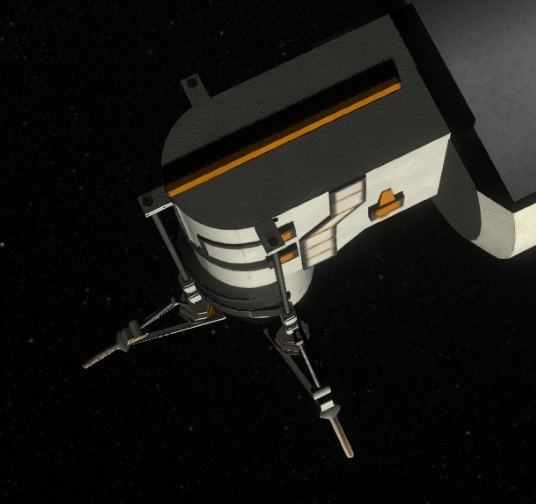
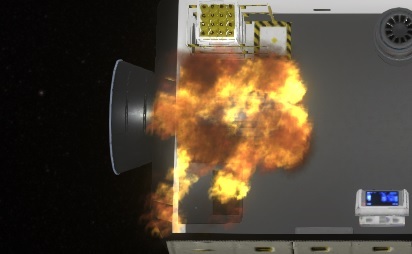
Here a picture from one of my playtests.
Plan for next Year
Beta Test and Demo
At the start of the year i plan to make a bigger public beta test. There will be a weekly tester event in Discord to get the last bugs out of the core systems.
Roadmap
The main part of the game is done and working fine so far. If you already have access to the playtest of the game, I would be happy for your comments on the changes. I plan to add more story related events, more achievements. Navigation systems and work more on the persons are planned too.
Wishlist
If you haven't done it yet, please wishlist and follow to keep up to date :)
Hello everyone, let me give you a short update on what happened this year and what you can expect for next year.
January - New Supply and Center of Mass
Revamping the dock and supply ship gameplay marked the beginning of the year. Supply ships gained independence from docks, a new Docking Port Interior Item was introduced, and Mass Balancers became interior items. Another addition was an interior mass balancer for early artificial gravity initiation.
February - New Shuttlebay and Overlays
I worked more on the Overlays, showing a Center of Mass overlay and more advanced overlays when hovering over a resource container, showing routes and more to make it easier to understand what's going on and why it might not work. I also converted the door to an interior item, which again brings a complete new game experience and makes rooms more updatable. The new Advanced Missions including a new Shuttlebay interior item are also finished.
March - Person Improvement
People have improved a lot in March. I improved the complete clothing and generation system and added more clothes and other looks. The Path system now uses more direct ways. Also nationalities have been added with more random names of the persons. Beside that a new History System has been added, so you can now analyze the resource creation, productivity and the Person Activities.
April - Under the hood
In this Month, there were not many new things, but under the hood happened a huge Unity Update and many bug fixes belong to that. It also got a huge fps improvement, by moving the mesh-cutter logic from the px based shader to a once calculated mesh cutting. Besides that many small ui and gameplay improvements. Big steps forward to the first beta test.
May - Air Systems
The Air Systems got a big overhole. Everything related to that has been improved, starting from gaugeelements, markers and more. Also the doors can now be just closed, so people can walk through. Rest of the Month was bug fixes and Polishings, to get the Game ready for the planned Beta phase.
June - Thermal Control
I finished the last 3D Model updates and added one of the last main features: Thermal Control. It’s a two step process, to get rid of the heat. Besides that i could finish most of the usability features, to improve the player experience.
July - Infrastructure
This month I was on vacation, so not so much happened related to the game itself. The main focus this month was on infrastructure topics. A better release process, reportings and make the server running on several servers, so it's more reliable.
August - Prepare for Playtest
I prepared for a larger beta phase and a demo phase. I also worked on some rare bugs and worked a lot on the Marketing, including a new Logo and preparations for a Trailer.
September - Fire
I created a new Trailer and also added Fire as one of the last bigger Features for the Simulation. The UI also gets a design that looks more scifi.
Oktober - Person Polish
This month was just a polishing month, adding uniforms for people, visualizing the slots and bringing the UI to the next level. At the end of the month the transportation system got a new logic.
November - Environment
In November the room types were removed, to make the game smoother to play experience. Instead of that, the planned environment feature was added, so interior items interfere with each other and make e.g. noise in the room. It also brings a new Storage system, that is easier to understand for new players.
December - Polishing
In December I was sick most of the time and could not work so much, so just some polishing was done there, no big topics.
Here a picture from one of my playtests.
Plan for next Year
Beta Test and Demo
At the start of the year i plan to make a bigger public beta test. There will be a weekly tester event in Discord to get the last bugs out of the core systems.
Roadmap
The main part of the game is done and working fine so far. If you already have access to the playtest of the game, I would be happy for your comments on the changes. I plan to add more story related events, more achievements. Navigation systems and work more on the persons are planned too.
Wishlist
If you haven't done it yet, please wishlist and follow to keep up to date :)
In this iteration there was a focus on the environment and many improvements in the interaction with the game.
New Room Concept
Every room now possesses distinct environmental values, introducing a rewarding or penalizing system for favorable or unfavorable combinations. The initial addition is the Noise factor, and we have exciting plans for future variables such as Appearance, Cleanliness, Smell, and Space.
Environmental Effects
These values influence activities in the ship. For instance, a loud factory floor might extend the time needed for a meal, while extreme conditions could prevent crew members from sleeping, impacting their mood.
Others will completely stop the activities like sleeping the bed. If the level reaches a certain level, persons can’t sleep anymore.
If that happens, some items will cause some thoughts to the person, making a longer negative impact on the mood of the person.
Environmental Factors
There are various ways to influence the ship's environment:
Active Item
Most interior items generate noise when active, contributing to the overall environment.
Finished Item
The completion of certain items can have direct effects on room characteristics, offering another layer of strategic planning.
Placing UI
Understanding the impact of interior items is now more intuitive with the new placement system. It provides a summary of the room's overall effect and displays changes over each affected interior item.
Global Interior Item Placement
With uniform rooms, the need for distinct room types is eliminated. Interior items can now be placed directly without the need to edit the room first.
Automatically add missing doors
When placing rooms next to rooms it will now automatically detect when there is a door missing and place it.
Changeable Recipes
Interior items can now feature changeable recipes. For instance, a gas releaser can switch between Oxygen, Nitrogen, or CO2.
The crafting UI has also been revamped for a more integrated and understandable experience.
New Supply UI
The supply UI has received a visual overhaul for enhanced usability. Now table-based and featuring a search bar, finding what you need is quicker and more straightforward.
Game element Context Menus
Another improvement are contextMenus for the game elements. You can now just right click on an element like an interior item or a person, to show up their context menu. If you select a person before, it still shows the PiMenu for that target, to e.g. grab the resources out. It also got the usual double confirm buttons to prevent unwanted actions as its known from the buttons.
New Objectives
While our original plan to introduce the story has been postponed due to substantial gameplay changes, we've laid the foundation for it. This iteration includes a new game setup mechanism, accompanied by a refreshed New Game menu.
Full ChangeLog
Fixes
Rare situation where person was stuck in an activity
Duplicate UnitSymbol for Skills in Tooltip of Supply Popup
First Person camera did not allow walking through doors
Slot items visible when person overview is hidden.
Updated Storage Values when they are changing live in UI
Wrong shown storage count in special cases
wrong no energy problem at hygieneArea
Problems for construction places were not readded when the resource got unavailable.
Fixed can't put resources to storage in special cases
Fixed PiMenu Sound for group selection
Fixed very long Crafting Duration timewarps were around 3s wrong
Fixed where Doors in interior p lacing were not moving on bad positions.
Prevent Doors could be droped over special interior items.
Layout of Task Icon at special case with problem and assigned person
Dismantle priority was dynamic when changing the priority while in dismantle mode
An exception at license the widget
Door update wrong when autoplacing doors
Some rooms got too the wrong state in some special cases
Icon of newly created Blueprints were not updated in BuildMenu when the async generating is finished
Wrong ProgressData was shown for constructions in waiting for resoruce state
Fixed Some I18nLabels were not linking to the correct TranslatorElement
Fixed some Lipsyncs were out of date
Translate Element: Not updated content when the list was filtered
ForceLive was not done in a special case
Timewarp not Stopped when unloading Dock
Some not wanted Transport Priorities are fixed
Showing Empty box in special cases where it should not be
Fixed situation when cheating it could happen that the person had unwanted empty resourcetype in a slot
Idle Persons not using not available area
Exceptions when deleting the last savegame
Fixed error on HistoryGraph without data
Fixed Bad sorting of resource recipes e.g. for generator
Markers of GaugePanels were not updated in the first rendered Frame when they are shown
Closing Arrived Persons Hint will stay closed now
Better Layout for Too fast in Tutorial Popup
New Room Button is not highlighted anymore, when a blueprint is selected
Flickering Out of Bounds indicator for Tutorial
Fixed Problem when Person has too much water, getting to an activity loop
Fire spreads out too fast.
Some Serializing issues for Productivity items
Quality of a resourceBox was shown wrong in some special cases
Maybe wrong translations when pluginmanager initialized twice
Rounding Errors on some special cases lead to not exact amounts
Persons idling didn't do tasks with priority 1
Checking now for available Path to the target rooms with pimenu
Error Logging when trying to render a path between 2 elements without a usable connection.
Person not putting things to dismantled storage
When working of door, the person was wrong rotated
Added
Click sound when hopening PrimaryObjective
Rightclick on the Recipe Queue priorize the item
Added Amount of Available Interior Items to the Interior item Build Menu.
Added first Difficulty setup to prepare for easy and hard mode
Primary Objective Popup
Make Intro and Tutorial skippable
New Game Dialoge
Focus a room is now related to the room size
Added Person Slot Icons to the Person Overview Element (lower right)
FullScreenMode Option is translated
Contextmenu for Interior Items, using the PiMenu
Added Double Confirm button for Pi Menu
Cheat for Instant destroy an Interior Item (Ctrl when clicking the button)
SupplyShip overview got a panel with the current Cargo for easier identify
Created custom search field and used it everywhere
Added Fancy Tooltips with headline separation
Cheating input resources with shift ctrl interior place
Changable Recipies for interior items
Scrollbars to blueprint list
Ask for automaticaly adding door, when a room is placed at another room without a door.
Shortcut 1-9 now defines different speed option
Added a Task Tooltip
Support for overtaking Worker Slots
Support Overtaking Service Tasks with the pimenu
Added TaskPanel to all Selection Panels
Improved
Store last used Tutorial and intro settings of NewGame Setup
Updated and reduced the tutorial to a minimum. Interactive help will be added soon to cover the rest.
Sorting in Person Selection Panel is now aligned with the rest of the UI
Improved PiMenu interaction
Better Layout of Lists
Interior editing now shows blocker areas in space from other rooms
New Design for Bexed Value Label
SupplyPopup Resource Table now supports leftclick to add and rightclick to remove (including the modifiers)
Implemented Maximum amount Resupply with delta to Supply)
Make WorldUIElement for Interior Item preview Scalable to the camera distance.
Timewarp behavior switching between speed and timewarps
RecipeChooser now using Table layout with categories and filters
Changed Blocking Graphics to a nicer one
Show the location of existing blueprints and set this by default if choosen.
Translator updates now the language files for easier changing the file by hand
Add interior Items now can switch rooms to drop.
Show all problems of a mission instead of just a single one.
Game Feedback dialoge is now always on top
Construction/Maintenance Bars scale dynamic to the distance
Changed Group hotkey usage to Alt+1 and so on, to have space for speed change
Construction Sides show now all Problems instead of just the first one
Make Help windows easy closable
Support larger amount of options
Highlight best connection in resource overlay
Performance improved for Path checks
PiMenu entries of Person with Interior Items can now use Transportslots even more
Replaced expensive simulation method to gain simulation speed on large ships
Balancing
More Resources from Missions
Supply from Earth now can now be setup in difficulty level
Perons can now carry half a box per transport, independent from the weight
Canceling Crafted items needs to be emptied the containers now first
Reduced BoxSize and content to half
We hope you enjoy these new features and improvements. As always, your feedback is invaluable in shaping the game's development. Stay tuned for more updates, and thank you for your continued support!
If you encounter any issues or have questions, please don't hesitate to reach out to us. Together, we'll make this game even better!
Want to see more?
I also post the progress and more pictures to our Discord:
And don't forget to wishlist and follow us to keep up to date.
The primary focus of this iteration was to restructure the whole transportation system.
Revolutionizing Storage Management
As Generation Ship continues its journey through development, a key focus has been placed on refining crew management for diverse tasks, prompting a substantial overhaul of the storage system. The traditional resource boxes have transformed into visual elements, simplifying the system and boosting efficiency by eliminating outdated code.
Redesigned Storage Units
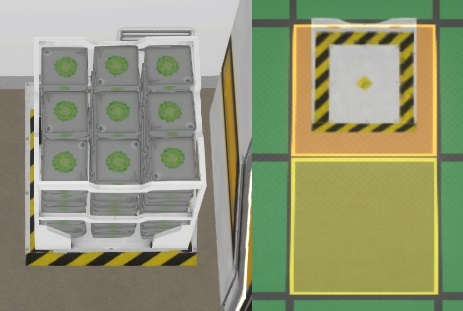
With crew members now taking on the task of moving resources themselves, the need for transporting drones is under consideration for future updates. Meanwhile, storage units have been revamped to offer better functionality. The 1x1 storage now accommodates a single box, while the updated 1x2 and 2x3 versions provide space for 9 and 24 boxes, respectively, optimizing storage room layouts.
Resource Visuals Refinement
Resources are now visually sorted by type, allowing for a clearer view of the quantities available. If three resource types occupy three columns, they will stack, simplifying resource tracking.
The new Resource Management
Connections between storages have been replaced with a more intuitive setup. Users can now specify desired resource quantities, configure them as input or output, and crew members will automatically fill or empty the storage. Additionally, a new section in the selected entity enables task prioritization and accessibility restrictions for all in/out connections of a storage.
Grouping Feature for the PiMenu
The pimenu receives a substantial upgrade with a new grouping feature, making item management more intuitive and user-friendly.
Dynamic Bars Visibility
Bars now remain visible for a longer duration and scale with the distance, providing a more dynamic and user-friendly interface.
Easier GameSpeed Control
To enhance the gaming experience during waiting periods, shortcuts have been added for adjusting speeds using the 1-9 keys.
Full ChangeLog
Fixes
Closing Arrived Persons Hint will stay closed now
Better Layout for Too fast in Tutorial Popup
New Room Button is not highlighted anymore, when a blueprint is selected
Flickering Out of Bounds indicator for Tutorial
Fixed Problem when Person has too much water, getting to an activity loop
Fire spreads out too fast.
Some Serializing issues for Productivity items
Quality of a resourceBox was shown wrong in some special cases
Maybe wrong translations when pluginmanager initialized twice
Rounding Errors on some special cases lead to not exact amounts
Persons idling didn't do tasks with priority 1
Checking now for available Path to the target rooms with pimenu
Error Logging when trying to render a path between 2 elements without a usable connection.
Person not putting things to dismantled storage
When working of door, the person was wrong rotated
Show Fire Risk when a fire broke out
Sort Connections Button was not working anymore
Wrong Avatar was used for some Helps
Out of Screen Indicator was not shown in some cases
Overlapping text in intro
Engines were on in the intro
Fixed Playing speech twice in some cases
By default new Player Blueprints not get to the Translation
Fire Burning Problem Icon was not fullsize
Wrong Problem Icon was shown in the Special Event Panel for unconciousness when the problem changed
Percent value of the Report sending was not shown
Opening Dynamic Translations not showing the correct value for some special cases
Ui disappeard in a special case due to a strange unity bug.
Endless simulation loop in a special case with Slots using Cheats.
Prevent overlapping of UnderConstruction text in the Progress Element
Fixed Exception with ResidentIcon
Added
Shortcut 1-9 now defines different speed option
Added a Task Tooltip
Support for overtaking Worker Slots
Support Overtaking Service Tasks with the pimenu
Added TaskPanel to all Selection Panels
ShipSection can have problems now
More Problem Elements to Special Event Panels
Game Feedback Dialog
Added Special Event Help to the Help Window
New Problem Popup with Interactive Help
Visualize Usable Person Slots as Model Changes
EventHistory ago got a tooltip with the exact time
Improved
Show all problems of a mission instead of just a single one.
Game Feedback dialoge is now always on top
Construction/Maintenance Bars scale dynamic to the distance
Changed Group hotkey usage to Alt+1 and so on, to have space for speed change
Construction Sides show now all Problems instead of just the first one
Make Help windows easy closable
Support larger amount of options
Highlight best connection in resource overlay
Performance improved for Path checks
PiMenu entries of Person with Interior Items can now use Transportslots even more
Replaced expensive simulation method to gain simulation speed on large ships
Tooling for Translation
Better placement for some Tutorial Texts and highlights
Person stop Balance Task if resources is removed from the storage
Border Color for warning, info and success boxes
Moved details of Room and InteriorItem down, and added General Problems to all Selection Panels to that place.
Padding of upper buttons in selection panels is now dynamic
Padding to highscore elements
Balancing
Canceling Crafted items needs to be emptied the containers now first
We hope you enjoy these new features and improvements. As always, your feedback is invaluable in shaping the game's development. Stay tuned for more updates, and thank you for your continued support!
If you encounter any issues or have questions, please don't hesitate to reach out to us. Together, we'll make this game even better!
Want to see more?
I also post the progress and more pictures to our Discord:
And don't forget to wishlist and follow us to keep up to date.
In this iteration, we've concentrated on enhancing the interaction with your beloved crew members and introducing a futuristic user interface design. Let's explore the updates!
Revamped UI Design
We're thrilled to unveil a new look for our UI. Our UI framework has undergone a significant overhaul, transforming it into a more cutting-edge and sci-fi-inspired design. Expect to see more highlights and futuristic elements integrated throughout the game. Here's a glimpse of what's new:
Uniforms
Managing a sizable crew can sometimes be a bit overwhelming, especially when finding the right person for a specific task. To make this easier, we've introduced uniform clothing for your crew members.
Now you can assign uniforms with customizable colors and predefined roles, ensuring that crew members are dressed appropriately for their duties. By default, they will don the smart gray assistant uniform, but the choice is yours.
Slot Visualization
In addition to the new uniforms, we've added 3D models for essential tools: the Tool Belt, Fire Extinguisher, and Oxygen Mask. These items are now visually represented on your crew members, making it a breeze to see what equipment they're carrying and ready to use.
Person Overview
To improve accessibility, we've made your crew members always visible in the bottom right corner of the screen. This handy feature displays their current task and will turn red to alert you when they encounter significant problems, such as running out of food or facing other critical issues.
Problem Help
New players, fret not! We've introduced a dynamic interactive guide that tailors itself to your current in-game situation. This feature provides guidance, helping you understand game mechanics better and showing you exactly what to do.
Full ChangeLog
Fixes
Fire Burning Problem Icon was not fullsize
Wrong Problem Icon was shown in the Special Event Panel for unconciousness when the problem changed
Percent value of the Report sending was not shown
Opening Dynamic Translations not showing the correct value for some special cases
Ui disappeard in a special case due to a strange unity bug.
Endless simulation loop in a special case with Slots using Cheats.
Prevent overlapping of UnderConstruction text in the Progress Element
Fixed Exception with ResidentIcon
Canceling a room in construction didn't create the door item
Credits Screen had duplicate entires
Fixed Crash on Starting the game, when pressing mainmenu in the error-popup.
Error where person keep filling Tool Belt.
Delete Button for Autosaves was disabled, when no normal savegames exists
Fixed Exception in simulation in special situations when persons died
Options Popup error on closing in some special cases
Update Popup had wrong version format
Walk out of Toilet Animation was wrong
Fixed rare Bug with some Exceptions on the Help panels
Shortcuts were shown in some cases even when they were disabled in the options
PersonIcon was not showing the Activity anymore
Bug when adding a normal Storage it added 2 simulation Storages
Where effect Intensity were not set in some rare caes.
Load Dialog when no savegame exists
Rare Exceptions on first Startup
Exception in Balance Overlay
When Closing a door while person moves though it.
Spread out was done too often.
Fixed Person was starting with a mounted construction Belt
Fixed Tutorial was not highlighting the correct Element, blocking the rest of the tutorial
Fixed Exception when opening Loading without savegames
Animation Positions for Cooling Plate
Fixed wrong detected Problem with supply ships without resource boxes
Warning for new Persons triggers an Metabolism Stopped in rare situations
When Overtaken a Task by another Person, Both persons were doing the task.
Warning when using the AssignWorker buton
Fixed some Errors and Warnings
Person will stop their Transport Activity if the storage is going empty while walking to it.
Construction was possible without Tools in belt
Construction Belt can just be done when its filled completely
Some Unconcious Problems for the User were not shown
Full Slot is not recognised in some rare cases
Errors when Mood goes below zero
Some rare Exceptions
Fixed specialcase in History when Inteiror Resources are moved
ForceOpen at door behaves now same as open for connection
Medical Bed was not working
Some rare UI Errors
Added
ShipSection can have problems now
More Problem Elements to Special Event Panels
Game Feedback Dialog
Added Special Event Help to the Help Window
New Problem Popup with Interactive Help
Visualize Usable Person Slots as Model Changes
EventHistory ago got a tooltip with the exact time
Added F5 Fix for a bug with construction rooms, till the reason is found.
Customize the Persons Cloths
Created a Crew Unitform
Mute audio when leaving the unfocus the Game (changable in Options)
Added Edge Scrolling
Person Overview Icon
Basic Infrastructure for Advanced Simulation Logging
O2 Mask to survive in low oxygen/high CO2 environments
Ctrl+Mouse Wheel Cheat support for Person Slots
Ctrl+MouseWheel cheats resourceBox fillsize
Priority Icon for Tasks
Added Problems to Tasks
Sounds for PiMenu - Open/Close
Improved
Person stop Balance Task if resources is removed from the storage
Border Color for warning, info and success boxes
Moved details of Room and InteriorItem down, and added General Problems to all Selection Panels to that place.
Padding of upper buttons in selection panels is now dynamic
Padding to highscore elements
Big Dehumidifier also counts now for the Achievement Task
Color of OverlayBars for better visibliity
Removed Logging on not finished Greenhouses
Only check for new Versions, when we not launch via steam.
Only mark a help as seen when the help is started
Changed all Molecule numbers to subscript
Added Special characters to Translator to easy copy paste
New Discord IDs are always lowercase
Improved Delay of Click sounds
Free Movie Camera now rotates with the Ship and alignes correct to the Floor
Air Problems go tbetter Icons
Colorized Construction, Maintenance and Fire Bars different, to show the difference better
Renamed Construction Slot to Tool Belt everywhere
Updated to new Unity Packages
Better PiMenu Problem for Person
Storage OVerview shows single ResourceType of storage if available
Faster reacting on critical need values
Button for Cancel rooms and interior items
Balancing
Reduced needed Photovotaic Panels from 5 to 3
Open Doors to space leaking 10x more air
The first Month in the game will be no Fire, to have an easier game start
Reduced Periority of Working.
We hope you enjoy these new features and improvements. As always, your feedback is invaluable in shaping the game's development. Stay tuned for more updates, and thank you for your continued support!
If you encounter any issues or have questions, please don't hesitate to reach out to us. Together, we'll make this game even better!
Want to see more?
I also post the progress and more pictures to our Discord:
And don't forget to wishlist and follow us to keep up to date.
We're excited to bring you the latest update for Generation Ship. In this iteration, we've added some blazing hot features and made several improvements. Let's dive right in!
New Trailer
One of the significant tasks we undertook was creating a new trailer that better reflects the gameplay. Check it out here: https://youtu.be/3WJcO4HAoZc
FIRE !
The highlight of this update is the introduction of fire mechanics. As we teased in previous updates, fire is related to the N² (nitrogen) level in the air. Low N² combined with adverse conditions will increase the chances of a fire outbreak.
Fires in the game have realistic effects: - They consume oxygen in the air, converting it to CO2, and rapidly raise room temperatures. - They reduce interior item and room condition. - While a fire is burning, interior items in the affected things cannot be used.
We've added visual fire effects that intensify over time when no action is taken.
In case of a fire emergency, there's a special event and some helpful guidance.
If the fire level becomes too high, it can spread to nearby interior items, so swift action is crucial.
You have two options to combat fires: Equip your crew with fire extinguishers, a new equipment slot that utilizes CO² bottles to put out fires.
In space, you can open exterior doors to reduce oxygen levels, eventually extinguishing the fire.
Oxygen Mask
Fighting fires in low oxygen environments can lead to crew members losing consciousness due to increased CO² levels. To counter this, we've added an oxygen mask slot. When worn, crew members will use their own oxygen instead of the ship's air.
Storable Blueprints
Blueprints can now be reused in other games.
We've also enhanced the user interface for blueprints and added a preview feature.
UI Improvements
We've made several UI improvements in this update. The "Energy Depleted" panel has been rewritten to provide clearer problem identification.
Improve Tasks
Tasks have also received significant enhancements. They now display a more detailed status, making it easier to understand why a task may be disabled or ready.
For disabled tasks, we've provided reasons, so players can quickly identify why a task is not available. Reasons could include the interior item's resource being full or the room being fully maintained.
We've also added a priority icon with up to 5 stars, indicating the importance of a task. Crew members may still choose lower-priority tasks based on their working room, skills, or proximity.
Full ChangeLog
Fixes
Fixed Exception when opening Loading without savegames
Animation Positions for Cooling Plate
Fixed wrong detected Problem with supply ships without resource boxes
Warning for new Persons triggers an Metabolism Stopped in rare situations
When Overtaken a Task by another Person, Both persons were doing the task.
Warning when using the AssignWorker buton
Fixed some Errors and Warnings
Person will stop their Transport Activity if the storage is going empty while walking to it.
Construction was possible without Tools in belt
Construction Belt can just be done when its filled completely
Some Unconcious Problems for the User were not shown
Full Slot is not recognised in some rare cases
Errors when Mood goes below zero
Some rare Exceptions
Fixed specialcase in History when Inteiror Resources are moved
ForceOpen at door behaves now same as open for connection
Medical Bed was not working
Some rare UI Errors
Prevent Metabolism Stoped Warning when Person goes on a mission
Loading Game with Inflating Walls cause wrong Heat Alert
Small inaccuracies storing doubles in Savegame
Cylinder Deform was not applyed for Prototypes while place rooms
Spinning Engines in Savegames behaved wrong.
Tooltip of OperateType of TransportSlot not changed when changing the operate Type
Full AutoCorrection throws an Exception
Shift for Cheat Resources was not working for Interior Configuration
Readded missing Side Connection Model.
SpecialCase where Demo Popup was not in front
Flickering of ContinueButton while waiting for Login
Not starting on some Linux Systems
Tutorial was not shown in some rare cases
AutoFocus in the whole game is removed, due to a bug in unity with no workarounds.
Starting Engine room to have longer O2 support
ResourceFinding Tutorial hinted to the wrong place
Fixed some special interioritems were not shown in Blueprint storage overview
Fixed Dock Storage was shown in Blueprints storage overview
Savegame could contain unparsable double Value in very rare cases
Logging of Exception Stacktraces
Feedback was not send in on special condition
Camera was not aligned correct on very low fps and high speed
Added
O2 Mask to survive in low oxygen/high CO2 environments
Ctrl+Mouse Wheel Cheat support for Person Slots
Ctrl+MouseWheel cheats resourceBox fillsize
Priority Icon for Tasks
Added Problems to Tasks
Sounds for PiMenu - Open/Close
Additional °C, Bar and Humidity Percent Marker Text to the Air Values to make it better readable
Focus Buttons instead of click on the icon in Selection Panels
Added Ctrl+MWheel on ResourceContainers as shortcut for changing container-value
Hardware Check in front of the game with some infos..
Auto Balancer Algorithm, to adjust the Center Of Mass as good as possible.
Blueprints have now Screenshot Icons
Blueprints can be saved in UserFolder, so can be reused in new Games
Welcome Text after register was sucessful
Ship Generator now using a Savable Playback System
Improved
Colorized Construction, Maintenance and Fire Bars different, to show the difference better
Renamed Construction Slot to Tool Belt everywhere
Updated to new Unity Packages
Better PiMenu Problem for Person
Storage OVerview shows single ResourceType of storage if available
Faster reacting on critical need values
Button for Cancel rooms and interior items
Added Energy and Heat to Interior Item Details
UI for Productivity hides energy and heatenergy when they have no influce
Warning Window when Energy is depleted
Close also copies the Storage Settings and set the StartRotation
Hide Recipes for Workbench that can't be placed
Reduced Animation Speed of Items while placing
Store Animation Position in savegame
Reduced Noise of Rocket Engines when far away
Persons PiMenu not show FillsTate with error, when person has the needed resource
Placement of rooms don't restrict rotation on manual rotation
FpsElement number format
Show Needed SkillLevels on Interior Item Preview
Moved Skills from Activity to Slots
Better Opening Times of Report Window on large ships
Big Performance Update for huge ships.
Disabled Light, when they are not visible to improve Performance
Reduced Lightcount for rooms
Removed Startup Camera, so its directly focused after loading a game.
Updated Feedback Screen
Updated to new Unity Version
Improved Building Generators Performance
Changed text of dismantle storages, To not intend players to remove all storages.
Layout of Blueprint Preview
Changed Date Format of SaveGames to ISO 8601
Move all GameData to a single spot
Balancing
Reduced Periority of Working.
Removed
Speed and Efficiency
We hope you enjoy these new features and improvements. As always, your feedback is invaluable in shaping the game's development. Stay tuned for more updates, and thank you for your continued support!
If you encounter any issues or have questions, please don't hesitate to reach out to us. Together, we'll make this game even better!
Want to see more?
I also post the progress and more pictures to our Discord:
And don't forget to wishlist and follow us to keep up to date.
Greetings, fellow spacefarers and esteemed shipbuilders!
I'm delighted to offer you a glimpse into the remarkable strides we've taken in the universe of "Generation Ship." Your unwavering support continues to drive us forward, and I'm thrilled to share our progress over the past couple of months.
Charting Our Course
While I took a well-deserved breather, your voices remained at the forefront of my thoughts. Your feedback and passion have been instrumental in steering our ship on the right trajectory.
Performance and Infrastructure
Efforts have been devoted to optimizing performance, ensuring that your voyage in "Generation Ship" is smooth and immersive. Alongside this, the game's infrastructure has seen enhancements to ensure a solid foundation for the journey ahead. Moreover, there is a new commit-based changelog system, keeping you informed about every change in small patches we make in Discord as soon as its ready to download.
From Logo to Trailer
I've been busy crafting marketing materials, and you might have already spotted the fresh logo design. Additionally, I've given the website a stylish update, and I've been diligently setting the groundwork for a new trailer. This trailer is in the works, aiming to spotlight the latest features and advancements.
Full ChangeLog
Fixes
UI is not rendered when switching Scenes
Exit Button was not working in Developer Mode
Plant Grow animation in Hydroponic box was not working anymore
Bad aligned Tooltips
Some wrong formated Changelogs
Quality is not removed for construction and maintenance
Fixed Stacktrace for Developers for warning/errors in tooltips
Fixed exception with bad savegames
Stop using Energy when workbench already finished
Remove Empty Popup when resource container is removed while the popup is open
Wrong rotated arrow in Tutorial when its out of the screen.
Wrong movement of Tutorial Highlihter in some special cases
Missing Lipsync in some help dialoges
Termal Control tutorial showing wrong text in special case
SaveGame Text of Version overlapping for Test Releases in Save/Load Dialoges
Memory leaak
Logout not working in game on License Restriction
Added
Add developer option for server debugging level
Autosaves toggle for Load Dialoge
Debugging option An additional field to hide technical details. Separate Debugging options can be still set. Thanks to Ichao
EULA is reviewable in options
New Commit based change logs
Improved
More reliable cache usage when loading games after a new Version
Big FPS increase for large Ship
Make Loading Text translatable
Better Game Loading Status
Reduced Filesize of Savegame
Updated to new Unity Packages
StartScreen
New Splashscreen on startup
Construction overlay for rooms is hiding on lower zoom levels
Environmental help to make partial preassure more clear
Changed Hallway Achievement to build an Engine room instead.
Rearanged Tutorials to respect new room construction time
Adjust position highlight of Dock
Changelog box Nicer styling Support for old changes
Removed warnings for workbench crafting
Timewarp for persons now estimate the ending time better.
Resource Tutorial now disables the overlay earlier to make it easier to click.
Updated Eula to new regulations
Japanese Translation
Developer OAuth Login
Error Messages for Register User
ChangeLog box in StartScreen has been improved
Align GameVersion
Select and Highlight correct Entities in ResourceUsers
Balancing
Removed the second storage in starting ships engine room
Workbench producing also heat
Energy Achievement done now earlier
Increased Construction Time of Rooms
Future Horizons
While I can't reveal all the details just yet, I can tell you that beta testing is on the horizon. I prepared the Game to be ready for this. If you are interested in this, join our Newsletter on https://scifanstudios.com or join our Discord Server. Your involvement will play a vital role in shaping the final journey.
As we continue to forge ahead, I encourage you to keep your wishlists active on our Steam page to receive the latest updates and news. Your unwavering support is deeply appreciated, and I'm committed to keeping you informed as we navigate toward the next chapter of "Generation Ship."
Stay tuned for more exciting news and developments, and thank you for being an integral part of our cosmic odyssey.
The primary focus of this iteration was the development of the new Thermal System. Additionally, several old interior items in the factory have been replaced with brand new models. Furthermore, numerous playtesters contributed to this iteration by identifying bugs and enhancing the tutorial.
Thermal System
While one might assume that space is cold and constant heating is necessary, the actual challenge lies in managing heat. In space, where there is very little matter, heat cannot be transferred to the surroundings like it can on Earth. Instead, your vessel is heated by the sun, as well as the heat generated by humans and electrical devices.
In this iteration, we have introduced the General Thermal Architecture of the ISS, consisting of two layers connected by a cooling pipe, into the game. Each ship section has its own temperature, and the environment system aims to maintain it at an ideal 22 degrees Celsius for human comfort.
Layer 1: Heat Collectors
The first layer serves as heat collectors, responsible for gathering heat from the rooms. To achieve this, you can construct Cool Panels that utilize internal Peltier technology. These panels do not require external power and efficiently transfer the heat from the Ship Section to the Cooling Pipes.
Additionally, a Stirling engine has been introduced, which can extract energy from the heat. However, it necessitates frequent maintenance.
Layer 2: Ship Radiators
The second layer consists of large radiators that extend into space. These radiators effectively dissipate the heat from the cooling pipes into space. To prevent overheating, they are positioned 90° away from the sun.
Construction Slot
Another significant gameplay change involves the introduction of specialized slots. In order to construct or maintain rooms and interior items, each person now requires an equipped Construction Slot. The person must then gather and place tools into the slot to use during their work. As the person works, the quality of the tools gradually diminishes, and when it reaches zero, they are converted into Garbage Iron, which can be recycled.
Effects
Furthermore, several new effects have been incorporated into the game. One notable addition is the representation of air leaks, which are now visually displayed on the exterior of modules.
Additionally, doors can now be opened to the vastness of space. There is a force open mode available, causing the air to rush out. While it serves various emergency purposes, its primary usage will likely be more prominent in upcoming releases, particularly when fire mechanics are introduced.
Another effect modification relates to the rocket engine's flame, which now accurately reflects the corresponding thrust.
Scene Tooltips
Hovering over objects in the scene now displays a helpful summary of their details. Similar to other tooltips, you can fix them in place using the middle mouse key and interact with them, such as turning them on/off or accessing additional information.
Notification Bell
Thanks to a suggestion from the community (special thanks to Revolus), an alert feature has been added to notify you when something is completed. This feature operates similarly to the Arrived Supply Ship Notification and can be activated for rooms and interior items. It pauses any running timewarps and displays a notification in the upper right corner, allowing for easy selection of the completed room or item.
Ship-wide Resource History
Global resources now have their own history, providing a comprehensive overview of, for example, food or oxygen consumption. This feature offers a better understanding of resource management throughout the entire ship.
New Electrolytics Machine
Continuing with the graphic updates, the new Electrolytics machine has been introduced. This machine utilizes electricity to convert water into oxygen and hydrogen.
New Smelting
The Smelting process has also received a visual upgrade, featuring a new model. This machine can transform garbage metal into new plain steel.
New Purification Plant
Introducing the Purification Plant, another new model in the game. This plant serves as the primary recycling machine for water, purifying garbage water into biomass and clean water.
New Sabatier Machine
The Sabatier machine has been updated as well. Using the Sabatier process, you can now create methane by combining hydrogen and CO2, offering an effective way to recycle CO2.
Single Click Chooser
To enhance UI interactions and make them faster, I have improved the chooser buttons. You can now use them with a single click by holding down the mouse button. This functionality is similar to PiMenus.
Tutorial Updates
Throughout this iteration, additional playtesters were invited to try out the game, resulting in minor releases. These valuable playtesting sessions have allowed for further improvements to the tutorials. A big thank you to all participants! The tester queue has now been cleared, but if you are interested in participating in a playtest, please join our Discord community.
Other changes
Fixes
Fixed an issue where ResourceContainer was not shown on Docking Port.
Fixed smooth updating of World Ship Section Gauge elements.
Fixed a bug where the next speech was not initiated.
Fixed the preview of InteriorItems not hiding when moving the mouse over the menu.
Fixed calculation of Gravity.
Removed the old ThrowAway Action.
Fixed wrong amount displayed in PiMenu for Empty Transport Slot with containers.
Fixed Action Point of Mass balancer.
Fixed a special case where transport was possible when it should not be.
Fixed a bug where persons took a long time to shower (thanks to gthbryce).
Fixed crashes in special cases (thanks to gthbryce).
Fixed an exception and changed it to a warning (thanks to Frayboy).
Fixed rounding issue with percentage values.
Fixed a problem when exiting the scene while an async savegame was in progress.
Fixed a problem when using Esc to close Loading Popups.
Fixed a warning for the workbench.
Fixed wrong Storage Warnings in special cases.
Fixed wrong Ship Rotation.
Fixed a special case for wrong Auto-Balancing to Optimum.
Fixed Walls being droppable when the neighboring tile is blocked.
Fixed overlapping placement of rooms allowed in a special case.
Added
Added RightMouse functionality on Marker to timewarp to the reach time.
Added the option to show tutorial Help as Dialogue in the Help Section.
Added Construction World Elements to show progress without selecting.
Added the shortcut Del to cancel or dismantle multiple selected items.
Added iterative naming for rooms and interior items (adding numbers to the name).
Added animation to Help Button to increase visibility.
Added Tooltips for Building Selection Panel Buttons.
Added the option to hide resources to prevent overflow for new players.
Hide interior Item Boxes when interior items are hidden.
Improved
Improved opening positions of hover at gauge elements.
Improved Mission Timewarp for PersonTimewarp.
All InteriorItems activities stop working when condition is below 10%.
Hide Condition, Gravity, and Player effect in Productivity if the item has no effect for a cleaner UI.
BuildMenu Room Tooltip now shows possible interior items instead of possible activities.
Using a PiChart for Person History.
Prevented Person from walking to the neighbor Section.
Right Click on TargetMarker now also timewarps to it.
Hide Storage for Dock to indicate it is part of the ship.
Highlight area of Rooms with more precision.
Close Blueprint submenu of BuildMenu when nothing is selected (thanks to FriendCalledFive).
Special Event now uses ScrollView to support more elements.
Prevented PiMenu on Itself, making it possible to create looping connections.
Skipped asking for Target-Dock when only one dock exists.
SpecialEvent-Panels now recover at save/load.
Removed "MainDoor." The construction door is chosen when the construction starts.
Air Bar Arrows are now more visible (thanks to Ɗґɑɡе Relgimi ƊɑґK).
Live update of Person History.
Added Problems to PersonPanel.
Reduced light of hygiene area.
Added support for new Discord IDs (thanks to Ichao and Frozzie).
FillBars in Icons now also adapt to new Markers.
Balancing
Condition Effect on Interior Items is now exponential until zero.
Balanced Humidity Air Leak with other Air Values.
Kitchen now uses less Electrical Energy (thanks to Frayboy15).
Playtest
The Game Core is nearing completion and will soon be ready for its first public Beta release. In order to ensure the best possible experience, we are looking for playtesters to help us identify any remaining bugs and assist with further polishing. If you are interested in participating, we invite you to join our Discord Community.
Additionally, we regularly post updates on the progress of the game and share more pictures there. If you would like to see more, feel free to visit our Discord community.
And don't forget to wishlist and follow us to keep up to date.
The main focus of this update is to improve the Air Systems and overall polishing. Along with numerous smaller bug fixes, several UI elements have undergone significant improvements. We are also pleased to welcome Mark, a new employee responsible for Pictures and Marketing. Additionally, we have overhauled the Steam Page and created a new fancy logo!
Partial Pressure
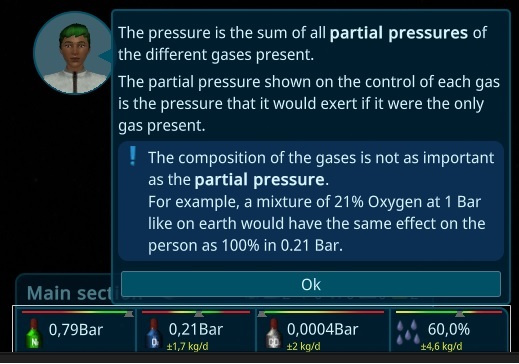
The primary change in this iteration pertains to the ship values. Through experimentation, I discovered that the atmosphere within the ship behaves differently from reality. As a result, I have made adjustments in the game to account for this. The focus now lies on partial pressure, meaning that it doesn't matter if the atmosphere is 100% filled with oxygen as long as it's at 0.21 bar. Consequently, nitrogen is not as crucial as previously thought and will serve a different purpose in future iterations.
Gravity Details
Gravity has undergone a significant rework and now features the same attributes as other resources. This includes displaying the interior items that influence gravity, a comprehensive history, and more. The calculations have also been adjusted to reflect a more realistic approach with rotational energy. This means that the thrusters need to be adjusted when mass is attached to or detached from the ship.
Advanced Doors
The doors now have an additional state. They can be open, closed, and sealed. The closed state allows individuals to walk through, but it stops the airflow. Essentially, closed doors act as airlocks.
Section List
You can now get an overview of all sections by hovering over the section name and reading the tooltip. Additionally, it is now possible to select the section. Currently, only basic features are available, but more will be added in future updates.
Keep Tooltips Open
To address a problem where new players were unable to see the reasons for disabled tasks, tooltips can now be kept open by clicking with the middle mouse button. This provides an opportunity to solve the issue. Special thanks to grantedthree for reporting this problem.
Markers
The Resource Tooltip Bars have received a complete makeover. They now have a unified style and are easier to use. Critical fill states, such as air values, are now indicated by markers. The markers also display the time to the next critical point.
Other Mass Balancer
To make balancing the ship in the late game easier, I have added a new Mass Balancer that functions similarly to the previous one. This new feature allows for the redistribution of mass away from the ship.
Game Time-based Autosaves
In addition to the existing "Every n Minutes" autosave option, a new Game Time-based autosave has been introduced. This can be configured in the options menu and will create a savegame by default every 7 days of in-game time. Special thanks to Bluesky-wr for reporting this. Furthermore, more metadata and a small screenshot have been included in the savegame to facilitate easier identification.
Mass History
The Mass now also includes a history feature, making it easier to track the magnitude of ship leaks.
New Soil Machine
As part of the ongoing updates to old models, I have created a brand new Soil Machine. Like before, it uses Bio Garbage, CO2, H2, and energy to produce Prepared Earth, which can be used for growing plants later on.
Other changes:
Fixed an issue where restarting the game with Dynamic Brightness would result in a workaround for a Unity Bug.
Resolved a problem where the Tutorial Tooltip was overlapping the white highlight box (thanks to hackerintraining).
Fixed the display of the correct amount of interior items in Blueprints.
Addressed missing values in Blueprints and various other UI elements.
Corrected the calculation of updating Moon Places with more than one crew member (thanks to Mark).
Fixed the Help feature when Gravity was not yet activated (thanks to Mark).
Resolved broken Person Animation Data (thanks to Mark).
Fixed an endless loop in the loadTransportSlot function when the transport slot is full (thanks to Mark).
Fixed the pimenu, preventing a person from filling up something when they are already carrying something else (thanks to Mark).
Fixed a sound issue with effects.
Fixed effects not starting after loading a game.
Fixed a problem where a box turned in the Stacked storage before moving in.
Fixed the placement of the Highlighter, ensuring it is sometimes not behind the UI.
Fixed doors not being multiselectable.
Fixed the Energy overlay not being displayed.
Fixed the Unconscious Animation not being used in certain cases.
Fixed a missing Delta label in a special case.
Fixed the pause not being stopped in a special case with some popups.
Fixed the Seal button not changing when unsealing in a specific situation.
Adjusted the SaveGame Progress to be in front.
Fixed special cases for PopupPanels.
Improved the error resistance of WorldElements.
Prevented a person from receiving a walking command when unconscious.
Fixed a flickering issue with food on the table while placing it.
Fixed a problem where a person would not stop being unconscious in special situations.
Fixed the canceling of Walking, which would move the person to the next position.
Fixed a selection problem where the MassBalancer was unintentionally selected.
Corrected the mass calculation while constructing a room.
Fixed some dismantle storages not sending resources.
Fixed the positioning of Resource-Overview elements for constructions (thanks to BurritoBotV3000).
Disabled tasks for interior items when the storage becomes empty.
Fixed WorldElements being shown at the wrong location when behind the camera.
Fixed the 3D icon for the mass balancer floating in the air.
Resolved a broken Camera Overflow feature (thanks to BurritoBotV3000).
Fixed the zoom on the HistoryGraph to prevent scrolling.
Adjusted the Person timewarp for Crafting to use the processing time as the target.
Implemented autocorrection for model problems to prevent spamming warnings.
Balanced the SupplyShip so that 12x 1t steel can fit into the 12t cargo (thanks to grantedthree).
Stopped the HelpElement when clicking on it again.
Showed the created Report ID when creating errors or feedback.
Included the resource type in the StorageProblem if it has only one resource type.
Changed the MassBalancer to show the TargetValue as Mass instead of Percent for easier setup.
Allowed the Optimal Resource to be cheat-able.
Adjusted the rotation of persons' idles to not always be the same.
Saved the CameraPosition, Zoom, and Current Selection in the savegame.
Hid Storage Hints for the Person Need overlay.
Remembered the last overlay when it is changed to improve usability.
Moved the ability to drop multiple rooms to the Shift key for easier dropping of single rooms.
Notified the player when humidity is low and explained the implications.
Included the Target Container Value as part of the container and added a special marker for it
Improved the readability of rounding for all values, preferring non-comma values.
Showed the Leaking Buildings instead of a general AirLeak amount.
Prevented connected doors from being removable (thanks to grantedtree).
Showed the reason for interior items and rooms being not dismantlable.
Prioritized workplace tasks for Transport, Construct, Maintain, and Working.
Increased the person's carry capacity from 20kg to 50kg (0.3g max) for improved efficiency.
Ensured that persons lay in their own beds and not in beds assigned to other persons.
Included the ConstructionState of construction sites in the priority list to prioritize their completion.
Increased the update of mass on SupplyShip and Shuttle arrival.
Made Maintenance dynamic, depending on the construction effort.
Restored the tooltip for Construction Effort.
Improved the sound of engines for the SupplyShip and Shuttle.
Removed the history of a resource when the container is removed.
Aligned the item size of storage buttons.
Reduced the occurrence of bad person models at medium zoom levels.
Displayed the Room Target of Construction in the Activity panel.
Enhanced the tooltip for activities on workbenches.
Improved the view with many ResourceFilters on a storage.
Made the location of ResourceContainers clickable to select the storing entity.
Enabled hiding overlays (like resource paths or container elements) in First Person View.
Hid non-buildable or deprecated interior items from the SupplyShip and Workbench (thanks to BurritoBotV3000).
Added a tooltip for Repeat Mission (thanks to BurritoBotV3000).
Increased the impact of high humidity on rooms and interior items.
Implemented autocorrection for problems with wrong AirVolume (thanks to Mark).
Implemented autocorrection for Storage Problems.
Want to see more?
I also post the progress and more pictures to our Discord:
And don't forget to wishlist and follow us to keep up to date.
This iteration focuses on improving the experience of individuals in the game. Along with some updated visuals for the crew, I have also enhanced the history system for each person. Additionally, the created statistic system can be easily extended to other uses, which I will show you below. Furthermore, there has been a significant update to the underlying framework, resulting in better graphics and improved performance.
History
A general history system has been added to the game that can store changes in the simulation. It has been integrated deep into the core of the game, designed to be efficient and save memory. This system has been implemented in several parts of the game, including:
Resource Charts
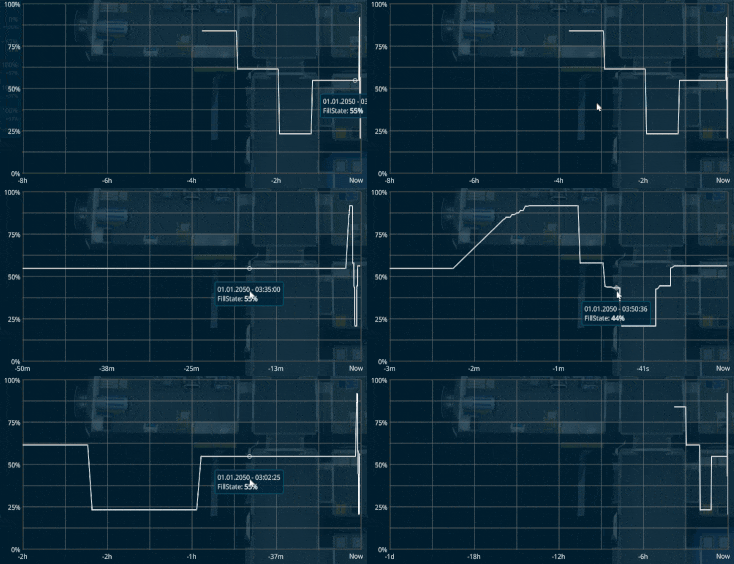
Each resource container now has its own history chart, showing the value over time, as well as increases and decreases over time. This makes it easier to track the status of resources in the game.
Ship Systems
The history system also works for ship and air systems such as energy, humidity, oxygen, and more.
Productivity
The new system now monitors the productivity of interior items, allowing you to see a graph of the item's usage in the details panel. Clicking on it will expand it.
Person Activity
The old history system for individuals has been replaced. While it no longer shows what kind of activity a person was doing at a specific time, it provides a good overview of the different aspects of a person. Additionally, you can now get a statistic for a week or month.
More Animations
A new animation has been added to the game: the bath door.
Person Improvements
The Person system has been enhanced with bug fixes, performance improvements, and better rendering quality. Specifically, I added LOD (Level of Detail) levels and other generator improvements, which means that person models will now switch depending on how far the camera is away from them, resulting in a better performance with only 10% of the vertices being handled by the GPU.
More Person Clothes
In addition to bug fixes, I have also added many new clothes, haircuts, beards, and more to the Person system, as well as improved the rendering quality.
Backpacks
The main reason for these changes was to add backpacks to the game, making it visible when a person is carrying something.
Person Customizer
To test and debug the new systems, I have created a Person Customizer Tool that works directly in the game. Although not yet perfectly finished, players can test it by enabling cheats and right-clicking on the person icon.
Consultant Avatars
Consultants in the game, who raise quests and show things to the player, are now animated persons that move their lips to the voice.
Consultant UI
The UI of the consultants has been converted into speech bubbles next to the element avatars, providing more space in the lower right corner. I plan to add some person-related features here to make them more easily accessible.
Nations
Each Person now has its own nation in the game. I have also added more random names, depending on the selection and the number of names in that speech region. Although I did not add it for all ~250 Nations, the game will pick random names from a similar region to get as close as possible. It is easy to add more names, and players can contribute in the Discord.
Organization
In the Storyline, nations have joined together to form larger countries. I used real data for all of the nations and tried to group them together from different perspectives and balance their GDP. Although not perfect, this is a start, and I plan to add a starting screen where players can choose this and get persons mostly from the nations of this organization in the future.
Supply Crew
As a result of these changes, Nations and Profile pictures are now visible in the supply popup with a nicer style.
Better Path calculations
The pathfinding algorithm has been improved, resulting in more direct routes for crew members.
Updated Framework
After a long process, the fourth attempt to update to the new Unity and Entities package was finally successful. The update comes with a brand new rendering pipeline and more features to come in future updates.
Special Thanks
To show appreciation to the community, contributors have been added to the Credits Window in the MainMenu. If they've configured an Avatar, they will also spawn in the game as crew members.
Other changes
Fixed Unit for Energy
Added Persons LOD levels to improve Performance for large ships
Persons not created with underwear.
Added Progress bar to Tutorial Achievement
Sending more debugging in Crash Log
Added Unity RichText support to I18n Elements (more next iteration)
Improved InGame Tooltips are not over the mainmenu anymore
Improved Error reports and Feedbacks sending to the server for better debugging
Popups also closing with rightclick
Improvements to Translation Editor
Added caching to persons animation creation
Added caching to persons avatar pictures
Want to see more?
I also post the progress and more pictures to our Discord:
And don't forget to wishlist and follow us to keep up to date.