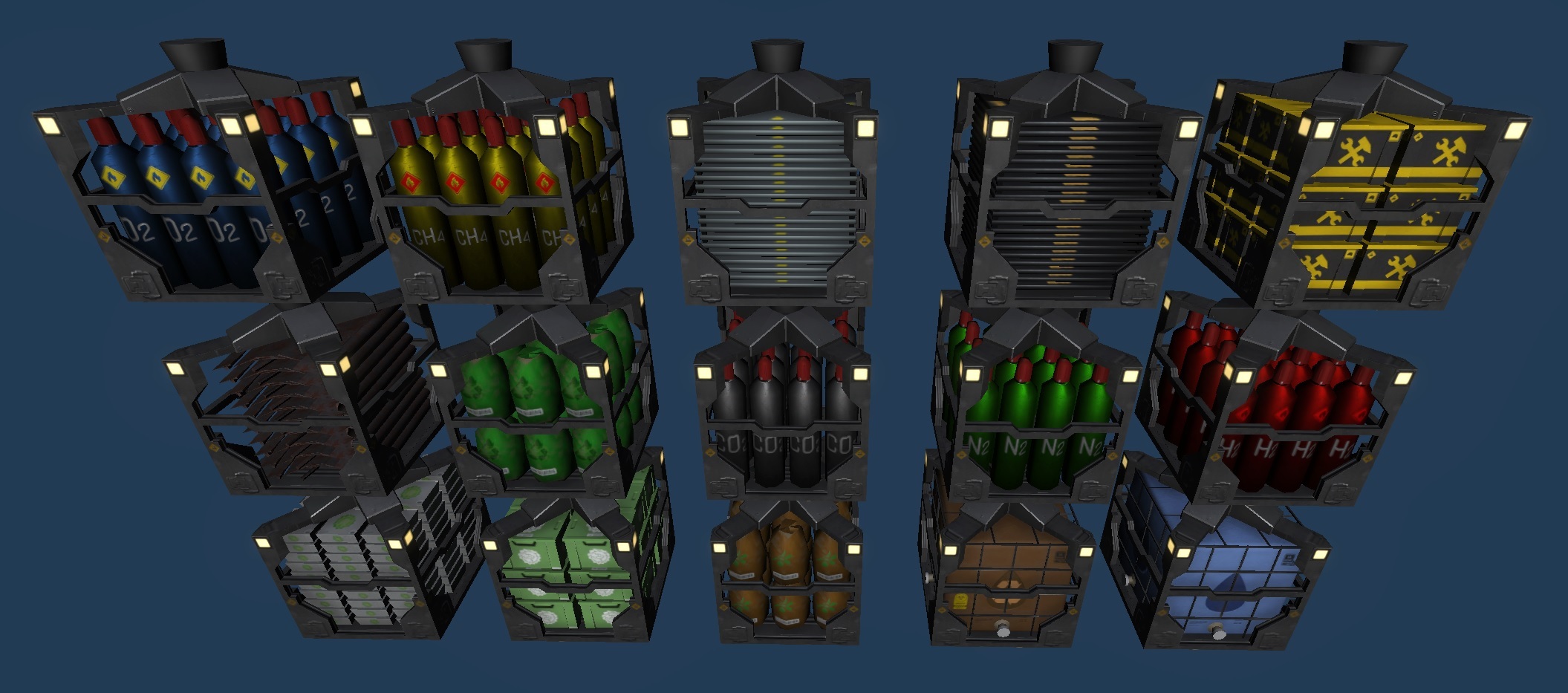
There have been some significant changes in the game. The shuttlebay has made a return with an upgraded version, and the Planning and Blueprint system has undergone a significant overhaul. Additionally, Interior Items now have a pi menu for more straightforward connection of storages or resource transfer. On top of that, there are numerous other fixes and improvements that you will notice.
New ShuttleBay
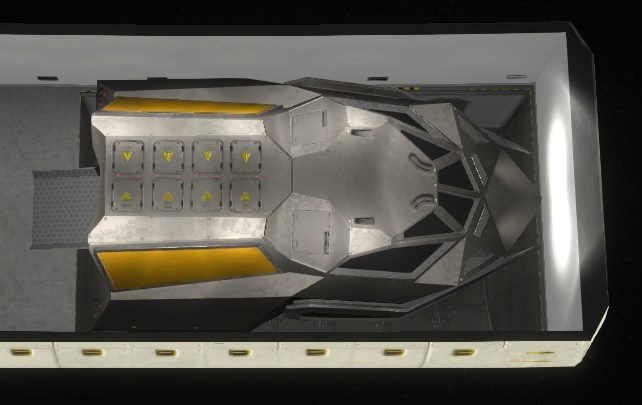
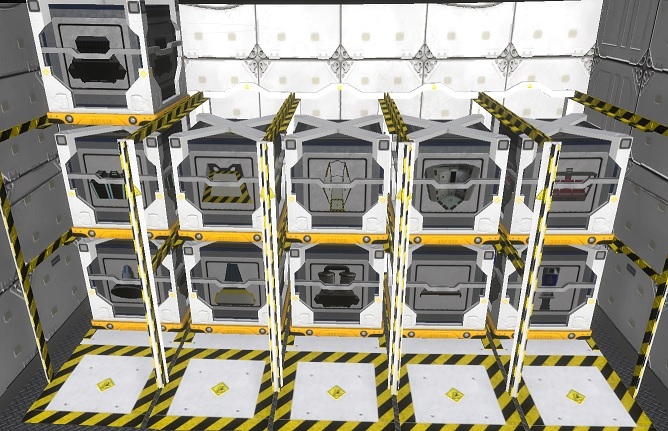
The shuttlebay has made a comeback with an updated version that now utilizes the new interior item system and features new graphics. Personnel now fill up the necessary resources for the shuttlebay, similar to other interior items.
Mission Places
The Missions have undergone a significant revamp with updated models and new locations that offer different resources to gather. It's now possible to add story events to the Missions, such as collecting old or spying satellites, or mining abandoned generation ships.
Configurable Missions
The Mission system has also been improved. The duration and number of crew members can now be adjusted. There's also a Repeat Mission feature that allows players to make gathering resources a routine activity, such as flying to the moon.
Advanced Missions
The mission places can be upgraded to enable faster resource gathering, though this requires additional resources and time. Different locations have varying levels of upgrades, allowing players to maximize their efficiency. The developer may also add new shuttles in the future. When a shuttle is on a Mission, players can see the resources increase and decrease when the shuttlebay is selected.
Removed Planning Mode
In earlier versions, players had to drop numerous buildings without the aid of interior items or room configurations. This aspect of the game has become obsolete and has been simplified. Players can now directly place rooms.
New Blueprint System
The Blueprint system has also been simplified. Instead of associating each room with a blueprint to hide the button, players are now prompted to name their blueprint via a pop-up. If a blueprint already exists, players will be notified and given the option to overwrite it.
Clone Room Button
To simplify the process, a clone feature has been added. Players can now plan an identical building again with a single button press, including all its interior items and configuration.
Configuration of Unfinished Rooms
Previously, players could only configure a room after it was finished. To make this more convenient, players can now see inside of unfinished rooms and select the unfinished interior items inside. They can also add and remove interior items inside of them.
Interior Item Pi menu
The Interior Items now feature a Pi Menu that makes it faster and easier to connect storage or send resource boxes. This menu also works for Rooms under Construction, allowing resources to be sent out.
Panels restructure
All Selection and most Tooltips now have an aligned layout and have been restructured. New Tooltips have also been added, such as the Person Activity Tooltip, making it easier to understand the different parts of the icon.
Other changes
Fixed Room Configurator
Fixed placement of new Rooms sometimes not auto-rotating correctly
Fixed "Choose Workplace" action not stopping with right-click due to Pi Menu
Fixed flickering animation due to rounding errors
Fixed Pi Menu for Services being active even when there were problems
Fixed Thought Summary having no date indicator
Fixed destroyed Interior Item being visible after loading the game
Fixed Tutorial in Savegame having no highlight area
Fixed Savegames for Player Groupings
Fixed Large Dehumidifier tile settings
Fixed InflatableWalls not supporting the hideTopOfRooms in special cases
Fixed flickering overlay in some cases
Fixed some Room Icons moving on timewarp
Fixed finished Storage not updating the interior containers
Fixed finished Storage not updating itself to request resources
Fixed another Savegame bug where duplicate entities were added
Fixed not updated UI for activity in some cases
Fixed bad rounding for energy in productivity Container causing confusions
Fixed space-tiles not being updated when the interior was dismantled
Fixed last piece of a crafted interior item not being transported to the original target
Improved automatic IconPositions for Problem Icons
Improved Icon Placement for Construction Hints of Rooms
Added ability to cancel constructing Interior Items like Rooms with Delete key and multi-selection support
Removed DragDrop Selection of Rooms, to focus more on persons and interior items
Not existing Text values in I18n Json files are now prefilled with empty text to make it easier to edit by hand
Improved Performance of Supply Popup
Added Shuttlebay and Gravity icon to Storage Room
Skipping tutorial directly starts the next one
Workplace choosing is now possible for all rooms, not only the ones with working places
Edit Name now marked when starting to edit
Overlay of Energy not showing connection hints anymore
Switching from Pause to another state now rechecks for possible resources to send to the Interior Items or Rooms
Make PiMenus closeable with Esc-Button
Transferring resource boxes to ConstructionSides now only shows the matching resource type
Feedback Popup pauses the game
Photovoltaic Panel was not hidden at the start of the game
Use nicer Stop Button for Help System
F1-F4 can now be used to skip time like the button upper right
Make Savegame more error-tolerant
Restructured internal error reporting to deal easier with reports
Aligned all Mass Calculations in Grams to use these base units everywhere and fix issues
Improved Selection Bounds for MassBalancer
Make Interior Items selectable by used Tiles instead of drop position
Show more detailed Content Value when the value is close to 0% or 100%
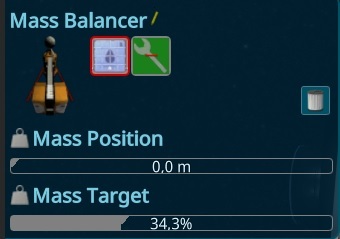
Mass Balancer Overlay always shows the Perfect Mass to make it easier to adjust
Dehumidifier versions now have different speeds
Hide the Massbalancer's tube while in construction
Allow multiple connections for storages via the choose action
Auto Choose ResourceFilter for connections without showing the popup if one has only one option
For single ResourceType Storages, show the ResurceType instead of the all Resources icon
Aligned all ValuePanels, so there is a similar style everywhere
No pause on asking for confirm multi-removal
Adjusted AirVolume of rooms
Reduced steel amount for rooms
Added detailed icon to ProblemIcons
Not showing useless overlay for condition-value
Big refactoring of the Room Creation Process to fix several issues
Take Resources now possible when the container can be emptied
Removed wrong error for ResourceBox garbage disposal
Want to see more?
I also post the progress and more pictures to our Discord:
And don't forget to wishlist and follow us to keep up to date.
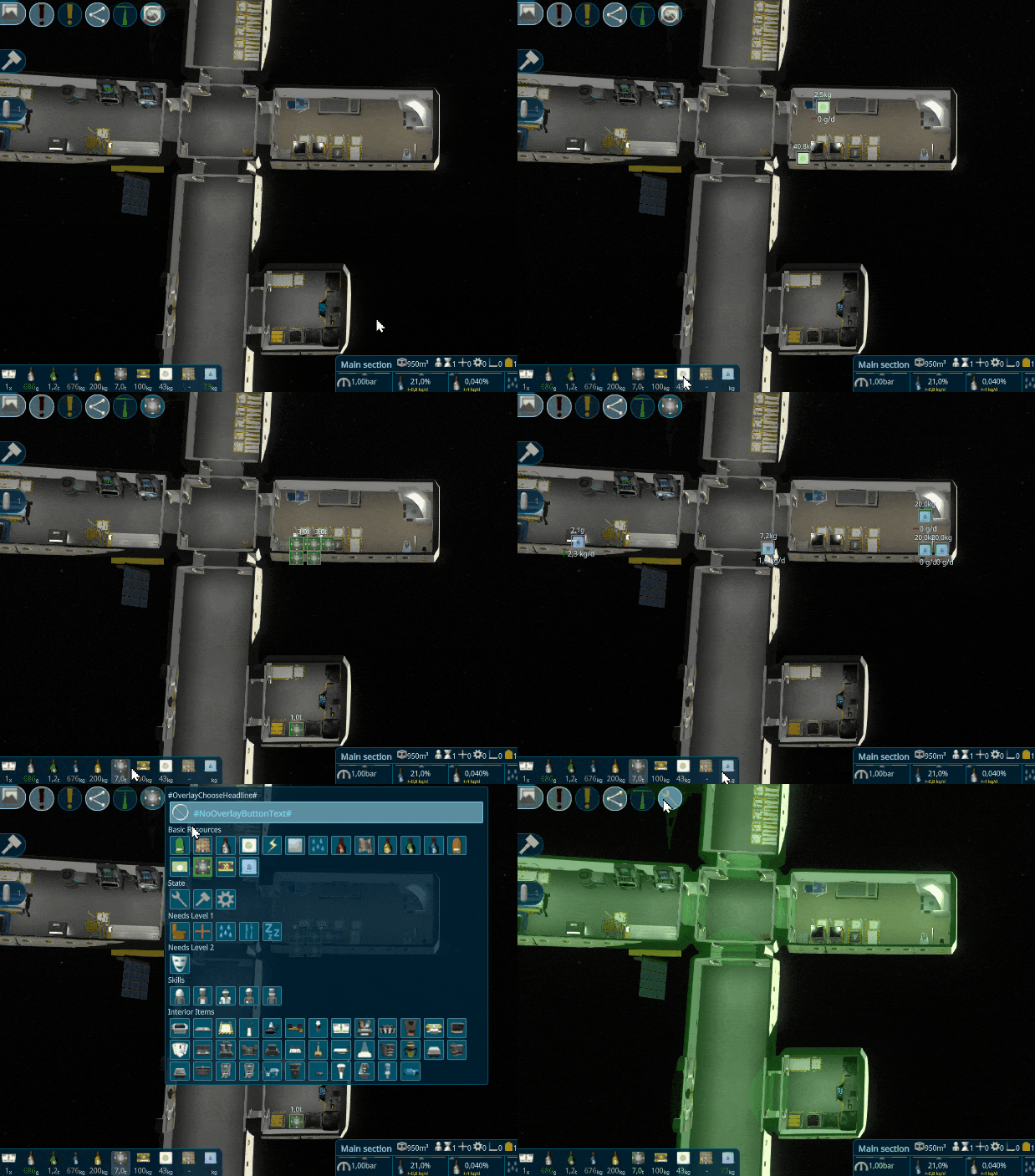
One big thing this iteration was to adapt the overlays to the new gameplay and improve them to the next level. I changed these overlays in different places, to gain more overview of what's going on and where the resources are.
Overlay - Resource Overview
When hovering over the Resource Overview Items below, it shows not only the connections for that resource Type as before, it also shows all resources the people have or interior items that consume, produce or store this resource.
Overlay - Storage Connections
When having a storage selected, it will now better display the connected storages, by showing animated lines with the resource types that can be transferred. It now respects the new filter on the connection and on the target storage.
Overlay - Interior Items
When having a storage selected, it will now better show the connected storages, by showing animated lines with the resourcetypes that can be transferred. It now respects the new filter on the connection and on the target storage. To have an overview about the possible input or output storages, it now also displays all storages with potential problems, why the crew can’t transfer them. For example, here is one of the storage empty, the others in the crew room are not accessible because of the configuration.
Overlay - Air in Section
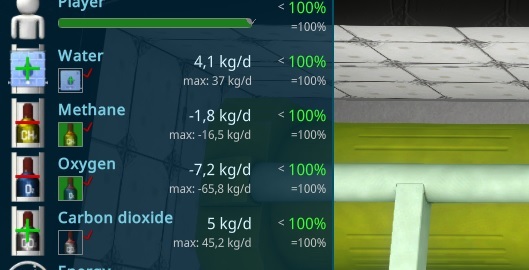
The last overlay I want to present to you is for the Air-values. Hovering over the Air values at the bottom side of the screen now also shows an overlay which displays where the consumers and emitters are.
New CO2 Scrubbers
The CO2 Scrubbers got a complete remake to fit the new graphic style.
New Dehumidifier
The Dehumidifiers Models are now also updated to the new graphic style, hope you like it :)
GarbageDisposal
A new Interior Item has been added, the Garbage Disposal. It can be used as a normal Storage Connection or as a target for the Empty Transport slot, like regular storages.
Translator Tool
More and more people from the community want to help translate the game to different languages. The game already supports directly adding or changing live the translation json files, but to make it even more convenient I migrated my tool to the game itself. It can be found at the language chooser.
It will show the outdated text parts and show the current English and current language to translate. It also has an auto-translate button, that uses the google translate api, to have a first suggestion. Above it has some filters and a search field to find things faster that need to be changed.
To make it easy to translate special things in the UI, it’s also possible to open the specific Text with AltGr + MouseClick.
Zoom Related Resource Overlay
To respect the new multi-filter storages, I adapted the Overlay, to see more icons at the same time. Its now zoom based, so zoom closer will show more resource icons.
Other changes
Fixed ResourceBoxes could be transferred to Dock
Fixed warnings when dismantle Mass Balancer
Fixed not all water was transferred out from the Mass storage on Dismantle
Fixed not requesting boxes for resource waiting building lot when door is finished
Prevent Walk Activity to not finished rooms
Improved visualizing paths to support more connections and show nicer less connections
Want to see more?
I also post the progress and more pictures to our Discord:
And don't forget to wishlist and follow us to keep up to date.
This time I reworked another feature of the game, that was not touched for a long time and needed an update to the new gameplay.
Center of Mass Logic
I updated the Center of Mass, to make it easier to see what's going on. The old “possible area” was not very intuitive, so I added a manual logic and an acceptable offset to the perfect mass balancing. The Player can now change the Target Mass and the extension of the Mass Balancers Water Balloon.
Center of Mass Overlay
To visualize this, I reworked the Overlay for it. It will also become visible, when the Mass Distance is changed by the player with Drag&Drop. Then it also shows the Center of Mass of the Ship when the Mass Balancer reached its target fill level. In case of the normal overlay, it shows the ships Center of Mass when all of the balancers reached its target fill level.
New Mass Balancer
This iteration I migrated the Mass Balancer to the new Interior Item System. It’s similar to the Dock reaching to the outside of the ship, to not disturb the player. The construction is made out of a big balloon that can be filled with 100T of Water. The Balloon can be extended via pipes that can be moved out. Similar to drilling oil, the pipes get mounted or unmounted when moving further. The tube storage and a connection is in the inside of the ship, so the crew can easily maintain it.
Early Artificial Gravity
The artificial gravity was a late game feature till now, due to the mass balancers moving their mass to the outside of the ship. But in reality it's also possible to use that technique for a small ship towards the other direction. This makes it now also possible to start the artificial gravity for the small new starting ship. I added an Achievement and Explanation later in the game as to not overload new players too much.
Improved Help System
To show that system to new players, the help has been changed. The Help menu now contains the old help for the activities, as to have one central place. Instead there are now context relevant help buttons, shown in green if they have not been seen by the player.
Door Interior Item
All testers asked about adding doors in finished buildings, so I had to support that and created a door interior item. It also has the effect that it’s easier to open and close the doors. All new rooms must get a door interior before they can be built.
Time Warp shortcut
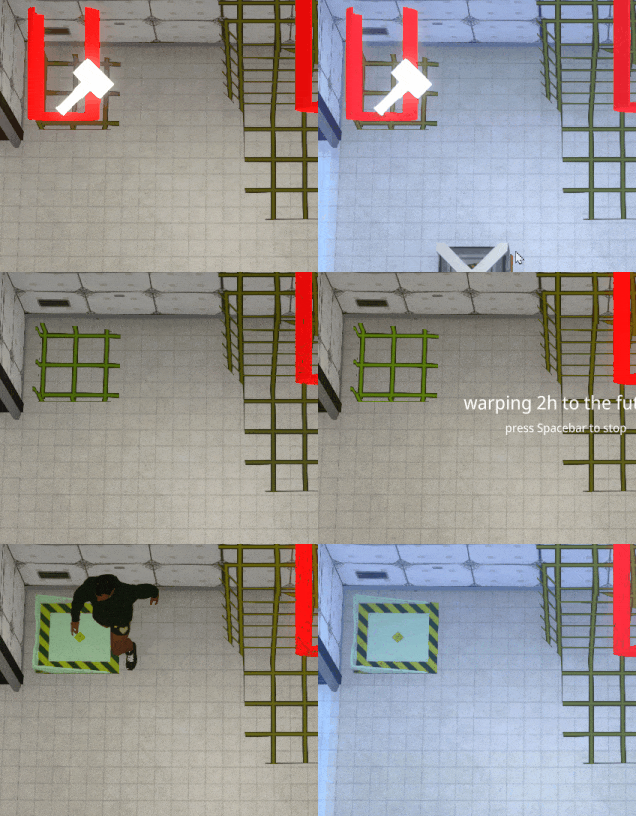
To improve the playing speed and make it more convenient, you can now start the time warps by just pressing the Tab Button. It will timewarp if there is a useful timewarp, e.g. it will timewarp to the end of the sleeping when the person is selected; or when a construction site is selected, to the end of the construction.
Better Interior Item Resources Interface
Each interior item has Containers and they were all shown without a logical structure. The condition has been moved to its own place, and the others are now sorted by the input and output storages. When the interior has Recipes like the workbench, the items are split by a Progress element, to make it even better to see what’s going on.
Outside Ambient Occlusion
To make the outside of the Ship better visible in the shadow of the sun, an ambient occlusion for the outside of the ship has been added.
Dynamic Star Background
Players have reported feelings of dizziness when engaging in the time-warp feature while rooms are visible. To combat this, I have implemented a feature that allows players to adjust the background brightness. By default, the background brightness will be dynamically calculated to match human perception, providing a more comfortable experience while time-warping.
Speed visualization
Analoge spinning clock to the timewarp overlay. This was a suggestion from the growing community, thanks to Revolus for the idea.
Other changes
Fixed wrong Door button
Fixed special cases for Transport Tasks not updated Task (Thanks to ichio)
Fixed ship was not spinning anymore when it should be
Fixed mouse capture was not working in special places on bars
Fixed wrong offset at dragDrop a bar
Fixed Engines start effect when the first engine is on.
Fixed duplicate resource container visible in ch4 engine
Fixed Not centered Problem Icon over N2Releaser
Fixed HideTopOfWalls Mode changed after adding the first interior item
Fixed Creating a room with preadded interior items takes too long time
Fixed Box arrival with small boxes still not starting the interior construction in special case
Fixed position of Room Problem icons in Scene
Fixed Part of the StackStorage Model was in the floor
Fixed Recipe not stops assigned persons activity
Added better Spawnpoints for DockingPort
Improved Intros Camera at the end not aligned good
Move Dock to separate interior Item category
Take Resources From Storage is sometimes shown 0.0x. Dynamic adding more numbers there.
Adapted stats for old Hydroponic Box (thanks to EkuDza)
Show the Construction Bar on top also for rooms.
Hide not needed containers for interior items in construction/dismantle phase
Added Warning for Paused Constructions
Added Storage Setup to the Blueprints
Hide Delete Recipe Button in output state, due to it has to be first emptied
ConstructionStorage should always merge automatically on arrival
Remove input and Progress container when recipe is done instead of later when its finished
Wrap line when too many resource Filters are active in a storage
Closed a hole in a room part mesh when ceiling is cut.
Better SupplyShip Speed when flying away
Want to see more?
I also post the progress and more pictures to our Discord:
And don't forget to wishlist and follow us to keep up to date.
This update goes leaps and bounds to make the game playable for new players. The complete tutorial has been redone to adapt to the new Gameplay. You may also notice that there are a lot of bug fixes, this was due to the huge changes the last time, it should get less after each iteration till the playtest will start.
New Tutorial
Due to the changes last year, the tutorial got more and more outdated. It didn’t show the new gameplay anymore. Due to the gameplay changing significantly and nearing it’s final stage, I completely re-did the tutorial.
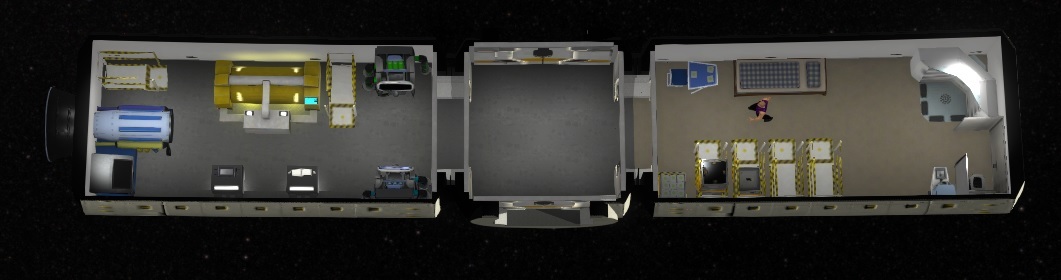
New starting satellite
With the tutorial, the starting satellite has also been re-done. The new gameplay makes it possible to reduce the size, so you can now build more things on your own.
New Docking Port
The Dock has been migrated to the new Interior Items. The logic there has now also been changed. Before every Dock had their own supply ship, what led to an easy way to get lots of supply ships by just building more docks. Now the Supply Ships can be managed separately. More supply ships can be bought and for each supply request the dock can be chosen.
Storage Filter
The storages can now be set up to support multiple Resource Types. This makes it easier to manage the resources in the ship.
Storage Transport Options
The storages can now also be configured to allow the usage of the persons. This is to prevent the persons filling up the storage or emptying it when you don’t want that.
Improved Problem Overlay
After all of these changes, the old setup was not useful anymore, so I changed the logic of the problems, to hint better towards the problem. For example the machines now hint to the needed resource types and not just showing “a resource is empty” icon. There is now also a problem added for no recipe set, low interior condition and resource container specific problems.
More Problems
To hint at potential problems, new warnings have been added. One is the low condition for interior items. The condition has an influence on productivity, so it's better to see it earlier. It's shown as a warning, when it has an influence and error when it's very low.
Other changes
Fixed not rotating Photovoltaic Panels
Fixed missing shadows in First Person Camera
Fixed annoying camera rotation when zoom to other camera
Fixed persons idling on used tiles when adding interior items
Fixed person not moving around when idle
Fixed person not start "real" idle when forced to walk
Fixed error when person try to pick up from a removed resource box
Fixed rounding Bug for InteriorItemBoxes arrived
Fixed creation of Empty ResourceBoxes at Transport
Fixed Exception when removing bed in configurator
Fixed SealButton not hiding (thanks to ichao)
Fixed SectionUI not change when selecting an interior Item
Fixed Input connections resource count not filters correct (thanks to ichao)
Fixed RoomConfigurator allows removing an part that should not be (thanks to ichao)
Fixed RoomConfigurator now allowed doors to other rooms
Fixed Exception in Updating special parts of the UI (thanks to ichao)
Fixed endless loop when person get unconscious when constructing a room (thanks to ichao)
Fixed Warnings on build, due to different materials
Fixed missing select sound not played anymore for single selection
Fixed wrong align of some Tooltips
Fixed Idle persons staying very long
Fixed Error on illegal Savegame FileNames
Fixed Maintenance Priority for Rooms not just updated when air-leak is starting (thanks to Bluesky-WR)
Fixed not showing names of renamed interior items in the room overview
Fixed rare exceptions in productivity visual element(thanks to Bluesky-WR)
Fixed some rare exceptions in simulation (thanks to Bluesky-WR)
Fixed RoomIcons are not changable
Fixed Bug in assigning Residents
Fixed Bug in Room Creator special case for some doors (thanks to Bluesky-WR)
Fixed Problem with Popups where Esc not opening Menu (thanks to Bluesky-WR)
Fixed Persons transported Resources to unfinished Storages (thanks to Bluesky-WR)
Fixed abort construction of interior in special case not finish (thanks to Bluesky-WR)
Fixed some rounding errors, where constructions were not finished (thanks to Bluesky-WR)
Fixed bug where building lot starts when some resources still in transit
Fixed Dismantle can create Empty resource Boxes
Fixed some Boxes started at a wrong position
Fixed Room construction person animation seems not working
Fixed Not Possible to let person fill up empty interior item with transported resources
Fixed Filllevel of H2O and H2O Brown were wrong visualized
Fixed Empty transport slot to a Storage shows 0g in PiMenu
Fixed OCD MODE in savegames
Fixed showing wrong connections on hover over ResourceOverview
Fixed Wrong Problem shown for empty resource container activities in private rooms
Fixed end of visualisation connection for special interior items (thanks to ichao)
Fixed Endless loop, related to an null AnimationPathEntity (thanks to ichao)
Mark current Residents in the resident window
Click on empty recipe opens add recipe popup
Hide some outdated blueprints and interior items
Improved SupplyPopup lower bars are broken
Add Door marker when placing Blueprints (thanks to ichao)
Only show center of mass overlay in overview perspective
Auto start Achievements to prevent players who don’t know what to do
Changed Color of Credit Text in Supply popup when running out of credits
Forced using Weight for Interior Item Boxes in Supply Popup
Improved Selection of Persons
Sort Choose Resident
Added WorldElements for Choose Resident Action
Added more AutoCorrections for usual problems
Updated UnderConstructionProblem WaitingForResources and make it as a warning, when the boxes are on the way
Zoom while adding interior only use the room-areas
Better Default Animation Position for Storage Interior Items
Added Missing ResourceType to BuildingLots
Custom SelectionBounds for CH4 Engine to prevent problems clicking on things behind
In this iteration I want to give special thanks to BurritoBotV3000 from our growing community, to help with the new Docking Port model and also for improving the text for the new Tutorial. Also to Ichao and Bluesky-WR this iteration for the good testing and bug reports.
Want to see more?
I also post the progress and more pictures to our Discord:
And don't forget to wishlist and follow us to keep up to date.
The main part of this iteration was a huge update of unity and the related packages. It had around 50% fps improvements, but there were many crashes when building the game and also on runtime, so I had to downgrade again. But I prepared for all necessary changes, so I will try it again next year.
Interior Item Construction Shader
I changed the interior item shader to make them more visible. It’s essentially the same as the rooms, but more visible and detailed.
New Interior Model
To improve the development speed I have started purchasing 3D assets. I used several tools to integrate it to my workflow to keep a consistent style. As an example, I updated the N² and O² Releaser. The gas bottles are the same as from the boxes and will show the internal filling state inside of the interior item.
Visualize Resources of Interior Items
To visualize the amount of a resource that's inside of the machine, it's now possible to show this by the amount of visible e.g. Gas bottles.
Hydroponic Box
To test another kind of asset I added a hydroponic box, where plants can grow. It can also show the progress by visualizing plants growing inside of the item.
Plant growing
Similar to the gas bottles, I also added some visualization of the progress to the new Hydroponic Box.
Multi select Interior Items
Multiple Interior Items like bed can now be selected at the same time. It shows an overview about the resources inside, the workers or residents and much more.
Colorizing Resource Overview
I added colors to the Resource Overview, to hint if it's increasing or decreasing.
Other changes
Fixed Savegame not working
Fixed not working Interior Configurator (thanks to Ichao)
Fixed bug when person died
Fixed bug when person stop causing other person to update, doing the same task
Fixed hiding selection panel when start transfer resources
Fixed several other bugs found with automated tests
Fixed wrong positioned Barrel icon in Problem Icon Overlay
Fixed not working working-lights and effects
Fixed not able to assign eating with PiMenu in a private room for residents
Show Private hint also in Activities
Add "Create New" Button at the top of Blueprints in Buildmenu to make it more clear
Don't stop timewarp when person arrived. Should be till the end of the activity.
Don't update the door in the interior editor, so the door stay open.
Tooltips in PiMenu causing closing PiMenu (on hover)
Added a "No Action" for PiMenus
Removed activity icon from ProblemIcons, due to outdated
Reduced size of problem icons in scene
Moved Public Private Activity to an icon with tooltips
Make Interior Items renamable
Added description for Mood (thanks to Ichao)
Prevent opening PiMenu when click on the ui
Want to see more?
I also post the progress and more pictures to our Discord:
And don't forget to wishlist and follow us to keep up to date.
The last huge step for the new Gameplay is now done.
Construction of Interior Item
Interior items (e.g. furniture or machines) are now built after the room is created. Once the room finishes completion, interior items will be constructed by a person.
Dismantle Interior Items
Interior items can now be disassembled. When removing interior items, you are given a boxed up version of that interior item. It is now required to deconstruct or disassemble interior items inside of a room before deconstructing a room.
Update Rooms
Rooms can now be re-furnished. There is an interior items button in the building UI to re-furnish the room.
Improved Pi Menu
Another small improvement I made was to add affected units to the PI menu as well as general improvements to the PI menu.
Other changes
Fixed exception with multiple dropped Storages (thanks to BurritoBot for report)
Fixed wrong Pi menu entries in some cases
Fixed missing interior count in blueprints menu element
Fixed problem where resources were not moved out of a dismantled building
Fixed walking command had no scheduled ending time
Fixed missing Activity and Storage in Room overview
Fixed Exception on general empty resource slot
Fixed Put Action is not allowed for non-resource containers
Improved Resource weight format for ui elements
Replace arrows for Exit with "Door" (thanks to BurritoBot for idea)
Persons are now assigned to Beds instead of the Rooms
Added Cheat for Resourceboxes of Generic Storages
Added Cheat for Changing ResourceContainer values
ps.: For Playtesters: Like the last iterations, the build will again be just available in the Latest Branch, but i will try in the next iteration the update again and hope they fixed the bugs.
Want to see more?
I also post the progress and more pictures to our Discord:
And don't forget to wishlist and follow us to keep up to date.
The next huge step for the new Gameplay is finished.
Interior Item Resource Box
The Interior Items now need the matching Interior Item Resource Box. Each Interior Item got their own box. Inside are the prepared things to construct the Item, so the person can assemble it in the building, or disassemble it to the Resource Box.
Construct Task
The person can now create the Room without the need of the construction Workbench. He is walking to the building lot now.
Maintenance Task
The maintain Task got also updated like this, so the old Maintenance Table is also outdated now. Its all added to the Pi Menu of the Person.
Interior Item Condition
To split up the interior items more from the building, i added also a condition effect on the interior item. Its similar than the one from the room, but sure not causing air leaks. Instead it influence the activity as worse the condition gets.
Crafting
Due to the old workbench is not constructing things anymore, i made a huge extension of the working logic what can be explained as crafting. I added Recipies to create different Interior items. The work contained 3 steps. Filling up the needed input resources, processing and clearing the output resources.
Queueing
A requested feature by the community was to queue up the building tasks. I added this now to the new Construction Table, so you can setup up to 30 items to be crafted. As usual, there is also a timewarp button to jump at the end of the crafting.
Other changes
Fixed BoxCount in Storage Connections
Fixed several Transporting Issues
Fixed wrong change icon for some resource container icons
Fixed wrong height of Bars with text
Fixed PiMenu popup on wrong position in special resolutions
Fixed Scrollbar for PersonUi and Supply Popup
Fixed not animated Photovoltaic Panels
Fixed persons not idling outside of the ship
Improved UI for Person Overview: Group Activities together
Transport Activities are now always at the Interior
ps.: For Playtesters: Like last time, the build will be just available in the Latest Branch, till the savegame problem related to unity is fixed.
Want to see more?
I also post the progress and more pictures to our Discord:
And don't forget to wishlist and follow us to keep up to date.
Hello friends, the last weeks i worked on more gameplay related features, to make the game more interactive. It's the first part of the last huge gameplay change, i plan to work on the rest of this year.
Interior Resources
The connection between the storages and the interior items were not so intuitive, so i split them up. Each interior item has now their own resource container included. In the next iterations, i plan to do this more visual, so showing the state of it by changing the look of the interior item.
Person Transport Slot
The game was also lacking some interactions of the crew. Till now, the crew just worked on the interior items and using the services to serve their needs. With this update the crew got more important, due to they are the only one to fill up or empty the new Interior Item Resource container. To make this work, the persons got a Transport Slot, where they can transfer some resources.
Pi Menu
Due to a person have now way more interaction possibilities with interior items, i created a pi menu like in Sims, where you can force the person to do something. Its opening by holding the right mouse key down. The major usage of the items will be in the center, so its just a simple right click to e.g. let the person eat on the table.
Transport Actions
The persons will automatically transport the Items to the interior items or empty their garbage/production resources. For special cases i also added other actions to fill up or empty their transport slot, to make sure they are not stuck somewhere.
"Walk to" Command
Another possibility i could add with that pi menu is to command the crew member to move to a specific place inside of the ship. For now, this has no gameplay usage, but later when the ship gets damaged or a virus is spreading around, this will get more important.
Separate Storage
Due to this update, the logic of the interior items with the activity/storage has been changed. The Interior items are now more independent from the building and will be split up in the next iterations. This makes each interior item has their own storage, so they can be setup individual. To make it easier to setup the storages, i created a large box storage with storage of 15 items with one interior item.
Animation System changes
Another more internal change in this iterations is the animation system. It now deal with the interior positions by itself, so the persons are directly move to the target position and just start the activity when they arrive at the position. I could remove a lot of the old code and removed a lot of special cases.
Emergency Lights
Due to the last updates, i was also able to add some emergency lights when the power goes off. Its turning the complete ship in a dark red light.
Other changes
- Fixed flickering of Room-Configuration - Removed Delay of WorldElements - More error tolerant savegames
The bad news at last: There is a new unity bug related to the savegames caused by the current unity version. Downgrading takes too much time. The related packages got a huge update to 1.0 these days, but still got big bugs. So the plan is to update when this is more stable hopefully at the end of this year. In that time, i will just release on the test branch (for the Playtesters) and keep implementing the new features.
Want to see more?
I also post the progress and more pictures to our Discord:
And don't forget to wishlist and follow us to keep up to date.
A thing what i always struggled were the design of the rooms. I want to show you the reasons and some impressions of the new design here.
New Design
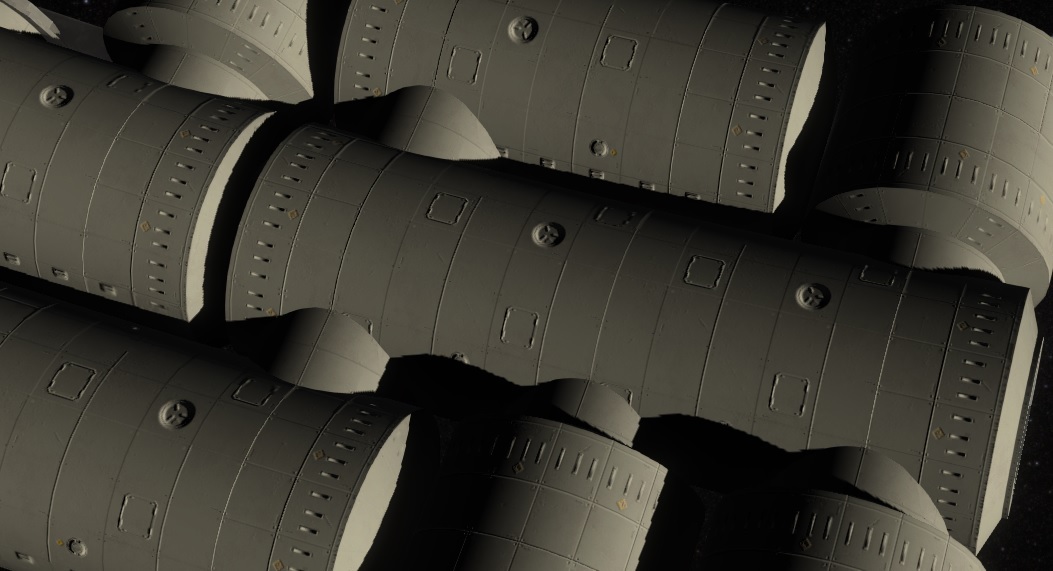
They had several problems, like when the ship is spinning, it causes motion sickness looking outside. Due to the "cut ceiling" feature i added latest, its now possible to create fully closed rooms. Another point was the general design, to have a better pressure capsule, a cylinder design is way more effective. So in case of realism it should be changed to this kind of design.
New ResourceBox Design
To create this new tube design with the old logic was complicated, due to the resource-rail system below. Due to that i changed that completely, so the resources are now above robot, that will move the boxes over the floor, where also the persons are walking.
Room Configurator
The main thing was now, that the tile based old room configurator was outdated, and replaced by an easy to use room configurator. The player can drop the start of the building and can than extend the tube or attach others next to it to extend them. There is a maximum of 3 tiles per tube and 3 tubes per building, to prevent too large room. The system supports more room styles, so the old Greenhouse design or a design with a glass roof can be added easy.
New Storages
Due to the resources are not moving below, all the storages needed to be updated. The wall height was also reduced from 3m to 2.5m, so the large storage wasn't fitting anymore. To still support that, i restyled them. The new Buildings can have a bit less space, so i also added an outside storage. This feature is also needed later when i change the shuttlebay and supplyship landing to the new interior items.
Hallways
The old Walkway had many special cases and was not included in the interior drop system. But it would be great to be able to let the player to customize them too, so i also used the new Room Configurator for them. Till now, this is the only way to create multiple exits at the rooms. The other advantage is, that it now way easier to create the whole circle of the cylinder, by "just" dropping large hallways blueprint the user can create. The disadvantage is that the player need to plan the exits in front, so it cause more early planning.
Animation System
All of that change also affected the Animation System, that i completely refactored several times, to a now more easy code without the need of the old special cases, that caused a lot of complexity.
Want to see more?
Thats the last update of the Graphic update. Hope you like the new graphics and i will continue with more gameplay now. I'll create a post like this when the rest is ready. I also post the progress and more pictures to our Discord:
And don't forget to wishlist and follow us to keep up to date.
Hi there, you may noticed, that the last update was a longer time ago, but there was a lot of work done in that time, i want to present you. The major change this release is the new Graphics. Like you can also see in the latest News, it brings the game to a new level of detail. Here some impressions.
Resource Boxes and their content were rewritten
and became a randomize position and rotation.
Many interior items were updated. Here just few of them
There are also new Interior Items, like the new Hygiene area (inspired by the ISS)
Interiors can be place inside of walls, like the Spinning Engines
The Photovoltaic Panels are migrated too and extends depending on the electricity usage
are rotating towards the sun
The Animation System has going through several large refactorings. Persons now directly move to their target positions through different rooms.
As you see, the Resource boxes are now also moving along the walking areas now. To do that, they get a small robot below.
Due to the missing underground level, the resource storages also got a remake
The reason for that were the big change of the rooms. They got now a cylinder shape.
Beside changing the Floor, the wall color can also be changed now
You can create these rooms with a new customizer tool when placing a new room
The Walkway is also replaced by the room Configurator, using blueprints, its now way faster to build the circle for the artificial gravity.
There is also a possibility to cut parts of the rooms away. This is used now for a new storage type, that can be placed in the wall to save space and later for shuttle bay and the dock interior item.
In the end, i could finally add the Lens flares for the sun.
Besides that more larger changes: - The savegame is now smaller and the save and load process got way faster. - Interior dropping has been improved, showing better problems and are animated - Cut top of Rooms - One big Unity Update with tons of breaking changes - Another big Unity Update with even more breaking architecture changes, but compile was broken in this version. But i prepared the architecture to update soon. - And for sure a lot of UI Changes
Want to see more?
Or have any questions, feel free to join our Discord.
And don't forget to wishlist and follow us to keep up to date.