

Instruments of Destruction
Stretching things out with the Winch, Rope controls, and Flex Lights
Added new part: Winch
Added rope extend/contract controls
Added new part: Flex Light
Added repeat count parameter for Flex Panel (repeats along Width axis)
Added 5 new styles for Flex Panel
Added new small part: Ultra Heavy S
Slightly tweaked Center of Mass (again, sorry) to fix issues with variable mass and multi-collider parts (mass remains unchanged)
Added wrecking ball mass adjustments
Increased Fixed Bombs max strength to 6 (reminder: Strength on Fixed Bombs only affects the damage it takes to explode, not damage/range/etc)
Increased max mass setting for Ultra Heavy/Steel Orb/etc
Improved grass/rock generation for large maps
Fixed dead/inactive flex connections drawing
Fixed pistons not using their sound overrides
Adjusted rope compute shader so it has less obvious twisting (when ropes are vertical)
Fixed rocket gravity settings with game speed set to anything besides 1.0x
Fixed Bomb launcher aerial timer (both versions) and delay time (S version)
Fixed Overdrive S not working for some parts (depending on the order of parts in the vehicle)
Made Overdrive S draw lines on the side
Changed ground plane levels (Desert Test) to use a dynamic mesh collider that follows the player (in addition to the giant plane)
- This makes walkers like Hex Storm more consistent in top speed
Fixed spread of bomb launcher being affected by aerial timer
Fixed (I think) tread belts no appearing if you start too far forward/back from the origin
Fixed some parts getting 2000kg added to them from enabling a checkbox (Wave Generator + Sequencer in particular)
Changed default flex tread values to be better
The big new part for today, and possibly the last major new part for a while, is the Winch. It uses a combination of an invisible joint and a resizable rope to create the winch. Like other ropes, it does have some limits on how much weight it can hold without getting a bit wonky, but you can always use more than one for bigger loads.
To make the Winch work, I had to tweak the rope resizing code a bit. It's a bit better overall I think, but adjusting how ropes work is always a bit iffy. Rather than worry too much, I decided to also add optional controls to regular ropes so they can be expanded/contracted. This kind of makes the Winch not as necessary for many builds, but I'd rather have more functionality/flexibility than less. Speaking of ropes, the Hook Launcher also got a bit of tweaking so that it works with the new rope resizing code.
The other part I think people will be excited about is the Flex Light. It's based on the Flex Panel (which also got a couple separate improvements), and it should be a nice improvement for making glowy lines/etc without having to use weird tricks/etc.
There were a number of other tweaks, particularly regarding part masses. There are a few more parts I'd like to add, but they aren't too important, and at this point I need to move on, so they'll be shuffled off 'til an update beyond the big campaign changes.
There's a lot to do for the campaign, and I'm not sure what I'll work on next. I need to do some AI enemies, but there are so many maps/missions to create that I may do a few of those first. Either way, I would expect this to the be last significant update for a bit.
Flex Tread Guide (Version 0.241)
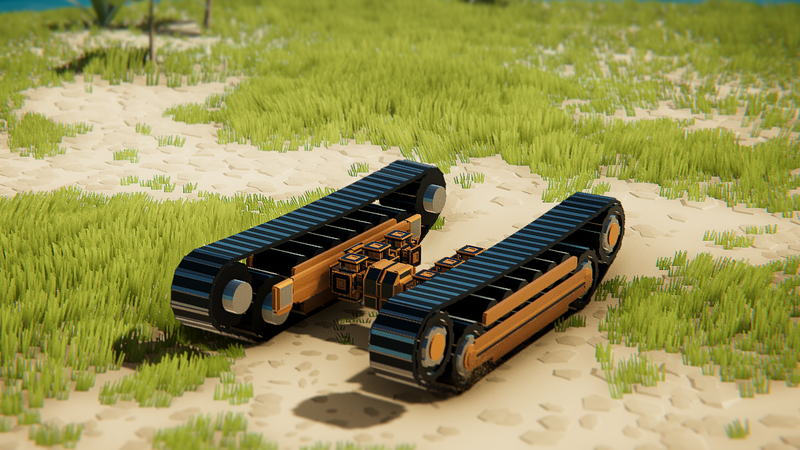
The new part is Flex Treads. There are a number of parameters to change the treads and make them how you want. Note that not all combinations of parameters will result in well-behaved treads (particularly with extreme settings), and you can easily create wheels that aren't really attached to anything, but they'll still function fine.

LENGTH
Extends the length of the treads. This is one of the two primary size controls.
WHEEL SIZE
Expands the size of the wheels. This is the other primary size control.
FOUR WHEELS
When checked, the Extra Wheel X/Y values control the offset of two additional wheels. When not checked, there are two smaller mini-wheels (these collide but do not provide power to the treads, and use somewhat different offset amounts).
EXTRA WHEEL X/Y
Controls the offsets of the third/fourth wheels, whether they are full wheels or mini-wheels.
ROLLERS TOP/BOTTOM
These are visual-only rollers, and completely optional. I'd recommend messing with these last, after the other parameters are set.
TREAD COUNT MOD
This changes the number of tread boxes used when the game is running. You won't see any change during build mode, but this is important to physics/etc. Try to have treads that align on the edges with neither a gap nor overlapping for the best results. A value of 0-5 is usually good.
TREAD TENSION
I've tried to set the tread generation to automatically create treads (during gameplay) that fit your frame/wheels but with extreme values it doesn't alway work out. Use this value to fine-tune the size of the overall tread shape. A higher value reduces the size of the tread shape and increase the tension/tightness. Too much tension will break things. You can make the treads floppier by setting a lower value. Generally you want tighter treads to work better with physics, but floppier treads sometimes look cool.
TREAD MESHES
There are 3 mesh types for each of these. Choose from any combo you want. Here's what each one controls
A - The main body of the frame (the solid front/back)
B - The large wheels
C - The mini-wheels (only enabled when Four Wheels is disabled)
D - The rollers (these are visual only, have no actual collision)
E - The tread mesh (the thing that spawns in-game) - You can't see this in build mode
I think that should get you started. Let me know if you have questions/suggestions/etc.
[FULL CHANGELIST BELOW]
- Added new part: Flex Treads
- Fixed solid pipes having no player collision (the center part)
- Added adjustable ground dust amount for cabs/vehicle
- Fixed damage mod UI on logic gate
- Changed wave generators to use a limited range of timer values (internal code change to prevent long-term waves from degenerating)
- Reverted mass changing from Center of Mass fix (CoM still fixed, mass is left alone)
Vehicles Destruction System (Version 0.240)
Vehicle Destruction is something I didn't really want in the game when it launched in Early Access, and until recently, I was fine not having it. The Floppy+Breakable option in Sandbox mode was a kind of goofy thing that kinda mimicked destruction, but it wasn't really suitable for using in the campaign. With the focus shifting towards some missions being combat-oriented, and the recent features for making objects destructible, I started to think about adding a real vehicle destruction system.
There were a few things that went better than I expected, so it didn't take as long as I thought it would. The most unexpected aspect was that destroying the joints in a vehicle worked right away for the majority of part types. I also was not looking forward to making the destruction directional like it is with objects. I already had the shader done from objects, but doing all the 3D math and damage tracking was probably going to be difficult. It turned out to be an unnecessary worry, as doing the part-based damage/tracking/etc was more than enough detail. I was able to spend more time focusing on customizing how different parts take (and spread) damage.
In terms of changes needed for vehicles themselves, they have been generally pretty minimal for the vehicles I've worked on. Currently, only parts with some sort of joint in them can be "broken", while others just take visible damage (and transfer damage to adjacent parts). I also have to say that currently there aren't a lot of things outside of explosive barrels that do a lot of damage to player vehicles. You can certainly build a separate turret (with a gauss cannon, laser, or explosive weapon) and shoot your own vehicles to see how they destroy. My experience so far is that partially destroyed vehicles are still quite satisfying/fun to drive, and there will likely be some "malfunction" missions where there's a soft time limit in the form of the vehicle falls apart within a few minutes.
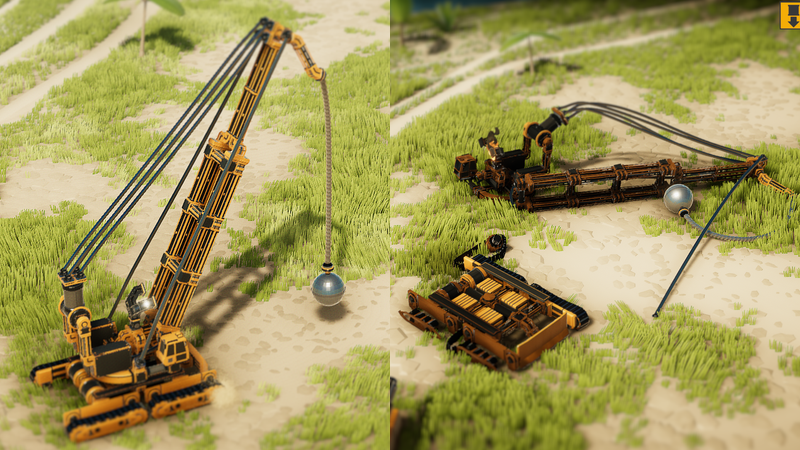
Because none of the vehicles/missions in the current campaign were designed with vehicle destruction in mind, I've disabled the system outside of Sandbox mode. I also removed Floppy+Breakable for now, and changed it so all the remaining cab-related settings can be used in any mode. This reflects the recent shift towards making the vehicle editing even more powerful (even though the number of settings/options for parts is too high for most players), so that really fun/interesting vehicles can be created more easily by vehicle builders.
After one more week or so of me working on additional campaign vehicles (and hopefully the addition of the long-awaited custom treads part), I'll be working on adding enemies and other vehicle-hostile obstacles of various sorts to the game. After there are a good number of enemies/obstacles, expanding the types of missions/objects that are possible will be next, and finally work on new campaign maps/missions can begin.
Here's the full changelist for version 0.240:
- Added vehicle part destruction system (sandbox only mode, for now)
- Added new part: Sequencer - Like a wave generator, but produces a series of pulses instead (up to 32)
- Add 8 new small parts (weapons now have S versions)
- Added Create Mirrored Selection shortcut (Control-M) - Creates a copy of selected parts and mirrors them
- Added Expand Part Selection shortcut (Control-E) - selects adjacent parts to current selected parts
- Added width/length offsets to flex panels/triangles
- Added some subtle mesh variations for Flex Panel + Triangle (Style slider)
- Made all cab/vehicle settings available in all modes
- Added Vehicle Damage multiplier (applies to all damage to player vehicles)
- Added damage mod advanced option to all parts (multiplier on that specific part)
- Removed part cost from Sandbox mode, show part hitpoints instead (vehicle cost still shows, but will be going away)
- Removed floppy and breakable settings for vehicles
- Made more advanced option variables apply to all parts, not just ones of similar type (Sound Volume, Sound Override, Damage Mod, and Material Override)
- All non-logic parts can now use material overrides
- Material Override can be set to "No Collide Parts" (uses default material, but won't collide with any other vehicle parts)
- Added an option to the Claw to set the starting angle (shows a preview of angle, but not fully visible 'til gameplay starts)
- Added a dark outline behind logic helper circle drawing
- You can now place explosive barrels in sandbox mode
- Enabled part rotation for more weapons
- Aiming Laser now has a strength value, only affects laser thickness
- Red Laser strength can now go up to 5 (instead of 3)
- Fixed missile/rocket trails disappearing if they were fired far enough
- Added No effects flag for power wheels and treads
- Updated collision for a number of parts
- Fixed solid pipe connectors being hard to select when the pipe was less extended
- Made smaller/larger parts draw if you have them selected (both in the library and the upper right)
More New Parts and Vehicle Building Improvements in Version 0.235
SIGNIFICANT NEW PARTS
Added new part: Shock Blaster - Instant blast/push with multiple adjustable options
Added new part: Power Socket - 4-way socket joint control
Added 2 new parts: Fixed Swivel and Fixed Pivot (like Flex Swivel/Pivot, but no joint used)
The Shock Blaster lets you create a small explosion or instant push on the player vehicle. Lots of parameters to tweak. The Power Socket is a 4-way joint controller to make some types of vehicles/machines easier to create. It's pretty straight forward to use. The Fixed Swivel and Fixed Pivot are similar to the Flex Swivel/Pivot, but with one key difference: They do not use joints, so they are completely stiff. No extra rigidbodies are added from wanting to create a custom angle in your creations from now on.
VERY IMPORTANT USABILITY IMPROVEMENTS
Added way to select all parts of a type (Shift+click on part type in library)
Added new function to shift selected part logic inputs/outputs to unused inputs outputs (Ctrl+L)
The first makes it easier to select a part that's buried inside other parts (or search for a part in a complex creation). It will select resized parts as well. The second function makes it WAY easier to make complex logic-based creations that need multiple sets of logic. Select all the parts you want to use separate logic then press Control+L. Those parts will change all their logic inputs/outputs to use new slots.
WAVE GENERATOR IMPROVEMENTS
Made wave editor wider and use 2 decimal places
Added some vertical grid lines to wave editor BG
Added phase offset for wave generator (as a multiple of time)
Added reverse inputs for Wave Generator
Added Copy button for waves (from other active wave)
Changed [Y] functionality to be a lot better/clearer
Added small dot for nodes in wave editor
Made wave editor wider and use 2 decimal places
Fixed disabled Reset On Release still resetting the outputs on release
Fixed loop flag not working correctly 1st spawn
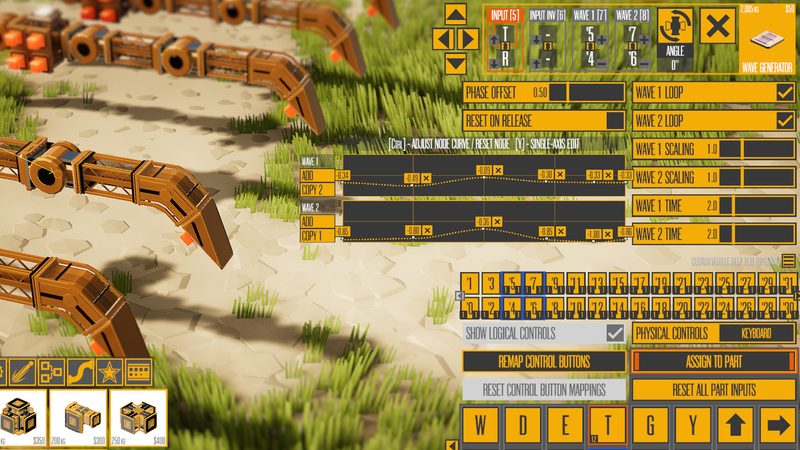
A lot of small changes that add up to the Wave Generator being a lot easier to use and edit. Combined with the Logic IO remapping above, creating walkers with legs is now a lot less tedious.
MORE CABS AND RESIZABLE PARTS
Added 5 new cabs - Just for visual variety/etc
Added 12 new S parts: 4-way Shield, Side Offset, Spike, Angle 45, Y-Split 45, Y-Split 120, 5-Way 120, Overdrive, Turbine Vacuum, Repulsor Drive, Hover Drive, and Accumulator
Added XXL version of Propeller
6-Way now contracts to 6-Way S (and 6-Way S removed from part list)
Power Pivot now contracts to Power Pivot S (and PPS removed from list)
The 5 new cabs are for visual/connection variety. The S parts lets you build more varied small vehicles, and I wanted an even larger Propeller for a vehicle so now there's an XXL version. A couple parts may appear to have disappeared, but they just got changed to an S version of a similar part. Wanted to do this for a while, and finally made a code change to how things can line up.
LOGIC AND ADVANCED OPTION IMPROVEMENTS
Added XNOR+NAND to logic gates
Added 3 advanced options for Arcing aiming laser
Added inputs to propellers/wings/aeroflaps, used as multipliers in force calculations (if no inputs are assigned, there's no change from before)
Added Magnets advanced options: Range, Applies To, and No Effects
Changed Hover to use input strength to affect hover height
Added Hover filter for Sea Level
Increased Hover height range to 128
Reduced min flex panel/triangle Length/Width to 0.5
Added NONE as an option for the vortex/turbine filter
Changed the output labels on the Camera Translator logic part (and Fast Rotation => Linear Turning)
Added dot product limits for movement and turning (Camera Translator)
Just a variety of improvements to advanced part editing. Some of these I needed for new campaign vehicles, while others were player requests.
MINOR TWEAKS/FIXES
Made F1 hide majority of custom drawing (and connectors) in build mode
Changed how 0 volume parts work a little (they no longer interfere with sound from other parts)
Changed some parts to be more flexible with variable + combined input strength (free swivel, free piston, vortex/turbine, and magnet)
Fixed a couple default values for Camera Translator
Fixed Undo forcing the camera to focus on the selected part (even with "focus on part" disabled)
Fixed problem with input strength being read as 0 when firing a weapon (not a perfect fix, but good enough)
Fixed Vacuum/Turbne being full volume with low input values
Fixed Min Clamp UI range on Output Modifier
Removed debug message for hovering over water
Just fixing things, making them work a little better, etc.
That's it for today. I'm nearing 30 campaign vehicles, and working on them is helping refine advanced part options and keeping my motivation up, so I'll probably keep doing them for longer than I expected.
Version 0.230 brings 3 major new parts, 12 new showcase vehicles, and more
- Added 12 new showcase vehicles (will be renamed/improved/used in upcoming campaign revisions)
- Added new part: Accumulator - Makes building debris stick to your vehicle
- - Multiple accumulators have no extra effects, recommend using a vehicle with 1 rigidbody
- Added new logic part: Wave Generator - Edit 2 curves and use them to sync up curves across multiple part types
- - NOTE: Outputs work a little different than other logic (Ideal for walkers/vehicles with complex motion requirements)
- Added new logic part: Logic Math - Apply math functions with up to 4 inputs (add, subtract, multiply, min, max, and average)
- - NOTE: Subtract takes away the 2nd/3rd/4th inputs from the 1st (all others are obvious)
- Added Sound Override option for a lot of parts
- Vortex/Turbine: Added Applies To, No Effects, and separate Range advanced options
- Added 3 new mini parts: Vortex, Gyroscope, and Attacher
- Added gyroscope Move Dampen advanced option (acts like additional drag on the vehicle)
- Added Sound Volume option for nearly all parts that make sound
- Added two new advanced options to Output Smoothing logic part (Mapping and Scaling)
- Added sound to Pusher
- Added Momentum Cam option for cabs (for vehicles where the cab rotates a lot and makes the default follow cam bad)
- Reduced pull on player from Blocks/Structures/Objects when using Vortex/Turbine
- Added drawing of same-index flex connection lines in advanced mode
- Increased linkages/channels to 16 (from 11) for various parts (32 for Flex Connection)
- Increased damage from cannon balls/boulders to destroyable objects
- Increased damage to smoking cars
- Fixed thrusters ignoring the strength of the input
- Fixed thrusters making a distortion effect when No Effects was selected
I'll cover the 12 new vehicles below. There are 3 major new parts this time (and 3 new mini-versions of some others). The first new part is the Accumulator, which lets you create a debris ball:
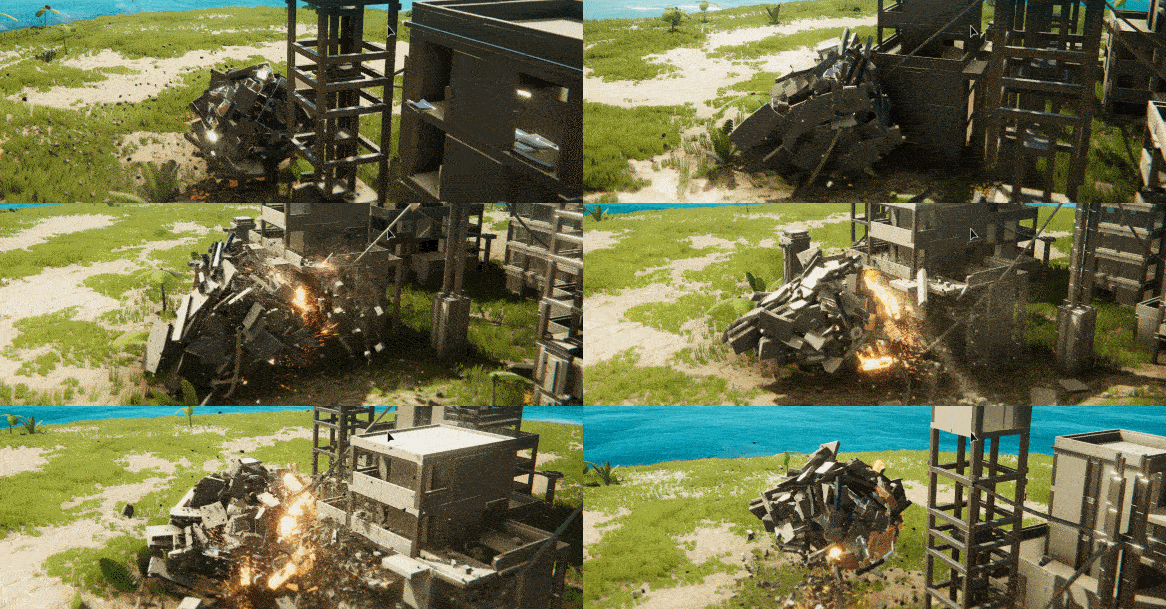
There's a new Showcase vehicle that uses the part (along with some other newer parts). With the Accumulator, you should only use 1 of them, and you'll probably want to keep your vehicle as simple as possible (physics-wise) because of how it functions. It's really only designed to do one thing, and while I might make improvements to it for future vehicles to make the Accumulator more flexible in its use, I don't have plans to at the moment.
The other two parts are the Wave Generator, and the Logic Math part. The Logic Math part is fairly straightforward, though Subtract function is a little different than the rest (it subtracts the last 3 inputs from the first). With the Math part, if an input it connected, it is always used in the calculations.
The Wave Generator lets you create 2 curves (as a loop or one-shot) and use those curves to control other parts. It's especially useful for doing complex motion, but it can be used to turn a normally continuous part into more of a one-shot function. It's probably one of the most powerful parts in terms of vehicle/control refinement, and I'm looking forward to using it more and seeing how you guys use it.
Side note: The Output Smoothing part also got some improvements to make it more useful/customizable, including a global scaling factor. The scaling factor is also in the Wave Generator, and both parts can scale their outputs by 3x. Some parts (including the just-fixed thruster) can use the additional input value to go beyond the normal limits. I have not tested many parts with 3x scale, so use with caution (and let me know if something ignores values above 1x and you wish they wouldn't).
"FUN" VEHICLES
The Accumulator Ball is one of 12 new Showcase Vehicles (scroll to the end of the list, the last two columns). I chose these 12 because they are pretty varied and can be fun in different situations, and I wanted to use them as examples for the upcoming Fun Factor Featured Vehicle Theme. I wouldn't consider any of these final for the campaign, but some of them are pretty close to what you'll see in the campaign (aside from the names). Every vehicle will have maps/missions designed *specifically* to highlight what the vehicle does well. Some vehicles may show up in more than 1 mission, but currently I'd expect most of them to be in only 1.
I'm going to list each vehicle and talk a little bit about how well (or not) it accomplishes the goal of being fun. Note that I'm focusing on Follow Cam (and using a gamepad) most of the time, but also using a keyboard and Isometric Cam to make sure those work too.
- Turbo MiniDozer: This is possibly the first vehicle the player will use in the game. It is super-simple (9 parts) but is an elegant design, easy to drive and fairly effective against small wooden/rock structures.
- Shover: This is another fairly simple vehicle, and barely changed (at the moment) from the one seen in the campaign. The visual design of this vehicle is too bland, but in the right scenario, it could be really fun. The scenario in this case: Shoving tires or crates across a gap into large walls. That's not something any of the current maps are designed for, but it's something I've done in previous test maps.
- Wormy Spiker: This is a more complex vehicle, and would be fun to use in more scenarios than the Shover. It's just a bit different (and satisfying) to drive and see the segments line up. It's also surprisingly good at destroying structures. It works better with low or skinny structures than wide tall ones due to the camera.
- Bash Buddy Quality: An evolution of the Bash Buddy vehicle from Orion in the current game. This is a relatively simple but polished version of a Wrecking Ball-equipped vehicle. Some vehicles like this one don't need a specific scenario to be fun.
- Small Excavator: This is quite similar to the Bash Buddy in overall direction. It automates the use of the attacher to make destruction easier, but otherwise serves a similar function of being polished and fun to use in most scenarios. (The amount of wobble will hopefully be reduced in a future version, and it does have an extraneous control currently - [T] is not supposed to be mapped to anything)
- OctoWalker Dual Laser: This is quite slow on purpose. It's equipped with some very powerful and accurate weapons, so it doesn't need to move fast. The walking motion isn't anything special, but it's satisfying to watch and stable. A mission designed around precise destruction would enhance the enjoyment of using this vehicle (it could probably use limited laser usage for gameplay purposes).
- Accumulator Ball: This is a vehicle focused on a single part: The Accumulator. The design could be improved a bit, and the balance of the controls might be tweaked. Not sure it's a "fun" example in general, but I've been using it to make sure the Accumulator works, so I decided to include it because of that.
- Hook Bomber: This has the most complex logic of the example vehicles. But it's not complex for the player. All the logic is to simplify the controls and make it easier to use. It is similar to the OctoWalker in overall function, but they feel different enough and focus on different parts so I don't mind having both. It's possible a mission in the campaign will allow you to choose between two vehicles, such as this and the OctoWalker (after introducing both vehicles separately).
- Car Killer: The name gives this one away. It's designed to be used on the racing maps (such as Desert Track). The turning controls still need a bit of work, as it turns too fast at low speeds, and the cannon balls should probably fly faster (will change that soon). The design on this one is ok but is lacking something compared to other vehicles on this list.
- Hover Hornet: This vehicle is difficult to control even though the controls are super-simple. I enjoy using it on Desert Test and Test Island, though neither is quite ideal. I
- think* it could really fun on a wide open map with lots of small/tall things to destroy, particularly with some that you need to slide past while firing. Unlike Car Killer, I think the visual design of this works quite well.
- Artillery Maybe: This is a more extreme version of the Hook Bomber and OctoWalker. It still needs some work design-wise (especially the front), and I'm not sure about the controls. It's possible I should simplify the controls more so it uses fewer inputs. I like some aspects of this thing, and I think a mission designed around slow methodical destruction would be enjoyable (perhaps one with multiple stages/vehicles). Definitely not a finished product though.
- Stick And Turn: Like the Artillery, this one is about potential. It has a unique mechanic in the stick-and-turn element, and maybe that aspect is good enough to build a (single) mission around. Wanted to include this as an example of another "concept" vehicle that is close but is lacking in a couple areas.
I think I've rambled on even longer than usual, and I'm anxious to get back to building more vehicles and few new parts (more cabs are the main parts I still want), so that's all for this week.
Excavator Featured Vehicles, and a Very Convenient New Part
Here are the winners in text form:
FEATURED VEHICLES
- Overhead Deconstructor - Kitten
- Crabcavator - St. Nicolas
- Long Reach Excavator - PyroTeknikid
- Digamatron 3000000 - Jonny_Arson
- Heavy Walking Excavator - Stranger
- ACCT Dionaea - Arad
- ACMT T-R-X - Arad
- Excavator Crusher - Stranger
- Articulated Excavator - PyroTeknikid
- Mammoth Excavator - Zombie Ninja
- Heavy-Duty Excavator - St. Nicolas
- Modern Excavator - Phynnix
HONORABLE MENTIONS
- Liebherr R9800 Excavator - Rosli.Othman
- Excavator - TimeMaster111
- Excavator - Agent McNeil
- ACMT Hydra - Arad
- Liebherr R 9800 Excavator - TurtleBravo85
- X-Cavator - [Arch] B_Glo
- X-cavator - Stranger
- ACMT D-E-U-X V.2 - Arad
- Apexcavator - Stranger
- Tyrexcavator - Stranger
- Bagger 293 - Neo_Runner
- 14T Excavator - Stranger
- X-Crab-Scavator 2.0 - Mastersubliminal
- Cool-Scavator 2.1- Mastersubliminal
- Bucket Wheel Excavator - BlueSky2011
- TAC-495 - Stranger
- 2013 Excavator Pro - Jonny_Arson
There were a good number of entries, and the engineering/design was very impressive as usual. The Articulated Excavator in particular had custom treads that were both relatively efficient and excellent at turning. It's obvious I need to add custom treads as a single part at some point soon, as a number of entries had custom treads that were too slow even on my 13th gen i9 CPU.
NEXT THEME: FUN FACTOR
DEADLINE: MAY 17th
For the next theme we're going to shift the focus to something different. Instead of a specific vehicle theme, I want to see vehicles that are just fun to drive and use (and aren't too big). "Use" can mean many different things in this context; that could be making it as fun as possible to destroy a building, a fast vehicle with weapons that are ideal for blowing up racing cars, or something that's great at picking up containers and moving them around with ease (or anything else you find fun).
The key things I'm looking for are easy-to-use controls in a compact and attractive design. You can add notes about which map it's best to use the vehicle, but it should only take a few seconds for me to figure out the vehicle controls and start having fun. Don't add all possible options/weapons to a vehicle. Just make it do 1 or 2 things really well.
BUILDING FUN AND ATTRACTIVE VEHICLES
Part of the reason I'm focusing on these elements now is because of the upcoming campaign changes. I've spent a couple days recently trying to make vehicles that are easy and fun to control. While there will be a few familiar vehicles from the current Showcase Vehicles, most of them just don't cut it because they aren't particularly interesting or visually distinct enough. As I've been creating this new batch of vehicles, it's apparent to me now that we need more advanced controls over some parts to make them feel like fully-finished vehicles.
It's also become obvious that advanced vehicle builders (aka you guys) have been using impressive workarounds to get things to fit just right, particularly in smaller vehicles. For this problem in particular, version 0.227's big new feature is a new part: The Flex Connection. I've seen requests for something similar to it in various forms (particularly since the Flex Beams were added), but I didn't fully appreciate the need for something like it until now.
The Flex Connection basically removes the need to use workarounds to connect parts in unusual ways. Instead you just use as many Flex Connection parts as you want, and all the parts of the same Linkage index will be joined together (invisibly). This means you can build physically impossible shapes like things floating in mid-air, but that's not something I've worried about for a while.
Rather than ramble on any more, here's the full changelist for 0.227:
- Added new part: Flex Connection (Decorative) - Creates a solid but invisible connection between all Flex Connections of the same Linkage
- - NOTE: Creating a connection between rigidbodies that are connected in other ways will give the "Connected to Itself" warning/error
- Added adjustable spread for rockets and missile pods
- Changed damage/speed to be separate values for rockets/missile pods
- Added Default camera option
- Changed how hover drive calculates forces (should be less jumpy, more consistent)
- Added damage to plants from entity collisions
- Changed how isometric camera updates its offset while rotating
- Increased death timer of missiles pods/rockets by 5x (12.5/25 seconds)
- Fixed free and spring pivot collision (couldn't actually go 90 degrees)
- Fixed attacher ignoring alt input (Normal mode)
- Added 2 shift all structure buttons to the layout editor and fixed Compound buildings
- Fixed Control + MMB/Wheel only working in certain modes
- Fixed mirrored rotation for hooks
- Fixed Shift + click in build mode still colliding with connectors and letting you add a part
That's all for now.
Changelist for version 0.226
- NOTE: The amount of damage taken by cars will likely be adjusted based on future maps/missions/etc
Rockets/missiles are now affected by gravity (new option in advanced mode)
Overdrive now affect rockets/missiles (speed and explosions)
Changed Follow camera to be the default
Made some improvements to Follow camera
Changed Normal camera name to Orbit
Re-enabled Normal/Orbit camera for play mode
Fixed/Changed right-stick behavior for camera on gamepad (lots of changes)
Fixed cars often becoming slow/etc after falling in water and getting back out
Adjusted Follow cam to not roll sideways
Reduced firing spread on missile pod (and a little bit on rockets)
Changed depth of field to be LOW by default (won't affect anyone who played the game previously)
Two explosive new weapons, big camera changes, and bigger plans
MIND-BLOWING PHYSICS?
Recently, Instruments of Destruction was listed as the #2 game with the most mind-blowing physics effects by GameRanx:
It was a pleasant surprise to say the least, and wishlist numbers have seen a nice spike because of that video. But I have to admit I don't really want the attention on the game, at least not yet. As I've been working on adding the object destruction, improving explosions, and doing other related tasks, I've been watching a lot of videos about what made Red Faction Guerrilla fun, as well as playing some Blast Corps for the first time (thanks to Rare Replay on GamePass). Both of those games come up time and time again as destruction-centric games that people remember fondly, and I needed to better understand why.
[Note: I worked on RFG for 5 years, but I don't remember everything we did, nor which parts turned out to be fun vs. those that didn't.]
At the same time I've been thinking a lot about how to make Instruments more fun and enjoyable. The game has enormous potential because of the destruction and physics, as well as the vehicle building possibilities. But seeing the footage in the GameRanx video really reinforced one idea that I've been obsessing about: Instruments is not close to realizing its potential. The gameplay they showed looked boring, especially compared to the RFG highlights. And playing Blast Corps, despite there being so much jank in the game, I have to say the fun factor in that game is undeniable.
A CAMPAIGN SHIFT
All this comes to a couple core philosophies for the campaign:
1) Make it as easy as possible for the player to have fun (aka more like Blast Corps).
2) Make the most of what Instruments of Destruction can do (aka more like RFG).
#1 means less friction for the player being able to jump in and have fun. And getting rid of unnecessary elements that don't improve the experience in a meaningful way. #2 means having as much cool/fun stuff to do in the game as possible.
To achieve both of these goals, the campaign will be expanded significantly while streamlining the user experience, and vehicle building will become completely optional. It may sound crazy that vehicle building will become a bonus feature for the campaign, but the main reason is this:
It is *difficult* to design and build fun vehicles. And Instruments has something else that is *very easy* to enjoy: Destruction (and physics). Vehicle building is not just difficult to do because it's hard to teach, but coming up with fun vehicle ideas and executing them is hard even for people who know what they're doing.
There are *SO* many fun vehicles possible in Instruments of Destruction, and there are many that would be fun *in the right circumstances* that are simply not worth building now because the maps and objectives have to be fairly generic in the current campaign structure. By relying on the player to design and build vehicles, and having maps/missions where the problems/solutions can't be too interesting (because they require very specific designs/parts/etc), the game is reduced to a bland version of RFG/Blast Corps/etc. Maybe it could be a more satisfying version of Besiege, but Besiege has cool stuff that Instruments doesn't (sheep, archers, etc) and I'd rather focus on what makes Instruments special.
I think what makes the game special is the *combination* of insane vehicles, destruction, and physics. Every vehicle in the campaign will be designed to be as fun as possible, and every map/mission will be made with a *specific* vehicle in mind. Rather than having 3 missions, maps will have at most 2, with the second mission also designed with a different specific vehicle in mind. [I expect all maps will have 2 missions, but won't force it in cases where it doesn't make sense.]
Vehicle building will not be going away, it will just not be what the campaign focuses on. It will still be the default in Sandbox, and it will unlock in the campaign after you beat a mission (like Challenge mode currently, but with simpler UI). From this point on, any new vehicle-building features will be either part of the big build UI revision, or focused on letting me build/tune vehicles to be as fun as possible. Most of these will be advanced options, and I'll be adding tooltips to many of the advanced options, but there will also be new parts (like today's new rockets/missiles).
I'll go over all the mission types in a future post, because this is getting too long. Just know that the current missions will be streamlined/improved significantly (or removed), combat missions vs. robots/drones will still be coming (but no more roguelike stuff), and racing will be a smaller set of missions. I want to have at least 60 islands in the campaign by late summer.
For vehicles, I'm compiling a list of what kinds will be in the game and which parts need to be featured in multiple vehicles (such as the Hook Launcher, weapons, etc). I'll be looking through past vehicle competitions for inspiration in addition to all the games mentioned above. Fun, unique, and easy to control (in that order) are the primary characteristics I'm looking for. As I said before, I expect the majority of the mission ideas to start with "here's a bad-ass vehicle, how can we show it off in a fun/challenging way?"
Ok, I've rambled on too long, and I haven't even mentioned the camera changes below (follow cam and isometric are the ONLY choices, except Sandbox mode) or the new object destruction system (try shooting up a cargo container). In case you can't tell, I'm super-excited about the shift in focus. I've always said this game has so much potential, and this feels like the best way to make the most of it.
0.225 CHANGELIST:
- Added new part: Rocket Launcher - fires medium-sized rockets (intended to use Single Shot)
- Added new part: Missile Pod - fires small missiles (intended to use Automatic)
- Changed Play Mode to only allow Isometric and Follow Camera
- Added optional camera filter to Sandbox mode (makes it act like play mode)
- Improved follow camera behavior in multiple ways
- Added vehicle-specific follow camera tuning options (Cab - advanced mode)
- Added isometric tuning options as well
- Improved how explosions affect certain objects (plants and crystals)
- Added object destruction system (it's on many metal objects, particularly cargo containers, but not cars yet)
- Added "Attach To" option for filtering what the Attacher/Hook Launcher attach to
- Added "Hover Over" option for the Hover Drive
- Added some new AI behavior to help them get unstuck
- Reduced the high speed camera wobble
- Fixed changing part color not working correctly
- Fixed Floppy and Breakable not working
- Fixed Pisces not showing up in Sandbox mode
Racing Ahead In Version 0.220
Here's the full changelist for those who prefer reading:
- Added new logic part: Relative Controls (up/down/left/right output based on camera direction and input)
- Added new part: Repulsor Drive (apply force/torque based on camera direciton and input)
- Added new part: Hover Drive (apply a stabilized upward force when near the ground/water)
- Added AI for automobiles: Place target markers in sequence to make them drive in a loop (AI chooses the closest and keeps going)
- Replace 4 variant islands with tracks for racing fun, available in Sandbox mode
- Added relative control option for limited pivots and pistons
- Changed fixed bomb controls so you can drop them without a release connector
- Added engine sounds for automobiles
- Updated follow camera for entities
- Updated automobile handling (more wheel friction)
- EDITOR: Made it easier to expand/contract markers (shift+click changes by 5)
- Fixed not all vehicle unlocking at level 20
- Increased global volume falloff a bit
I didn't write everything down as I did it, so that might be missing a couple minor things, but the big things are the 3 new parts, the relative controls option for pivots/pistons, and the 4 new maps with AI-driven racers on them.
RACING IN A DESTRUCTION GAME?
Instruments will not be turning into a a racing game. But the AI for racing was relatively simple to add, because of the incremental features that I'd added for player controls and relative controls, and the experience I have from making a racing game semi-recently (Speed Demons on Apple Arcade). This AI is not complex or particularly good, but it is efficient at adding some interest to racing around small tracks.
There's no logic for doing actual races, but instead the AI just does laps infinitely. You can add as many cars as you want to the race, and I've done up to 200 in my testing, and the game still ran above 60 FPS. The only optimization I had to make was changing the colliders on cars from meshes to boxes (2 boxes for the truck) to get the framerate up. As before, just Shift + right-click to take over a vehicle. Or use your custom built vehicle.
I don't plan on doing real game logic for races anytime soon, as this was just a little detour on the way to the combat campaign. Up next is adding some real destructibility to entities. It's something I've avoided so far, but cars need it, and what comes after cars will need it. So you'll be able to destroy parts of a thing, and it will look damaged and smoke/spark/etc. I'll add more final explosion stuff as well, though that's the easiest part (it still takes time to do, but there's nothing technically difficult).
What comes after damage to objects is animated enemies, meaning things like a walking mech, a small spider tank, and turreted vehicles, among other things. I've put off learning IK/rigging/animation tools in any real way for a while, but I want to try doing more with Instruments and future games, so that's what I need to learn. After some destroyable enemies are in (along with a couple more combat-related parts), the game will go silent for a bit as I figure out how to fit all the new stuff together. I have a plan, but plans always change/evolve as you work on the actual thing.
[REMINDER: Excavator Featured Vehicle submission deadline is a week away.]
That's about it for now! -Luke
Round and Round in Instruments' One-Year Anniversary
I like that trailer, but it's only the 3rd-best trailer the game has had so far, with the Announce Trailer and Release Date Trailer easily topping it. There have been over 100 updates to the game in the past year, with many of those adding fairly significant new features or parts. The game still has a way to go before it's ready for 1.0. But instead of talking about the future or past of the game, let's talk about the present, because today also marks the release of version 0.215.
TAKE CONTROL
The most significant new feature in version 0.215 is the ability to take control over certain types of objects in the world. The objects you can control include the 3 automobiles, the 2 bounders, and the crash test dummy. First, here's how you do it:
Enter "Place Object" mode in Sandbox during gameplay (P is the shortcut). You'll likely place whatever object you want to control, but it can already be in the world. Then mouse over the object, and push Shift+RMB. The camera will switch to that object, and you'll see controls for the object on the left side of the screen.
There are 4 movement directions, and an action button. The movement controls are fairly obvious, but the action button depends on the object type. For vehicles, the action button is both accelerate and a boost button. Basically, when you first press the button, you'll get an extra push. The faster you're going the less push you'll get. If you want to accelerate without a boost, just use forward instead.

For boulders, the action button is a jump button, and while in the air, you can push and hold the action button to slam back to the ground. Boulders will often cause a shockwave on impact when slamming back down, though not always (depending on what they hit and how fast you're going, etc).
For dummies, the action button is context sensitive. If you're flat on the ground, it lifts you up so your body is floating/standing off the ground a bit. Push the button while floating and you'll jump, and you can also double jump. Once you jump or fall off a ledge, you'll return to "no float" mode. It sounds kinda weird when I describe it, but it feels (mostly) logical when you're in game.
To exit "object control" mode, just push Shift+RMB when not highlighting a controllable object. [You can still control your normal vehicle while controlling an object.]
ROUNDING IT OFF
The other significant addition/change to the game is making all the wheel colliders a lot more rounded (64-segment cylinders), and adding some new small wheel parts (with sphere colliders) to the game. The new small wheels and the Giant wheels also have flexible sizing, so you can make wheels of a lot more sizes. Finally, I added 2 new tire materials to the material override list (with a bit less friction than the original tire), and made all tires able to use the overrides.
Altogether these wheel changes let you do a lot more with vehicle handling than previously possible, without resorting to thrusters or other "hacks". Between the automobile control and the improved wheels, I want to mess around with driving a bit more, and will be adding some new test maps soon that are essentially tracks to race around.
Aside from adding maps, I don't expect to spend too much more time messing with vehicles for the player. But I will be trying out AI-controlled vehicles, as they will be necessary for the combat campaign. It's possible there will be driving-heavy maps in both the combat campaign and the main one, but I want to avoid going too far in that direction for the game. It's a good change of pace, but based on previous experience with Red Faction Guerrilla, it's better to not have raw racing in a destruction game. If destruction can't be tied into the gameplay, it won't be in the campaigns.
That's all for now, but here's the full changelist for version 0.215:
VERSION 0.215 CHANGELIST
- Added ability to take control over cars, dummies, and boulders
- Controls are shown on HUD, and you can change them in Remap Controls screen
- Added new parts: Small Wheels (Free and Powered) that use spherical colliders and variable sizing
- Changed all other wheel parts to use much smoother colliders (64-segmented cylinders)
- Changed all wheels to have selectable materials
- Changed Giant Wheels to have variable sizing
- Max part count increased to 2,000
- Limit number of times the "place another rope" message appears (6 times)
- Fixed alt input on release connector not working
- Update part count more frequently/generally, so it should be correct the majority of the time now
- Fixed Flex wheel mass/cost to be more reasonable (and not scale to 0)
- Adjusted some other wheel costs slightly
- Fixed Steering wheel angles not working
- Reduced ground effect for vehicles that are touching the ground, particularly when using powered wheels and treads
- Removed strength limit message
- Changed bombs so they can explode every consecutive physics frame