The faster a train goes the more fun it is. This is a scientific fact. Also, the less bumpy the ride when said train is going fast the less vomit inducing. FACT.
To make Locomancer reflect these facts I've been working on making locomotives go faster and bump less when you are riding them. In working on this I came to the conclusion that Unity/PhysX do not like wheels spinning very fast. So I removed wheels from the game.
Up to this point the wheels have been physically simulated ones that actually propel the locomotives by rotating and pushing against the rails. Now, they still spin, but the spinning isn't actually what propels the locomotives, instead the wheels just apply a forward force.
The advantage of this is that the wheels don't wobble all over the place which allows the locomotives to go faster without derailing (they still have a high chance of derailing at high speeds).
I also added some smoothing to the locomotive cabs that functions similar to car shocks. The bumpiness experienced while riding around curves has been significantly reduced.
https://www.youtube.com/watch?v=cXsBnOV823E
I've pushed these changes to the experimental branch as I'm not entirely sure that they won't break things. If you want to be a crash test dummy, please opt into the experimental branch in the betas section and report any issues you encounter.
Also, gelatinous space cubes.
https://www.youtube.com/watch?v=_I1-Gc2WR9c
Changes
Removed wheels and replaced them with imposters
Made locomotives speed up and slow down instead of immediately changing speed
Added smoothing to locomotives when riding them
Fixed bug related to couplings
Added gelatinous cube to props
Added flame thrower to props
Minor Update
I fixed a few minor issues, added some internal stat tracking (to be exposed later), and updated the demo to have the new room/gloves.
Fixed mounted artillery car snapping to itself.
Added remote control panel summon button to toolbox.
Modified the tutorial to use new control panel summon button.
Added item delete step to tutorial.
Fixed potential issue with track placement during tutorial.
Made the remote control panel available when not riding a locomotive (in a railcar or on a station platform). Point at a locomotive and press the menu button to summon.
Added stat tracking (spawn counts, meters ridden, etc.).
Fixed hidden eject handle in double porter locomotive.
Locomancers Are Go!
Locomancer is now on sale! ːsteamhappyː
https://www.youtube.com/watch?v=5YSNMhoha08
Hint Hint, Nudge Nudge, Wink Wink
I've been working on polishing a bunch of stuff up.
Teleportation was bound to trigger + grip, which was a really awkward combo. I decided to make it a first class interaction so now it's bound to the touchpad like other games with teleport.
I also added a shortcut to riding rideables allowing you teleport into them so you no longer need to point at them with the trigger and then click the touchpad. You can teleport within rideables, but you are limited to its bound to make it slightly more realistic.
I brought back the full laser because it was too difficult to see where you were pointing with just the dot. It's now much easier to target distant objects.
I finally modeled in-cab controls to replace all the placeholders. They are nice and shiny. I added a long overdue speedometer and a light switch so that you can toggle an engine's lights on and off. Engine lights now default to off for performance reasons (more lights on = worse performance).
At the same time I modified how engine throttle works. Now instead of speed increasing linearly it increases with a curve that uses more of the lever for slow speeds. This prevents you from instantly ramping up to max speed and crashing.
The last obvious feature is that I added a mini tutorial when you first launch the game. It takes you through the major interactions in the game by highlighting the necessary controller buttons and physical objects you need to interact with. These can be disabled/reset with the "Toggle Hints" button inside the toolbox.
And the last change that is not obvious at all is that I moved the user data folder from the Steam folder to Users/[Windows Username]/Documents/My Games/Locomancer/. This makes it easier to find and allows for per-user settings/saves if you have multiple users on the same machine.
https://www.youtube.com/watch?v=yVca2nad5iU
Also, the game officially comes out next week? :trainbowbarf:
Updated Remote Control
I've replaced the old RC car style remote with a mock in-cab control panel remote. The new controller is nice because you don't have to keep holding it while you use it, it floats like the toolbox. It also has more space so all of the different controls fit on it. I also added a speedometer and a first person view camera which makes it easier to drive out of view locos.
The new controller can be sommoned by pointing at a loco and pressing the menu button. Once summoned you can switch between all of the active locos.
https://www.youtube.com/watch?v=Z7CBJtuMHW4
The Radio Update
I pushed a small update today that improves the radio and adds 26 minutes of original music by Nathan Boler (http://www.nathanboler.com/):
https://www.youtube.com/watch?v=waJ7yHwnIOg
I also added a game volume dial to the toolbox and fixed the save delete bug.
One Does Not Simply Add In More Drawers
I just released an updated toolbox that is more visually refined and hopefully easier to use.
https://www.youtube.com/watch?v=j0wS9aU7x6I
I finally added a model for the save camera that opens and closes when you pick it up.
I temporarily moved the vacuum, remote, and airbrush into a pull-out shelf on the right side of the toolbox. All three need to be improved so I didn't want to make any changes to accommodate their current designs.
In addition to the toolbox, I added an alternate hand position that should more accurately reflect your hand position (especially with Oculus Touch). This can be toggled with a button inside the lid of the toolbox.
Updated toolbox models
Split inventory into multiple categories each with their own "drawer." Some are further divided into subcategories.
Inventory page scroll is animated to make it more obvious when pages switch
Updated all of the dials to use the new dial model
Added alternate hand position
Hands now become transparent when grabbing dynamic objects instead of disappearing completely
Added red glow to items when deleting them using grip buttons, glow intensifies until object is deleted
Added the ability to delete saves by gripping them the same way as other objects (but didn't check that they were actually being deleted so this is half broken :conwayshrug:)
Custom Scenery Guides
I just published three guides to get people started with creating and importing their own custom scenery.
Tilt Brush is the easiest way for beginners to start creating content:
http://steamcommunity.com/sharedfiles/filedetails/?id=850258456
For more advanced users here's a guide for Blender. Most of this should apply to other modeling software as well:
http://steamcommunity.com/sharedfiles/filedetails/?id=849800564
And finally once you have your models:
http://steamcommunity.com/sharedfiles/filedetails/?id=850285056
The BYOS Update
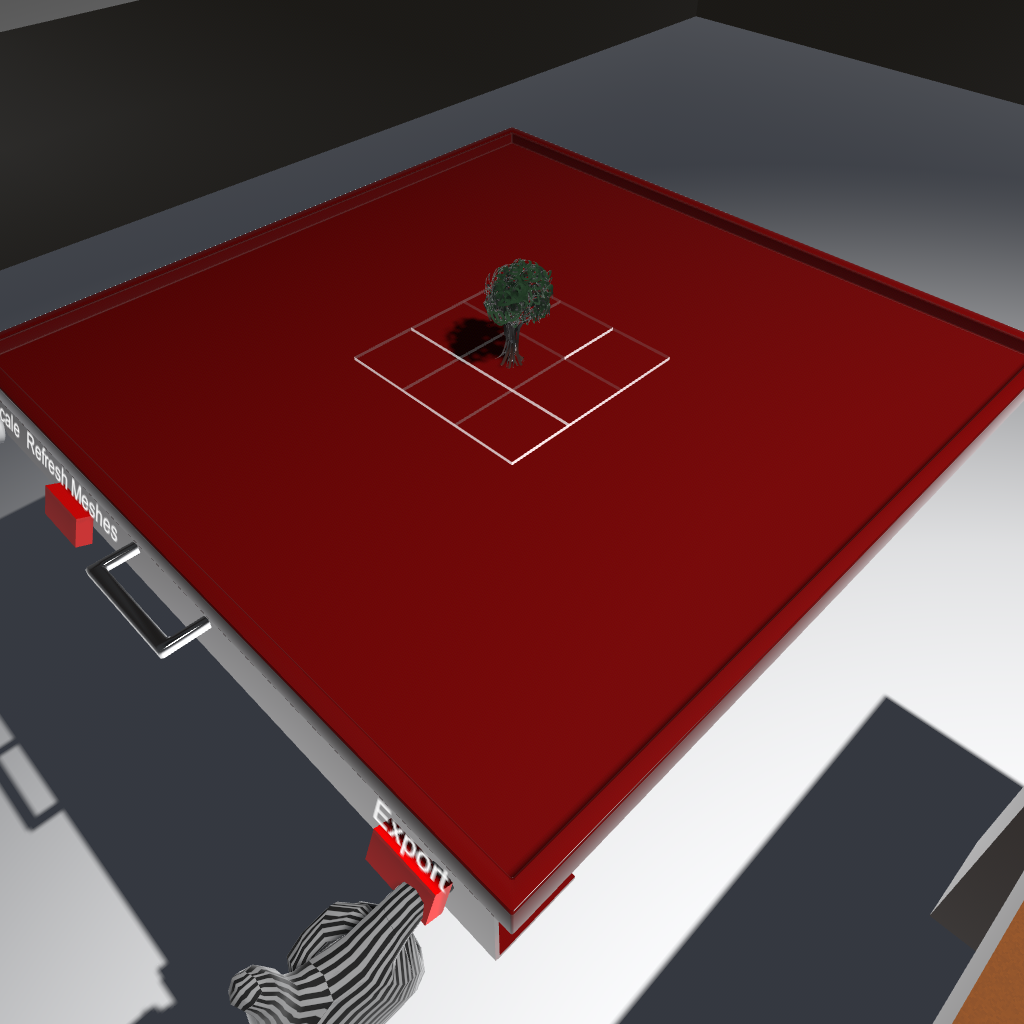
The S stands for scenery because you can finally import your own models into the game! Right now it's only static scenery because I haven't figured out a simple and intuitive way for players to attach wheels and the like.
The fastest way to get your own content in the game is to paint something in Tilt Brush, export it, and drop the resulting .fbx file into the Locomancer/models folder. Here's a tree I painted:
The currently supported formats are .fbx and .obj. FBX is preferred as it supports vertex colors and object hierarchies, but OBJ is a more universal format. I'll post a more detailed guide to modelling for the game soon.
I should have released an update before I started working on custom models because a lot of smaller things got stuck waiting on it.
The next update is going to focus on bringing some much needed polish to parts of the game. Hopefully it will arrive sooner than this one did.
Changes:
Tweaked grabbing in an attempt to prevent grabbing track underneath the loco/car you were actually trying to grab
Added wooden variants of the standard track pieces (no switches or tunnels)
Added a new Halo inspired table that allows building on the inside and outside surfaces with limited building on the edges
https://www.youtube.com/watch?v=rjni8nc5K1Y
Added a number of Möbius strip rails that are self-contained tables
https://www.youtube.com/watch?v=Hh9tRjF4J6E
Modified how tables are assigned to prevent odd cases where pieces were stuck to tables they shouldn't have been
Made the water paintable
Fixed the cannon car constantly freaking out
Added stationary mounted cannon
Fixed bug where cannon shells leaving the room would cause tables to move
Added new layout loading animation which mostly prevents the game dropping to the Steam VR environment
https://www.youtube.com/watch?v=sPg_hul8qlo
Added a vacuum which can be used to clean up loose pieces or--in turbo mode--can tear up the entire layout. Press the menu button or turn the dial to toggle turbo mode
Fixed bug where saving a layout while at a lower build scale cause the resulting polaroid to be enormous
Tweaked the wheel rolling sound so that it doesn't sound like every car has three axles
Fix bug where switches would toggle when a loco/car went over them backwards
Added model editing tool bench (can be summoned from the toolbox)
Added support for importing .fbx files
Added support for importing .obj files
Added support for .fbx files exported from Tilt Brush
Added support for saving/loading custom scenery pieces
Added support for loading custom scenery from layouts
Removed slot car section from inventory, it will return when more complete
Moved save files to custom binary format to reduce size when including custom scenery
Layouts are now saved in the background to (mostly) prevent the hang when saving
Added support for saving modified versions of in-game scenery (painted/rotated)
Added a new starting scene
Release Delayed to End of February
I'm sorry to do this again so close to the schduled release date, but the game still isn't finished so I'm delaying it again. This is the last time and if I get everything I want to significantly earlier I'll release sooner. Thank you for your patience.