Here's the changelog for the latest test build available right now on the test branch (check out the next chapter to try it).
New content and features
Added the "Breach and Clear" practice mission
Added the "Shooting Range" practice mission to the demo/prologue builds
Improvements
Banned cheaters from the leaderboards
Floor tiles don't reveal characters in lower storeys anymore
Improved the bullet case visuals
Reworked the targeting system of all the agents
Fixes
Fixed dead enemies still blocking vision
Fixed shield FoVs appearing when the agent is in a lower storey
Fixed the camera obstacle hiding option not being saved when using the shortcut
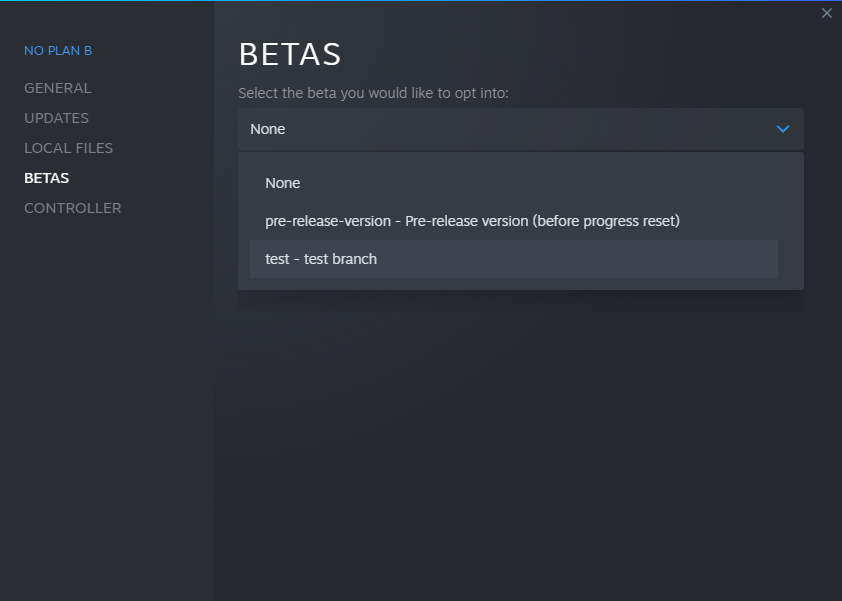
Reminder: switching to the test branch
In the Steam client, right-click on the game from your library and select "Properties". Select the "BETAS" tab. Select the "test" branch listed in the dropdown menu under "Select the beta you would like to opt into".
The game then should automatically update to the test version.
To switch back to the public branch, just select "None" in the betas dropdown.
No Plan B "Verticality" Update (Beta 5)
Multi-Storey Buildings
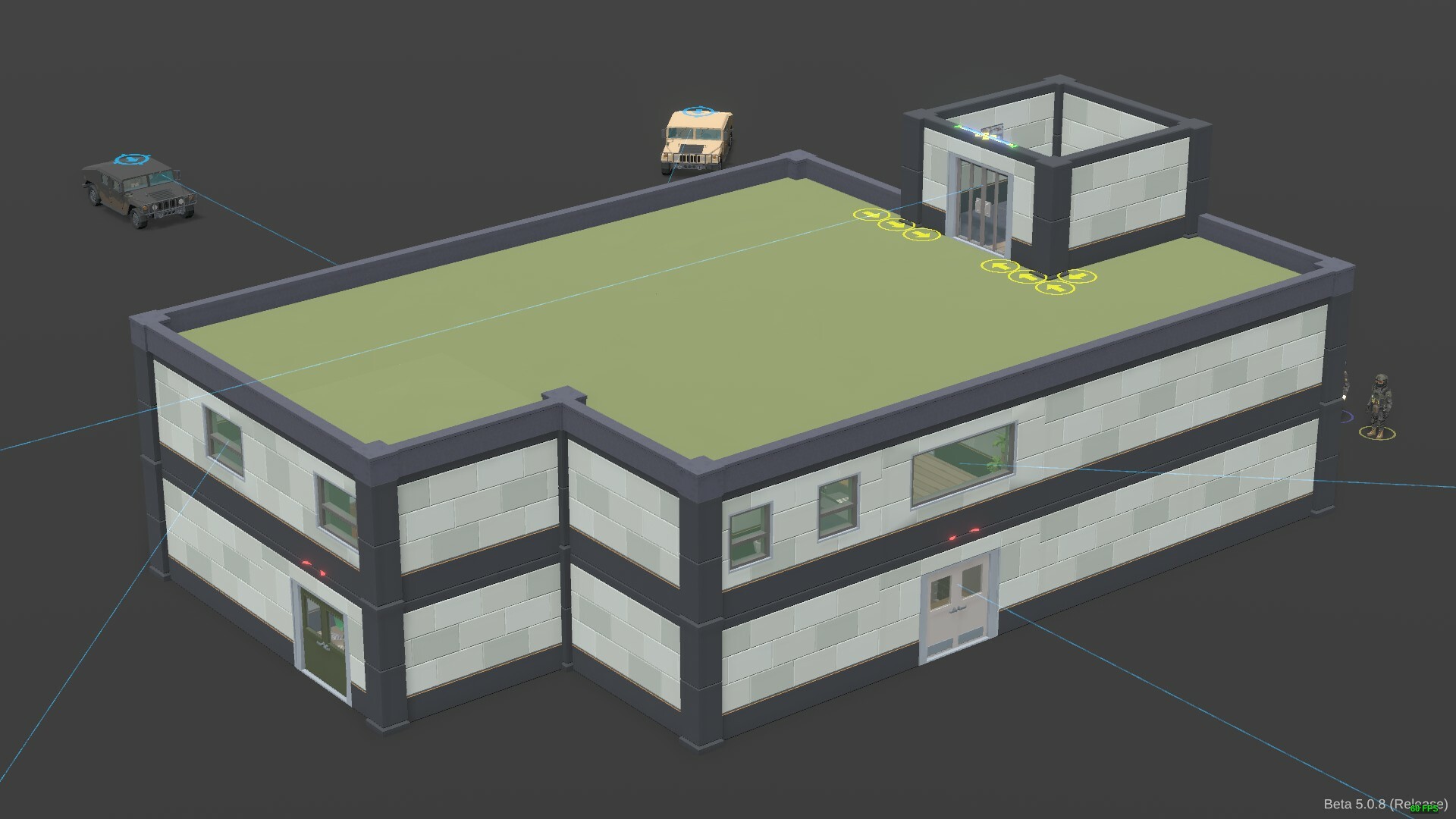
Time to add some verticality in your tactical gaming, folks! NPB now plays in 3D for good with the addition of 2-3 storey buildings. Obviously, along with them will come the deadly stair cases! The map generator uses several types of them, offering more or less concealment and view angles. You'll love to hate them XD
As you can see, I also added some roof top entries to a few of the buildings to offer new ways to approach your missions.
The map editor was improved for the occasion to make it easier to work on several floors.
New Replay Cameras
You can now use 5 different replay cameras to make your successful missions even more tacticool:
The "Free" camera is the one you're already used to: you can move freely around the map with any focus on a specific position.
The "Position" camera, which is anchored to the position of the selected agent. It will keep the camera angle you've defined. It's place over the head by default but you can adjust it.
The "3rd person" camera, which is anchored to the position AND the orientation of the selected agent. It's placed behind the right shoulder by default but you can adjust it.
The "1rd person" camera, which is also anchored to the position and the orientation of the selected agent. It's pre-placed and oriented to mimic the view in a FPS game but as usual, you can adjust it.
The "Weapon" camera is pretty straight forward as it will stick to your weapon. Position and angle can also be changed.
Here's a demo using each of them:
Note that you still blend and cut between the different views you will configure.
Balancing
Weapons
Most of the weapons have undergone significant changes to their stats in order to make battles more dynamic. Assault rifles in particular, have now faster aiming but slow down your agent's rotation.
Enemies
The reaction time of the enemies has been reduced and their number increased. The goal here is to make it easier to surprise them, while maintaining the importance of bringing enough agents to the party and checking every corner.
Weapon point rewards
I heard your feedback, weapons are too expensive. That's why I added weapon point rewards to the random and community missions. I also increased the rewards of the skirmish and challenge ones.
Free tip: don't forget to buy more grenades to help you during the campaign ;)
Full changelog
I couldn't mention them all in one post, so here is the exhaustive list of all the changes contained in this update: https://store.steampowered.com/news/app/1269020/view/3222899175379890636 https://store.steampowered.com/news/app/1269020/view/3222899858143773467 https://store.steampowered.com/news/app/1269020/view/3227404186659795545 https://store.steampowered.com/news/app/1269020/view/3335492321471396076 https://store.steampowered.com/news/app/1269020/view/5966721145568643963 https://store.steampowered.com/news/app/1269020/view/5966721145587713165 https://store.steampowered.com/news/app/1269020/view/3329864090471490990 https://store.steampowered.com/news/app/1269020/view/3329864090471789439
Test Branch Update! (Beta 5.0.8)
Changelog
Here's the changelog for the latest test build available right now on the test branch (check out the next chapter to try it).
New content and features
Added the version label in the bottom right corner of the screen
Fixes
Fixed the weapon camera smoothing (too high)
Reminder: switching to the test branch
In the Steam client, right-click on the game from your library and select "Properties". Select the "BETAS" tab. Select the "test" branch listed in the dropdown menu under "Select the beta you would like to opt into".
The game then should automatically update to the test version.
To switch back to the public branch, just select "None" in the betas dropdown.
Test Branch Update! (Beta 5.0.7)
Changelog
Here's the changelog for the latest test build available right now on the test branch (check out the next chapter to try it).
New content and features
Added the lower/upper storey buttons in the map editor
Improvements
Tweaked the mission rewards and possible paths inside the campaign chapters
Improved the stunned markers
Randomized the ambient light intensity
Fixes
Fixed the campaign map sizes
Fixed the stun animation in certain cases
Reminder: switching to the test branch
In the Steam client, right-click on the game from your library and select "Properties". Select the "BETAS" tab. Select the "test" branch listed in the dropdown menu under "Select the beta you would like to opt into".
The game then should automatically update to the test version.
To switch back to the public branch, just select "None" in the betas dropdown.
Test Branch Update! (Beta 5.0.6)
Changelog
Here's the changelog for the latest test build available right now on the test branch (check out the next chapter to try it).
New content and features
Added support for bigger buildings (final missions in campaign chapters)
Added new multi-storey building templates
Added roof top entries to some building templates
Added shortcuts for the lower/upper storey buttons (keypad 0/1)
Added lights to the police cars
Improvements
Removed the possibility to use grenades and open doors silently when carrying a shield
Tweaked the mission rewards and possible paths inside the campaign chapters
Changed the way entries are blocked by the map generator
Updated translations
Fixes
Fixed the incorrect storey being displayed when selecting a resting character
Fixed window spawn points getting hidden by some floor tiles in the planning view
Reminder: switching to the test branch
In the Steam client, right-click on the game from your library and select "Properties". Select the "BETAS" tab. Select the "test" branch listed in the dropdown menu under "Select the beta you would like to opt into".
The game then should automatically update to the test version.
To switch back to the public branch, just select "None" in the betas dropdown.
Test Branch Update! (Beta 5.0.5)
Changelog
Here's the changelog for the latest test build available right now on the test branch (check out the next chapter to try it).
New content and features
Added weapon point rewards to the random and community missions
Added roof tops to some building templates
Added sniping spots in front of transparent entry doors
Added tutorial and campaign disclaimers
Improvements
Increased the weapon point rewards of the skirmish and challenge missions
Dragging a character through a door will kick it
Changed the color of the shield protection angle FoV
Changed the order of the cancel/confirm buttons in the customization screen
Improved the auto storey switch when dragging a character
Improved the bullet case model
Improved the golden weapons material
Improved the tutorial missions (focus on shift+click move)
Made the helicopter blades rotate
Reduced the field of view angle when sniping (60° -> 30°)
Spaced the sniping spots
Spaced the spawn points from the entry doors
Updated translations
Fixes
Fixed doors being clickable through floors
Fixed agents shooting after game over
Fixed grenades dragging zone
Fixed monitors blocking vision
Fixed the depth of field effect and camera controls bugging when moving too far from the play area
Fixed the flickering buttons in the character/door/grenade menus
Fixed the game getting stuck in the loading screen after changing a character's skin
Fixed the grenade explosion area visual bugging when the grenade explodes near the tosser
Fixed the help panel fullscreen layout
Fixed the main menu mission names not updating after changing the language
Fixed the planning version of some map assets
Fixed the planning ground opacity when viewed from below
Reminder: switching to the test branch
In the Steam client, right-click on the game from your library and select "Properties". Select the "BETAS" tab. Select the "test" branch listed in the dropdown menu under "Select the beta you would like to opt into".
The game then should automatically update to the test version.
To switch back to the public branch, just select "None" in the betas dropdown.
Test Branch Update! (Beta 5.0.4)
Changelog
Here's the changelog for the latest test build available right now on the test branch (check out the next chapter to try it).
New content and features
Added more map generation content
Added the "fit to screen" button
Added the missing roofs to the skirmish mission maps
Added the weapon type in the weapon tooltip title
Improvements
Weapon balancing (important change: faster aiming, slower rotation for ARs)
Increased the amount of enemies in normal (60% -> 65%) and hard difficulties (70% -> 80%)
Nerfed the enemies reaction delays
Split move and rotation speed in weapon stats UI
Changed the default keyboard shortcut for the camera obstacle hiding toggle (F7 -> F5)
Changed the way the map size is displayed in the mission tooltips
Disable the motion blur post effect while dragging a character
Hide characters aiming target in cinematic mode
Ignore map elements placed out of range in custom maps (fixes the initial view being off)
Ignore map elements with a zero scale in custom maps
Ignore the selected character in the depth of field focus distance computation when using the head or weapon cameras
Removed confirmation when exiting current mission after game over
Removed room lights (optimization)
Removed useless material selectors on the map assets
Replaced the loading videos by random the help ones
Tweaked the post effects
Updated translations
Fixes
Fixed keyboard shortcuts not working when pointer is above a UI element
Fixed discontinued path across storeys
Fixed exiting setup without any weapon locking the game during tutorial missions
Fixed exterior ground models
Fixed visible fields of view from character at different storeys
Fixed lighting issues in the setup and shop scenes
Fixed paths disappearing when characters are in different storeys
Fixed roofs being selectable in the map editor when the camera is facing down (preventing from selecting anything else)
Fixed roofs not hiding when between the camera and the characters
Fixed sniping spot placed inside buildings
Fixed some characters, enemies and civilians appearing above the selected storey
Fixed some plants blocking vision too high
Fixed the agent animations bugging when showing/hiding them with the storey selection buttons
Fixed the ceiling borders showing when tilting the camera
Fixed the depth of field effect
Fixed the exfiltration spawn spots being visible even when viewing a lower storey
Fixed the light shield material when hovered
Fixed the map editor now showing roofs
Fixed the motion blur setting changing the bloom effect
Fixed the planning version of some props not matching the real size or shape
Fixed the roofs not appearing in replays
Fixed the top of some planning walls hiding parts of the doorway markers
Fixed the transparent doors allowing to see behind the adjacent wall when opened
Fixed timeline glitches when clicking on a waypoint after the death of the agent
Fixed tooltips appearing on top of the timeline
Reminder: switching to the test branch
In the Steam client, right-click on the game from your library and select "Properties". Select the "BETAS" tab. Select the "test" branch listed in the dropdown menu under "Select the beta you would like to opt into".
The game then should automatically update to the test version.
To switch back to the public branch, just select "None" in the betas dropdown.
Test Branch Update! (Beta 5.0.3)
Changelog
Here's the changelog for the latest test build available right now on the test branch (check out the next chapter to try it).
New content and features
Added the storey navigation UI
Implemented the sticky replay cameras (position, TPS, FPS, weapon)
Improvements
Hide waypoints above the currently displayed storey
Display discovered NPCs during the execution phase (avoids them popping in and out of the view)
Improved the accuracy stats display (added decimals)
Improved the camera keyboard controls (ZQSD to move/zoom, arrows to rotate/tilt)
Improved the camera shots timeline UI
Increased the door kicking default stun duration (1 -> 1.5s)
Widened the objective area so that a character placed on a border is considered inside
Tweaked the default quality settings
Added the selection keyboard shortcut to the character tooltips
Improved the healer skill description
Updated translation
Fixes
Fixed the missing character spawn spots in certain generated missions
Fixed waypoints being clickable through floors
Reminder: switching to the test branch
In the Steam client, right-click on the game from your library and select "Properties". Select the "BETAS" tab. Select the "test" branch listed in the dropdown menu under "Select the beta you would like to opt into".
The game then should automatically update to the test version.
To switch back to the public branch, just select "None" in the betas dropdown.
Test Branch Update! (Beta 5.0.2)
Changelog
Here's the changelog for the latest test build available right now on the test branch (check out the next chapter to try it).
New content and features
Added the accuracy to the score computation
Added detailed character stats to the game over screen
Added new props to the map generator
Improvements
Lowered the time left impact in the score computation
Increased the default door kicking stun range (1 -> 1.5m)
Improved the depth of field effect: now focuses on the closes agent in frame
Reduced the amount of transparent doors generated
Updated translations
Fixes
Fixed the infinite door kicking bug (?)
Fixed collisions with lower storeys getting detected when tossing a grenade
Fixed the way the door kicking stun effect is computated
Fixed planning version of transparent doors
Fixed some props colliders
Fixed the last skirmish mission of the Robbers spawn positions
Reminder: switching to the test branch
In the Steam client, right-click on the game from your library and select "Properties". Select the "BETAS" tab. Select the "test" branch listed in the dropdown menu under "Select the beta you would like to opt into".
The game then should automatically update to the test version.
To switch back to the public branch, just select "None" in the betas dropdown.
Test Branch Update! (Beta 5.0.1)
Changelog
Here's the changelog for the latest test build available right now on the test branch (check out the next chapter to try it).
New content and features
Added transparent doors
Added the "delete all camera shots" button
Added the motion blur post effect (ultra global quality)
Added more rug and floor types to the map generator
Improvements
Optimized mission generation
Optimized execution phase resolution
Increased the default door kicking stun range (1 -> 1.5m)
In-game menus can now be closed using the "Cancel" key (Escape by default, see input settings)
Tweaked the ambiant occlusion post effect settings
Nerfed the NPC burst cooldown modifier (75% -> 90%)
Only ask for execution confirmation during campaign missions
Tweaked the scoring computation (mainly lowered impact of time)
Improved the game over screen score details UI
Updated translations
Fixes
Fixed door opening when another one needs to be crossed on the way
Fixed grenade explosion not emitting any light if the lighting setting is off
Fixed grenades in upper storeys
Fixed player's agents stunned animation
Fixed replay shots not being saved if all the shots have been removed
Fixed some NPC spawn zones not generating any NPC
Fixed some double doors being passable by walking between them
Fixed the small glass coffee table being walkable
Fixed the way the door kicking stun effect is computated
Reminder: switching to the test branch
In the Steam client, right-click on the game from your library and select "Properties". Select the "BETAS" tab. Select the "test" branch listed in the dropdown menu under "Select the beta you would like to opt into".
The game then should automatically update to the test version.
To switch back to the public branch, just select "None" in the betas dropdown.