Here's the changelog for Beta 3.0.2 available right now on the test branch (check out the next chapter to try it).
New content/features
Added a button in the character menu allowing you to pause/resume their plan
You can now change aiming without moving
Show a help video about the controls when entering the setup screen
Show the isolate and arriving time help videos contextually during planning
Improvements
Reduced skills unlock costs
Updated translations
Reminder: switching to the test branch
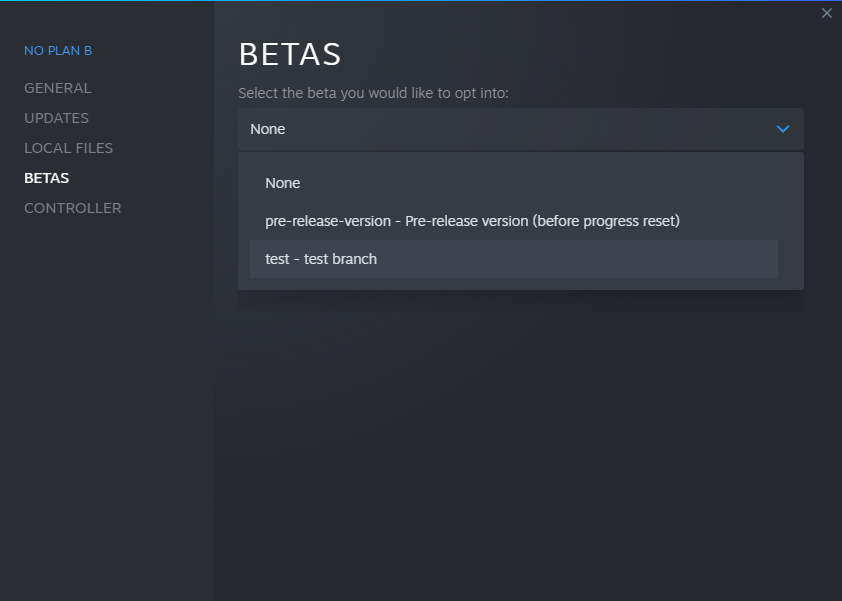
In the Steam client, right-click on the game from your library and select "Properties". Select the "BETAS" tab. Select the "test" branch listed in the dropdown menu under "Select the beta you would like to opt into".
The game then should automatically update to the test version.
To switch back to the public branch, just select "None" in the betas dropdown.
Test Branch Update! (Beta 3.0.1)
Fixed the bald SWAT characters ^^"
Test Branch Update! (Beta 3.0.0)
Changelog
Here's the changelog for Beta 3.0.0 available right now on the test branch (check out the next chapter to try it).
New content/features
Characters incapacitated during campaign missions don't die anymore and are still available when starting a new chapter
Skills points are now wons by each participating character (still available after completing a chapter)
Characters now start the campaign with 3 skill points
Added civilians in the "High Threat" difficulty level (SWAT and FBI factions will fail the mission if a civilian is killed, the other factions will get a score malus)
You can now sell weapons and grenades for half their selling price by right clicking on them in the setup screen
Added defensive enemies on mission objectives (green zones)
Added new map and room patterns to the mission generator
Added screen shake on weapon shots and smoke grenade explosions
Added the "Mandatory" toggle on NPC spawns/zones that ignores the difficulty spawn ratio
Improvements
Reduced the overall difficulty (+10% aiming duration for enemies)
Tweaked faction modifiers
Reduced aggressive enemies investigation range
Agents can see behind civilians
Optimized the game resolution performances
Improved support of right to left languages (Arabic, Farsi, Hebrew)
Changed the default quality level from "Ultra" to "High"
Updated translations
Fixes
Fixed pathfinding quirks happening when moving around obstacles
Fixes grenade explosions having no effect if the agent that tossed it died before it exploded
Fixed doors opened during the plan acting as already opened on the first tick of the resolution, triggering enemies reaction too early
Fixed transparent doors blocking pathfinding even when opened
Fixed some doors getting kicked by dragging a character during the planning phase
Fixed the camera keyboard controls (didn't take rotation into account when moving)
Fixed the camera zoom speed when using keyboard controls
Fixed the initial camera zoom/position in custom missions using lights placed far away from the scene
Fixed the light sources being disabled when using a global quality lower than "high"
Fixed the post process effect when changing playback speed
Fixed the loading of custom missions using unsupported scenarios
Fixed freshly bought weapon materials
Fixed saving of weapons and grenades position and orientation on the weapon rack
Fixed floor assets collisions
Fixed stairs assets collisions
Fixed walls missing their back faces
Don't hide map parts above resting characters
Reminder: switching to the test branch
In the Steam client, right-click on the game from your library and select "Properties". Select the "BETAS" tab. Select the "test" branch listed in the dropdown menu under "Select the beta you would like to opt into".
The game then should automatically update to the test version.
To switch back to the public branch, just select "None" in the betas dropdown.
Beta 2 Fixes and Improvements (Beta 2.1.2)
Here's a bunch of fixes and improvements coming from the test branch. Enjoy!
New content/features
Enemies now hear and react to characters running
Improvements
Improved QoL when playing multiple stories maps: hide map assets above a certain height from the selected agent
Improved characters' targeting: when an aiming direction is defined, prioritize the enemy that has the tightest angle from it
Reduced the damages done by enemies at close range
Made the agressive archetype more agressive (increased its max investigation distance)
Reduced the size of the characters vision blocking collider
Improved the camera zoom controls: zoom speed increases with the distance from the ground
Tweaked the map assets hierarchy
Changed the default quality level from "Ultra" to "High"
Increased the max shadow distance for each quality level
Improved the initial position of the enemies created from NPC spawn zones (not so close to the room borders)
Updated the translations
Fixes
Fixed the performance issues with the latest public update
Fixed the color of the pillars in randomly generated maps
Fixed the light sources being disabled when using a global quality lower than "high"
Fixed walls missing their back faces
Fixed walls, doors and windows physical presence (collisions, pathfinding, transparency)
Fixed the initial camera zoom/position in custom missions using lights placed far away from the scene
Fixed the loading of custom missions using unsupported scenarios
Restored the weapon preset assets in the map editor
Fixed some weapon models in the map editor
Fixed opened doors disappearing in the execution view
Fixed vision through doors with windows
Fixed some doors still blocking path once opened
Fixed some doors getting kicked when dragging a character around it
Fixed the cover detection when behind windows
Fixed the fog of war effect on big maps
Fixed the map editor asset previews
Fixed the pathfinding around a recently opened door when rewinding time
Fixed vision through the teller desk barrier glass
Test Branch Update (Beta 2.1.2)
Changelog
Here's the changelog for Beta 2.1.2 available right now on the test branch (check out the next chapter to try it).
Improvements
Improved performances of the multiple stories maps asset hiding feature
Don't hide map parts above resting characters
Fixes
Fixed the tutorial missions not loading
Fixed Shift + click moving characters to the lower story when they are on a upper one
Reminder: switching to the test branch
In the Steam client, right-click on the game from your library and select "Properties". Select the "BETAS" tab. Select the "test" branch listed in the dropdown menu under "Select the beta you would like to opt into".
The game then should automatically update to the test version.
To switch back to the public branch, just select "None" in the betas dropdown.
Test Branch Update (Beta 2.1.1)
Changelog
Here's the changelog for Beta 2.1.1 available right now on the test branch (check out the next chapter to try it).
Improvements
Improved QoL when playing multiple stories maps: hide map assets above a certain height from the selected agent
Reminder: switching to the test branch
In the Steam client, right-click on the game from your library and select "Properties". Select the "BETAS" tab. Select the "test" branch listed in the dropdown menu under "Select the beta you would like to opt into".
The game then should automatically update to the test version.
To switch back to the public branch, just select "None" in the betas dropdown.
Test Branch Update (Beta 2.1.0)
Changelog
Here's the changelog for Beta 2.1.0 available right now on the test branch (check out the next chapter to try it).
New content/features
Enemies now hear and react to characters running
Improvements
Improved characters' targeting: when an aiming direction is defined, prioritize the enemy that has the tighest angle from it
Reduced the damages done by enemies at close range
Reduced the size of the characters vision blocking collider
Tweaked the map assets hierarchy
Optimized performances when displaying the planning view
Changed the default quality level from "Ultra" to "High"
Increased the max shadow distance for each quality level
Fixes
Fixed the camera keyboard controls (didn't take rotation into account when moving)
Fixed the camera zoom speed when using keyboard controls
Fixed the color of the pillars in randomly generated maps
Fixed the light sources being disabled when using a global quality lower than "high"
Fixed walls missing their back faces
Fixed walls, doors and windows physical presence (collisions, pathfinding, transparency)
Reminder: switching to the test branch
In the Steam client, right-click on the game from your library and select "Properties". Select the "BETAS" tab. Select the "test" branch listed in the dropdown menu under "Select the beta you would like to opt into".
The game then should automatically update to the test version.
To switch back to the public branch, just select "None" in the betas dropdown.
Test Branch Update (Beta 2.0.9)
Changelog
Here's the changelog for Beta 2.0.9 available right now on the test branch (check out the next chapter to try it).
Fixes
Fixed the performance issues with the previous build by making the fog of war module position follow the camera
Reminder: switching to the test branch
In the Steam client, right-click on the game from your library and select "Properties". Select the "BETAS" tab. Select the "test" branch listed in the dropdown menu under "Select the beta you would like to opt into".
The game then should automatically update to the test version.
To switch back to the public branch, just select "None" in the betas dropdown.
Test Branch Update (Beta 2.0.8)
Changelog
Here's the changelog for Beta 2.0.8 available right now on the test branch (check out the next chapter to try it).
Fixes
Fixed the initial camera zoom/position in custom missions using lights placed far away from the scene
Fixed the loading of custom missions using unsupported scenarios
Temporarily disabled the extra fog of war groups to see if it improves performances
Reminder: switching to the test branch
In the Steam client, right-click on the game from your library and select "Properties". Select the "BETAS" tab. Select the "test" branch listed in the dropdown menu under "Select the beta you would like to opt into".
The game then should automatically update to the test version.
To switch back to the public branch, just select "None" in the betas dropdown.
Test Branch Update (Beta 2.0.7)
Changelog
Here's the changelog for Beta 2.0.7 available right now on the test branch (check out the next chapter to try it).
Improvements
Made the agressive archetype more agressive (increased its max investigation distance)
Improved the camera zoom controls: zoom speed increases with the distance from the ground
Improved the initial position of the enemies created from NPC spawn zones (not so close to the room borders)
Updated the prologue outro message
Updated the translations
Fixes
Restored the weapon preset assets in the map editor
Fixed some weapon models in the map editor
Fixed opened doors disappearing in the execution view
Fixed vision through doors with windows
Fixed some doors still blocking path once opened
Fixed some doors getting kicked when dragging a character around it
Fixed the cover detection when behind windows
Fixed the fog of war effect on big maps
Fixed the map editor asset previews
Fixed the pathfinding around a recently opened door when rewinding time
Fixed vision through the teller desk barrier glass
Reminder: switching to the test branch
In the Steam client, right-click on the game from your library and select "Properties". Select the "BETAS" tab. Select the "test" branch listed in the dropdown menu under "Select the beta you would like to opt into".
The game then should automatically update to the test version.
To switch back to the public branch, just select "None" in the betas dropdown.