Hello, all you rail barons and track tycoons out there! Welcome back to the depot, where we trade wrenches for keyboards and gears for code, diving deep into the engine room of our beloved Rail Route. We're all aboard the Update Express, fueled up and ready to chug along with a whole set of promising new features that we've been tinkering away at in our virtual workshop. Ready to dig into some juicy behind-the-scenes progress? Let's go!
Regional Train Automation and Shunting
No more idle hands on deck, folks! We are up to our elbows in the thick of things, working hard on regional train automation. This will make managing those pesky regional trains a breeze, bringing a whole new level of slickness to your operations.
To achieve this, we are laying the foundation for another massive game changer: shunting! Say goodbye to blocked platforms during regional trains' intermission. Though you can manage it manually, shunting will lift that burden off your shoulders, letting you focus on the big picture.
INTRODUCING: The Shunting Circuit
Enter the Shunting Circuit, a new game element to enable shunting. This little piece of railroad magic can be built on auto signals, adding shunting command processing logic to the signal where it's built. The logic is executed once the train stops at the signal, keeping your network fluid and dynamic. Be ready to allocate a small upkeep of 100/cycle for each of these helpers, though!
QUEUE THE MAGIC: Shunting Queue Editing
With shunting, we are also introducing the ability to edit the shunting queue of a train. You can add Go To Signal commands to route the train to the next signal, or Reverse commands to send the train back. Need to reuse the train for the next leg of service? Just use the Reuse command!
IN ACTION: Shunting Queue Execution
Once the commands are set, the Shunting Circuits swing into action when the train stops at the signal, executing your shunting commands to keep things running smoothly. Just watch your trains navigate through your network like clockwork - it's a thing of beauty!
That's it for this week's sneak peek into the Rail Route's engine room. We're thrilled about these developments and can't wait to see how they will enhance your gaming experience. Remember, these updates are the result of our constant endeavor to give you the best railway management game out there.
All this groundwork on shunting sets the stage for upcoming features. Soon, you'll see the stabling sensor (for hands-free shunting queue adjustments), dedicated shunting tracks (for a more organized train storage), and the eagerly anticipated turn-around sensor. This will make automating the locomotive switch on ICs trains a breeze!
We always love hearing from you, so do drop your thoughts, suggestions, and feedback in our Discord. And, of course, stay tuned for more exciting updates in our next blog post. Until then, keep your signals green and your passengers happy. Catch you on the flip side!
NEW: Added option to station info panels to toggle showing train name popups

UPDATE: Better visual representation of platform number in station visits
UPDATE: Finished schedule icons in the train bottom bar will be shown always and highlighted once a train has to leave
UPDATE: Localizations (it: research, tutorials, ui)
UPDATE: Next/previous train instance in the train bottom bar will be shown only for multi leg trains


FIX: Bottom bar showed first leg even if schedule editing was initiated from subsequent leg of a multi-leg train => previous leg (Q) was not working
FIX: Contract schedule in bottom bar was not updated when active contract was edited.
FIX: Game with FirstTimePlayer flag reset but without any saves failed to load
FIX: Next leg first station visit in the train timeline was not being shown the same for both current and next train instances
FIX: Offered contract bottom bar with contract times was displayed for active contract editing
FIX: Reuse icon displayed over former (already bulldozed) Coach Yard position where previous leg train was stabled before.
FIX: Train alerts where shown under bottom bar
FIX: Unable to deselect train in station info when selected in offered contract focus view
FIX: Upcoming train in general bottom bar not being shown properly
Hotfix 1.14.5
NEW: Added particle effect from waiting train icon to train reuse icon when clicked

UPDATE: Auto-assign Dispatcher Office to non-board stations only to reduce confusion. Manual assignment still possible.
UPDATE: Buy mode can be toggled off by secondary action (RMB)
UPDATE: Localizations (nl: research, tutorials, ui)
UPDATE: Train number no longer shown in station info panel timeline on selected trains


FIX: Departure sensor tutorial was blocked because signal upgrade action changed to building auto signal over manual signal
FIX: Multi-leg contract trial did not fail when trial train exited the map prematurely
FIX: Some regional train contracts originated in non-border stations if a Dispatcher Office was assigned to a border station
FIX: Urban Transit contracts were not generated
Update 14 Rolls into the Station
Hello, train enthusiasts and track tycoons! It's that time of the week when we swap our hard hats for conductor caps and share the latest and greatest from our bustling workshop. I'm excited to announce that Update 14 has safely pulled into the station! Now, let's not wait any longer - let's dive straight into what's new in Rail Route!
NEW: Buildable Dispatcher Office
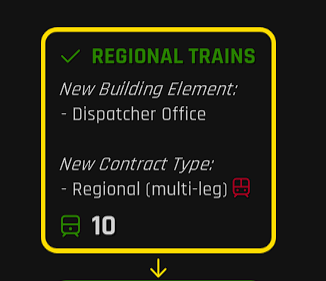
Our first new feature is the buildable Dispatcher Office, and it's all about giving you more control over your bustling stations. Want to dictate where the contract intermissions will be? Simply place the Dispatcher Office in that particular station, and voilà! And if you think one office isn't enough, just add more to the same station to not only increase the number of contract slots but also boost the contract generation speed. It's a handy new tool that makes managing your regional and urban train contracts both flexible and efficient!
NEW: Regional Trains' Quick Turnaround
With Update 14, we're excited to introduce the first part of our grand plan for red contracts progression and automation. Regional trains can now be reused for the next leg without being sent to the Coach Yard. Yes, you read that right - it's all about making your operations sleeker and more efficient. Stashing and converting trains during its legs now becomes a walk in the park!
NEW: Icons that Tell a Story
Update 14 introduces new sink and Coach Yard icons in the train's bottom bar. These intuitive visuals give you a quick overview of the train's next destination once the schedule is finished - be it leaving the board through the sink or waiting for its next leg.
NEW: Easier Upgrading Tracks
We know that upgrading track speeds can be a bit of a pain, but not anymore. Now, you can simply build higher speed track over the already built one to upgrade. And voilà, you have an upgraded track ready to take on faster trains!
NEW: Customizable Bulldozing Action
Ever wished you could choose what a primary action in bulldozing does? Your wish has been granted! Now you can choose your preferred bulldozing action for connections - whether to remove whole tracks or just sections. Customization is king!
Other Updates
We've made a few more tweaks and updates, including adding a dispatcher office upgrade video, enabling building on allocated tracks with Signaling Safety off, renaming Manual signal security upgrade to Signaling Safety, enlarging the max distance of the Coach Yard from the station, and updating the Select Object to match the new UI style. All these smaller changes come together to make a big difference!
Full Patch notes
New
Buildable Dispatcher Office item added
Existing tracks are upgraded to built track speed when part of the connector
Preferred bulldozing action for connections (bulldoze whole / bulldoze section) can be configured
Regional trains can be reused for next leg without being sent to Coach Yard
Sink and Coach yard icons in the train bottom bar to indicate the leave place once the train schedule is finished
Updates
Added dispatcher office upgrade video
Added invalid configuration icon to dispatcher office when no station is assigned
Building on allocated tracks possible (with Signaling Safety off)
Changed dispatcher office color to white
Localizations (nl: all)
Localizations (pt: ui; ru: ui)
Manual signal security upgrade renamed to Signaling safety
Max distance of coach yard from station enlarged to be always buildable where it was even after proximity algorithm change
Replaced node / station selector right click to clear with dedicated ui button
Select object updated to match new UI style
Station selector selected station shows as station sign visual
Fixes
FPS drop occured when modifying contracts with many stops
'Select platform' was displayed over selected platform in Station Visit View
Assigned station text in dispatcher office configuration panel would show as black
Color picker would not stop following mouse upon releasing button
Dispatcher office built in custom map editor was not saved
Each trial leg accumulated to fulfilled count
Changed station colors where not applied on game load and changing track speed colors didnt update colors on loaded level immidiatly
Intermission highlight didnt look the same as train stop highlight
It was not possible to bulldoze a short track between two signals.
Next stop highlights on train bottom bar where not working on trial trains
Offered contract icons showed under board elements interfering in their functionality
Offered contracts at dispatcher office where misaligned
Offered contracts where slightly offset next to dispatcher office
Rejecting train that is on board would leave behind train bottom bar
Station info panel scale settings where not saved
Station info panels on sides did not update colors when station color was changed
Station signs where not highlighted while assigning station to dispatcher office
Steam playtime tracking was not resumed after main menu shown
Tunnel was grabbable and its grabbing caused errors
Waiting train icon timeout circle not being shown after opening and closing the build mode
We're incredibly excited for you to try out all these new features in Update 14! We always love hearing your thoughts, ideas, and feedback. So, feel free to chime in on our Discord or leave a comment below. Until next time, may your signals always be green, and your passengers always on time. Catch you at the next station!
NEW: A button in the train bottom bar that disables the train automation for sensors and coach yard once clicked

UPDATE: General bottom bar will automatically be shown instead of the train bottom bar once the selected train is disposed.
UPDATE: Train reward icons are no longer shown in Rush hour mode
UPDATE: Waiting train icon tooltip will show only when it's hovered

FIX: Train instance number and previous/next instance buttons were visible in the train bottom bar in rush hour and timetable modes
FIX: Train rewards in the bottom bar were visible in Rush hour and Timetable modes
Update 13 is Now Live
Update 13: The Highlights
We've made some significant changes to the Construction UX. Right-clicking now acts as an "undo" button, taking you back a step. If you're holding an item, you either build it or drop it. If you're not holding an item, you can modify everything. We've also added visual guidance, with different grid colors to indicate your current state. You can configure this behaviour in the options:
We've introduced a new focus view for station configuration. This will allow you to manage your stations with greater precision.
We've also added a variety of new keybinds. The best part is that you can now rebind more freely, and we've made it so that duplicates are allowed.
But that's not all. Here's the full list of what's new, updated, and fixed in Update 13:
Changelog
New
Added a display of the train's experience points in the train bottom bar
Added individual rebindable keybinds for various ingame actions
Added keybind for selecting first upcomming train
Added keybind for system upgrades button
Added reset binding override button to currently overridden actions in options menu
Configure Station is now a focus view
New configuration option for Default secondary action (Do nothing, Bulldoze, Toggle action wheel)
New configuration option for Empty space secondary action (Do nothing, Activate Bulldozing tool, Close Construction)
Primary action rotates signal of the same type as currently selected
Recurrent InterCities are an Upgrade for 5 green points
Updates
'Empty hand' state in Construction for existing elements modification
Added "N" as default keybind for toggle buy tool on keyboard
Allow duplicate bindings to be set
Changed highlighted single stop in train bottom bar to match other highlighted stop visuals
Connections' speed can be updated even when there is a track item in your hand
Do not display grid in editor when not building
Game mode description text added to map selection pages
Ghost color for unable to build state changed to brighter one (was too dim)
Grid changes color to red when in Bulldoze mode
Grid not displayed in 'empty hand' state
Last selected building item has special highlight when empty hand is selected
More visible track network in focus view
Prevented station configuration focus view from opening for stations without any platforms (sign only)
Secondary action (RMB) closes bulldozing
Secondary action over a train can cancel the train reverse command
Signal's 'change type' actions removed from 'empty hand' state, now signals are upgraded/downgraded by building one over another.
Station visit panels will expand/collapse on mouse enter/exit
Track Lines thicker in focus view
Unbound gamepad pause binding and added cycle time speeds backwards
Notable fixes
Active build button was not centered on bottom bar
Bindings for time controls conflicted with build button bindings when in buy mode
Grid were visible at the start of game after being in editor previously
Incorrect tooltip on train bottom bar start train buttton
Irrelevant buttons were shown on bottom bar for a split second when selecting a train
Last selected building item button visuals not always in the correct state
Previously selected train was not always deselected when a new train was selected
Selected building item name had incorrect background size for displayed text
Station info panels were not being loaded with the same order they were saved in.
Station signs didnt animate on when buying a station
Train leg highlight was not working for regional trial train contract focus view
Upcoming train items had incorrect size until they where hovered over
That's all for this week. See you at the next one! Stay connected and be cool. - Angel
🚂 Join the Rush Hour Contest: Conquer the Creato Map!
📣 Calling all Rail Route players! 🚂 Participate in the exhilarating Rush Hour Contest happening now until Friday. 🎉 Immerse yourself in the challenging map "Creato" created by the talented TyperiMILOS. 🌟 Test your skills in managing complex station layouts and intense traffic scenarios. 🚦 Show off your strategic prowess and compete for exciting prizes! Don't miss out on this opportunity. Join the contest today! 💪🏆
FIX: It was not possible to edit schedule of contract over hour - already due run was selected for editing FIX: Misleading instruction corrected in sensor tutorials (click instead of middle click) FIX: Reg contract without mandatory stop in middle leg were generated FIX: Unable to load saves containing saved NotificationInfoPanel FIX: Urban trains were not disabled in Automated Contract Manager before unlocked
Rail Log #20: All Aboard for Update 13!
Hello, fellow rail enthusiasts! Your friendly neighborhood game developer here, bringing you another edition of Rail Log. Can you believe it's already been a week since Update 12 rolled out of the station? Time flies when you're having fun, or in our case, when you're busy laying down tracks for Update 13. We've got a staging version ready to roll, so let's take a sneak peek at what's coming down the track!
Construction UX: Right Click Changes
First up, we've made some tweaks to the Construction UX. Now, right-clicking acts as your personal "undo" button - it'll always take you back a step. If you're holding an item, you either build it or drop it. If you're not holding an item, you're free to modify everything. Rotate those signals! Change that track speed! Move that sensor! We've even added visual guidance, with different grid colors to indicate your current state. It's like mood lighting for your construction work.
And that's not all - more configuration options are in the works, including an instant bulldoze feature.
Station Configuration: New Focus View
Next on the list, we're introducing a new focus view for station configuration. It's like getting a brand new pair of glasses, but for your stations. Now you can manage your stations with the precision of a Swiss watchmaker. We can't wait for you to try it out!
We're planning to revamp all configurations in this manner.
Keybinds: More Freedom, More Control
We've also added a bunch of new keybinds. But the real news here is the freedom we're giving you. You can now rebind more freely, and we won't even bat an eye at duplicates.
We're as excited about these changes and can't wait for you to try them out. As always, we're all ears for your feedback. So, get ready to update, explore, and let us know what you think. Until next week, keep those trains running on time!