
FIX: Impossible to upgrade Signal to Auto Signal in Departure Sensor Tutorial
FIX: NRE in ReuseShuntingCommand execution in single player
FIX: Routing Sensor Configuration was not refreshed after Signal was selected
FIX: Train composition was cleared by the first modification in single-player mode
FIX: Typo in "Last passeger did not make it on time"

Rail Route
Hotfix 2.3.9
Rail Route 50% Off – Celebrate the Co-Op Update!

To celebrate the release of our Co-Op Update, we’re offering our biggest discount yet – 50% off! Now is the perfect time to jump into Rail Route and experience the new multiplayer mode with your friends.
Whether you want to build, dispatch, and automate together or challenge each other in Timetable Mode, Rail Route is now more fun than ever with co-op play!
https://store.steampowered.com/app/1124180/Rail_Route
https://store.steampowered.com/app/3570380/Rail_Route__Curated_Map_Pack/
Don’t miss this limited-time offer – get Rail Route for half price and start your dispatching adventure today!
Happy dispatching!
https://store.steampowered.com/app/1124180/Rail_Route
https://store.steampowered.com/bundle/37986/Rail_Route_Supporter_Bundle/
https://store.steampowered.com/app/2943430/Rail_Route__Happy_Passengers/
Rail Route’s Co-Op Update is Live!
We’re excited to announce that the Co-Op Update is now live!
This update comes as we celebrate the one-year anniversary of Rail Route’s 1.0 release. To mark the occasion, we’re offering our biggest discount yet – 50% off! It’s the perfect time to invite a friend and play Rail Route together.
Co-Op Multiplayer, Desyncs, and More
We have added co-op multiplayer to all three game modes, so you can now enjoy Rail Route with friends! Adding multiplayer to a finished game like Rail Route was a big challenge, but we found a good way to do it using the lockstep technique.
While we have worked hard to make multiplayer smooth, desynchronization issues can still happen. Our amazing Discord community helped us find and fix many problems, but there might still be a few left. Please be patient as we continue to improve multiplayer.
Curated Map Pack
We believe multiplayer is a great addition to Rail Route, and we hope you enjoy this free update as much as we enjoyed making it!
https://store.steampowered.com/app/3570380/Rail_Route__Curated_Map_Pack/
If you’d like to support our team and future free updates, we’ve released a small optional DLC – the Curated Map Pack. This pack includes carefully selected community-made maps that we think are fun and interesting to play. Each map has been slightly improved and included with the author’s permission to ensure quality and playability. If you don’t want to search for great maps yourself, this pack is for you!
How to check for Desynchronization Issues
If the game desynchronizes, it means that the client and host might see different versions of the game. At first, these differences may be small and hard to notice, but they can grow over time.
If you experience this, we recommend the client reconnects to the host. This refreshes the game state and should fix the problem.
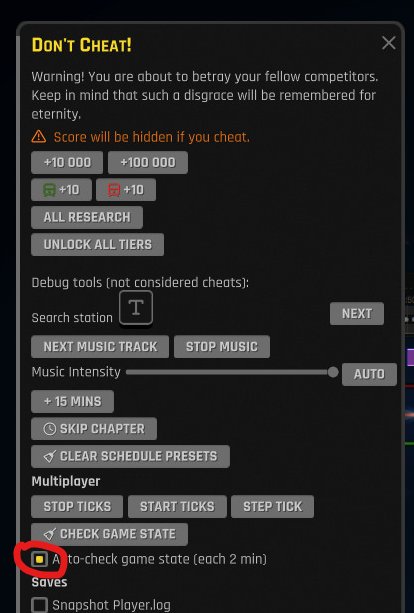
If you want to help us find more desync issues, you can enable the automatic game state checker in the debug panel (F2). This tool checks the game every 2 minutes and reports any differences. If you find an issue, please send us the logs from all players involved so we can investigate!
Thanks for reading, and happy dispatching!
https://store.steampowered.com/app/1124180/Rail_Route
https://store.steampowered.com/bundle/37986/Rail_Route_Supporter_Bundle/
https://store.steampowered.com/app/2943430/Rail_Route__Happy_Passengers/
Unstable Branch: Multiplayer
It’s been a while since we shared any big news, but we’re excited to announce a small update to celebrate the one-year anniversary of our full release.
We’ve mostly been focusing on bug fixes and minor improvements since the Happy Passengers DLC, but later this year, we decided to revisit some features we had in the works. We didn’t want to throw away what we’d already started—and that feature is multiplayer!
Our new version with multiplayer is now on the #unstable branch, which you can find access through our Discord. You need to be there to report issues and provide us the required logs, so we are sorry for forcing you there.

We’d love for you to check it out and share your feedback. Thanks for sticking with us!
—The Rail Route Team
https://store.steampowered.com/app/1124180/Rail_Route
https://store.steampowered.com/bundle/37986/Rail_Route_Supporter_Bundle/
https://store.steampowered.com/app/2943430/Rail_Route__Happy_Passengers/
Hotfix 2.2.10
FIX: Mouse cursor was not visible when game started with controller
FIX: Pause button missing controller glyph hint
Hotfix 2.2.9
FIX: Advanced features were unlocked in Arrival and Routing Sensor tutorials
FIX: Dropdown was having focus wrongly when using the controller
FIX: Inability to compare wave durations in Rush Hour mode against previous personal record after wave 10 due to new personal record being incorrectly used as the benchmark
FIX: Mouse was visible in menu when using controller and sometimes, controller stopped working afterward
FIX: Percentile 100 was not displayed if a new global record was created - the player was counted twice
FIX: Unwanted possibility to build tracks after the end of a wave in rush hour
Hotfix 2.2.8
NEW: Timetable score screen displayed when score is clicked

FIX: First 4 trains were not awarded in SoJ
FIX: NRE when perpetual key was pressed just after a Perpetual Circuit was built
FIX: Rush Hour train numbers were changed & prefixed with type prefix on save&load and on localization change
Hotfix 2.2.7
UPDATE: Logging of long interlocking computation
UPDATE: Reset time speed to 1× when next wave starts in Rush Hour

FIX: NREs when passenger's itinerary used a train with Any platform setting
FIX: Save button in editor was reset from 'Saving' state before saving was actually completed
Hotfix 2.2.6
NEW: Custom contract number used as base for clone numbers

UPDATE: Car collider adjusted to prevent train crashes when switch is already deallocated but vehicle still obstructs it visually
UPDATE: Click on save name initiates its editing
UPDATE: Ignore signals without shunting circuit when testing alternative detach-towards signals at shunting group track
UPDATE: In Departure Sensor configuration, when a destination is reachable from both platform signals, both routes are highlighted
UPDATE: Newly created map in Editor is immediately saved to appear in Main Menu
UPDATE: Unity version to 2021.3.44f1 to fix Mac double-click problems

FIX: Bounding wall ignored loaded walls, cutting out pre-designed corridors
FIX: Construction task was not initialized in the correct moment during the tutorial so the Time Saver achievement was never unlocked
FIX: Departure Sensor was not acting when a train was heading towards sink
FIX: Dispatching from Coach Yard in reversed order flag was not applied to custom contract clones
FIX: Same delay entries were logged multiple times
FIX: Waypoint with player-increased duration was stored as preset, causing inability to shorten the stop for any subsequent contract havning the same pattern
Hotfix 2.2.5
UPDATE: Can decouple multiple locos coupled together
UPDATE: Chokepoints removed from München map
UPDATE: Hovering over partially overlapping shunting command now shows hovered command on top

FIX: Bulldozing a perpetual circuit in Rush Hour and Timetable modes was returning the circuit to the inventory even though it's given for free when you build the auto signal, That led to free perpetual circuits in the inventory
FIX: Contracts menu button didnt listen to keybind after closing construction mode with close menu keybind
FIX: Departure Sensor was acting even without signal
FIX: Error thrown when dispatcher office was placed in custom level and stations where just created
FIX: Error updating train timeline when rejecting a contract
FIX: Infinite loading when steam workshop level was added manually without proper file name
FIX: Locomotive detachment on shunting group was wrongly computed
FIX: Loop including a switch was wrongly connected
FIX: No building item hint shown for Stabling Sensor in Simplified Chinese
FIX: Path was not deallocated from bulldozed signal when it was not connected from the other side
FIX: Populating Shunting Sensor configuration to other platforms did not update attachment endpoint (platform signal)
FIX: Satisfaction bar fill value in the contract detail panel was being changed according to the zoom level
FIX: Services Contracts panel was being shown under the train
FIX: Shunting commands could be shown fully overlapping
FIX: Train label position rapidly changed when it was exiting autoblock
FIX: Typo in the name of the station `Berliner Tor` in Hamburg map
FIX: Waiting train icons with a first schedule that has no specific platform was causing a huge performance drop