Rec Room PATCH - the "Holy Update, Coach!" edition
General Improvements and Bug Fixes
Hope this puts you in a good mood: Rec Room Studio rooms now support Mood v1 chips!
Added an "Always Snap Circuits" option in Maker Pen under the Circuits & Debugging dropdown menu. When toggled, circuit boards moved together will always snap to each other, regardless of your current Maker Pen snapping mode.
When using the MakerPen rotate tool on a shape inside a container with Rotate Around Pivot set, the shape will now rotate around the container's pivot point rather than the shape's center point.
The MakerPen transform tool now respects the RotateAroundPivot setting as well.
Saving changes to a swatch, creating a new swatch, and deleting a swatch now correctly updates the list of swatches when performed.
Fixed a bug where the From Rec Room Object chip would fail to convert seats properly. We couldn't stand having that bug. So now we're... seated? Yeah, sure, that works.
Seats will now also have their Lock Player In and Lock Player Out values reset when you use room reset from the MakerPen.
Dracula finally learned to aim! Fixed a bug where Dracula's fireballs would frequently collide with his own cape in Crescendo.
Fixed a bug where offline rooms booted from RRS would attempt and fail to update room permissions.
Fixed the distance output on the Spherecastchip.
Fixed a bug that caused the 'Radius' input on the 'Respawn' chip not to work as expected.
Fixed a bug where Text Set Text wouldn't always respect the net heat limit.
Fixed a bug that caused the MakerPen to be invisible after being pulled from the backpack.
Fixed a bug where grabbing a handle of a vehicle that had been clamped to something broke it. If you rip the handle off a vehicle now, consider if you are just incredibly strong.
Fixed a bug where merging shapes would show incorrect selection bounds.
Added various fixes and stability improvements for Hierarchical Building Alpha Preview.
Fixed a desync that happened with Holotars and Audio Samplers when a player was muted or PTT while recording.
Fixed a bug where clicking on the end of an input field caused the text cursor to go to the second to last position instead of the end of the text.
Fixed a bug where screen-mode players could get into a broken state if they went to a new room while holding a drawn bow.
Please see here for convenient links to controls, tutorials, comfort options, etc.:https://recroom.com/community
We love to hear your feedback, so please don't hesitate to let us know what you think.
Rec Room PATCH - the "Holy Update, Coach!" edition
General Improvements and Bug Fixes
One cannot get that drip, if one cannot seek the drip. Check the watch menu shop and use the search to find your next look in the top 1000 trending shirts.
The Full Body Costume Dummy now works with the Set Position chip, and can be wired to gizmos.
Get that party started, creators! There's a new chip that checks if the player is in a party.
Added a Clamp Circuits chip that keeps numbers from turning to utter chaos... that is, keep them within a certain range.
Sure, time is a flat circle, but where are you on that circle? Find out with the 'Player Get Time Zone' chip in beta.
Fixed a bug that caused the 'Set Player Name Color' chip to use more network heat than expected.
Fixed a bug that prevented synchronized Destination Room variables from working. We always knew they were destined for greatness...
Fixed another bug where players would sometimes join a room, but fail to load all of the CV2 chips. That should be the last of 'em!
Fixed several long standing issues with grid snapping
This is why we don't throw things at people...sometimes the MakerPen would become inoperable after hitting another player with it and then picking it up quickly. We fixed that issue, but, like, don't take that as an excuse to go hurling your Maker Pen as a weapon.
Fixed a bug where configuring an item with the maker pen could lead to random scrolling in the UI when editing values
Fixed a bug that blocked some characters when configuring HUD element labels
Fixed a bug that broke voice chat in a small number of rooms
All Gamepad/Keyboard control schemes are unlocked now!
For new players, third person beta may require opting in from the settings menu before it can be used.
Please see here for convenient links to controls, tutorials, comfort options, etc.:https://recroom.com/community
We love to hear your feedback, so please don't hesitate to let us know what you think.
Rec Room PATCH - the "Holy Update, Coach!" edition
Audio Player improvements
Added new chips in beta:
Audio Player Get Audio
Audio Player Set Time Stamp
Audio Player Set Max Rolloff Distance
Audio Player Get Max Rolloff Distance
Audio Get Length
Added settings when configuring the Audio Player to control the rolloff curve and the doppler effect.
The 'Audio' type is now fully supported with the 'To String' chip and with port hover previews.
Fixed a bug that could cause the Audio Player to reset the playback position when paused and resumed.
General Improvements and Bug Fixes
For players with localization, you can now invite your friends to join Rec Room in your language.
Changes made through the Button Set Text chip will no longer save with the room.
The Button and Dome Light components can now be unsynced.
Added new SFX for each type of circuit error.
We've updated the behavior of Debug Targeted Execution. When enabled, exec ports can now be run by long-pressing them with the Connect tool. Quickly tapping them with Connect will disconnect them.
Cleaned up "invalid players" in Circuits. You should now be able to properly compare Player values with Equals chips in all circumstances, even when they are no longer valid. Hovering over Player ports whose values are invalid will now show "Invalid Player (None)" for (None), or "Invalid Player (#)" with a number to refer to a specific player who has left.
Deprecated and replaced the Player Variable chip. The old version had a bug where, when synced, it would start outputting (None) when the player it was storing a reference to left the room.
Selections with object boards are now supported with the Copy, Clone, and Make Invention operations.
Fixed the bug that the player can boost wolf ride, 50s car and truck in VR mode by pressing sprint button.
Fixed an issue on Xbox where brightly colored blobs would sometimes appear around UI dialogs.
Removed the blue tint effect that occurs in dark rooms for Rec Room Studio rooms.
Players who own some but not all items in a bundle offer will now automatically see the bundle as a purchase option, regardless of other filtering in place (such as a filter excluding players who already own all of the items).
Fixed a bug that could lock up the watch if it was closed during a purchase.
Please see here for convenient links to controls, tutorials, comfort options, etc.:https://recroom.com/community
We love to hear your feedback, so please don't hesitate to let us know what you think.
Rec Room UPDATE - the "Holy Update, Coach!" edition
Aaaaaaaaaand we're back! Sorry this one took us so long - we were busy ~~adding~~ removing as many bugs as we could! But now we're back on the proverbial ~~horse~~ wolf ride, so updates should resume at their usual cadence of Soon(tm).
New Stuff
If a player is wearing a custom shirt, you can now view and purchase that custom shirt from the outfits screen on their profile. No more racking your brain for who you bought it from... or what room...
Rec Room Plus players can now put an emoji at the end of their name tag for further customization. Yes, we know what you're thinking, and no, you can't pick that one. Name tag outlines have also been made slightly thicker.
Added a shortcut to get to your chats to the HUD on iOS and Android.
General Improvements and Bug Fixes
On both Laser Tag maps, fixed issues where you could get out of the map and made small layout adjustments based on feedback from the Laser Tag community. A nitty gritty log of changes will be shared on Discord.
We've started rolling out localized Chat UI to some players. Hello! Bienvenido! Come va? Brezel! Au revoir!
Improved the audio experience on vehicles driven by other players -- they now sound more consistent with what you would hear if you were the driver! Could still make you motion sick if you're with a particularly bad driver though.
Fixed an issue where certain environment and ambient sound won't react to audio sliders in the Settings menu. You can still keep it at 100% if you'll miss the sweet sounds of coffee being made in the Rec Center!
The palette search bar is now automatically focused on PC and iPad with keyboard, including when reopening the tab/menu.
Fixed custom shirt announcements for some players. Still broken for others! (*Unverified but statistically likely.)
Fixed a bug where palette carousels would reset their scroll when other users cloned, copy-pasted, or spawned in inventions.
Fixed Gamepad unexpectedly ending up on the Configure tab when backing out of the menu with Circle/B.
Fixed a bug where the ink color on the charades pen would sometimes be different from the drawn color when using Maker Pen skins.
Fixed a bug where players would sometimes join a room, but fail to load all of the CV2 chips. No more silent music events! (Mamamonkey breathes a sigh of relief.)
Fixed a bug that caused room consumables to sometimes activate without being consumed.
Fixed a bug where basic settings on premium inventions could not be configured.
Fixed a bug that allowed duplicate items to be added to a UGC storefront.
Fixed a bug that caused UGC storefronts to induce an FPS drop when loading in and out of view. Time to revisit all those cool mall rooms that you couldn't move in before!
Fixed a bug where players could not draw on other players' clothing customizer boards without being focused. Focus, artists, focus!!
Fixed hitching while using the people menu on Playstation platforms.
Fixed an issue where gifts opened by other players would stutter while floating.
Fixed a graphical issue in screen mode when holding the Share Camera while also drawing on a canvas.
Fixed a visual bug in the lighting effects for Disc Golf Propulsion for VR.
Fixed bug where event UI doesn't update to show the join button when an event starts.
Fixed a bug where the invention details page would only show the first one or two tags
Fixed a bug that caused potions to appear small in the backpack.
Circuits Changes
Exec Port Debugging
We've added the ability to execute Circuits chips on-demand - it's super useful for debugging! Turn on "Debug Targeted Execution" in your Maker Pen Menu, then tap an exec port with your Connect or Configure tools to start execution from that point.
Heads-up! When enabled, this does interfere with disconnecting exec wires a bit. Hang tight - we've got a revised version coming soon!
Laser Pointer Component
It's the other half of the Rangefinder - now in CV2! Use it for all your serious presentation needs, and definitely not for creating cool light shows.
General Changes
Added Color support to the Lerp chip.
Added Intensity port to the Set Player Vignette chip.
Various chips that only ran for the local player now include a 'Player' input port.
Fixed a bug that could cause the Get Formatted Time chip to return invalid results with one character formats.
Fixed a bug that could cause the radius setting on the Explosion Emitter not to work as expected.
Added the following chips (beta):
Rec Room Object Set Authority (Did anybody actually want this one?)
Player Prompt Multiple Choice
Get Closest
Get Farthest
RGB To Color
HSV To Color
Parse Color
Please see here for convenient links to controls, tutorials, comfort options, etc.:https://recroom.com/community
We love to hear your feedback, so please don't hesitate to let us know what you think.
Rec Room PATCH - the "Not in '87 anymore" edition
Make sure to check out the \^RecCenter for our NFL collaboration, just in time for the playoffs! Brand new hats and sweatshirts for EVERY NFL team are available! Root your team on, rep your city, or just up your style, it's all there =D
General Improvements and Bug Fixes
Junior accounts were not appearing properly in the new people menu, we fixed it.
Please see here for convenient links to controls, tutorials, comfort options, etc.:https://recroom.com/community
We love to hear your feedback, so please don't hesitate to let us know what you think.
Rec Room UPDATE - the "Not in '87 anymore" edition
Happy new year! We're working on a lot of exciting new things for this year, so keep your eyes open =D
Please see here for convenient links to controls, tutorials, comfort options, etc.:https://recroom.com/community
We love to hear your feedback, so please don't hesitate to let us know what you think.
Rec Room PATCH - the "Winter Wonderland '22" edition
We hope you're enjoying the Winter Wonderland season! We're enjoying the snow but also looking forward to exciting new things in 2023. =D Happy holidays!
Please see here for convenient links to controls, tutorials, comfort options, etc.:https://recroom.com/community
We love to hear your feedback, so please don't hesitate to let us know what you think.
Rec Room PATCH - the "Winter Wonderland '22" edition
General Improvements and Bug Fixes
Fixed an issue where certain environments and ambient sound won't react to audio sliders in the Settings menu.
For those who have localization, we're rolling out localized Chat UI!
Fixed a bug where players would sometimes join a room, but fail to load all of the CV2 chips!
Fixed an issue that caused some wires to be invisible when first connected between two chips in cases where the first chip was out of view when the wire was connected to the second chip.
Please see here for convenient links to controls, tutorials, comfort options, etc.:https://recroom.com/community
We love to hear your feedback, so please don't hesitate to let us know what you think.
Rec Room UPDATE - the “Showdown” edition
Heard some folks were having problems timing out trying to visit Sarsparilla Springs. We got that all fixed so come over and say howdy ya'all!
Custom Colors (Beta)
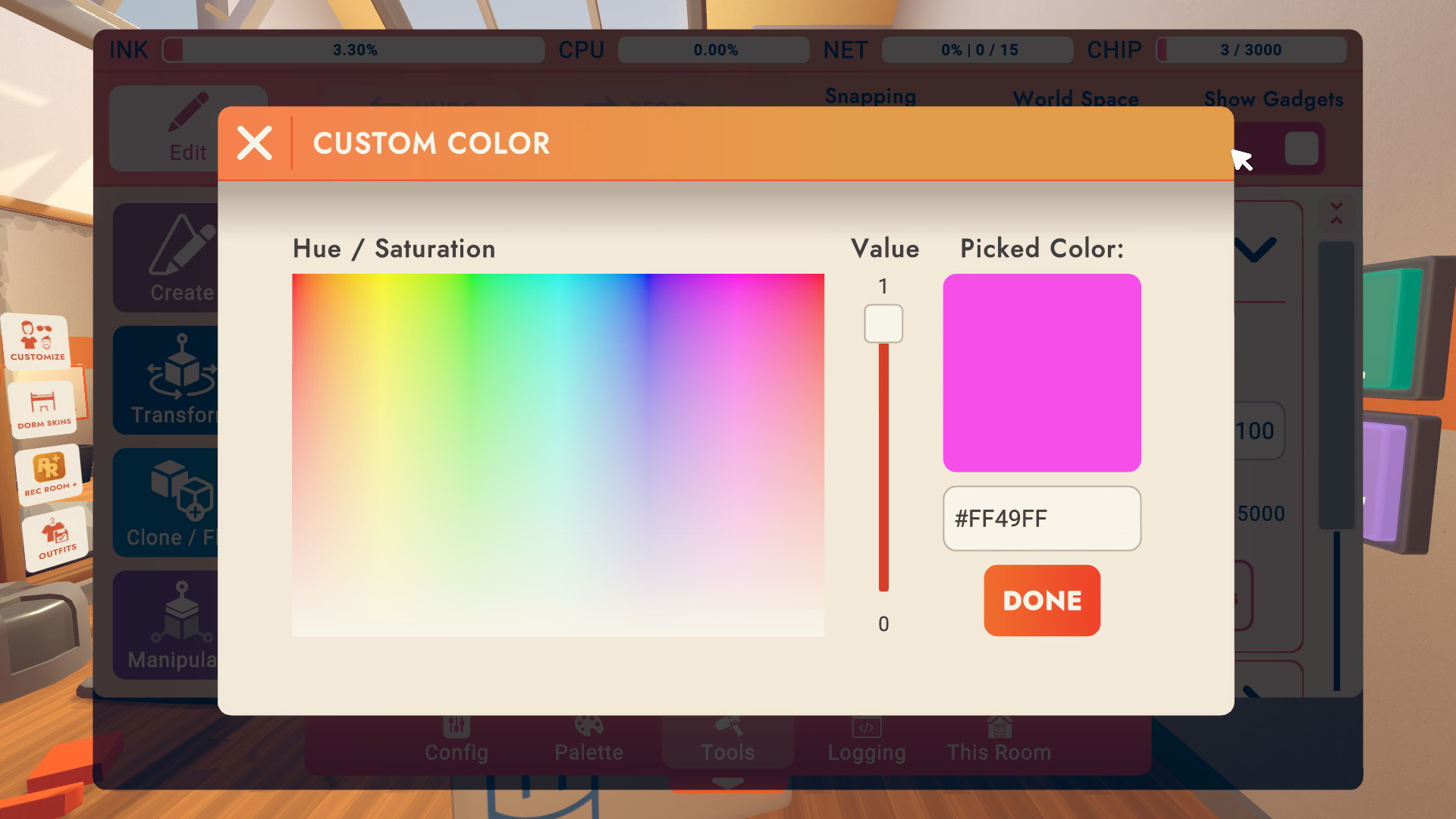
Now in beta... All color pickers (recolor, swatches, magic marker, etc!) include a custom option that lets you choose any color via an HSV picker or HEX input field. Note that we may need to retroactively make minor adjustments to custom colors as we leave beta or change our rendering system down the road.
Multi-Select Config (Beta)
Multi Select Config is here (in beta)! When more than one object is selected by the maker pen, you can edit config options that are present on all selected objects! To start, this only includes some of the basic prop and shape options. More to come as creators let us know what is valuable to add!
Additionally, config is now strongly tied to selection. The config menu is always linked to all objects you have selected.
Creator Roles (Beta)
If your room is beta-enabled, there's a new "Maker Pen" tab in the "Game Roles" settings screen.
There are new Game Role settings governing Can Use Maker Pen, Can Use Room Reset Button, Can Use Delete All Button, Can Save Inventions, and Can Spawn Inventions. A user must have the right Game Role OR Room Permission (if Game Role has not been overridden) to do any of these things.
A brand new Game Role setting called "Can Create Role Assignment Chips." When disabled, users will not be able to spawn role-assigning objects (Role Mapper Chip, Costume Dummy, Add Player Role Chip, Remove Player Role Chip).
There is another new Game Role setting called "Creation Restrictions Apply." The room owner must enable the room setting "Enable Creation Restriction Settings in Roles" to use this feature. As objects are created, they are imprinted with the creator's current Game Roles. When other players attempt to select those objects, they must share a common Game Role with the imprinted role set. Room owners and co-owners are not subject to these restrictions, and can modify the restrictions on objects via the config menu.
Circuits Updates
Known issue (fix soon!) - the Equip to Player chips cannot currently equip objects to a player that is not local.
Fixed Get Party of Player chip for non-local player inputs.
Fixed a bug where cloud variables wouldn't always have their values saved if you left a room using auto-follow.
Fixed a bug where the Costume Unequip chip would run when its Player output was used by another chip or looked at with the connect tool.
Role restrictions now properly work on seats.
Constant chips now share a fresh new look.
Added additional object board attachment modes, 'Follow' and 'Orbit'. These allow boards to track the movement of their attached object without rotating, so that you never wind up with an upside-down chip on your Rotator! (Existing boards won’t be affected, but new ones will default to “Follow.”)
Added List Shuffle chip in beta for all your list shuffling needs.
Fixed the Make Tuple chip (beta). Now it makes a tuple instead of... not... doing that... Look, it just didn't work at all before, but now it does.
Fixed a bug where Circuits chips would sometimes move faster than other things you had selected when using move/transform. Turns out chips get the zoomies too.
Tapping a port with the connect tool to disconnect its wires no longer selects it.
Removed the beta requirement from deletable object boards.
Fix for equip chip "cannot be equipped when not visible" error when a tool is indeed visible.
Fixed a bug that prevented recently configured spawner components from working as expected.
General Improvements and Bug Fixes
You could already share rooms and photos, but now you can also share public/unlisted events and public clubs in chat!
Fixed a bug where active public events wouldn't show up in an event search. Now you can be fashionably late to an event, even if you didn't RSVP.
Screens Gestures are moved back to a radial menu for all control schemes.
Fixed an issue where buttons in the watch UI would not appear as configured.
Fixed a bug that could cause the cursor to become misplaced when typing in the palette search field. o more having your first character end up at the end!N
Fixed a bug where tubes drawn with the Charades Pen would sometimes look like they were pinched or really twisty. That was definitely the reason why nobody could figure out what I was drawing!
Connecting two unselected objects no longer clears your current selection.
We love to hear your feedback, so please don't hesitate to let us know what you think.
Rec Room UPDATE - the "In Control" edition
We've got a huge update this week, so buckle up!
New Screens Control Schemes
Here's the big one - we're rolling out new control schemes for Screens:
Some of you might have the option to change your control scheme! If not, hang in there, we're trying to get them out to everyone ASAP!
Yes, there is a Classic option, we aren't forcing you to relearn all the buttons like last time... but the new controls are pretty slick and an easy adjustment coming from other first person games
More exciting news, this update paves the way for rebindable controls, which are Coming Soon! So if you're not totally satisfied with the keys we picked, or want a blend of our two control schemes, stay tuned for that. Lefties, rejoice!
If you've played any other first person games on your device, the new Default controls should feel like a comfy sweater.
Swap out your held tool and pick up another one in a single button press (like toss + grab combined)
Aim down sights with the right click / left trigger (how conventional!)
Dedicated reload input, which you can even use while holding a grenade/map/flag
Holsters show a preview of each slot in the HUD
Holster shortcuts for each slot on Keyboard & Touch
Share Cam and Maker Pen shortcuts on Keyboard & Touch
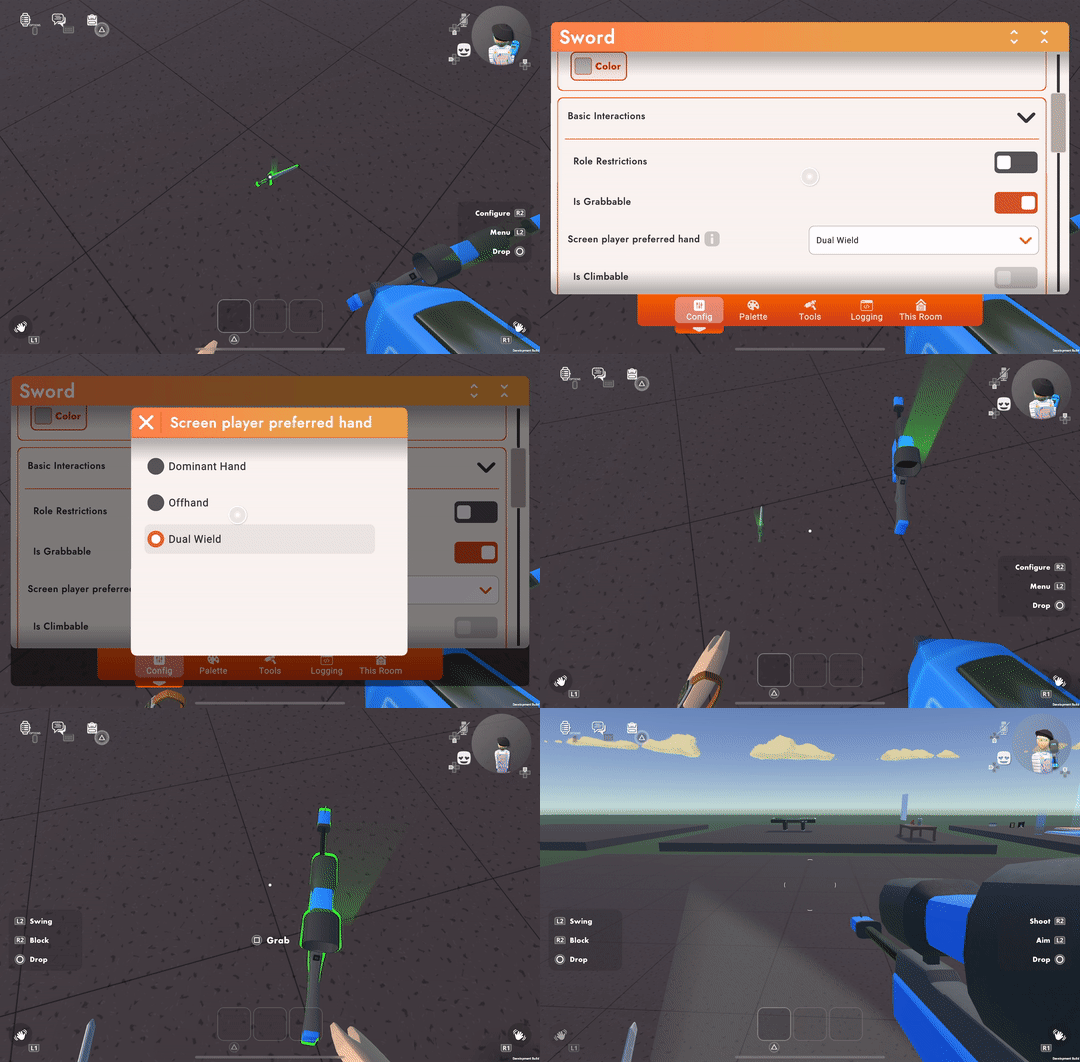
UGC objects can be configured as Dominant, Offhand, or Dual Wield. This will help out Screen players so they hold objects in the right (I mean... correct) hand. See the blog for more info.
More controls updates
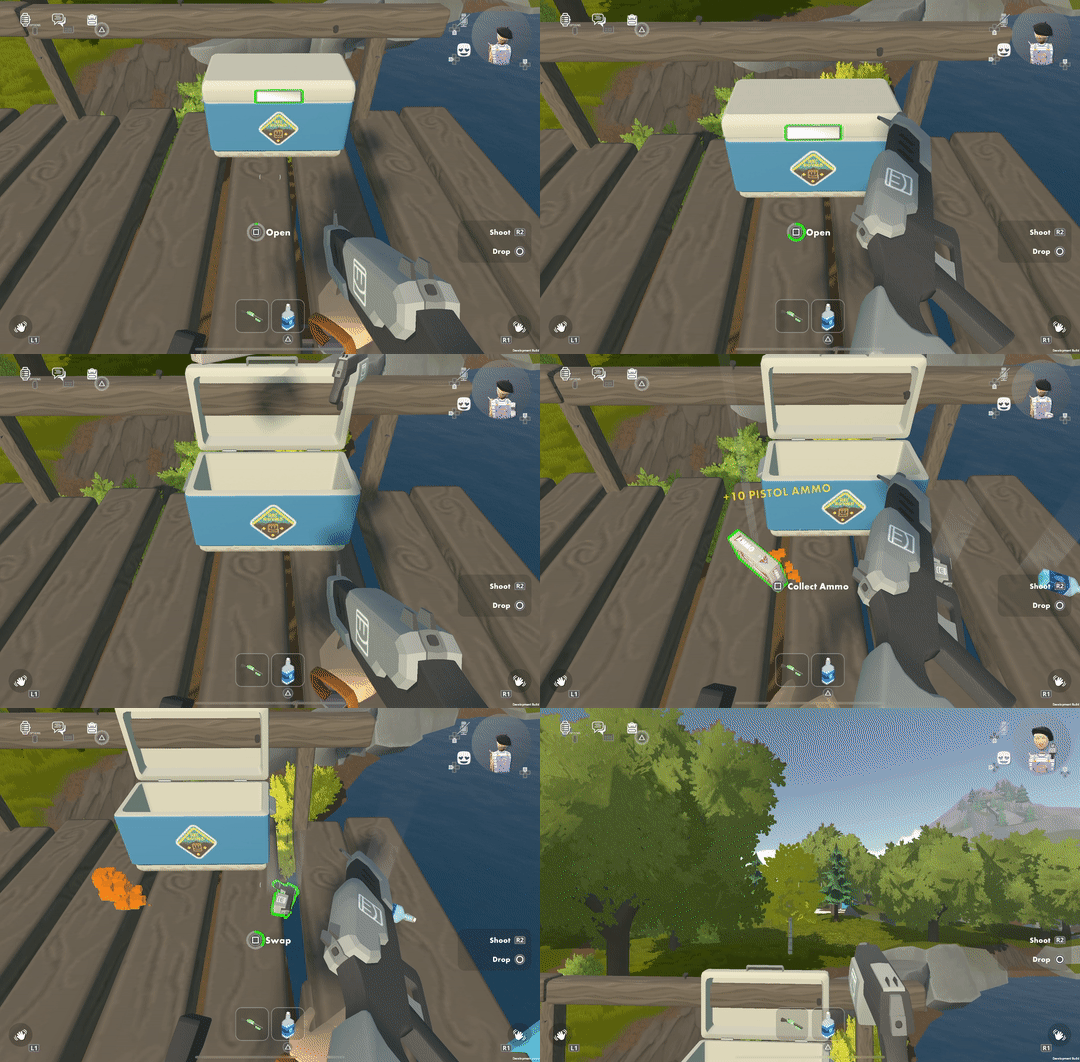
We've converted some RRO interactions so you can use them even with your hands full - just like Doors, Seats, or the Interaction Volume. You can now:
Loot chests in Rec Royale and quests
Collect ammo/gold/silver
Return the Paintball flag for your team
Don't try this at home, folks - opening chests with your hands full will likely lead to bruised knuckles in real life!
We updated waving controls so Screen players can be more expressive in real-time:
You can now change hand poses on the fly, no digging through menus. Time for a dance off!
The last hand pose is remembered for next time you wave so you can have it ready. We expect you'll all remember to turn off thumbs down within a week or two!
Added analog reaching with Gamepad triggers
You can now hold out the fist pose as a shortcut to offer a Party Up prompt to other Screen players (same as how VR offers the prompt)
We're starting to expand Third Person capability & parity:
You can now do all movements in Third Person like sprint, crouch, and even climb
Added two-handed waving so you can practice your moves in either perspective (dance Mode is taking a breather for now!)
Misc. Screens controls:
Sprint resumes when un-crouching (while using auto sprint or still holding the sprint button)
Touch does not unintentionally exit crouch/prone when moving forward. Crawling, full speed ahead!
Holster cycling goes right in order, so it's more predictable and easier to use all available slots
Emotes menu now opens instantly so you can react faster - get that grimace in before the moment passes!
Flick up on the watch notification to dismiss it on Touch, just like dismissing all those mobile notifications you get from us!
Fixed Rec Royale chests getting stuck in your hand and opening automatically (firmly grasp it for a few seconds to open)
Screens visuals/animation
Flying hands animation is less in your face
Added subtle zoom for guns that didn't have aim down sights already
Lots of animation tuning on various items like melee weapons, breakable weapons, and guns
Dorm Skins Store Improvements
We're starting to roll out a few small improvements to store features. Dorm Skins now have their own fully organized & curated store tab that you can access through the Dorm Skins mirror button. We've also brought back a "Buy" button - you can now purchase dorm skins & inventions directly from their card in the store without going through the invention details page. You can still access the invention details page by clicking on the item itself. Get that fresh dorm skin even faster!
New Beta Creative Tools
CV2 Equipment Chips (Beta)
Equip, unequip, and holster objects onto players with CV2! Want to give your players a cat to hold? Give 'em a cat to hold!
Six new beta chips: Equip Object to Dominant Hand, Equip Object to Off Hand, Holster Object, Unequip Object from Player, Unequip Object, Unequip Slots
One new beta player logic board event: Object Grabbed
CV2 Welcome Mat and Room Flow chips (Beta)
These showed up a couple patches ago, but we forgot to mention them! Use "Go To Room" to send a player to a Room, subroom, and Welcome Mat as specified in a Room Destination constant. We're looking forward to the greater immersion and better flow you can create in your rooms!
As was the case previously, if the destination is a different room, you may only target public subrooms. The party invite/auto follow options should also be consistent with the existing doors.
New to V2, the Room Destination can include a specific welcome mat instead of the other way around. (The destination room must be saved after the welcome mat is placed in order for the welcome mat to be an available selection.)
Set a welcome mat as "Default" to prioritize it for new arrivals.
The welcome mat includes a visualization for spawn radius that turns red if there are no valid spawn locations within the specified radius. I'm sure you'll all miss falling through floors, getting your heads stuck in the ceiling, etc. etc.
The V1 welcome mat has been renamed "Welcome Mat (Legacy)"
Five new beta chips: Welcome Mat Enable, Go To Room (Note: the setting "Remove Griefable Chips" will affect Go To Room), Room Destination (Constant), Room Destination (Variable), Room Destination List (Variable)
One new beta component: Welcome Mat
CV2 Combat HUD UI (Beta)
Add Player HUD UI elements that can be used for in-game stats such as score, timer, health, ammo, etc. Configure a new HUD Element constant for each part of your UI, then use the corresponding chips to enable and modify those elements to suit your game. We've seen some pretty cool HUDs in Rec Room and we hope this lets you do even more!
Respawn a player with Respawn Player and they'll spawn at one of any number of Respawn Points configured to spawn the specified role or tag. Respawn Points can also be configured to avoid players with a different role or a tag within a radius, and will try to choose the safest place to put the respawning player. Use the accompanying chips to dynamically enable spawn points, add or remove roles or tags, or target a specific spawn point directly.
12 new beta chips: Respawn Point Add Avoid Role, Respawn Point Add Avoid Tag, Respawn Point Add Spawn Role, Respawn Point Add Spawn Tag, Respawn Point Get Active, Respawn Point Remove Avoid Role, Respawn Point Remove Avoid Tag, Respawn Point Remove Spawn Role, Respawn Point Remove Spawn Tag, Respawn Point Respawn Player, Respawn Point Respawn Player At Respawn Point, Respawn Point Remove Set Active
One new beta component: Respawn Point
CV2 Gun Handle (Beta)
Much like the trigger handle, pressing the action button while holding the Gun Handle will output a CV2 signal. However, the gun handle can be configured to support reload, role-based aim assist, and other gun-specific features such as you might find on our paintball guns. The Gun Handle is best paired with the Projectile Launcher component. Pew pew pew!
10 new beta chips: Gun Handle Add Auto Aim Role, Gun Handle Apply Recoil, Gun Handle Get Current Ammo, Gun Handle Get Firing Direction, Gun Handle Get Max Ammo, Gun Handle Remove Auto Aim Role, Gun Handle Set ADS Enabled, Gun Handle Set Auto Aim Roles, Gun Handle Set Current Ammo, Gun Handle Set Max Ammo
One new beta component: Gun Handle
We can't wait to see what you make!
General Improvements and Bug Fixes
Fixed a bug where the first reward item would not be shown in the Frontier Pass menu if opened in a second instance of RecRoyale.
CV2 Dome Light angle and softness parameters are now set properly again.
Bug Fix for the KO Shirts. We'll miss you, wacky dual-color shirts!
Fixed a bug where you could give other players admin permissions on your portfolio.
Moved projectile and explosion hit events out of beta
Added the 'String Concat' chip to concatenate a series of strings with an optional separator (beta)
Added audio constant chips to work with the Audio Player: SFX, Music, Ambience. These include all the same sounds from the SFX gadget and the two radio props, with a few new ones added in! (Beta)
Added a "Set Firing Player" chip for the projectile launcher (Beta)
Added projectile force to the Projectile Launcher component. Use the force, Coach!
Upgraded Projectile Launcher's projectile spread values to float precision
Improved Projectile Launcher behavior while in motion
Added a "Set Camera Shake" chip (Beta). (To Mamamonkey's great relief, this only affects Screens players!)
Taggable chips caused some issues with load times and have temporarily been altered. The taggable type has been removed and these chips now work with players and objects directly. Slight updates to rooms may be necessary but many others are fixed by this change.
New Text components behave better with left and right alignment. Text components already in use will continue to function as they did previously. Replace them with a new version from the palette to get the fix!
Circuit boards can now be placed inside object boards, player definition boards, and other circuit boards.
Fixed a typo in the Select Influencer dialog.
Please see here for convenient links to controls, tutorials, comfort options, etc.:https://recroom.com/community
We love to hear your feedback, so please don't hesitate to let us know what you think.