Welcome back to Starbase Community News, your monthly post dedicated to all things Starbase community, both in-game and outside the game! Community News has been running since October 2020, and past issues can be found on the official Starbase forums under Developer topics.
March has been a busy month all over with new game updates and the announcement about upcoming heat mechanics, not to mention within the community with lots of new cool creations and designs.
The highlight of the month was undoubtedly the Laborer Rumble event on Saturday the 26th March, hosted by Biohazard. Laborers fought for survival at Ghost Station Relicta. This Captain's Journal on reddit by ZombieMouse guides us through the preparation and aftermath of the event.
Next, let us take a closer look at what else the community has been creating in the past month!
Community Highlights
[previewyoutube="4tdQCPwmGTk;full"] Introducing the Trans-Continental, a new Quasar Systems ore hauler by Arion234!
[previewyoutube="G3qo5iC_95E;full"] Commando Doggo takes the Jaeger mech on a station tour!
[previewyoutube="TMScz6V4kTU;full"] Happy Trigger 42 Plays presents a handy, self-made digicode!
[previewyoutube="U5bRheqH-Bg;full"] Meet the inertia dampener, also by Happy Trigger 42 Plays!
[previewyoutube="K4ta_U_KN_8;full"] Want to learn more about enhancers? FatFly World of Games has got you covered!
[previewyoutube="MXNPDLxQRtY;full"] Howler Monkey presents a highlight clip from an anti-pirate operation!
[previewyoutube="I1Zl2mli1YQ;full"] Krawll Unchained showcases The Tugger by Egomaniac.
Screenshot Showcase
Posted by HappyTrigger42 on reddit
Posted by HappyTrigger42 on reddit
Posted by DRSTARKE on reddit
Posted by HappyTrigger42 on reddit
Posted by Kodey on Steam
Posted by Toomboost on Steam
Posted by DRSTARKE on Steam
Posted by KamataSatomi#0642 on Discord
Posted by H3I70R on Steam
Posted by rekiat55 on Steam
Fanwork Showcase
[previewyoutube="NOUHXNU4JNI;full"] Superwafflefry presents a YOLOL cover of "A Cruel Angel's Thesis"!
[previewyoutube="2u_sY2CU9ww;full"] Meanwhile, this new hit by Loops hits the Eos Radio Top 10! Recommended for your journeys to the moons and back.
[previewyoutube="4EFQqceR_FE;full"] Check out Moon Walk, a YOLOL game by Beat Breaker!
"lesWAV CLBH-1 Leporinus" a small and agile asteroid hauler by Leslawangelo on reddit. Find the blueprint here!
Posted by Lazy_Adagio_4762 on reddit
Starbase wallpaper, posted by FatFly#6857 on Discord!
Ship design sketches, posted by Beatbreaker#1783 on Discord
An updated version of Starbase Research Calculator has been released! v0.6 contains new recipes and the possibility to add weights to materials has been added. Read more here.
Would you like to be featured in next month's Starbase Community News? To submit your creations, contact us via e-mail at community@frozenbyte.com with the subject headline "Starbase Community News"! Remember to mention who the submission is from and what name you want to be credited. We reserve the right to curate suggested content and cannot guarantee all submissions will be published.
We hope you've enjoyed this issue of the Starbase Community News. See you next month!
PTU Update 25.3.2022 (PTU Build 830)
Animations
Minor modifications to crouch carry arm animations
Added 1st person prone move animations
Audio
Added missing UI sounds to Ship Designer
Fixed repeated button hover sounds in menus
Crafting and research
All Furniture and Decoration Modules under "Misc." subcategory have been move to the "Furniture & Decorations" category
"Misc." subcategory has been removed from the "Station Modules" category
Fixed an issue where crafting from ship crates failed, if the crafted item needed at least 2 different ores and none of them were in backpack's ore slots
Devices
Added support for filling nearby cable and pipe holograms with the Blueprint Filler
Towing Beam
If Towing Beam loses power, it remains off for at least 0.3 seconds
Fixed an issue where ship moves further and further away during a tow until it is eventually detached for being too far away
Fixed an issue where pointing a Towing Beam at a ship not owned by the Towing Beam's owner causes the beam to blink between locked and not locked status
Change Towing Beam's minimum locked range from 50 to 75
Towing Beam electricity consumption raised from 3 per 1000kg to 5 per 1000kg
Fixed an issue where building tool doesn't repair anything and stays in character's hand after it's unequipped
Easy Build Mode
Fixed an issue where selecting an item for Easy Build Mode placement just before opening the esc menu, caused the esc menu to stop working
Fixed an issue where the Easy Build Mode was unintentionally turned off
Fixed an issue where some modules didn't have the fix that should prevent large gaps between them
Fixed an issue where trying to snap anything requiring hard point connection to a hard point in Easy Build Mode froze the first time and dropped framerate to 1 afterwards
Gameplay
Fixed an issue where player hitboxes were not working correctly
Fixed an issue where dead endoskeleton's armors were turned into "default" appearance after dead player respawned
Fixed an issue where Magnetic Boots caused framerate drops
Fixed an issue where the game crashed if the Universal Tool was opened while seated in a pilot chair right after autosave has saved the blueprint
Fixed an issue where getting killed while seated on a pilot chair with no space to exit leaves you in control of the ship
Added more chat messages for different Insurance Transfer failures
Ship Designer
Added windows layer opacity options to settings menu
Fixed an issue where containers such as propellant tanks did not show their values in edit mode
Hidden layers are now properly ignored in snapping, after visiting test mode
Added crafting bench upgrades
Ship designer material colors adjusted to be more colorful instead of greyish
Ships
Fixed an issue where Main Flight Computer and Flight Control Unit were not working unless there was another device in the network
Fixed an issue where ship owner with "host owned ships ON" loses controls to ship if the ship is hosted by other client with "host owned ships OFF"
Capital Ship warp frame corner and turn modules now connect properly for warp frame block count calculation
Added info about the requirement of of nozzle rings and the max amount that can be used for a single thruster to their tooltips
Capital ships station UI should now say expansion available if validity is met
Prevented creating capital ship if there are no station slots left
Heat sinks added to power category in Ship Designer asset browser:
Heat Sink Beam
Heat Sink Cube
Heat Sink Plate
Modules
Module changes:
Cockpit 2 Small Exposed (T1 Laborer) -> updated with heat information panels
New modules:
Tier 1 Generator 2 Radiator 1 heat Sink
Basic 1 Heat Sink Flat
Basic 1 Hardpoint 1 Heat Sink
Moon
Moon bases now have anti-gravity zones equal in size to the safe zone
Moon base support modules can no longer be stacked on top of each other, as in occupying the exact same space
Trying to place objects on moon bases to a spot that a player is blocking no longer incorrectly sends the message "Object is outside the reach of a support leg."
Fixed an issue where the ore collector collects the Moon's surface Valkite even if it is not turned on
Surface mining will now collect ore through resource bridge, and will prioritize resource bridge over the player backpack
Research tree:
Heat sinks added to "Tier 1 Generators"-node
New heat sink modules added to "Tier 1 Generators"-node
Tier 1 Generator 2 Radiator 1 heat Sink
Basic 1 Heat Sink Flat
Basic 1 Hardpoint 1 Heat Sink
Radiators moved to "Tier 1 Generators"-node
"Radiators"-node reneamed to "Coolant"-node
Cooling cells, related devices and modules moved to "Coolant"-node
Ships
Laborer Module (Tutorial reward ship) updated to work with the new heat mechanics
Updated Hauler, Laborer, Laborer II, Belka (starter), Vigo (Starter), Alfrigg (Starter), Trident T1 (Starter), Worker Ant (Starter), Workmate (Starter), Rockhopper (Starter), Mara (Starter), Marmot-ST (Starter), Modulus (Starter), Momento (Starter), Moneymaker (Starter), Catbox M (Starter), Aphelios (Starter), Initium (Starter), Antares (Starter), Gofer, Hedron, Nautilus Cargo, Ocelot, Pioneer, Romulus, Vasama and Zilant spaceships to work with the new heat mechanics
Changed names and description of ships:
Gofer -> Gofer Explorer
Hedron -> Hedron Tug
Nautilus Cargo -> Nautilus Miner
Ocelot -> Ocelot Bus
Pioneer -> Pioneer Builder
Romulus -> Romulus Hauler
Zilant -> Zilant Racer
Vasama (description change only)
Ship weapons:
Mounted Weapon electricity and heat generation sees a noticeable change. Weapons now have more distinct differences between electricity used and heat generated. In general, all mounted weapons have very effective heat transfer rate to heat sinks. Using heat sinks to store and dissipate heat is key to keep all weapons cooled. Now different weapons have three archetypes between electricity and heat resource management for ships. Autocannons generate more waste heat per shot and require less electricity while Laser Cannons and Rail cannons are more heat efficient due to their nature but require far more electricity to operate. Plasma cannon is hybrid of both, requiring balanced amount of both electricity and heat dissipation.
Autocannon
Electricity per shot reduced from 330 to 94
Heat generated per shot increased from 45 to 125
Laser Cannon
Electricity per shot increased from 400 to 440
Heat generated per shot increased from 60 to 80
Plasma Cannon
Electricity per shot reduced from 2,500 to 2,000
Heat generated per shot increased from 250 to 800
Added a new "Ship weapons" PTU directory for crafting the following new items:
5-Tube Rocket Launcher
Fixed High Explosive Missile
Fixed High Explosive Dumbfire Torpedo
Heat Mechanics Announcement & Feature Video
Hello everyone!
We’re happy to announce a new feature on its way to the game - heat mechanics. In short, this includes changes to how devices like generators, radiators, ship weapons and coolant work, as well as the addition of heat sinks. These changes will allow new possibilities in gameplay and more depth in ship designs.
For more details on what exactly changes and what is new, you can check out the feature video linked below as well as the Heat Mechanics wiki page. Heat mechanics will make their way to the PTU first and to the live server later.
IMPORTANT NOTE:After the implementation of these changes, most ships will need some amount of rework. This means it’s good to start preparing and adjusting for these upcoming changes as soon as they're added to the PTU. The ships that will be affected the most are small fighter ships: after this update they will start needing a heat sink for the weapons to work properly, and the heat sinks are quite large and heavy. See the Heat Mechanics wiki page for details that will help you best prepare for the changes.
In addition, the tutorial’s Laborer will have its cooling board removed and replaced with a cube-shaped heat sink. Any existing Laborers will need a bit of rework too, but just bolting a heat sink to it is enough for it to work properly again. You can see how to fix the Laborer yourself from the gif below, but if you need any help you can always reach out to us as well.
Starbase Early Access Update 22.03.2022 (EA Build 827)
Gameplay
Fixed an issue where ships being repaired in the Ship Repair Hall got stuck
Fixed an issue where deleting nameless modules also deleted other items
Starbase Early Access Update 15.3.2022 (EA Build 824)
Note: the same update also released on the PTU server. No separate PTU patch notes will be posted as the same changelog applies.
New Features
Towing Beam
Towing Beam can tow ships and only ships
Only one ship can tow one additional ship at a time
The device consumes electricity in relation to the mass of the ship it's towing, 1000 kg mass requires 3 electricity per second
Towing a ship inside a safe zone can be enabled for a specific ship in the Ships menu, from the setting "Allow towing in safe zone" allowing anyone to tow the ship
Without this setting ships need to be decommissioned to be towable inside safe zones
Art
Xhalium raw ore art updated
Exorium raw ore UI icon art updated
Auction House
Fixed a crash where adding Ores that were already being listed at the Auction House in another auction caused the game to crash
Audio
Prevented the playing of multiple Missile launch sounds per launch
Crafting
Crafting Benches now allow crafting from anywhere within one Player Station Easy Build Mode area
Devices
Fixed an issue where Asteroids got stuck on ships when a Cargo Lock Frame was used on them
Ship Transponders can now display the company name for a company ship
Fixed an issue where picking up a solar panel setup caused it to vanish from existence
Reconstruction Machine
Fixed an issue where Reconstruction Machine activated at station only after the player has relogged after the first time it was built
Fixed an issue where Solar Power recharge did not start/work when built with items from inventory in-game
Ducts
Fixed side edge connectivity issue for three ducts, edges of these ducts did not connect with hardpoints
Duct Straight 12x192 cm
Duct Straight 12x36 cm
Duct Corner 15x15 cm
Easy Build Mode
Fixed an issue with M2 unwelding not working more than once
Expansion visualizations are shown when in Easy Build Mode or when close to an expansion
Building long lines with modules should no longer create considerable gaps, miniscule gaps might still be noticed in extreme cases
Gameplay
Fixed issues with dead endoskeletons showing as default models and colliding with players
Fixed an issue that caused the game to freeze when loading/unloading certain ships
Player characters that were stuck in a permanent death state have now been fixed and unstuck
Fixed an issue where ship Batteries did not recharge
Inventory
Fixed an issue where items that can't be equipped to hand/leg inventory slots could still be placed in those slots. This has now been prevented and only items that can be equipped to hand/leg slots can be placed there.
Player Stations
Fixed an issue where being close enough to another station made setting up new stations sluggish or impossible in nearby cells
Updated Station Info HUD
Ships
Updated:
30 Allons Danser
Added descriptions for:
Mammoth II W
Phat Roadster
Atolla
Ramora
Batfish
Komatsu T2
SkipJack
Vector7a
Updated description of:
Manta-DC
Ship Shops
Removed the following ships from OKI ship shops:
Piece of Cheese from OKI 1
Flatter Extands from OKI 2
Barrow84 from OKI 2
Barrow40 from OKI 2
Miredge 8 from OKI 3
Added the following ships to ship shops:
Rocker Duo to Rando 2
MPMS-2 T2 CLF to Rando 4
Arundel Mk1 TypeA to Rando 4
Moved The Manta-DC from Rando 1 to K-Bot ship shop
Ship Designer
Fixed an issue that enabled building blueprints without building area restrictions
Autobolt action in Ship Designer should now avoid bolting objects connected to joints to rest of the ship, which would cause the joint to no longer be able to move
Ship Repair Hall
Fixed an issue where damaged components that are not part of the ship were sometimes not moved to Station Storage
Fixed an issue where components that were damaged but later repaired using Building Tool sometimes counted as being damaged by the Ship Repair Terminal
Weapons
Fixed Tripod Weapon UI showing 0 as Magazine count when entering a Tripod
UI
Fixed collision detection, highlights and sound for quickbar placement previews
Added "don't show this again" option to Station expansion notification
Added "reset pop-up hints" option to Esc menu settings tutorial section
Tooltips now follow cursor when mouse is moved instead of closing
Tooltip opening delay can be adjusted in settings
Removed permission edit page from Stations Tab
Premissions are now changed by clicking Permission icons
Fixed broken station names in Insurance Transfer Menu
Known Issues
Towing a ship at high speeds can cause the towed ship to gradually move further away from the towing ship and ultimately detach from the tow beam
PTU Update 11.3.2022 (PTU Build 818)
Art
Xhalium raw ore art updated
Exorium raw ore UI icon art updated
Auction House
Fixed a crash where adding Ores that were already being listed at the Auction House in another auction caused the game to crash
Audio
Prevented the playing of multiple Missile launch sounds per launch
Crafting
Crafting Benches now allow crafting from anywhere within one Player Station Easy Build Mode area
Devices
Fixed an issue where Asteroids got stuck on ships when a Cargo Lock Frame was used on them
Ship Transponders can now display the company name for a company ship
Fixed an issue where picking up a solar panel setup caused it to vanish from existence
Easy Build Mode
Fixed an issue with M2 unwelding not working more than once
Expansion visualizations are shown when in Easy Build Mode or when close to an expansion
Gameplay
Fixed issues with dead endoskeletons showing as default models and colliding with players
Fixed an issue that caused the game to freeze when loading/unloading certain ships
Player characters that were stuck in a permanent death state have now been fixed and unstuck
Fixed an issue where ship Batteries did not recharge
Inventory
Fixed an issue where items that can't be equipped to hand/leg inventory slots could still be placed in those slots. This has now been prevented and only items that can be equipped to hand/leg slots can be placed there.
Ships
Moved The Manta-DC from Rando 1 to K-Bot ship shop
Ship Shops
Removed the following ships from OKI ship shops:
Piece of Cheese from OKI 1
Flatter Extands from OKI 2
Barrow84 from OKI 2
Barrow40 from OKI 2
Miredge 8 from OKI 3
Added the following ships to ship shops:
Rocker Duo to Rando 2
MPMS-2 T2 CLF to Rando 4
Arundel Mk1 TypeA to Rando 4
Ship Designer
Fixed an issue that enabled building blueprints without building area restrictions
Autobolt action in Ship Designer should now avoid bolting jointed objects so that joints would not move because of bolts
Ship Repair Hall
Fixed an issue where damaged components that are not part of the ship were sometimes not moved to Station Storage
Weapons
Fixed Tripod Weapon UI showing 0 as Magazine count when entering a Tripod
UI
Fixed collision detection, highlights and sound for quickbar placement previews
PTU Only
Removed the separated components of Capital Ship Devices from crafting
Fixed an issue where players did not remain in same session during Capital Ship Fast Travel
PTU Update 4.3.2022 (PTU Build 812)
Devices
Reconstruction Machine
Fixed an issue where the Reconstruction Machine activated at the station only after the player had relogged after the first time it was built
Machines now unlink players when they lose Factory Hall Area/Station safezone access
Fixed an issue where Solar Power recharge did not start/work when built with items from inventory in-game
Ducts
Fixed side edge connectivity issue for three ducts. Edges of these ducts did not connect with hardpoints:
Duct Straight 12x192 cm
Duct Straight 12x36 cm
Duct Corner 15x15 cm
Easy Build Mode
Building long lines with modules should no longer create considerable gaps. Miniscule gaps might still be noticed in extreme cases.
Player Stations
Fixed an issue where being close enough to another station made setting up new stations sluggish or impossible in nearby cells
Updated Station Info HUD
Ships
Updated:
30 Allons Danser
Added descriptions for:
Mammoth II W
Phat Roadster
Atolla
Ramora
Batfish
Komatsu T2
SkipJack
Vector7a
Updated description of:
Manta DC
Ship Repair Terminal
Fixed an issue where components that were damaged but later repaired using the Building Tool sometimes counted as being damaged by the Ship Repair Terminal
UI
Added "don't show this again" option to Station expansion notification
Added "reset pop-up hints" option to Esc menu settings tutorial section
Tooltips now follow cursor when mouse is moved instead of closing
Tooltip opening delay can be adjusted in settings
Removed permission edit page from Stations Tab
Permissions are now changed by clicking Permission icons
Fixed broken station names in Insurance Transfer Menu
PTU Only
Fixed an issue where locking a ship with Towing Beam and releasing it did not remove the added mass or the thruster efficiency reduction
Player Stations can now be renamed
Towing Device
Now reports target mass in kg, not g
Made the deformation prevention area under Moon Base Support Legs slightly smaller
Added area validity for all station types. For an area to be valid, it must have at least 5 million KV of material in it. Expansion prevention if all current areas are not valid will continue to only affect Capital Ships.
Starbase Community News: February 2022
Welcome back to Starbase Community News, your monthly post dedicated to all things Starbase community, both in-game and outside the game! Community News has been running since October 2020, and past issues can be found on the official Starbase forums under Developer topics.
February was a busy month for us Frozenbyteans - there were several new game updates both on the Early Access live build and the PTU, adding some much needed fixes and quality of life improvements, as well as introducing Ship Repair Terminals on the live build.
While we await the next update, let's check what shenanigans our players and the rest of the community have been up to during the shortest month of the year!
Community Highlights
[previewyoutube="0UGduezw-Xo;full"] Dropship combat action on the moon, presented by Red Vipre!
[previewyoutube="s8fuEYpawAY;full"] FatFly World of Games introduces the bomber ship Kondor Mk2!
[previewyoutube="eHyB8hiwk4Y;full"] Check out this amazing mech by Commando Doggo!
[previewyoutube="cZdMPyvsk1c;full"] Building a station hopper with Baboon King!
[previewyoutube="ENxTp8zyoTE;full"] Time to tackle a new project with Softwerker!
[previewyoutube="YitIWRdzPMM;full"] Combat footage of a fighter engaging with an Empire gunship, presented by Biohazard!
Screenshot Showcase
Posted by Nudelteppich#2409 on Discord
Posted by ChaosRifle on Steam
Posted by ZombieMouse on Steam
Posted by Kodey on Steam
Posted by PunchoKilla on Steam
Posted by dice2tilz on Steam
Posted by Talon on Steam
Posted by Sp1ceRub on reddit
Fanwork Showcase
"ETLXS-062D Eleganz", posted by Astralion#5521 on Discord.
Posted by Sᵽɨđɇɍ on Steam
"MPMS-2", a multipurpose modular ship posted by Leslawangelo on reddit. Blueprint available for free here!
The Shoob, posted by JodTheThird on reddit
"Tachi" replica, posted by GluxDesigns on reddit
Would you like to be featured in next month's Starbase Community News? To submit your creations, contact us via e-mail at community@frozenbyte.com with the subject headline "Starbase Community News"! Remember to mention who the submission is from and what name you want to be credited. We reserve the right to curate suggested content and cannot guarantee all submissions will be published.
We hope you've enjoyed this issue of the Starbase Community News. See you next month!
PTU Update 22.2.2022 (PTU Build 803)
Note: this update is significantly larger than normal, around 24 GB. Prepare for a longer download time.
New features
Towing Beam
Towing Beam can tow ships and only ships
Only one ship can tow one additional ship at a time
The device consumes electricity in relation to the mass of the ship it's towing, 1000 kg mass requires 3 electricity per second
Audio
Added "Loop Ambience" volume setting
Added UI sounds for chat window and settings
Added missing UI sounds for quickbars and associated submenus
Added UI sounds to Ship Designer
Fixed an issue with rifle weapons making zoom in/zoom out sounds without actually zooming
Updated Shotgun shooting sounds
Updated Pickaxe swing sound timings
Animations
Polished sit tool normal and relaxed aim animations
Polished tool sit normal and relaxed aim poses
Sitting and aiming around should now move smoothly
Polished pickaxe stand and crouch relaxed
Polished rifle stand and crouch relaxed
Polished rocketlauncher sit normal and relaxed
Modified pistol prone normal and relaxed animations
Aimings should now be smoother and left hand should now stay in its place when changing from default to relaxed state
Tool crouch normal and relaxed aim animations polish
Pistol crouch relaxed aim animations polish
Rifle crouch aim animations polish
Lower body movement unified. Pelvis and knees should now move smoothly and similar compared to each other
Tripod gunner (autocannon) stand aim animations polished
Tripod gunner (autocannon) sit aim animations polished
Tripod stand aim animations polished
Tripod crouch aim animations polished
Tripod sit aim animations polished
All these animation sets should now work more smoothly. Fixed some minor issues and polished movement overall.
Crafting and Research
New modules added to the Research Tree:
Edge Corner Inner
Edge Junction
Slope Corner Outer
Slope Corner Inner
Slope Turn Inner
Slope Turn Outer
Slope Junction
Ramp Corner Outer (Gentle)
Ramp Corner Inner (Gentle)
Ramp Turn Outer (Gentle)
Ramp Turn Inner (Gentle)
Ramp Corner Outer (Steep)
Ramp Corner Inner (Steep)
Ramp Turn Outer (Steep)
Ramp Turn Inner (Steep)
Bench Extension (Smart Casual)
Bench End Right (Smart Casual)
Bench End Left (Smart Casual)
Bench Curve Outer (Smart Casual)
Bench Curve Inner (Smart Casual)
Counter Chair (Smart Casual)
Table (Smart Casual)
Coffee Table (Smart Casual)
Shelf (Smart Casual)
Counter (Smart Casual)
Counter Curve Outer (Smart Casual)
Counter Curve Inner (Smart Casual)
Bench A (Idustrial)
Bench B (Idustrial)
Chair (Idustrial)
Office Chair (Idustrial)
Counter Chair (Idustrial)
Side Table (Idustrial)
Table (Idustrial)
Counter (Idustrial)
Shelf (Idustrial)
Shelf Wall (Idustrial)
Shelf Wall Long (Idustrial)
Modular Pillar A (Idustrial)
Modular Pillar B (Idustrial)
Modular Pillar Slanted A (Idustrial)
Modular Pillar Slanted B (Idustrial)
Modular Pillar Corner (Industrial)
Panel Long (Industrial)
Panel Medium (Industrial)
Panel Short (Industrial)
Easy Build Mode
Fixed an issue where M2 removal would stop working
Fixed an issue that caused Station Easy Build Mode area borders to fade out when the player was in a corner area even though they were still in the building zone
Devices
Paint Tool
Added Area Paint mode
Fixed an issue where Paint Tool became unusable after painting Stations
Paint Tool now works on ships outside of Safe Zone without requiring access to the ship
Cable Tool
Fixed an issue where the tool was collecting more Cable ammo than was placed down
Reconstruction Machine
Fixed an issue that prevented a second player from linking to the machine
Fuel Rod
Fixed Fuel Rod explosion push radius being too small to exist
Gameplay
Updated hitbox system for player characters. Projectiles, melee and mining laser use the new system. Also hitboxes should not lag behind players anymore
Fixed an issue where Ship/Station owner could not enter the Safe Zone with a Ship if a player without access rights exits the game while standing on the Ship
Fixed an issue where objects and ships were despawned in Moon craters
Fixed an issue where players sitting on chairs ignored any object collisions
Fixed an issue where Weapon projectiles could pass through ship LODs and kill player characters
Revamped Exorium and Charodium Ore art and models
Inventory
Fixed an issue that caused dragged items to drop while moving on a fast ship
Fixed an issue where reloadable tools (Bolt, Cable, Pipe) magazines could not be filled with their respective ammo stacks
Fixed a crash that occured when picking up items to a Station Storage
Missiles and Torpedoes
Fixed an issue where the sounds were not moving with the missile
Missiles will now disappear if they hit players or objects while safety is on
Removed "Detonate"-field from all fuses
Player Stations
Player stations should now load their far LODs and be visible from further than 1.5km away
Fixed an issue where the Station Foundation Projector did not complete creation of the station if the button was spammed
Fixed an issue where the Station Foundation Projector could delete the station upon server restart
Ships
Fixed an issue where Thrusters not fully bolted to frame consumed resources without thrust
Fixed an issue where Ship velocities were affected by frame rates
Updated:
Manta
Mustang
The Manta-DC
Buffalo
Marmot-TNK
Added description:
Hexxer
Shifter
Updated descriptions
Hellfire M2
On9-Duck
Changed name:
Hellfire to Hellfire M2
Added to Rando 1:
Shifter
Phat Roadster
Added to K-Bot:
Komatsu T2
SkipJack
Ramora
Batfish
Atolla
Added to OKI 2
Mammoth II W
Removed from OKI 2
Moonfish Quadro
Moved:
Kuitara Explorer from OKI 1 to OKI 2
Hopbox LCOT202 from OKI 2 to OKI 1
Consultor II LMOT402 from OKI 2 to OKI 1
Ship Designer
Creating a new module from selection even if the selection contains modules parented under one of the selected modules now allowed
Tripods
Fixed an issue where picked up Tripods sometimes disappeared from inventory
Fixed an issue that caused Easy Build Mode to be usable while operating a Tripod
Fixed an issue with Tripod Weapons not being attachable to Tripods via the Tripod Handle
Prevented attaching damaged Tripod Weapons to Tripods
UI
Small update to the translations of all languages
Weapons
Remote Explosives
Now turn planet and asteroid ores into nuggets
Revolver
Damage changed from 75 to 65
Rail Rifle
Damage changed from 125 to 150
YOLOL
Fixed empty strings (inputted as "") being parsed as strings containing two quotation marks instead of being empty
PTU Only
Added Tripod Laser and Tripod Plasma weapons
Tripod Railgun Projectile Energy Increased from 1080 to 2400
Tripod Railgun Electricity Usage Increased from 900 to 3000
Starbase Early Access Update 8.2.2022 (EA Build 789)
[previewyoutube="JGXvkXkR8ts;full"]
New features and Major Updates
Added Ship Repair Terminals to Ship Designer Halls:
Flying a broken ship to the ship area will open repair costs to the terminal, and accepting the operation will repair the ship over a period of time depending on the amount of damage being fixed The ship will essentially become a clean copy of the blueprint. This means any changes, for example in YOLOL chips, will also revert.
You can only have one ship being repaired at once
Any items that are not part of the ship's blueprint or are in its cargo will be moved to the station storage automatically. If there is no space in storage, items are deleted instead. Warnings are shown in terminal for both cases
You will gain crafting points for any parts that are repaired and you have unlocked in research already
Easy Build ships are not supported yet
All new inventory windows (equipment, backpack and station storage) can now be opened with the default keybind "I":
In Settings -> Controls -> Menu, you can find multiple new keybind options for these new inventory windows (keybinds for different window combos as well as the option to have all of these windows opened with separate keybinds):
Backpack, Equipment and Station inventory (Default)
Backpack
Equipment
Station inventory
Backpack and Equipment
Backpack and Station inventory
Equipment and Station inventory
The old inventory is still in the game for now, but it doesn't have a default keybind anymore. The old inventory keybind can be set in Settings -> Controls -> Menu -> Old inventory if needed.
Reworked Insurance Transfer UI in terminals and ESC menu:
All transfer points that exist at the same station are now grouped up to a submenu, under an UI element with the specified station's name
Allowing for much more transfer points than what was previously possible with the old menu
Transfer Panels also have buttons to better control the transfer points with "Unlink this terminal", "Unlink Location" and "Unlink Selection"
Reworked rotation system:
The rotation system in-universe now has similar controls to Easy Build Mode to unify the control schemes more. The rotation system uses 15 degree increments.
The controls are visible on a controls HUD element that can be minimized if needed
Two methods of scroll rotation: you can toggle between horizontal rotation according to player or object orientation.
The orientation of the last 5 placed single items and modules is remembered and used when another copy is taken in hand
"R" can be used to reset the orientation of one axis based on current orientation, or double clicking it to completely reset the piece
The old rotation system binds for X, Y and Z axis rotations and rotating the object with player movement are unbound by default, but can be manually set from control settings
Large objects can no longer spawn on top of the player upon grabbing, and the range they have been pushed to is remembered when new copies are taken in hand
"F" is now default for pick up, and "P" is default pick up and equip to bring item manipulation controls closer to each other
Station Build Mode improvements:
You can now build long lines of modules by holding down the placement bind and moving, or by moving the cursor in cursor mode
Choosing a module or station single piece from the quickbar automatically turns on Build Mode
You can use the pick up bind to take a copy of the pointed object from your station storage in your hand
Welding or unwelding single items to stations is now disabled. Single items now use the same automatic welding upon placement and M2 removal as other modules instead.
Single items in Build Mode use the same rotation scheme as single items outside of Build Mode, rotating in 15 degree increments.
The controls are visible on a controls HUD element that can be minimized if needed
Large objects can no longer spawn on top of the player upon grabbing, and the range they have been pushed to is remembered when new copies are taken in hand
Note: there are some snapping issues present on the single items in Build Mode from the changes (snapping inside other objects, snapping some distance away from objects) that are currently under work
Animations
Prone move animations polished
1st person pistol fire/ADS fire animations polished
3rd person pistol draw/holster animations improved
Auction House
Items listed in the Auction House buy tab categories are now the only items allowed to be auctioned
Fixed an issue that caused the system message "Unable to open Auction House" to repeat itself
Company
Company Owner can now manually give up Company Ownership to a player of their choosing from the Context menu. The owner who has stepped down is given the second highest rank instead.
If the Company Owner's account is deleted/banned, a new player is selected to be the new Company Owner
This is given to the second highest rank and prioritized by online status at the time of leader change
If multiple second highest rank members are online, the owner will be chosen at random. The same applies if all second highest rank members are offline (note: rank is prioritized over online status in these cases).
Crafting and Research
Spaceship Registration Deed added to Weapons/Tools research tree
Corrected crafting data, making Missile Fuel Modules craftable
Added missing Warning Light Button 12x12cm to the Crafting Tree
Containers in personal inventory can be refilled with Station Storage materials from context or crafting menu
Torpedo Fuel Tank refill/crafting a full one is now crafted with power resource
Fixed an issue where Station Modules could not be crafted with two Advanced Crafting Benches in range
Fixed Paint Canister 20 (gray) crafting data
Devices
Fixed an issue where Mining Laser did not hit a player while also hitting a planet surface
Prevented unlocking YOLOL chips on ships in Safe Zones by players who don't have the necessary permissions
Reconstruction Machine:
Added a confirmation pop-up to the terminal if unlinking from another ship's machine
Ship now unlinks ungrouped players when towed
Fixed several issues related to spawning in moving, unloaded and/or large ships
Fixed an issue where the Battery Gauge was not working on old ships
Fixed an issue where bolting the Terminal and the Cradle in Ship Designer displayed the durability incorrectly
YOLOL Chips
Prevented grabbing when the YOLOL Chip is zoomed to
Free cursor mode is now enabled when the Chip is zoomed to
Updated Box and Triangle Thruster locales to correct base Propellant consumption values. These values do not include Propellant Converter values and are calculated at 100% thrust.
Fixed an issue with handheld Paint Tool secondary action (Mouse 2) not working on some items
Fixed an issue with handheld Paint Tool painting differently compared to the Ship Designer Paint Tool
Decomissioned ships can now be registered with Ship Registration Deed
Fixed an issue where Fuel Rods did not explode from voxel damage
Fixed an issue where an object remained highlighted even when the Welding Tool was lowered
Easy Build Mode
Fixed an issue that caused Easy Build Mode to turn on outside of Easy Build Mode Area when picking up items
Rotations of modules are now remembered relative to station rotation
Objects can now be placed while holding down placement keybind (default keybinds: "M1" or "E")
Fixed some issues where M2 unwelding was not working properly
Switch between two scroll rotation modes (default keybind: "V")
Added bolting sounds for Easy Build Mode autobolting
Fixed an issue where picking up objects fast enough resulted in picking up to fail
Fixed freeform Easy Build Mode surface snapping not working with objects in some specific rotations due to holograms sinking very slightly inside surfaces
Prevented unwelding modules if there's no room in Station Storage to pick them up
Interaction is now prevented while carrying anything
Disabled name field in Ship Easy Build Mode
Rotation of degrees per turn for single objects changed from 22.5 to 15
Grabbing an item from world while Easy Build Mode is turned on now turns Easy Build Mode off
Easy Build Mode cannot be turned on if grabbing an item
Modules are always picked up to Station Storages
Modules can now be unwelded by pressing Mouse 2 (default bind) without using a Welding Tool
Bolts can now be removed by pressing Mouse 2 (default bind) without using a Bolt Tool in Factory Hall Areas
Changed rotation of non-module holograms to 15 degrees to unify behaviour inside and outside Easy Build Mode
Fixed an issue that caused Factory Hall Areas to not rebuild again properly and with placed objects disappearing
Easy Build Mode is now enabled if a module of a correct type is selected from the quickbar inside an Easy Build Mode area
Fixed an issue where Module placement did not work if the player was too close to the Module being placed
Removed "Easy Build Mode: on/off" text
Easy Build Mode controls default to expanded at first appearance
Fixed an issue with module placement which should reduce failed module placements
Easy Build Mode - Station
Fixed an issue where objects were sometimes being placed on top of each other when placing modules rapidly
Fixed an issue where area component budget UI was not being shown while in a Factory Hall Area
Factory Hall Areas
Easy Build Mode right click unwelding now works in Factory Hall Areas
Fixed an issue that caused items to disappear when rapidly picking them up in Factory Hall Areas
Fixed an issue that prevented other players than the owner of the Station from being able to start cabling on floors and walls
Fixed an issue in M2 removal not working for bolted objects in Factory Hall Areas
Fixed an issue caused by an object being inside the Area while it was enabled
Fixed an issue where constructing and deconstructing the Area prevented the Area completion before a relog
Fixed an issue that allowed devices or YOLOL chips to be operated without proper access rights
Enabled Cabling/Piping on Factory Hall Area walls
Fixed issues where players could manipulate Factory Hall Area contents without access to the Area
Fixed an issue causing the chat message for Easy Build Mode enabled not being shown while inside Factory Hall Areas
Fixed an issue where some items disappeared if they were bolted to Factory Hall Areas by clients when the host/owner of the station was away
Fixed an issue where rebuilding an existing Factory Hall Area did not reactivate it
Fixed an issue where activating a Cargo Lock Frame in a Factory Hall Area permanently affected the building budget
Fixed an issue where Beams could not be welded to other Beams that had been bolted onto Factory Hall
Gameplay
Fixed an issue where Ore stacks were lost during transfer between storages
Fixed an issue caused by grabbing onto a Ship binds menu window
Fixed an issue where excess Ore disappeared when stacking Ore from container to Station Storage
Fixed an issue where transferring Ore to full Station Storage caused the Ore to stack on top of itself
Improved grabbing zoom logic
Unified visuals and behavior of items in the quickbar regardless if dragged from the inventory or Crafting tab
Safe Zone entering prevention considers ship bounds instead of mass center and also handles players differently, no longer allowing them softly inside
Inventory
Prevented placing parts from modules in Station Inventory when using the quickbar
Fixed an issue that caused subitems from entityitems in Station Inventory being recognized as single items in quickbar
Fixed an issue that occurred when exiting the game before Ore transfer finished
Fixed an issue causing the right click context menu options being available even when the Inventory was locked
Fixed an issue with tooltips and hover effects not working for inventory windows that lose focus
Fixed an issue with the Backpack window taking input from outside the window when it is being scrolled
Fixed an issue where the Backpack Material Slot rings were being displayed outside the window area
Fixed an issue where double clicking tools/weapons/armor from Station Inventory did not equip them
Fixed an issue causing the Station Inventory search not working for modules
Fixed a crash when dragging items from new inventory windows to the old inventory window
Fixed an issue where item icons were not previewed when items from the new inventory windows were dragged and hovered in the quickbar
Fixed an issue where inventory windows were interfering with dragging items in the Trade window
Prevented inventory input while Trade, Auction or Inbox compose window is open
Fixed an issue where dragging Ore from Ship Ore Crates to the quickbar left the Crate slot stuck
Fixed an issue where two right clicks were required to open the context menu
Prevented screen rotation from starting when the cursor is inside the inventory window
Fixed an issue where storage windows could not be opened after dragging an item and closing a window
Fixed Inventory right click context menu missing a transfer option to mass transfer ores to Ship storage
Fixed an issue where screen rotating mode got stuck
Player Stations
Fixed an issue where shadows were not working properly in Player Stations founded far away from cell origins
Fixed an issue where the player could not connect modules from the founding area to the expansion areas from the whole area
Ships
Fixed an issue where blowing up a joint connection did not remove it from the ship, even though there was no physical connection
Players can now resign their access to operated ships
Ship owner is now visible and is always on top of the operator list
Added Ship Rename button
Related company ship rank right is now visible to players
Ship Shops
Removed 3D printers from Robotnik player-made ships due to them currently not being available for use and made some alterations to remove the empty gap left by them
Removed the mention of 3D printer from Robotnik's description
Added the following ships to shops:
Sunny Ship Center
Protopros Hauler
Protopros Salvager
Epic 1
Python
Rando 1
Goldfish
Hellfire M2
R-17 Recolter
Rando 4
Stocker
Rando 7
Ghidorah
Mako Mk.1
Rando 8
Havoc Mk1
Vintage 1
26 So Eager are our People to Obliterate the Present
Oki 2
Flatter Extands
Magnus IV FR-R
OKI 3
Miredge 8
Removed due to player requests, legacy items and other issues:
Rando 1
Colossus
The Cyclops
Glacier AH-06
Hedgehog
Bat
Aphelios
Turtle
Chalcosoma
Magni
Enceladus
Rando 2
Inanis Venari
Taniwha
VoxelWing
Clownfish
BlueJay
BlueJay FA
GDYV Corsair
Tadpole Mk.1
Bumblebee
Rando 3
The Martok
Akimbo 1
KOIOS Transferens
Sherwood
MLS-8-252 "Truzhenik"
Vidar
Racer
Rando 4
Migrator
Beaver-11C
Workmate V2 Pro
Termite-5C
Wolf-2540-2
Tetracore
Draco
Monarch Luxury Transport
OKI 1
Tricone
OKI 2
Eurypterid V 1.2
Magnus III MN
Molerat
Kreeft
OKI 3
Coyote
Flatter
Myrmidon II
T2-A "Widukind"
Wing II mk 3
Moved:
CMC Nakota to OKI 1 from OKI 3
CMC Razorback to OKI 1 from OKI 3
F1-A Xiphos to OKI 1 from OKI 2
Halite to OKI 1 from OKI 3
Hopbox LCOT202 to OKI 2 from OKI 1
Legitimate Salvager to OKI 3 from OKI 1
Merchantman to OKI 1 from OKI 2
Meteor to OKI 1 from OKI 3
Moti Double to OKI 1 from OKI 2
OKI "Manatee" Freighter to OKI 2 from OKI 1
OKI Cougar to OKI 1 from OKI 3
Stibnite from OKI1 to OKI 3
Tick to OKI 1 from OKI 3
Updated:
Barrow84
Marmot-ST
Marmot-TNK
Merino
The Flatter
Zimitra
Changed names of:
Marmot-ST to Marmot-ST2
The Flatter to Flatter Extends
Updated descriptions of:
Axiom
Blood Hound V2-9-1 Auto
Blood Hound V2-9-1 Laser
Blood Hound V2-9-1 Plas
Ore-Wing
Sawfish
GrumbleBee
Malamute DOS
The Bruiser "Bob"
The Owl
Zimitra
Added descriptions:
16 Red Chains
Ghidorah
Mantis Punisher
Mantis Brawler
Mantis Crusher
Mantis Hunter
Marmot-ST2
Marmot-TNK
Merino
Added Protoporos Basic to premade Ship Designer ships
Ship Designer
Fixed an issue causing personal module folders to randomly disappear and appear
Paint Tool:
Added tool option for selecting paint layers
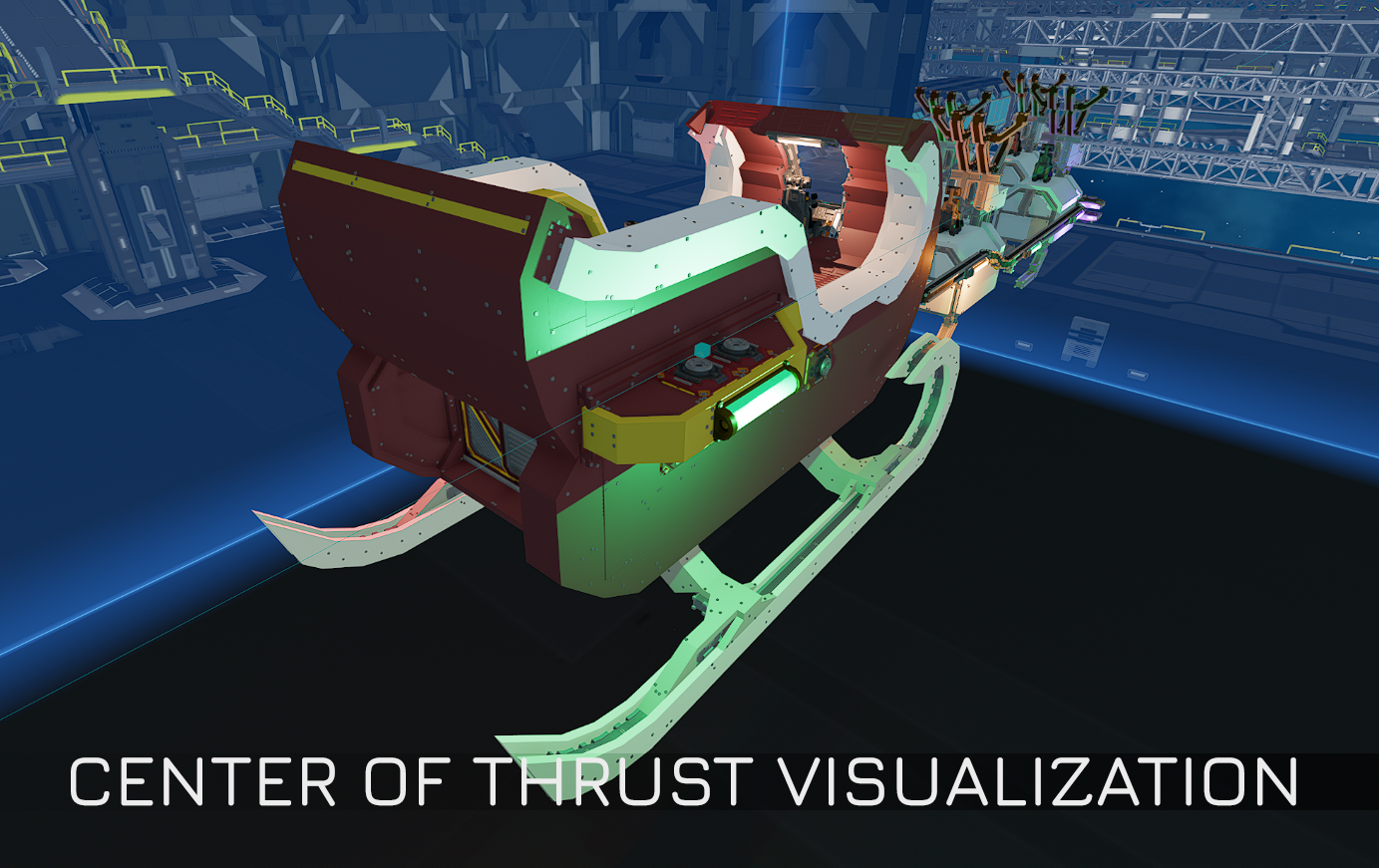
Added center of thrust indicators
Thruster Exhaust visualization now available
Fixed an issue where damaging a generator in Test Mode and quickly going to edit mode caused the explosion to carry over into the edit mode
Stations
Added insurance transfer points to Ghost Station Arma
Tools
Paint Tool:
Fixed an issue where painting tint on Plates would make no change but would still consume ammo
Fixed issues caused by painting objects bolted to stations inside Factory Hall Areas
Paint Tool now has a layer mode to select painting/resetting the base colour or tint colour. Can be selected with Mouse Wheel (default bind).
Tripods
Changed Tripod pickup input to Grab (default keybind "E") from Pickup (default keybind "F")
Fixed an issue where moving items in inventory while disassembling a tripod caused the item to temporarily disappear
Added ascend (default keybind: "Space") and down (default keybind: "S") inputs to leaving tripod weapon interaction
Fixed an issue with Tripod weapons getting stuck in firing state
Fixed an issue where Tripod zoom stayed on when leaving a Tripod without player gravity changing
Changed Tripods to be placeable on objects inside Factory Hall Areas
Fixed a visual issue where player's hands were visible while on a Tripod on a fast moving ship
Fixed an issue that caused Tripod Weapons to be reloadable with any kinds of magazines
Tutorial
Added Station and Factory Hall Area tutorials
UI
Fixed an issue in crafting tooltips showing the bench requirement with red when a bench was available
Fixed an issue where HUD UI could be manipulated with a hidden cursor when the Universal Tool was open