Techtonica cover
Techtonica screenshot
Genre: Simulator, Strategy, Adventure, Indie

Techtonica

Techtonica v0.2 Patch Notes - Base Building is here!

Welcome to the biggest update for Techtonica since Early Access launch, Groundbreaker.

Base Building is here! That means players will have pieces and tools at their disposal to build unique bases, factories, outposts, and malls on Calyx, transforming what it means to play Techtonica in the process.


We are so excited for players to get their hands on this update and everything it includes. Today, we’ll share the Base Building update trailer (above), include the patch notes video for those who hate reading (or just love watching), take a deep dive into the banner features added with this massive update, and wrap it up with the complete v0.2 patch notes.

Let’s dig in.


Build your bases, tell your story


The toolset for Base Building that’s waiting for you on Calyx is large and diverse. Once scanned or unlocked, you’ll have an array of floors, walls, railings, pillars, beams, catwalks, stairs, lights, and plants to build whatever you see fit. Everything conducts power, too, so you’ll have the freedom to turn your bases into massive factories as you play.

The stuff we’ve been building during the development and testing process is pretty wild.
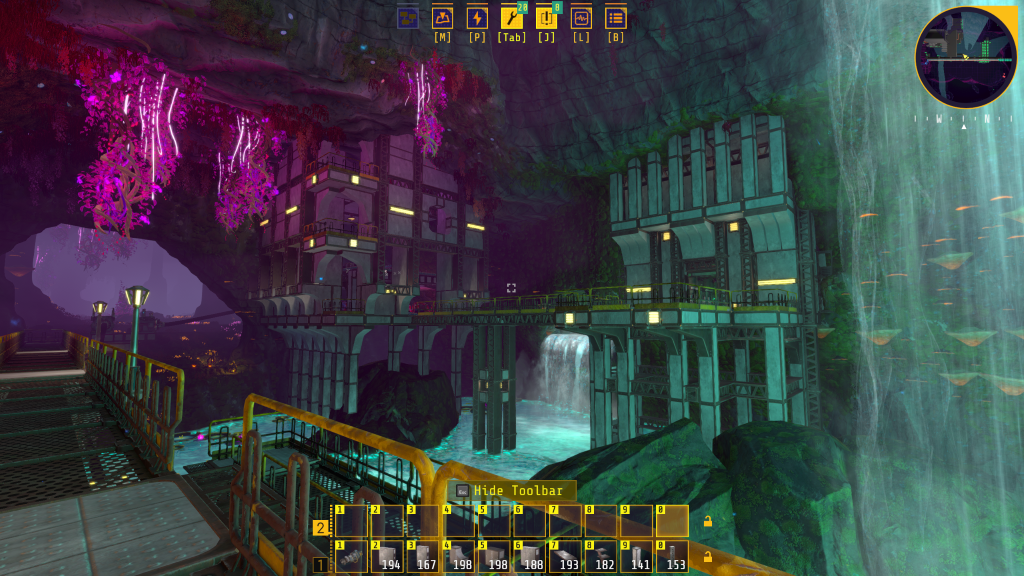


You’ll have, essentially, two ways to get to the base building pieces. You can unlock them in the new Construction tab on the Tech Tree (more on that in a bit), and you can scan them as you explore the new abandoned facilities that litter the subsurface world.


These facilities are built entirely from Base Building parts and occupy new caverns. Tear them down by scanning them to get the pieces for your own purposes, and you’ll have access to a brand new cavern to customize completely.

PT XRAY and the refactored Tech Tree


We just mentioned the new Construction tab on the Tech Tree, but that’s only one of the changes you’ll find as you explore the research system. You’ll also notice a new layout, more detail for each unlock, and a brand-new Production Terminal.


Hover over an upgrade, and you’ll now see everything it unlocks, as well as the Cores and charge required to unlock it. We’ve also reworked many of the Tech Tree tiers, so you may notice upgrades have been moved up or down to make play that much better.

This is PT XRAY, and it’s the home for the Base Building system.


Take note, Groundbreaker! You can upgrade PT XRAY and PT VICTOR in tandem. You do not need to complete one in order to access the other. Their upgrades are separate from one another.

Upgrading PT XRAY will grant you five new tech tiers, including two new machines and various upgrades. It’ll also grant you access to the necessary Base Building pieces to make your vision a reality.

You’ll notice that PT XRAY boasts internal Monorail Depots instead of ports. Those who want to automate the PT upgrade process will need to do so by train. You can also do it by hand, just like the other PTs. Dealer’s choice!

Two explosive machines join the ranks alongside 39 new intermediates


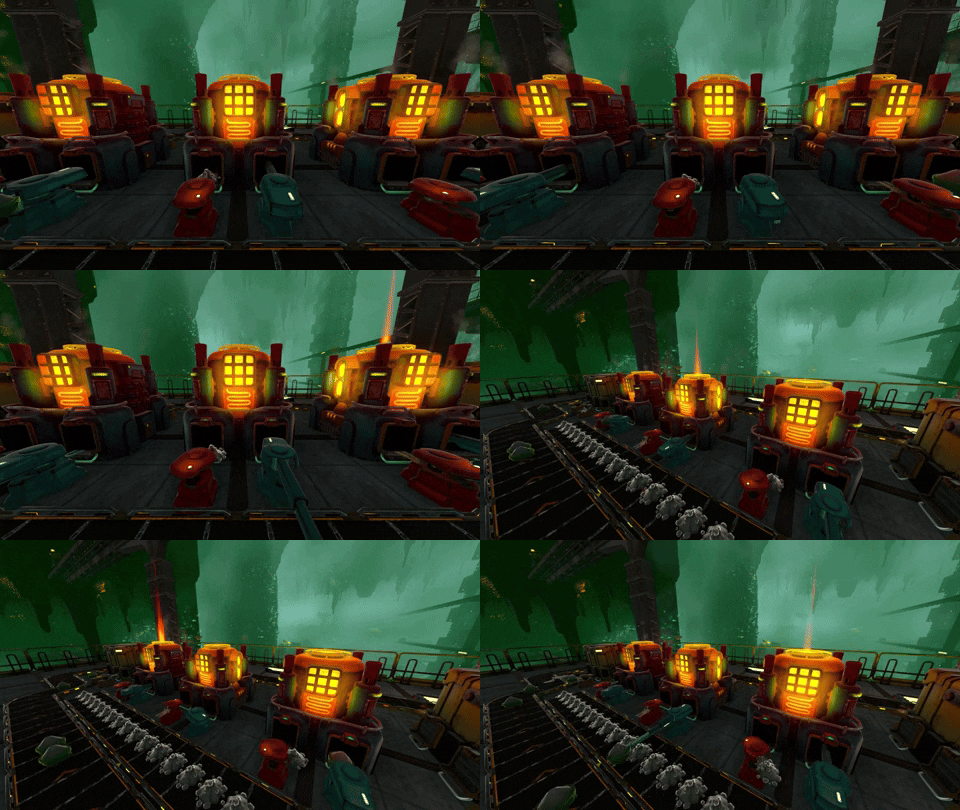
The Blast Smelter and Blast Drill arrive with the Base Building update. These machines offer a unique gameplay loop for factory fans.


Both machines are fueled by Mining Charges, a cheap (2x Plantmatter Fiber, 2x Kindlevine Extract, 2x Shiverthorn Extract) and renewable fuel made up of intermediates late-game players often have too much of. Each detonation clears the queue and produces an output; Blast Drills produce Chunks and Blast Smelters produce Slabs.

Players can saturate each machine’s Belts with Mining Charges and treat them as a resource sink that produces crucial Base Building intermediates.

These machines, though, add an extra bonus for players who want to really dig into the factory math and logistics systems (which will improve over time!). If players saturate the belts, they get all the benefits of the upgrades. However, players who love logistics can make carefully timed setups to deliver just the right amount of explosives to get the same upgrade benefits with fewer boom booms.

We've balanced this loop to make it fun for both play styles! We're excited to see what solutions players come up with here!


Speaking of new intermediates, players will find 39 new ones as they work their way through all the content that arrives with this update. Moreover, our designers have made it so intermediates have alternate recipes to give players unique ways to cook up progress.

Give the Blast machines and new recipes a shot, and let us know what you think!

Yes! More narrative and voice lines


We’re not spoiling anything here, but we can share that the Base Building update will deliver a lot of new narrative to uncover. That includes voice lines, so get ready to hear more from Sparks and Paladin and some $&Q@&%#&@^%.


Also! We’re introducing a new way to uncover this narrative that you’ll discover as you proceed through the Tech Tree and receive new beacons. Again, no spoilers, but this is a bit of a change compared to how the narrative unfolded in v0.1.x, so we hope you enjoy it.

Will this update bork your save? Nay! But…


Right, we won’t break your saves with the update to v0.2. You’ll be able to load up your old factories without getting hit with an Invalid Save message. But, we do have a caveat here.

We’ve changed some recipes and upgrade paths in the Tech Tree, so it’s possible that your new factory either won’t be as efficient as it once was or will greet you with a screen packed with mismatched inputs. We can’t avoid this! We hope you diehard factory builders will see the recipe and tech tweaks as a challenge to overcome in the ongoing process of Early Access. You can always start a new save or put on your thinking caps and solve the fresh logistics puzzles we’ve delivered.

As for completely borked saves? Yeah, it’s going to happen eventually. We’ll do our absolute best to warn you ahead of time, but there will definitely be an update (or several?) that involves a map or quest change big enough to break saves. Hopefully, you’ll be cool with that.

Big bugfixes and FTUE tweaks


FTUE… that’s First Time User Experience, and it’s really important for games to work to make new players feel welcome and ready to play. It’s also super tough to get right. Since you’re here with Techtonica so early, you’ll likely see a lot of patch notes about FTUE or tutorialization as we move through Early Access and improve our approach through player feedback.

All that to say that we’ve made some FTUE updates! That includes some changes made when the player first leaves LIMA and hits VICTOR. If you want to check it out, fire up a new save to see what’s new and different.

Regarding banner bug fixes, there are a few to mention here before we dig into the full notes below.

First, we fixed the streaming issues for a lot of rocks and terrain so they won’t blink in and out of existence nearly as much as you walk around Calyx. This is especially true for the ravine and the space near the Freight Elevator.

We also fixed that super annoying Power Floor issue where connecting them to an already powered segment would have them conduct power without turning their lights on. Their lights turn on now, and it’s so much better.


We fixed a lot of issues related to improperly placed protection zones. You’ve definitely hit those while digging around Calyx. If you spot a new one, let us know!

Finally, we fixed a wild 0,0,0 issue where the Omniseeker would lead players there with super intriguing question marks. That’s gone. Stupid 0,0,0, always rising from its grave.

And with that, we turn to the complete patch notes.

The Complete v0.2 Patch Notes


Mechanics and Feature Changes


  • Base Building has arrived, and it’s a massive, transformative system that gives Groundbreakers a ton of new tools and pieces to play with. Calyx will never be the same again.
    + Scan and unlock a host of base building pieces, including walls, lights, floors, doorways, and decorations.
    + There are many pieces and variants to deploy, so get creative! Build something that would make Paladin proud.
  • We’ve completely rebuilt the Smart Snapping system to accommodate base building. A tip to Groundbreakers who are fiddling with piece placement: try turning Smart Snapping off if you find something not cooperating the way you want it to. You should turn it back on when you’re done. Smart Snapping is in the Settings menu.
  • UNIHAZ suits will now respawn Groundbreakers at the nearest unlocked Production Terminal instead of flinging them way back to VICTOR every time.
    + The funny thing about space, though, is that proximity can be deceiving. Don’t be surprised when you respawn from the Warehouse and find yourself back at LIMA.
  • The Omniseeker now exclusively shows ore veins, making the tool significantly more simple to use.
  • We’ve adjusted the multi-placement functionality for Stairs to be more intuitive.
  • Groundbreakers will scan a bunch, bunch of stuff in this update, so we’ve improved the Scanner to scan already scanned items more efficiently. Say that five times fast.
  • The sound is a little less high-pitched, too!
  • Power networks have been expanded to allow connecting and powering machines through various new base building pieces, including Stairs!
  • New Achievements added to Steam! Unlock them!

New Machines


The Blast Drill

  • The Blast Drill mines with the power of Mining Charges; but mastering it takes logistical know-how. Don’t worry, all you Groundbreakers who hate math, stuffing it full of explosives works, too.
  • Use the Blast Drill to harvest unique new intermediates, like Iron Chunks, Copper Chunks, and Atlantum Chunks.
  • As you upgrade the Blast Drill, fueling more Mining Charges will yield additional outputs, logistics lovers can precisely time their throughput to be extra efficient with explosives.

The Blast Smelter

  • The Blast Smelter also operates via Mining Charges.
  • The Blast Smelter’s unique operation properties mean it, too, is the primary machine for new intermediates like Iron Slabs, Steel Slabs, and Copper Slabs.
  • Just like the Blast Drill, there is optional room to optimize your logistics and save on explosives.

Both new machines were designed to be resource sinks and be rewarding for players who want to go the extra logistics mile. You can ignore the timing loops and simply use them as sinks for excess resources, or you can try and nail efficiency to gain a bonus in output. The choice is yours, Groundbreaker!

Balance and Logistics Changes


  • We’ve added 39 new intermediates, resource variants, and corresponding recipes:
    + Carbon Powder
    + Quicklime
    + Cement
    + Sand
    + Gravel
    + Iron Ore Powder
    + Iron Chunk
    + Refined Iron Chunk
    + Copper Ore Powder
    + Copper Chunk
    + Refined Copper Chunk
    + Atlantum Chunk
    + Iron Slab
    + Copper Slab
    + Steel Mixture
    + Steel Ingot
    + Steel Slab
    + Atlantum Slab
    + Limestone Brick
    + Plantmatter Brick
    + Clay
    + Concrete
    + Decorative Concrete
    + Glass
    + Ceramic Parts
    + Iron Mechanism
    + Copper Mechanism
    + Ceramic Tiles
    + Steel Frame
    + Wire Spindle
    + Gearbox
    + Reinforced Iron Frame
    + Reinforced Copper Frame
    + Electrical Set
    + Electric Frame
    + Electric Motor
    + Processor Array
    + Relay Circuit
    + Shiverthorn Extract Gel
  • Groundbreakers looking for a little spice when it comes to making intermediates will find multiple alternate recipes to enhance possibilities for production.
  • Many techs that were once grouped together have now been split up! If you find yourself unable to make an intermediate, have a closer look at the Tech Tree to see if there might be a few new (very cheap) unlocks you’ll need to restore your progress. Also, check to make sure that any techs you thought were unlocked are still unlocked.
  • If you boot your game and find that your factory is broken, congratulations! You now have more challenging logistics puzzles to solve thanks to updated recipes.
  • The ANEXCAL Engineers have reworked the Stack Inserter logic a bit. Now, Stack Inserters have an increased maximum throughput and will give up on waiting too long for material and dump what they’ve got in queue instead of sitting static, forever.
  • Some upgrade effects have been adjusted to improve balance.
  • Some recipes have been adjusted to improve balance and progression.

World Changes


  • PT XRAY is here, complete with its own special cavern, five new Tech Tree Tiers, and an additional category in the Tech Tree called “Construction.” (We overhauled the Tech Tree, too, but we’ll touch on that later!) This Production Terminal will serve as your home for Base Building upgrades and the brand-new Blast Smelter and Blast Drill.
  • The world of Calyx grows, Groundbreaker, as we’ve added a slew of new caves and points of interest to explore.
  • Some of those caves even have abandoned facilities littered with scannable goodies to accelerate your base building progress.
  • MOSSY would be delighted to learn that we’ve added Kindlevine to the world. Groundbreakers will also find more Kindlevine and Shiverthorn Seeds in a secret location.

Narrative and Quest Changes


  • Groundbreakers will uncover brand new narrative through a narrative system that we won’t spoil here. Get ready!
  • The narrative, of course, includes a pile of new voice lines.
  • We dare you to put Sparks or Paladin on a Conveyor Belt.
  • Groundbreakers will also have the opportunity to experience a lot of tutorial tweaks and other guidance changes in the earliest phases of the game, particularly during the immediate aftermath of arriving at VICTOR. You never know what you might learn a second time around, so give it a shot!

Settings, UI, and Performance Changes


  • The Tech Tree UI has been overhauled to include better navigation, more information, and relevant requirements for unlocks.
  • Some Base Building pieces have variations that can be accessed by pressing V on keyboard or LB on controller. This includes flipping some pieces upside down. Some variations may require being scanned first in order to access them.
  • Items made only from threshing are now listed in the Tech Tree and Schematics menus.
  • The first time the player uses the scroll wheel on mouse while in erase mode or hiding the toolbar reselects the toolbar item the player had previously selected rather than changing the selection.
  • Multi-Place Building toggle added to the Settings menu specifically for Base Building pieces. You may find, when building enormous monoliths to Sparks (All hail Sparks), that you’d rather single place items instead of being able to place a bunch at once. The Multi-Place Building toggle may be the solution to your problems.
  • We’re now displaying resource names in the inspection panel for Conveyor Belts.
  • Groundbreakers should experience improved performance for the M.O.L.E.’s 12x12x12 digging mode.
  • Added on-screen tooltip to encourage newly awoken Groundbreakers to hold the correct button to dig with the Pickaxe.
  • Brought back the plant health bar for larger plants; whack away at those Waterglass Monarchs! At least you now know how many hits they’ll take to die.
  • Scrolling behavior has improved across menus.
  • Generalized improvements made to UI across systems.
  • Machine lights now completely fade out at far away distances, improving performance.
  • Dutch language added. Sorry–ahem… Nederlandse taal toegevoegd.

Bugfixes


Please note that this list is not exhaustive and does not include all minor bugfixes.

  • The rocks and mushrooms no longer flicker as you wander near the Freight Elevator and down the massive ravine. In fact, Groundbreakers might notice that lots of items have stopped flickering as we fixed some render distance issues.
  • Fixed that one super annoying issue where adding Power Floors to an already powered network would not turn their lights on.
  • Fixed an issue where coolant was being consumed incorrectly by the M.O.L.E..
  • Fixed an issue that would break quest logic when players saved while upgrading terminals.
  • Fixed an issue that prevented Purple Research Core boost from enabling.
  • Fixed an issue where Assemblers would display incorrect output schematics when next to each other.
  • Fixed an issue where Groundbreakers would confuse machines about power by placing unpowered floors near them. Well, you can't confuse them by building additional floors, but if said machine was already associated with an unpowered floor, it will stay that way Look, I’m saying you can still confuse machines, but even this patch note is extremely confusing.
  • Fixed an issue where Omniseeker would report a ? beacon at 0,0,0.
  • Fixed an issue where Elevator cutscene wouldn’t play for some Groundbreakers.
  • Fixed an issue that would incorrectly display Xbox buttons in the controller remapping screen.
  • Fixed a crashing issue related to the Omniseeker.
  • Fixed an issue where scan count of items on the Tech Tree would not match actual scan counts. This was super confusing, and we’re sorry.
  • Fixed issues causing voice lines to delay.
  • Fixed an issue where Groundbreakers would inadvertently erase components connected to HVCs during routine deconstruction procedures.
  • Fixed an issue where holograms for belts would hang when Groundbreakers load into save.
  • Fixed issues related to the Storing Energy quest line and its Accumulator requirements.
  • Fixed some issues related to infinite loading screens on Xbox.
  • Fixed some behaviors with erasing so that adjacent items are less likely to be erased when erasing single items while the Mass Erase technology is active.
  • Fixed a spot where Groundbreakers could clip through a gap in some Atlantum before unlocking explosives.
  • ANEXCAL Engineers have tidied up the Protection Zones around the Production Terminals and in some previously anomalous spots around the world.
  • Fixed an issue where some terrain textures appeared to have black spots on them.

Known Issues


These are the smaller or more edge-case issues that we know still exist as we launch v0.2 into your hands.

  • While we’ve localized the core narrative and voice lines for all supported languages, some Databank entries (or all of them, for Dutch), as well as miscellaneous lines for parts of the game still in active development, have not been localized yet. Sorry, Groundbreakers! It’s in the queue.
  • Some Groundbreakers may boot into v0.2 only to hear Sparks immediately tell them about how floors conduct electricity. She’s just making sure you know, okay? It’ll only happen once.
  • A headscratcher for Calyx-bound engineers: Biomass is not selectable in the Filter Inserter menu until Fiber Decomposition is unlocked, despite being an output of threshing Shiverthorn Buds.
  • Groundbreakers may run into trouble when it’s time to upgrade the Freight Elevator. They can’t do it easily by hand! Heed our warning: use Inserters to upgrade the Freight Elevator.
  • Groundbreakers continuing saves from previous updates may notice some occasional odd (but not game-breaking) behavior, such as:
    + quest states that don’t seem quite right,
    + superfluous tutorial VO,
    + or floating plants or fragments in areas that have previously been excavated.
  • Groundbreakers using their Hoverpack up high in the cavern near PT VICTOR might notice that it decides to stop hovering. Let’s pretend it’s a temporary fuel shortage.
  • Groundbreakers may notice something funky with already placed Filter Inserters from saves before the Base Building update. If your Filter Inserter isn't working after launch or after you upgrade specifically Kindlevine-related tech, open its menu and reselect the item it's set to filter.
  • Groundbreakers have reported some weird behavior with floors. While we work on a fix, a simple save, close, and reload resolves the issue.
  • Since the Warehouse facility has been slightly reworked, Groundbreakers may find that some scannable fragments overlap. They will scan and disappear as intended, so enjoy the wonders of game development.
  • With the Tech Tree rework, upgrades associated with the Toolbelt have moved. Groundbreakers continuing a save from before v0.2 might notice some difficulty using toolbars. If this happens, reactivate Toolbelt tech on the Tech Tree, and you should be good to go.
Two explosive machines join Techtonica with Base Building

We’re really, really close to the launch of Techtonica’s Base Building update. Yes, we’re still slated to launch it next week. We’re working hard to make sure you have something new to enjoy in our game over the holiday break.

This will be the largest update we’ve dropped to-date, and it adds new narrative, intermediates, base building pieces, caves to explore, abandoned facilities and… the focus of this post… two new machines.

These dudes are explosive.


Ready to meet two new machines? Let’s dig in.

Say hello to the Blast Smelter and Blast Drill


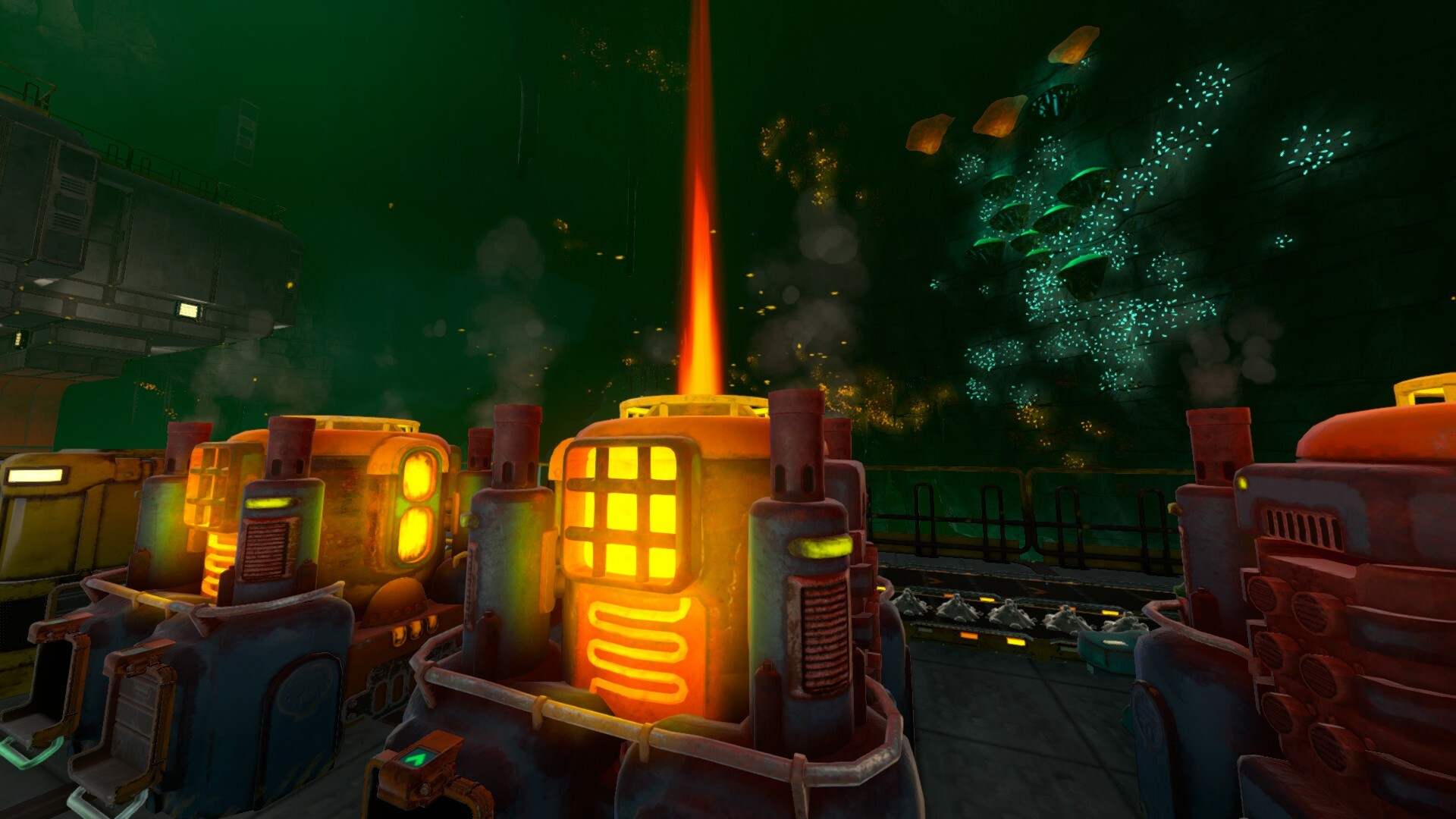
*Slaps roof of the Blast Smelter* This baby can fit so many explosives.


The Blast Smelter and Blast Drill join the ranks with the Base Building update! These two new machines yield access to new intermediates and gameplay loops that we’ll discuss in today’s update.

But first? Some GIFs of each machine in action.

We’ll start with the Blast Smelter.


And now for the Blast Drill.


A strategic approach to fuel with consequences


As their names imply, both the Blast Smelter and Blast Drill utilize explosives in order to fire and harvest or create outputs. The Blast Drill, for example, is the primary machine for harvesting Iron, Copper, and Atlantum Chunks, a new intermediate that arrives with Base Building.

The funny thing about explosives? They blow things up. Groundbreakers will find a warning when they inspect both machines that indicates that, once the cooldown cycle is complete, these machines consume all explosive fuel in their queue to fire off.


If you don’t efficiently time your fuel supply lines for these machines, you will waste a lot of Mining Charges. To compensate for wasted explosives, we’ve made them cheaper and easier to make.

With the threat of consequence, we also introduce reward. Once upgraded, the Blast Drill will provide more raw resources per cycle as long as you’ve timed up your fuel lines correctly. The Blast Smelter can be upgraded, too, to produce more outputs per explosion cycle. However, you’ll need to make sure you’re timing your Mining Charges to match the listed cadence. Be careful, Groundbreaker!


The Blast Loop™️ is also a rewarding resource sink


Do we have plans for resource sinks? Yes! And they will be introduced as factory systems in Techtonica evolve through Early Access.

The Blast Machines and base building components arrive as two excellent resource sinks. You’ll make use of that limestone for base building parts with this update, and you’ll have a great dump for your Kindlevine and Shiverthorn farm surplus with the Blast machines.


These machines consume Mining Charges, and Mining Charges are an endless sink if you have the right farm system set up. We’ve found through our internal sessions that both systems have been a great sink for stuff we didn’t have much of a use for in v0.1.

This doesn’t mean that we’re skipping providing a more traditional resource sink in Techtonica. We have plans for that down the line, too; but, you should find your overwhelming piles of limestone and plant products alleviated with these new machines and loops.

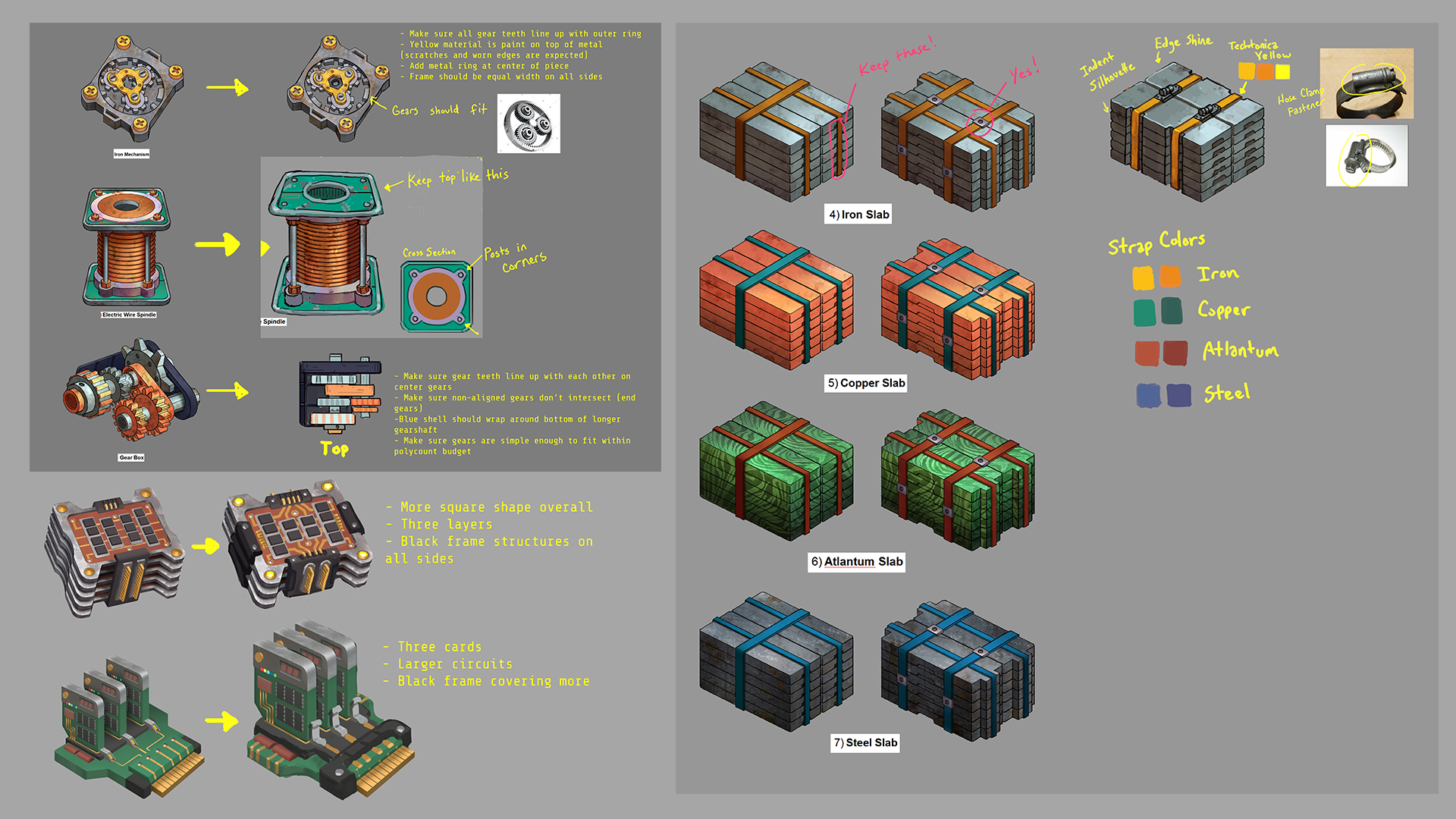
The concept art for the Blast machines kinda rules


When Andrii, one of our designers, approached our art team about the Blast Drill, their immediate response was fantastic.


That evolved, of course, into some really cool drawings of how the Blast machines would function and look.

The Blast Drill would fire gnarly bits into the wall with explosive force.


The Blast Smelter would fire, simmer, and cool with smoke stacks and an exhaust on its top to keep from completely exploding.


That’s it for this week’s news! We’re still on pace to deliver the Base Building update during the week of December 18th (next week!). We’ll have the patch preview first, of course, and then we’ll deliver the update alongside a trailer showcasing a ton of what’s coming.

In the meantime, come join our Discord and hang out!

Base Building release window narrows, plus we've updated the roadmap

Greetings, Groundbreakers! We have a few pieces of huge news for you today.

The Base Building update will launch the week of December 18th.


While we can’t give an exact date just yet, we wanted to give players a little more info! This is the biggest update we’ve had thus far for Techtonica, and we are so so so excited for you to play it. We’ve been able to narrow our release window to the week of December 18th and wanted to make sure y’all knew!


We’re adding content monthly to Techtonica


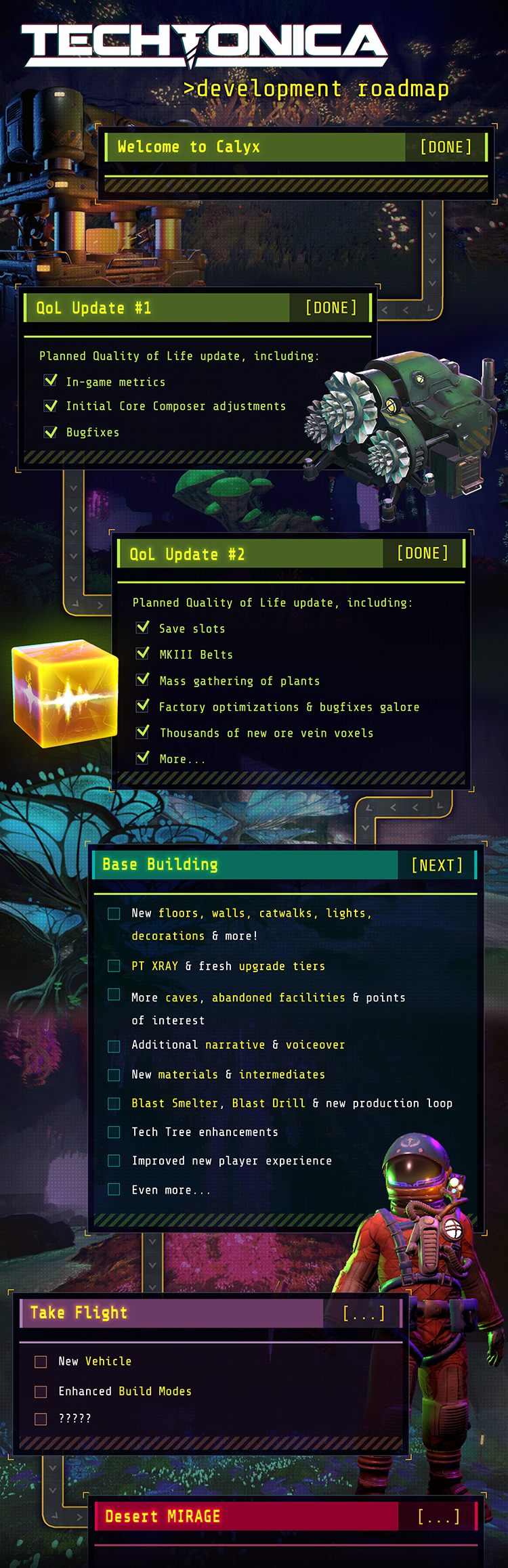
Which brings us to the Roadmap update. We’ve shifted things around on our Roadmap and added several new monthly content pieces. Behold, the Roadmap in all it’s glory!


The art team has been steadily chugging along, enough to where they have time in between major updates to give you new content. And that content will be released monthly. This is a wild, unique idea, and we hope you enjoy it.

What will this content look like? Think small packs that are related to the updates before them. Have an idea for a pack? Let us know in the comments. We will give you more details on the first content pack after Base Building emerges into existence!

Hang on, what’s that new update..


You’ll also notice that Take Flight has been pushed down to make room for another major update - Enhanced Logistics! If you’ve ever been to our feedback website, you’ve seen the top two upvoted posts are for Stack Filter Inserters and Vertical Belts.


And Enhanced Logistics will include *drumroll please* vertical belts and stack filter inserters. Asking for both of those has become a meme in our Discord. We want them, you want them… We’re doing it.


Enhanced Logistics will also include more stuff based on player feedback, so keep giving us suggestions on Discord and our new feedback website. We really do listen - these two listed items were included at your request!

Other than these two items, the entire update will be based around improving your factory’s logistics, so it’ll be pretty nice to have earlier.

Version numbers proudly return


Eagle-eyed players will also notice we’ve added the version numbers back to the roadmap. You wanted ‘em there, so they’re back!

That’s all for this week’s update! When the code becomes sentient and awakens into consciousness the week of December 18th, you can enjoy the myriad wonders that Base Building has to offer. And buy Techtonica now while it’s on sale!

Oh yeah, and we’re on sale!


Techtonica is on sale right now for 20% off. Buy it for yourself, for a friend, for a random stranger you meet on the street who you want to give a new addiction hobby. Grab it before Base Building descends from the celestial void; we have a lot of content incoming!

Base Building is almost upon us, so you should join our Discord for some sneak peeks and memes! discord.gg/techtonica

See you next week!

We’ve littered Calyx with more abandoned facilities for you to discover

The Base Building update that we’ll release for Techtonica in December (next month, woo!) will feature a lot more than just base building pieces.

We’ve already covered the new Production Terminal, and we’ve shared a lot of the pieces you’ll have at your disposal as well as the intermediates to make them. Today? Today, we’ll talk about the new abandoned facilities that litter the subsurface world of Calyx.

Don’t worry too much about spoilers here. We’re saving the lion’s share of facilities for you to discover as we’re only focusing on one in order to give you an idea of how they’ll all function. We also won’t share any of the core narrative; that will always be the case for these updates.


Ready to learn more about one of the abandoned facilities you’ll unearth with the Base Building update?

Let’s dig in.


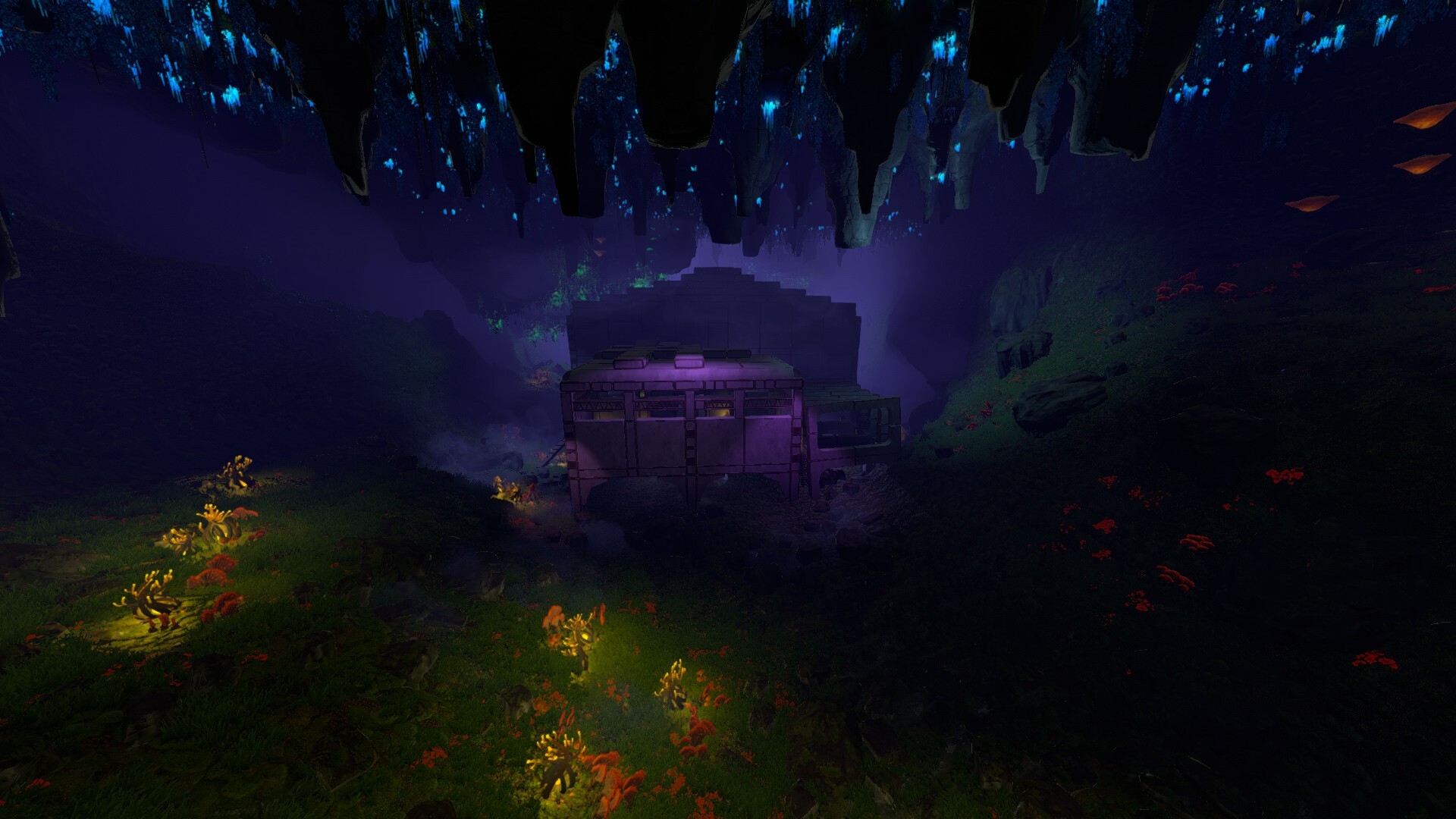
Meet the ancient Agricultural Facility…


Farming for food? No, the UNIHAZ suits take care of sustenance needs for Groundbreakers on Calyx. This massive Agricultural Facility was farming for fuel, a demand that far outstripped the need for something to eat.


Something happened here, it seems. Time and the shifting of Calyxian soil have partially fractured and crushed the Agricultural Facility. We’ll share some screenshots and talk about how we pulled off the effect later in this post. We think it looks a bit spooky and very cool.


Damaged or not, it’s clear that the intention was to grow and harvest seeds in this location while using Monorails to distribute the crop to another facility entirely. Those depots look extremely unused, too. Maybe you can do something with them?


The evolution of showcasing decay


We mentioned this last week, too, but Base Building is an opportunity for us and players to put on a quieter type of storytelling. You’ll craft your own stories with the bases you build, and we’ll tell more stories of Groundbreakers past with these aging facilities. (To be clear, we’ll also have more voiced story in this update…)

Telling a story of destruction and decay with these facilities produced some interesting problems for our design team. They had to build these structures, in-editor and in-game, first.


With them built, the structures had to then be broken. An interesting process in and of itself. Andrii, a member of our design team, had to twist and turn individual pieces to a wall, say, collapsing or some scaffolding falling.


Add in a few in-game models and machines, and suddenly we go from a mess of Lincoln Logs to a building that’s falling apart. It also offers a lot of opportunities for players to explore while jumping.


Telling stories while teaching players


While abandoned facilities like this one offer up world-building narrative, they’re also a great resource for scannables and showcasing. All the pieces that make up the massive structures can be scanned and come from the set of pieces you’ll get with the Base Building update.

That’s right! We used the Base Building sets to create these abandoned structures, though we used some developer tools to make them look fractured and broken in order to tell you a story of collapse and decay.


It’s our aim to show you just a little of what’s possible with the tools we give you through these facilities. Of course, we know your work will probably blow ours away.

This is one facility, there are many more


Just to restate! We’ve only showcased one facility buried in the Base Building update. We’ll have others for you to explore for yourself once we release.

When are we releasing the Base Building update? We’re still on track for December. As soon as we nail the date down, we’ll share it with you.


In the meantime, join our Discord, tell your friends to snag Techtonica while it’s still on sale (that ends today, November 28th!), and we’ll see you on Calyx!

Nominate Techtonica in this year's Steam Awards!

Since we started development on Techtonica in earnest, we've had a core goal as our focus: we're working to make a factory automation game that rewards players with a relaxed, zen-like state as they play.

We only started our Early Access journey with Techtonica in July of this year, but the future looks both chill and bright for Groundbreakers seeking some peace and quiet in their factories after a long day of work, school, or other real-world responsibilities.

So, please vote nominate and vote for Techtonica in the Sit Back and Relax category for this year's Steam Awards.


Thank you for your support, Groundbreakers! We'll see you extremely soon with the Base Building update.

These are the pieces that will make your bases in Techtonica

Over the last few weeks, we’ve teased some of the outposts that we’ve been working on as we test the waters of the Base Building Update in Techtonica here behind the scenes at Fire Hose.

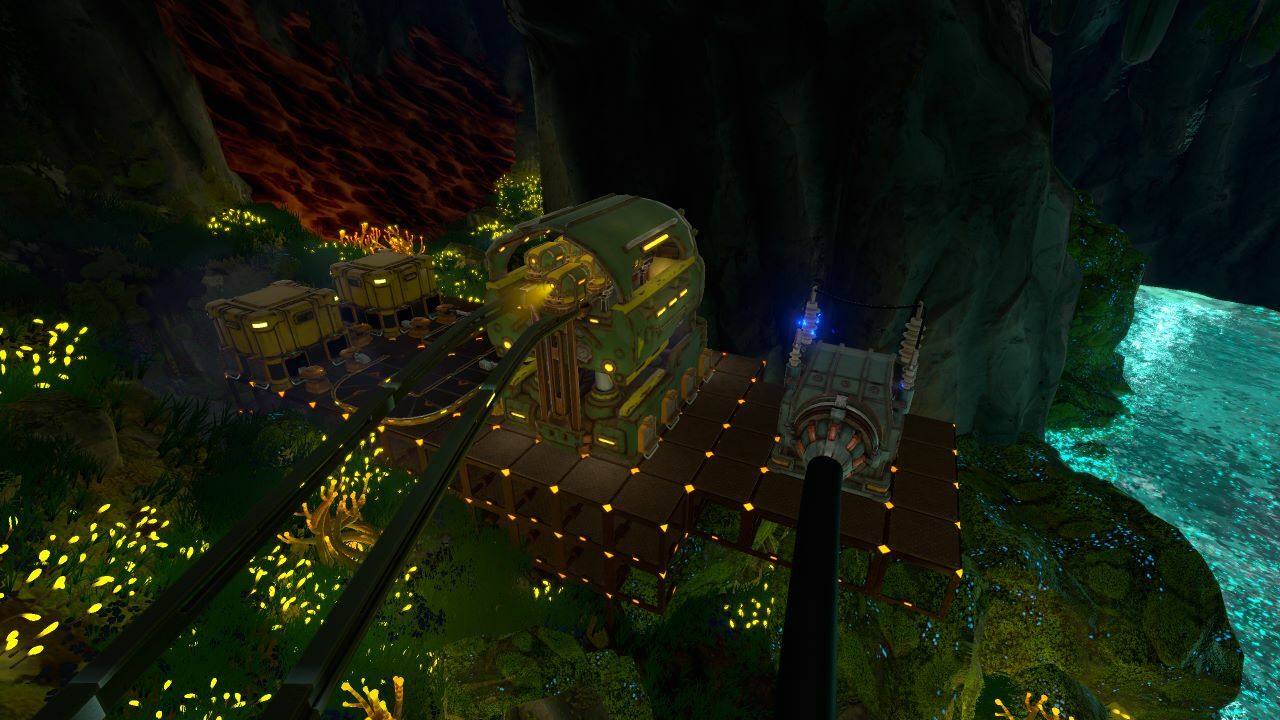
Here’s one I built, for example, to house a small Quicklime and Cement assembly depot.


Everything you see in this screenshot, aside from the machines and colored lights, is completely new with the Base Building Update.

This week, we’re pulling back the curtain on the base building pieces and deco that you’ll be able to work with when we drop the update next month.

As always, here’s the video, and you’ll find the post below.


Let’s dig in!

A sampling of the pieces at your disposal


Base building in Techtonica works with our universal grid. Everything’s voxel-based, and that means your bases will be as clean and organized as you’d like them to be.

That also means, in order to offer as much variety as possible, we’ve been working on a whole slew of unique pieces. When you mix and match things? Well, a whole lot is possible. One of our artists, Ryan, spent some time building a smattering of floor and wall concepts that the rest of the team could use when building bases. It looks cool enough that I thought we should share it with you folks.


Let’s take a look at a few of these pieces now.

We’ll start with three flavors of floors, below. A 1x1, 3x3, and a 5x5.


And here are some of the wall choices you’ll have available.


Next, curved pieces for a decorative touch or the impression of support.


Doorways? Of course.


We also have some railings for UNIHAZ safety.


Finally, my favorite, a few of the lights!


What’s a good home without some potted plants?


We’ve heard, since we announced the game, that players want a way to build their own greenhouses for all the beautiful neon fauna at home on Calyx. So, some of the early decorations we’re including in the Base Building Update are the potted plants you’ve been after.

Here’s a greenhouse that I built specifically for this section of the update!


The deco extends beyond one-sized planters, too, as our art team’s cooked up plants of a host of sizes and varieties. That includes these wall planters that I can’t stop staring at.


On art and inspiration…


What were we trying to accomplish with our approach to base building in Techtonica? To answer that question, I turned to our art team.

With the Base Building update, we’re really interested in player-produced storytelling. I’m not talking about the narrative we’ve constructed in the game. I’m referring to the bits of story you tell as you build your factories and outposts. My greenhouse above is a great example of this. But, how about this peaceful retreat one of our team members built last week? It tells a small story of its own!


We wanted the stories you tell with the Base Building Update to feel at home in the world of Techtonica, too, so we’ve worked to give you a set of pieces that create a brutalist, industrial, minimalist feel. And that process can be seen in our concept art and inspirations.


Here’s a look at a much, much earlier iteration in-game of some of these tools we were toying with. Not all of these pieces are present in the update, before you ask, but versions of them might be soon.


We’re really looking to give you the ability to be creative beyond just laying out your factory or terraforming, and we believe the Base Building Update will provide the tools and materials you need to really have a lot of fun with our game. That was the true inspiration.

There’s a lot more to come after this update


“Is this everything?” you might be asking. No. There’s a lot more coming with the Base Building update that I didn’t specifically call out here. You might see it in screenshots or the video above, or you might not see it until you get your hands on the update next month.

In addition to the pieces we’ll have ready for you this December, we’re working on a plan to give you more to build with on a regular basis. Nothing to announce here and now, but, in the new year, we’re hoping to be able to share our approach to growing the base building side of Techtonica.

We hope you look forward to it!

Heads up! Techtonica’s going on sale…


That’s right! Starting tomorrow (November 21st, 2023, at 10am Pacific), Techtonica will be 20% off on Steam as part of the annual Steam Autumn Sale. The discount will run through November 28th, 2023, so grab a copy (or tell your friends to grab a copy) now.


Get the game at a discounted price ahead of our Base Building update next month!

As always, you’re invited to come hang out in our Discord–home of memes, dreams, and our friendly team.

New intermediates and an overhauled Tech Tree

The Base Building update in December features more than just PT XRAY and Base Building items; we’re adding a whole slew of intermediates and reworking the Tech Tree.

Today, we’re diving into the new intermediates and taking a look at the new UI! I spoke with several team members (Ryan, Andrii, and Allie) to get all the deets.

As a reminder, there be spoilers ahead!


We added a lot of intermediates


With Base Building, we aren’t just adding in new building pieces (we are adding those in, a lot of them, but this blog isn’t about that). We’re bringing in dozens of new intermediates to build those base building parts.

These new pieces (and their associated recipes) will likely change as the game evolves from now to our 1.0 launch. The intermediates may even exist in completely different biomes; we’re using them now to give players a chance to see them in action and share their thoughts.

As always, we welcome your feedback on all of our content and are especially looking forward to your reactions to these!

How an object goes from Design’s brains to in-game


When we create intermediates, it’s a multi-step process involving several teams!

First, we get a list of new intermediates from Andrii & the Design team. From that info, we put together a brief that lists all visual and technical requirements as well as reference images for each one.

We ship these off to outsourcing, and while they’re working on those, we also handle some of the concepting in house. For the Base Building intermediates, it was about 50/50 for outsourcing vs. in-house concept art.


We then go back and forth on concepts; usually by the third round they're approved. Outsourcing gets to modeling and sends those over for feedback as they complete them. Once the meshes are approved, outsourcing works on creating the materials and textures.

When we feel those models are excellent looking, Ryan takes a final polish pass on all of the materials and meshes (resizing, rotations, color tweaks, etc) based on how they look in-game.
After the art is done, there are a few hookups to get them into the virtual world, and we're all set!


Without further ado, some Base Building intermediates


And here’s what they look like in-game!


The Tech Tree refactor


Adding all of these intermediates means a lot of new technology unlocks, and the Tech Tree was starting to get pretty full. We want the PTs to unlock their respective tiers in any order so that players who forge ahead can progress multiple things at once. This helps players feel more free to explore.

At the same time, the UI department (AKA Ryan) was like, “Hey, this is one of the older UIs in the game. Since we're going to have to re-organize it to accommodate the above changes to make it visually clearer that the tiers are grouped, we might as well make it look pretty, too.” This involved Quality of Life features like the quick-scroll buttons on the right and an improved left-hand panel with more information on it, as well as just generally re-arranging and tidying graphics up and adding new assets to make it shine a bit more, and be less "flat colored boxes".

Here’s a view of the old Tech Tree


Compared to the new!


If you hover over a tech, the info panel on the left will now show everything it unlocks, the Core and Power requirements, and its recipes. This is a massive upgrade!

We’ve also added an entirely new tab... Construction!


Construction will host all of your Base Building pieces, along with some helpful tech upgrades.

We also added new bookmarks to the right-hand side for each Production Terminal’s unlocks. By clicking these quick-scroll buttons, you’ll jump to the tech you unlock at that PT. Pretty neat, right?


That’s it for this week! With Base Building right around the (catwalk) corner, you should join our Discord for some sneak peeks and memes! discord.gg/techtonica

See you next time!

Introducing PT XRAY, the new Production Terminal in Techtonica

Production Terminals in Techtonica are meant to feel special. They should give Groundbreakers a sense of awe when discovered, and they should each stand with their own unique tone and definition.

Think of the moment you see PT LIMA as you exit the cryo-chamber at the start of the game. Or, consider when you M.O.L.E. your way from LIMA to PT VICTOR and go from confined tutorial caverns to your first open factory space. Those segments are intentionally crafted to feel really special.

We’re aiming to do it again with the Base Building update and its new Production Terminal.

If you want to wait until you find it for yourself when it’s added to Techtonica with the Base Building update due in December, consider this your spoiler warning. We will reveal PT XRAY in this post and in this week’s video update.

To the Groundbreakers who want to learn more, hello!


Ready to meet PT XRAY? Let’s dig in.

Well hello there…


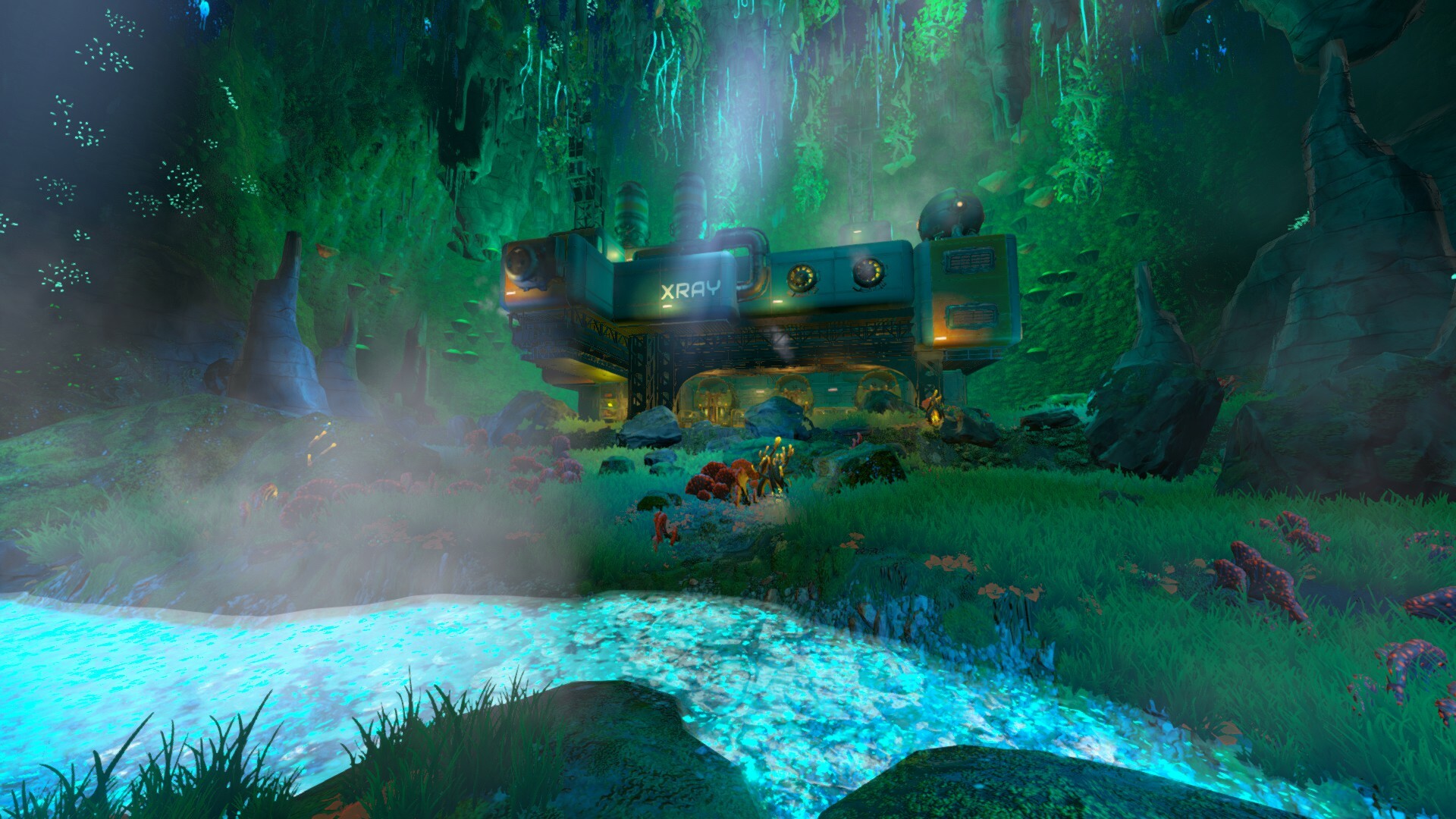
When the art and design teams started sharing mock-ups and ideas for PT XRAY, it immediately became my new favorite point of interest in Techtonica. This new terminal and its location on Calyx are an amalgamation of nearby flora and world design, and that makes the space both familiar and hauntingly alien.

Just, look at it!


PT XRAY echoes elements of LIMA and VICTOR with its cantilevered design, presence, and lighting, but it immediately feels like its own distinct place. That comes thanks to its green color scheme and its mix of fungus and dripstone environments.

PT XRAY also features a U-shaped silhouette, a new look for PTs on Calyx, and it includes a garage-like area with embedded Monorail Depots.


Early concept art for your consideration


If you were with us ahead of launch, we typically took some time in these weekly updates to share some concept art for the new environments, machines, and tech we were making for the game.

You can expect that to continue as we move away from Quality of Life updates and into brand new mechanics and features. So! Here’s some of the concept art that helped bring PT XRAY to life.


Why call it “XRAY?”


First of all? It just sounds cool. We won’t hear differently on this one, PT XRAY is a really cool name for a Production Terminal on Calyx.

There’s a narrative-focused reason for the naming of Production Terminals, too, but we won’t tip our collective shadowy hand on that one just yet. Curious Groundbreakers will have to wait for the story to unravel to fully understand that tidbit.

Instead of worrying about the secret narrative, let's focus on the happy accident pointed out by Will, our narrative lead. X-rays are for bones, and PT XRAY is focused on base building. Bases are the bones of your factories.

See? Perfect.

Of course it comes with tiers of tech


We’re not ready to share the precise suite of upgrades you’ll tap into with PT XRAY, but we can say that you’ll have more to unlock with each PT tier. And that tech also brings a ton of new intermediates.


In the coming weeks leading up to the launch of Base Building, we’ll talk about the machines and intermediates you’ll discover when the new content reaches Techtonica.

Oh, and a note about stairs and power!


The Base Building update will feature different sets of stairs, and we wanted our current stairs to match what’s being added. So, we’ve updated the stair model for the 1x1 stairs.

That’s not all, though, we’re reworking some elements of the power system, and we’ve made it so all stairs now conduct power. No more having to run a pillar of Power Floors behind your stairs to get juice to a second floor. That sweet, sweet electricity will run through the steps.


Why did we talk about this in the post focused on PT XRAY? It’s a small tidbit that we wanted to share but didn’t have room to in other stories. So! It lives here, with PT XRAY. Which is a great home, if you ask me.

By the way, the video update for this week features the stairs, too, but I may have slipped a peek at some Base Building update parts in a small base I built myself. Might be worth a look if you’re interested!

As always, join our Discord and chat with us, like, a lot. https://discord.gg/techtonica.

See you there!

https://store.steampowered.com/app/1457320/Techtonica/

Base Building Release Window & Roadmap Update

Techtonica v0.1.2, our second planned Quality of Life update, is out now, so it’s time to look ahead to future updates.

We’ve updated the roadmap with a lot of information about Base Building, and we can finally announce a release window!

Base Building will hit Techtonica in December.


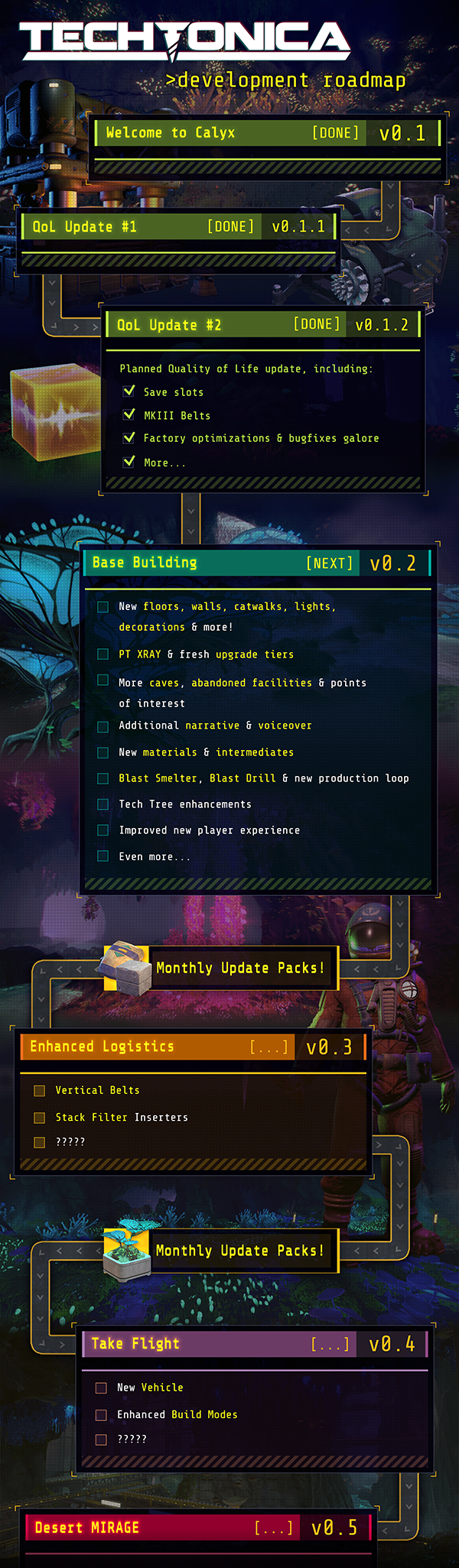
And now, check out the new and improved roadmap!


Let’s chat about what we’ve added! We will go more in depth on these items in the coming weeks as we get closer to launch, but here’s a brief overview of each bullet point.


New floors, walls, catwalks, lights, decorations & more


Here’s a single sneak peek at a Base Building asset. This might get updated with new textures, but look at it? It’s amazing. Perfection, no notes.


I do my little turn on the catwalk.

Technically this is two parts: catwalks and railing. But you can’t have one without the other, right? Safety first.

PT XRAY & fresh upgrade tiers


Yeah, that’s right, a brand new Production Terminal with its own upgrade tiers. And a fancy new cave for it, too.

More caves, abandoned facilities, & points of interest


The Techtonica map is expanding! Get ready to go spelunking in new caverns, mysterious abandoned buildings, and more things I can’t talk about yet.

Additional narrative & voiceover


A conspiracy will be buried within the new facility ruins that Groundbreakers will explore; one that will shed new light on the Expedition and introduce SPARKS and PALADIN to a hidden past.

Blast Smelter, Blast Drill, & new production loop


We’re adding two new machines and a full production loop with them. And yes, blast means more explosives. We’re ‘splodin more stuff. Boom.

New materials & intermediates


New machines mean new materials, and then intermediates for Base Building parts. Your factory is gonna get a whole lot bigger.

Tech Tree enhancements


We’re adding a new page to the Tech Tree for Construction, and we’re revamping some of the UI.

Improved new player experience


The initial quest lines at Production Terminal VICTOR will be retooled to help Groundbreakers get on their feet with threshing, planting, filtering, and electrical power.

Roadmap general changes


We removed the numbers from updates. Why? Because we aren’t 100% sure how many major updates there will be. If we continued with the 0.1, 0.2, etc. nomenclature, it might seem like we’d need to land at exactly 10 updates for 1.0. We are really excited to keep developing Techtonica, and want to do so without needing precisely 10 major updates!

We also collapsed some of the older updates. The content is still in game, we just needed to condense the graphic to fit on Steam and our website. Say goodbye to all the old bullet points.

Over the weeks between now and the Base Building update, we’ll dig deeper into what’s coming. We have a lot to share from Techtonica, so stay tuned.

Have questions? Want to chat with us directly? Join the Discord at https://discord.gg/techtonica.

Until then, Groundbreaker, let’s get to work.

Techtonica v0.1.2 - QoL #2 Patch Notes

Techtonica v0.1.2 has officially arrived! This is the second of two Quality of Life updates that were added to the Development Roadmap immediately after our launch into Early Access.

How did we get here? The two Quality of Life updates came because of your feedback. So, thank you! Our community has consistently delivered great feedback and bug reports, and we log and review all of it.

Below, you’ll find the complete patch notes for the new version as well as a section highlighting the changes and the patch preview video we put together earlier this week.


Let’s dig in!

We squashed some big bugs, including those related to the Monorail and HVC


Yes! Gosh, we hated this bug a lot. Players would get to the late-game stages of v0.1, go to use their new Monorails, connect them with the HVCs, and… nothing. The power systems were busted.


We weren’t sure we’d be able to correct the Monorail and HVC power issues, but they have been solved for v0.1.2. Go on, connect your Monorail Depots via HVC, and enjoy not having to run a billion miles of Conveyor Belts or Power Floors. Just like Sparks intended.

The infamous 0,0,0 bug was slain


0,0,0 may be the most talked about bug across our Discord and subreddit. Right below the sloped river that leads to the hydroelectric facility is the exact center of the map for v0.1. We used that space to load in some assets, and they were incorrectly displayed both on the mini-map and as buried holograms.


So, so, so many players reported this location on our Discord, only to be given a laugh and a badge (literally).


Consider the 0,0,0 bug dead and more buried than ever before. Rest in Peace, 0,0,0, we hardly knew ye.

We added a lot more ore


The ore veins in Techtonica are massive, but they are also finite. We want players moving their factories and expanding their outposts, and our hope is to give them a world worth exploring and moving across as we march towards 1.0.

That said, we wanted to add some more ore voxels to the existing ore veins with v0.1.2 as we prepare for the future that starts with base building in v0.2. So, we did. We added a lot more ore.

How much? Look, I made a fancy chart.


So, what happens to players who’ve already dug into the space we use for the new ore voxels? We simply won’t create the new ore in dug-up spaces when saves are loaded at the start of v0.1.2. Don’t worry, your factories are safe.

Zoom! MKIII Belts are here!


Faster belts? Yes! MKIII Belts have arrived, and they are a heck of a lot faster than their MKI and MKII counterparts.

MKIII belts move items at 720 per minute, while II moves at 480 per minute, and I moves at 240 per minute. The speed is wild in motion, so check it out.


The obvious question here? We’re giving you new belts, but what about other logistics tools to further enhance your factories? Those are coming soon, and we’ll be updating the roadmap in the coming months to let you know, roughly, when. Stay tuned! We have grand plans!

Save Slots for more organized Groundbreaking adventures and the Look Input Smoothing toggle


We just covered the new Save Slot system in detail in a recent weekly update, but here’s the rundown. Every time you hit “New Game,” we create a folder for that world of yours. We’re using those folders and the auto and manual saves within them to roll out our Save Slot system.

We have plans to let you name saves, but those aren’t here yet! We’re working to overhaul the UI and UX for Techtonica, and that’s when we’ll be able to build a save naming system that fully supports controllers. Believe me, I want this, too!


While we’re on the subject of menus, we’ve also added two new toggles that were requested a lot by Groundbreakers like you. First, you can turn off belt riding. We call that the “no fun” toggle. We get it, though, accidentally riding belts while trying to build can be a pain.

The other? We now have a toggle for Look Input Smoothing (or, as it’s otherwise known, Mouse Acceleration). First-person games like ours have an acceleration in place to make turning feel smoother and more natural. It’s hardly noticeable to most players, but it can cause motion sickness for others. You can now turn this off to get an instant feel for your mouse controls.

Mass Gathering of plants with a single button hold


Early on in Techtonica, as you likely know, gathering plants is a necessary step in getting your factories up and running. Until you automate farming, in fact, you’ll need lots of plantmatter.

Before v0.1.2, gathering plants meant mashing the Gather button a ton as you walked the Calyxian caverns. Now, we’ve bound that gathering process to a simple button hold. Look at a plant, hold the Gather button and keep gathering plants as you look at them.


We think this change strikes a nice balance between making it easier to gather plants while not making it so easy that you’ll get to farming later than you should.

Machine Streaming yields improved performance


We’ve also implemented a Machine Streaming system that will optimize game objects to help with big factories. We covered this in a larger post a few weeks back, but here’s the part you’ll likely care about most.

How many FPS will players gain with Machine Streaming in v0.1.2?

That’s an incredibly nuanced question with many answers. The new and improved Machine Streaming is primarily targeted at two things: reducing the hitches players experience while walking and the RAM consumption of large factories. It is not simple to measure how much Unity overhead we have cut out when we don’t have access to their API, but players should experience higher frame rates in large factories. Reduced RAM usage should also reduce the likelihood of crashes on Xbox platforms.

I want to reiterate: this is not an optimization to improve performance on smaller factories. These Machine Streaming updates are an investment we have made in our systems before we start giving players tools to build really massive factories and give them new places to build those factories. Yes, it comes with some performance improvements in large factories, but most importantly, this optimization lays the groundwork for many future performance improvements we’re planning to make that were impossible without this new Game Object-less Machine Streaming system.


The colors, the fog, oh my!


Finally, you’ll notice a more vivid and colorful world with v0.1.2. We’ve added a colored fog system that brings some much-needed, relevant ambiance to the distinct spaces in Calyx.

We’ve also made some changes to our color filtering techniques that have done a lot to enhance the feel of the caves themselves. Check the differences in the screenshots below.

Old fog and color filtering.


New fog and color filtering.


Old fog and color filtering.


New fog and color filtering.


Before we hit the patch notes below, a reminder that we hang out in our Discord! Join us at https://discord.gg/techtonica.

The Complete v0.1.2 Patch Notes


World Changes


  • No, Groundbreaker, the Calyxian flora is not causing hallucinations. We’ve added a new fog system that’s colored based on the surrounding environment. The green mushroom grotto near the freight elevator, for example, now boasts a looming green fog. We’ve also updated our coloring filters, so expect more vibrancy than before.
  • “More ore?!” Sure! We’ve added thousands of new ore voxels to the veins scattered around Calyx. If you already dug out the space occupied by the new ore in your save, don’t worry, we won’t cover your factory space in ore. We won’t place the ore in dug-out voxels if we detect them.
  • If you’re hunting Atlantum ore, you may discover some completely new spaces. The geodes surrounding the ore have been added and styled to feel especially alien and green. We love them.
  • Those Water Wheels near the hydroelectric station? They were running the wrong way, and you couldn’t rotate them. Well, they’ve been fixed.

Balance Changes


  • MKIII Belts added. See the Mechanics and Features section for more detail.
  • MKII Mining Drill recipe updated to require either 286 Iron Ingot, 360 Copper Ingot, and 80 Kindlevine Extract for raw material construction or four Mining Drills, four Accumulators, and 30 Copper Frames for faster ingredient-based construction. Previously, they required Atlantum Ingot.

Mechanics and Feature Changes


  • Rest those tired fingers, Groundbreaker. We’ve added a Plant gathering feature that allows Breakers to hold a single button when walking through the fields of gatherable plants to suck them up instead of today’s exhausting method of spamming the gather button.
  • Ever tried to build levels of machines only to have those pesky clearance requirements stand in your way? We’ve reduced the vertical clearance around machines to a single voxel, so you’ll be able to more tightly stack floors and floors of whatever you want.
  • Zoooooom! MKIII Belts are now available for more logistical mayhem. These babies move goods at 720 items per minute. Of course, we’ll add more logistics-based machines in the future to further balance the new speed, but these belts are great.
  • Groundbreakers are now outfitted with a brighter headlamp that creates a warmer glow, closer to the Breaker.

Narrative and Quest Changes


  • The Accumulator quest was broken, but now it’s fixed. Groundbreakers will find that the total amount of power required has been updated to match the maximum capacity of player-built Accumulators required. This should be significantly less confusing, unlike the sentence you just read a second ago.
  • Quest requirements during the Research Core tutorial were inaccurate; they’ve been updated so that the number of Cores displayed in the text is the true value required.

Settings, UI, and Performance Changes


  • Machine Streaming tech developed and implemented. We detailed this in a much longer blog post a few weeks back, but the gist of it is that massive factories should be less demanding on performance, especially when they are spread out.
  • Save Slot system added for organized save structure. Saves slots are world-based and are created whenever you click “New Game” from the main menu.
  • The autosave system has been improved to include older autosaves.
  • Smart Snapping now has a toggle in the settings menu. This turns off snapping logic in build mode, and it’ll be extremely useful when Base Building arrives. You can try it now, though.
  • The Tech Tree tech now accurately lists the accumulated charge required for unlocks, so no more guessing!
  • Groundbreakers will also find an indicator on their Tech Tree that reveals when they don’t have enough power to complete upgrades. Previously, the Tech Tree simply displayed as “LOCKED” when Groundbreakers were short on power.
  • Planter UI now displays the 200w required to be fully operational instead of the 50w required per plant.
  • Belt Riding can now be disabled. We call it the “no fun” toggle, but you do you.
  • Look input smoothing (or mouse acceleration) can now be disabled.
  • Groundbreakers looking to cap their framerate will find a framerate limiter has been added.
  • Fullscreen borderless windowed? Check!

Bugfixes


Please note that this list is not exhaustive, and it does not include all minor bugfixes.

  • The map icon and the odd machine holograms known as the 0,0,0 bug have been eliminated. Rejoice!
  • We fixed that pesky Monorail bug that prevented them from working when hooked up to HVCs! Here’s a blog post about QA and here’s another about the bug. Lots to read, if you’re interested.
  • Fixed a bug that would sometimes occur while building or erasing HVC splitters. This was a weird one, but some players reported this creating corrupted states for the HVCs in general.
  • Fixed a bug that caused text to overlap in the Monorail Depot UI.
  • Players with lower-quality texture settings will no longer see a low-quality save icon that was blurry. Saving is in FULL HD now (maybe not full HD, but you get the point).
  • Voltage Stepper Sparks are now visible in more than just build mode.
  • We’ve updated FMOD, our audio system, and that may have fixed the reported lack of audio encountered by some users. Please let us know if the issue persists!
  • We fixed several localization bugs related to AZERTY settings.
  • We fixed a slew of more generalized localization issues, too!
  • Adjusting the ambient audio slider now affects facilities instead of completely ignoring them.
  • Fixed a bug that displayed incorrect information in the Mining Drill Inspector UI.
  • Fixed a bug that caused audio to distort while using the M.O.L.E.’s Flatten Mode.
  • Fixed a bug that showed placeholder keys in the UI when Groundbreakers bound special characters on their keyboard.
  • Fixed several bugs related to inclined belt behavior, potentially improving bumpy belts for Breakers everywhere.
  • Reduced the light flash on explosive charges.
  • Fixed a bug that caused the sound effects near some river sections to mute.

Known Issues


These are the smaller or more edge-case issues that we know still exist as we launch v0.1.2 into your hands.

  • With Mass Erase open, machines turn into hologram versions of themselves. Less visible, just as effective.
  • When an Xbox controller is plugged in, some players report that Xbox buttons appear in the keyboard and mouse section of the Control Remapping menu.
  • Techtonica may launch into Windowed Mode after this update. Change the display mode to whichever one you prefer after that first open, and that setting will stick.
  • Groundbreakers may find that Inserter overlay icons hover over Inserters oddly. This will be fixed for v0.2!