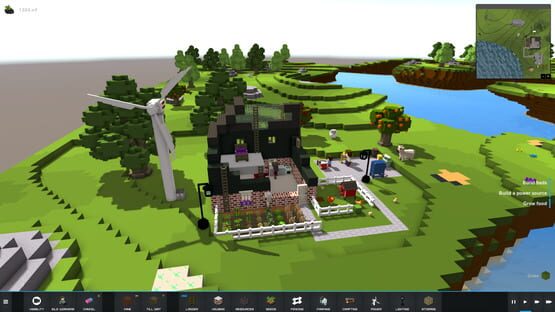
The Steam stable branch has now been updated to Alpha 5.
As always, a big thank you to everyone playing the game and sending through your bug reports!
This update is all about bringing relationships and babies to The Kindred.
When two adult Kin really like each other they now form relationships. The new status updates at the bottom left hand side of the screen will let you know when the Kin become a couple and you can then choose to place their beds side by side or leave them on their own.
If you click on Details in the Kin menu you will see a new menu screen which shows more details for each of the Kin. More information will be added here in future updates but for now you can see the relationships in more detail under the relationships tab.
If you place a cot within 4 blocks of the bed of a Kin in a relationship (in the right age bracket, etc) this will open the possibility of a baby for the couple.
The stork will periodically arrive and deliver babies into empty cots. If you want a couple to have more children, just place more cots.
What is missing? We still need to add animations for the babies and their parents, at the moment the babies stay by themselves in their cots but we will need to implement an adult caretaker to look after the babies, age ranges and child behaviour will also be tweaked in future updates.
Patch notes for v0.5.9
Kin can now have babies!
Added Kin Relationships
Added Cots
Added Stork
Added status messages
Added new Doors and Windows
Improved speed of game start
Alpha 4.1 is now Live!
Hi Everyone,
The Steam stable branch has now been updated to Alpha 4.1
The issue with loading larger world sizes as well as issues with crop farming should be fixed with this update. Two exciting new additions as well - wireless electricity and the first stage of population growth with more kin arriving through the portal after the initial 6 Kin.
Wireless electricity
Text prompts have not yet been added to the game but when placing your wind turbine or coal powered generator (NEW) place a battery beside it for storage and electrical towers to transmit the energy further (these replace the original cables).
Clicking on any electrical item will show you the range that the electricity is travelling. These areas must overlap to provide complete coverage for the area.
The current H frame electrical tower is the base tower model - more will be coming soon with more expensive crafting costs but wider coverage as well.
Population Growth (first phase)
Late arrivals through the portal will be joining the Kin you start with as you play. You will be notified when a portal is activated and if you click on the camera icon you can go to that location to click on the Kin and see their work skills and stats and what location they arrived in (the portals won’t appear in the same location each time) OR you can just open your work allocation screen and assign them work based on their stats and they’ll get started on any unassigned work you have queued for that option (eg. chopping wood, crafting etc).
Patch Notes v0.5.7:
New Features
Wireless electricity
Population growth (first stage) More Kin arriving through portals
Improvements
Optimised plants to improve both loading and runtime performance
Larger world sizes now load and run faster
Newly planted plants now appear instantly
Performance optimisations
Added ElectricalTower - This item can be crafted and placed to expand your power network range
Updated Light models
Fixes
Fixed issue with Kin not always facing the correct direction when working
Fixed issue with first person controls being mirrored
Fixed issue with cursor getting stuck in Search field during building
Fixed issue with two or more animal zones causing a shepherding conflict
Fixed rare issue with Kin not waking up after loading a saved game if they tried to talk on waking
Fixed bug causing seeds to not be planted
Changes
Removed requirement for Electrical Cables, electricity is now conducted if object is within range of a power source or transmitter
Kiln, Processor & DairyMachine now require power to operate
Update to the Unstable Branch - Patch Notes v0.5.6
Hi Everyone,
We have a new update on the unstable branch ready for testing!
The issue with loading larger world sizes should be fixed with this update. Two exciting new additions to this update - wireless electricity and the first stage of population growth with more kin arriving through the portal after the initial 6 Kin.
Wireless electricity
Text prompts have not yet been added to the game but when placing your wind turbine or coal powered generator (NEW) place a battery beside it for storage and electrical towers to transmit the energy further (these replace the original cables).
Clicking on any electrical item will show you the range that the electricity is travelling. These areas must overlap to provide complete coverage for the area.
The current H frame electrical tower is the base tower model - more will be coming soon with more expensive crafting costs but wider coverage as well.
Population Growth (first phase)
Late arrivals through the portal will be joining the Kin you start with as you play. You will be notified when a portal is activated and if you click on the camera icon you can go to that location to click on the Kin and see their work skills and stats and what location they arrived in (the portals won’t appear in the same location each time) OR you can just open your work allocation screen and assign them work based on their stats and they’ll get started on any unassigned work you have queued for that option (eg. chopping wood, crafting etc).
As always, any suggestions or feedback is appreciated!
Patch notes for the latest release:
New Features
Wireless electricity
Population growth (first stage) More Kin arriving through portals
Improvements
Optimised plants to improve both loading and runtime performance
Larger world sizes now load and run faster
Newly planted plants now appear instantly
Performance optimisations
Added ElectricalTower - This item can be crafted and placed to expand your power network range
Updated Light models
Fixes
Fixed issue with Kin not always facing the correct direction when working
Fixed issue with first person controls being mirrored
Fixed issue with cursor getting stuck in Search field during building
Fixed issue with two or more animal zones causing a shepherding conflict
Fixed rare issue with Kin not waking up after loading a saved game if they tried to talk on waking
Fixed bug causing seeds to not be planted
Changes
Removed requirement for Electrical Cables, electricity is now conducted if object is within range of a power source or transmitter
Kiln, Processor & DairyMachine now require power to operate
Alpha 4 is now Live!
The Steam stable branch has now been updated to Alpha 4.
As always, a big thank you to everyone testing the unstable branch!
Lots of changes since Alpha 3, the highlights are below but you can also find more detail in the individual patch notes. Some tips on using the new building system can be found here - http://thekindred.net/devlog-6-new-building-system/
TIP: Bonus building materials available in inventory when starting the game in easy mode.
Please be aware that this update is not save game compatible.
New mining zones (quarries)
Managed livestock zones
Ability to re name the Kin
New building system (based on player feedback)
Ability to view inside buildings (remove walls/roof, etc)
New building materials eg, terracotta roof tiles, more brick textures, etc
Updated terrain generation - trees grouped to create forests, more vegetables spawned at start up, ore grouped to make quarries easier to place and manage.
Lots of bug fixes!
Devlog 6 - New Building System
The last few weeks we've been working on updating the building system to make it more intuitive and easier to use. We also wanted to incorporate some of the feedback that we'd received since release. A few of the icons are placeholder but all of the functionality is now in place for custom building.
The building system is now separate from the main menu to avoid confusion. Clicking on the Build button in the main menu will bring you to the main build menu.
Types of building are displayed on the left - walls, floor, roof and objects with the method accessible from above (the selected item is highlighted in yellow). You can also search within each sub category to help narrow own your selection eg, all brown items or to help you find a specific item within your inventory.
The method gives you a few options within each category. For walls the options are single block, column, single row, wall loop and square room. To place any of these simply click the item you want to use eg, red bricks then click a position in the world, drag and click again to confirm the final position (however single block mode only requires one click). The selection will turn red if you try to place more than the amount you have in inventory.
To remove an item hold down Ctrl while building to destroy the item and return it to your inventory. You can also select the destroy button (yellow crane).
Separating the building types into walls, floor and roof now allows you to toggle visibility modes.
From the main menu you can select the toggle walls/roof/floor button and remove one or all block types to not only view within the building but also place items.
There are a few new options while placing objects, with items like fencing you can now drag out a square and add in an access gate afterward. The option to inset an object will replace the current item with the new (eg, remove a fencepost and replace it with the gate). This also works with buildings so you can now inset windows and doors without having to carve out holes for them.
To rotate objects right mouse click and the item will rotate clockwise (you can also still use the Q&E keys to rotate). You can also move an item once it has been placed without needing to return it to inventory first. The mouse cursor will change when it is over an object. You can then left click the item to move it.
If you want to experiment with the new building system we've placed some bonus materials for you in inventory when you start the game in easy mode on the unstable branch of the game.
Update to the Unstable Branch - Patch Notes v0.5.0
Hi Everyone,
We have a new update on the unstable branch ready for testing.
Some improvements and bug fixes are included but the main change has been a complete overhaul of the building system.
TIP: Bonus building materials available in inventory when starting the game in easy mode.
Patch notes for the latest release:
Implemented new Build Mode interface
New visibility buttons, toggle walls, floors and roof
Increased world build height from 32 to 128
Camera can now zoom out much further
Fixed bug with some Kin not sleeping
Fixed some memory related issues
Added terracotta and concrete roof tiles in multiple colours to easy mode (recipes and crafting options to follow)
Update to the Unstable Branch - Patch Notes v0.4.11
Hi Everyone,
We have a new update on the unstable branch ready for testing!
This update includes the new zones for mining and animal farming.
To assign an animal to a zone - after creating the zone (shepherding must be enabled), select the animal, then select the zone button. Choose the zone name from the drop down list, the assigned Kin will then collect the animal and take them to the zone.
Note: you don’t need fences to create an animal zone but you will need fences to stop the animals wandering off.
For example you will want fences to keep your milking cows contained but won’t need them around a hunting zone e.g. slaughter house.
Patch notes for the latest release:
Added managed mining zones
Added managed livestock farming zones
Kin names can now be changed in their profiles
Fixed a save/load bug
Fixed bug that stopped master logger achievement being unlocked
Fixed issue with sugarcane farms not being saved correctly
Fixed issue with some network cards not detecting correctly
Fixed some memory related bugs
Devlog 5
Last month our focus was on improving work allocation, making the crafting and cooking UI more user friendly and adding the beginnings of automation to the game with the new automated crop farming zones.
So what do we have planned for April? In no particular order, our aims for this month are:
Mining zones - select an area and a depth level and assign a miner. The Kin will automatically mine the area and ladders will be constructed to allow them to enter and exit.
Animal farming zones - you will be able to select an area, assign it to a specific animal (chicken, cow, etc) and the Kin will automatically collect eggs, milk, wool etc with the appropriate tools.
Reproduction - relationships, babies, families
Begin updating the building system
Ability to re-name the Kin
Alpha 3 is now Live!
The Steam stable branch has now been updated to Alpha 3!
Thank you to everyone testing the unstable branch for all of your help over the last month. We couldn’t have done it without you.
There have been a lot of changes since the last stable release, the highlights are below but you can also find more detail in the individual patch notes.
Please be aware that this update is not save game compatible.
[h1[HIGHLIGHTS
Managed farm zones (automated farming)
Updated crafting/cooking UI
2 new crop types (Sugarcane and Tomatoes)
20 new recipes
New decorative items that can be made in the crafting bench
Wisps/fireflies now appear at night
Various work queue fixes and improvements
Update to the Unstable Branch - Patch Notes v0.4.9
Hi Everyone,
We have a new update on the unstable branch ready for testing.
A few fixes and improvements, an option to halt harvesting of farming zones and options to auto save and delete your save games.
Patch notes for the latest release:
Added auto save (frequency can be changed in options)
Saved games can now be deleted
Fixed bug that stopped animals breeding
Adjusted light colour of wisps
Added green wisp
Added harvest when mature checkbox to farming UI to enable/disable auto harvesting. Useful for decorative plants and trees.
Added extra button to crafting UI queued items to allow removal of 1 or all at a time
Fixed bug stopping crafting UI’s X to close button to not work