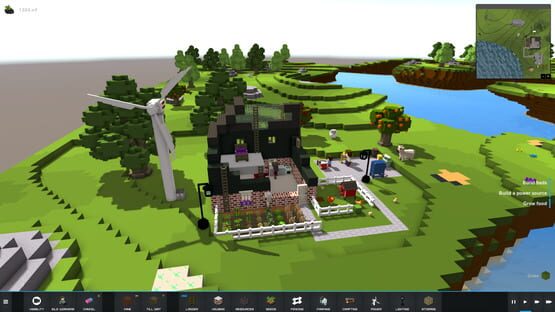

The Kindred
Devlog 4
It’s been a busy week here working on The Kindred!
We put the new automatic farming system we spoke about last week up on the Steam Unstable Branch earlier in the week and today have updated to the newest version which includes the new UI for crafting and cooking.
While we were putting a new build up we thought we’d include some fun new content – 2 new crops (tomatoes and sugarcane), 20 new recipes (for the cooking pot, processor and dairy machine), some flower pots that can be crafted on the crafting bench and the wisps/fireflies that make their appearance as night falls.
So let’s talk about some of these changes! The new farming system seems to have been received well and seeing the beginning of some automation in the game has been really satisfying. We still want to add a few more options to the farming menu like selecting whether you want the crop auto harvested or not – this will mainly be useful for decorative flowers and trees you may like to plant and leave in a certain position like the topiary trees.
The new crafting menu is much easier to navigate and the search bar works really well. You can even narrow your selections down by colour which I can see being useful once we add more decorative items to the game.
We still want to add the option to assign a crafter to a machine and also the ability to maintain x stock in inventory to give the system some automation. I’m really looking forward to the day you can set up a factory of workers each returning to their own machine each day to do their set work.
The new cooking menu is much like the crafting menu. You now have a basic description of the meal and can see what it looks like as well as the nutritional rating of the meal. You can see a few of the new recipes here which include chamomile tea (giving a temporary use for the chamomile plant until we implement health), cornbread, molasses and more for you to discover…
Our two new crops are the tomato and sugarcane plants. The tomatoes are the start of some healthy eating crops available for the Kin and sugarcane is another staple crop. We adjusted the growing times of all of the crops so for example growing sugarcane is a long term investment with a payoff at the end while items like carrots and tomatoes grow in a much shorter time frame, much as it is in real life.
Wait for nightfall and you will see lighted insects flitting about the night sky. Based on fireflies, Matt likes to call them wisps, they won’t interact with the Kin at all but add a bit of mystery and light to the night.
Update to the Unstable Branch - Patch Notes v0.4.8
New update is now out on the unstable branch and ready for testing.
This update not only has bug fixes and improvements but also MORE CONTENT!
You will find 2 new crops (seeds included in inventory), 20 new recipes, a new creature appearing at night and some decorative items to be made in the crafting bench.
We’ve fixed a few bugs that was causing the Kin to idle and not eat in this update so if you come across Kin stuck in idle mode please let us know.
This update also includes the first draft of the new crafting/cooking UI, there are a few descriptions missing but overall it is ready for your feedback. In a future update we’ll also be adding the ability to assign the machine to a specific Kin and the ability to have them auto craft items when your inventory runs low.
Patch notes for the latest release:
FEATURES
- Added new decorative items (made in crafting bench)
- Added new crafting UI
- Added 20 new cooking recipes to Cooking Pot, Processor and Dairy Machine
- Added 2 new crops - Sugarcane and Tomatoes
- Wisps/fireflies now appear at night
FIXES
- Work queue fixes (idle kin not eating)
- Managed farm zone save/load fixes
- Fixed out of memory error
- Adjusted plant growth cycle
Update to the Unstable Branch - Patch Notes v0.4.8
New update is now out on the unstable branch and ready for testing.
This update not only has bug fixes and improvements but also MORE CONTENT!
You will find 2 new crops (seeds included in inventory), 20 new recipes, a new creature appearing at night and some decorative items to be made in the crafting bench.
We’ve fixed a few bugs that was causing the Kin to idle and not eat in this update so if you come across Kin stuck in idle mode please let us know.
This update also includes the first draft of the new crafting/cooking UI, there are a few descriptions missing but overall it is ready for your feedback. In a future update we’ll also be adding the ability to assign the machine to a specific Kin and the ability to have them auto craft items when your inventory runs low.
Patch notes for the latest release:
FEATURES
- Added new decorative items (made in crafting bench)
- Added new crafting UI
- Added 20 new cooking recipes to Cooking Pot, Processor and Dairy Machine
- Added 2 new crops - Sugarcane and Tomatoes
- Wisps/fireflies now appear at night
FIXES
- Work queue fixes (idle kin not eating)
- Managed farm zone save/load fixes
- Fixed out of memory error
- Adjusted plant growth cycle
Update to the Unstable Branch - Patch Notes v0.4.7
We have a new update on the unstable branch ready for testing that includes the first version of the new automated farming zones!
This update is semi save game compatible but we recommend starting a new game.
What is still missing?
- Option to expand a farming zone
Patch notes for the latest release:
- Added new crop farming zones
- Updated some UI elements to be more consistent
- Fixed out of memory crash caused by batteries
- Fixed a bug causing Kin to not work due to the above
- Fixed a bug that was causing Kin machine operation to not save correctly
- Fixed a bug causing fences to loop indefinitely between 2 models when placed in a grid layout
- Fixed a bug causing fences and cables to not always be returned to inventory when destroyed
- Fixed a bug causing fences and cables to leave behind an ‘invisible’ block
- Changed Kin so they will now finish their current job before taking a higher priority job
Devlog 3
You can now view all of your resources in storage across the entire world. You have the option to filter by category, search for an item or scroll through the entire list.
In the future we will be adding the ability to click on the items for detailed information cards and you will also be able to pin/save items to the main screen if you choose, eg to keep an eye on how much wood you have in stock, etc.
The new farming system is also now in progress. The process has been designed, the template for the UI has been created and we hope to have a draft up on the unstable build for testing by the end of the week.
The new system will solve a lot of issues we were experiencing with seeds being difficult to place and players needing to micro manage their harvest.
Soon you will be able to set out farming zones rather than planting individual seeds. You will select an area and then choose a crop to plant and a farmer to seed and harvest the plot. You will also be able to see detailed crop information such as yield, whether the crop is edible (for example cotton vs corn) and for edible crops you will be able to see available recipes to cook.
To give you an idea of where we're heading with all of these changes, we're starting to put in place the beginnings of Kin ownership of work and certain types of production so that once you are able to increase your population the Kin will be tied to their jobs. For example you may have old man Johnson growing oak trees and his wife Esme logging the managed forest while Claire Higgins runs the sawmill down the road and turns the raw wood into planks for building. Of course you will always be able to change their jobs but we want to start the process of making the Kin unique in their abilities rather than interchangeable.
So far we've been making great progress on our goals for March and are continuing full steam ahead. For those of you that don't know we're expecting the birth of our first baby in the next week or two! We have plans in place for updates over the next few weeks and while things may slow down slightly it won't impact our overall goals.
Alpha 2 is now Live!
Thank you so much to everyone testing the unstable branch for all of your help in making this happen!
There have been a lot of changes since the last stable release, the highlights are below but you can also find more detail in the individual patch note announcements.
Please be aware that this update is not save game compatible.
HIGHLIGHTS
- New work allocation system
- New global inventory system
- Player controlled building (Kin no longer ‘build’ blocks in game)
- Improvements to crafting speed
- Improvements to the way Kin eat
- Ladders are now placed top down by selecting the highest point of your ladder with distance to the ground calculated automatically.
- World seed is now displayed in the options menu
- Destroy button can now be used on objects (eg, fences, cables, machines, etc)
Patch Notes v0.4.5-6
- Added new getting started/help guide to replace tutorial
- Fixed recipes containing milk
- Fixed issue with settings not saving
- Fixed performance with tree blocks removing and re-enabled
- Fixed issue with Kin not operating a machine correctly after loading a saved game
- Increased plant growth time
- Reduced fatigue impact while chopping trees
Update to the Unstable Branch - Patch Notes v0.4.4
We have a new update on the unstable branch ready for testing.
You should see a big improvement with the Kin’s eating habits with this update and some fixes for the new work allocation options.
Patch notes for the latest release:
- Fixed issue with Kin eating too much food
- Kin that ate high nV food would sometimes go to waste. Kin hunger can now go over 100%
- Fixed a load game issue
- Fixed save game dialog X button not closing window
- Fixed issue with Kin stuck/not working when a tool is re-assigned in the work allocation matrix
- Fixed bug with re-assigned tools causing Kin to be stuck in a permanent working animation cycle
- Fixed bug with cooking work allocation requiring a hammer
- Fixed bug with planting seeds causing seeds to be lost
- Fixed issue with some Kin only having 1 tool belt slot
- Fixed threading issue that slowed game start/load
- Improved Kin object selection
- Disabled individual blocks being removed from tree trunks to stop a performance and ram issue
Known Bugs:
- Removing a bed while Kin is sleeping will leave the Kin stuck in mid-air
- Kin now wander into the water on occasion. We haven’t rectified this yet as it provides a way for you to get the Kin out of the water. Simply left click them and order them back on to dry land.
Update to the Unstable Branch - Patch Notes v0.4.1-3
The two main things we were looking to improve with this update were the new work allocation menu, Kin performing work and Kin eating.
HIGHLIGHTS
- Work allocation menu updated - tools are no longer dragged and dropped. Skills are now ticked to be selected
- Fixed bug with Kin not eating
- The destroy button now removes objects as well as blocks (eg, fences, cables, machines, etc)
- Ladder code has been re-written so that placing ladders is easier. Ladders are now placed top down by selecting the highest point of your ladder with distance to the ground calculated automatically.
What is still missing?
- The UI to view your global inventory is yet to be added.
- You will be warned when closing the work allocation matrix that you haven't assigned shearing/milking even if you haven't crafted the tools yet. The warning messages will be clarified with the next update.
Known Bugs:
- Extra milk buckets may appear in your work allocation matrix or disappear, we are working to locate the source of this bug but it doesn’t appear to impact any other tools.
- Kin now wander into the water on occasion. We haven’t rectified this yet as it provides a way for you to get the Kin out of the water. Simply left click them and order them back on to dry land.
- Destroyed blocks aren't always visually removed. We have identified the source of the problem and are currently thinking of a solution.
FULL PATCH NOTES
- World seed is now displayed in the options menu
- Destroy button can now be used on objects (eg, fences, cables, machines, etc)
- Re-wrote ladder code so that placing of ladders is easier - ladders are now placed top down and calculate distance to the ground automatically.
- Changed cow milking. Buckets can now be re-used and milk is stored in cartons in inventory
- Improved Kin selection code
- Fixed bug with Kin falling in the water after loading a saved game
- Fixed bug with deceased Kin not having a tombstone
- Fixed bug with deceased Kin causing saved games to not load correctly
- Re-wrote display for work allocation matrix
- Added warning messages when Kin or work types are unassigned
- Added tool tips to each work type
- Kin will now only get given a shepherding task if they have nothing else to do
- Similarly, Kin will not be given other work while shepherding
- Re-wrote door/gate open/close code
- Fixed bug with batteries being able to be placed inside each other
- Increased wood yield from trees
- Tweaked Kin work speed
- Reduced Kin idle movement
- Fixed Kin not using the correct tool model bug
- Reduced size of some machines to suit game scale better
Update to the Unstable Branch - Patch Notes v0.40
We have v0.40 up on the Unstable Branch with lots of new changes to the game. For all of you that have been testing this means new features for you to play with!
So what exactly has changed?
We have updated to the latest version of Unity which means that there is a new settings popup dialog when you launch the game. Please note the key bindings are currently not implemented, however for those of you with multiple monitors, you can set which monitor you want the game to appear on.
Work Allocation Matrix
The first step to starting a game is to allocate tools to each of the Kin and essentially give them a profession. You can see their skill level indicated with a number and can return to the matrix to change their tools at any time via the Work Allocation button on the task bar.
Global Inventory
No more crates! Your inventory is now available globally which means the Kin aren’t tied down to a particular location. The only location they will return to at the moment is where you place their bed when they’re ready for a rest.
NOTE: The UI for global inventory still needs to be added so there is no way to view your inventory at the moment other than going through the building or cooking menus.
Instant Building
When you place objects and blocks in the world they will now appear instantly.
New building controls for placing blocks or objects.
- Left click = Place 1 Block
- Left Shift + Left Click = Drag out multiple blocks in a flat plane
- Left Alt + Left Click = Drag out multiple blocks as a column/wall
This also applies to objects like Fences and Cables where you normally would place multiple at a time. The controls are a work in progress and we will continue to tweak them until we find something that works well for the majority.
You will notice that the functionality of these features has been changed but the UI has largely remained the same. Bear with us for now but we hope to have these completely updated over the next few weeks!
Patch notes for the latest release:
FEATURES
- Implemented player-build - Player now builds blocks and objects/machines. Kin do resource collection
- Implemented Work Allocation UI - Player assigns Tools to Kin, and enables/disables work they want Kin to do individually
- New building controls - Left Click for 1 block at a time, Hold Left Shift to drag an area, Hold Left Alt to drag a Wall
- Added Destroy button to enable player to remove player-built blocks
IMPROVEMENTS
- Added Mouse Sensitivity slider to options
- Added Screen resolution and monitor display options to game start dialog. This will also enable users with multiple screens to choose which to run on
FIXES
- Cancelling Shepherding now cancels correctly
CHANGES
- Implemented Global Inventory - Individual inventories for crates, kin, machines no longer used
- Tool simplification - Removed FruitPicker tool to increase user friendliness of above UI
- Reduced size of Kin and Animals to better fit overall scale of game
- Reduced size of Beds to perfectly fit as 2blocks against a wall
- Reduced task icons to help with smaller resolutions
- Updated unity engine version
PLEASE NOTE: These changes are not save game compatible
You may need to go to Properties->Local Files->Verify Integrity of Game Cache to make sure you are on the latest release (v0.40)
Release Week Update: Over 40 Improvements and Bug Fixes!
UPDATES
With all of your help we've made over 4o improvements and bug fixes since release last week! Our main focus has been improving the AI so that our little workers will continue working, eating and sleeping the way that they are meant to. Increasing our player base from a handful of testers to hundreds of players pushed the AI to its limits but has helped us identify some weaknesses that we're working hard to fix. We're still making adjustments and improvements and your feedback has been fantastic in helping us refine this.
Our philosophy to this point has been to RELEASE EARLY, RELEASE OFTEN but we understand that not everyone enjoys daily game updates so we'll be organising a pre-release testing group soon to test updates prior to general release.
FEEDBACK
One of the things we were looking forward to with an early access release was feedback from players and so far we've received some fantastic ideas and suggestion for what people would like to see in the game and how they would prefer to play. As a result we have slightly adjusted our development schedule to incorporate some of these great ideas.
Overall the feedback we are hearing says that you want - more automation, more control and less clicking through menus. We agree!
MARCH DEVELOPMENT SCHEDULE
In no particular order, our aims for March are:
- Continue to improve the Kin's AI
- An automated farming system. Allocate an area for crops/orchards to grow and the Kin to care for them and automatically harvest and re-plant when they're grown.
- Add the ability to assign work to individual Kin, adjust their actions to give them professions (eg, assign someone as a farmer, cook, builder, etc based on their skills)
- Improve the crafting process
- Add new recipes and crafting machines
- Add scenic creatures (eg, fireflies)
- Continue to work on eradicating bugs as they are reported
At the moment we are looking at introducing a staggered release throughout each month with at least one big update per month after each new feature has been tested.
ROADMAP
Our long term roadmap can be found on our website www.thekindred.net or the Steam store page but our short term roadmap includes:
- Ability to reproduce to increase the population
- Modern tool upgrades for experienced craftsmen including chainsaws, jackhammers, and nail guns.
- Completely overhaul the current building system
Medium term goals:
- Multiplayer