Tiny Life cover
Tiny Life screenshot
Linux PC Mac Steam
Genre: Role-playing (RPG), Simulator, Indie

Tiny Life

0.42.2

Additions
  • Added an accessibility setting that pauses the game when the interaction menu is open


Improvements
  • Don't allow the jungle gym to be close to walls
  • Roofs on the same floor are now hidden when the walls are fully down
  • Steam Workshop item tags are now updated when updating an existing item


Fixes
  • Fixed lot previews throwing an exception on small maps
  • Fixed tall objects like trees being drawn behind walls on higher floors
  • Fixed pathfinding exceptions not being handled gracefully, causing the game to crash


API
  • Added construction events for furniture and action types
  • Made various additional API methods public

Plenty of Personalities and Different Difficulties

Hi everyone! It's been a minute, but we're back with more fun updates to Tiny Life, as well as fun updates related to Tiny Life.

If you're not in the loop with the regular updates, you might be wondering why I'm starting to break Tiny Life's "one major update a month" stride. As discussed a few months ago, I'm a solo developer who, at the start of the year, got a part-time job alongside my uni studies. On top of that, I've now also been roped into a fun game development project at my uni, for which I'm creating art and helping out with various other things. It's not super-duper public yet, but once it is, you'll be able to hear from it through my personal website, should you be interested. Nevertheless, I'm still fully committed to working on Tiny Life, but updates will just be a little slower than they used to be.

That being said, let's get into this one!

Outright Full of Pride


To celebrate this year's Pride Month, we've partnered up with the amazing LGBTQIA+ charity Outright International, to bring you a fundraiser that will not only help queer people all around the world, but also bring cool new Pride-themed content into Tiny Life!

We're starting out small this first year with a goal of \$1000, but if the fundraiser goes well, we may introduce additional steps and increase the overall fundraising goal. All money donated goes directly to Outright - they're actually the ones hosting the fundraiser as part of their Family Pride campaign.

As more money is donated, more items are confirmed to be added into an awesome Pride Set that'll launch after the fundraiser has completed. This content includes cool stuff like new Pride-themed decorations, body-positive clothing, identity-affirming interactions, and even a new lot type: the rec center!

You can find all the info on the fundraiser's page, with regular updates also being posted on Twitter as well as the Discord.

New Personalities


This update features four new personality types, which we're going to showcase briefly in this devlog post! In addition to that, the amount of major personality types a Tiny can have has also been increased. For adults, the previous maximum of two has been increased to three, and for children, the previous maximum of one has been increased to two! If you want to edit the additional personality types that your Tinies get randomly assigned when loading your saves after installing this update, you can use the EditPerson cheat.


Cheerful Tinies always have a spring in their step! Their positive emotion modifiers are stronger, and their negative ones are weaker. They can also cheer up other Tinies when they're feeling down.


Brave Tinies are far less fazed by anything that makes them stunned, uneasy or embarrassed, causing emotion modifiers to be much weaker. Additionally, they don't back down from difficult social situations, making high-risk interactions likelier to succeed.


The Cheerful and Brave personalities are the first two personalities to introduce a new type of change that personalities can bring: they increase or decrease the amount of an emotion that certain types of emotion modifiers give. For example, whereas normal Tinies get a +2 Happy emotion modifier from a nicely decorated room, a cheerful Tiny will get a +3 Happy emotion modifier instead.


A homebody Tiny loves nothing more than being in their home, sweet home, and will start to feel a bit uneasy if they haven't been there in a while. While at home, they also excel at domestic skills like cleaning and cooking.


Occasionally, the mind of a daydreamer will wander off, causing them to think of something else for a few minutes. Doing so may cause their mood to change in various ways.


This is the only minor personality out of these four. It's a fun personality that causes Tinies to randomly enqueue a Daydream action which, if not canceled, will cause them to receive an emotion modifier of a random type. This includes, with different likelihoods, Angry, Confident, Creative, Embarrassed, Energetic, Fine, Happy and Sad.

Adding more personality types and expanding the feature set that existing personalities have is an ongoing effort throughout development, so look out for additional improvements to these, as well as even more personality types, in upcoming updates!

Different Difficulties


The ability to change the difficulty of a game is an accessibility feature that we think is very important, so we've been pondering for a while how to best include something like it in Tiny Life.

A type of feedback we get a lot on the feedback form is that needs decay too fast or too slow, that earning money in the game is too easy or too difficult, and so on. This shows that different players and play styles benefit from the game being balanced around different factors.

With this first revision of the difficulty feature, we've tried to take both of these factors into account. We also tried to make sure that the naming of these difficulties doesn't feel too punishing or patronizing, which is why we opted to stay away from "Easy" and "Hard", and decided to go for "Chill", "Normal" and "Intense" instead.


At the moment, these difficulties modify a few major things in the game:
  • The speed at which breakable furniture breaks
  • The hourly pay of jobs and projects like books
  • The factor that needs reduce by
  • The amount of friendship and romance that is gained and lost through social actions
  • The amount of time that positive emotion modifiers last
  • Whether households get emergency food when their funds are low, which now only happens on the Chill difficulty


In the future, difficulty settings will likely have a lot more effects, though. Please share your feedback as to what you think about this feature, as well as what things you think the difficulty settings should include or change. Please also share whether you think the Chill and Intense difficulties seem fair and balanced at the moment, or whether you think something (and what) needs to change about them.

The Full Changelog


That's about it for this update in terms of gameplay features!

Unfortunately, this update also includes a lot of API changes, so sorry to any modders, who will likely have to update their mods. The main change in this update is that most of the code in the Person class has to be moved to the new PersonLike superclass. This is in preparation for additional types of person-like objects (like pets) being added in the future, but also to allow for mods to do that sort of stuff already! We also added a few events and made some more helper and extension methods accessible to mods, should you need them.

As always, here's the full changelog for your enjoyment!

🏳️‍🌈🏳️‍⚧️ ❤️ Ell

Additions
  • Added the Homebody, Daydreamer, Cheerful and Brave personalities
  • Added the ability to set the game's difficulty level between Chill, Normal and Intense modes in the gameplay options. Difficulty influences skill building, relationship gain, need reduction, and more.


Improvements
  • Increased the maximum amount of personalities for adults from 2 to 3, and for children from 1 to 2. To edit the personalities of your existing Tinies, you can use the EditPerson cheat.
  • Improved the way that lot staff chooses objects to prepare orders with
  • Improved random generation style choices to make them a bit more consistent
  • Make clear what exactly is missing when trying to exit the character creator
  • Improved performance when adding and removing objects, walls, stairs, roofs and lights
  • Made more specific emotion types with the same amount be prioritized over Happy, Uncomfortable and Fine
  • Various actions now take a randomized amount of time, rather than a fixed amount
  • Order personality types by name
  • Made Tinies that live on lots with missing amenities automatically leave town to fill their needs elsewhere if they're unplayed
  • Don't automatically generate a babysitter for a map when none are needed yet
  • Change the baby's last name automatically when adopting or having one
  • Scroll the color selection menu if necessary to avoid UI elements overlapping each other
  • Made emergency food delivery only occur in the Chill difficulty
  • Display a Tiny's pronouns and reproductive abilities in their About tab
  • Made children not immediately eat food they made on the child stove
  • Only focus the camera on dying people if at least one household member knows them
  • Made the chance of fooling around failing lower the higher the romance level is
  • Made the Illusion of Bridge debug object be only the ground part, rather than the ground and fence. Fences can now be placed on top to allow more variety in bridge styles.


Fixes
  • Fixed an exception when a possible romantic partner is removed during an action
  • Fixed the bar in Maple Plains City being inaccessible for ordering
  • Fixed an exception when no valid position to order or view art from is found
  • Fixed an issue where the game would sometimes stick around after closing
  • Fixed babies being able to get some child-and-up emotions
  • Fixed controls hint options box not having a correct default value
  • Fixed people being able to put babies down through walls
  • Fixed mean people not having higher success chances in social actions if their charisma skill is higher
  • Fixed large objects escaping their build mode buttons
  • Fixed various personality types not counting for both partners of an interaction
  • Fixed chatting on the computer displaying friendship particles on the other person
  • Fixed relationship bars in action argument menus being mouseable
  • Fixed multiple outfits being generated for adoptable children, even if they don't match their intentions
  • Fixed lot previous working incorrectly with auto-tiles like paths and water
  • Fixed children being able to hire a babysitter
  • Fixed Tinies leaving public lots immediately when asked to visit sometimes
  • Fixed bees still going through walls
  • Fixed babies not being able to interact with other babies
  • Fixed getting unbalanced diet emotions from drinks


API
  • Split Person out into Person and PersonLike to allow for mods and future game content to feature other person-like objects like animals, and allow actions, personality types and more to be restricted to specific PersonLike types
  • Made some more helper and extension methods public
  • Made actions have the ability to last a random amount of time easily
  • Allow specifying emotes directly, rather than just categories
  • Added events for selection handler selection changes
  • More aggressively ensure that mods only use their assigned Harmony instances
  • Fixed Harmony not working correctly due to an incompatibility with .NET 8

0.41.2

Additions
  • Added a romantic action to ask other people about their reproductive abilities


Improvements
  • Improved occasions that the Clean Everything action displays on
  • Lower the chance of people visiting residential lots further
  • Made it likelier for family members to visit each other
  • Allow disabling controls hints through the in-game hint about them
  • The pregnancy ability and voice style is now randomized when a baby is born, rather than selectable by the player
  • Cleaned up the relationships tooltip
  • Include the lot type and lot's covered areas as a tag when uploading a lot to the Steam workshop
  • Made babies gain communication skill even when someone else initiated an interaction with them
  • Increased the speed of reading skill gain again
  • Made babies gain communication skill when being helped with actions


Fixes
  • Fixed being able to view art through walls
  • Fixed a rare exception when pathfinding to the current location
  • Fixed the credits menu not being gamepad scrollable
  • Fixed babies being unable to put down items if the only available parent object is on another floor
  • Fixed babies trying to follow adults who are on different floors
  • Fixed being unable to switch the viewed floor while following a person with the camera
  • Fixed the new bee particle being able to go through walls


API
  • Shortened the game's log message prefix by removing the date and shortening the log level to its initial

0.41.1

Additions
  • Added two new achievements, one of which is hidden


Improvements
  • Made food expire immediately when thrown in the trash


Fixes
  • Fixed a rare crash when adding a new map with lot employments set
  • Fixed an exception during payment when a babysitter has a life goal

0.41.0: Huge New Set, Babysitters, Museums, More Stings, and More

Hi everyone! It's that time of the month again where we go through all the changes, additions, and improvements in Tiny Life, and then let you try them out yourselves. Exciting!

This time around, there are a lot of new features that haven't been worked on exclusively by me, so they deserve a massive shoutout to the people I collaborated with.

Contemporary Complements


There's a new Set to join the collection! This time, I collaborated with the lovely Gindew, who is an amazing artist, and we ended up creating a lot more pieces than we'd originally planned. What I'm trying to say is: this Set is big.


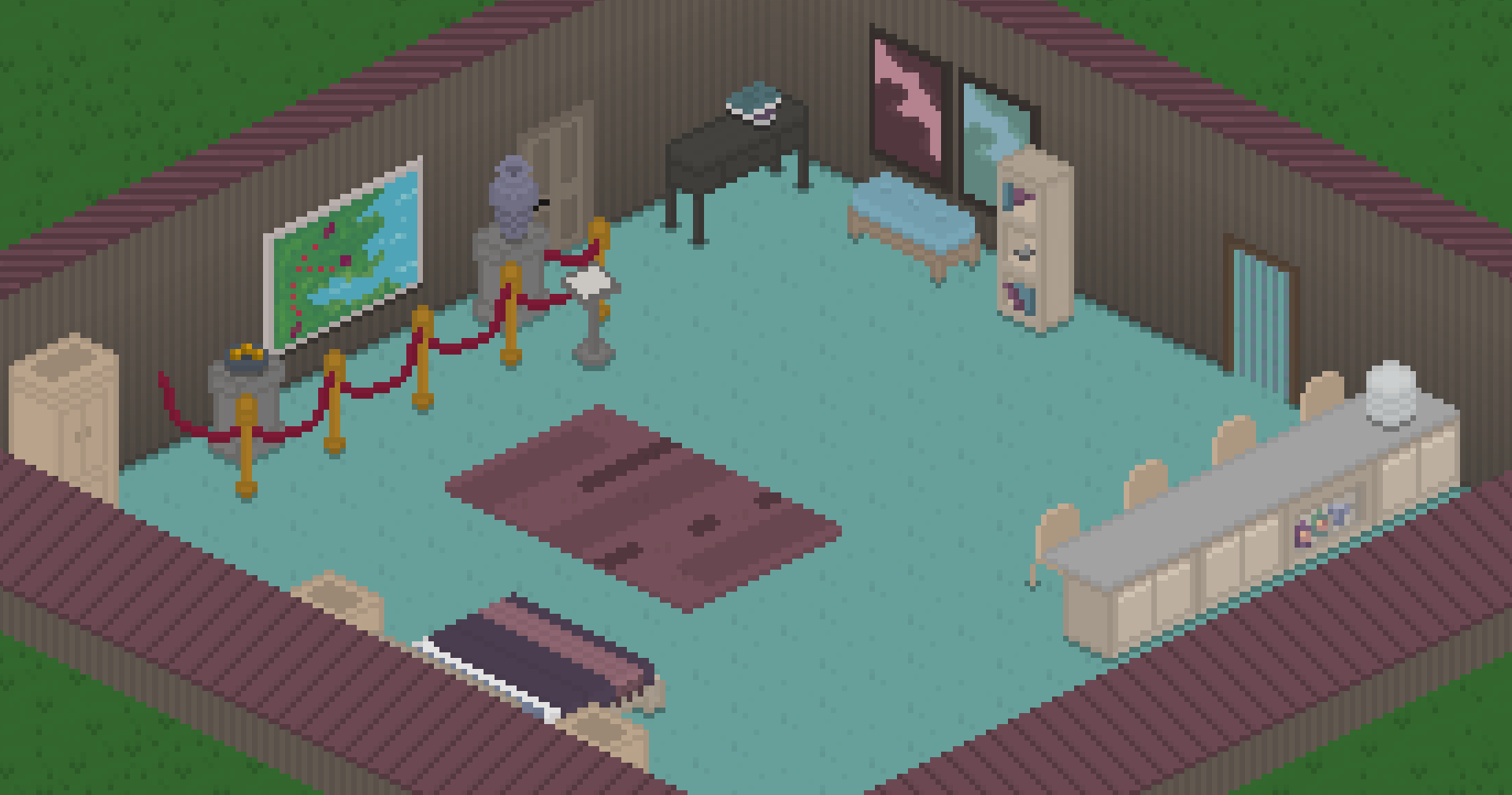
The Contemporary Complements Set contains a large amount of contemporary furniture, including beautiful beds, simple bars, boxy shelves, gorgeous pieces of art, and more. It also has the single cutest door that we've ever added into the game. It's, like, a rope curtain! Look at that!!

As part of the Set, we've also added a bunch of new museum-focused decorations, including the lovely rope fence you can see in the screenshot above. After Gindew pitched a bunch of these cute (and very customizable, by the way) art pieces to me, we decided that it would only make sense to turn them into a whole thing, which is why the next feature we'll talk about has found a place in the game as part of this update.

Oh, also: the Set contains a lot of bowls. Just decorative bowls. With various items in them. Yay?

I asked Gindew to relay his experience, and some information about his design and pixelart process, to you lovely readers. While he didn't comment on what's up with his obsession with bowls, he did have this to say:

The moment Ell approached me to make a set, I whipped out my wish-list! We quickly agreed that a timeless contemporary style would suit us best. I was personally inspired by IKEA for its flexible furniture to fit any space. As both a builder and a pastel fan, I ended up creating some neutral, minimal, but also colorful furnishings!

My process is actually really simple. I used existing objects as a base and expanded on them. This both kept the style consistent and helped keep the work quick! I highly recommend if you plan on modding, to take a look at the packed texture cheat in the game, you’ll see how all the objects are layered and how the style works.

In addition to making a full set, I also helped with the new Museum lot type. I helped create a bunch of pedestals and even an ottoman, which happens to fit nicely in the set too. I hope you enjoy these objects as much as me and Ell have in making them!


I really recommend following Gindew on his socials, as well, as he posts some lovely art from time to time, and also works on an awesome furniture mod for the game called Moar Furniture!.

Museums


In a lot of life sim games, museums end up being, well... kind of boring. Let's be honest: this first iteration of Tiny Life's museums is also still a little bland, but not only does it have some fun features that'll have your artist Tinies coming back to it again and again, we're also planning on introducing some fun additional features to them in the future.

For now, a museum is a lot that you can view art at, make your own art at, and get advice from the museum curator that roams the lot.


Of course, we already know that feeling creative gives you a massive boost to your skill building and painting speed, but that's not all! Painting (or doing any creative activity, for that matter, including woodworking) on the museum lot will actually give your skill building another 50% speed boost as well! Isn't that lovely?

Babysitters


You've been asking for it, and for good reason: Up until now, baby Tinies could be haphazardly left at home while all adult Tinies were at work or off visiting other lots.

Well, okay, that can still happen. But now, it's not the only option anymore!

Now, when you head to your phone, you'll find the new "Services..." option, and in it, the option to hire a babysitter!


A babysitter hire is a one-off action, and costs 24 tiny bucks an hour. After hiring the babysitter, they will arrive at your lot, hang out with your babies and children, and leave again when they deem appropriate. They'll stay for a minimum of five hours, and only leave when there is at least one adult household member on the lot. Of course, if you want them to leave earlier, you can always ask them to leave, as well.

A babysitter will, while on your lot, roam around and do the usual actions required of any Tiny. However, they'll have a much higher priority for interacting with your children and baby Tinies, and they'll be much likelier to take care of them over taking care of other things.


Imp-roof-ments


Ever tried to build a roof in Tiny Life, and it just wasn't really going your way? Gables got you down, so to speak?

Well, now, there's some more flexibility with roof building! Specifically, you can now make your gabled roofs (and flat roofs, too!) start at a higher point than the default, all the way up to just before the next level up.


This allows you to build much more complex roof setups, and also allows you, for example, to have a roof that starts with a gable, becomes flat, and then continues going up again.

You can access the option by heading to the roof tool and using the slider below the color selection. If you're using a gamepad, you can access the slider the same way you access the color selection: by pressing the Y button, by default!

Lot Tooltips


For the longest time, figuring out what lots did what and who lived where was... tedious, to say the least. It didn't help that, if you were colorblind or forgetful, the little outline color coding of lot types didn't really help all that much. Or at all. So we decided to get rid of it and come up with something better!

And what's better than tooltips, am I right?


Hovering over a lot, either in the household selection menu, or with the camera zoomed all the way out in play mode, will now show a tooltip with some information about the lot. Currently, this includes the lot's name, the lot's type, as well as, for residential lots, what household lives there. This should make it a lot easier to find the lots that you're looking for!

New Stings and a New Voice


A now quite long while ago, we did a poll asking players what they think about the current emotion sting sound effects in the game, and whether they think there should be additional stings for important events. The consensus was: yes, there should be! But they should have their own volume setting. And it was so!

There are now sting sound effects for important events, like getting a promotion, reaching level 10 of a skill, reaching maximum friendship or romance with another Tiny, and more. These sound effects, much like the emotion stings, were contributed by the lovely Jamal Green.

Of course, if you don't like hearing stings during important events, or you prefer these over the emotion stings, you can head to the sound options menu and change them independently of one another.

Last, but certainly not least, there is a new, third adult voice in the game now! Before, we've had Sweet and Warm, but now Soft joined the party, too! Hm, that sounds kind of gross.

The soft voice was contributed by the lovely Jason Hall, an independent voice actor who expressed interest in working with me on additional voices for Tiny Life. He did a great job, and so now you too can sound like Jason's impression of a Tiny. Or, well, your Tinies can.

The Full Changelog


Okay, that's pretty much it for this update! It turned out to be quite a lot, but Gindew and I have been working on the Contemporary Complements set for a long while now, so we're very happy to get it out to you finally.

Last but not least, as always, here's a copy of the full changelog for your perusal. As you can see, there have been quite a few small improvements and a lot of bug fixes again this time around.

Additions
  • Added the Contemporary Complements set with art by Gindew, which includes a large amount of new furniture items, art pieces, and more
  • Added the ability to hire a one-off babysitter using the phone
  • Added a museum lot type, along with a museum curator lot staff, and the ability to view art pieces
  • Added a new voice type, the soft voice, by Jason Hall
  • Added event sting sound effects for various important events by Jamal Green
  • Added the ability to adopt someone as a parent
  • Added the ability to set a height offset for roofs, allowing more advanced roof layouts
  • Added cute little ambient bee particles around flowers and flower bushes


Improvements
  • Improved center position when rotating the camera on higher floors
  • Also allow storing furniture in the household storage while on the cursor
  • Made it take much longer for family-focused people to miss their family
  • Made people get uncomfortable if they eat the same food too often
  • Display roadmap and wiki links in the main menu
  • Made people discard their held item before sleeping
  • Slightly decrease the size of the controls hints by default
  • Made the money change overlay more prominent
  • Allow making UI scale much smaller on high-res screens
  • Made lot staff types have icons
  • Move all furniture to its correct parent object spot position on load
  • Cull roof filler walls that aren't visible
  • Improved skill gain speed of the communication skill
  • Display a tooltip when hovering over lots, rather than having to guess the type by the lot's outline color
  • Improved the styling of in-world tooltips for the gamepad cursor


Fixes
  • Fixed a bed that only has the current person in it saying you're not romantic enough with them
  • Fixed TVs close to map borders causing an exception when trying to watch
  • Fixed being unable to start interactions with people on different floors
  • Fixed a crash when selecting a tile that is out of bounds
  • Fixed an exception when opening a people selection menu from a small map
  • Fixed content not being selected when switching furniture tabs using a gamepad
  • Fixed gamepad tooltips being in the corner of the screen for one frame
  • Fixed the played household's held furniture items being deleted when loading the game
  • Fixed roof filler walls z-fighting when moving the camera
  • Fixed a rogue wallpaper pixel being visible on gabled roofs in some camera rotations
  • Fixed babies being unable to eat when the only seat is on a different floor
  • Fixed people turning a weird direction sometimes when interacting with big furniture items
  • Fixed ordering from staff not failing when the staff can't be reached, causing far-away interactions


API
  • Localizers: the verbose log now displays mismatched newline characters between localizations
  • Added a proper README to the API

0.40.1

In yesterday's update, we made a last minute change to lot visitation behavior that we thought was minor but turned out to break a lot of things. Oops?

Fixes
  • Fixed played people also having to be invited in, causing them to be unable to visit lots
  • Fixed home lots not counting as visited when first spawning on them, causing people to be unable to find objects on them
  • Fixed players having to use the visit lot action for people to be able to see objects on lots

0.40.0: Lunar Grove and Populated Homes

Hi cool Tiny Life enjoyers! There's an awesome new update out now, and it features a ton of improvements and fixes (seriously, check the changelog once you're done reading this devlog), but it also has some exciting new features and a whole new map to explore.

Let's get into it!

Welcome to Lunar Grove


Picture this: You've lived in Maple Plains City your whole life, and all that you're looking for at this point is a blissful escape out of the suburbs. You consider moving to Demoville but, well, that's the suburbs too! Of course, you could explore the Steam workshop to find a new place to live, but you're looking for a very special place. One that you can relax in, one that is secluded but easy to reach, one that stuns you with its beauty at night.

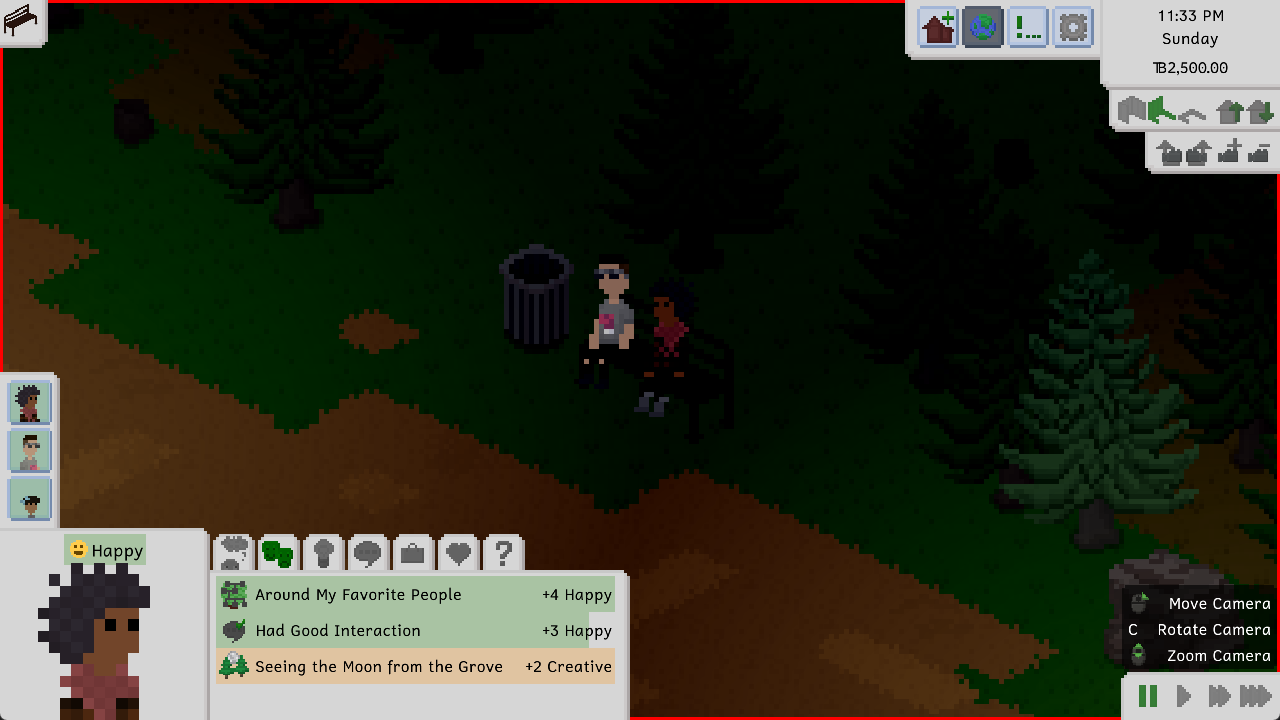
So you learn about Lunar Grove. A rural area in the middle of an evergreen forest, this small town is the perfect place for families trying to get away from the rush of the city. Once you arrive there, you look up at the night sky, the moon glowing and glistening with reflections from the sun. You're finally home, you think to yourself.


Lunar Grove is a beautiful new world that is now a permanent part of Tiny Life, and that can be added to your save file by heading to the gameplay options menu, just as any other world can be. It's a beautiful small forest town with a bar, a park, and four residential lots, two of which are inhabited, and one of which has a starter home that is ready for you to move into.


Honestly, it looks especially beautiful at night. Just look at this.


All the buildings and lot furnishings for this new world were created by the lovely Plumbella, who kindly agreed to build create buildings and populate the small park for Lunar Grove. They turned out incredible, and we are so happy and proud to have collaborated with her on this project. Thanks so much again, Jesse, for all your hard work on this.

Populate Those Empty Homes


In preparation for some other upcoming features that would have the ability to pretty quickly rid all of a world's homes of inhabitants, we've been working on a lovely new feature to be ready: The Populate Empty Homes option.


This option, which is enabled by default, but can be disabled in the gameplay options, will cause most of the empty homes in your save file to be populated automatically after a few days of in-game time, either with an exported household or with a randomly generated one.

As to avoid any problems involving a lack of beds, a lack of food, or a lack of toilets, homes will only be populated if they have a certain number of basic amenities, and only ever with families that the house can fully provide for. For example, a house with a single double bed will only be given to a single Tiny, or a pair of Tinies that are close enough to be able to sleep in a double bed together.

Randomly generated households - which are an entirely new system that we added as part of this update - can have one of several default constellations (with mods being able to add additional constellations if so desired), causing them to have meaningful and logical genealogies and relationships. As an example, there is a constellation (internally called the coparenting constellation) that is able to generate with one or two adults (who can be friends or romantically involved), zero to three children, and one to two babies, all of which can be the children or niblings of one or more of the adults.

Total Tooltip


There have been quite a few tooltip- and UI-related improvements in this update in general, but there are two major ones that we'd like to mention.

First of all, and this has been an incredibly frequently requested one, there will now be a tooltip that explains the reason a furniture item or other object cannot be placed in the highlighted location in build mode.


We hope that, with this tooltip, the reasons on why a potential home location for an object is blocked should be clearer to everyone now!

Secondly, while watching gameplay content from people playing Tiny Life for the first time, we noticed that a common occurrence was people missing important notifications because they were being overshadowed by other, less important notifications. To remedy this issue, we've introduced a whole new type of notification: a sort of center-of-the-screen splash notification that grabs your attention straight away.


In-game, it'll be used for important events like life goal updates, achievement completion, pregnancy announcements, and a few more.

Backup Management


Pretty much ever since the first public alpha release of Tiny Life came out, the game has had an automatic backup creation feature. The game would create a backup of a save before loading it, and it would create a backup of the last save before saving over it with new save data. A few updates ago, the game has also started to, additionally, create a backup every time you load a save after a game version change, or after your list of installed mods changed.

However, up until this update, there was no way to look at, edit or remove these backups from within the game, and so players had to painstakingly head into the game files and rename backup files until they got the one they wanted to load. There was also no ability for players to create backups from within the game, either.

But now, introducing the backup management screen!


You can head to the screen using the new two-folder-and-a-plus button in the Load Game menu, and it lists all of the backups that your save currently has. At the bottom, you can create a new backup, and you can use the Restore as New Save button to, well, restore any backup as a new save file. Doing so will not remove the backup, nor will it alter or overwrite your current save.

The Full Changelog


And that's about it for the major new features for this update! As I said at the top, there are quite a lot of additional improvements and fixes, and also some new cakes as well. Tasty!

If you're interested in that sort of thing, feel free to read the full changelog below. Please also keep in mind what I said in the last devlog regarding development speed going forward, since I am still enjoying and thriving at my new research assistant job.

Thanks for sticking with me, and thanks for being so kind and lovely about updates and everything else Tiny Life.

❤️ Ell

Additions
  • Added Lunar Grove, a lovely secluded forest town with buildings contributed by the lovely Plumbella
  • Added the ability for empty homes to be populated automatically with exported or randomly generated households during gameplay
  • Added a backup management screen that allows creating, removing and restoring save backups from within the game
  • Added on-screen camera zoom buttons
  • Added a few new cakes


Improvements
  • Display some important notifications as splashes in the center of the screen
  • Display the reason an object can't be placed in build mode as a tooltip
  • Display achievement progress in the achievements menu
  • Improved the look of tooltips
  • Made some foods incompatible for people who are pregnant
  • Display food restrictions when they apply, rather than when they don't
  • Moved chair spots slightly closer to their parent objects
  • Disallow children from visiting a strange household with no children in it
  • Made people discard their held item automatically before going out of town
  • Display relationship levels in the people selection menu
  • Avoid households with more household members also receiving more visitors
  • Display which items were changed in the steam content notification
  • Made people go on parental leave automatically if necessary when giving birth
  • Made people stay at home and on lots longer
  • Don't require a table for children to do homework
  • Display rooms on lower floors a bit darker to make depth clearer for open floor sections
  • Highlight the selected person more thoroughly compared to other people when using the highlight tinies option
  • Display an auto-save indicator at the top of the screen


Fixes
  • Fixed doors opening for people on different floors
  • Fixed people being allowed to use doors when they weren't invited in
  • Fixed the Maple Plains City Campers' Lane 2 living room area being inaccessible in new saves
  • Fixed a rare crash when loading a save with complex fencing setups
  • Fixed existing work relationships not improving if the ai relationships option is off
  • Fixed a rogue black pixel in the rhombus rug
  • Fixed the ability to make the UI scale so large that reverting was impossible
  • Fixed depth rendering issues for people with a lot of clothes layers equipped
  • Fixed UI blinking briefly when a person is selected using right-click
  • Fixed mail carriers and trash collectors not going home after their route is done
  • Fixed children being able to apply furniture upgrades
  • Fixed outfit previews in the character creator ignoring hidden layers
  • Fixed the cheat history storing empty strings when invoking an empty cheat
  • Fixed lots being marked as visited when walking over them, causing people to stick around lots they weren't meant to
  • Fixed removing maps from saves causing people to spawn at map borders and getting stuck


API
  • Added SimpleBehavior action, an action type that allows easily creating behavior-based actions without a custom class
  • Improved the way special action types, like talk actions and project actions, are constructed
  • Game content initialized through static constructors is now explicitly loaded in order. If a mod disrupts the order by accessing content earlier than expected, a warning is emitted.
  • Generified the color system to allow all objects with colors to have a color map and default colors

0.39.1

Improvements
  • Display a roadmap information box about household selection area colors


Fixes
  • Fixed the MonoGame About link in the credits
  • Fixed mods not being able to register actions correctly


API
  • Reverted static constructor game content loading change from 0.39.0
  • Added code documentation for changes since 0.38.0

0.39.0: An Upgrade to Your Tiny Life

Hi Tiny Life community!

It's been a minute since the last update that featured a devlog, but why that is, and why development speed will be a bit slower for a while, will be explained as part of this devlog. So don't worry, we're not ghosting on yall!!

First, though: The fun stuff! This update mainly features various improvements and a lot of bug fixes, but it also has a very exciting new feature that was never really part of the public roadmap, but was always something we'd been wanting to add: Upgrades for your appliances!

Let's Tinker and Upgrade


If you know about upgrades from The Sims, you know that they're usually applied through some skill and then allow you to either do special actions you weren't previously able to do, or they make actions more efficient somehow. Upgrades in Tiny Life do pretty much the same, but the way you discover and apply them is a bit different. Let's run you through the system!

To get started with upgrades, you first have to acquire the new Tinkering skill, which can be done by tinkering with objects. The Tinker With action previously leveled up your Repair skill, but not anymore: It now gives the new Tinkering skill instead.


Tinkering with objects still has a chance to break them, but now, it also has a chance to unlock a new upgrade you can apply to the type of appliance you're tinkering with! Unlocking the upgrade causes your Tiny to be able to install it on the appliance, as well as all other appliances that the upgrade works on.


Keep in mind that discovering the upgrade is not enough: You also have to have a Tinkering skill level high enough to be able to install the upgrade on your appliances. In addition to these two requirements, upgrades also cost a bit of money per application - usually between TB100 and TB400.


As part of this release, there are already plenty of upgrades to be discovered and installed. Some of these upgrades make actions faster and more efficient, and some add entirely new actions for you to play with. Some of them also include some fun visuals that make your objects more enjoyable to look at.

For example, check out the RGB Lighting upgrade, as well as the Advanced Configurable Shower Head upgrade:


Of course, throughout Early Access and beyond, more upgrades will slowly be added, both for existing appliances and for newly introduced ones!

Character Creator Coolness


The character creator used to have a bit of a weird layout - okay, it still has a bit of a weird layout, but at least now, the layout fits in with the game's UI style more!

Previously, the character creator featured panel-inside-panel action, which looked a bit silly and unnecessarily took up space between your Tiny and their information and clothes. Now, the entire panel is a little wider, and because there's not a panel-inside-panel thing going on anymore, there's also a lot more space for content.


We're still not 100% happy with the way the character creator looks - especially the fact that you have to remove all Tinies from the household you're creating to close it without saving - but it's slowly getting to a nicer place.

About Development Speed


You may have noticed that, over the last few months, development on Tiny Life has slowed down a bit compared to the previous year or so. For transparency, and so you don't feel like we're not giving you all the content you deserve, we want to talk about that!

If you don't know, Tiny Life is developed by a single developer: me, Ell, who is also writing this devlog post right now! While some content is created by community members, and the music is created by the lovely Leiss, pretty much everything else is done by me! As you can imagine, this is quite a big undertaking for a single person, and so getting stuff done takes quite a bit of time.

In December, a big chunk of my time has been taken up with celebrations and family, which is why development was - as with many other projects - slow over the holidays.

I am also a student (studying computer science!), and - this is really the main part - I've recently started a part-time job as a research assistant at my university, which takes up about ten hours a week, with additional time spent traveling and trying to finally figure out how git rebase works. This job has been incredibly fun so far, and it's also going to be a great way to get myself a topic and an advisor for my bachelor's thesis, so it's very important to me.

Nevertheless, I am still committed to Tiny Life and its community, and I plan on maintaining the "one major update with a devlog per month" schedule that I've been trying to stick to for the last two years. However, please be prepared for these updates to potentially be a little less major than they've previously been.

I hope you, as the community, understand, and are still excited for future updates and the general future of the game and its development!!

Tiny Lifestreams


Lastly, I want to mention a fun little thing that I've been planning on doing: livestreaming on Twitch more again! While I used to do this quite frequently (I actually became a Twitch affiliate in 2017-ish), my streams have slowed to a trickle, and I've been interested in picking it back up more frequently again.

Since Tiny Life development, and engaging with the Tiny Life community, takes up a big chunk of my free (!?) time, I plan on encorporating those things into my livestreams as well. Some of the ideas I've had are working on pixel art and code for new Tiny Life features, potentially fixing bugs and refactoring code, but also doing fun community engagement stuff like modding tutorial and custom content exploration livestreams!

If you're interested in any of that sort of stuff, you should follow me on Twitch, and then eagerly await my "getting back into livestreaming" era.

The Full Changelog


Yall are probably used to this by now, but: as always, here's the full changelog for your perusal. You can also always check it in the bottom-right corner of the game's main menu, if you want a reminder of recent changes and fixes!

Other than that, that'll all for this devlog. Thanks so much for reading, and I hope you enjoy this update!!

❤️ Ell

Additions
  • Added the tinkering skill and the ability to discover upgrades
  • Added the ability to upgrade various furniture items
  • Added a variation of the wooden stairs that doesn't have wallpaper


Improvements
  • Improved the visual style of the character creator
  • Made the family-focused personality's emotions also take close friends into account
  • Only allow admitting to romance with someone else for seven days after it happened
  • Renamed "Add a Little Something" to "Enhance Flavor"
  • Made energy loss and the chance of splinters lower when woodworking
  • Made people not stand in the same spot when multiple people visit a lot at the same time
  • Improved the Tiny Bucks logo to be more easily decipherable as TB


Fixes
  • Fixed the furniture tool considering possible parent objects on different floors
  • Fixed moving to a different map not moving people there correctly
  • Fixed a crash when moving ceiling-hung objects out of bounds using the furniture tool
  • Fixed the same map being able to be in a save twice
  • Fixed help actions not working correctly when the person is being held
  • Fixed notifications not being able to be dismissed when clicking their icon
  • Fixed object selection not working correctly on higher floors
  • Fixed objects at map borders causing a crash when checking for free interaction spots
  • Fixed an exception when the sink or baby is missing while cleaning up a baby
  • Fixed objects still being highlighted while placing stairs
  • Fixed collision issues with stairs


API
  • Game content initialized through static constructors is now explicitly loaded in order. If a mod disrupts the order by accessing content earlier than expected, a warning is emitted.
  • Made TestedVersionRange property mandatory for mods
  • Refactored particle and light property names to be more consistent

0.38.4

Additions
  • Added pantyhose and semi-transparent pantyhose leg accessories
  • Added leggings for adults and children


Improvements
  • Automatically populate Steam item descriptions with data from the shared item
  • Use the household split panel when inviting someone into your household
  • Made it more difficult to die from being too brewed
  • Display untested mods info as a proper warning popup so players miss it less easily
  • Removed the name "Nazi" from the naming database. Being a reasonably popular middle-eastern/asian name, it was part of the database of popular international names Tiny Life used. Because of obvious connotations, we've decided to remove it.


Fixes
  • Fixed an issue where Tinies with partners that aren't in the world are inconsistently marked as single
  • Fixed an error when trying to move a Tiny to their home location but there aren't any empty spaces around
  • Fixed being able to change your pronouns in a language that doesn't include them
  • Fixed Tinies thinking they'd reached their destination already when being on a different floor
  • Fixed being able to add the same map to the list of maps in a save twice, causing a crash
  • Fixed an exception when putting down a painting on the easel you're about to start a new painting on
  • Fixed being able to walk through stairs in certain situations


API
  • Added leg accessory clothing category
  • Allow mods to add custom names to name collections
  • Added GetRooms methods to Map and Lot