
- Update Oculus SDK to 1.30.
- Add "Invert Y" option back to the Aiming settings, which was removed by accident.
- Fix match browser saying "No matches found." instead of "Refreshing..." while refreshing.
- Add error screen if server process fails to launch.
- Add HAPTICS menu in settings with vibration STRENGTH and FADE.
- Tune haptics on WMR controllers.
- Fix crash that could occur in the server networking under certain conditions.
- Players with Mic volume muted can now still transmit gestures to the video chat.
- Animate mouth on Pilot customization screen.
- Fix frame hitch when grabbing or releasing radio.
- "STICKY" grip mode. Tap the grip to latch on and let go, OR hold the grip and release to let go.
- Add strong rotation bias to eject handles to avoid grab conflicts with other controls.

Vox Machinae
Patch Notes - 0.27.16 alpha
Patch Notes - 0.27.13 alpha
- Fixed bug which caused projectiles (cannon, railgun, missile, bullets) to not be associated correctly with the target they hit. This caused a number of issues including impact visuals appearing inside/behind the target, damage texturing not updating, combat music not playing, and cockpit shake/haptic feedback not triggering when taking hits.
- Increase mid-range damage of Lasers. Before: 500m = 60%, 750m = 30%. After: 500m = 80%, 750m = 45%.
- Catalyst receives a 25% bonus to heat dissipation.
- Changes in this patch require an update to servers, which will happen at different times depending on location.
Patch Notes - 0.27.11 alpha / 0.27.12 alpha
- Fix server browser menu freeze if trying to select an option before it finishes opening.
- Preliminary support for Razer Hydra. May not work properly yet.
0.27.12 alpha - October 8, 2018
- Fix bug that prevented launching training missions or creating a match if the install directory had an apostrophe in it, such as C:\Bob's Games.
- Prevent irrelevant XInput warnings in log file.
Patch Notes - 0.27.10 alpha
- Add "Aggressive" blinder mode for extra comfort.
- Hide radio model on pilot customization screen.
- Mirror pilot on the customization screen.
- Increase Grab threshold to make it easier to blind-grab cockpit controls.
- Add RESET option in the Controls menu.
- Add "Reticle Offset" option to set the reticle off-center vertically 2, 4, or 6 degrees.
- Fix networking error that could cause the server to become unresponsive. (rolling out to dedicated servers on version 0.28.0)
- Add more communication with server during level loading and increase max allowed loading time before being disconnected from server to avoid problems for players on spinning hard drives.
- Add visual cues to show that some radial menus contain more entries and can be scrolled.
- Fix virtual nose turning transparent during training.
Patch Notes - 0.27.9 alpha
- Fix unresponsive pilot customization screen when player has non-ASCII characters in their name. These characters will still not display correctly for now, but the game will behave properly.
- Fix a few very rare errors that probably nobody noticed. :tgrin:
- Fix error that could cause some controllers to not read analog input properly.
- Workaround for Oculus SDK bug that prevented haptic feedback on Oculus Touch controllers as well as occasional crashes when launching the game.
- Fix missing LOADOUT and MODIFY icons on the respawn menu.
Patch Notes - 0.27.8 alpha
- Fix WMR headset placed too high and needing to be recalibrated every run. WMR players will need to hold the menu button in-game to calibrate the headset one time, and this calibration will now be remembered between runs.
- Remove function of holding the Scope button to take a screenshot to prevent accidental taking of screenshots during gameplay. High-res screenshots can still be taken with the F5 key.
- Fix error that could prevent the player grid from displaying properly.
- Fix error that could prevent AI speech from playing.
Patch Notes - 0.26.0 alpha to 0.27.7 alpha
- Little buildings now destructible.
- Achievements added.
- Prevent entering Spectate while the screen is fading out, which could result in black screen until menu button was pressed.
- Optimize performance of Bloom effect. (bloom ~25% = overall ~2%)
- Improve the spotlight effect in Training to help catch player's attention if they are looking away from the focus point.
- Add "-wipe" command line option to reset loadouts.
- Increase default VR super-sampling to 1.2x for 8GB GPUs.
- Reduced default music volume.
- Simplify menu in training missions.
- Optimize debris effects.
- Add dynamic resolution option.
- Fix bug that caused dropped frames while moving through the map.
- Training missions and offline matches now pause when: removing Rift headset, opening Oculus overlay, or opening SteamVR overlay.
- Fix stuttering when loading into map
- Fix stuck on black screen after first time calibrating headset.
0.27.0 alpha - September 18, 2018
- Added developer credits.
- Factories play sounds when captured in Stockpile mode.
- Add filters to the server browser, with options to hide Empty, Full, Dedicated, and Player Hosted servers.
- All Grinders except Goldrush can receive damage when their torso collides heavily with terrain or other objects.
- Drill can more easily kill. It's quite a thrill.
- Add Communication training mission.
- AI buddy only moves sometimes.
0.27.4 alpha - September 24, 2018
- More accurate aiming of turret-mounted weapons. (Goldrush, Drill, roof weapons on Dredge)
- Added auto-reconnect for players who are connected when the servers need to restart (every few days or so).
0.27.5 alpha to 0.27.7 alpha - September 26 - 29, 2018
- Added Vive Pro controller support.
- Added NOLO VR controller support.
- Added Knuckles EV1.3, EV2.0, EV3.0 support.
Jet Set Aerial Future
Jumpjets as a blunt Weapon
Since Vox is entirely physics-driven, we’re able to leverage jumpjets in ways most other games can’t. Take Goldrush for example, its built-in cowcatcher together with an extra pair of jets gives it a unique physically-forward punch. Able to ram at double the speed, it can take out an enemy with a single crafty trajectory. Aim too high however, and good old physics will teach you that you can’t survive so good without a set of legs to stomp on. Other grinders can get in on the collision action too using their bodies and jumpjets to forcibly remove enemy limbs.
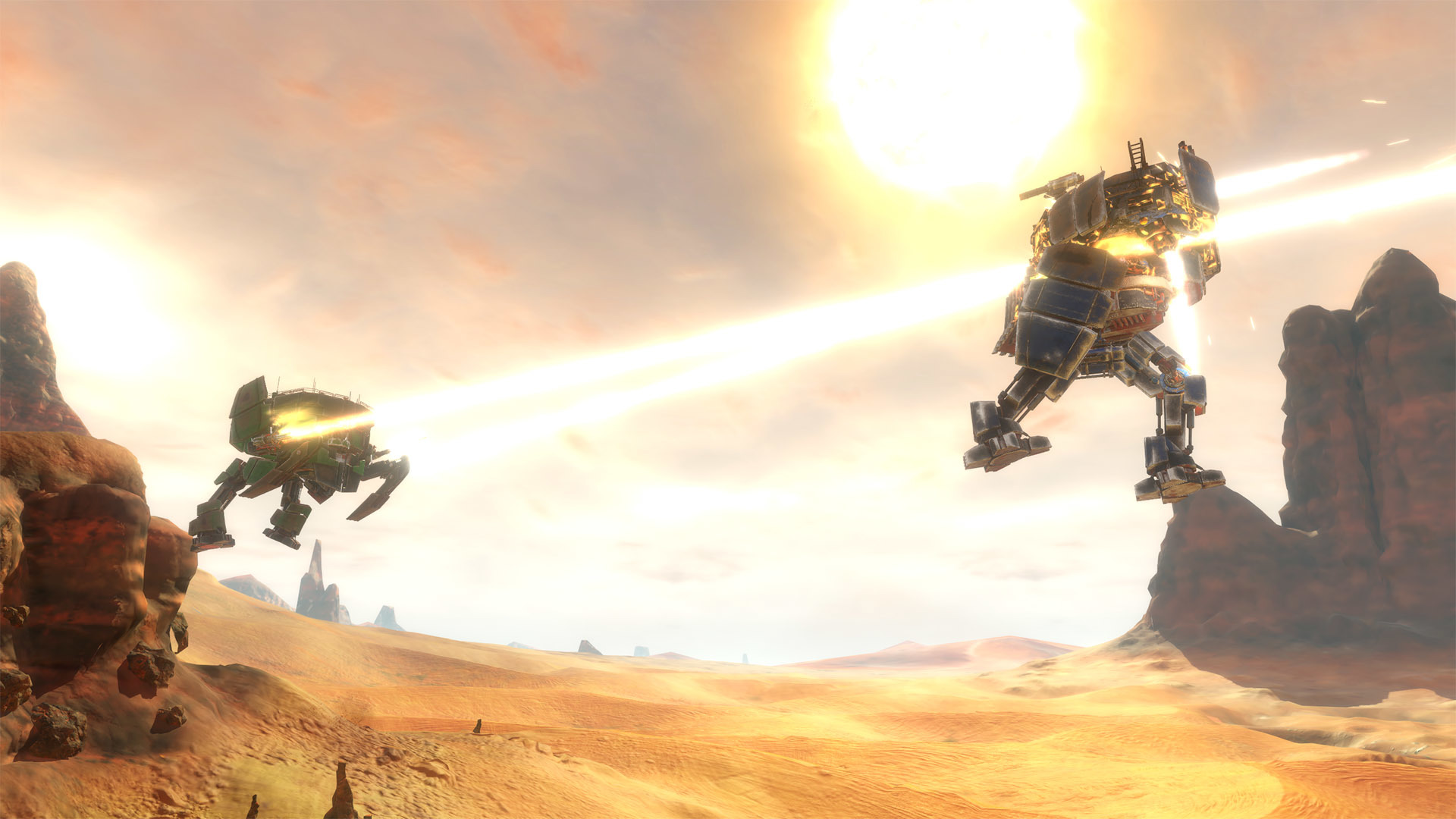
Jetting to high ground
The battlegrounds in Vox Machine were built to be vertically exploited with the use of jumpjets. Perch atop the biggest rock at the center of all the action on the Serpent Plains, or seek a spikey shelter between the spires of Pierced Valley. Using your fuel wisely is key since limited fuel supply means you have to be careful where you take it to zero. And although it will self-recharge over time, you don’t want to be stranded too long without fuel in a sticky situation.

Jumpjets for a tactical advantage
And it’s not just about getting from point A to B either. Use a lighter grinder’s jumpjets to arc swiftly around to Goldrush’s weak back-plating, or try death from above on a Catalyst’s exposed head. Another tactic when faced with an incoming Goldrush is to simply jet out of the way, bruising their ego and armor plating in the process.
One standout Grinder with purpose-built jumpjetting is Drill. While it’s fuel capacity is small like its svelte physique, it can recharge like nobody’s business, enabling it to hover effortlessly. Not only that, but it’s built with unique upward firing jets that will propel it down for a punishing drill attack or a timely air dodge.

Built to complement our grinder’s lumbering pace, jumpjets offer exhilarating maneuverability that’s fun to mess around with and a challenge to master. Vox Machinae will be blasting through the Early Access gates real soon, so keep watching the skies for more info to come.
Crossplay, the Vox Way

As you may very well know, Vox Machinae is built from the ground up to be a VR-first title. What you may NOT know, is that it's also being designed to play wonderfully on flat screens such as the one you’re looking at right this moment. Naturally over the course of development we got to thinking, what if both our VR and non-VR folks could all play together? So that’s exactly what we set out to do, carefully balancing the pros and cons of each platform so they could compete on the same skill level while retaining the advantages of each.
Speaking of platforms, we’re supporting all the major PC VR headsets at launch, specifically Oculus Rift, HTC Vive, and now Windows Mixed Reality. And we didn’t stop there, players who purchased Vox Machinae on the Oculus Store will be able to play with players who own the game on Steam. Finally a game that can settle the age-old VR platform debate via giant robots with rockets and frickin’ laser beams.
With so many platforms, controlling those giant robots had to cover a wide range of input devices. As VR progressed through the years from curiosity to the consumer market, the way players controlled VR games went through many iterations too. From fumbling around for your mouse/keyboard on DK1/2, Xbone gamepad’n it at Rift’s launch, to motion controls with Vive/Touch, We’ve developed through (and learned to support) it all. Seriously, by this point we think it’s safe to say that we’re likely the longest in-development VR title to date. So one of the happy accidents that came with the territory was incorporating all those control schemes along the way, meaning you can play whichever way suits you best.
So no matter HOW you or your friends choose to Vox Machinae, you’ll be able to fight together when it launches later this year in Early Access form.
Patch Notes - 0.25.2 alpha
Behold, it improveth.
- Write screenshots to disk in the background, greatly reducing the pause that happens when a screenshot is taken (by holding down scope button).
- Fix mouse aiming not being affected by Invert Y control option.
- Detached limbs of any team will highlight with a neutral color.
- Improve spawning of objectives, which were sometimes appearing in the wrong location.
- Add -reset launch flag to reset all game settings to default.
- Improve detection of monitor native resolution (used as default).
- Enable asymmetric rendering on Oculus Rift for increased performance ~10%.
- Stabilize shadows to prevent shimmering/flickering when moving and looking around.
ːsteamsaltyː
:2016snocone: