X4: Foundations cover
X4: Foundations screenshot
Linux PC Steam Gog
Genre: Simulator, Strategy

X4: Foundations

Multiverse Team Seasons: Public Beta now available

Our new Multiverse Team Seasons Public Beta is ready for you to test. In this evolution of the earlier ventures feature you will get access to multiverse ships, and other exclusive rewards, by joining a coalition and embarking on exciting asynchronous team-based operations. With the brand-new Multiverse Team Seasons we're expanding the social aspect of X4: Foundations. You can now join a coalition, interact with your teammates and, most importantly, pursue a common goal as a team.


Please find an extensive FAQ and step-by-step guide below.
>> Multiverse Team Seasons Public Beta Forum

Earn team loot, such as exclusive limited ships


At the end of a successful Season, loot will be distributed among your team. Rewards can include exclusive ships and paint mods, not available elsewhere.
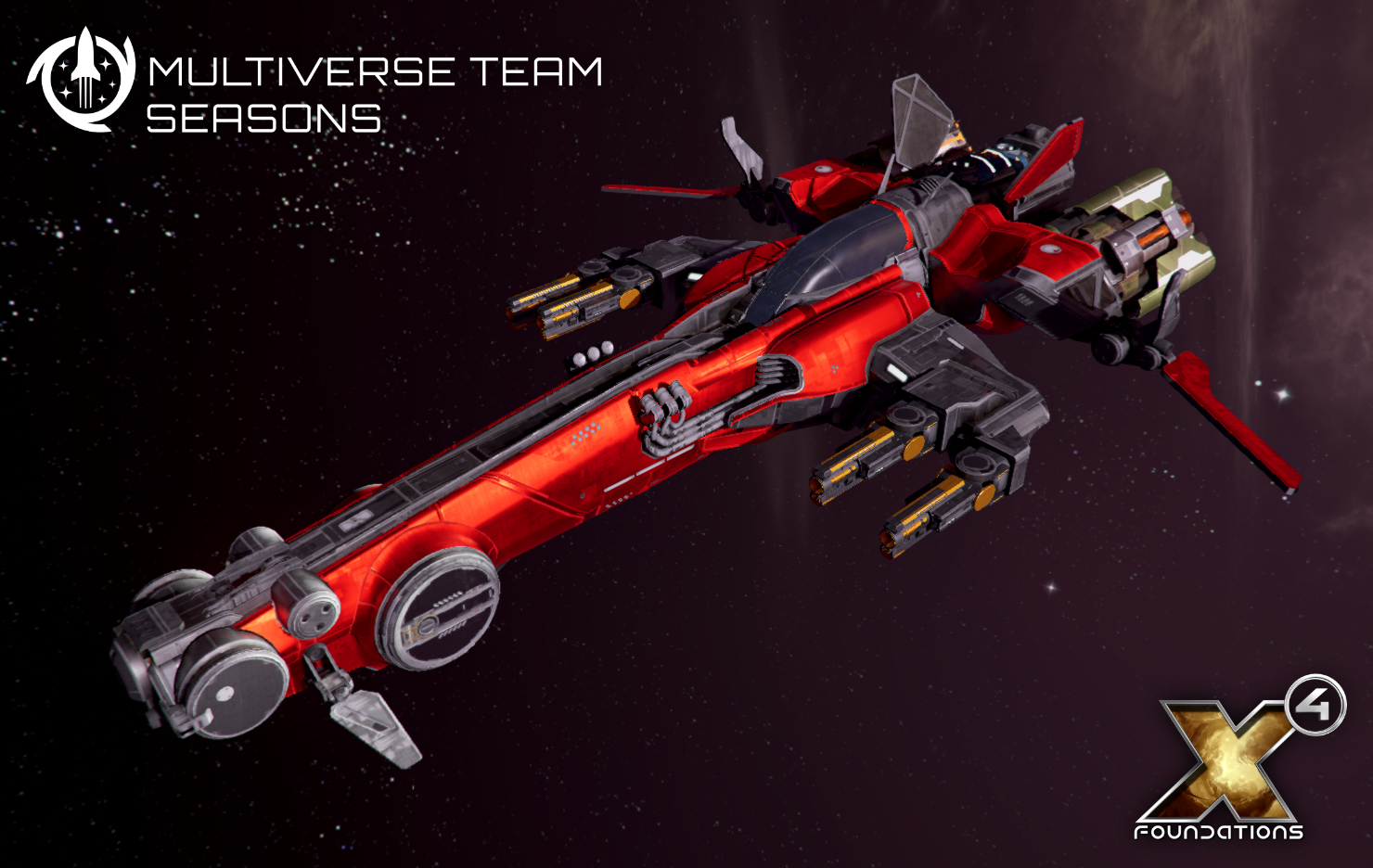


The Yasur (pictured above) is a light fighter that will amaze you with its agility and speed. But don't let its small size mislead you; for a ship of this class, it is extremely well-armed and powerful. You can expect Multiverse Team Seasons reward ships to have quite an impact, so you'll only be able to have a limited number of them in your game, and no blueprints will be available.

Every player joining a team will earn at least one ship at the end of a Season, but the better your team the more loot you can gain!

Warning: any savegames created with this Multiverse Team Seasons Public Beta will NOT be compatible with the current public version of X4 (6.00).


FAQ


How do I join?
We've prepared a step-by-step guide to explain how to join the Multiverse Team Seasons Public Beta. It is included beneath this FAQ section.

How are Teams and Coalitions formed?
To join a Season for the first time, you will need to choose which Coalition you want to side with. Coalitions are political groups in the X multiverse, and to start with there will be a choice of two. When choosing one coalition over the other, you will be deciding who your enemies are.

The next step is to choose your inner circle, in other words your Team. Teams are groups of players who have all joined the same Coalition, and who will pursue a common team goal by playing missions or online Ventures.

Building a Team can be as simple as joining a random one, or alternatively you can set up a party and invite friends. You will be able to send invitations to your friends, so that you will end up in the same Team, but any remaining free slots within that Team will be filled up automatically with other players.

How does my Team win? How is the score tracked?
By completing Ventures in the Operational Goal chapter, you will earn Team Shares. These will count towards the Season score, not only for your Team, but also for the Coalition you are associated with. At the end of the Season, the accumulated rewards are handed out to the Team - it's loot time! The more successful you, your Team, and your Coalition were during the Season, the more interesting the loot.

What does a Season look like? How long will a Season last? What can I get out of it?
During this Public Beta, a Season will last for approximately two months. During this time, players will play to increase their rank within a Team, as well as globally within their Coalition, and to achieve common goals. By contributing to your Coalition's win during a given Season, you can gain access to unique multiverse ships.

A Season is broken down into Operations; you can think of an Operation like a chapter in the overall story of a Season. Each Operation offers a selection of missions and online Ventures.

What are online Ventures? How do I play during a Season?
Each Season brings with it new missions, similar to those you know from the X4: Foundations plot. The Season also offers online Ventures, which are played by sending your ships into the multiverse. Ships at your Venture Dock can jump into the multiverse to visit other players' universes. Online Ventures can take anywhere from a few minutes to several hours to complete. During a single online Venture, your ship may travel to many different players' universes. These online Ventures are essentially tasks that your ship executes while in these universes, and can include attacks against opposing players. For example, your ships might attack stations or ships belonging to your rival Coalition, or they might support your own Coalition's forces.

Both local missions, that you play by yourself, and online Ventures can increase your standing within your Team, and may also increase your Team's chances of earning more loot at the end of the Season.

The Operation Overview menu shows which missions and online Ventures (marked with a red "v" icon) are available to play. You can also see which Ventures are currently being played by your teammates on the Multiverse Map.

Will I be able to play an unlimited number of online Ventures per Season?
There is no fixed limit; the limiting factor is the time taken by each online Venture. A single Venture Dock can only host a single ship at any one time, so if an online Venture takes an hour, the dock is blocked for that length of time. By using Brane Fuel, you can accelerate your Venture and finish them faster.

What is Brane Fuel, and how does it work?
Brane Fuel is a resource that your ships can mine in the multiverse. Brane Fuel can then be invested to accelerate your Venture, helping to complete them faster.

Will Multiverse Team Seasons feature stories or generic missions?
Yes! The idea is that each online Season can bring new stories, and new unique items, including exciting ships and upgrades.

Why can't I join Multiverse Team Seasons with my modified savegame?
Multiverse Team Seasons are a competitive activity, allowing you to make use of some of your achievements in your local universe to help in your online fight against other players. For this reason, we cannot allow modified games that potentially change the game balance, or give a player an unfair advantage.

As mentioned in the build up to the 6.00 release, we are looking into signing a selection of popular quality-of-life mods, so that activating these won't flag your game as "modified" any longer, and thus would give you access to Multiverse Team Seasons. This, however, is an ongoing process, and we will update you on it as decisions are made.

We apologise for any inconvenience this may cause some players, but we would like to encourage everyone to try out the Multiverse Team Seasons with an unmodified savegame. This does not prevent you from playing modified games in offline mode.


Step-by-step guide on how to join the Multiverse Team Seasons (Public Beta)


Step 0: During the Public Beta phase - join the mts_public_beta
  • Make sure that your savegames are backed up!
  • To start using the Public Beta version, right-click X4: Foundations in the Steam client
  • Select Properties and go to the Betas tab
  • Enter the password IBackedUpMyOfflineSaves
  • Select mts_public_beta from the dropdown list
  • To return to using the non-Beta version, select NONE from the same dropdown list
Step 1: Create an Egosoft forum account and register your game
Create an Egosoft (forum) account at https://forum.egosoft.com/
Afterwards, register your game by following these platform specific instructions:

Visit https://forum.egosoft.com/ucp.php?i=-egosoft-settings-ucp-gamereg_module&mode=gamereg and click the "Sign in through Steam" button. Follow the process and sign in using your Steam account. Your copy of X4 should automatically show up in the list of game registration codes.

Step 2: Enable the Multiverse Team Seasons updating mechanism in X4: Foundations
In the X4 main menu, visit the "Online Features" menu and enable the "Check for Downloads" entry. This must be enabled for the automatic updating mechanism to download and verify the Multiverse Team Seasons data on gamestart.

Step 3: Log in using your Egosoft (forum) account
In the X4 main menu, select "Online Features" and log in using your Egosoft forum username and password.

Step 4: Load any of your existing (unmodified) X4 savegames or start a new game

Step 5: Build a Venture Dock and Venture Platform on a station
Building the dock is a relatively cheap and quick process, and once it is finished you have a shiny new Venture Dock. You can visit the Venture Platform from any elevator on this station, and from there you can see and control the dock.

Step 6: Convert your savegame to an online save
Selecting the "Show Multiverse Map" button in your game will trigger a message asking you to convert your savegame into an online save. This is mandatory to participate in Multiverse Team Seasons. There can be only one online save at a time on your account.

Step 7: Join a Coalition
This is as simple as pressing a button, but you should first read what each Coalition has to offer for this season. The stories and rewards shown here can change from season to season.

Step 8: Join or create a Team
Joining a Team can be as simple as clicking on the Join Random Team button, but you can also choose to create a party or accept invitations from your friends, in order to play with people you know.

You are now all set and ready to play local missions, as well as online Ventures with your teammates, and battle for the rewards the multiverse has to offer.
Update 6.00 HF 1


  • Fixed missing voices for some characters in French and German.

X4: Kingdom End and major 6.00 Update now available

The time has come! You can now update your X4 to the brand new 6.00 version and, with the purchase of X4: Kingdom End, embark on a new and captivating chapter of X4. A long-awaited reunion with the Boron is in store for you - be prepared for unique ships, distinctive systems, old secrets and new acquaintances!
https://www.youtube.com/watch?v=IdLuSIB76UA
https://store.steampowered.com/app/1990040/X4_Kingdom_End/

New X4 Bundles


We're celebrating this gathering of all the familiar species of the X universe by putting together two new X4 bundles:
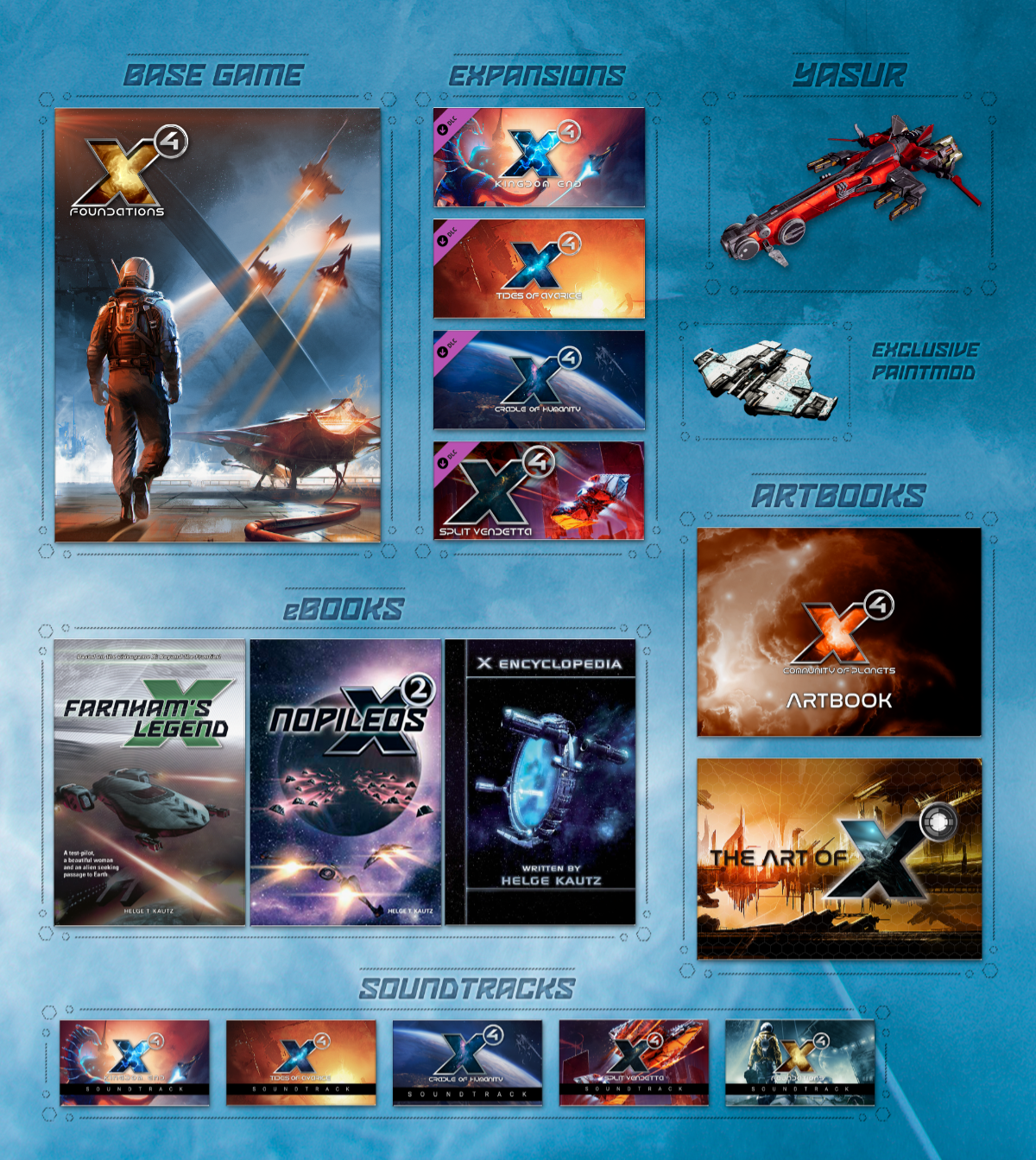
While the Community of Planets Edition is quite self-explanatory, in that it includes only game content, we have a summary image for the new Collector's Edition that shows you what's included:


You can find more detailed descriptions on the new X4: Community of Planets Collector's Edition bundle page. We thank you in advance for your support!

6.00 Update


The free major 6.00 update for X4: Foundations introduces some significant improvements. You can find the complete changelog at the end of this news, but we would like to highlight a few individual points:

🪐 X TECH 5
While integrating the next generation of our graphics engine with several big visual improvements (details below), as well as a new, more powerful physics engine with performance and feature improvements, we're also maintaining savegame compatibility for X4.

🪐 New physics engine
Experience the thrill of space more than ever before in X4: Foundations, with the integration of Jolt Physics into X TECH 5. Whether you're navigating an asteroid field, docking at a space station, or engaging in combat, Jolt Physics adds a new level of realism and immersion to every moment of gameplay. You'll feel the full force of acceleration and deceleration as you pilot your ship, and every collision will have a tangible impact. In addition to enhancing the overall gameplay experience, the integration of Jolt Physics also brings about performance and feature improvements to X TECH 5.

🪐 Improved lighting
The main goal with the new lighting engine in X TECH 5 is to improve natural-looking sunlight in space. More vibrant colours, higher intensity suns, and a wider range of interesting lighting moods. X TECH 5 gives us many new tools to achieve this. Reflection probes greatly improve lighting situations inside cockpits, bridges and on stations, and seamlessly integrates with the screen space reflections introduced in a previous version of X4. You will also note that the shadow-casting in X TECH 5 has massively improved. This greatly helps in producing more realistic visuals at greater distances.


🪐 Introduction of parallax occlusion mapping
With the inclusion of parallax occlusion mapping, X TECH 5 features a technique that allows us to add extra detail and depth to surfaces in the game. This is achieved by using a special type of texture that encodes information about the height and shape of a surface, which is then used to create the illusion of 3D depth and detail. As a player, you can expect to see a noticeable improvement in the realism and immersion of surfaces in the game, as parallax occlusion mapping allows us to add subtle details and depth that were not previously possible.

🪐 Position Defence
The new Position Defence feature in Update 6.00 allows players to have a single carrier-led fleet defend multiple locations while maintaining its streamlined support structure. Individual subordinate groups within the fleet can be assigned to protect specific locations, and will patrol the area until they need to return to the carrier for repairs or resupply. Additionally, these subordinate groups can be set to support other groups in the fleet if they come into contact with threats. This allows for flexible and dynamic defence of multiple locations with a single fleet. We can't wait for you to try out this new feature and see how it enhances your gameplay experience.

🪐 Live Stream camera mode
Live Stream is a brand-new camera mode in X4: Foundations that brings you closer to the action. Once activated, by hitting F6, Live Stream mode allows you to watch interesting events and scenes unfold in your game in real-time. Whether it's an epic space battle, a bustling space station, or a beautiful nebula, this new mode has you covered. One of the best things about Live Stream mode is that it automatically switches between scenes, so you never have to worry about missing out on the action. You can sit back, relax, and enjoy the show, as our new camera mode takes you on a tour of the most interesting moments in your game.

🪐 New builder ships are here
In the 6.00 update for X4, the existing builder ship model for the Paranid and Teladi will be replaced by the following new models:

HERACLES (Paranid XL builder ship)


ALBATROSS (Teladi XL builder ship)


If you own the X4: Split Vendetta and / or X4: Cradle of Humanity expansions, you can also look forward to the following new models:

ELEPHANT (Split XL builder ship)


KYUSHU (Terran XL builder ship)


6.00 Update (New / Added / Improved - full changelog linked at the bottom of this news)


  • New Feature: Updated graphics engine, with Parallax Occlusion Mapping, Reflection Probes, enhanced lighting, improved shadows, and more.
  • New Feature: Jolt Physics engine.
  • New Feature: Live Stream camera mode.
  • New Feature: Position Defence for carrier-led fleets.
  • New Feature: New Construction Vessel designs for Paranid, Teladi, Split and Terran factions.

  • Added new bombardment assignment for subordinates.
  • Added command to order ships to attack surface elements on designated targets.
  • Added Salvage at Position and Deliver Salvage commands for use with repeat orders.
  • Added self-destruct command for player-owned satellites, resource probes, nav beacons, lasertowers and mines.
  • Added detection and penalty for theft from station build storage.
  • Added more gamestart information, indicating whether they are Tutorial, Guided, Assisted or Sandbox, and adjusted order.
  • Added option to edit Buccaneer relations in Custom Gamestart Editor under certain circumstances.
  • Added Custom Gamestart Editor story states for Tides of Avarice stories.
  • Added player HQ to Station Design Simulator.
  • Added Supervised Mining missions.
  • Added Kha'ak-specific Destroy Station missions.
  • Added extra Signal Leak missions for factions foreign to station owner, allowing player to earn reputation for Vigor Syndicate at Teladi stations and for Fallen Families at Free Families stations.
  • Added news banner to Start Menu.
  • Added hint for missing research to Equipment Mod Workbench menu.
  • Added button to force station build to complete instantly in Station Design Simulator.
  • Added visual hint for destroyed ships in Transaction Log menus.
  • Added links to Object Information and Object Transaction Log from entries in Transaction Log.
  • Added hint about trade entries in Transaction Log to Logbook.
  • Added order descriptions to Interact and New Order context menus.
  • Added mappable hotkeys for deploying objects such as Satellites and Laser Towers.
  • Added mappable hotkeys for giving and aborting player squad attack order.
  • Added option to hold Shift while dragging on map to move orders vertically.
  • Added support for PageUp/PageDown in menu dropdowns.
  • Added search functionality to Controls menu.
  • Added transform gizmo to station editor.
  • Added double-click on module in Station Build menu to focus camera on module.
  • Added shortcut to Manage Plots menu to console in Station Design Simulator
  • Added surface elements of environment object to Next/Previous Target selection.
  • Added warning if NPC-owned ships are about to undock with player on board.
  • Added option to allow player-owned ships to deploy laser towers in response to attack, inspection by police, or pirate harassment.
  • Added conversation option to return to normal duties when talking to pilots belonging to player faction.
  • Added option to cancel multiple construction orders at once.
  • Added options to pre-configure blacklists and fire authorisation overrides when building ships.
  • Added station construction menu help information when expanding HQ for storage relevant to research.
  • Added ship size information to Encyclopedia.
  • Added descriptions to many items in Encyclopedia.
  • Added information about long range scanner range and scan area to Encyclopedia.
  • Added distinction between enemies and hostiles to Encyclopedia faction entries.
  • Added distinction between friendly and allied relations to target monitor.
  • Added more relation perks to Factions and Relations menu.
  • Added option to ignore cargo space reservations when setting up trade loops.
  • Added option to exchange captains when transferring crew.
  • Added possibility to override faction logo per fleet.
  • Added modified hint to Continue Game option in Start menu.
  • Added mission highlight to transporter room button and other elements.
  • Added some landmark stations to Encyclopedia.
  • Added player relation details to Encyclopedia faction entries.
  • Added tooltips explaining Allies, Enemies and Hostiles lists in Encyclopedia.
  • Added tooltips with relation name to Faction and Relations menu.
  • Added Optimal Workforce information to Build Module Encyclopedia entries.
  • Added information about claiming sector ownership to station module Encyclopedia entries.
  • Added engine check light to indicate reduced engine functionality to HUD.
  • Added hull bar animation when receiving damage.
  • Added mission arrow towards platform guidance if not on screen.
  • Added animation when selecting target.
  • Added several new achievements.
  • Added new ultra shadow quality option.
  • Added race-specific command consoles.
  • Added Tides of Avarice soundtrack to Station Design Simulator playlist.

  • Improved Argon Federation and Godrealm starting relations with player in The Untested Explorer and The Accomplished Scientist starts.
  • Improved Terran Cadet transition into Defenders of Sol mission.
  • Improved Find Resources missions by adding guidance sphere and increasing reward according to how many Resource Probes player will probably need.
  • Improved Deliver Inventory missions by adding option to deliver all matching items at once.
  • Improved Build Station missions by diversifying requirements for defence platforms.
  • Improved Scan mission rewards and accuracy of displayed difficulty if target is hostile.
  • Improved The Fate of the Yaki mission by spawning reward lockboxes in safer location.
  • Improved balancing of Kha'ak Mining Escort Mission difficulty.
  • Improved balancing of some Terraforming projects by making them resilient against setbacks from events such as quakes.
  • Improved room variety for certain missions.
  • Improved Give Seminar conversation choice.
  • Improved placement of data leaks to claim abandoned ships.
  • Improved dock position tolerance when flying capital ship without docking computer.
  • Improved undocking behaviour in certain dock areas.
  • Improved presentation when sharing transporter room with NPCs.
  • Improved Zyarth economy to counter it being overrun by Xenon (affects new games only).
  • Improved faction defence station loadout selection when responding to aggression.
  • Improved fighter combat movement against large targets.
  • Improved coordination within fleets during attack.
  • Improved behavior of ships fleeing from attacks.
  • Improved MoveWait fleet behavior immediately before performing attack.
  • Improved combat behavior of ships in fleet with carrier or fleet auxiliary ship.
  • Improved carrier behavior in combat if all fighter subordinates are on detached assignment.
  • Improved police response to EMP bombs being lobbed at policed stations.
  • Improved ships fleeing Tide when far from any neutral station.
  • Improved handling for attempting ware exchange where transport drones are needed but unavailable.
  • Improved amounts sold by free traders and miners when only selling, particularly across multiple sectors.
  • Improved ship behaviour when colliding with other objects, especially at narrow dock area exits.
  • Improved behaviour of deployable objects such as satellites and nav beacons by limiting effect of forces from anomalies and Tide.
  • Improved S/M ship undocking from build modules.
  • Improved ware exchange between ships and stations to prevent undocking if order starts while ship docked and station doesn't yet have wares to transfer.
  • Improved missile damage and ammo consumption simulation when player not present.
  • Improved capital ships using forward-mounted guns in combat when player not present.
  • Improved accuracy of multi-barreled beam turrets firing at missiles.
  • Improved capital ship transition through jump gates and accelerators.
  • Improved approach to target in preparation for launching boarding pods.
  • Improved reliability of attack subordinates engaging commander's target.
  • Improved resupply behavior to allow ships that have loadout level of 0 to automatically get repairs as needed.
  • Improved decision-making for when commanders recall subordinates upon receiving move order.
  • Improved responsiveness of attack subordinates when commander attacks new target.
  • Improved explicit command Attack Surface Elements by preventing ships ever firing at target's hull intentionally.
  • Improved collection of multiple drops in same area by multiple ships.
  • Improved signal and data leaks on stations to be in more varied locations.
  • Improved container magnet making pickups much more reliable.
  • Improved behavior of missile-armed fighters attacking stations or capital ships.
  • Improved cohesion of travelling fleets when player is not present.
  • Improved notification and logbook entry for player-owned ships and stations being destroyed.
  • Improved presentation of out-of-stock items in Ship Upgrade menu.
  • Improved estimated arrival time of incoming deliveries.
  • Improved ship upgrade by allowing multiple ships with equipment from another race to be upgraded if all ships share same equipment.
  • Improved factory icons to indicate produced ware.
  • Improved Options menu by making it full-screen.
  • Improved messages in message ticker and logbook for attacked or destroyed player property.
  • Improved control mode messages to be informative rather than commanding.
  • Improved visuals when showing in-game scenes on target monitor.
  • Improved HUD visualisation when enemies enter weapon range.
  • Improved storage type colours in Logical Station Overview to match module design better.
  • Improved display of turret group modifications in Object Loadout menu.
  • Improved visibility by decreasing brightness of window dirt at border of cockpit glass.
  • Improved matching of corridors to rooms on Argon stations.
  • Improved pilot chair in Terran ships.
  • Improved transporter room visuals.
  • Improved readability of stars for NPC skills.
  • Improved reflections on cockpit glass.
  • Improved impact and muzzle sounds for various weapons.
  • Improved thruster sound volume to be less obtrusive while maneuvering.
  • Improved sound occlusion in interiors.
  • Improved high and ultra graphics presets to include screen space reflections (change only applied when reselecting preset).
  • Improved deadzone in default input profiles for gamepads by reducing it from 50% to 10%.
  • Improved game startup time, and time for loading and saving savegames.

>> Full Changelog

6.00 RC3 now available

6.00 RC3 Changelog:
  • Improved ware exchange between ships and stations to prevent undocking if order starts while ship docked and station doesn't yet have wares to transfer.
  • Fixed autopilot breaking after going through gate.
  • Fixed traders sometimes not finding trades if only one valid trade in their operational area.
  • Fixed walking sound loop playing while menu open on ship that is not oriented to ecliptic (problem introduced in 6.00).
  • Fixed several causes of crashes.

6.00 RC2 now available

6.00 RC2 Changelog:
  • Added conversation option to return to normal duties when talking to pilots belonging to player faction.

  • Improved balancing of Kha'ak Mining Escort Mission difficulty.
  • Improved display of turret group modifications in Object Loadout menu.
  • Improved ship behaviour when colliding with other objects, especially at narrow dock area exits.
  • Improved behaviour of deployable objects such as satellites and nav beacons by limiting effect of forces from anomalies and Tide.
  • Improved S/M ship undocking from build modules.

  • Fixed not being able to use spacesuit with some Custom Gamestart characters (problem introduced in 6.00).
  • Fixed Supervised Mining missions being offered by factions that do not have M-sized miners.
  • Fixed being able to buy multiple Astrid ships from Northriver Company at end of Avarice story.
  • Fixed duplicate voice line when accepting certain missions.
  • Fixed signal leaks not offering any hack missions.
  • Fixed playback of terraforming debriefing message videos.
  • Fixed Scale Plate Pact not attempting to rebuild Pirate Bases.
  • Fixed inability to move after using transporter rooms (problem introduced in 6.00).
  • Fixed defence drones launching much too fast from stations (problem introduced in 6.00).
  • Fixed case that could lead to drones waiting indefinitely for dock to be assigned.
  • Fixed ships sometimes failing to navigate out of dock areas.
  • Fixed S/M ship undocking from Teladi Trading Station.
  • Fixed autopilot flying into gate or accelerator geometry after transition.
  • Fixed AI usage of charged weapons.
  • Fixed docked ships sometimes being stored immediately after retrieval.
  • Fixed towed objects not moving correctly when player not nearby.
  • Fixed Salvage in Radius order icon displaying question mark icon.
  • Fixed equipment mod quality indicators in surface element lists missing when using workbench under certain circumstances.

  • Fixed rooms visibly overlapping when talking to Dal while in different room on HQ.
  • Fixed incorrect opening of space suit dock hatches on Chthonios, Zeus, Osaka and Syn.
  • Fixed Paranid heads clipping into roof console on Callisto, Discoverer, Pulsar and Quasar.
  • Fixed Paranid player unable to leave Kyd chair.
  • Fixed Chimera Transporter door not fully opening.
  • Fixed visual holes in pirate S ships.
  • Fixed various cockpits having applied paint mods in unwanted areas.

  • Fixed walking sounds lingering too long after stopping (problem introduced in 6.00).
  • Fixed walking sound loop not stopping when taking control of ship (problem introduced in 6.00).

  • Fixed game freeze when cycling surface element targets on object with no targetable surface elements (problem introduced in 6.00).
  • Fixed several causes of crashes.

X4: Kingdom End Launch Trailer


Note that the embargo on X4: Kingdom End previews and pre-recorded videos ends on April 5, 2023 at 2pm CEST. So if you want to see more of X4: Kingdom End ahead of its release on April 12, you can expect to find more videos online from X4 content creators soon after the launch trailer premiere.

https://store.steampowered.com/app/1990040/X4_Kingdom_End/

6.00 RC1 now available

How do I take part in the Public Beta?
Every player who owns X4: Foundations has the opportunity to download the new 6.00 beta version. In order to ensure that beta participants are aware of the risks and rules involved, we ask all interested players to visit our forum, where they will find the rules and disclaimers, as well as practical instructions for participating in the beta. Follow this link to our forum (no registration required) to find the relevant information.


6.00 RC1 Changelog:
  • Added Tides of Avarice soundtrack to Station Design Simulator playlist.
  • Added channel lock to Live Stream view (new feature in 6.00).

  • Removed invalid rebate from two terraforming projects.

  • Improved accuracy of multi-barreled beam turrets firing at missiles.
  • Improved capital ship transition through jump gates and accelerators.

  • Fixed Terran "Covert Ops" mission activating even when set to completed in custom gamestart.
  • Fixed mission ship trapped in minefield fleeing after being scanned by police.

  • Fixed getting stuck in floor of ship after returning from external target view (problem introduced in 6.00).
  • Fixed falling through floors after teleporting or loading savegame (problem introduced in 6.00).
  • Fixed subordinates sometimes getting assigned to different subordinate groups on commander destruction.
  • Fixed player being allowed to dock while towing an object.

  • Fixed cancel ship construction orders interface (problem introduced in 6.00).
  • Fixed missing map marker for Explore and Revisit Known Stations orders (problem introduced in 6.00).
  • Fixed select closest target/hostile hotkeys not working (problem introduced in 6.00).
  • Fixed autopilot and other features not working with some custom gamestart player characters (problem introduced in 6.00).
  • Fixed modules incorrectly blocking others in station editor (problem introduced in 6.00).
  • Fixed being unable to select asteroids from Drill miner.

  • Fixed capital ship interior corridors not matching style of constructing race.
  • Fixed visual holes in Theseus cockpit.
  • Fixed hole in Terran vertical connection module.
  • Fixed pink geometry appearing on Raptor bridge.
  • Fixed LODs of pirate casino being rotated incorrectly.
  • Fixed cockpit glass reflection setting not working with reflection probe quality set to off/low (new feature in 6.00).
  • Fixed various sounds for moving in first person not working (problem introduced in 6.00).

  • Fixed several causes of crashes.

X4: Kingdom End and 6.00 Update for X4: Foundations to be released on April 12

We are very excited to announce that our new expansion X4: Kingdom End, and the major free 6.00 update for X4: Foundations, will be released on April 12th, 2023.

https://store.steampowered.com/app/1990040/X4_Kingdom_End/

Enjoy a long-awaited reunion with the Boron in X4: Kingdom End, the fourth expansion for X4: Foundations, which completes the collection of the main factions in the X Universe. Discover the unique Boron ships, and fly them through distinctive systems, on a journey of discovery. Visit fascinating places, uncover old secrets and make new acquaintances. Embark on an immersive new chapter of X4!

For more details, visit the expansion's Steam page where you can add X4: Kingdom End to your wishlist in order to be notified when it's released.

If you haven't heard about our big free 6.00 update for X4: Foundations yet, you should check out this news about the start of the public beta phase, and our latest XLOG video (embedded below). In addition to major engine changes and additions, there is also a new camera mode that has received great feedback so far. We have also created brand new models for several construction ships in the game. Definitely worth checking out!
https://www.youtube.com/watch?v=mbfez5ljdE4

X4: Kingdom End Official Soundtrack released today


To celebrate today's release date announcement for X4: Kingdom End, we're releasing the brand new Original Soundtrack for it on Steam. Renowned X-series composer Alexei Zakharov has composed a beautiful and atmospheric soundtrack to accompany players on their journey into the realms of the peace-loving Boron.

https://www.youtube.com/watch?v=KiVb4bkJUZs

The official soundtrack consists of 16 original tracks, each designed to transport the listener into the captivating world of X4: Kingdom End. With Zakharov's unique style and expertise, players can expect to be fully immersed in the game's thrilling journey of discovery.

The X4: Kingdom End Soundtrack is now available on Steam, and will shortly also be available for streaming on all major platforms. Get into it, embarking on a musical journey and feeding your anticipation for the release of the expansion on April 12th, 2023.

https://store.steampowered.com/app/2288980/

Thank you for your support, and please don't forget to add X4: Kingdom End to your wishlist.

X4: Kingdom End Soundtrack Preview


https://store.steampowered.com/app/2288980/X4_Kingdom_End_Soundtrack/

Renowned X-series composer Alexei Zakharov has composed a beautiful and atmospheric soundtrack to accompany players on their journey into the realms of the peace-loving Boron. The official soundtrack consists of 16 original tracks, each designed to transport the listener into the captivating world of X4: Kingdom End. With Zakharov's unique style and expertise, players can expect to be fully immersed in the game's thrilling journey of discovery.

6.00 Public Beta 7 now available

New week, new beta - and one week closer to the finishing line! X4 6.00 Beta 7 is now available for you to check out. We'll add the complete list of changes to the end of this news, and would ask you to continue reporting any issues in our Public Beta Feedback Forum as usual. Thank you for your continued support during this public beta test cycle!

How do I take part in the Public Beta?
Every player who owns X4: Foundations has the opportunity to download the new 6.00 beta version. In order to ensure that beta participants are aware of the risks and rules involved, we ask all interested players to visit our forum, where they will find the rules and disclaimers, as well as practical instructions for participating in the beta. Follow this link to our forum (no registration required) to find the relevant information.

Note: If Steam displays an older Beta version rather than "public_beta - 6.00 Beta 7" in the beta drop-down menu, this is just a display error in the Steam client. You can correct this by re-entering the beta password (see forum), but even with the incorrect version displayed in the list, you will still be playing the latest version of the beta if you have selected the public_beta branch.


6.00 Beta 7 Changelog


  • Added option to cancel multiple construction orders at once.
  • Added low and medium settings for Reflection Probes (new feature in 6.00).
  • Added random object selection to Live Stream view (new feature in 6.00).
  • Added race-specific command consoles.

  • Improved The Fate of the Yaki mission by spawning reward lockboxes in safer location.
  • Improved lighting in reflections from stationary objects (new feature in 6.00).
  • Improved thruster sound volume to be less obtrusive while maneuvering.

  • Fixed False Sense Of Security signal leak mission not providing boarding target.
  • Fixed guild missions not being offered if one was accepted from another guild.
  • Fixed Collect Drops retaining ownership of abandoned cargo containers on order cancellation if one cargo container had earlier already been collected.

  • Fixed escape pods sitting in space if there are no nearby stations to flee to.
  • Fixed Explore and Update Trade Offers commands refusing to go through gates when directed at gate (problem introduced in 6.00).
  • Fixed licence requirements for Habitat Modules to fit relation progression.
  • Fixed collisions against stations not working after using highway (problem introduced in 6.00).
  • Fixed some dock requests persisting indefinitely.
  • Fixed construction vessels not honoring blacklists.

  • Fixed some station entries in the encyclopedia not marked as read when using "Mark all as read" option (new feature in 6.00).
  • Fixed gamestart description texts being cut-off under certain circumstances.
  • Fixed being unable to select objects when sitting in pilot chair of Ides.

  • Fixed fog sometimes disappearing briefly after loading.
  • Fixed radar visuals with low quality FSR and small resolutions.
  • Fixed muffled signal leak sounds (problem introduced in 6.00).

  • Fixed several causes of crashes.